.svg)

Best AI customer service software: a workflow-based evaluation guide


The best AI customer service software is the product that completes your own support work correctly: it answers from sources you approve, uses account data only when it is permitted, finishes the actions it supports, and hands a customer to a person with the context intact. No product is best for every queue, so this guide gives you a method instead of a ranking: eight test tasks, a weighted scoring rubric, and a dated table of what eight products document about answers, actions, handoff, deployment and billing.
FullSession Max is built for that work. Max answers support and sales questions from the docs, help center, pricing pages and support portal you point it at, reaches permitted data and actions through your application's MCP server, and co-drives a fix in your product while the customer watches. When a person is needed, your team takes over in the same thread. Max runs inside Zendesk, HubSpot, Freshdesk and other supported helpdesks, or in the included FullSession Desk with a shared inbox and human chat, with no seat fees. Max costs $0.39 per AI-assisted conversation, with a $99 monthly minimum credited toward conversations. See the Desk's published capabilities.
Every product fact below is documented, from the vendor's own pages checked 19 October 2026, not a hands-on result. Hands-on evidence is what the eight tasks produce: run them on your own content and record them in the free evaluation rubric.
What AI customer service software has to do
AI customer service software puts an AI agent in front of customers and website visitors and connects it to three things: approved knowledge for answers, account systems for permitted data and actions, and an inbox where your team takes over. Some products run on top of the helpdesk you already have, others are helpdesks with their own agent, and some work both ways. That difference shapes your shortlist before any feature does, because it decides where your team works and which subscriptions you keep paying.
How to build an honest shortlist
A shortlist is honest when every product on it could plausibly do your work and gets the same chance to show it:
- Choose the deployment path. Keep your helpdesk if routing, reporting and email or social channels live there, and shortlist agents documented to run inside it. Consider a desk that comes with the agent if your inbox is mostly chat.
- Name the systems the agent must read or change. The store, the billing system, your own application. A product with no documented route to those systems cannot pass tasks 4 and 5 below.
- Read each vendor's own documentation and date it. Roundups are leads, not evidence. Make any undocumented capability a demo question, not a missing feature.
- Keep two or three products and give each the same conditions: the same knowledge sources, test account and questions, word for word.
The dated table further down does steps 1 to 3 for eight products. Recheck any cell your decision depends on.
Eight test tasks to run on every shortlisted product
Each task tests one job the agent will do every day. Use a real question from your queue, word for word, on the channel you will launch first. The pass column is an expectation, not an observation; the rubric has a record field for what actually happened.
Run each task at least twice, because the same question can produce different answers, and save every dated transcript. Tasks 1 to 3 depend on the knowledge you load; the chatbot knowledge base guide covers how to prepare it. Tasks 6 to 8 depend on handoff design, which the chatbot-to-human handoff guide covers in detail.
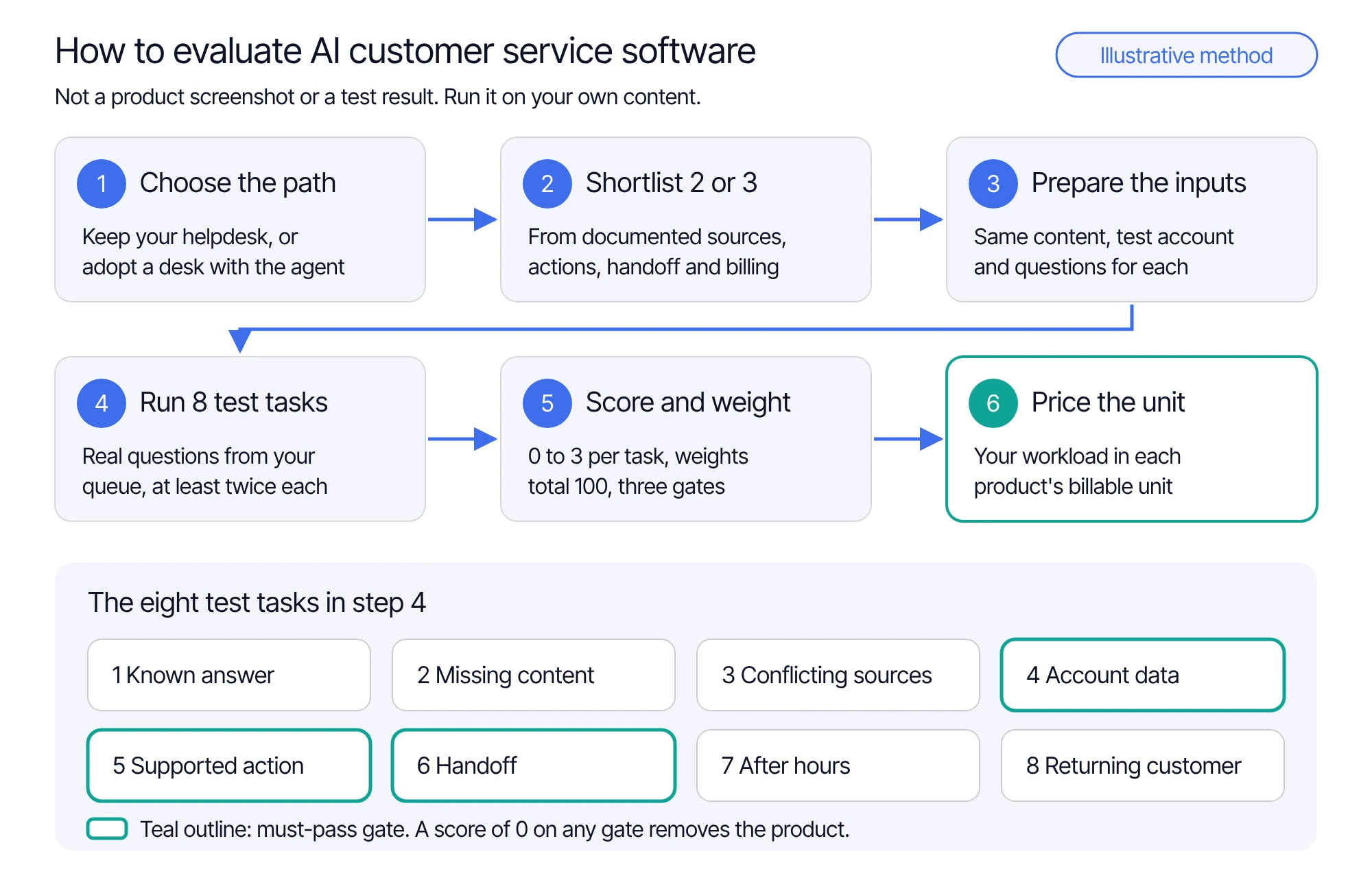
The method in the diagram, step by step:
- Choose a deployment path: keep your helpdesk, or adopt a desk with the agent.
- Shortlist two or three products from their documented capabilities and billing unit.
- Load the same content, test account and questions into each product.
- Run the eight test tasks with real questions, at least twice each.
- Score each task 0 to 3, apply your weights, and drop any product that scores 0 on a gate.
- Price your workload in each remaining product's billable unit, then decide.
Score the results with a weighted rubric
Score each task from 0 to 3 for each product. No saved transcript, no score.
Treat tasks 4, 5 and 6 as must-pass gates: a product that scores 0 on account data, a supported action or the handoff leaves the shortlist, whatever its total.
Then give the eight tasks 100 points in total. Start from each task's share of last quarter's conversations, then move points toward risk: a wrong order change costs more than a slow answer to a common question. Keep at least 5 points on every task. The weighted score is the sum of weight × score ÷ 3 across the eight tasks, out of 100.
For example, a fictional product that scores 3, 2, 1, 3, 3, 2, 2 and 1 on tasks 1 to 8 with the SaaS weights earns 230 ÷ 3, or about 77 out of 100. The number ranks only products your team tested the same way; it is not a benchmark.
AI customer service software compared: what each vendor documents
Each cell is what the vendor's own pages document, in no rank order: FullSession first because this is our guide, then alphabetical. "Not documented" means the pages checked did not state it, so ask in the demo.
Sources, checked 19 October 2026. Prices are in USD before tax and change often; recheck them on the day you decide.
- FullSession: Desk, pricing
- Ada: platform, knowledge, handoffs, pricing
- Decagon: integrations, overview
- Fin: training, escalation, pricing, outcomes
- Freshdesk: knowledge, Freddy AI Agent, sessions, pricing
- Gorgias: knowledge, Shopify actions, AI Agent billing, pricing
- Tidio: Lyro help, Lyro, pricing
- Zendesk: AI agents, knowledge, transfer, resolution tiers, pricing
Read the table by deployment path first. Max, Ada, Decagon, Fin and Tidio Lyro are documented to run on top of an existing helpdesk. FullSession, Freshdesk, Gorgias, Tidio, Zendesk and Intercom (for Fin) come with their own desk. Max sits on both paths: inside your helpdesk, or with the Desk app, shared inbox and human chat included, with no seat fees.
What each product needs from you before the test means anything
An AI agent is only as good as what it is allowed to use. Prepare the same five inputs for every product on the shortlist.
Approved knowledge, with an owner and a version. Load the same articles, policies and pricing pages into each product and remove what is out of date. Tasks 1 to 3 measure your content as much as the product.
A permitted route to account data. Task 4 needs an identity check your system enforces, not an instruction in a prompt. Routes differ: Max uses your application's MCP server for the data you choose to expose, Fin uses data connectors through MCP or API, Ada and Lyro document API and MCP tools, and Gorgias reads the connected Shopify store. Test the route you would use in production.
Actions with a confirmation and a way to check the result. Decide which changes the agent may make and which need the customer's confirmation. For task 5, the record in your own system is the evidence, not a "done" message.
A handoff destination and staffed hours. Tasks 6 to 8 need a real inbox, an assignable teammate and office hours. In FullSession Desk, every conversation lands in one shared inbox sorted into Open, Pending and Closed, visitors can still leave a question after hours, and a returning visitor picks up the same thread.
The privacy settings you would launch with. In FullSession, chat inputs follow the same masking rules as recorded inputs, permissions are set per site and role, and Enterprise adds SSO/SAML, custom roles and audit logs.
Pricing units and the costs outside them
The products in the table bill different things. Max and Lyro bill per conversation, Freshdesk per session of up to 24 hours on chat or 72 hours on email, and Fin, Zendesk and the Gorgias automation fee per outcome or resolution. Around the agent, most desks also charge seats or tickets. The same customer issue can be one billable unit in one product and none in another, so unit prices side by side do not compare. Price your own workload in each product's unit instead.
For each finalist, settle in writing what starts a billable unit and its time window, what is not billed, the monthly minimum and whether it is credited toward usage, seat or ticket charges and helpdesk subscriptions you keep, and optional modules such as voice or recording. The rubric's billing worksheet lists each question.
Max answers them on its pricing page. One AI-assisted conversation covers one user in one thread for a fixed 24 hours from Max's first substantive answer, guidance or supported action. Greetings, clarification-only exchanges, human-only chat, internal tests, failed starts and handoffs before substantive help are not billed. Human replies add no charges, though once Max has given substantive help a later human reply does not cancel the charge. You pay $99 or your conversation charges, whichever is higher, so 1,000 conversations cost $390 and the minimum applies at 253 conversations or fewer. There are no seat, MAU, app or per-lead fees, and the workspace owner sets a spending limit. Taxes, optional Core CX / UX recording (from $39.20/mo billed annually), third-party helpdesk subscriptions and separately agreed services are extra. See current Max pricing. For a full budget across vendors, including an equal-volume Max and Fin example, use the AI chatbot pricing guide.
Fit by customer type: ecommerce, SaaS and portals
The eight tasks stay the same across businesses. The weights and the data the agent needs change.
Ecommerce. Shoppers ask about products, orders and returns, often after hours, so known answers, order lookups and order changes carry the most weight. Gorgias documents specific Shopify order actions. Max reads order, account and product data and takes permitted actions through your own MCP server, so it works with exactly the data and actions you choose to expose, and the same agent answers buying questions on your website. The ecommerce chatbot guide compares four options on one shopper scenario.
SaaS. Customers ask how to do something in the product, and the best answer is often doing it with them, so weight supported actions, handoff and the returning customer. Max co-drives a fix or setup steps in your product, remembers personal next steps across visits, and can switch between text and voice within a conversation. The SaaS chatbot guide covers account access, in-app work and an evidence scorecard.
Portals and internal apps. Users ask about their own records under strict permissions, so conflicting sources, account data and handoff carry the weight, and the privacy checks above become shortlist filters. Test what each role can see and which plan includes the access controls you need.
If you are replacing Intercom specifically, the Intercom alternatives guide compares platforms and agents for that switch.
Where FullSession Max fits
Max is one customer-facing agent for support, sales and Customer Success on one meter, and it maps directly onto the eight tasks. Approved sources serve tasks 1 to 3, and on your website the same agent takes buyers to the right plan and passes ready buyers to sales with no per-lead fee. Your MCP server supplies the permitted data and actions for tasks 4 and 5, and Max co-drives the work in your product. The same-thread takeover, assignment, office hours and returning-visitor thread cover tasks 6 to 8, in the included Desk or the helpdesk you keep. Add Core CX / UX and the teammate also sees the page and the recorded session behind the question, which turns a vague "it doesn't work" into something your team can check. Recordings depend on your Core plan, capture settings and retention, so a handoff includes one only when that session was captured.
Bring your test tasks to a Desk walkthrough
Fill in the eight tasks in the evaluation rubric with real questions from your queue and bring them along. We will walk through how Max handles each one: the answer and its source, the route to permitted data and actions through MCP, the takeover in the same thread, office hours, and the returning customer.
Questions buyers ask about AI customer service software
No. The best product is the one that passes your own test tasks on your own content, systems and staffing. Products differ in where they run, which systems they act in and what they bill, so a Shopify store and a SaaS product rarely choose the same one.
Two or three, chosen by deployment path and a documented route to the systems the agent must use. Run all eight tasks on each under the same conditions.
Treat them as context, not evidence. Vendors define resolutions differently, and their rates come from other companies' content and queues. Your own transcripts, scored with one rubric, are the evidence for your customers.
Eight tasks, each with a real question from your queue on the channel you launch first: a known answer, missing content, conflicting sources, an account-specific question, a supported action, a handoff, the same request after hours, and a returning customer. Score each from 0 to 3 per product, and give no score without a saved transcript.
Max and Lyro bill per conversation, Freshdesk per session of up to 24 hours on chat or 72 hours on email, and Fin, Zendesk and the Gorgias automation fee per outcome or resolution. Most desks also charge seats or tickets around the agent, so total seats, AI units and add-ons at your own volume.
See what’s costing you, and prove whats fixing it is worth
Watch the real journey, rank every issue by revenue impact, and validate the result against baseline.






.svg)
.svg)
212 E Stone Path St Derby, KS 67037 Phone: +1 415-649-4222



All systems operational.