.svg)

AI chatbots for ecommerce: compare buying help, support and handoff


Choose an AI chatbot for ecommerce by the shopper job you need finished: a buying question answered, an order checked, a permitted change completed or an exception handed to a person. A product recommendation and a shipping-address change need different information and authority. Ask each vendor to demonstrate your complete path, including what happens when it cannot finish.
Start with FullSession Max AI when you want buying and support answers, supported co-driving and human continuity in an included Desk without seat fees. Evaluate Gorgias for Shopify-centered shopping and order-service operations, Tidio Lyro for conversational shopping with configured support actions, and Shopify Inbox for a native storefront agent if your store meets its requirements. The comparison below explains what to verify before choosing.
This is a documentation-based shortlist, checked on 19 October 2026. The fit judgments are ours; they are not a ranking from hands-on product tests. Use the ecommerce chatbot evaluation checklist to compare the same shopper cases in your own setup.
AI chatbots for ecommerce: a focused shortlist
These tools overlap. The meaningful comparison is whether the product, connections and operating setup cover your chosen shopper journey. A feature named “AI actions” is a starting point for that discussion, not evidence that your specific return or order change already works.
Separate buying help, order data and actions
An ecommerce chatbot can answer from approved content, retrieve authorized order data or perform a supported action. Keep those jobs distinct when specifying the experience. A return-policy answer can come from a public page; “Can I return this order?” may depend on the purchase date, item condition and an exception policy. Issuing a refund introduces a separate permission and financial decision.
Use the same cases on the actual channels you intend to launch. A website-chat demonstration does not establish email or social-channel behavior. Include your markets, languages, catalog variants and service hours where they change the answer.
Where each shortlisted tool fits
FullSession Max AI: one Desk for buying help, supported work and people
Max AI answers support and sales questions, co-drives supported work on your website or app, and lets your team take over in the same conversation. That makes FullSession Support & Sales Desk a strong starting point when the shopper needs help moving through a task as well as an answer.
The application connection determines which current data and permitted actions Max can use. Scope those through your application's supported tools, including its Model Context Protocol (MCP) connection where applicable. Use the walkthrough to confirm your store's catalog, order lookup and permitted action path; native Shopify connectivity, automatic catalog synchronization and refund setup need specific verification.
The commercial case is straightforward: Max includes the full Desk app, shared inbox, human chat and supported integrations with no seat fees. The current Max offer is $0.39 per AI-assisted conversation with a $99 monthly minimum credited toward usage. For example, 1,000 AI-assisted conversations cost $390, with the included Desk. One conversation covers one shopper in one thread for a fixed 24 hours from Max's first substantive help. Optional Core CX / UX recording, third-party subscriptions and separately agreed services are additional. To budget several vendors side by side, use the AI chatbot pricing guide.
For the walkthrough, bring one buying question and one order-help exception. Ask to see the approved answer, supported task path, confirmed result where applicable, and the conversation a teammate receives.
Gorgias: Shopify shopping and order-service workflows
Gorgias documents shopping-assistant and post-purchase support roles, drawing on store content and Shopify data. Its AI Agent can hand conversations to the team and use opt-in, configurable actions. That makes it a relevant shortlist candidate when Shopify order service and shopping assistance need to sit together. See Gorgias's explanation of the two roles.
Its Actions documentation describes connected-app operations including Shopify cancellations and address changes. Evaluate the particular action, conditions and connected apps your store needs. A cancellation that is allowed before fulfillment does not establish that every later order state can be changed.
Choose this evaluation path when your buying decision centers on those commerce workflows. Bring an order that is eligible for a change and one that must go to a person; inspect both the resulting order and the handoff.
Tidio Lyro: conversational shopping with configured support actions
Tidio's current release page describes Lyro product cards, variant selection and add to cart for Shopify and WooCommerce, plus catalog feeds for other storefronts. It is worth evaluating when the buying experience includes a recommendation and a useful next step inside chat.
Keep shopping and support setup visible in the evaluation. Tidio's Lyro Actions release documents configurable actions and a Shopify order-status template. Its AI Agent page describes handoff and escalation rules. Test the action you intend to use and what your person receives when that action cannot finish.
For a catalog-led walkthrough, ask a question with a missing preference, then change a stock or variant condition. Check that the recommendation changes for the right reason and that the proposed action is available in the demonstrated setup.
Shopify Inbox: evaluate the native agent as it exists today
Shopify Inbox includes an opt-in Inbox agent that can answer product and policy questions and make personalized recommendations from available information. Shopify's overview identifies catalog, policy and storefront content among its sources.
The assignment guide also documents signed-in order lookup, add to cart and staff handoff. It requires an active online store, new customer accounts and a supported Shopify plan: Basic, Grow, Advanced or Plus. When staff are unavailable, the documented path shares the store's sender email address.
Put it on the shortlist when your immediate job is native storefront shopping assistance. Verify those prerequisites and demonstrate the exception your team actually handles; do not assume an order lookup includes permission to change or refund that order.
Compare the same fictional shopper scenario
Imagine a fictional outdoor retailer selling two rain jackets. The shopper asks, “Which one fits over a thick fleece?” Later, the same shopper asks to change a delivery address. One sample order is unfulfilled and eligible for a change under this invented store policy; another has already shipped and requires a person.
This is an evaluation design, not a customer story, product transcript or tested integration. The expected behavior below is what to request in a demonstration. Replace the invented products, policy and order records with safe fixtures for your own store.
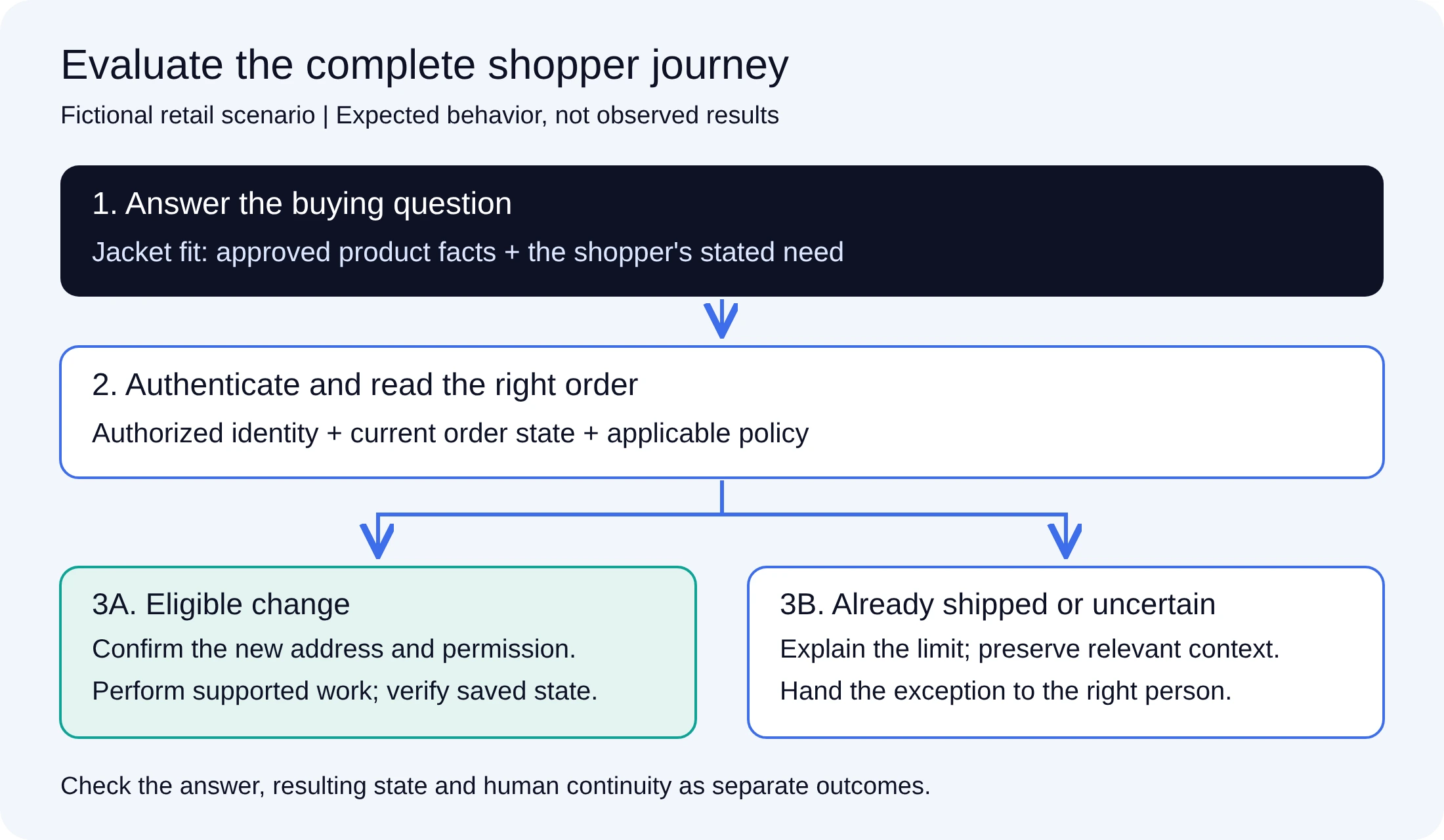
Start with the fit question using approved product information. Move to an authenticated order lookup, then either verify the permitted change or hand the shipped-order exception to a person. Carry the relevant history across the path.
If a tool cannot demonstrate a required operation in your setup, record the missing dependency and its owner. It may still fit your buying-answer or human-support scope. Make the selection against the scope you intend to use, rather than treating an unconfigured feature as either a proven capability or a permanent absence.
Make the decision from evidence, operating fit and total cost
First, decide which shopper cases are essential. A store focused on product selection may begin with a different configuration from one handling frequent order exceptions. Require the essential cases to work with the relevant data, permission and human path. A polished recommendation should not outweigh disclosure of another customer's order or a falsely reported refund.
Then compare the operating setup: where staff work, who owns product and policy updates, which channels and markets are covered, and who maintains the connection. For broader storefront friction beyond the conversation, use the existing guide to improving Shopify conversions. It addresses the store experience, rather than proving any chatbot's impact.
Finally, request a written quote for the same required scope. Separate the base platform, AI meter, included allowance or minimum, seats, channels, actions, optional services and retained subscriptions. Vendor billing units are not interchangeable. For Max, use the published AI-assisted conversation rate and the included Desk rather than adding a second charge for teammates or human chat.
After launch, review sampled buying answers, confirmed actions and useful handoffs separately. Track how many cases were reviewed and any unknown results. If you measure conversion or repeat contact, connect the conversation to the relevant events within your data rules; a change over time alone does not prove the agent caused it.
Ecommerce chatbot questions
Does an ecommerce AI chatbot need a live catalog connection?
It needs a current, appropriate source for every product claim it makes. Approved product pages may support stable fit or material answers. Current stock, variant availability and account-specific prices require a source and refresh path suitable for those changing facts. Ask the vendor to show where the answer came from and what happens when that source is unavailable.
Can a chatbot change an order or issue a refund?
Some products support configured commerce actions. Verify the exact platform connection, permitted operation, customer authorization, policy conditions and saved result. An answer explaining refunds, a prepared return request and money actually refunded are different outcomes. Include the ineligible case in the demonstration.
What should reach a person when the chatbot hands off?
The shopper's goal, relevant history, appropriately scoped identity/order context, what was attempted and whether it succeeded, failed or remains unknown. The shopper should know the next step and actual team availability. Record the fields you need in the evaluation and check that the receiving person can use them.
Bring the buying question and the awkward order case
Download the ecommerce evaluation checklist, choose one product question and one order-help exception, and bring both to a Max AI and Desk walkthrough for your store. We will scope the knowledge, supported connection, permitted work and human path needed for your setup.
See what’s costing you, and prove whats fixing it is worth
Watch the real journey, rank every issue by revenue impact, and validate the result against baseline.






.svg)
.svg)
212 E Stone Path St Derby, KS 67037 Phone: +1 415-649-4222



All systems operational.