.svg)

AI chatbots for SaaS: compare support, actions and handoff


Choose an AI chatbot for SaaS by the work it can finish in your product: answer the support question, use the right account context, complete a permitted task and keep a person within reach. For teams that want that combination with an included Desk and no seat fees, put FullSession Max AI on the shortlist. Evaluate Fin for an agent on your chosen helpdesk, Zendesk for service workflows centered on its platform, and Gleap when in-app bug evidence reaching engineering is a central requirement.
The buying decision is concrete. When a user asks, “Can you set this up for me?”, will the assistant explain the steps, perform a supported change, or send the request to a person? Establish which result you need, then ask each vendor to demonstrate it on the same SaaS task.
This guide compares four approaches and supplies a downloadable SaaS evaluation scorecard. FullSession publishes it; the product claims below come from current vendor sources checked 19 October 2026. Fit recommendations are our editorial judgment. We have not run a comparative product benchmark.
AI chatbots for SaaS: four useful shortlist paths
These tools overlap. The table identifies a practical reason to evaluate each, followed by the question that should decide whether it fits your setup. It is a source-based shortlist, not a numerical ranking.
FullSession Max AI: support that can carry the task forward
Max answers from approved knowledge and co-drives supported work in your app while the user watches. Your application's Model Context Protocol (MCP) connection can expose permitted data and actions. When a person takes over, the conversation continues in the shared inbox. That makes Max a strong fit to evaluate when your support queue contains “help me do it” alongside “tell me how.”
The commercial advantage is clear: the Desk app, shared inbox, human chat and supported integrations are included, with no seat fees. Add optional Core CX / UX for session recording; retained third-party subscriptions remain separate. Review the Desk's published capabilities and inclusions, then scope the application connections needed for your task.
Fin: connected procedures on your helpdesk path
Fin is a relevant shortlist when the AI agent and helpdesk are separate purchase decisions, as well as when you want Intercom's integrated option. Its Data Connectors guide describes retrieving information directly and using connectors inside multi-step Procedures to retrieve, update and confirm information. Ask to see the Procedure configured for your SaaS workflow, including its exception destination.
Compare the deployed connection rather than assuming that a general integration logo covers every account operation. Keep the existing-helpdesk option and Intercom's paid-seat option separate in the proposal.
Zendesk: evaluate the configured service workflow
Zendesk's AI-agent setup guide spans knowledge answers and more complex automation through procedures, dialogues, actions and API integrations. It is a natural evaluation path for a SaaS company whose support ownership, ticketing and channels already center on Zendesk.
Bring the actual channel and action requirements to the demonstration. Confirm which features are in the proposed configuration and how the receiving team will work the exception. A knowledge-answer demo alone does not establish that a connected account change is ready.
Gleap: add the engineering investigation to the buying decision
Gleap adds a useful SaaS-specific distinction to this shortlist. Its current product page describes in-app bug reports with screenshots, replay and logs, and an AI investigation workflow that prepares a coding task. Evaluate it when unresolved support issues routinely need engineering evidence.
Follow one report from the user to the receiving team. Check which evidence is captured, who can access it and who owns the response. A coding task prepared for engineering and a customer problem confirmed fixed are different milestones; record both accurately.
What a SaaS support chatbot needs to understand
A SaaS question often depends on the workspace, subscription, role, configuration and current state of an integration. “How do I schedule a report?” can be a documentation question. “Why can't I schedule this report?” may require knowing that the user is a member in one workspace and an admin in another.
Check four capabilities in sequence:
- Answer the applicable question. Use current approved instructions and the correct plan or product version.
- Establish the permitted context. Identify the workspace and retrieve only the account data the request is allowed to use.
- Carry out supported work. Prepare or complete the intended change under the configured approval policy and check the result.
- Preserve continuity. Give the receiving person the request, relevant context and the truthful status of any attempted work.
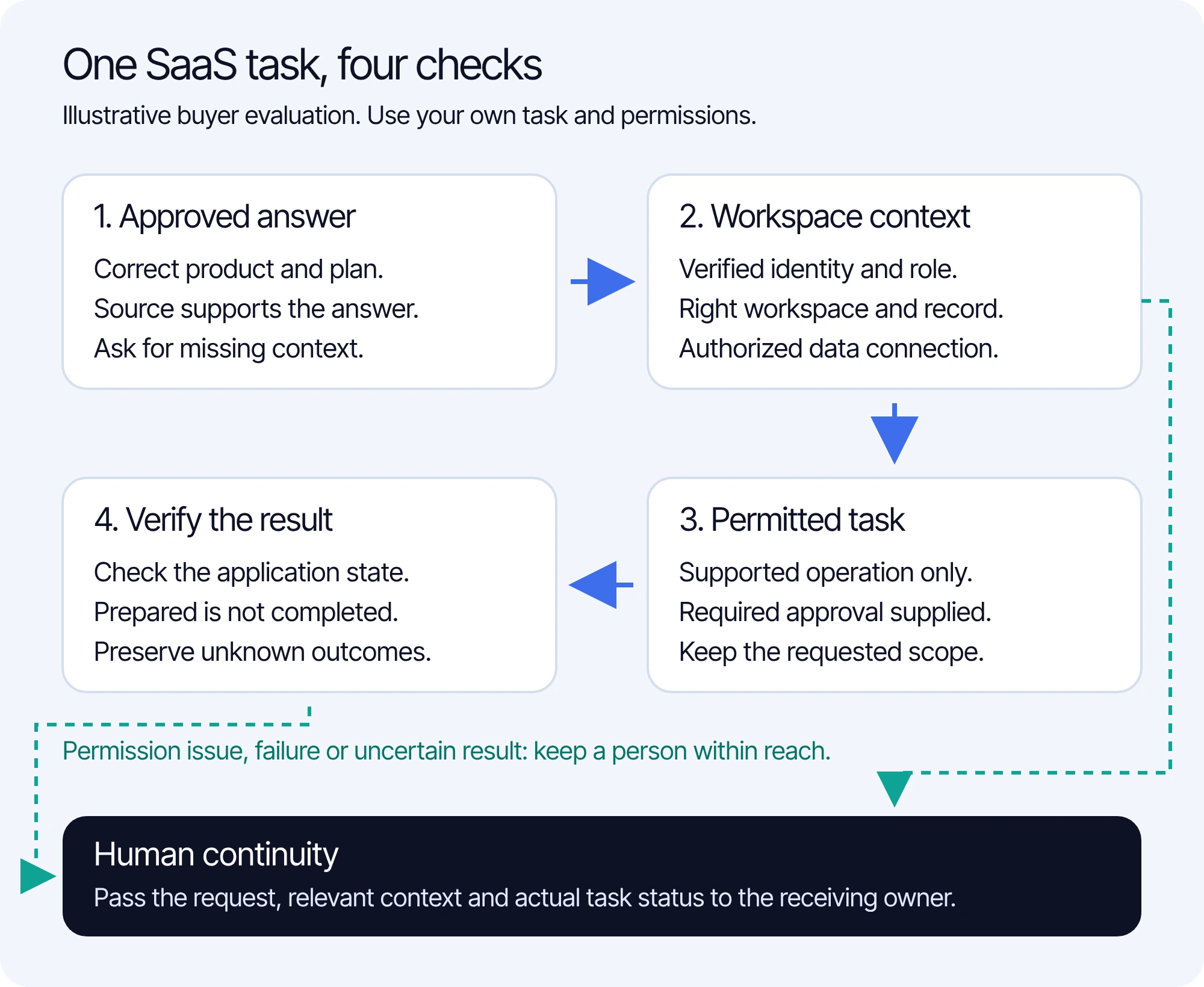
That sequence also defines the boundary of your first purchase. A documentation assistant may meet an answer-only need. If customers need the supported work completed in the app, make that part of the demonstration and acceptance criteria. For the deeper onboarding and ongoing Customer Success use case, see FullSession Digital Adoption.
Run the same SaaS task through each demonstration
Use one recurring task that connects an ordinary question to useful work. Here is a fictional example: a customer wants a weekly report emailed on Monday at 09:00 in the America/Chicago time zone. In this example app, the Team plan includes scheduling, workspace admins may change schedules, and members may view reports. These are invented test conditions, not FullSession plan terms or a configured Max feature.
Supply each vendor with the same approved policy, safe test workspace, role and report record. Ask what it can demonstrate now, which connection must be configured, and which parts would remain a human task. Keep the demonstration outcome separate from a roadmap promise.
“Done” is a claim about the application, not the quality of the assistant's prose. Open the saved schedule or the authoritative result record. Check the same fields the customer requested. A drafted form, a successful tool invocation and a confirmed saved schedule should be recorded as different states.
A user who asks for a person should not have to restate the entire task. Inspect the receiving view as well as the chat widget. If no teammate is available, the response should describe the actual next step and ownership without inventing an immediate reply or an unsupported service deadline.
Use an evidence scorecard rather than a feature count
Download the SaaS chatbot evaluation scorecard and use one copy for each candidate. It contains the shared scenario, exception variants and spaces for evidence, dependencies and the buying decision. Results are blank because this is a tool for your evaluation, not a completed vendor test.
For each criterion, distinguish observed in the demonstration, documented only, requires a dependency, not supported in the proposed scope and unknown. Record the evidence and follow-up beside the label. Do not turn these states into a fabricated vendor ranking or average away an unauthorized disclosure.
A dependency is a buying decision. If the report action needs an application endpoint or approved screen map, name its owner, scope and commercial terms. If the required workflow cannot be demonstrated, establish the acceptance condition before treating it as part of the delivered configuration.
Check account access separately from a convincing answer
Ask how the assistant receives verified identity, workspace membership and the permissions needed for the operation. Keep authorization enforcement in the application or connected access layer. A prompt that tells the model to be careful does not grant or enforce those permissions.
Intercom's own API guidance for Data Connectors explicitly tells customers to handle authentication and authorization in their systems, including protection against enumerating other accounts' data. Apply that same buying question to every candidate: what prevents this permitted lookup from becoming an unauthorized one?
Also test missing or revoked permission, a changed workspace and an unavailable connection. The answer should preserve the limitation and offer the useful next step. It should not claim it checked an account it could not access, or report that a change succeeded when the result is unknown.
Compare the included workspace and the AI bill
FullSession's Max plan includes the Desk app, shared inbox, human chat and supported integrations without seat fees. Support, sales and Customer Success share a $99 monthly minimum credited toward AI-assisted conversations at $0.39 each. That gives a SaaS team one commercial model for support questions and buying help. See current Max pricing. For a fuller vendor-by-vendor budget, use the AI chatbot pricing guide.
Max bills AI-assisted conversations, each covering one user in one thread for a fixed 24 hours from Max's first substantive help; Fin bills qualifying service outcomes. Equal illustrative counts do not establish identical real-world usage or guaranteed savings. The example covers support service outcomes, excludes Fin sales qualifications and voice, and excludes taxes, optional Core recording, other add-ons and separately agreed services. Fin on another helpdesk requires no additional Fin seats; Intercom Essential uses its $29 annual seat rate. Sources checked 19 October 2026: Fin pricing and Intercom plan terms.
For all candidates, request a proposal for the channels and controls you actually need. Keep optional recording and retained third-party subscriptions visible. Use the demonstration and quote together: choose the configuration that completes your required work, preserves human continuity and makes ongoing charges clear.
Choose evidence that connects support to SaaS progress
After the workflow is configured, measure the customer job as well as the conversation. For report scheduling, the useful event is a correct saved schedule; a chat closed without a person is a different event. Record task completion, unsupported or incorrect claims, handoff reasons and unresolved cases using definitions your team can inspect.
For the product team, keep examples of recurring permission confusion, integration failures and requests the product cannot fulfill. Those examples help distinguish a knowledge problem from a product problem. For growth, evaluate the separate buying journey: an accurate plan answer followed by a buyer-chosen next step, rather than counting every chat as a qualified lead.
Review these signals by the task and relevant account segment. A release, pricing change or shift in customer mix can change the numbers. A general resolution-rate claim from another vendor cannot predict the result of your own configured workflow.
AI chatbot questions SaaS buyers should resolve
Can an AI chatbot complete a SaaS task rather than just explain it?
Yes, where the product supports the operation and the configured connection, permissions and approval policy allow it. Ask for the final state in the application as evidence. Max supports co-driving and permitted actions; the task for your application should be part of the walkthrough scope.
Do we need a separate helpdesk?
It depends on the buying path. FullSession includes the Desk, shared inbox and human chat with Max, while also supporting integrations with named helpdesks. Fin offers both an existing-helpdesk path and Intercom's integrated option. Price and demonstrate the actual arrangement your team intends to use.
How should we test account-specific answers?
Use a permitted test record and a denied account or workspace request. Check the underlying access result as well as the response. Include an unavailable connection so that a plausible answer cannot pass without the required data.
Bring one SaaS task and one exception to Max
Bring a recurring task that blocks progress in your product, plus an account or permission exception your team has to handle. We will walk through Max's supported answer, action and human path, and confirm the application setup needed for that workflow.
See what’s costing you, and prove whats fixing it is worth
Watch the real journey, rank every issue by revenue impact, and validate the result against baseline.






.svg)
.svg)
212 E Stone Path St Derby, KS 67037 Phone: +1 415-649-4222



All systems operational.