.svg)
The Fullstory Workforce alternative that puts insight to work.
Evaluating a Fullstory Workforce alternative? FullSession connects repeated work to its estimated cost, helps employees take the approved path with Coach, and measures what changes on that same workflow.
Process intelligence. In-app coaching. Measured improvement. Detect covers the analysis scope; Coach is priced by coached employee and requires Detect.
.webp)












.svg)

From the first finding to the next completed task.
FullSession combines the evidence to find costly work, the guidance to improve it and the measures to show what changed. Here is how the capabilities and operating requirements compare.
Swipe to compare the platforms →
.avif)
Comparison sources · checked 22 September 2026. Competitor descriptions refer to the linked product and documentation pages. Compare the relevant product, package and deployment.
1. Workflow Intelligence ↗ 2. Internal support ↗ 3. Workforce employee guide ↗ 4. Fullstory Workforce ↗One incomplete worksheet. Another round of work.
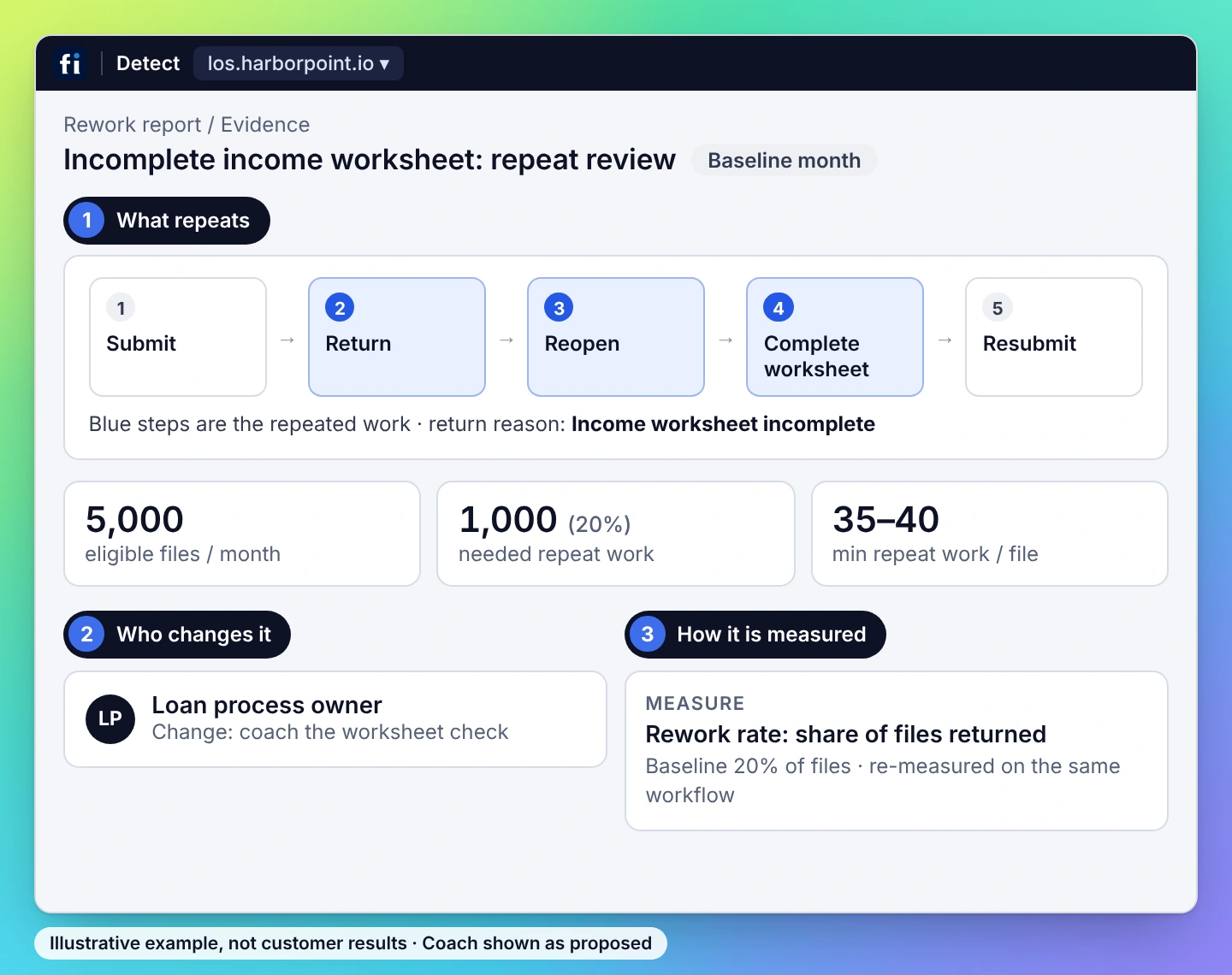
A loan file comes back because the income worksheet is incomplete. The employee reopens the file, completes the worksheet and submits it again. FullSession connects that repeat work to its estimated cost, brings the approved check into the next submission and measures the change on comparable files.
Trace repeat reviews and submissions to the incomplete income-worksheet step in the approved browser workflow.
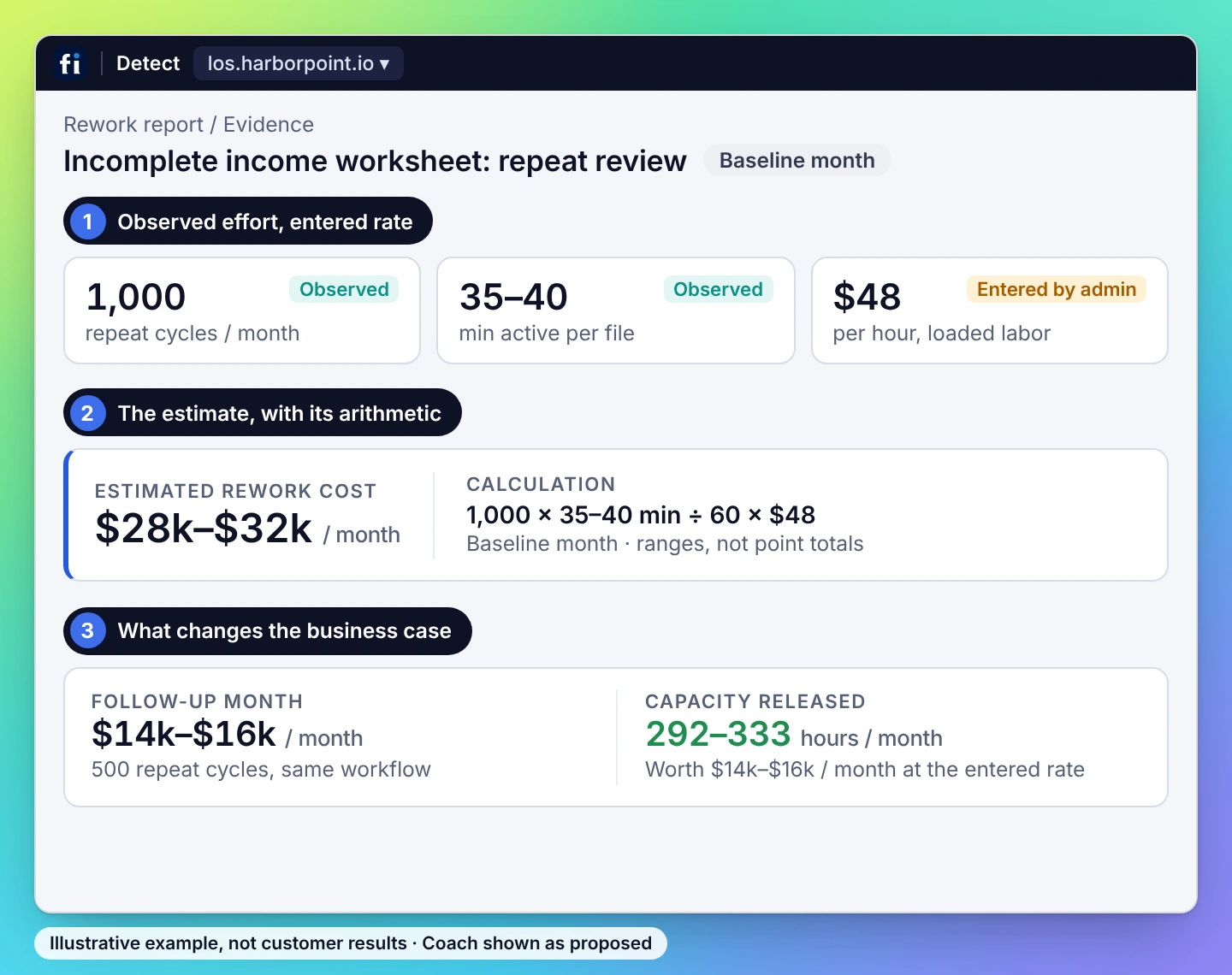
Use observed repeat effort, occurrence volume and the entered loaded labor cost. Keep the assumptions visible.
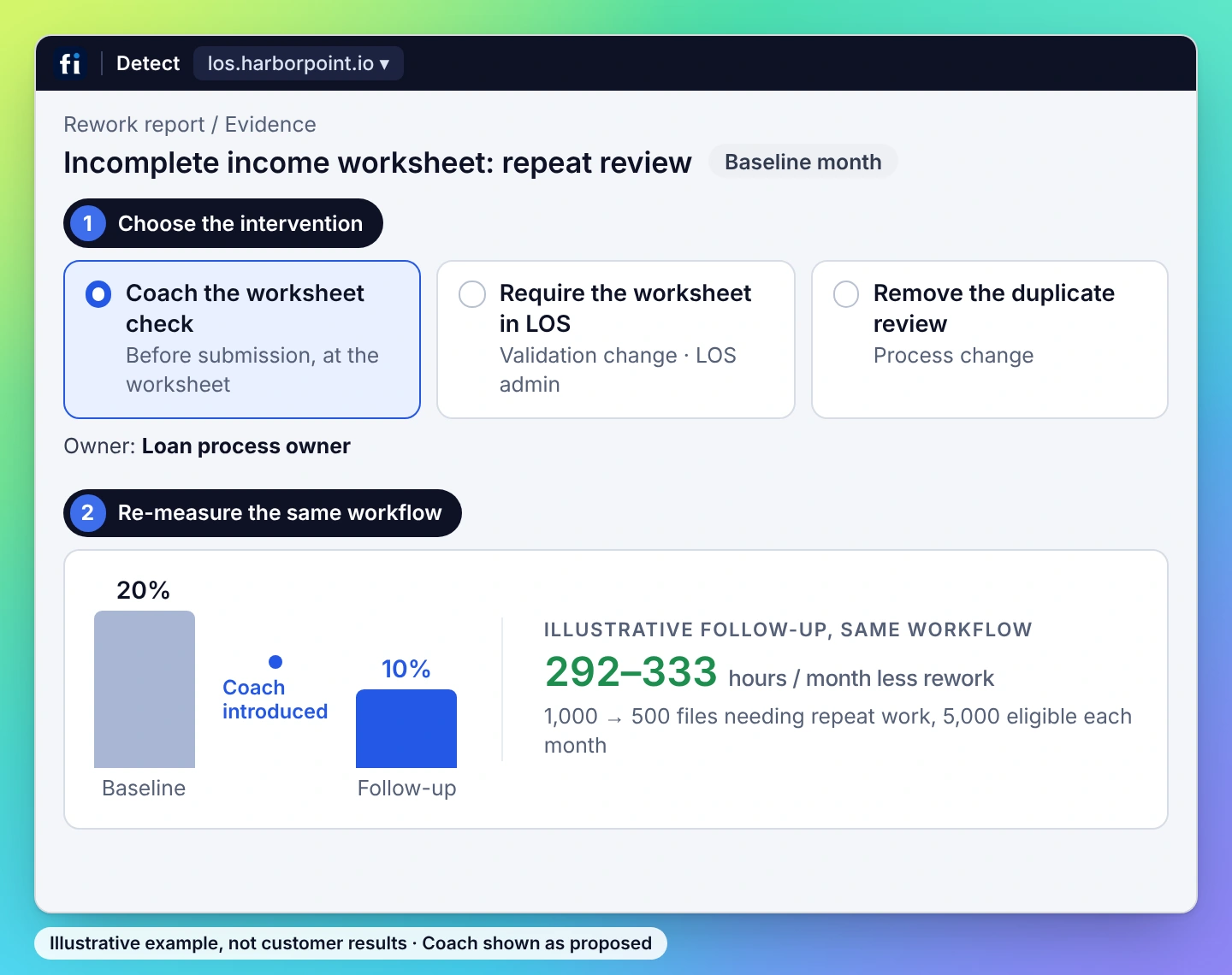
Show the approved worksheet check beside the relevant task. The employee completes the fields and submits the file.
Compare equivalent files for rework rate, repeat submissions and observed active effort, with the required completion checks intact.


The finding is the start. The changed workflow is the test.
Choose FullSession Workforce to connect process evidence, operating cost and employee guidance in one improvement cycle. Detect finds repeat work and explains its estimated cost. Coach helps employees complete the approved workflow. Re-measurement shows which changes reduce effort on the same work.
Why choose FullSession over Fullstory Workforce?
Trace a recurring problem to the steps that caused it. Put the approved response beside the employee’s next step. Compare repeat touches and handling effort after the change.
One problem. One intervention. One measure.
A finding with an operating cost, an intervention employees can use and follow-up on the same process.
Operations gets the task to improve; Finance gets inspectable cost inputs; IT gets a controlled deployment. All three can inspect the same work.
Illustrative workflow; no promised savings or customer result.
Detect + Coach + re-measure.
01 Trace
Trace the recurring problem to the steps and evidence behind it.
02 Price
Combine observed repeat effort, frequency and the customer’s loaded-cost assumption.
03 Coach
Bring the approved procedure into the application beside the task.
04 Prove
Compare equivalent cases for repeat touches and handling effort after the change.
Keep required quality checks intact. Changes depend on the approved workflow and permissions.
See Detect + Coach in action
Start with a useful workflow. Build the scope around it.

01 · Set the capture boundary.
Select the team and approved browser apps. Configure capture, masking, reporting access and retention, then deploy the extension.

02 · Connect the finding to an action.
Validate the evidence and baseline. Add the approved procedure for Coach, and name the application or process owner for other changes.

03 · Agree how improvement is measured.
Choose comparable cases, repeat-touch and handling-effort measures, and the quality checks that remain part of the process.
Protect captured information
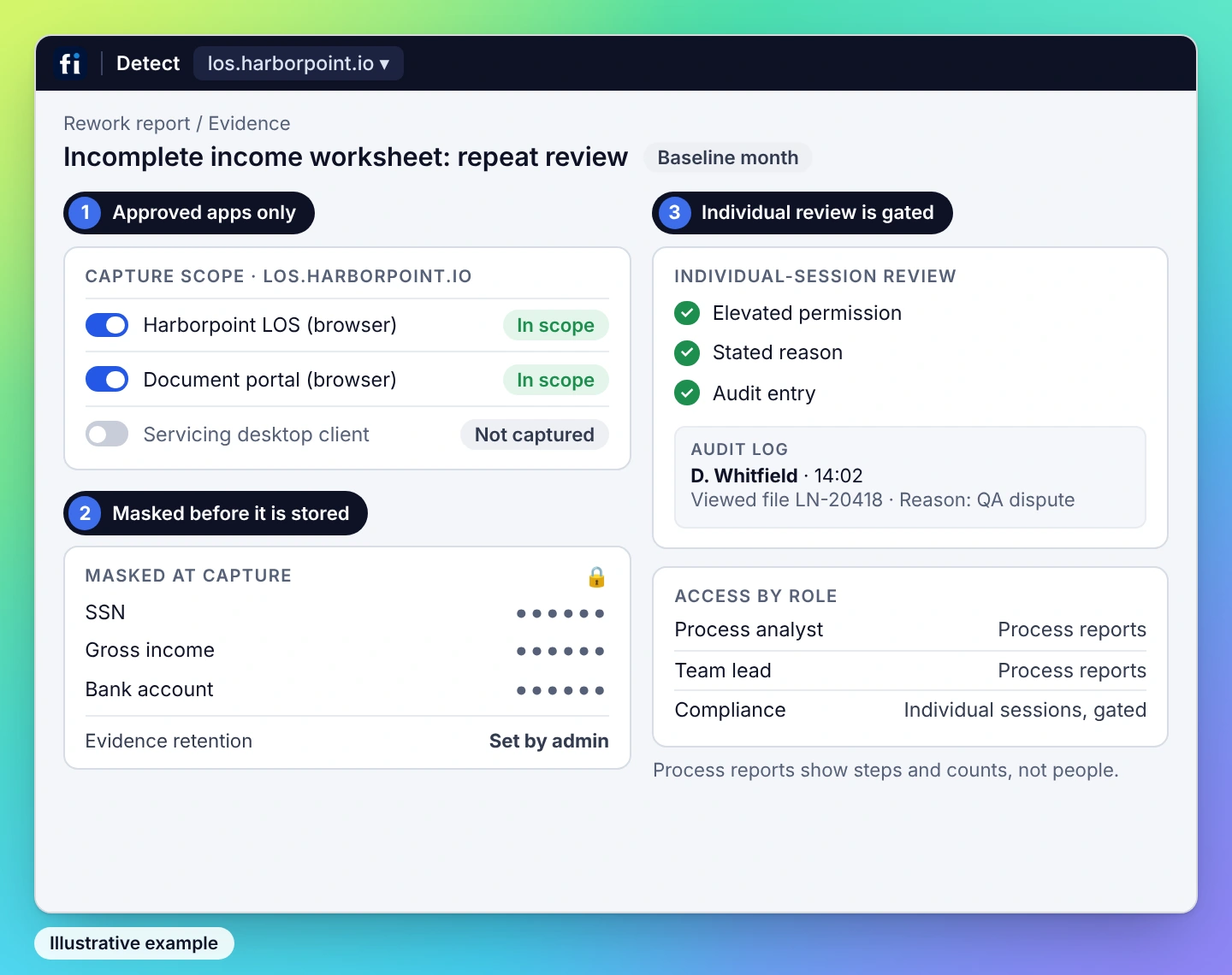
Limit observation to approved applications and configure masking and retention for the process. Keep client or business scopes clearly defined.

Control access to evidence
Use role-based access. Individual-session review on Detect Business and Enterprise requires elevated permission, a stated reason and an audit entry.

Detect for the work. Coach for the employees who need help.
Scope Detect by team, application and process. Add Coach by coached employee. Include access controls, retention, deployment and support in the proposal. Coach is paired with Detect.

Small repeated steps. A cost worth changing.

Repeat work per case
2 minutes
A repeat lookup may take minutes. Across thousands of cases, that effort becomes capacity your team could put elsewhere.
Cases with that repeat work
3,000 / month
At this illustrative volume, two minutes of repeat work adds up to 100 hours of repeated effort each month.
Loaded hourly cost
$45
Use your own loaded-cost assumption. The model gives Operations the task to change and Finance an estimate it can inspect.
ILLUSTRATIVE INPUTS · NOT A CUSTOMER RESULT. 2 ÷ 60 × 3,000 × $45 = $4,500 estimated monthly cost of that effort. This is the opportunity to investigate. Measured improvement and realized financial benefit are assessed after the change.
Explore plansSee what changes for your part of the business.
Operations needs a better process. Finance needs a credible value case. IT needs a controlled deployment. FullSession connects those questions to the same work. ONE FINDING. ANSWERS FOR THE BUYING TEAM.
Find repeat worksheet reviews. Coach the completion check and measure rework per file.
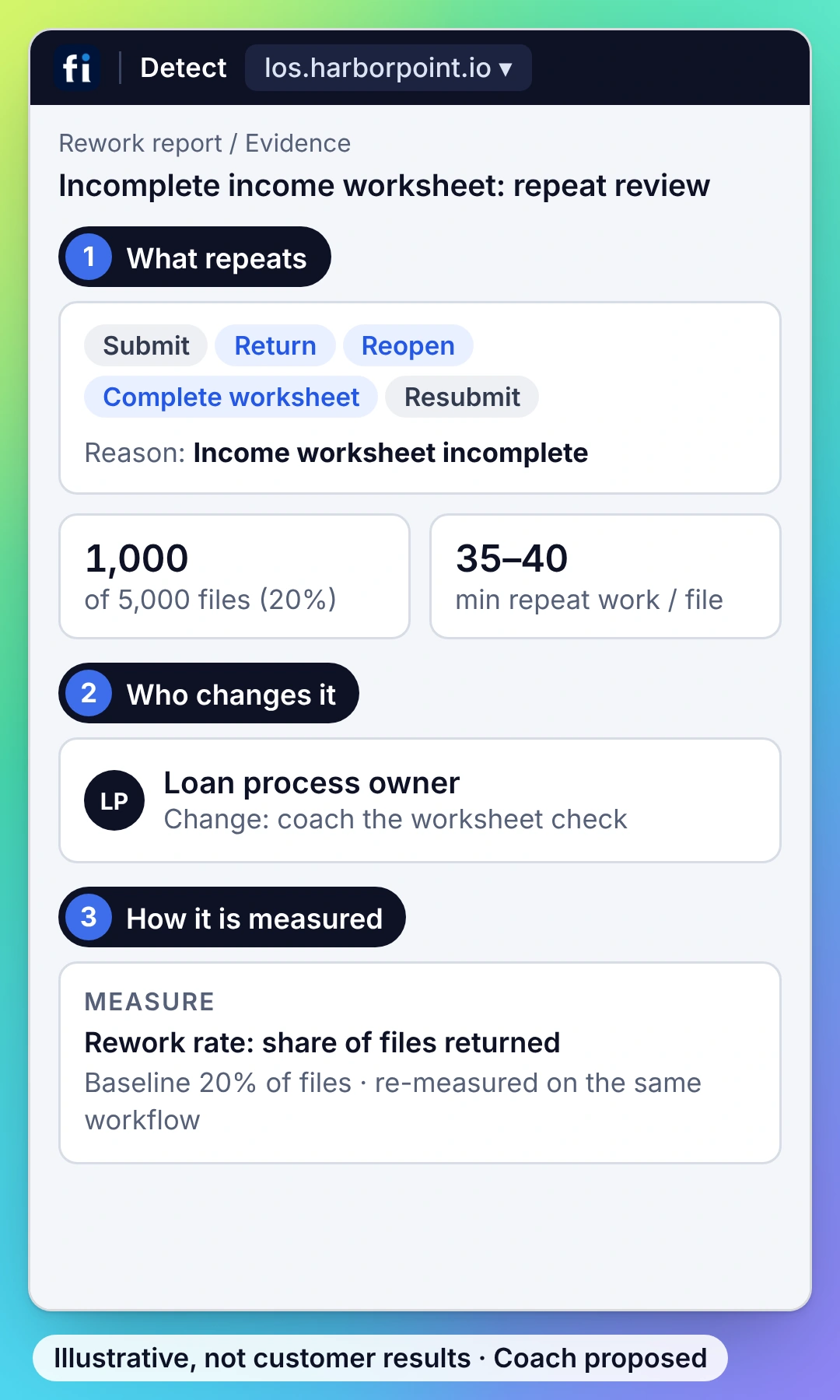
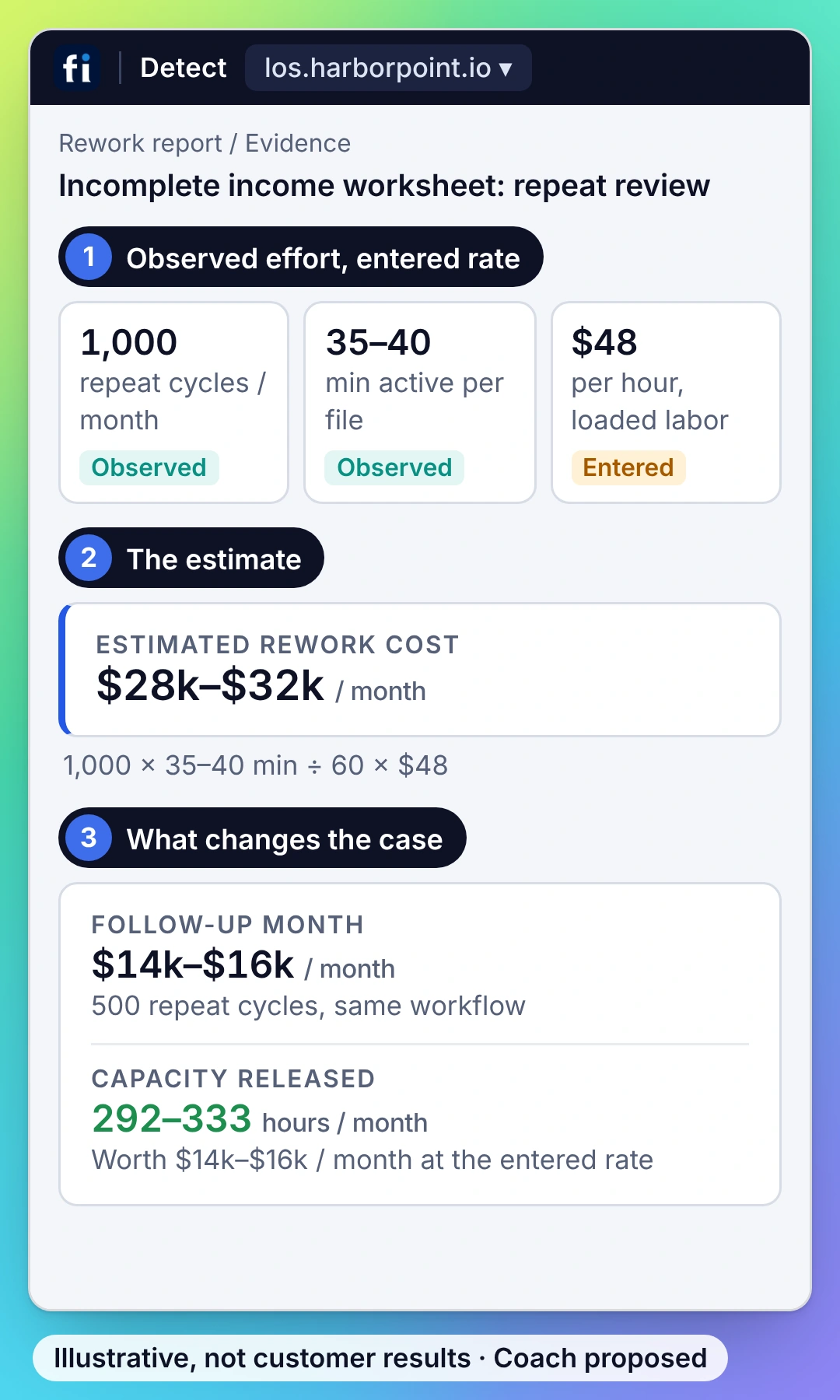
Inspect the effort and cost behind worksheet returns, then track the capacity released.
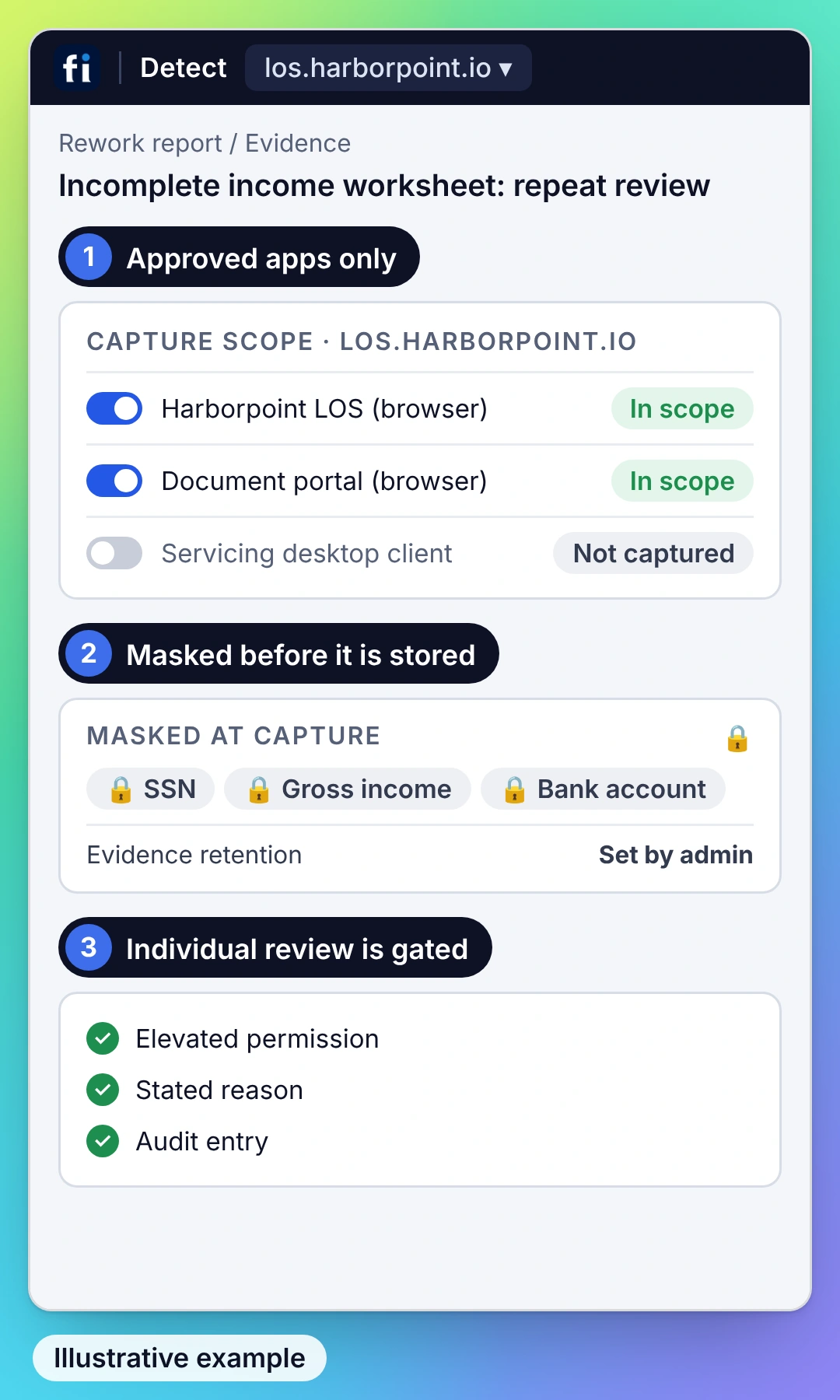
Set capture, masking and access for the approved loan-operation applications.
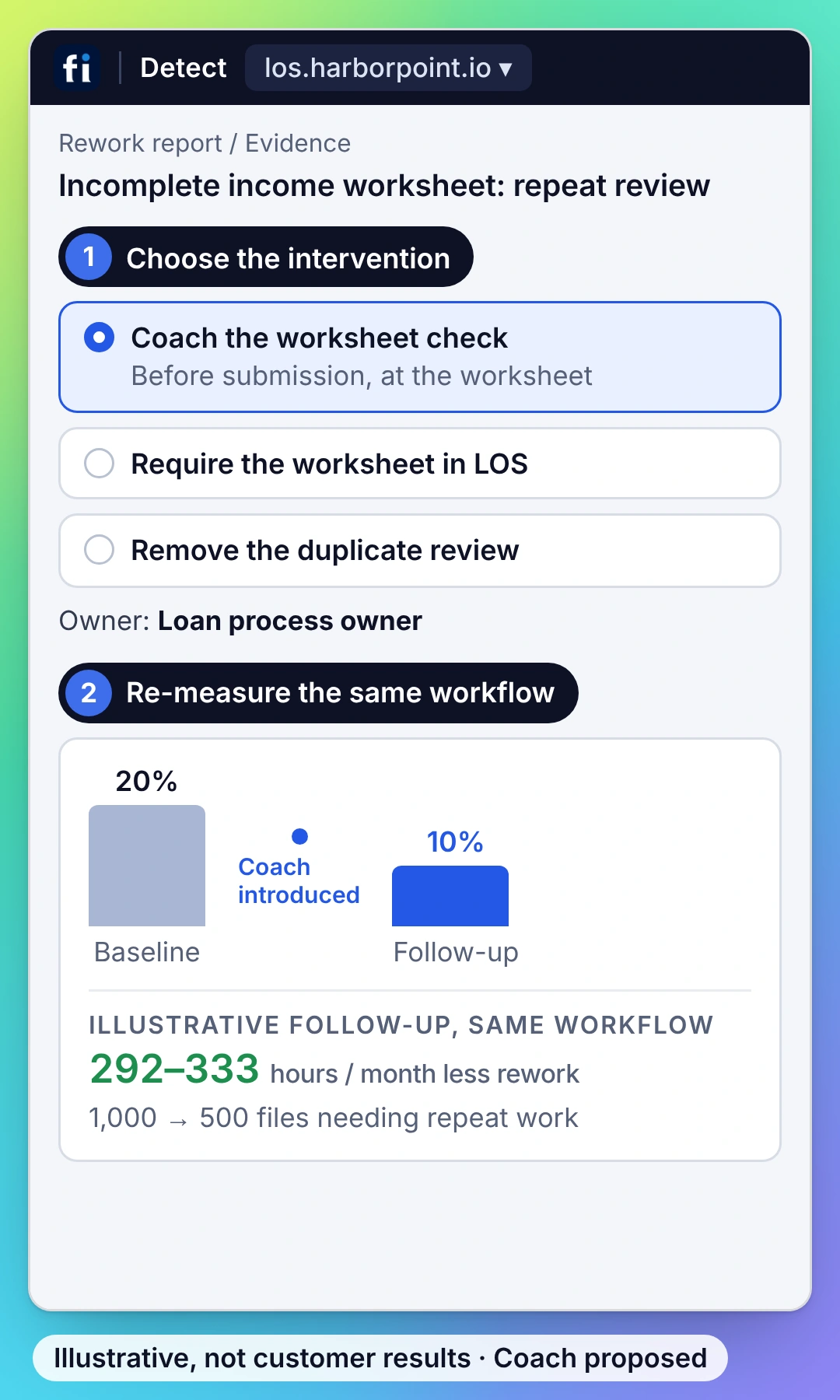
Choose the right fix for the document-check exception, then measure the same loan-file type after rollout with required checks intact.
What you need to know about FullSession.
Value, implementation, coaching and the details your buying team needs.
Why choose FullSession as a Fullstory Workforce alternative?
Choose FullSession when you want process intelligence and employee guidance working together. Detect connects repeated steps to evidence and an operating-cost estimate. Coach helps the employee follow the approved procedure inside the application. The same workflow then supplies the baseline and follow-up measures, so operations and finance can inspect the improvement.
What does a FullSession finding contain?
A finding identifies the recurring process problem, the steps and evidence behind it, and the inputs used to estimate its cost. It connects that problem to a practical intervention: coaching, an application configuration change or removal of a redundant step. Your team can examine the evidence and decide which action fits.
Can FullSession help employees complete the task correctly?
Yes. Coach places procedure-based guidance in the application while the employee works. For example, a loan-file workflow can guide the required document check before submission. The guidance preserves the required check and helps avoid the return loop that follows an incomplete submission.
What does deployment involve?
Choose the team and browser applications, configure capture and masking, and deploy the Workforce extension. Validate a representative workflow and its evidence, then establish the baseline. For Coach, supply the approved procedure and define where guidance belongs. Your application owner handles configuration changes when the finding calls for one.
How does FullSession calculate the cost of rework?
The estimate combines repeated handling effort, occurrence volume and your loaded hourly cost. For example, two minutes of repeat work on 3,000 cases represents 100 hours; at a $45 loaded hourly cost, that is $4,500 in estimated monthly effort. Those are illustrative inputs, not a customer result or a promised saving. The follow-up measures how the workflow actually changed.
How does FullSession protect sensitive information?
Define the approved applications and capture boundaries, apply masking and set retention for the process. Control who can inspect the evidence. Individual-session access in Detect Business and Enterprise requires elevated permission, a reason and an audit entry. Review your identity, residency and DPA requirements as part of the deployment.
What is included in a Workforce proposal?
The proposal scopes Detect for the teams, applications and processes to analyze, then adds Coach for the employees receiving in-app guidance. Coach requires Detect. Include the deployment, access controls, retention and support requirements so the package matches the work you need to improve.
Which applications does FullSession Workforce cover?
FullSession observes approved browser-based internal applications and the work between them. Scope the relevant CRM, operations portal, browser ERP or other internal web workflow during setup. If a process includes desktop tools or phone work, identify those steps separately so the measures describe the evidence actually captured.
See the finding. Watch Coach help. Inspect the result.
See FullSession turn a recurring workflow problem into a practical improvement. Talk about your goals during a Workforce demo.






.svg)
.svg)
212 E Stone Path St Derby, KS 67037 Phone: +1 415-649-4222



All systems operational.