.svg)
Reproduce it from the session, and triage by what it actually costs.
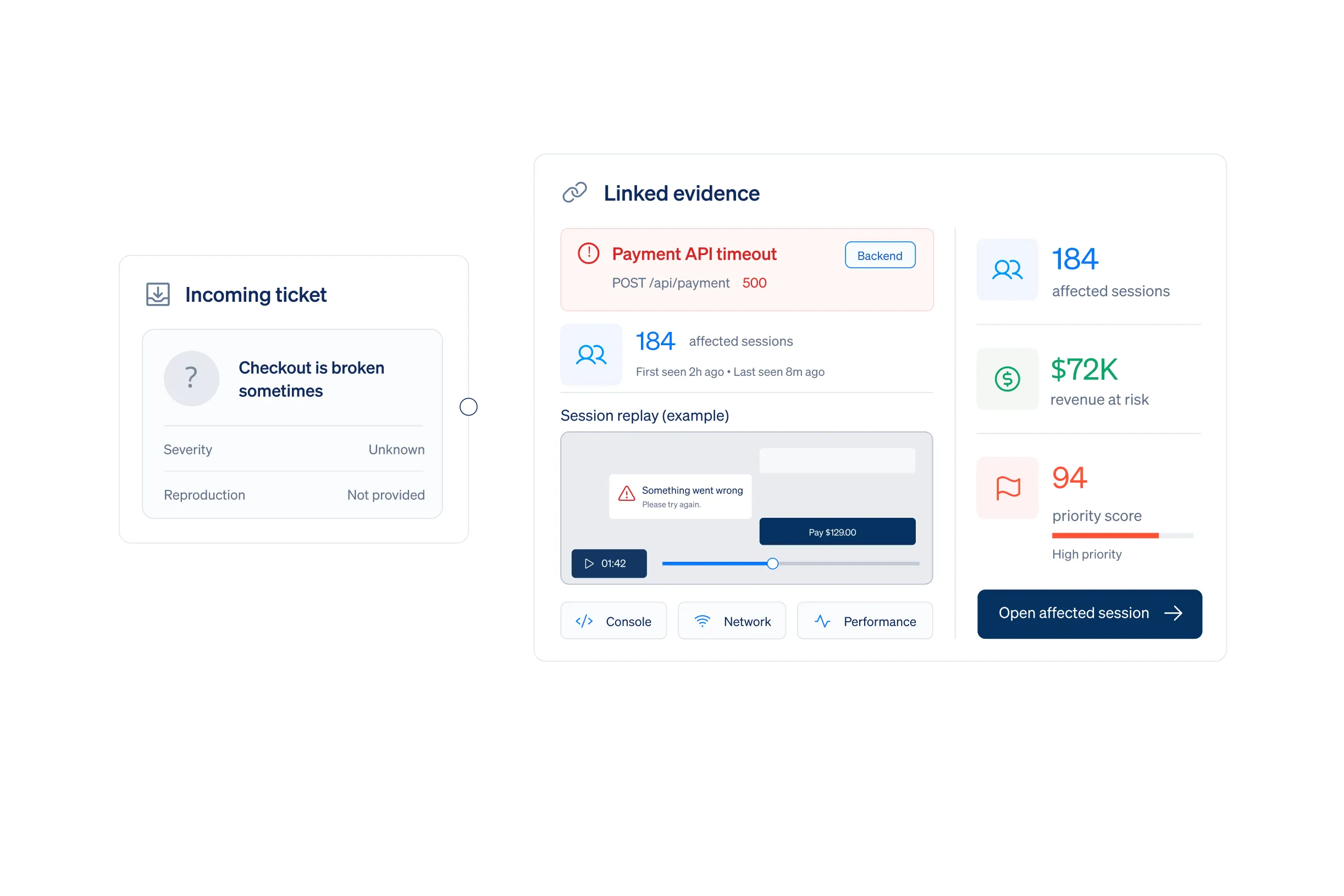
Link every error to the session, logs, network, and performance context—then rank the queue by business impact.






.svg)

Who runs their triage through FullSession?
Engineering and QA teams at software and ecommerce companies, using it to reproduce faster and prioritize by business impact.

Engineering leaders
Cut MTTR, reduce firefighting, and give your team clear evidence for prioritizing bug fixes alongside roadmap work.
Senior engineers
Jump from a ticket or error into the session behind it and see console logs, network calls, and DOM changes on one timeline.
QA engineers
Record and share exact reproduction paths from pre-production and production, reducing back-and-forth with developers.
SRE & platform
Correlate frontend behavior with incidents, errors, and degraded experiences to see how outages affect users in real time.
Why reproducing a revenue-blocking bug takes so long
A vague ticket without browser, device, steps, or error context turns reproduction into hours of guesswork—and severity into whoever escalates loudest.
.webp)
Open the exact broken session
Start with the real browser, device, path, user actions, and technical events—not a vague description.
.webp)
Rank by customer impact
Group repeat failures and order the queue by affected customers, journey impact, and revenue at risk.

Share a reproducible ticket
Attach replay, logs, network response, and environment so engineering can begin at the failure.
Debug faster with replay plus technical context
Watch exactly what happened in production and see the logs, network calls, and environment details tied to the user’s experience.
A lightweight script records user interactions, DOM changes, console logs, and network calls, so you get a complete picture of what happened when something broke.
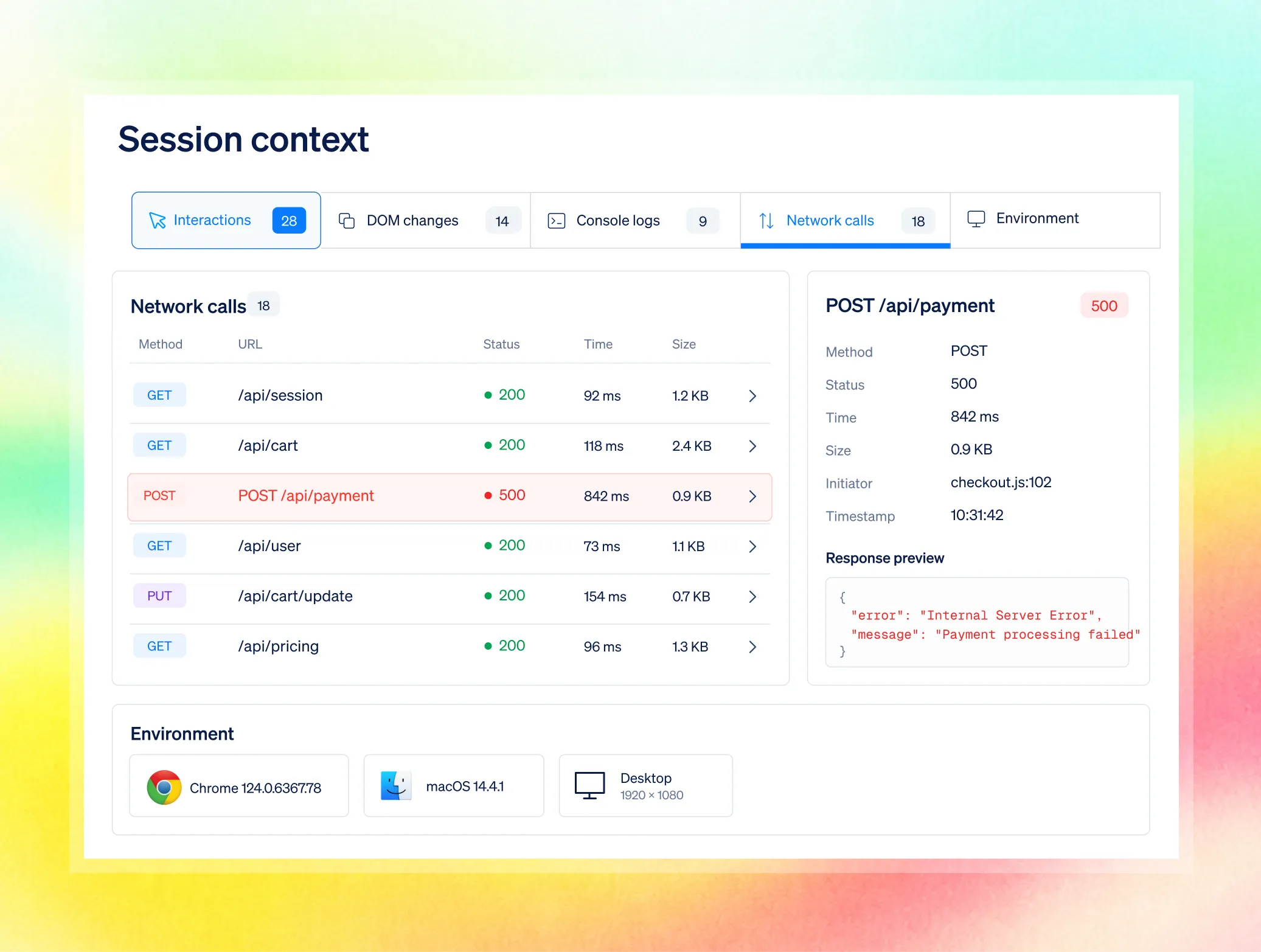
Jump from an error, ticket, or funnel drop-off straight into the replay that shows what the user did, what they saw, and which technical events fired.

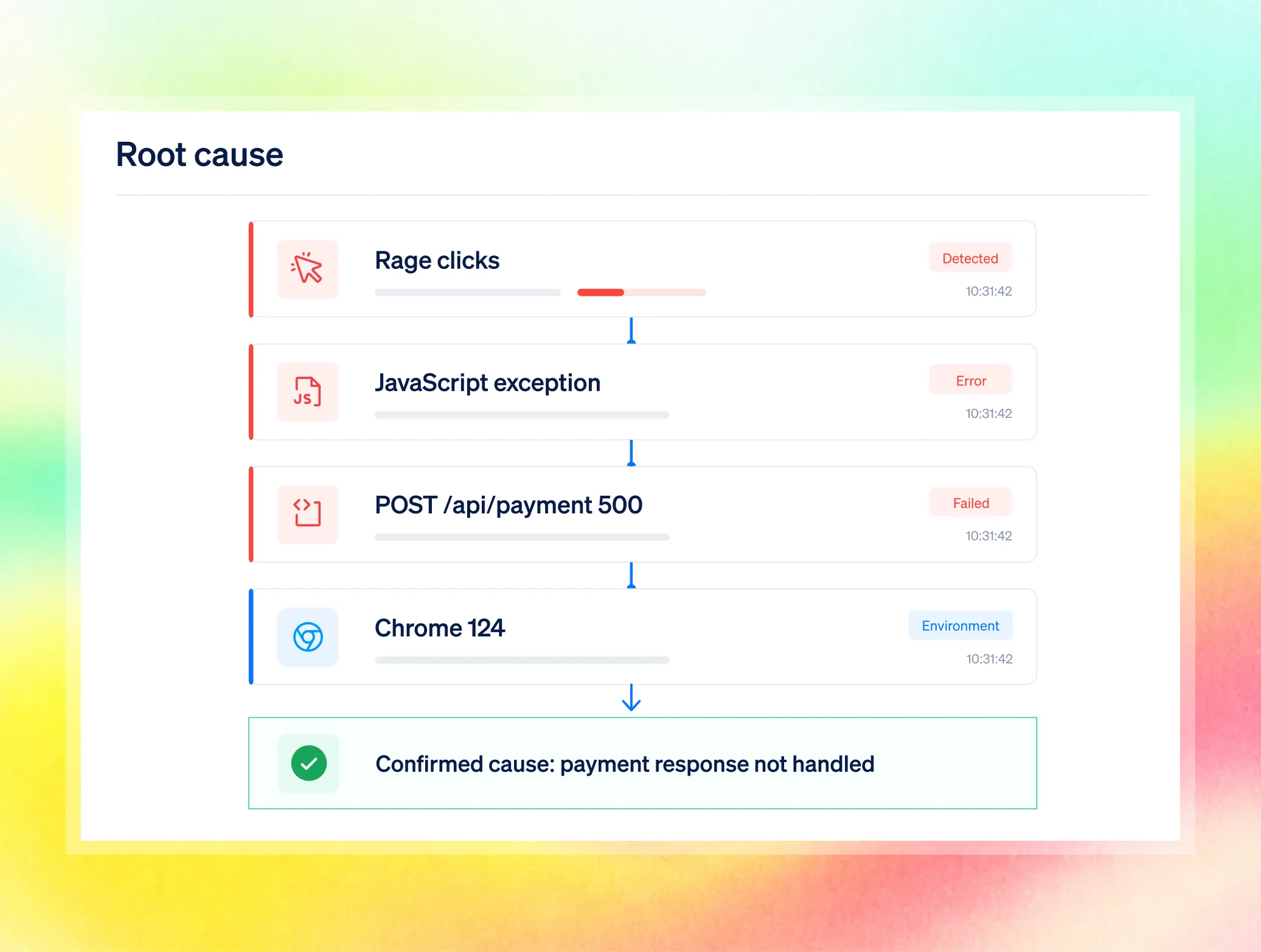
Use the combined view of UX behavior, console logs, API responses, and environment details to understand root cause quickly and ship the right fix.

What an engineering team gets
Real-session reproduction, severity ranked by customers and revenue, and proof the fix held—taking reproduction from days to minutes.
.avif)
Reproduce bugs in minutes
Start from the session already linked to the error, not a description that must be recreated.
.avif)
Triage by actual impact
Prioritize by affected customers and revenue—not raw volume or the loudest escalation.
.avif)
Verify the fix holds
Measure against baseline after ship and reduce repeat-failure escalations by around 25%.
.avif)
Bring evidence into AI safely
Query ranked errors and draft tickets through MCP in Claude or Cursor with inherited access and masking.

Turn a vague report into a ranked, reproducible ticket
Rank by journey impact, predict the lift before committing the fix, and prove the result after ship.
Teams use FullSession to turn behavior into proven outcomes.
"FullSession shows us exactly where users get stuck without digging through hours of recordings. It’s where we start when we know there’s something wrong and needs fixed. It was easy to launch and the FullSession team is super responsive and helpful."

12x
5x


Safe to connect to your workflow and AI tools
Review real sessions and query technical context without exposing protected values.

Mask fields, elements, or entire pages at capture, so sensitive data never reaches FullSession. Add playback masking and honor user consent or opt-out preferences.

Use browser-side masking, RBAC, SSO/SAML, audit logs, GDPR, CCPA and PCI support, US/EU residency, and permission-inherited MCP access.

Enterprise-ready security reviews, uptime SLAs, and independently verified safeguards. Data is hosted in the US, with European residency available on request.
Multiple Integrations built in the platform because we want no resitance in your workflow





Engineering & QA playbook.
Connect errors, session evidence, and release proof to fix issues faster.

Frequently Asked Questions.
Frontend and backend errors are linked to the session, so you see the exact path, inputs, and state, plus console and network context, rather than a stack trace alone.
It brings FullSession into Claude and Cursor so engineers can query session and error context in plain language and act on it. Access inherits the permissions the signed-in user already has.
By journey impact in Errors & Alerts, and by predicted revenue impact in Lift AI.
It complements it, adding the session, customer, and revenue context stack-trace-first tools do not carry.
Yes, provided their role has access, they can open the linked session and confirm what happened before escalating.
Reproduce the next one in minutes, and fix the one that actually costs money.
Growth sees conversion, Product sees friction, and Engineering sees the exact technical context
behind it.





.svg)
.svg)
212 E Stone Path St Derby, KS 67037 Phone: +1 415-649-4222



All systems operational.