Hotjar is best for website heatmaps, recordings, and feedback. Mixpanel is best for event-based product analytics across web and mobile. Contentsquare (formerly Clicktale) is best for enterprise teams that need broader digital experience analytics, journey analysis, and voice-of-customer capabilities.
Hotjar, Mixpanel, and Contentsquare solve different analytics problems, so the best choice depends on what your team needs to understand. Hotjar is strongest for visual behavior insights, Mixpanel is better for event-based product analytics, and Contentsquare is better suited to enterprise digital experience analysis.
In this guide, we compare their features, setup requirements, pricing models, and best-fit use cases so you can choose the right platform for your team.
Key Takeaways
- Hotjar is best for website teams that need heatmaps, session recordings, and direct user feedback to identify UX friction quickly.
- Mixpanel is best for product and growth teams that need event tracking, funnels, retention, and cross-platform product analytics.
- Contentsquare (formerly Clicktale) is best for enterprise teams that need deeper digital experience analytics across journeys, feedback, and broader experience intelligence.
- Choose Hotjar for qualitative website insight, Mixpanel for event-based product decisions, and Contentsquare for enterprise-scale experience analytics.
- If you want a simpler all-in-one alternative, compare these tools against platforms that combine replay, heatmaps, funnels, and feedback in one place.
| Tool | Best for | Setup effort | Data style | Works best for |
|---|---|---|---|---|
| Hotjar | UX and CRO insight | Low | Visual behavior + feedback | Websites |
| Mixpanel | Product analytics | Medium to high | Event-based analytics | Web + mobile products |
| Contentsquare | Enterprise experience analytics | Medium to high | Journey and experience intelligence | Larger digital teams |
Visualize, Analyze, and Optimize with FullSession
See how to transform user data into actionable insights for peak website performance.
What is FullSession?
FullSession is an advanced user behavior analytics software that helps you visualize all user interactions, evaluate trends and patterns with laser precision, and optimize your website for peak performance. An intuitive dashboard gives you a 360-degree view of user behavior data in one place.
Let’s explore the key features and benefits of FullSession software.
Session recordings
The FullSession session recording and replay functionality gives you a clear view of how customers interact with your website. Product and marketing teams can detect JavaScript errors, user frustrations, usability challenges, and underperforming content, which can help improve your design and user experience.
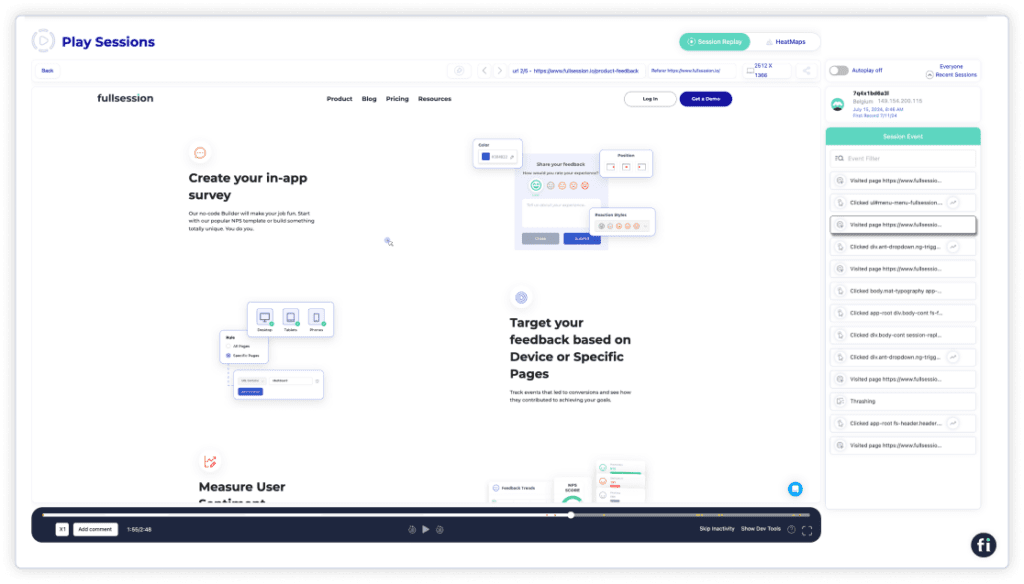
You can:
- Examine user behavior patterns, including clicks, scrolling, and mouse movements, to better understand their interactions
- Identify which pages are most engaging for users and observe how much time they spend on each page
- Assess the impact of specific marketing campaigns by tracking how users interact with your web pages
- Evaluate sessions using data points like user location, IP address, referral sources, pages visited, and session events
- Skip inactive segments of user sessions to focus on the activities that provide the most valuable insights
Plus, FullSession prioritizes privacy by not recording sensitive content such as passwords or credit card numbers, ensuring your users’ information is secure.
Heatmaps
FullSession offers three types of interactive heatmaps: click maps, mouse movement maps, and scroll maps. These maps clearly show where your visitors focus their attention and what they engage with most.
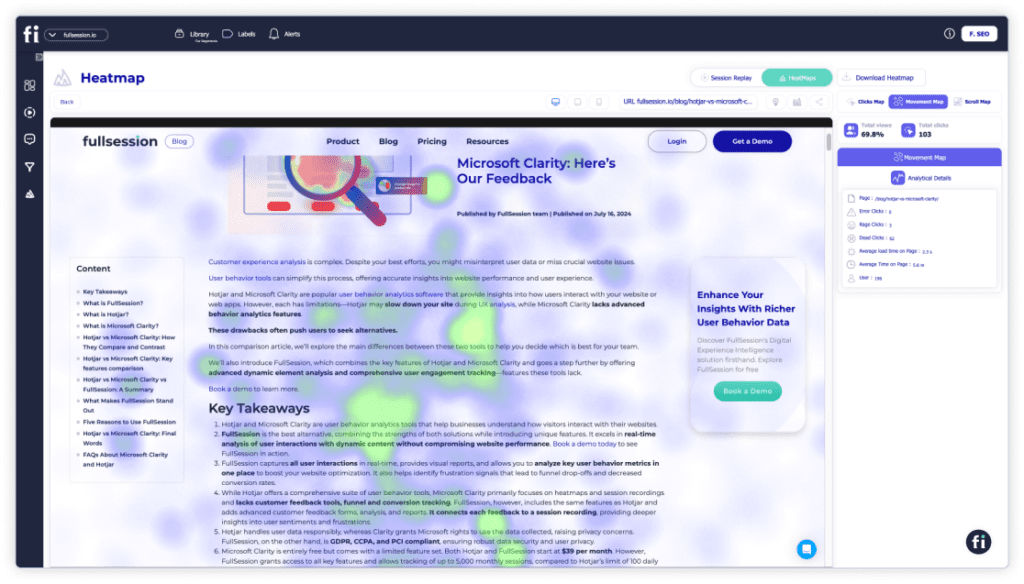
What’s great about FullSession is that these heatmaps update in real time. This means you can spot issues and make changes immediately to improve the customer experience. You can customize heatmaps to focus on specific pages, events, or user segments to get insights that can help you optimize your website.
Plus, FullSession’s heatmaps work hand-in-hand with other features like session recordings and user feedback. This way, you’re not just seeing where users click but also understanding the “why” behind their actions.
Customer feedback tools
Customer feedback tools make it easy to get answers directly from your users about their experience on your website. Instead of guessing what works or what needs fixing, you can ask them directly with real-time surveys, pop-up forms, or feedback widgets.
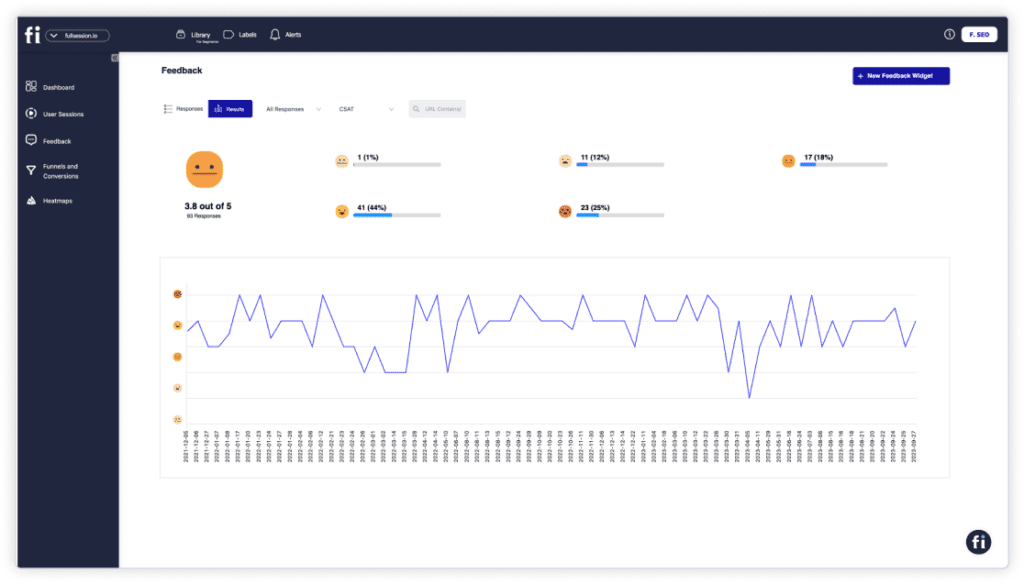
Plus, FullSession offers flexible customization options for your feedback forms. Aside from the appearance, you can set which devices you want to target (mobile phones, tablets, desktops) and specific triggers that would lead users to your survey (e.g., rage clicks and dead clicks).
Feedback is linked to a session recording. So, you can see exactly what a user did when they left their comment, giving you a clear picture of what’s working and where there might be issues.
Advanced event and user filtering
Segment your users for an in-depth view of their digital engagement with your product. Get granular insight into behavioral patterns and run more tests on these groups to boost your engagement, conversions, and other online metrics.
Insights
Instead of sifting through endless data, FullSession pulls out the most important trends and patterns so you can see what’s really driving user behavior.
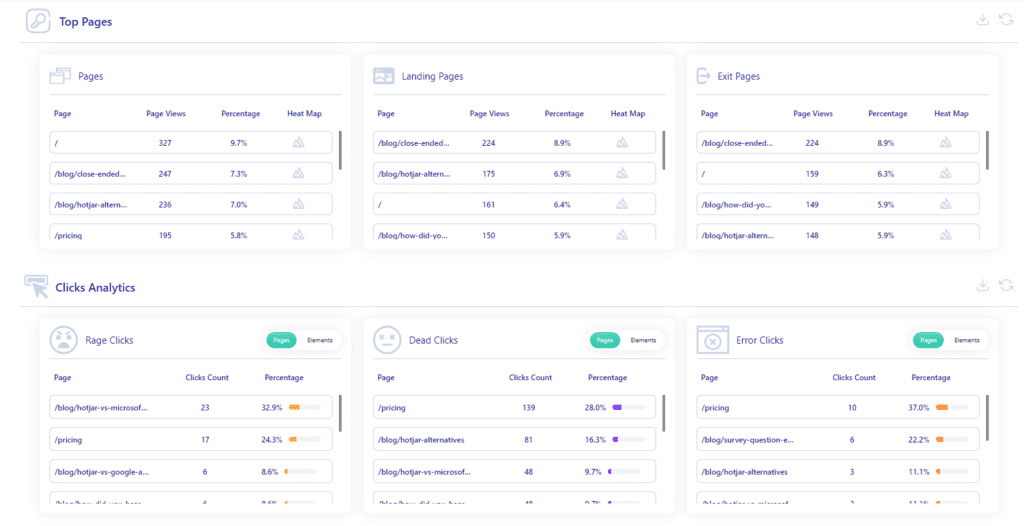
You can get easy-to-visualize data on the following.
User engagement
- Median scroll depth by device
- Page load speed by browser
- Session playlist
- Top users
- User trends
- Breakdowns (based on device, browser, and screen)
User experience
- Event per session
- Session length
- Active time
- Feedback data
- Top pages
- Clicks analytics
- Error analytics
- Slowest pages (pages, landing pages, and exit pages)
Marketing channels
- UTM analytics
- Top referrers
Conversion funnel analysis
FullSession funnel and conversion optimization tools help you see how users move through your conversion funnel, making tracking, understanding, and optimizing each step easier.
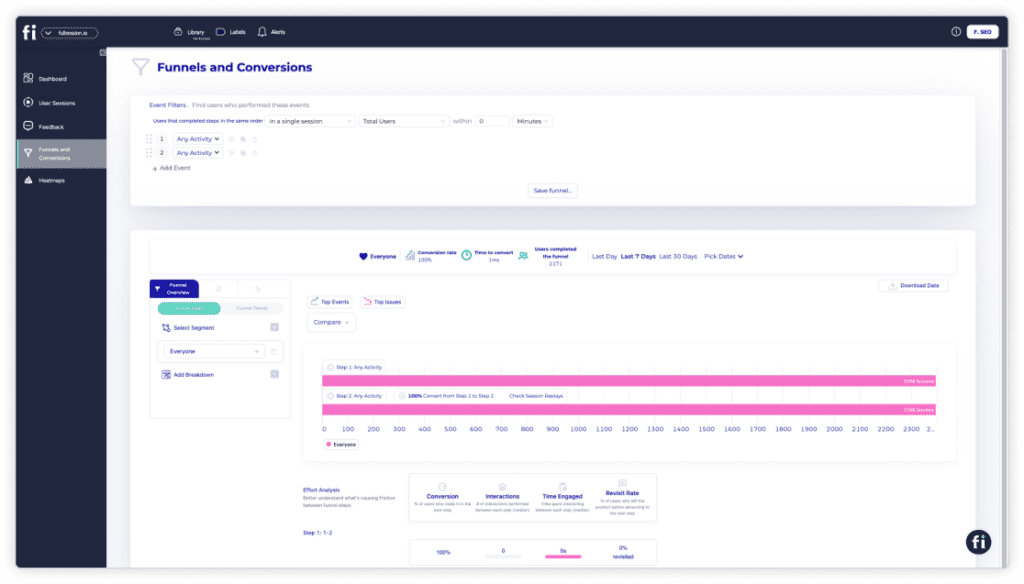
You can monitor trends over time, identify key events, and see exactly where users drop off and which actions drive conversions. This allows you to improve funnels and fine-tune the user journey for better conversions.
Additionally, FullSession allows you to compare funnel performance across different user segments and time periods, which can help you tailor strategies to specific audiences and maintain strong performance year-round.
Error tracking and analysis
The error analysis feature makes it easy to spot and fix issues that might frustrate your users. It tracks everything from error clicks and network problems to console errors and uncaught exceptions, giving you the insights you need to keep your site running smoothly.
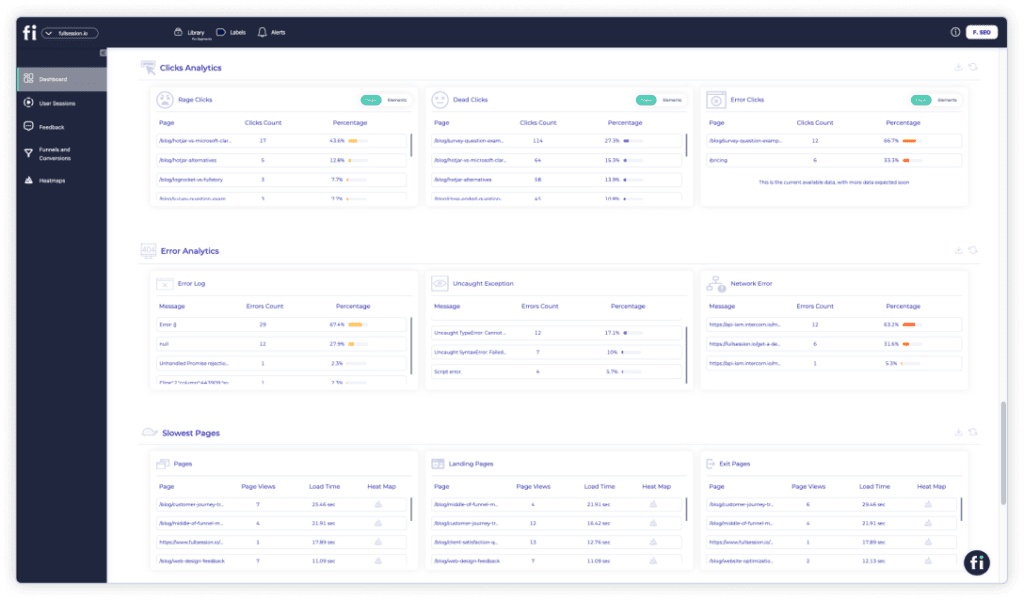
For instance, you can quickly see where users are clicking on non-responsive elements or where server issues are causing disruptions.
Visualize, Analyze, and Optimize with FullSession
See how to transform user data into actionable insights for peak website performance.
Why Use FullSession?
Positive user experience is the key to your business’s growth. You will get data that can direct your company to reach its full potential and attract more visitors to your site or mobile app.
FullSession helps you do just that with real-time session recordings and interactive heatmaps. Session recordings don’t capture sensitive information to safeguard your users’ privacy. On the other hand, heatmap processing is instant, so you don’t have to wait to analyze user behavior.
The platform’s advanced user filtering and segmentation make it easy to analyze large amounts of data. Simply filter by user characteristics, location, event type, and more to make data-driven decisions for each customer segment.
Plus, FullSession is built for cross-functional, more productive teams to help them communicate and work easily. It is tailored to the unique needs of web designers, marketers, UX/UI researchers, and product managers at hyper-growth technology companies.
How to start
FullSession is completely free for you to start. There are no time limitations, no credit card required, and no risk of chargebacks. See how easy it is to engage customers, improve your website, and give your audience the customer experience they expect.
FullSession offers a 14-day free trial. The basic plan starts at just $39 a month! You can get a 20% discount when you sign up for the annual plan.
What is Hotjar?
Hotjar is a web analytics tool that helps you track customer journeys and understand customer behavior. It provides visual data and reporting to help you reveal what your site visitors like and don’t like and how you can optimize your website to achieve your business goals.
By monitoring users’ behavior in real time, you can take quick actions and immediately observe the effect of your changes.
Hotjar key features
Compared with other alternatives, Hotjar has integrated analytics, Conversion Rate Optimization (CRO), and feedback tools in one platform. Here is a breakdown of the features you can expect from Hotjar:
- Heatmaps: Visualize where users click, scroll, and hover on your website, understand audience behavior, and optimize page layout.
- Session recordings: Watch recordings of individual user sessions to see exactly how they interact with your site, identifying pain points and areas for improvement.
- Conversion funnels: Track user journeys through your site’s conversion funnel, pinpointing where users drop off and optimizing the steps to increase conversions.
- Form analysis: Analyze how users interact with forms on your site, identifying fields and other factors that cause friction and improving form completion rates.
- User feedback: Collect direct feedback from users through on-site surveys and feedback forms to gain insights into their experience and satisfaction.
- Incoming feedback: Gather immediate user reactions with targeted feedback widgets, allowing users to share their thoughts in real time as they browse.
- Surveys: Create and distribute surveys to your audience, collecting valuable data on user preferences, behaviors, and opinions.
- Usability testing recruitment: Recruit participants for usability testing directly through your website. It allows you to gather in-depth insights from real users without making the process time-consuming.
- A/B testing: Compare two different versions of your website to see which one performs the best.
Hotjar vs Google Analytics
Google Analytics reveals the raw data on your website visitors’ behavior, but it’s not a good option if you don’t have enough time or knowledge to dig through its complex reports.
Compared with Google Analytics, Hotjar helps you understand the context of your users’ behavior, providing visual data that is easy to interpret. Combining these two tools gives you a holistic view of what’s driving your visitors to convert or what challenges they might have.
Check these out if you want to read more about Hotjar alternatives:
- Hotjar vs FullStory
- Hotjar vs Lucky Orange
- Hotjar vs Crazy Egg
- Hotjar vs Microsoft Clarity
- Hotjar vs Smartlook
- Hotjar vs Inspectlet
What is Mixpanel?
Mixpanel is user analytics software that collects data from mobile devices and web browsers, making it one of the most popular analytics platforms on the market. It lets you link every event on your website with a single user, receiving data from the user’s device in real time.
Mixpanel key features
Mixpanel focuses on automatically analyzing information and creating accurate and relevant reports to help you improve the user experience. Here is an overview of its most important features.
- Interactive reports: Mixpanel offers eight types of reports—Insights, Funnels, Flows, Retention, Impact, Users, Experiments, and Signal—providing detailed breakdowns over time.
- Team dashboards and alerts: Customize dashboards, set up real-time alerts, and send weekly digests via email or Slack integration to keep your team informed.
- Limitless segmentation: Segment data by any attribute, cohort, or action to uncover engagement drivers and quickly identify areas that need improvement.
- Group analytics: Analyze data at the account or organization level to understand sales funnel friction points and create targeted retention strategies.
- Data integrations: Centralize your business data by integrating various sources into one location.
- Data management: Clean and manage your data to boost revenue and conversions, with options to add or sync data from other tools.
- Security and privacy: Protect customer data with advanced encryption from end to end.
- Scalable infrastructure: It supports high-volume data analysis with zero pre-computation, scaling easily with your needs.
Hotjar vs. Mixpanel
Hotjar and Mixpanel are often compared because they’re both web analytics platforms. What makes one platform better and which you choose depends on what you’re looking for in your analytics software.
Hotjar vs Mixpanel: What is the difference?
With Hotjar heatmaps and session recordings, you can see how visitors behave on your website. Also, it allows you to collect user feedback with forms and customer satisfaction surveys. It best suits web/UX designers, digital marketers, product managers, UX researchers, and data analysts.
Mixpanel is an event-centric platform focused on users’ actions on a page, such as clicking a link or typing text into a form field. It uses custom events and engagement metrics to build detailed profiles of user interactions.
Hotjar vs Mixpanel: Which is easier to set up?
Hotjar is faster to set up than Mixpanel and does not require you to add tracking code to specific sections of your site. One of the biggest cons of Mixpanel is that it requires more technical knowledge, as you need to set up action logging and integrate with other tools.
Hotjar vs Mixpanel: Platforms
If you want to analyze and optimize your website, then Hotjar is your best option because it’s built specifically for web analysis. However, if you also have a mobile app, Mixpanel is the right choice because you can track metrics across all devices.
Hotjar vs Mixpanel: Integrations
One of the best pros of Mixpanel is that it integrates with more than 50 platforms, such as Google Analytics, Zoho, Meya, FullStory, and more. This makes Mixpanel more powerful overall and saves you time when building reports and dashboards.
Hotjar vs Mixpanel: Data
Mixpanel is a unique product that collects data through API or SDK. You can export data from your Mixpanel account and make it work with other services. Make sure you have a developer on standby to add Mixpanel’s tracking code.
Hotjar vs Mixpanel: Pricing
Hotjar offers a free plan that lets you track up to 35 daily sessions. For paid plans, you can choose from the following:
- Plus: $39/month for 100 daily sessions, filtering, segmentation, and interaction tracking
- Business: $99/month for 500 daily sessions, custom-built integrations, user attribute tracking, and frustration tracking
- Scale: $213/month for a customizable number of daily sessions and access to all user journey analysis features
Mixapanel also has a free plan that lets you track up to 20 million monthly events. Paid plans include:
- Growth: $28/month for 10,000 monthly events and advanced analytics
- Enterprise: Customizable pricing for advanced features
What is Contentsquare?
Contentsquare (formerly Clicktale) is a cloud-based digital experience platform that allows businesses to gather and understand how their customers interact with their digital products. It allows businesses to record actual site visits and browsing patterns and gain insight into customer behaviors.
Contentsquare key features
Traditional web analytics tools have a lot of graphs, charts, and numbers that nobody understands. Contentsquare gives you everything you need to know about your website or app with a user-friendly interface. Here’s a closer look at its key features:
- Customer journey analysis: Monitor visitor interactions with journey mapping, segmentation, and reverse journey features to see how they engage with your website.
- Zone-based heatmaps: Identify where users get confused or disengaged and see which site elements contribute most to conversion rates.
- Session replay: Replay individual customer experiences to confirm ideas, spot bugs, and get a “bird’s-eye view” of user interactions.
- AI insights: Turn raw data into actionable insights automatically to understand the source of customer satisfaction or dissatisfaction.
- Mobile app analysis: Gain full insight into your customers’ mobile experiences and align your product with their needs.
- Merchandising analysis: Improve your websites and online sales by gaining insights into product performance and competitor data.
- Struggle analysis: Identify and address issues that impact revenue, bounce rates, and conversion rates, improving customer experience.
- Impact quantification: Track trends and statistics on both macro and micro levels, such as browser usage and transaction completion, for predictive analysis.
Hotjar vs Contentsquare: Two rivals have joined forces
In 2021, Clicktale, or now Contentsquare acquired Hotjar for an undisclosed amount. The acquisition comes as a part of a mission to expand its product offering and provide a complete solution for businesses worldwide.
Both companies will work together to ensure the best possible results for their joint market strategies, but for now, they will continue to operate independently.
Hotjar vs Contentsquare: Basic differences
Product and UX teams use Hotjar to build better products and meet more business needs. Data analytics teams use Hotjar to improve acquisition, engagement, and conversion. Hotjar is useful for small and medium-sized companies that might not have the budget for extensive usability testing.
Contentsquare has a complete set of enterprise-level features that allow you to unlock customer data in a way that your entire team can easily interpret. It is best suited for digital marketing, analytics, eCommerce, design and UX teams, operations and IT, and product teams.
Hotjar vs Contentsquare: Platforms
Hotjar is designed for web-based apps, so it won’t work with mobile apps. On the other hand, Contentsquare is a comprehensive analytics solution for both web and mobile apps that will give you in-depth insights into your customers’ journeys.
Hotjar vs Contentsquare: Data
Contentsquare has an advantage because it uses advanced technologies such as artificial intelligence and machine learning to provide information about customer behavior. Its unique features provide incredibly detailed data about how users navigate pages and interact with all key elements.
Hotjar vs Contentsquare: Integrations
Hotjar primarily integrates with platforms like Google Analytics, Optimizely, and others, but it relies heavily on Zapier for additional integrations.
On the other hand, Contentsquare offers a broader range of direct integrations with third-party services such as Heap, Google Analytics, LiveChat, Mailchimp, and more, making it more versatile.
Hotjar vs Contentsquare: Supported languages
Contentsquare and Hotjar differ in their features and multilingual support. Hotjar supports multiple languages for its user-facing features, such assurveys and user feedback, while Contentsquare only supports English.
Hotjar vs Contentsquare: Pricing
There is no information on Contentsquare pricing on its official site, so anyone who wants to learn more will have to contact sales representatives. It is known for its subscription-based pricing.
On the other hand, Hotjar is not free. It does offer a free software version with some limitations, but for a fully-featured experience, you’ll need to upgrade the pricing plan.
Comparison Summary
Now that we’ve highlighted the features, pros, cons, and pricing of each page, let’s summarize our reviews:
| Tool | Best for | Strongest capability | Main limitation | Best team type |
|---|---|---|---|---|
| Hotjar | Website UX analysis | Heatmaps, recordings, feedback | Less suited for deep product analytics | Marketing, CRO, UX |
| Mixpanel | Product analytics | Events, funnels, retention, cohorts | More setup and instrumentation needed | Product, growth, SaaS |
| Contentsquare | Enterprise experience analytics | Journey analysis, enterprise DX insight | More complex and typically higher-tier | Enterprise analytics, ecommerce, DX |
| FullSession | All-in-one behavior analytics alternative | Replay, heatmaps, funnels, feedback | Less known brand than category leaders | Teams wanting one platform |
Want to read about other tools? Here are other comparison guides:
- Mouseflow vs VWO
- Mixpanel vs Amplitude
- Amplitude alternatives
- Hotjar vs FullStory
- UserZoom vs UserTesting
- Hotjar vs Lucky Orange
- Hotjar vs Smartlook
Visualize, Analyze, and Optimize with FullSession
See how to transform user data into actionable insights for peak website performance.
Hotjar vs Mixpanel vs Contentsquare: Our Verdict
When it comes to choosing between Hotjar, Mixpanel, and Contentsquare, it really depends on your needs. Hotjar is suitable for visualizing user behavior with its heatmaps, session recordings, and feedback tools.
Mixpanel is all about the details, focusing on event-driven analytics. It’s a good product analytics solution if you need to dive deep into user actions and track specific behaviors over time. It works for product teams that need granular insights.
Contentsquare is more of an enterprise-level powerhouse, offering detailed customer journey analysis and strong integrations, but it’s mostly limited to English.
What if you could combine the best of all three solutions?
That’s where FullSession comes in. It offers a blend of visual insights, detailed analytics, and real-time data, all in one easy-to-use platform. If you’re serious about optimizing your website, user experience and boosting conversions, FullSession is your top choice.
FullSession can help you:
- Monitor dynamic elements in real time for precise insights
- Accelerate heatmap processing without affecting site performance
- Ensure user privacy by excluding sensitive data from recordings
- Handle large data sets efficiently to uncover key insights quickly
- Limit user behavior tracking to your site to prevent misuse
- Unify team efforts and enhance collaboration on a single platform
Book a demo with FullSession today and see how it can help you take your website to the next level.
FullSession Pricing Plans
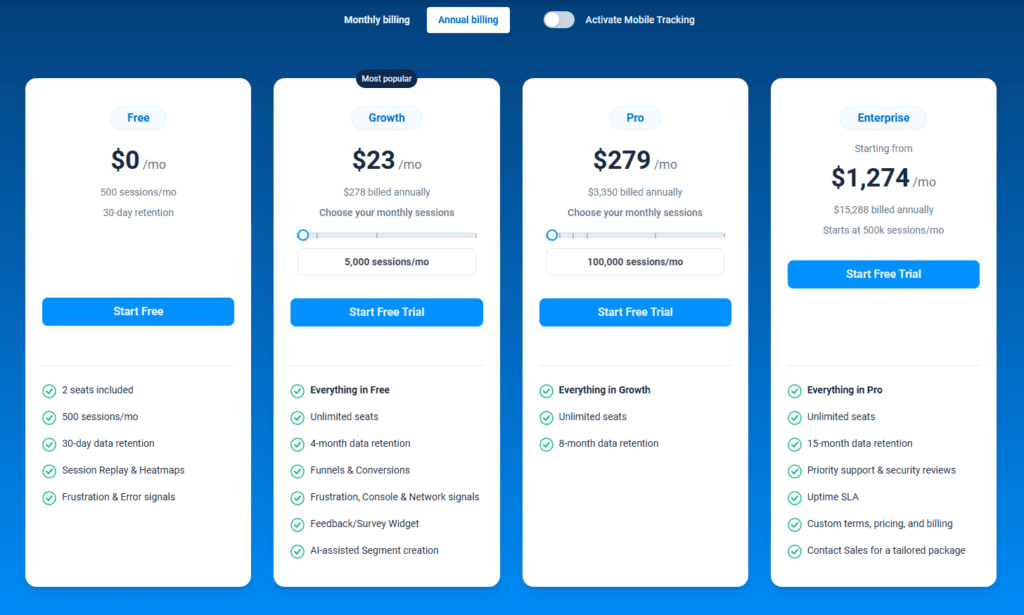
The FullSession platform offers a 14-day free trial. It provides three paid plans—Starter, Business, and Enterprise. A yearly subscription can save you up to 20%.
Here are more details on each plan.
- The Free plan is available at $0/month and lets you track up to 500 sessions per month with 30 days of data retention, making it ideal for testing core features like session replay software, website heatmap software, and frustration signals.
- The Growth Plan starts from $23/month (billed annually, $276/year) for 5,000 sessions/month – with flexible tiers up to 50,000 sessions/month. Includes 4 months of data retention plus advanced features like funnels & conversion analysis, feedback widgets, and AI-assisted segment creation.
- The Pro Plan starts from $279/month (billed annually, $3,350/year) for 100,000 sessions/month – with flexible tiers up to 750,000 sessions/month. It includes everything in the Growth plan, plus unlimited seats and 8-month data retention for larger teams that need deeper historical insights.
- The Enterprise plan starts from $1,274/month when billed annually ($15,288/year) and is designed for large-scale needs with 500,000+ sessions per month, 15 months of data retention, priority support, uptime SLA, security reviews, and fully customized pricing and terms.
FAQs About Hotjar vs Mixpanel vs Contentsquare
What is the difference between Hotjar and Mixpanel?
Hotjar is built for visual behavior analytics and feedback, while Mixpanel is built for event-based product analytics like funnels, retention, and cohorts.
Is Clicktale the same as Contentsquare?
Clicktale is the legacy brand. Contentsquare is the current platform name and should be treated as the product being evaluated today.
Which tool is easier to set up?
Hotjar is typically easier to install and start using. Mixpanel usually requires more event planning, and Contentsquare is often evaluated in a broader enterprise context.
Which tool is best for startups?
Hotjar is often the easiest starting point for website-focused teams. Mixpanel is better for product-led SaaS teams with stronger analytics maturity.
Which tool is best for enterprise teams?
Contentsquare is generally the best fit when organizations need broader experience analytics across teams and channels.
Can Hotjar replace Mixpanel?
Usually not. Hotjar is better for visual UX insight, while Mixpanel is better for event-based product analytics.


Mohamed oversees operations and finance at FullSession and has contributed to the company’s UX analytics knowledge base.