.svg)

Conversational AI for sales: evaluate website answers and the next step


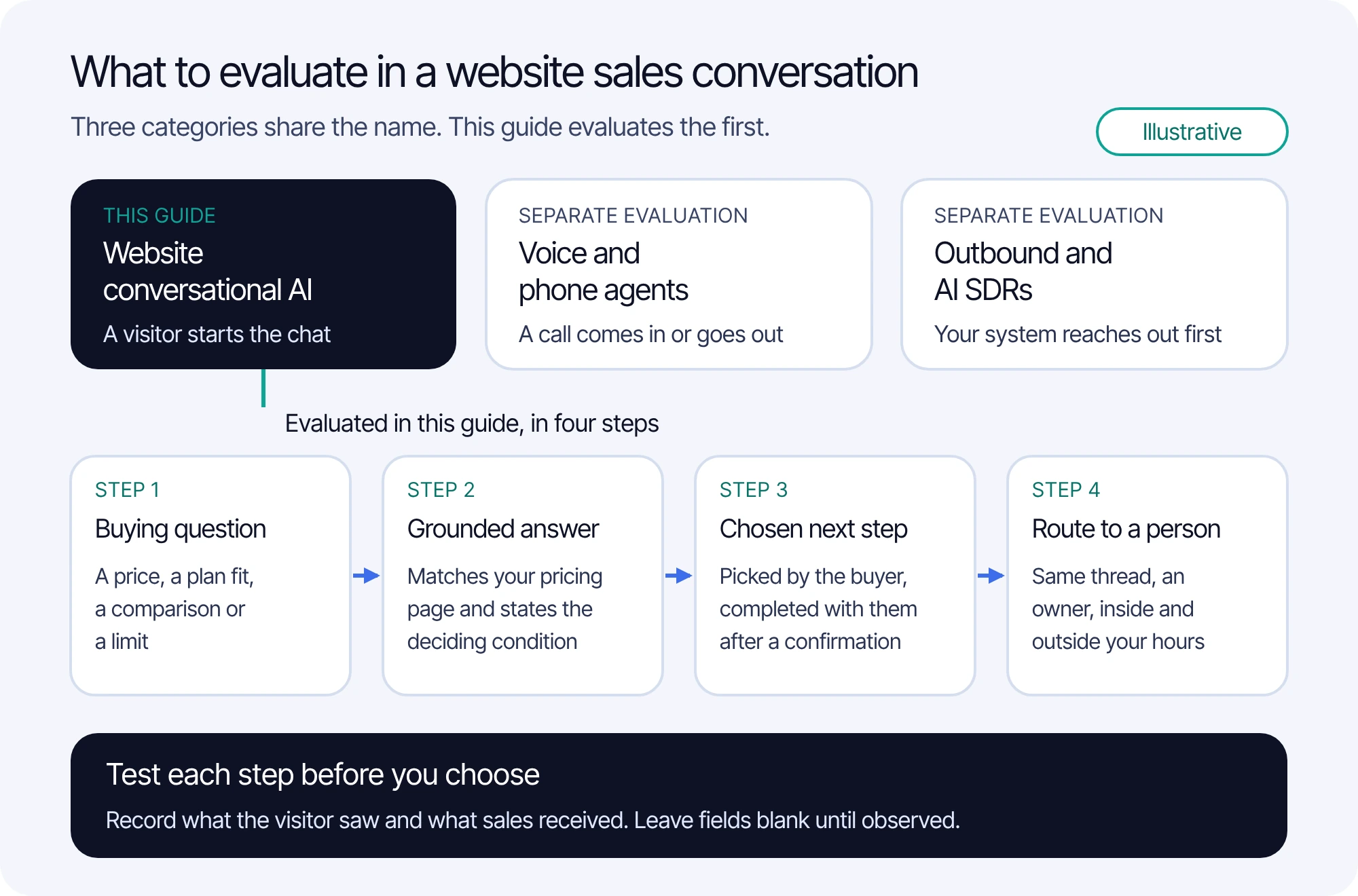
Conversational AI for sales is a label shared by three different kinds of product. Website conversational AI answers buyers who start a chat on your site. Voice agents hold sales conversations over the phone. Outbound systems, often sold as AI SDRs, start conversations with prospects by email or other channels. Each needs its own evaluation, and this guide covers website conversations. Judge a website sales AI on three things: whether its product and pricing answers match your pricing page, conditions included; whether it helps the buyer complete a next step they chose; and whether a ready buyer reaches a person without starting over.
FullSession Max AI works in that website conversation. On your website it answers from your pricing and product pages, takes buyers to the right plan or fills in the demo request with them, and passes ready buyers to sales, with no per-lead fee. Visitors always know when they are talking to Max and can ask for a person at any time. Max costs $0.39 per AI-assisted conversation across support, sales and Customer Success, with a $99 monthly minimum credited toward usage, and the Desk, shared inbox and human chat are included with no seat fees.
For one complete demo-request conversation, stage by stage, see the lead generation chatbot walkthrough; this article is the evaluation guide around it. Max capabilities and prices come from FullSession's Support & Sales Desk page and Desk pricing, checked 19 October 2026. The example company and its answers are illustrative, not a recorded Max session or a customer result. The sales chat evaluation checklist is a plain-text file with blank observation fields.
What counts as conversational AI for sales?
Search results for the term mix three product categories that solve different problems. The difference that matters most is who starts the conversation and where it happens: a visitor on your website, a caller on the phone, or your own system reaching out to a prospect.
Some guides also list conversation intelligence, which records and analyzes sales calls for coaching. It studies conversations rather than holding them, so it belongs in a separate evaluation.
Pick the category from the problem. If buyers reach your pricing page and leave with an unanswered question, evaluate website conversational AI. If inbound sales calls go unanswered, look at voice agents. If the pipeline needs more first conversations, look at outbound. Many revenue teams need more than one, and each gets its own test.
Max belongs to the first category. It works in conversations that visitors start on your website and that users start in your product, and it co-drives your app and your website instead of describing the steps. Within one conversation Max can switch between text and voice on the web; that is a conversation mode, not a phone line.
In a website sales conversation, evaluate four steps in order:
- The buying question: a price, a plan fit, a comparison or a limit.
- The answer: checked against your pricing and product pages, stating the condition that decides it.
- The next step: chosen by the buyer, and completed with them on your site after a confirmation.
- The route to a person: in the same thread, with an owner, inside and outside your hours.
How do you evaluate product and pricing answers?
A buyer's question during an evaluation is usually narrow and commercial: what will this cost at my size, which plan covers my case, how does this compare. The answer is useful only if it matches what your pricing and product pages say, including the condition that decides it. Grade answers against your own published pages, not against how confident they sound.
Five tests cover the common buying questions. Write the expected answer and its source passage for each test question before you run it, so the grading does not depend on memory.
A graded example: one pricing question, three answers
Tallyline is a fictional scheduling product for clinics, invented for this example. Its approved pricing page says:
Approved source, Tallyline pricing page (fictional): Starter is $49 per month billed annually, or $59 billed monthly, for up to 3 locations. Growth is $129 per month billed annually, or $155 billed monthly, for up to 15 locations, and adds online payments. Enterprise is quoted after a demo.
A visitor on the pricing page asks: "We run eight clinics. What would Tallyline cost us per month?" Here are three answers a sales AI could give.
Answer C is the one to watch. It passes a casual review because every figure in it appears on the pricing page, and only a grader who checks the deciding condition catches it. That is why the expected answer has to be written before the test. If your own pricing page does not state its conditions clearly, fix the page first; the chatbot knowledge base guide covers preparing sources so that conditions travel with the answer.
Max answers from the approved sources you connect: documentation, help center, pricing page, marketing site, support portal and your own MCP server for the data you choose to expose. Put your pricing page and the product pages buyers compare on that list before the first test, and keep questions you never want improvised, such as custom discounts and contract terms, with a person.
What next step should a sales AI offer?
After a useful answer, the buyer decides what happens next. Good options on a pricing or product page are few: the details of the plan that fits, a trial or sign-up if you sell self-serve, a demo request, or a person. The AI offers them after it has answered, and the buyer picks. A sales AI that pushes every visitor toward a meeting turns a buying conversation into a form.
A supported next step means the AI helps the buyer complete it on your site instead of only pointing at a link. Max takes buyers to the right plan or fills in the demo request with them, and the request it fills in is your own demo form. The lead generation chatbot walkthrough shows that path in one annotated conversation, including the confirmation before submission, the receipt and what sales receives.
When you evaluate any vendor, list the next steps your sales process needs and treat each as its own requirement. Common ones are plan selection, trial or sign-up, a demo request, a meeting booking, a CRM record and a lead score. Write down which system completes each one, whether the conversation, your existing form or sales system, or a different tool, then test that path end to end. For each step, check that:
- it is offered after the answer, and the buyer can decline it and keep asking;
- details the buyer already gave are reused, and only missing ones are asked for;
- nothing is submitted until the buyer confirms what will be sent;
- the result is reported honestly as completed, failed or unknown.
How should a ready buyer reach a person?
The route to a person is where a website sales conversation can lose the buyer. If the rep starts from a bare lead record, the first call repeats questions the buyer already answered. Test three things: the buyer can ask for a person at any time, the person sees the conversation, and someone owns the reply, including outside your hours.
With Max, visitors always know when they are talking to Max and can ask for a person at any time, and you can let visitors choose Max or a person. Max passes ready buyers to sales, and your team takes over in the same thread from one shared inbox with the conversation and available context. You can assign conversations and control who can view them, and replies from Max are labeled in the transcript. Set hours in your team's time zone with an away message; visitors can still leave a question after hours, and a returning visitor picks up the same thread. If your team works in Zendesk, HubSpot, Freshdesk or another supported helpdesk, Max also works inside it; otherwise the included FullSession Desk is the inbox. With optional Core CX / UX, the rep can also see the recording of the buyer's session when that session was captured.
Two decisions belong to your team rather than the software: what makes a buyer ready for sales on your site, and who replies to questions left after hours, and by when. Write both down before launch. For the full design of the transfer, including triggers, the context to pass and honest waits, see the chatbot-to-human handoff guide.
How is a website sales conversation billed?
Billing units differ by category, so compare what each one counts before you compare prices. Voice agents often bill per minute of call time. Outbound products vary by vendor. Website AI may bill per conversation, per outcome, per qualified lead, per seat or a mix; Fin's pricing page, for example, lists $0.99 per outcome and Qualifications at $9.99 each (checked 19 October 2026). For a sales use, ask three questions: what counts as one billable unit, whether a conversation that ends in a demo request costs more than one that ends in a plan answer, and whether the people who take over need paid seats.
Max's price answers all three. It costs $0.39 per AI-assisted conversation across support, sales and Customer Success, with a $99 monthly minimum credited toward your conversations rather than added. There are no seat, MAU or per-lead fees, so a buying conversation that ends in a demo request costs the same as one that ends in a plan answer. At 1,000 AI-assisted conversations in a month, the bill is $390; at 253 conversations or fewer, the $99 minimum applies. The Desk app, shared inbox, human chat and supported integrations are included; optional Core CX / UX recording (from $39.20 per month billed annually), third-party subscriptions and taxes are separate. See current Max pricing.
Billing note: one conversation covers one user in one thread for a fixed 24 hours from Max's first substantive answer, guidance or supported action. A change from a support question to a sales question inside that window stays the same conversation, and so does switching between text and voice. Greetings, clarification-only exchanges, unaccepted proactive offers, human-only chat and handoffs before substantive help are not billed, and human replies add no charges. To budget across vendors and volumes, use the AI chatbot pricing guide.
What should you test before choosing a deployment?
Run the evaluation on your own pages with your own questions before you commit. Start with about twenty real buying questions taken from sales call notes, chat transcripts and the questions your reps answer every week. Write the expected answer and source passage for each, then run them as a visitor with a test identity and a test form destination. Have two people grade: someone from sales, and whoever owns the pricing page.
Two Max details matter for area 9: what visitors type in the chat follows the same masking rules as every other input FullSession records, and permissions to view, reply, assign and change settings are set separately per site. SSO/SAML, custom roles and audit logs come with Enterprise.
The sales chat evaluation checklist carries all ten areas as a fill-in record, with blank observation fields, a billing worksheet and a decision record. Expected behavior is not an observation: leave a field blank until you have seen the result. To measure what happens after launch, from buying conversations to opportunities, use the measures in the lead generation chatbot walkthrough; this checklist ends at the decision to deploy.
Test a pricing question in a Desk walkthrough
Bring one real pricing question your buyers ask and the page that should answer it. We will walk through how Max answers a question like it from approved pricing sources, the next steps the buyer can choose, how the conversation reaches your sales team, and what billing looks like at your volume.
Conversational AI for sales questions
No. A sales chatbot, or website conversational AI, answers buyers who start a conversation on your website. An AI SDR is an outbound system that starts conversations with prospects by email, phone or social messages. They solve different problems and are evaluated differently: answer accuracy and the route to sales for the first, data quality, deliverability and reply handling for the second.
It can when its answers come from your approved pricing page and that page states its conditions. Test it with real questions and expected answers written in advance, grade the deciding condition as well as the figure, and check that it says so when your pages do not answer a question. Max answers from the pricing and product pages you connect.
No. Max costs $0.39 per AI-assisted conversation across support, sales and Customer Success, with a $99 monthly minimum credited toward usage and no per-lead, seat or MAU fees. A conversation that ends with a ready buyer passed to sales costs the same as any other.
A few options the buyer chooses after the answer: the details of the plan that fits, a trial or sign-up if you sell self-serve, a demo request, or a person. Max takes buyers to the right plan or fills in your own demo form with them. A sales AI that pushes every visitor toward a meeting turns a buying conversation into a form.
Test three things: the buyer can ask for a person at any time, the person sees the conversation, and someone owns the reply, including outside your hours. With Max, your team takes over in the same thread from one shared inbox, with the conversation and available context, and Max passes ready buyers to sales with no per-lead fee.
See what’s costing you, and prove whats fixing it is worth
Watch the real journey, rank every issue by revenue impact, and validate the result against baseline.






.svg)
.svg)
212 E Stone Path St Derby, KS 67037 Phone: +1 415-649-4222



All systems operational.