.svg)

LogRocket Pricing: Plans, Hidden Costs, and a Better Alternative

LogRocket pricing starts at $69/month on paper, but the real cost for most software teams only becomes clear after they examine what each tier actually includes.
You cannot use heatmaps, funnels, cohort analysis, or Galileo AI unless you sign up for Professional, which starts at $295/month and requires an annual contract. If you need to understand user behavior beyond basic session replay, that jump happens faster than most teams expect.
This guide covers every plan, what actually pushes costs higher, and how LogRocket compares to FullSession.
Full disclosure: FullSession is our UX analytics platform. All pricing data for both platforms is sourced directly from official pricing pages, verified as of April 2026.
Key Takeaways
- LogRocket’s Team plan starts at $69 per month for 10,000 sessions, billed annually, and applies to web usage. Product and UX analytics, advanced issue management, and Galileo AI are only available from Professional ($295/month+) on an annual commitment.
- Data retention on the Team plan starts at one month. That is not enough for quarterly trend analysis or seasonal comparisons.
- Hidden costs (session overage fees, extended retention add-ons, and onboarding fees) are rarely visible during evaluation but significantly increase annual spend.
- LogRocket’s value-for-money score on GetApp is 4.3 out of 5, the lowest-rated dimension across all criteria.
FullSession combines session replay with heatmaps, funnels, and error reporting starting from its $23/month Growth plan (billed annually for web usage), features that LogRocket reserves for its Professional plan.Book a demo to see how much you could save.
What Is LogRocket?
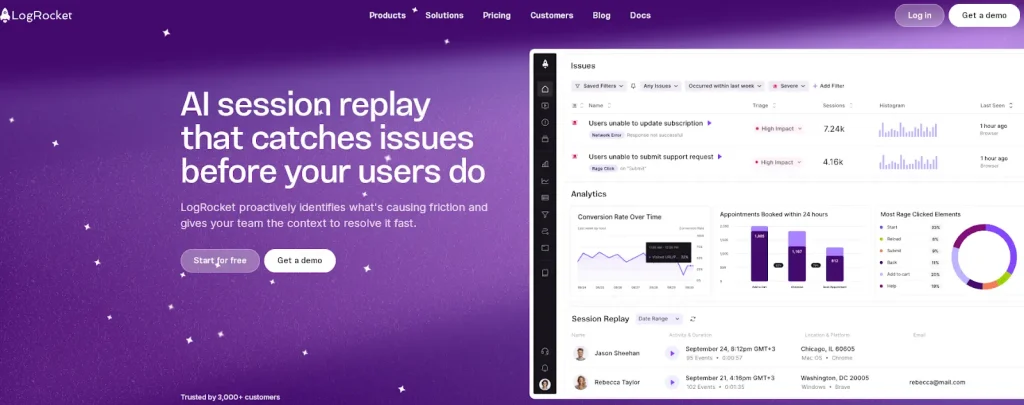
LogRocket combines session replay with error tracking, frontend performance monitoring, and AI-powered issue triage in one place. It is built for empowering software teams to understand why users struggle and where products break.
You get console recordings, network request logging, and stack traces right next to the behavioral replay. When a bug hits, you are not piecing together what happened from three different tools. You can see it across web apps and native mobile products, at the exact moment it occurred.
That combination is what makes LogRocket stick as a digital experience analytics platform. Application performance data and session context live in the same workflow. That is genuinely useful for engineering-led debugging, where root cause analysis and the user behavior that triggered the issue are not separate conversations.
LogRocket Pricing Plans Explained
LogRocket offers four plans with web and mobile usage: Free, Team, Professional, and Enterprise, all structured around session volume and billed monthly or annually. Here is what each one actually gives you.
LogRocket Web Plans
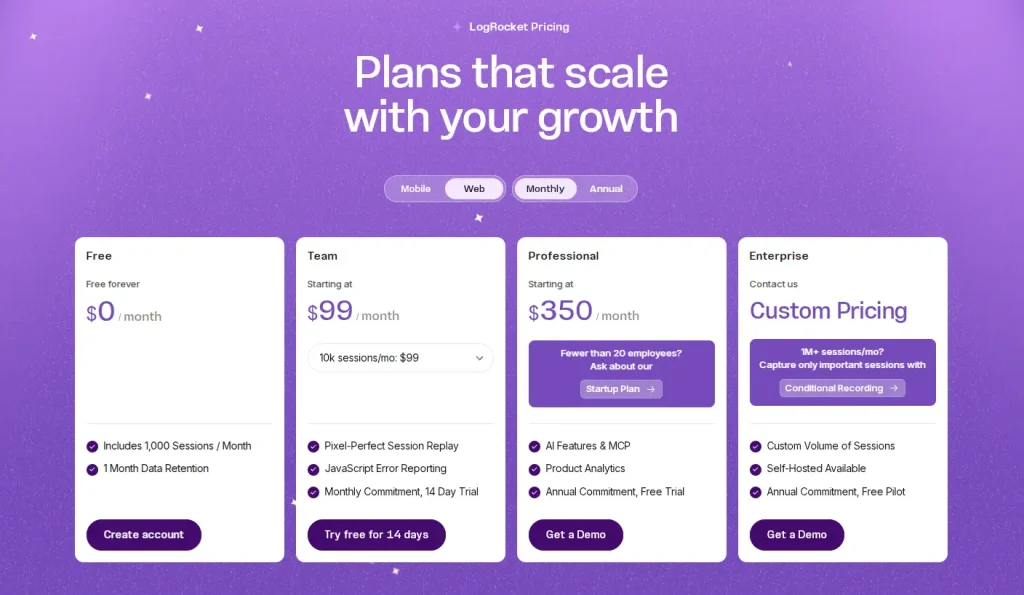
Monthly billing: Team is the only paid plan available on a monthly commitment. Professional and Enterprise require annual contracts.
Plan |
Monthly Price |
Sessions/Month |
Data Retention |
Commitment |
|---|---|---|---|---|
Free |
$0/month |
1,000 |
1 month |
None |
Team |
From $199/month for 10k sessions From $399/month for 25k sessions |
10,000–50,000 |
Starts at 1 month |
Monthly 14-day trial |
Professional |
From $420/month |
Any volume |
Custom |
Annual required |
Enterprise |
Custom pricing |
1M+ |
Custom |
Annual required |
Annual billing: The Team plan starts at $69/month and is available on a monthly basis only. The Professional plan starts at $295/month and requires an annual commitment. The Enterprise plan with custom pricing also requires annual billing.
LogRocket Mobile Plans
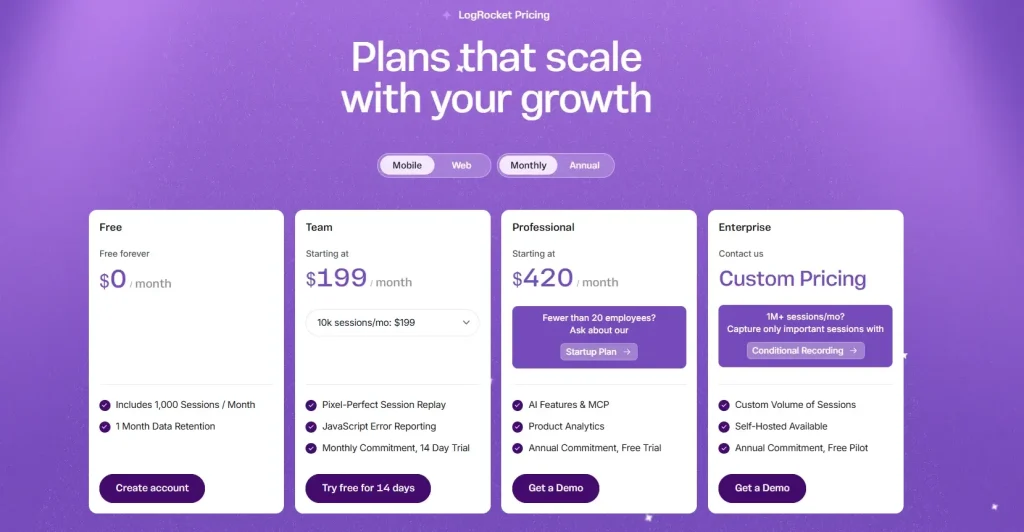
Monthly billing: Team is the only paid plan available on a monthly commitment. Professional and Enterprise require annual contracts. Mobile sessions cost approximately twice the web rate at equivalent session tiers.
Plan |
Monthly Price |
Sessions/Month |
Data Retention |
Commitment |
|---|---|---|---|---|
Free |
$0/month |
1,000 |
1 month |
None |
Team |
From $199/month for 10k sessions From $399/month for 25k sessions |
10,000–50,000 |
Starts at 1 month |
Monthly 14-day trial |
Professional |
From $420/month |
Any volume |
Custom |
Annual required |
Enterprise |
Custom pricing |
1M+ |
Custom |
Annual required |
Annual billing: The Team plan starts at $139/month and is available on a monthly basis only. The Professional plan starts at $350/month and requires an annual commitment. The Enterprise plan, with custom pricing, also requires annual billing.
Free plan
Free forever, up to 1,000 sessions per month. You get 1 month of data retention, 3 seats, console logs, basic JavaScript error reporting, and user session replay.
Key features like heatmaps, product analytics, and funnels are not included. To be clear, 1,000 sessions will be used up quickly for most real products. The Free plan is mainly useful for getting started.
Team plan
Starting at $69/month for 10,000 monthly sessions ($139/month for 25,000 sessions), scaling up from there. Monthly commitment, 14-day free trial. You get session replay, JavaScript error reporting, and bug tracking.
Seats are capped at five to ten. Performance data, heatmaps, funnels, cohort analysis, and Galileo AI are all absent. If any of those are on your list, Team is not your destination. It is a stopping point on the way to higher-tier plans.
A good fit for small product and engineering teams that need session replay and error reporting and are not ready to commit to a year-long contract.
Professional plan
The Professional plan starts at $295/month on an annual commitment, with session volume quoted by sales based on your traffic.
LogRocket Galileo comes at this tier. It is the platform’s machine learning functionality, and it is genuinely good at what it does, automatically surfacing the most pressing issues ranked by user impact so your team does not have to manually dig through error queues.
Product analytics, funnel analysis, cohort analysis, path analysis, and issue tracking are all available. More advanced features like streaming data export and de-noise error alert filtering come as add-ons.
Enterprise plan
No published session minimum. You negotiate volume and scope with LogRocket’s sales team directly. Teams hitting 1M+ sessions/month are pointed toward Conditional Recording to keep costs from spiraling.
Enterprise gets everything in Professional plus single sign-on (SSO/SAML), role-specific access controls, audit records, self-hosted deployment, and an uptime SLA under a custom pricing arrangement. You get a dedicated customer success manager and customized legal and security terms.
What Actually Drives LogRocket Costs
LogRocket costs depend on your session volume, the feature tier you pick, and how long your contract runs.
- Session volume is the biggest one, and it is the one that catches teams by surprise. A product launch, a marketing push, a viral moment: any of these can blow through your tier and trigger an upgrade conversation. The jump from Team to Professional to track user behavior across the full funnel takes your minimum monthly bill from $69 to $295. That is true whether you are using every Professional feature or just the two you actually need.
- Feature requirements are the second pressure point. Performance metrics, product analytics, advanced dashboards, and user journeys are all Professional-only. Teams that want quantitative product data alongside session replay will find Team insufficient pretty quickly.
- Contract lock-in is the third. Get to Professional, and you are on an annual commitment. If you have budget constraints or your product direction shifts mid-year, you are still on the hook. Teams that need quarterly billing flexibility do not have a path to Professional features.
One more thing worth knowing: as your product grows and more sessions come in each month, your lever for reducing recording costs is the Conditional Recording add-on. That is not included by default. It is extra.
Hidden Costs and Overage Risks
When your product exceeds its session cap, every extra session gets billed separately. LogRocket does not publish these overage rates publicly, so the number you pay depends on what you negotiated.
Data retention is the second hidden cost. One month on the Team plan. That is it. If you are looking into performance issues from six weeks ago, or trying to compare behavior before and after a product change, that data is simply gone unless you paid for extended retention upfront. Real user sessions outside the window are not archived; they are deleted.
User-reported issue triage, including severity scoring, recommended fixes, and integrated error alerts, is a Professional feature. Team gives you basic error detection.
The Feedback widget and Conditional Recording both look like platform features. They are paid add-ons. Confirm what is included in your specific quote.
If your session replay costs have crept higher than expected, book a demo and we will run the numbers on your actual session volume.
LogRocket vs FullSession Pricing Compared
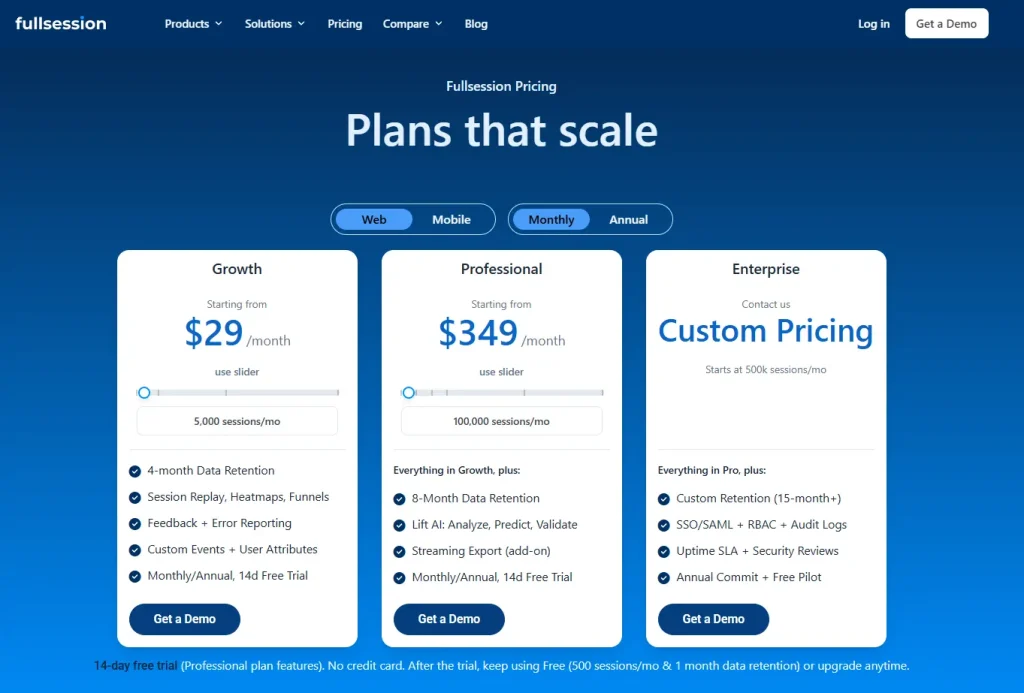
Full disclosure repeated here because it matters: FullSession wrote this article. We have pulled pricing from official pages for both platforms, verified April 2026.
Web monthly and annual plan comparison
LogRocket charges the same for Professional whether you pay monthly or annually, and Team has no annual option at all. FullSession cuts 20% off every paid plan when billed annually, so the longer you commit, the bigger the gap gets.
Feature |
FullSession Growth |
FullSession Professional |
LogRocket Team |
LogRocket Professional |
|---|---|---|---|---|
MONTHLY BILLING |
||||
Price/month |
$29 |
$349 |
$69 |
$295 |
ANNUAL BILLING |
||||
Price/month |
$23 |
$279 |
Not available |
$295 |
Annual savings |
$72/year |
$840/year |
— |
No discount |
PLAN DETAILS |
||||
Sessions/month |
5,000 |
100,000 |
10,000 |
Custom (sales) |
Data retention |
4 months |
8 months |
1 month |
Custom |
Seats |
Unlimited |
Unlimited |
5–10 |
Custom |
Session replay |
Yes |
Yes |
Yes |
Yes |
Heatmaps |
Yes |
Yes |
No |
Yes |
Funnels and conversions |
Yes |
Yes |
No |
Yes |
Error reporting |
Yes |
Yes |
Basic only |
Yes |
Feedback widget |
Yes |
Yes |
Add-on |
Add-on |
AI features |
Lift AI (fair-use) |
Lift AI (full) |
None |
Galileo AI |
Annual contract required |
No |
No |
No |
Yes |
Mobile monthly and annual plan comparison
FullSession again applies a clean 20% annual discount on mobile plans. LogRocket’s annual mobile figures shown ($199 Team, $420 Professional) are actually higher than monthly, which suggests the annual view is defaulting to a higher session tier rather than offering a billing discount. No annual savings on mobile with LogRocket.
Feature |
FullSession Growth |
FullSession Professional |
LogRocket Team |
LogRocket Professional |
|---|---|---|---|---|
MONTHLY BILLING |
||||
Price/month |
$79 |
$509 |
$139 |
$350 |
ANNUAL BILLING |
||||
Price/month |
$63 |
$407 |
$199 |
$420 |
Annual savings |
~$192/year |
~$1,224/year |
None |
None |
PLAN DETAILS |
||||
Sessions/month |
5,000 |
100,000 |
10,000 |
Custom (sales) |
Data retention |
4 months |
8 months |
1 month |
Custom |
Seats |
Unlimited |
Unlimited |
5–10 |
Custom |
Heatmaps |
Yes |
Yes |
No |
Yes |
Funnels and conversions |
Yes |
Yes |
No |
Yes |
AI features |
Lift AI (fair-use) |
Lift AI (full) |
None |
Galileo AI |
Annual contract required |
No |
No |
No |
Yes |
Why choose FullSession
The LogRocket pros are real. For developer-heavy teams where debugging, stack traces, and AI-powered issue triage are the primary workflow, the platform is very good at what it does.
The user interface is polished, the feature depth at Professional is real, and LogRocket Galileo cuts the manual work out of error triage in a way that saves engineering time.
The math changes when users interact with a product across growth, marketing, and customer success, not just engineering.
Unlike LogRocket, FullSession includes a 20% discount, heatmaps, conversion funnels, and error reporting from $23/month with no annual contract. Transparent pricing is published for every tier; no sales call required.
For more details, check out FullSession vs LogRocket.
What to Evaluate Beyond Session Volume
Most pricing pages lead with session volume because it is the simplest number to compare. But for a PM building a business case, session volume is only one of five cost drivers that determine whether a plan actually fits your team.
Here are the five dimensions that matter:
- Feature-tier gating. Which capabilities does your team need daily? If heatmaps, funnels, or product analytics are gated to a higher tier, your real price floor is that tier, regardless of session volume.
- Session volume headroom. How many sessions does your product generate today, and where will that number be in 12 months? Pricing that works at 10,000 sessions can look very different at 50,000 or 100,000.
- Data retention window. How far back does your team need to look? If you run quarterly business reviews or need to compare behavior before and after a release from three months ago, a one-month retention window forces compromises.
- Workflow coverage (single tool vs multi-tool stack). If one platform does not cover replay, heatmaps, funnels, feedback, and error tracking, you will pay for a second or third tool. The total cost is the sum of all tools, not the price of one.
- Implementation and switching cost. How long does it take to instrument, and what is the cost of migrating if you outgrow the plan? A quick implementation reduces time-to-first-insight and lowers the risk of a bad fit.
Implementation note: LogRocket’s quickstart can be completed with an NPM install or a script tag. LogRocket.init() must run client-side. This keeps the initial setup cost low. The cost question becomes more nuanced at renewal, when your session volume, feature needs, and team size may have changed.
Trade-Offs by Team Profile
Not every team has the same needs, so LogRocket’s pricing structure will fit some profiles better than others. Here is how to think about it.
Small team, early-stage SaaS, replay-only workflow
If your team is small (1 to 3 people looking at sessions) and you primarily need session replay and error tracking, LogRocket’s Team plan at $69/month for 10,000 sessions is a reasonable starting point. You get the core replay and error-reporting capabilities without paying for analytics features you may not use yet.
Mid-market PM team, needs heatmaps and funnels daily
If your workflow depends on heatmaps, funnel analysis, path analysis, or cohort views, you are looking at the Professional tier ($295/month) or above. At this profile, the relevant comparison is not Team vs Professional; it is LogRocket Professional vs a consolidated platform that includes all of those capabilities in a single tier.
Growth-stage SaaS, 50K+ sessions, multi-role team
At higher session volumes with product, engineering, and growth stakeholders, the questions shift to scaling cost, data retention, and whether one tool serves all three roles. If LogRocket’s published tiers do not show your volume, you are likely in Enterprise (custom pricing) territory, which makes direct comparison harder without a quote.
When to Re-Evaluate Your Plan or Vendor
Pricing decisions aren’t set in stone. It’s worth revisiting them at a few key moments:
- At renewal time. Before letting a contract roll over, take another look at your total cost of ownership. Session volume, team size, and feature requirements can shift quite a bit over a year.
- When you’re nearing a session limit. If you’re getting close to your cap, it’s a good time to request updated pricing from your current vendor and compare it with at least one alternative before overage charges start adding up.
- When you add another tool to the stack. If you find yourself paying separately for heatmaps, feedback, or funnels, it may be more cost-effective to switch to a platform that covers everything in one place.
- After a major launch or team change. New products, audiences, or internal stakeholders can quickly change which features matter most. A plan that worked six months ago might not make sense anymore.
Set a yearly reminder, ideally aligned with your renewal window, to spend 30 minutes reassessing your vendor. It helps keep your costs in line with what your team actually needs.
How FullSession Delivers More for Less
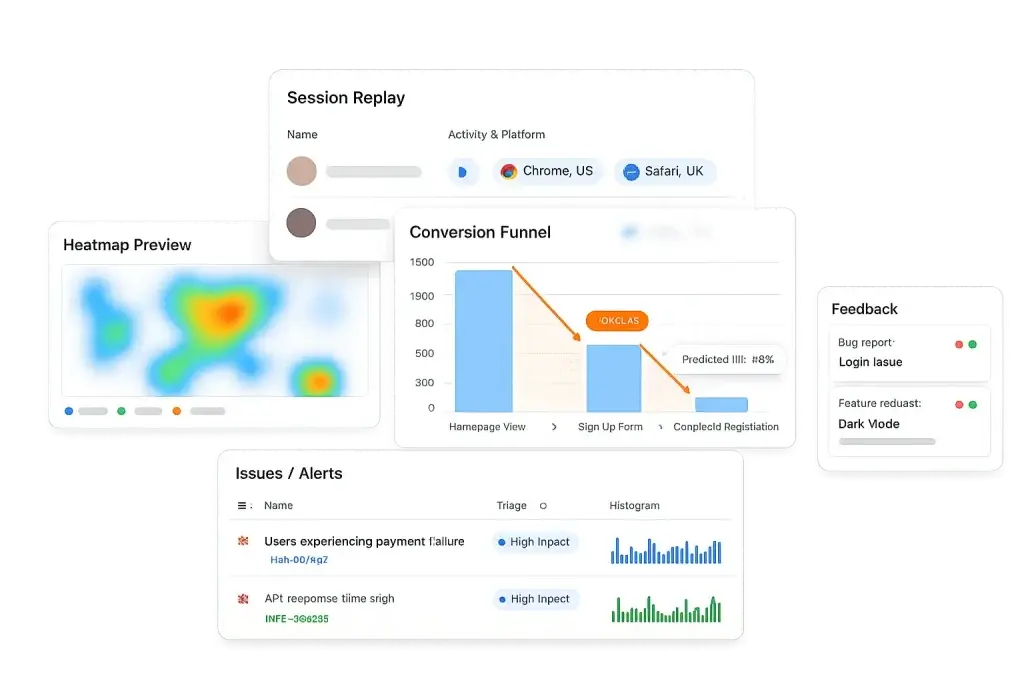
FullSession is a cost-effective alternative for teams that need the full behavioral analytics suite without upgrading to LogRocket Professional.
Heatmaps, funnels, error reporting, 4 months of data retention, and unlimited seats are all included in the Growth plan from $23/month, available on a monthly billing cycle. That is not a stripped-down version of those features. It is the full thing.
FullSession is also user-friendly in a way that matters operationally. Product managers, growth marketers, and customer success teams can run queries, watch replays, and build funnel reports without pulling in a developer. The dashboards surface behavioral data in formats designed for each role, not just engineering workflows.
Advanced filtering with sequence-based segments, frustration signal filters, and segment-by-performance conditions is available on all paid plans. You do not have to upgrade to get serious segmentation.

Lift AI is available from the Growth plan at fair-use limits, with higher allowances on Professional. It does not wait for you to ask it questions. It analyzes behavioral data and surfaces a ranked list of friction points ordered by estimated revenue impact, so teams can make data-driven decisions without needing someone to interpret the output first.
Real-time notifications for rage clicks, dead clicks, JavaScript errors, and custom alert conditions come with Growth and above. The user experience degrading does not cost extra to know about.
For growing teams expanding across product, design, and engineering, the unlimited-seats model means adding new people does not trigger a plan upgrade or increase the monthly bill.
Start a free trial to test the platform.
Who Should Switch to FullSession
- Teams on the LogRocket Team who need heatmaps, funnels, or more than one month of data retention are the clearest candidates.
- Product teams and small businesses that want the full analytics stack without a $295/month annual commitment are the clearest fit for FullSession Growth.
- Teams analyzing user behavior holistically, beyond just debugging individual sessions, benefit most from FullSession’s broader analytics suite available from the Growth tier.
- Product teams that need to present quarterly behavioral trends to stakeholders cannot do that on LogRocket Team’s one-month data window. FullSession Growth provides four months of retention from its $23/month entry point, covering most quarterly analysis cycles without an upgrade.
- Engineering and QA teams that need error tracking, console replay, network logs, and heatmaps and funnels get it all in a single FullSession subscription, rather than managing separate tools.
- Companies managing seat growth across departments avoid per-seat cost pressure entirely. FullSession includes unlimited seats from the Growth plan onward, so product, marketing, and customer success users can all get access on the day they need it, without bumping up the bill.
How Enterprise Ecommerce Teams Get the Most Out of FullSession
Most ecommerce analytics setups tell you that conversion dropped. FullSession tells you why the person who added $340 worth of items to their cart abandoned it on the payment screen.
Heatmaps show you the product page reality: the hero image nobody scrolls past, the size guide link that gets clicked constantly but goes nowhere useful, the add-to-cart button that sits just below where most mobile users stop scrolling.
Funnel analysis shows you the checkout step where you are losing orders, whether it is the shipping cost reveal or a form field that looks fine until you watch someone try to fill it in on a phone.
That is where session replay earns its place. A cart abandonment in your funnel data is a data point. The actual session behind it is a story. You see the failed card attempt, the confused back-and-forth, the moment someone gave up.
Lift AI connects those stories to revenue impact and tells you which ones to fix first, so the team is not arguing about priorities in a spreadsheet.
Traffic in November looks nothing like traffic in February. FullSession’s monthly billing means your contract is not priced around your Black Friday peak all year. Scale up for the campaign, scale back down after.
And as your team grows, nobody is doing the math on seat costs. Unlimited seats from Growth onward means your merchandising team, your CRO analyst, and your customer support lead all get access the day they need it, without increasing the plan or the bill.
Not ready for a demo? Start a free trial and get 14 days of Professional features. No credit card required.
Conclusion About LogRocket Pricing
LogRocket is a capable platform with a strong developer focus, deep frontend performance context, and genuine AI-powered triage through Galileo. For engineering teams where debugging and error investigation are the primary workflows, the Professional plan’s pricing reflects real capability.
For teams that need session replay, heatmaps, funnels, and behavioral analytics together, without an annual contract or a $295/month floor, FullSession is the more practical choice. The feature gap between LogRocket Team and Professional is significant. FullSession Growth closes that gap at a fraction of the cost.
Book a personalized demo and we will compare FullSession directly against your current LogRocket plan.
FAQs About LogRocket Pricing
LogRocket’s Team plan starts at $69/month for 10,000 sessions, scaling to $139/month for 25,000 sessions. The Professional plan starts at $295/month and requires an annual commitment. Enterprise pricing is fully custom. A free plan is available indefinitely, with up to 1,000 sessions per month, 1 month of data retention, and 3 seats.
Yes. LogRocket’s free plan is available permanently. It includes 1,000 sessions per month, one month of data retention, and three seats. Core session replay and JavaScript error reporting are included. Heatmaps, product analytics, and funnels are not available on the free plan; those features require a paid upgrade.
LogRocket is worth the investment for engineering-led teams where stack traces, network monitoring, and AI-powered issue triage are primary use cases. For product and UX teams that primarily need session replay, heatmaps, and funnels, lower-cost alternatives such as FullSession offer a broader feature set at a lower entry price with no annual commitment.
LogRocket Professional includes Galileo AI, full product analytics, funnel insights, cohort analysis, path analysis, heatmaps, retention charts, and advanced issue management. An annual commitment is required. The plan starts at $295/month with session volume custom-quoted by sales. Conditional Recording and the Feedback widget are available as separately priced add-ons.
FullSession Growth ($29/month) includes session replay, heatmaps, funnels, and error reporting, features that LogRocket only includes from its Professional plan ($295/month+) on an annual commitment. FullSession provides 4 months of data retention on Growth, versus 1 month for LogRocket Team. Both platforms offer a 14-day free trial with no credit card required.
See what’s costing you, and prove whats fixing it is worth
Watch the real journey, rank every issue by revenue impact, and validate the result against baseline.






.svg)
.svg)
212 E Stone Path St Derby, KS 67037 Phone: +1 415-649-4222



All systems operational.