.svg)

Meet Daleel. Your data has work to do.
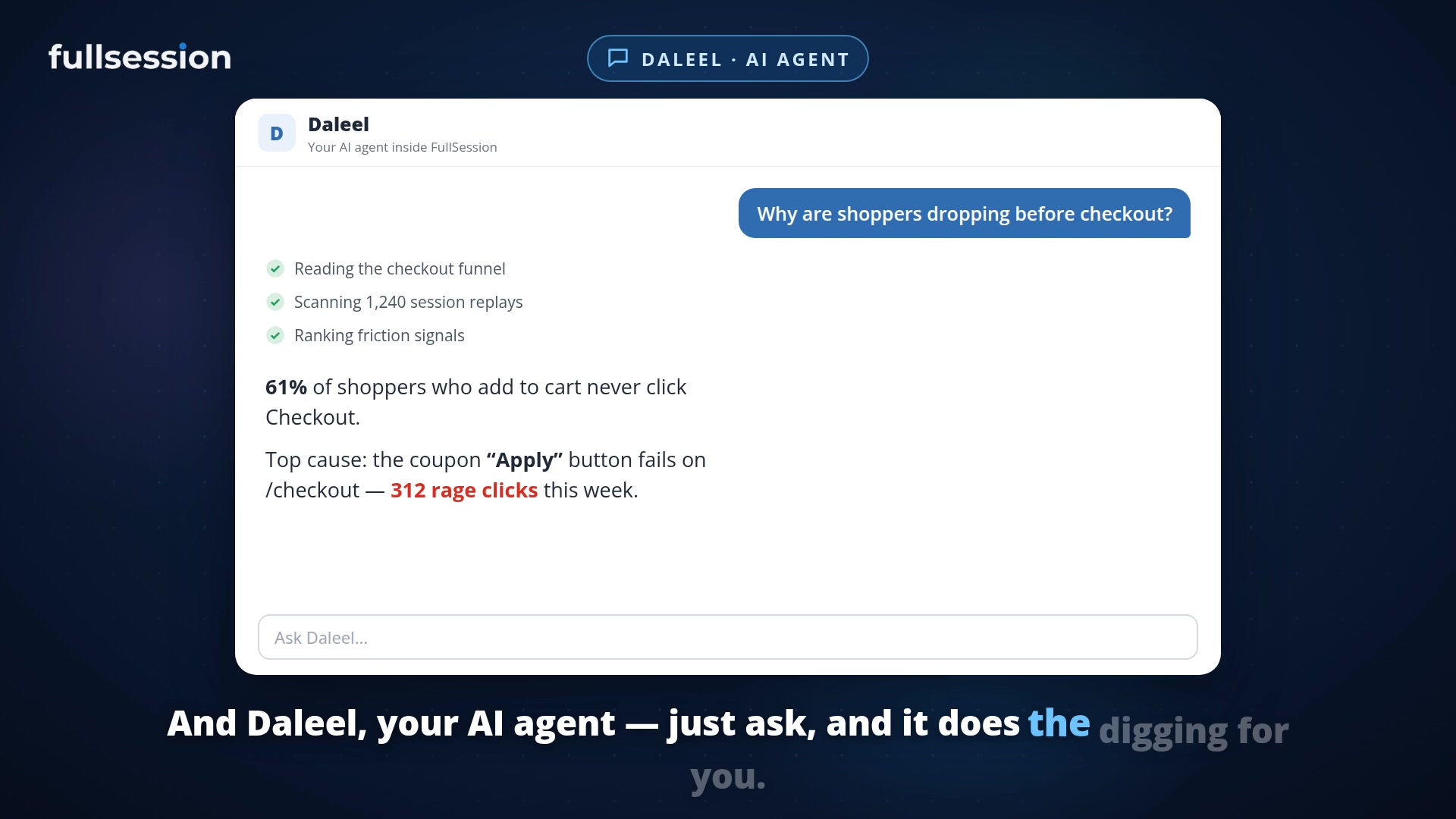

Daleel surfaces insights you have not asked for, understands the FullSession app, and helps turn findings into action. With Lift AI to prioritize opportunities and MCP to connect your own AI tools.
The gap between knowing and doing
A dashboard can show you the drop-off. Your team still has to do something about it.
Someone has to find the relevant sessions, work out what went wrong, decide which issue deserves attention, build the analysis, and come back after the fix to see whether it helped. When those steps stay disconnected, buying more analytics can mean buying more work.
And if every investigation depends on someone asking the right question, useful findings can stay buried.
Today, we are introducing Daleel, the shared AI layer in the FullSession Digital Experience Platform. Daleel answers questions, carries out analyses, and proactively surfaces interesting insights from your data. It brings knowledge of the FullSession application, CX/UX expertise, behavioral evidence, and supported actions into the work.
That is the standard we think AI in digital experience should meet.
You should not have to ask every useful question.
Daleel can bring an insight to your attention before you ask for an analysis. That matters because knowing what to investigate is itself part of the work. Your team should not have to anticipate every pattern worth a closer look.
From there, you can ask why it matters, inspect the evidence, and decide what to do. Or start with your own question: Why are shoppers adding products to the cart but leaving before checkout?
A useful investigation needs more than a plausible explanation. It needs the relevant journey, the sessions behind the drop-off, the friction those sessions reveal, and a way to test the next decision.
Daleel understands the meaning and relationships of FullSession's screens, controls, and analysis objects. It can connect your goal to the relevant tools and evidence inside the app. You can ask a follow-up, challenge the explanation, or move into building the analysis.
In the recorded Daleel walkthrough, that work includes creating a segment and funnel. The conversation produces something the team can use to keep investigating.
A useful answer should leave you closer to getting the work done. That is why supported action is part of the Daleel experience.
Daleel: Discover insights proactively and work through them with FullSession application knowledge and CX/UX expertise.
Lift AI: Prioritize conversion opportunities and measure what changes.
MCP: Access FullSession data and supported tools from your own compatible AI assistant.
Lift AI puts the priorities under pressure.
Finding friction is only part of the decision. A broken coupon interaction, a slow product page, and a payment error can all demand attention. The loudest complaint is a poor substitute for evidence about what matters to your goal.
Lift AI, inside FullSession Core CX, ranks opportunities by predicted business impact. It attaches session evidence, an estimated conversion-lift range, and confidence to help your team decide what to work on first.
After the change ships, Lift AI measures the result against the baseline. The prediction and the outcome remain separate: an expected improvement is a reason to investigate, not a result to claim.
For a growth or ecommerce team, this changes the discussion from Which chart looks worrying? to Which fix deserves our attention, what evidence supports it, and what happened after we shipped it?
Shipping the fix is a milestone. Measuring its effect is how you judge the work.
Connect through MCP. Get the Daleel experience in FullSession.
Your team may already work in Claude, Cursor, or another compatible AI client. FullSession's MCP server gives that workflow access to FullSession data and supported tools through the Model Context Protocol.
Ask for the sessions behind a payment error. Pull ranked Lift AI priorities. Inspect the evidence and draft a ticket for the recommended fix. FullSession supports read and write workflows, with the signed-in person's permissions checked on each request.
Connecting an assistant through MCP does not give you the full Daleel experience. Access to a tool is one part of the job. Daleel brings the product intelligence and initiative around it:
Semantic knowledge of FullSession. Daleel understands what the app's screens, controls, segments, funnels, and other analysis objects mean and how they fit together. That helps it connect a business goal to the right analysis and the place to work on it. A connection to FullSession's MCP tools does not, by itself, give your assistant that native understanding of the application.
Proactive insight discovery. Daleel surfaces interesting findings without waiting for a prompt. Connecting your assistant to MCP gives it access to exposed data and tools; it does not install Daleel's proactive insight experience in that assistant.
Product and CX/UX expertise. Daleel helps work through which question to pursue, how to investigate it, and what the evidence means for the next decision. That expertise is built into the FullSession experience, rather than left to your team to assemble around a tool connection.
A working path inside the app. The insight, explanation, relevant analysis, and supported next step live in the product where your team can use them. MCP lets your own agent call available tools; Daleel brings the guided experience around the work.
Use MCP to extend your existing AI workflow. Use Daleel for FullSession's integrated intelligence, initiative, and application expertise. They complement each other; they are not interchangeable.
An action needs authority. You set it.
An explanation, a prepared change, and an executed action carry different responsibilities. Daleel's approval model makes those differences explicit: Answer, Navigate, Prepare, Complete.
Your organization sets how far an agent can go. The available application tools, permissions, and approval policy determine which actions it can carry out. Completion means an action within that authority, with a result you can inspect.
This is the shared foundation across FullSession's four solutions: Core CX/UX, Support & Sales Desk, Digital Adoption, and Workforce/Employee Experience. Max AI is the customer-facing agent for Support & Sales Desk. Daleel is the AI layer across the platform.
Start with Daleel in Core CX, alongside Lift AI and FullSession's MCP tools. Capabilities vary by solution; Digital Adoption is in development. A demo should show the exact workflow you intend to use.
Raise the bar at your next demo.
If you are evaluating Fullstory, Contentsquare, or FullSession, ask what the AI can surface without a prompt. Then bring a business question. Follow the evidence, ask what the AI can do inside the application, and see how you will measure the result.
A fluent answer is a starting point. It should not be the finish line.
With Daleel, Lift AI, and MCP, FullSession connects discovery, investigation, prioritization, supported action, and measurement. Your team can pursue its own questions and investigate the findings it did not know to ask for.
Bring us the question your current reporting still leaves you to solve.
Find what you missed. Put the next step in motion.
See Daleel surface insights and work through them inside FullSession, with Lift AI to set priorities and MCP to extend your own AI workflow.
See what’s costing you, and prove whats fixing it is worth
Watch the real journey, rank every issue by revenue impact, and validate the result against baseline.






.svg)
.svg)
212 E Stone Path St Derby, KS 67037 Phone: +1 415-649-4222



All systems operational.