Heap built its reputation on a simple promise: install a snippet, capture everything, and define events later. For a long time, that was enough. Then in 2023, Contentsquare acquired Heap and began folding it into its enterprise platform.
For teams that relied on Heap as an independent, mid-market product analytics platform, the acquisition raised questions about pricing, roadmap, and long-term support.
If you’re evaluating your options, you’re not alone. Teams across SaaS, e-commerce, and B2B are actively looking for Heap competitors that offer the same automatic tracking convenience that Heap provided and, in most cases, more than Heap ever did.
This guide covers the 10 top Heap alternatives. For each tool, you’ll find what it is, who it’s best for, its key features, and its cost.
What to Look for in Heap Alternatives
Before comparing tools, you should know what criteria matter for your team. Picking the wrong Heap alternative means paying for features you won’t use or missing capabilities you need.
Here are the five factors worth evaluating:
- Autocapture vs manual event tracking: Heap’s biggest selling point was that it captured everything without requiring developers to set up individual events. Some alternatives offer the same automatic tracking, while others require manual event tracking setup upfront. If your team lacks engineering bandwidth, autocapture is a meaningful differentiator.
- Session replay and qualitative insights: Quantitative analytics tell you what happened. A dedicated session replay tool lets you watch real user sessions and understand user behavior at the individual level, so you can see exactly where confusion, hesitation, or frustration occurs. This user behavior data is often more actionable than aggregate charts when you’re trying to diagnose why a funnel step is underperforming.
- Pricing transparency: Some tools in this category require a sales call to get an estimate. Others publish every pricing tier publicly. If budget predictability matters to your team, pricing transparency should be a selection criterion, not an afterthought.
- Ease of use: A user-friendly platform with a visual interface lets non-technical users build reports, view sessions, and interpret key metrics without writing queries or involving a developer. It increases adoption across non-technical teams in marketing, customer success, and product management, ensuring user insights are accessible to those who need them most.
- Integration with your existing analytics stack: If you already use tools like Google Ads, Salesforce, Slack, or a data warehouse, ensure your next analytics tool integrates with them without a complex technical implementation.
Heap Competitors at a Glance
| Tool | G2 Rating | Best For | Top Feature | Starting Price |
| FullSession | 5.0 / 5 | E-commerce, product, SaaS & growth teams | Lift AI + session replay | Free plan available; Professional from $279/month |
| PostHog | 4.5 / 5 | Engineering-led teams | Open-source, all-in-one | Pay-as-you-go from $0/mo |
| FullStory | 4.5 / 5 | Enterprise behavioral autocapture | Fullcapture + DOM replay | Not publicly available |
| Amplitude | 4.5 / 5 | Scale-up product teams | Behavioral cohorts + AI | $49/mo billed annually |
| Mixpanel | 4.5 / 5 | Product & marketing teams | Event-based segmentation | Growth starts at $0; $0.28 per 1K events after 1M free events |
| Google Analytics 4 | 4.1 / 5 | Marketing teams | Event tracking + Google Ads | Free |
| Pendo | 4.4 / 5 | Customer success teams | In-app messaging + NPS | Not publicly available |
| Glassbox | 4.9 / 5 | Enterprise / regulated | AI struggle detection | Not publicly available |
| Optimizely | 4.3 / 5 | Experimentation teams | A/B testing at scale | Not publicly available |
| LogRocket | 4.6 / 5 | Engineering & QA teams | Replay + error tracking | $99/mo |
10 Best Heap Alternatives in 2026
Choosing a Heap alternative in 2026 means weighing more than autocapture. Teams now need to compare roadmap stability, pricing clarity, qualitative insights, and how well each platform fits their existing analytics stack.
This guide reviews the 10 best Heap alternatives so you can compare the right tools by use case, feature set, and cost.
1. FullSession
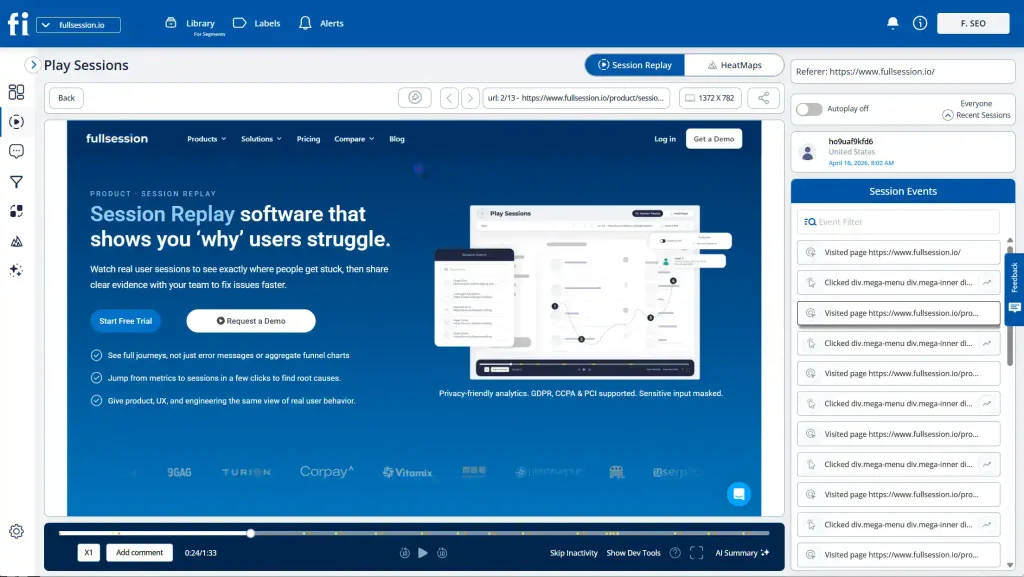
FullSession is a user behavior analytics platform. It combines session replay, interactive heatmaps, conversion funnel analysis, error and alert monitoring, in-app feedback, and mobile session replay for iOS and Android in one subscription.
Its purpose is to help product teams understand where users struggle, what they do before converting, and which friction points cost the most revenue.
What sets FullSession apart? Three things.
- You get qualitative and quantitative coverage in the same tool.
- A privacy-first architecture that’s GDPR, CCPA, and PCI DSS compliant by default.
- Lift AI is an AI-powered prioritization engine that tells teams what to fix first based on revenue impact.
Unlike a traditional customer data platform focused on data aggregation, FullSession is built around behavioral observation. It enables businesses to act on what they see, not just store what they collect.
Need to measure customer experience and user engagement end-to-end without stitching multiple tools together? FullSession offers a level of completeness that most Heap alternatives in this price range can’t.
Best for
Product managers, growth teams, and UX analysts at SaaS and e-commerce companies who need to understand how users interact with their product. No data science team or complex technical implementation required.
Key features
- Session replay tool with pixel-perfect fidelity, an events panel covering clicks, scroll depth, and timestamps, plus direct links from sessions to heatmaps and funnels
- Interactive heatmaps covering click, scroll, mouse, and attention maps in FullSession’s website heatmap tools view, within one click from any session
- Conversion funnel analysis that maps each step from signup to activation, shows drop-off points, and links to the sessions behind the metric
- Error and alert tracking that detects rage clicks, JavaScript errors, and broken user flows in real time, before they become support tickets
- Lift AI, FullSession’s prioritization engine that ranks friction by revenue impact, links to session replays, and validates whether fixes worked
Pricing
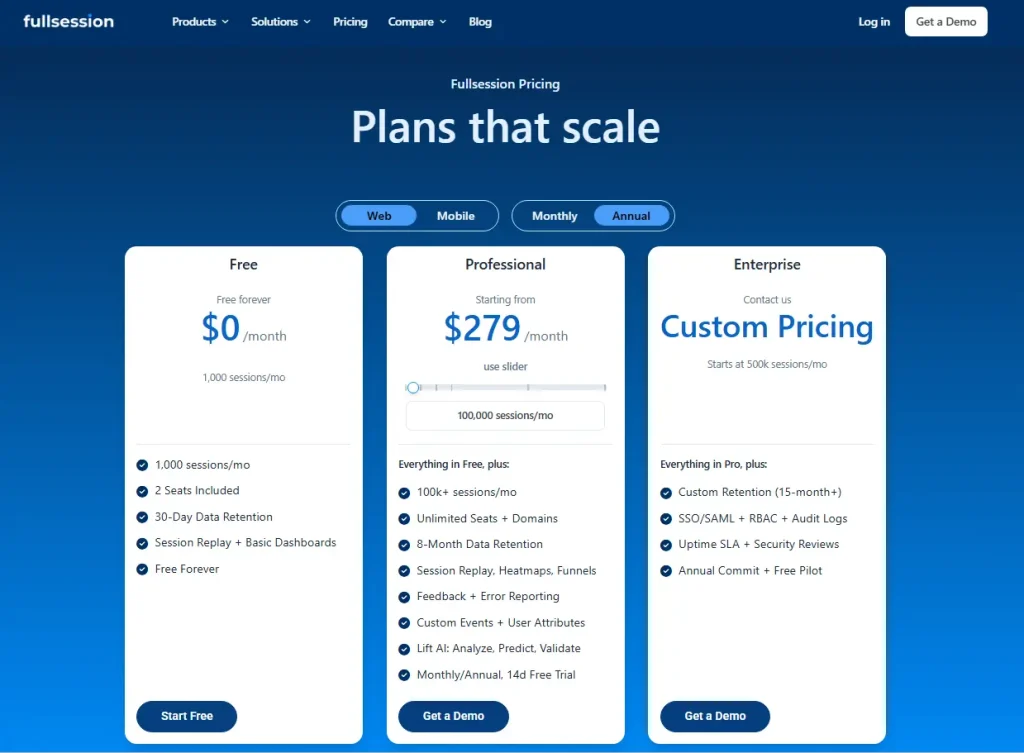
FullSession offers a Free plan at $0/month with 1,000 sessions/month, 2 seats, 30-day data retention, session replay, and basic dashboards.
Professional starts at $279/month for 100,000 sessions/month with advanced analytics and Lift AI, while Enterprise uses custom pricing for 500k+ sessions/month with 15+ month retention and enterprise security features.
Visit the pricing page to learn more.
Book a 20-minute demo and get a personalized walkthrough of session replay, heatmaps, and funnel analysis.
2. PostHog
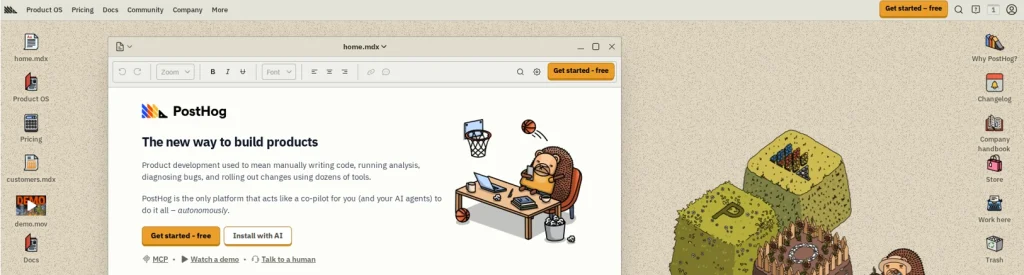
PostHog is an open-source, all-in-one product analytics platform built for engineering teams and developers. It covers product analytics, session replay, feature flags, A/B testing, error tracking, web analytics, user surveys, and LLM observability, all in one self-hostable platform.
What makes PostHog distinct? It’s open-source.
PostHog also gives teams flexibility in how they manage data. They can use the cloud version for faster setup or self-host the platform when they need more control over infrastructure, security, or data residency.
Teams can audit the code, self-host, and contribute to the roadmap. That matters to companies with strict data residency requirements or teams that want to avoid vendor lock-in.
Learn more about PostHog alternatives.
Best for
Engineering-led product teams and startups that want an open-source analytics stack. They can self-host, extend, and integrate it with their existing developer resources and infrastructure.
Key features
- Automatic event capture with a toolbar for visual event labeling, similar to Heap’s visual labeling tool
- Product analytics with funnels, retention charts, user paths, and cohort analysis
- Session replay with console logs, network activity, and DOM explorer
- Feature flags with local evaluation and JSON payloads for safe, targeted rollouts
- A/B testing with up to 9 variations, automated sample size calculation, and statistical significance reporting
- Built-in data warehouse for querying Stripe, HubSpot, Zendesk, and other external sources alongside product analytics data
Pricing
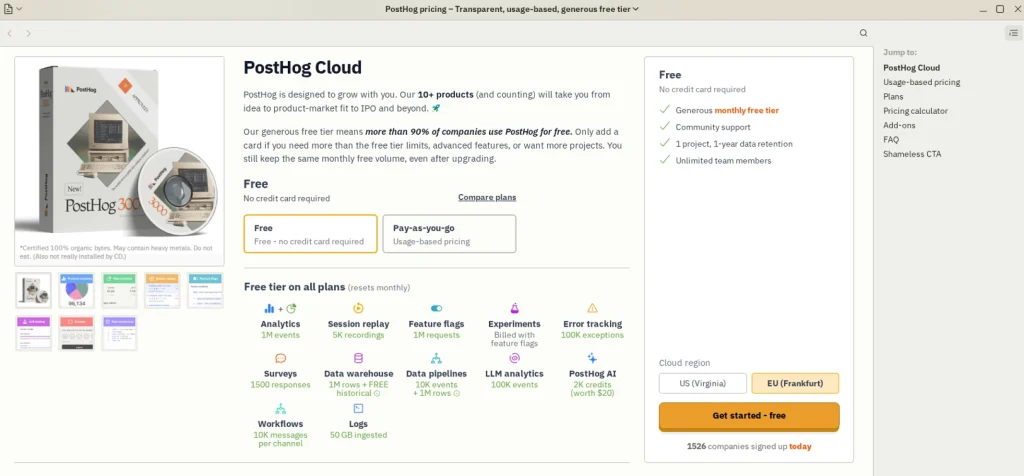
PostHog offers a free tier with 1 million analytics events and 5,000 session recordings per month, with unlimited team members. Paid plans use usage-based pricing on a pay-as-you-go basis. No enterprise-only gates on core features.
3. FullStory
FullStory is an enterprise digital experience analytics platform known for two capabilities: retroactive event capture and pixel-perfect session replay.
Retroactive indexing captures every user interaction the moment you install the script. If you realize months later that you need to analyze a specific button click, that interaction data is already available. The data is already there.
That makes FullStory suitable for teams in retail and financial services that need complete historical audit trails of how users interact with their digital products.
Best for
Enterprise UX, CX, and digital experience teams in regulated industries like banking, insurance, and e-commerce. Teams that need high-fidelity session replay, complete retroactive data coverage, and strict data governance and compliance certification.
Key features
- Retroactive event capture that records all interactions from day one without prior tagging
- Pixel-perfect session replay with DOM mutation tracking and granular privacy controls for masking sensitive data
- Behavioral analysis tools, including funnel analysis, journey mapping, and user segmentation
- Console logs and network error context, alongside session replays, are useful for engineering teams to debug production issues
- Enterprise integrations and warehouse options with tools such as Salesforce, Segment, Zendesk, BigQuery, Redshift, and Snowflake
- Enterprise-grade privacy and security controls, including SOC 2/SOC 3 reporting, data masking, and compliance support for regulated teams
Pricing
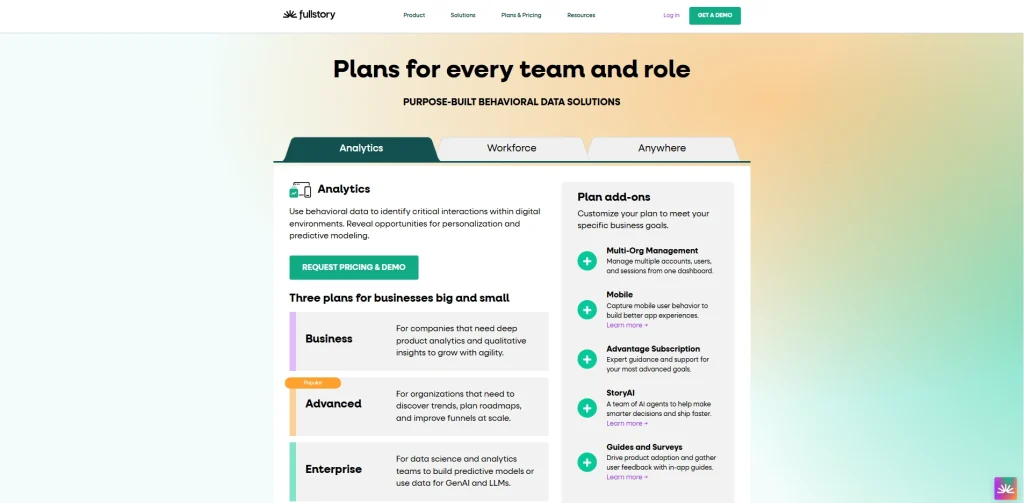
FullStory offers a free plan with limited usage. The free plan includes 30,000 sessions per month, 10 user seats, 5,000 server-side events per month, and 1 year of retention.
Paid plans are custom-priced and include higher limits, advanced features, and full customer data ownership. FullStory also offers programs for startups and early-stage teams.
4. Amplitude
Amplitude is a product analytics and experimentation platform. It has expanded over time, adding session replay, heatmaps, and AI-powered analytics alongside its historically strong behavioral cohort and retention analysis.
Thousands of companies use Amplitude to analyze customer data at scale. Amplitude’s AI layer provides automated anomaly detection, natural language querying, and predictive analytics driven by machine learning models trained on behavioral data.
Learn more about Amplitude alternatives.
See how Amplitude compares to Mixpanel.
Best for
Data-driven product teams at growth-stage and enterprise companies who need deep funnel analysis, retention modeling, A/B testing, and machine learning-driven insights. It is especially useful for teams with dedicated data resources, high event volume, and the need for more advanced analytics setup.
Key features
- Behavioral cohort analysis with retroactive segment creation
- Funnel reports, retention charts, and user path analysis for tracking conversion and engagement patterns
- Session replay is natively integrated alongside analytics (recently added)
- A/B testing and feature experimentation via Amplitude Experiment
- Amplitude AI for natural language querying, predictive analytics, and automated insight generation
- Customer journey mapping tools and cross-platform tracking for web and mobile
Pricing
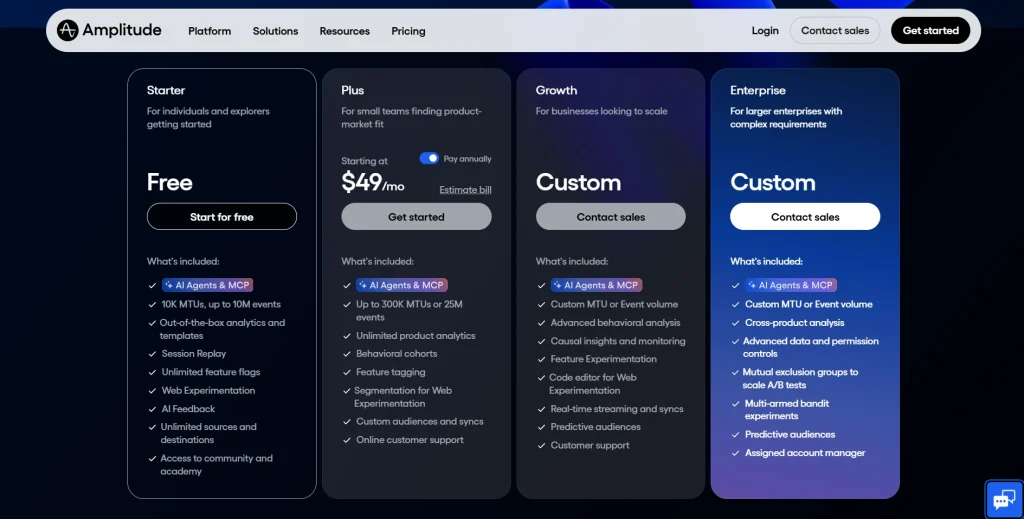
Amplitude offers a free Starter plan, while the Plus plan starts at $49/month with an annual payment. Growth and Enterprise plans require a sales conversation for custom pricing. Pricing scales with monthly tracked users (MTUs) rather than events.
5. Mixpanel
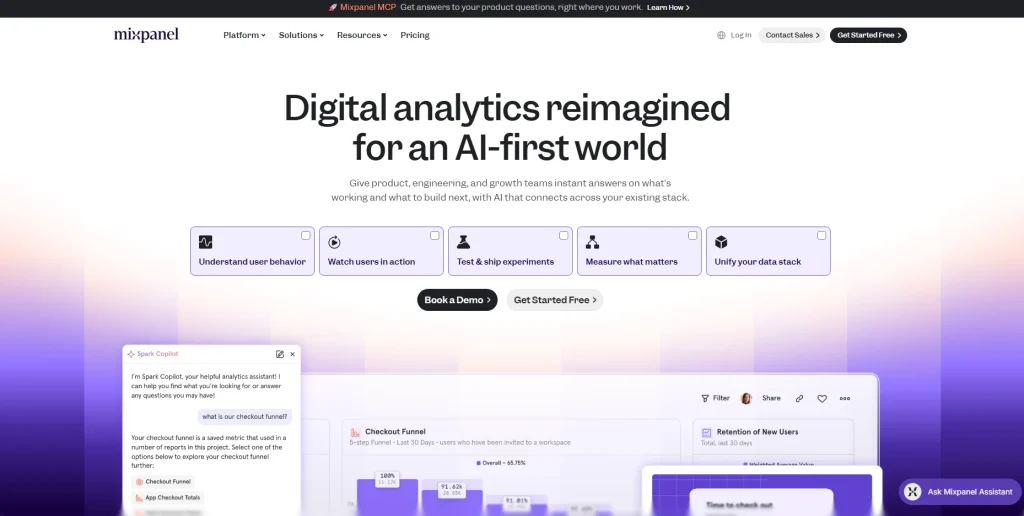
Mixpanel is a product analytics platform focused on event-based tracking, user segmentation, and behavioral analysis. It doesn’t include session replay natively, which makes it more of a pure analytics tool than an all-in-one behavioral analytics platform.
Mixpanel excels in the depth of its event tracking and cohort analysis. Teams can gain insights into which user actions correlate with retention, conversion, and churn, then build specific user segments from those behaviors.
It integrates well with mobile app analytics workflows and supports both web and native mobile apps.
Learn more about Mixpanel alternatives .
Best for
Product and marketing teams that need precise event-based product analytics and user segmentation, minus the session replay layer. Teams that want to scale from startup to enterprise without heavy data engineering overhead.
Key features
- Event-based tracking with flexible analysis, so teams can define funnels, cohorts, and reports from captured product events
- User segmentation and behavioral cohorts for targeted analysis based on user properties and actions
- Funnel and retention reports with drill-down by events, cohorts, and user properties
- Experiment analysis via Mixpanel Experiments for measuring how A/B test variants affect product metrics
- Mobile app analytics support with SDKs for iOS, Android, React Native, Flutter, and other platforms
- Warehouse connectors and data pipeline exports for working with tools such as BigQuery, Snowflake, Redshift, Databricks, and Postgres
Pricing
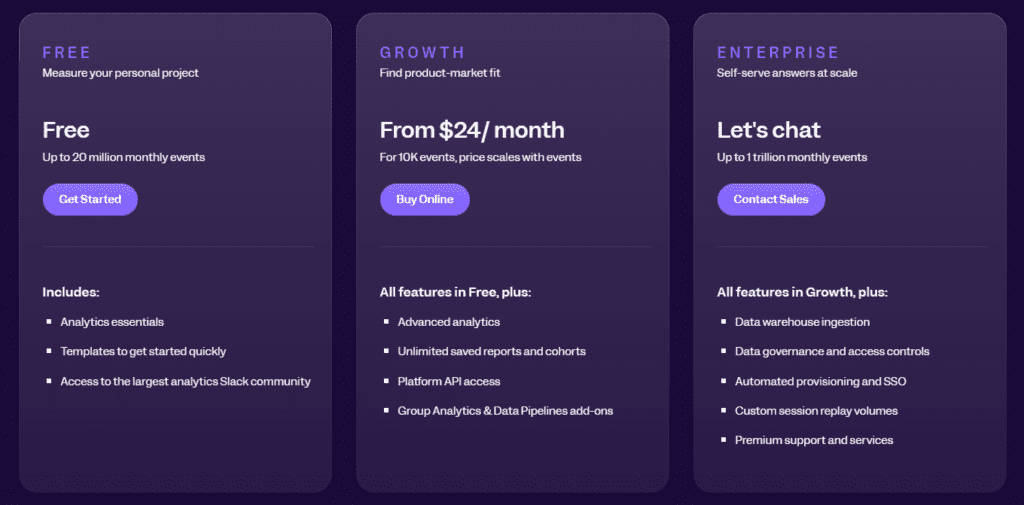
Mixpanel offers a free plan with up to 1 million monthly events. The Growth plan starts at $0 and includes the first 1 million events free, then costs about $140/month for 1.5 million monthly events. Growth supports up to 20 million monthly events, while Enterprise plans are custom and support up to 1 trillion monthly events.
6. Google Analytics 4

Google Analytics 4 (GA4) is Google’s free web and app analytics platform. It uses an event-based data model that captures user interactions across websites and mobile apps in a unified platform, with native integrations to Google Ads, Google Tag Manager, and BigQuery.
GA4 is one of the most widely deployed analytics tools on the internet, often the first analytics platform a business installs.
For teams already using Google products, GA4 fits naturally into the existing marketing workflow and gives them a reliable baseline for tracking acquisition, engagement, and conversions.
Its strength is breadth and cost. It’s free, deeply integrated with Google Ads for marketing campaign attribution, and it lets teams export data directly to BigQuery for deeper analysis.
See Hotjar vs Google Analytics.
Best for
Marketing teams, content publishers, and small-to-mid-sized businesses that need reliable website traffic and event analytics tightly tied to Google Ads and marketing channels. Teams that don’t need session replay, qualitative insights, or deep product analytics.
Key features[
- Event-based tracking across web and mobile, with no session volume limits on the free tier
- Native Google Ads integration for marketing campaigns, attribution, and audience building
- Exploration reports for funnel analysis, path analysis, and cohort analysis
- BigQuery export for teams that want to query raw analytics data via SQL
- Predictive audiences using machine learning (purchase probability, churn probability) available in GA4 360
- Basic analytics reporting with real-time data, acquisition, engagement, and monetization reports
Pricing
GA4 is free for standard use. GA4 360 (enterprise tier) starts at $50,000/year and adds higher data limits, more granular reporting, and SLA support.
7. Pendo
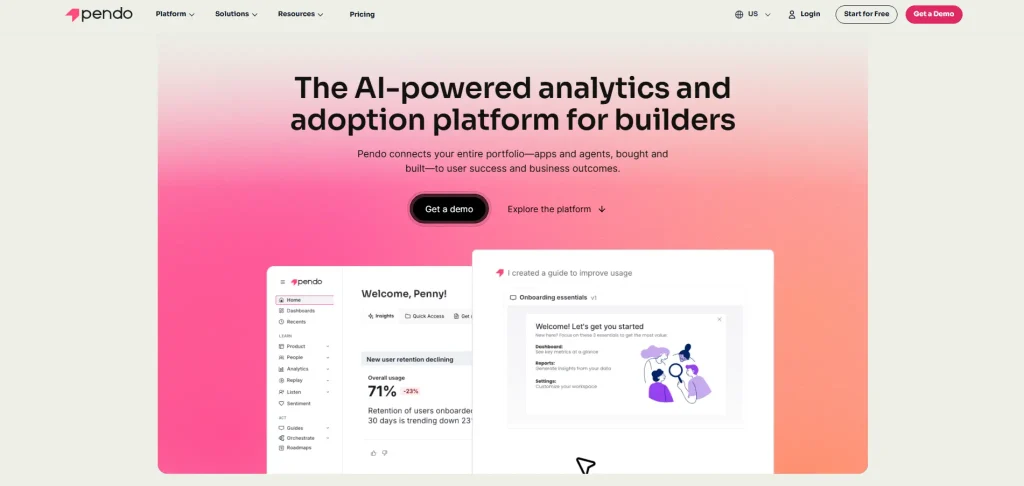
Pendo is a product analytics platform that extends into user onboarding, in-app messaging, NPS surveys, and product feedback. It sits in a distinct category from the other tools on this list. Most focus on understanding how users interact with a product after the fact.
Pendo also enables companies to actively guide users through the product with no-code in-app tours, tooltips, and announcements. This dual role (analytics plus customer engagement) makes it popular with customer success teams and SaaS product teams trying to improve activation and reduce churn.
For product and marketing teams aligning their marketing strategies with in-product behavior, Pendo offers valuable insights into feature adoption that most pure analytics tools do not.
Learn more about Pendo competitors.
Best for
SaaS product teams and customer success teams that need to combine behavioral analytics with active user onboarding, feature announcements, and in-product NPS or user feedback collection. All without engineering involvement for the engagement layer.
Key features
- Product analytics with funnel analysis, retention tracking, and path analysis
- No-code in-app guides, walkthroughs, and tooltips for user onboarding, deployable by non-technical team members without developer involvement
- In-app messaging and announcements for feature releases, onboarding prompts, and user re-engagement
- NPS surveys tools and product feedback tools for collecting in-product feedback and organizing customer signals through Pendo Listen
- Session replay for qualitative context alongside analytics, feedback, NPS, and user drop-off signals
- User segmentation by behavior, user properties, account data, and subscription tier
Pricing
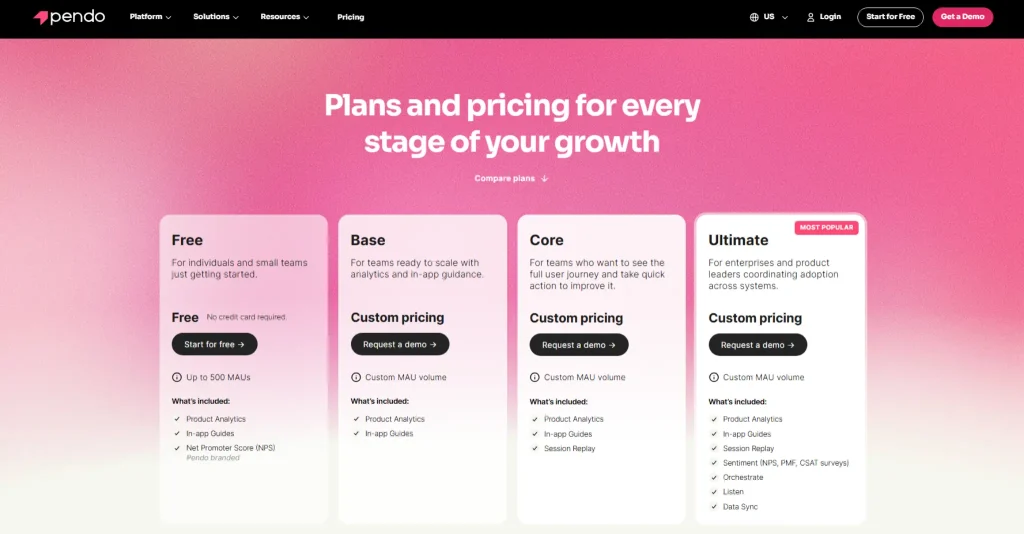
The free plan covers up to 500 monthly active users. Growth and Portfolio plans use custom pricing via sales. No public pricing beyond the free tier.
8. Glassbox

Glassbox is an enterprise-grade digital experience analytics platform focused on high-volume, compliance-ready session capture and AI-powered struggle detection.
Organizations in retail and financial services use it to record and analyze millions of user sessions without sampling, while holding to strict data governance and compliance standards.
Its AI layer detects user struggle patterns (rage clicks, form abandonment, error loops) and surfaces them before teams have to search session recordings manually. Glassbox unifies analytics across web and native mobile apps into a single view of the customer journey.
See how Glassbox compares to Quantum Metric.
Best for
Enterprise digital and CX teams in regulated industries: banking, insurance, utilities, and enterprise e-commerce. Teams that need unsampled session capture at scale with AI-powered struggle detection and compliance-grade data masking from day one.
Key features
- Automatic session capture across web and mobile apps, with unsampled digital interaction data for enterprise-scale analysis
- AI-powered struggle and error detection for identifying rage clicks, error loops, abandonment patterns, and other friction signals
- Privacy and security controls with data masking, omission rules, encryption, role-based access, and support for PCI, GDPR, and CCPA requirements
- Mobile app analytics and crash context for understanding app performance, technical issues, and user behavior on native mobile apps
- Customer journey analytics for visualizing behavior, funnels, and friction across devices and sessions
- Enterprise integrations and data export for connecting Glassbox insights with existing analytics, CRM, and data workflows
Pricing
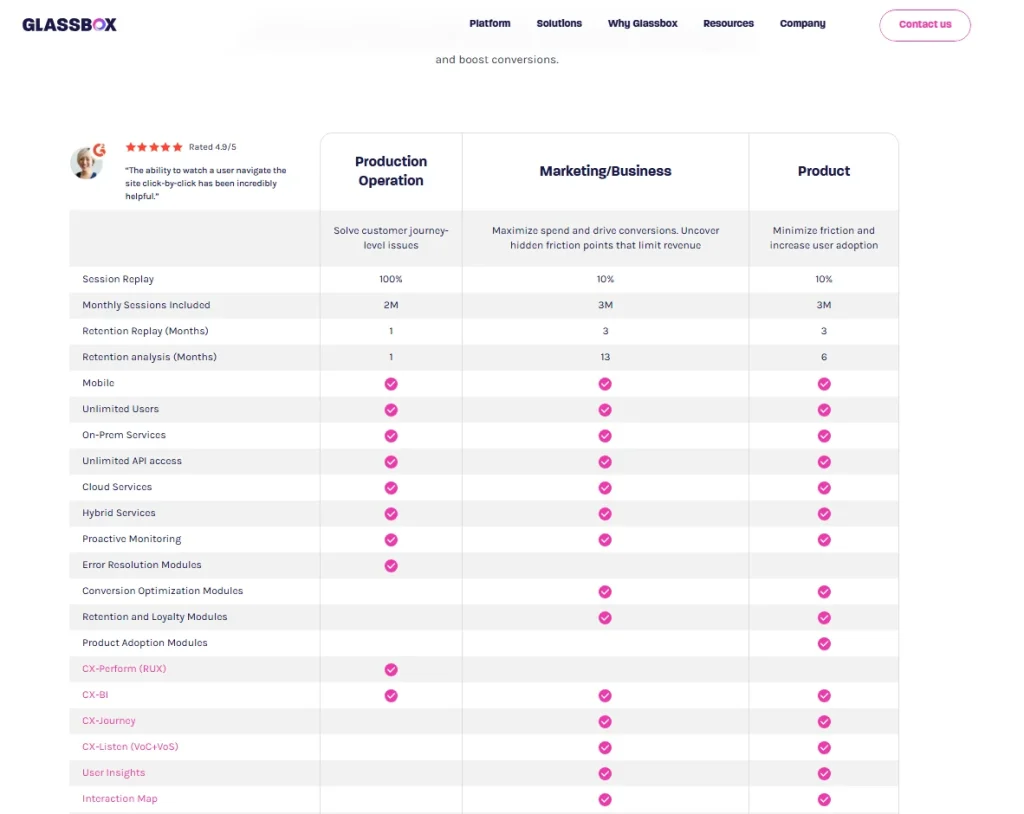
Enterprise custom pricing only. No self-serve plan or public starting price. Contact sales for a quote.
9. Optimizely
Optimizely is a digital experience platform built around experimentation. It’s the most mature experimentation platform on this list, offering A/B testing, multivariate testing, and feature flags at enterprise scale.
This makes it a strong fit for teams that treat experimentation as a core part of product development, not just a one-off marketing tactic.
It also bundles a content management system, personalization engine, and content marketing tools.
For teams where product experimentation is a core discipline, Optimizely provides the infrastructure to run hundreds of concurrent tests with a rigorous statistics engine.
That level of testing infrastructure is useful for large teams that need governance, consistent reporting, and reliable decision-making across multiple experiments.
It works as a dedicated experimentation platform rather than a general-purpose analytics tool, so it pairs best with a separate analytics layer.
Best for
Product and engineering teams at large enterprises that run high-frequency A/B testing and feature experimentation. E-commerce, media, and SaaS, where teams need scalable A/B testing infrastructure and are willing to integrate it with their other tools.
Key features
- A/B testing and multivariate testing at enterprise scale with sequential testing and a proprietary stats engine
- Feature flags and feature rollouts for safe, targeted deployment with automatic tracking of flag-driven behavioral changes
- Personalization engine for delivering tailored experiences based on user segments and behavioral triggers
- CMS and content workflow tools for marketing teams running experiment-driven campaigns
- Integrations with most major analytics platforms, CDPs, and data warehouses
- Developer-friendly SDKs for technical implementation across web, mobile, and server-side
Pricing
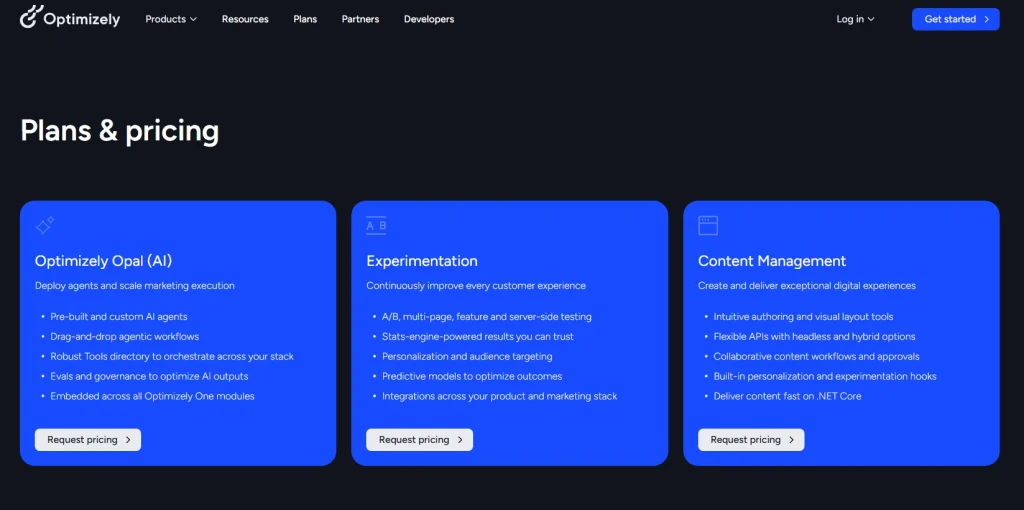
Custom pricing only. No public starting price. Contact Optimizely sales for a quote based on traffic volume and product tier.
10. LogRocket
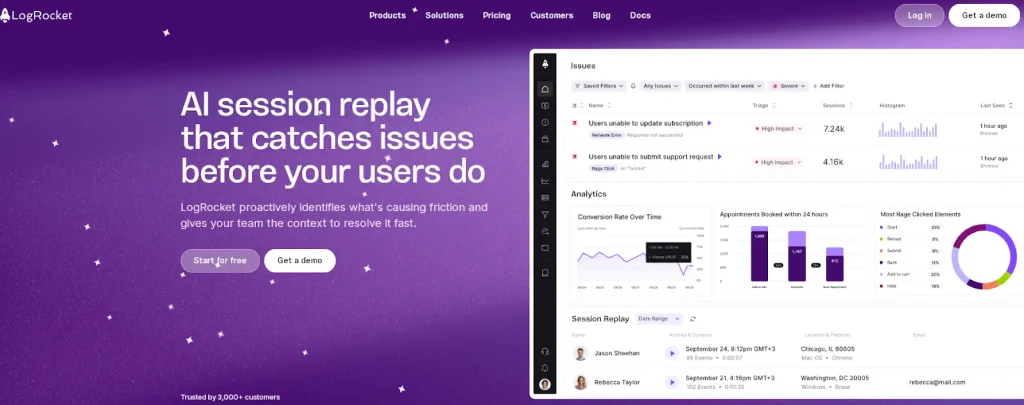
LogRocket is a frontend monitoring and session replay platform built for engineering teams and product developers. It combines pixel-perfect session replay with JavaScript error tracking, network request logs, Redux and Vuex state inspection, and front-end performance monitoring.
That gives developers the technical context they need to reproduce and fix bugs without asking users to recreate the issue.
This makes LogRocket especially useful when teams need to connect user behavior with the technical details behind errors, slow pages, or broken interactions.
LogRocket also includes product analytics capabilities (funnels, retention, and user properties). Its primary identity, though, is as a developer-focused debugging tool rather than a product analytics platform.
Teams that need deep developer resources for frontend debugging will find that LogRocket fits their workflow better than most alternatives here.
Learn more about best LogRocket alternatives in 2026.
See LogRocket vs FullStory.
Best for
Frontend engineering teams and QA teams that need complete technical context: session replay, console logs, network activity, and state inspection. Users who want to reproduce and resolve production bugs and performance issues efficiently.
Key features
- Session replay with console logs, network request/response logs, and Redux/Vuex state alongside the visual recording
- JavaScript error tracking with stack traces, user impact data, and direct links to the session replay where each error occurred
- Front-end performance monitoring, including Core Web Vitals and load time analysis across real user sessions
- Product analytics with funnel analysis, retention reports, and user segmentation by user properties and behavioral data
- Galileo AI for automated issue detection and surface-level analysis of high-impact problems
- Integrations with Jira, Slack, GitHub, Sentry, and other engineering workflow tools
Pricing
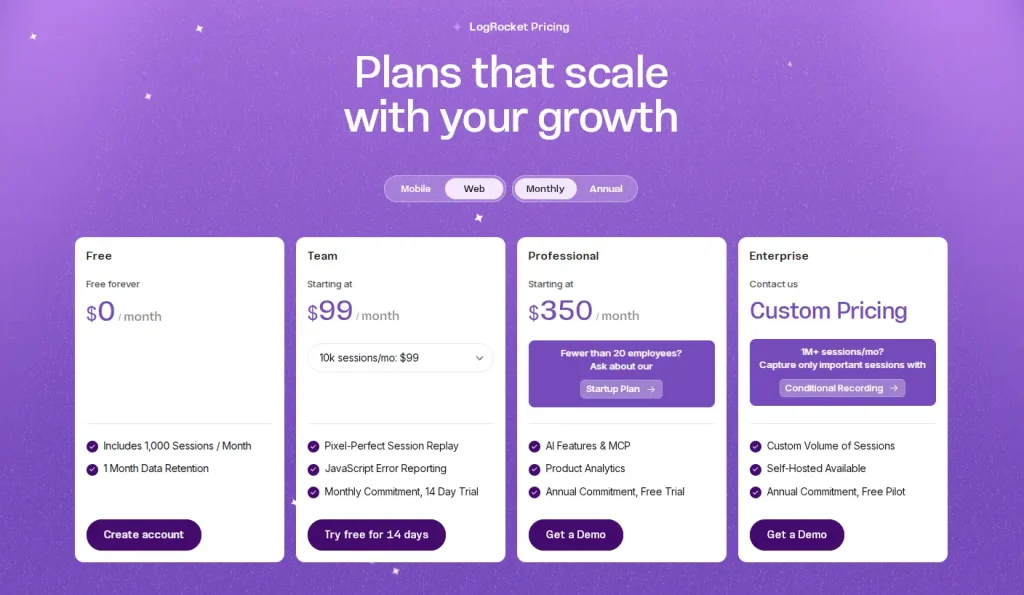
Free plan available (1,000 sessions/month). Paid plans start at $99/month. Enterprise plans available at custom pricing.
Is FullSession the Best Heap Alternative?
There are strong, well-established tools in this category. Some are genuinely worth considering depending on your team’s needs.
But for teams that need to move quickly from behavioral data to business decisions, without juggling multiple tools, complex technical implementation, or enterprise contracts, FullSession consistently stands out.
Here’s what puts it near the top.
One platform, everything included
Most teams pay for three or four separate tools to cover what FullSession handles in one subscription: session replay, heatmaps, conversion funnels, error monitoring, in-app feedback, and mobile session replay for iOS and Android.
User engagement analysis, feedback, and behavioral data live on the same dashboard from day one. No stitching tools together. No surprise upgrades to unlock features you expected from the start.
The Play Sessions interface gives immediate access to every session, with an events panel showing each user interaction in sequence. The HeatMaps tab sits one click away.
This keeps the investigation process simple: teams can move from a user session to a heatmap or funnel view without losing context.
The Errors and Alerts dashboard surfaces broken flows before they become tickets, and every view connects to session recordings.
Lift AI: from observation to action
The most expensive problem in analytics isn’t missing data. It’s the gap between seeing a problem and knowing what to fix first.
Most teams using behavioral analytics tools spend hours manually reviewing sessions, cross-referencing funnel data, and debating what to prioritize. Lift AI closes that gap.
It scans behavioral data across captured sessions, ranks friction by revenue impact, and links each point to the session replays where the issue occurs. When a fix ships, Lift AI validates whether it moved the website retention rate and conversion metrics you care about.
Teams don’t just learn what to fix. They confirm it worked. That feedback loop turns user analytics from a reporting exercise into a revenue-driving discipline.
An interface built for real teams
Behavioral analytics tools are only useful if your team actually uses them. A product built for data teams often gets abandoned the moment it needs a SQL query for a basic question.
FullSession’s interface is clean enough for product managers, marketers, and customer success teams to navigate without training.
Filters, session search, and heatmap views help any non-technical team member reach actionable insights in a few clicks. Non-technical users can track user behavior, review the full user journey, and understand key metrics without engineering.
This matters in organizations where making data-driven decisions is a team sport, not a privilege reserved for analysts.
Proactive detection, not reactive firefighting
Rage-click detection and error alerts notify your team the moment users hit problems, before they escalate into a support ticket, a churn event, or a lost conversion.
Rather than waiting for customers to report broken flows, FullSession shows where users struggle in real time. Your team gets the behavioral context to act immediately.
For teams running ecommerce conversion optimization or critical SaaS onboarding flows, that time advantage is significant.
Performance, your site won’t feel
FullSession’s SDK runs asynchronously on a separate thread, leaving your Core Web Vitals untouched. You get full behavioral coverage across web and mobile apps without the performance penalty that heavier SDKs introduce.
For teams where page load speed ties directly to conversion rates, this is a meaningful operational advantage over tools that add measurable overhead to page render.
Transparent pricing, exceptional value
FullSession offers a Free plan with 1,000 sessions/month, 2 seats, 30-day data retention, session replay, and basic dashboards. For higher-volume teams, the Professional plan starts at $279/month with 100,000 sessions/month, 8-month data retention, heatmaps, funnels, feedback, error reporting, custom events, user attributes, and Lift AI.
The Free and Professional plans make it easier to evaluate cost before talking to sales, while Enterprise plans are available with custom pricing for larger teams.
Most platforms charge separately for session replay, heatmaps, funnels, and error tracking, then bundle them in an enterprise package with custom pricing. FullSession keeps these capabilities together across clear plan options.
That makes it easier for teams to compare plans, forecast costs, and choose the right tier without waiting for a sales quote.
No hidden tiers. No features withheld to drive an upsell.
Privacy built in from day one
FullSession masks sensitive form inputs by default. GDPR, CCPA, and PCI DSS compliance come built in. No privacy modules, custom configuration, or legal review before you go live.
For teams in regulated sectors, or those selling to enterprise buyers who ask about compliance in every procurement conversation, this is a baseline expectation, not a premium add-on.
Support that treats you like a partner
FullSession’s Customer Success team responds fast and personally, not with queue-based auto-replies. When something’s broken, you reach a person who knows the product and prioritizes your outcome over closing a ticket.
The team tracks feature requests, including third-party integrations, and ships them regularly. The platform you’re using six months from now will reflect feedback from teams like yours.
Where FullSession is a bit behind some of the larger competitors is in Integrations. However, we welcome integration requests as part of any enterprise engagement. If it’s a blocker to adoption, we build it. Responsiveness is something we can still offer that the larger players can’t.
Book a demo to get a personalized walkthrough of FullSession’s full analytics suite.
Conclusion About Heap Alternatives
The right Heap alternative depends on what your team actually needs.
- PostHog works best for open-source engineering teams that want flexible product analytics and more control over their data setup.
- FullStory or Glassbox fit enterprise compliance.
- Amplitude or Mixpanel covers deep event-based product analytics.
- LogRocket is a better fit for developer-focused debugging.
- Optimizely leads in large-scale experimentation.
- Pendo suits customer success and onboarding workflows, especially for teams that need product adoption guidance inside the app.
- GA4 handles free marketing attribution.
For teams that need it all (session replay, heatmaps, funnels, error tracking, feedback, mobile analytics, and AI-driven prioritization) without the overhead of multiple tools or unclear enterprise pricing, FullSession is the strongest option on this list.
Start a free trial and see how quickly your team gets to first insight. Or book a demo for a walkthrough tailored to your product.
FAQs About Heap Competitors
What is the best alternative to Heap?
FullSession is the best Heap alternative for most product and growth teams. It covers Heap’s core use cases, including user behavior tracking, funnel analysis, and user segmentation, and adds session replay, interactive heatmaps, error tracking, and Lift AI in one privacy-compliant platform. Teams can start with the Free plan, while Professional plans start at $279/month for 100,000 sessions/month.
For engineering-led teams who want an open-source stack, PostHog is the strongest alternative. For enterprise CX teams in regulated industries, FullStory is worth evaluating.
Why are people looking for Heap alternatives in 2026?
Contentsquare acquired Heap in 2023 and is folding it into its enterprise platform. This created uncertainty among existing Heap customers about pricing continuity, roadmap direction, and whether mid-market features will stay at current price points.
Many teams are proactively evaluating Heap competitors before their next renewal to avoid disruption.
Is Heap being discontinued?
Heap still exists as a product, but it’s no longer independent. As Contentsquare keeps integrating Heap into its platform, the roadmap and pricing for standalone access could change.
Teams with mission-critical analytics dependencies should evaluate options now, before a forced migration.
What is the difference between Heap and Hotjar?
Heap is primarily a product analytics platform with automatic event capture, funnel analysis, and user segmentation. Hotjar is a behavioral analytics tool focused on session recordings, heatmaps, and user feedback. They solve related problems, not the same one.
FullSession combines the capabilities of both (product analytics, session replay, heatmaps, and in-app feedback) in one platform. That’s why many teams evaluating either end up choosing FullSession instead.
Which Heap alternative is best for non-technical teams?
FullSession and Pendo are the strongest options for non-technical teams. FullSession offers a no-code visual interface with automatic session capture, heatmaps, and funnels that any team member can use without SQL or developer support.
Pendo specializes in no-code in-app messaging and onboarding guides, a strong fit for customer success teams focused on product adoption. For teams that need a free, basic option, Google Analytics 4 has a familiar interface, though it lacks qualitative analytics.
Does FullSession replace Heap?
Yes. FullSession replaces Heap’s core capabilities: automatic behavior capture, funnel analysis, user segmentation, and customer data analysis. It extends them with session replay, interactive heatmaps, in-app feedback, mobile analytics, error tracking, and Lift AI.
For most product and growth teams, FullSession covers everything Heap did and adds the qualitative analytics layer that Heap never offered.

Roman Mohren is CEO of FullSession, a privacy-first UX analytics platform offering session replay, interactive heatmaps, conversion funnels, error insights, and in-app feedback. He directly leads Product, Sales, and Customer Success, owning the full customer journey from first touch to long-term outcomes. With 25+ years in B2B SaaS, spanning venture- and PE-backed startups, public software companies, and his own ventures, Roman has built and scaled revenue teams, designed go-to-market systems, and led organizations through every growth stage from first dollar to eight-figure ARR. He writes from hands-on operator experience about UX diagnosis, conversion optimization, user onboarding, and turning behavioral data into measurable business impact.