If you are evaluating Pendo competitors, the real question is not which platform has the longest feature list. It is which tool fits the way your team measures product usage, improves onboarding, collects user feedback, and drives feature adoption.
Pendo works well for teams that want product analytics and in-app guidance in one digital adoption platform, but it may not be the right fit for every product team. Some teams need deeper behavioral analytics, stronger session replay, automatic data capture, transparent pricing, or a more focused way to understand user behavior across web and mobile applications.
This guide compares 6 Pendo alternatives: FullSession, Heap, Appcues, Amplitude, FullStory, and PostHog. Each section explains what the tool does, who it is best for, the key features that matter, and how pricing works.
By the end, you will have a clearer shortlist of product analytics tools and digital experience analytics platforms to compare before booking a demo.
Book a demo for a 20-minute walkthrough of FullSession tailored to your team’s use case.
Key Takeaways
- FullSession: A strong fit for product-led growth teams that need session replay, funnel analysis, feedback, and behavioral analytics in one unified platform.
- Heap: Best for data-driven teams that want automatic data capture and the ability to define events retroactively, without building in-app guidance.
- Appcues: The go-to for non-technical teams that need onboarding tools to launch onboarding flows, product tours, and checklists without engineering involvement.
- Amplitude: Purpose-built for data science and enterprise teams that need advanced behavioral cohorts, experimentation, and data governance at scale.
- FullStory: The right fit for UX and engineering teams that need pixel-accurate session replay and structured user behavioral data to diagnose friction fast.
- PostHog: Ideal for engineering-led teams that want an open-source, self-hostable platform with analytics, feature flags, and A/B testing in one platform.
FullSession is a practical Pendo alternative for product teams that need session replay, heatmaps, funnels, error tracking, and feedback in one platform. Automatic data capture, transparent pricing, and strong privacy standards compliance help you understand user behavior, reduce friction, and drive feature adoption without heavy setup.
Book a demo to see how FullSession fits your workflow.
How to Score Pendo Competitors: Key Features to Look For
Not every product analytics tool fits the same team. Score each tool against these criteria:
- Automatic data capture: Does the tool record user interactions without manual event tagging? Manual setup takes engineering time and creates gaps. Tools that focus on automatically capturing user interactions are ready from day one.
- Session replay: Can you watch real user behavior in your product? Aggregate data tells you what happened. Session replay shows you why.
- In app guidance: Do you need onboarding flows, product tours, or in app guides? Some tools do this natively; others don’t.
- Pricing model and transparency: Is pricing published? Does it scale on monthly tracked users, events, or seats? Pendo’s MAU-based pricing catches teams off guard as their user base grows.
- Google analytics and data stack integrations: Can the tool connect to your existing stack without heavy engineering effort? Gaps create duplicate tracking and inconsistent data.
- User segmentation and data analysis: Can you filter behavior by plan type, cohort, geography, or custom attributes? Segmentation and clean data analysis make product usage analytics actionable.
- Support for non technical teams: Can product managers and customer success teams run the tool without code? No code solution options matter when engineering bandwidth is limited.
- Mobile app coverage: Does the tool work across web and mobile applications? If your product spans both, confirm mobile support before committing.
Pendo Alternatives at a Glance
The table is for fast scanning. Full tool entries follow with details on key features and pricing.
| Tool | G2 Rating | Best For | Top Feature | Starting Price |
| FullSession | 5.0 | E-commerce, PLG, and product teams that need behavioral insight | Lift AI, session replay + funnel analysis | Free trial; paid from $23/mo (billed annually) |
| Heap | 4.4 | Data-driven teams needing retroactive analytics | Automatic data capture | Free tier; custom pricing |
| Appcues | 4.6 | Non-technical teams building in-app experiences | In-app flows and checklists | Custom pricing |
| Amplitude | 4.5 | Data science and enterprise analytics teams | Behavioral cohorts + experimentation | $61/mo |
| FullStory | 4.5 | UX and engineering teams are diagnosing friction | Session replay + DX Data | Not publicly available |
| PostHog | 4.5 | Engineering-led teams want open-source flexibility | Feature flags + autocapture | Pay-as-you-go |
Note: G2 ratings and pricing details can change over time. Verify ratings on each vendor’s G2 profile and confirm current pricing on the official pricing pages before making a final decision.
6 Best Pendo Alternatives in 2026
These Pendo alternatives cover different needs, from product analytics and session replay to in-app guidance, user feedback, and feature adoption. Use the list below to match each tool to your team’s main priority.
1. FullSession
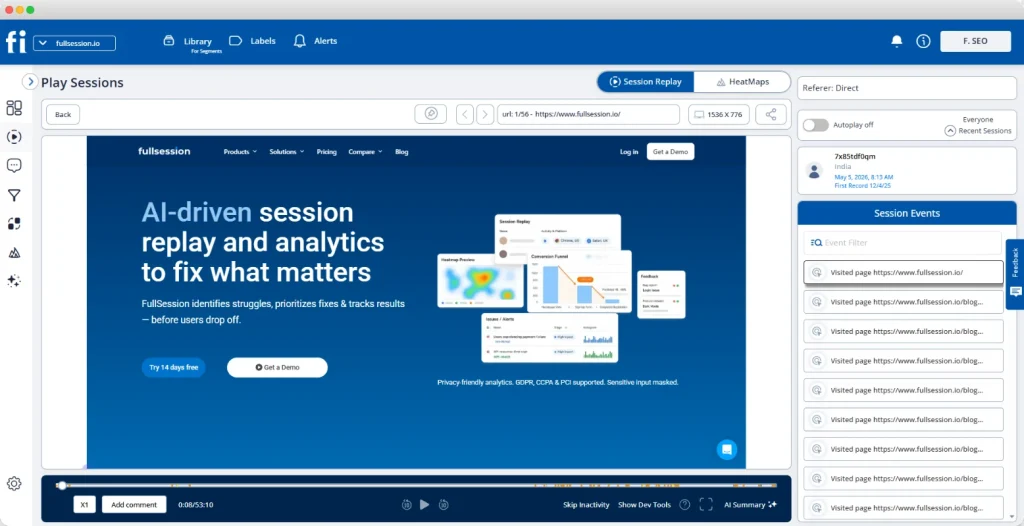
FullSession is a digital experience analytics platform that gives you session replays, heatmaps, funnel data, user feedback, and error tracking in one platform. It differs from a digital adoption platform like Pendo by focusing on what users actually do rather than guiding them through preset flows. FullSession pairs quantitative funnel analysis with qualitative replay in the same view, turning raw sessions into actionable insights.
Best for
Product, marketing, and growth, engineering and QA, and customer success teams at B2B SaaS companies that want to diagnose friction in real user flows without manual event setup or engineering resources.
Key features
- Session replay: Watch real user behavior at the session level to see where users hesitate, drop off, or run into friction.
- Heatmaps: Analyze clicks, scrolls, and movement patterns to understand which page elements get attention and which are ignored.
- Funnel analysis: Track user flows from entry to conversion and identify the exact steps where users leave the path.
- User feedback collection: Collect in-page customer feedback so teams can connect user sentiment with actual behavior.
- Error tracking and alerts: Detect JavaScript errors, broken interactions, and technical issues, then review the related session for context.
- Lift AI: Prioritize friction points based on their likely impact on conversion, customer satisfaction, and feature adoption.
Pricing
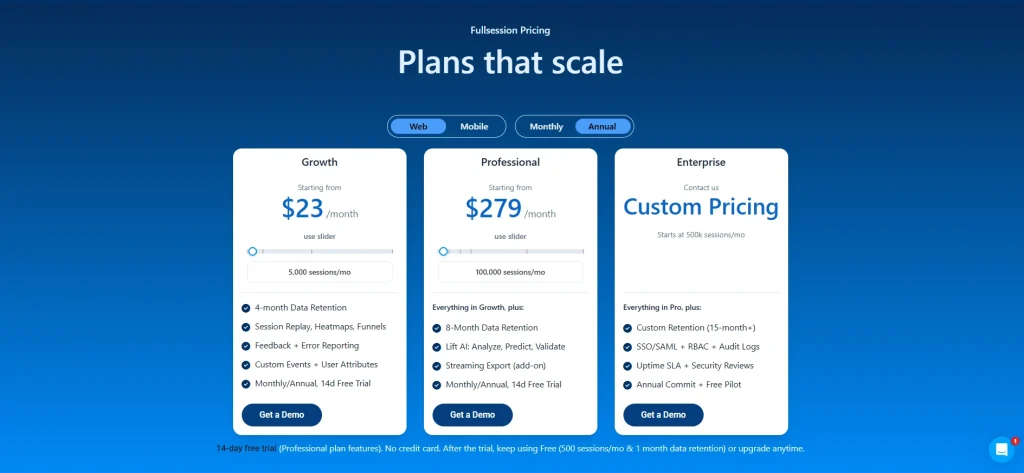
FullSession offers a Free plan with 500 sessions per month, so teams can start collecting user behavioral data without a paid commitment.
Paid plans start at $23/month when billed annually and include 5,000 sessions per month.
As traffic grows, pricing scales by session tier, so costs stay easy to estimate as your usage increases. Visit the pricing page to see the full plan breakdown.
Book a demo to find the best plan for your team.
2. Heap
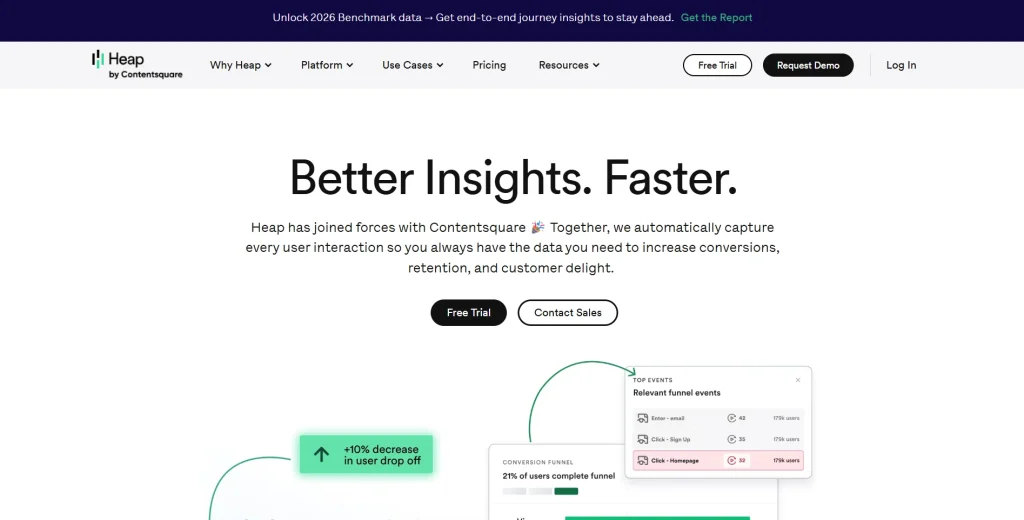
Heap is a product analytics platform built around automatic data capture. It records all user interactions from the moment the snippet is installed, with no manual event tagging. Heap automatically captures every click, form submission, and page view, then lets you define events retroactively.
Heap doesn’t include in-app guidance natively. The focus is on analytics depth and historical retroactivity.
Learn more about Heap alternatives.
Best for
Data-driven product and engineering teams that need retroactive analytics and don’t require in-app guides in the same tool.
Key features
- Autocapture: Capture user interactions from installation so teams do not miss events because of incomplete tracking code.
- Retroactive analysis: Define new events after the fact and analyze historical data without redeploying tracking.
- Segments: Build user segments by behavior, plan type, custom properties, or lifecycle stage for deeper product usage analysis.
- Funnel analysis: Track where users drop out of defined user flows and compare drop-off by segment.
- Heap Connect: Sync user behavioral data to your data warehouse for analysis in existing BI tools.
- Dashboards: Monitor product usage analytics across custom metrics without needing a dedicated data science layer.
Pricing
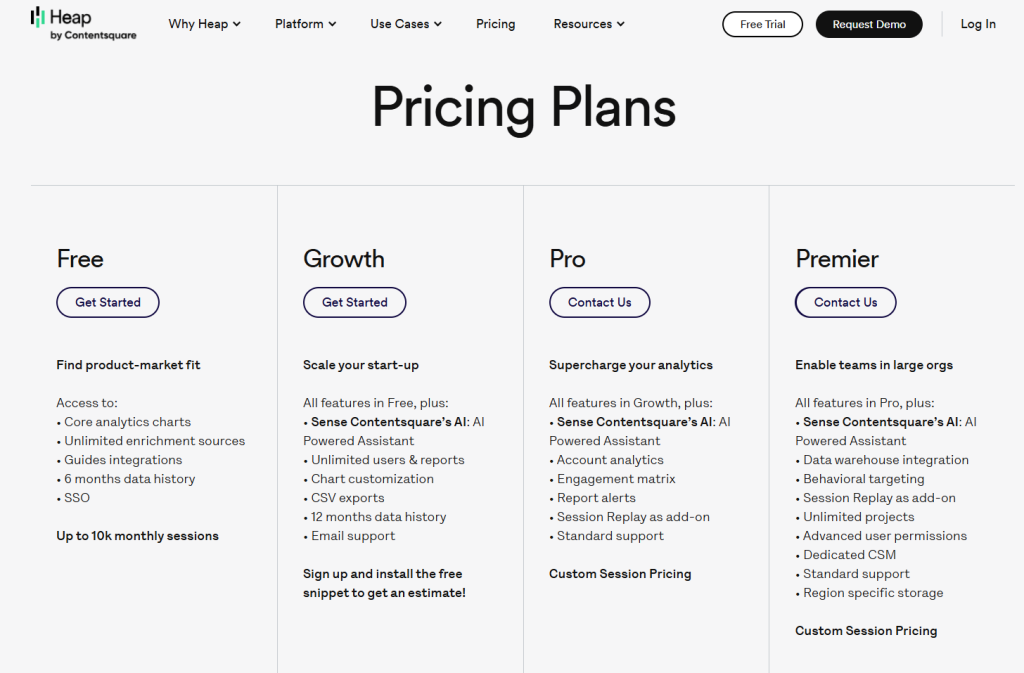
Heap offers a Free plan for up to 10,000 monthly sessions. Growth pricing requires a signup and snippet installation for an estimate, while Pro and Premier use custom session pricing.
This pricing works for teams starting with basic product analytics, but some features are add-ons and higher-tier pricing is not fully public. Teams should confirm the total cost before choosing Heap as a Pendo alternative.
Session Replay, Heatmaps, and Error Analysis are add-ons on higher plans.
3. Appcues
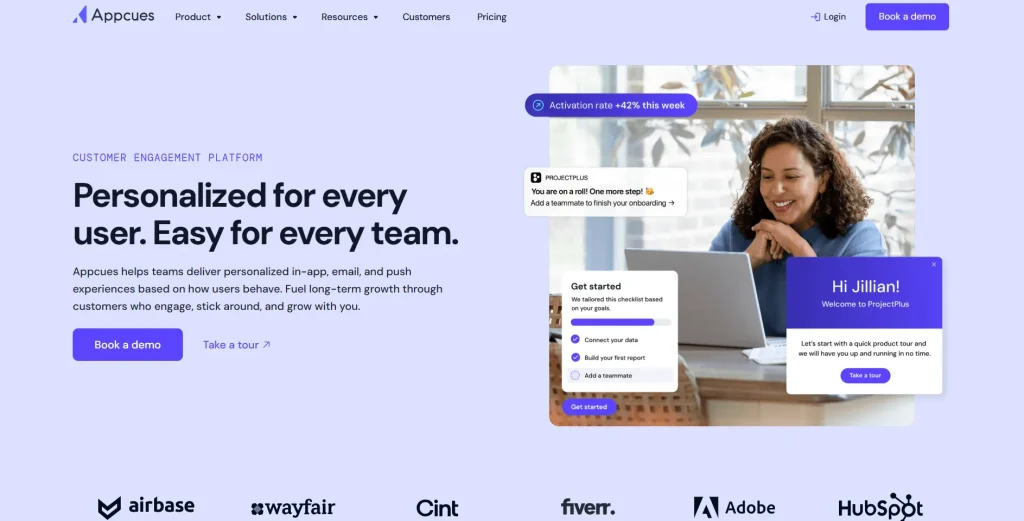
Appcues is a user engagement and in-app experiences platform built for non-technical teams. Where Pendo started with analytics and added guidance, Appcues was built guidance-first. That makes it simpler for marketing and product teams to run customer onboarding without CSS work or engineering support.
Best for
Product and marketing teams at early-to-mid stage SaaS companies who want to launch in-app flows without engineering.
Key features
- In-app flows: Builds multi-step onboarding sequences, product tours, and feature announcements with a no-code solution editor.
- Checklists: Embeds onboarding checklists in the product to help users complete tasks progressively.
- NPS and surveys: Collect user feedback and user sentiment through in-app surveys tied to user actions or milestones.
- Behavioral email: Triggers email sequences based on in-app behavior, connecting guidance to off-app engagement.
- Push notifications: Send mobile notifications linked to in-app experiences across web and mobile apps.
- Appcues AI: Generates in-app experience copy and targeting suggestions to cut manual setup time
Pricing
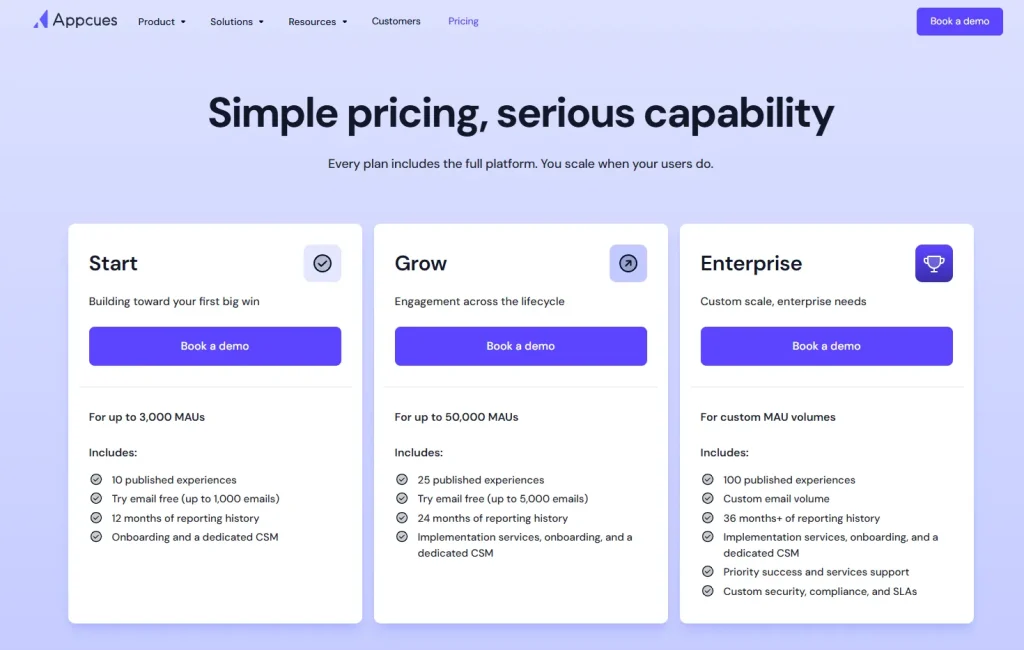
Appcues pricing is based on monthly active users. Appcues lists plan tiers such as Start, Grow, and Enterprise, but full pricing is not publicly available. Teams need to request a quote or speak with sales to confirm the final cost.
The Start plan is designed for smaller teams with limited monthly active users, while Grow and Enterprise are built for larger teams that need more advanced onboarding, support, and customer engagement features.
4. Amplitude
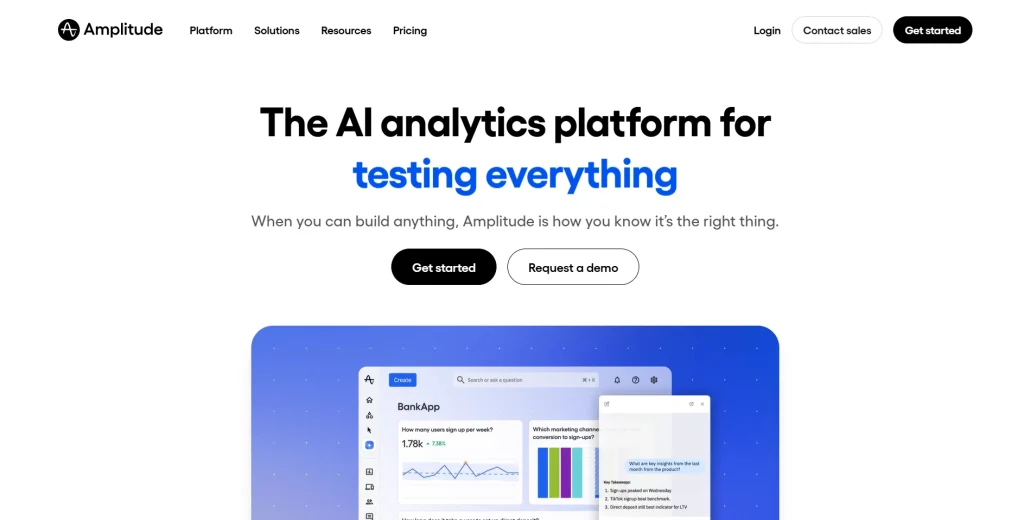
Amplitude is a product analytics platform with enterprise-grade analytics depth, behavioral cohort analysis, and experimentation tools. It’s more analytics-heavy than Pendo and doesn’t include native in-app guidance. It’s the choice for data science teams modeling user flows at scale across web and mobile applications.
- Learn more about Amplitude alternatives
- See Google Analytics vs. Amplitude Comparison
Best for
Product analytics and data science teams at mid-to-large companies that need advanced behavioral analytics, A/B testing, and data governance across web and mobile applications.
Key features
- Event tracking: Captures user interactions across web and mobile apps, with support for both manual instrumentation and autocapture.
- Behavioral cohorts: Group users by shared behavior patterns so you see how segments engage with features over time.
- Journey analysis: Maps the paths users take through your product, including unexpected routes to conversion or churn.
- Experimentation: Runs A/B tests tied to user behavioral data, so you measure feature adoption impact without switching tools.
- Data governance: Controls how events are defined, tracked, and surfaced across teams to keep product usage data consistent.
- Amplitude CDP: Unifies customer data into a single profile for more accurate user segmentation.
Pricing
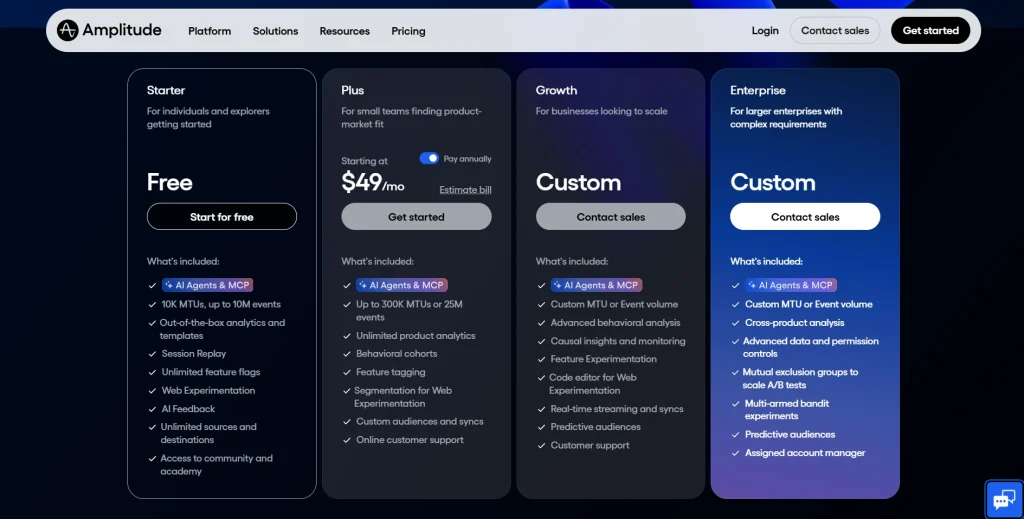
Amplitude offers a free Starter plan with 10K MTUs and up to 2M events. The Plus plan starts at $49/month when billed annually or $61/month on monthly billing, and supports up to 300K MTUs or 25M events.
Growth and Enterprise plans use custom pricing for larger teams with advanced analytics, experimentation, governance, and support needs.
5. FullStory
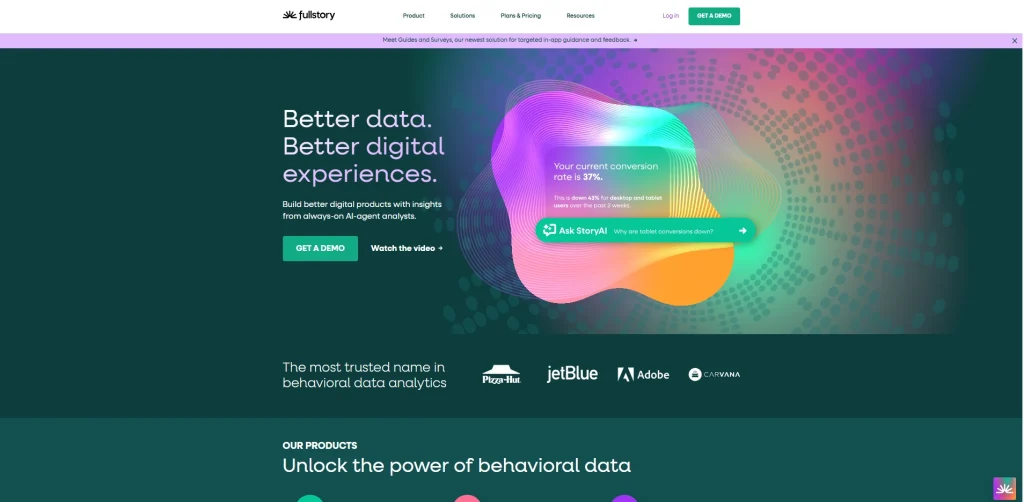
FullStory is a digital experience analytics platform centered on session replay and user behavioral data. It helps product, UX, and engineering teams see where users hit friction.
FullStory doesn’t offer in-app guidance. Its core value is qualitative insight and DX Data, a structured behavioral dataset derived from session captures.
- Learn more about FullStory alternatives.
- See our FullSession vs FullStory comparison guide
Best for
Product, UX, and engineering teams that need deep session-level visibility into user friction, error patterns, and UX issues across web and mobile applications.
Key features
- Session replay: Records full user sessions with pixel-accurate playback, including rage clicks, dead clicks, and error events.
- Frustration signals: Surfaces rage clicks, dead clicks, and thrashing cursor movements as friction signals.
- DX Data: Turns raw session data into a structured behavioral dataset that product and engineering teams query like a database.
- Heatmaps: Aggregates click, scroll, and engagement data across pages to reveal where attention and frustration concentrate.
- Funnel analysis: Tracks conversion paths and drop-off points, linking any funnel step to the session in which it happened.
- FullStory AI: Surfaces anomalies and friction patterns automatically, so teams skip manual review of every session.
Pricing
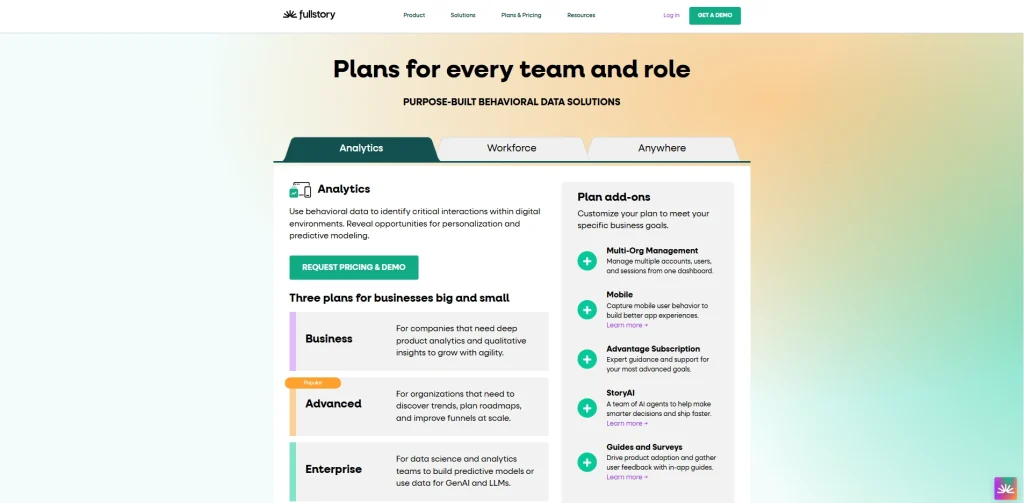
Fullstory offers a free plan with 30,000 monthly sessions, up to 10 users, and 12 months of analytics retention.
Paid plans include Business, Advanced, and Enterprise options, but pricing isn’t listed publicly. Teams need to request a demo or contact sales for a custom quote based on session volume, features, and support needs.
6. PostHog
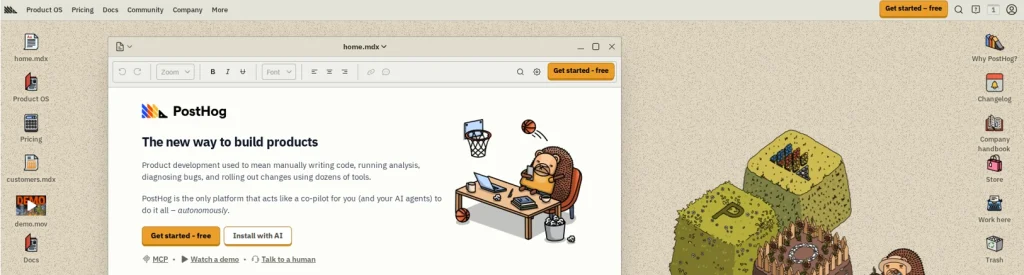
PostHog is an open-source product analytics platform that combines event tracking, feature flags, A/B testing, session replay, and surveys in one self-hostable or cloud-based tool. Its open-source model and developer-first design set it apart from Pendo’s no-code solution and product-team focus. It’s a strong option for engineering teams that want full control over their data.
Learn more about PostHog alternatives.
Best for
Engineering teams and product-led growth teams at early-stage or developer-focused companies that need an open-source option with flexible deployment and usage-based pricing.
Key features
- Product analytics with autocapture: Tracks user interactions automatically from installation, with no manual event tagging for basic coverage.
- Session replay: Records user sessions in the same platform as your analytics, so you move from aggregate data to individual behavior without switching tools.
- Feature flags: Roll out features to specific user segments without a deployment, enabling controlled releases and instant rollbacks.
- A/B testing: Runs experiments tied to user behavioral data, with statistical significance calculated inside the platform.
- Surveys: Collect user feedback and customer satisfaction scores in-app, with targeting based on user properties or actions.
- Data warehouse sync: Exports user behavioral data to your data warehouse for analysis alongside other business data.
Pricing
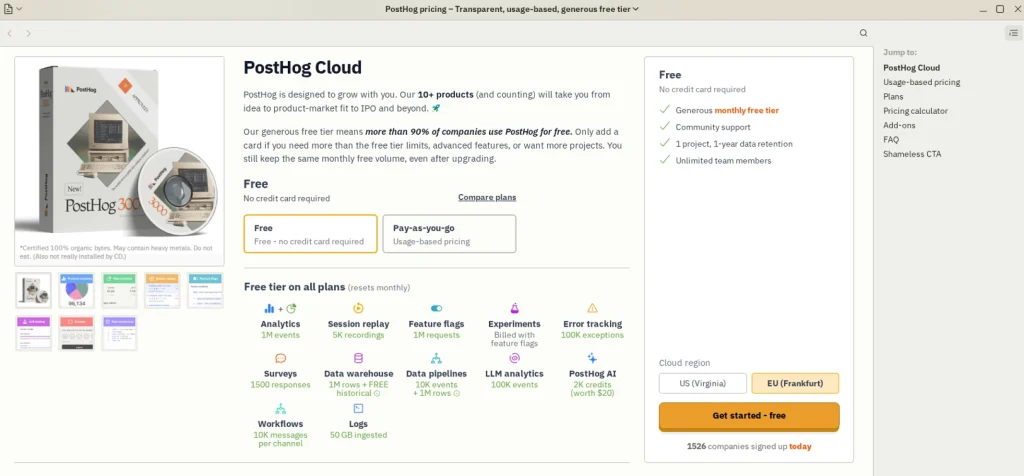
PostHog has a free tier with 1M analytics events, 5K session recordings, 1M feature flag requests, 100K exceptions, 1,500 survey responses, and 1-year data retention.
Paid usage is based on volume across products like analytics events, session recordings, feature flag requests, surveys, and error tracking. Teams can use PostHog’s pricing calculator and set billing limits to estimate costs before upgrading.
Digital Insights Platform vs. Digital Adoption Platform
Not all Pendo competitors belong to the same category. Knowing the difference helps you pick the right tool before comparing products.
| Digital Adoption Platform (DAP) | Digital Insights Platform | |
| Primary purpose | Guide users to complete tasks via in-app walkthroughs | Capture and analyze real user behavior to surface friction |
| Core output | Completed onboarding flows, product tours, checklists | Session replays, heatmaps, funnel data, behavioral analytics |
| Who operates it | Product and customer success teams | Product, UX, and engineering teams |
| Analytics depth | Basic engagement metrics | Deep behavioral analytics and user segmentation |
| In-app guidance | Native and central | Absent or limited |
Some tools combine both. Pendo sits in the DAP category. FullSession and FullStory sit in the digital experience analytics category.
Heap and Amplitude are product analytics platforms. PostHog spans analytics and DAP-adjacent features like feature flags. Appcues is guidance-first.
Knowing which category you need saves you from buying a DAP when you need analytics depth, or vice versa.
How These Tools Connect to Google Analytics and Your Data Stack
Teams running Pendo alongside Google Analytics often hit data discrepancies. The two tools track data differently, and reconciling them manually wastes time. Aligning product analytics with your web analytics stack matters when reports go to leadership.
If your team is also comparing CRO and experimentation platforms, reviewing VWO alternatives can help clarify which tools fit testing, behavioral analytics, and conversion optimization workflows.
Check whether any of the Pendo alternatives connects to your stack:
- Google Analytics: FullSession integrates with GA via its integrations page. Amplitude has a native GA connector. PostHog supports GA data import. Confirm current status on each tool’s official pages.
- Data warehouse: Heap Connect and PostHog’s data warehouse sync export user behavioral data directly to your warehouse. Amplitude has its own CDP layer.
- Other tools: Many tools offer integrations with analytics, CRM, CDP, and warehouse tools, but connector availability varies by vendor and plan.
Verify integration claims on the tool’s official page, not third-party reviews. Integrations change.
Should You Bundle Product Analytics With In-App Guides?
Pendo bundles product analytics and in-app guidance in one platform. That sounds efficient, but it’s worth asking whether the bundle serves your team.
Combining product analytics with in-app guidance cuts context switching. That’s a real benefit. It often means compromising on analytics depth, though, because tools that do both well are rare.
Using separate specialized tools (one for behavioral analytics, one for in-app guidance) typically gives you more capability in each area. FullSession covers the analytics side. If you also need in-app guides, Appcues runs alongside it.
The right call depends on your team’s main need. If you spend more time diagnosing friction than building walkthroughs, an analytics-first tool will serve you better than a DAP with analytics bolted on.
Where Automatic Data Capture Creates Privacy Risk
Automatic data capture is convenient. It’s also where most teams underestimate compliance exposure.
When a tool records every user interaction from day one, it can capture personally identifiable information unless masking is set up correctly. For teams in regulated industries or serving enterprise customers, that’s a real risk to your business processes and customer trust.
Before picking any tool with automatic data capture, confirm:
- SOC 2 Type II certification: Is the vendor certified, and can they provide the report?
- GDPR and CCPA compliance: Does the tool support data residency? Can you delete user data on request?
- PII masking: Does the tool mask sensitive fields automatically, or do you configure exclusions manually?
- Data retention controls: Can you set retention periods? What happens to session data after it ages out?
FullSession already covers the main privacy and security requirements teams should review, including configurable data masking, retention controls, role-based access, SSO, audit logs, and DPA support. For more details, review the FullSession safety and security page.
What Pendo Actually Costs and How to Compare Total Spend
Pendo’s average annual contract value is approximately $47,330, based on 523 deals tracked by Vendr. Vendr reports a pricing range from $15,000 to $142,476 per year.
For SMB customers, SpendHound reports average Pendo pricing of $54,757 per year, while enterprise contracts average $214,512 per year, based on spend data from 160 Pendo customers.
Pendo prices are primarily based on monthly tracked users. Costs rise as your user base grows, often without a matching increase in value.
When comparing total cost across Pendo competitors, factor in:
- Pricing model: Compare how each platform charges as usage grows. MAU-based pricing, event-based pricing, session-based pricing, and seat-based pricing can create very different costs once your team scales.
- Transparent pricing vs. contact sales: Tools with published pricing pages are easier to budget for. FullSession and Amplitude publish their pricing. Other Pendo alternatives require a sales call.
- Engineering cost: Manual event tracking takes ongoing engineering time. Tools with automatic data capture cut that overhead.
- Feature overlap: If your team is not actively using Pendo’s in-app guidance, you may be paying for bundled features that do not support your current product analytics or user adoption goals.
The right tool isn’t the cheapest. It’s the one that cuts support load, lifts feature adoption and user adoption, and shows friction without heavy engineering investment.
Onboarding Checklists for Switching from Pendo
Switching product analytics tools is manageable if you plan the transition. Run through this checklist before you cancel Pendo:
- Audit current Pendo usage: Which features do you use week to week? Session replay? In app guides? NPS? Only migrate what you’re actively using.
- Export your data: Download event history, user segments, NPS responses, and any reports you reference before you lose access.
- Identify integration dependencies: List every tool connected to Pendo (CRM, data warehouse, email). Map what needs to be reconnected so customer onboarding and support workflows keep running.
- Map your event tracking: Document the user interactions and custom events you’re tracking. Recreate these in the new tool before you go live.
- Run parallel tracking: Install the new tool alongside Pendo for two to four weeks. Compare outputs before relying on them exclusively.
- Train your team: Customer success teams, product managers, and growth leads all need time with the new interface. Schedule walkthroughs before cutover.
- Time your cancellation around renewal: Review your Pendo contract’s renewal and cancellation terms early. Many SaaS agreements require advance notice before renewal.
For teams switching to FullSession, book a demo for a migration walkthrough tailored to your stack.
Why Choose FullSession
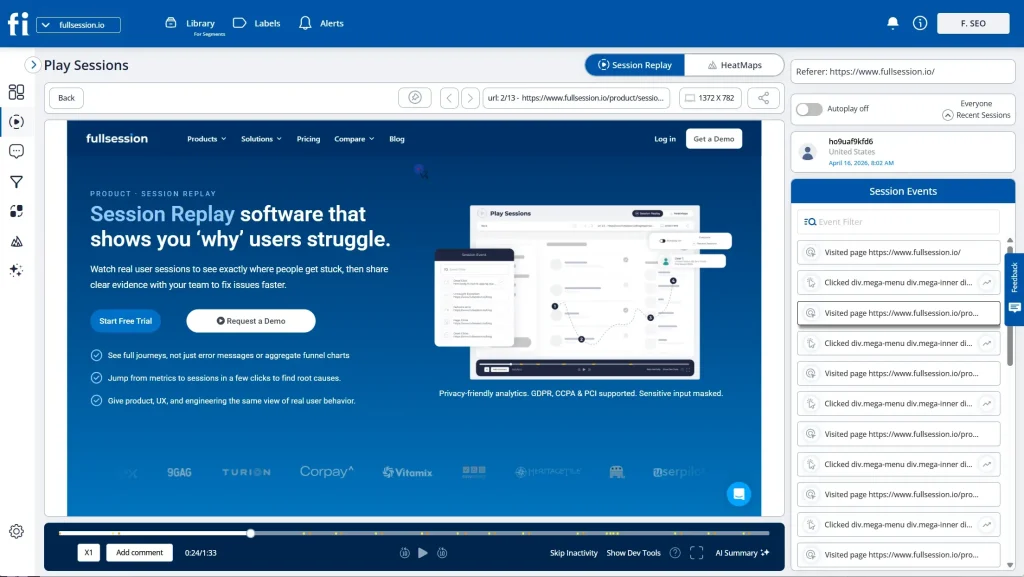
FullSession is built for product teams that need to understand user behavior, diagnose friction, and turn product usage data into action without switching between multiple tools. It combines session replay, heatmaps, funnel analysis, user feedback, error tracking, and Lift AI in one platform, so teams can move from insight to decision faster.
Qualitative and quantitative insight in one place
Most product analytics tools show aggregate data, but they often miss the context behind user behavior. FullSession connects quantitative funnel analysis with qualitative session replay, so you can spot where users drop off and then watch the exact sessions behind that pattern.
This helps product teams, customer success teams, and engineering teams understand real user behavior, identify broken user flows, and prioritize fixes based on evidence instead of assumptions.
No manual event setup required
FullSession starts automatically capturing user interactions after installation, so teams can review sessions, heatmaps, funnels, and customer feedback without building a complex tracking plan first.
You do not need engineering teams to define every event before analysis begins. That makes it easier for non-technical users, product managers, and customer success teams to understand user behavior, monitor feature adoption, and act on friction quickly.
One platform for replay, funnels, feedback, and errors
FullSession brings session replay, funnel analysis, heatmaps, user feedback, and error alerts into a unified platform. Instead of paying for separate tools or stitching data together manually, teams can see what happened, why it happened, and where users struggled from the same dashboard.
This is especially useful for product-led growth teams that need actionable insights across onboarding, conversion, customer onboarding, and product usage without adding extra complexity.
Lift AI prioritizes what to fix first
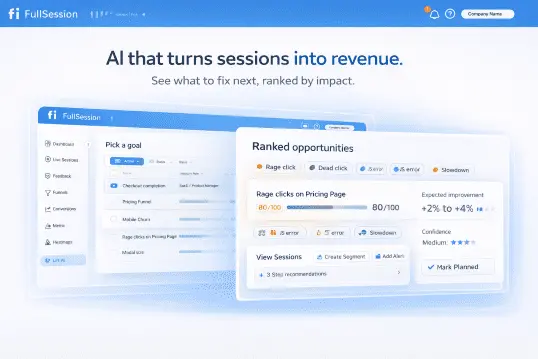
Not every friction point has the same business impact. Lift AI analyzes user behavioral data and surfaces the issues most likely to affect conversion, user adoption, and feature adoption.
That helps teams avoid wasting time on minor UX issues and focus on the changes that are most likely to reduce support load, improve customer satisfaction, and move users through key flows.
Transparent pricing
FullSession publishes its pricing, so teams can evaluate cost before booking a sales call. Paid plans start at $23/month when billed annually and include session replay, heatmaps, funnels, feedback, and Lift AI.
For teams comparing Pendo alternatives, this makes budgeting easier than tools that require contact sales before showing plan details.
Book a demo to see FullSession in action with a walkthrough tailored to your team’s use case.
Conclusion About Pendo Competitors
Choosing between the best Pendo alternatives comes down to what your team needs. Need in-app guidance and basic analytics in one tool? A DAP like Appcues fits.
Need serious analytics depth? Amplitude or Heap are built for that. Need to understand user behavior through session replay and user behavioral data? FullSession and FullStory are the right categories.
For product-led growth teams wanting qualitative and quantitative insight in one platform, with automatic data capture and transparent pricing, FullSession is worth a close look. Before making a final decision, compare each tool by the problem your team needs to solve first. If onboarding is the priority, choose a guidance-first platform. If finding friction, analyzing funnels, and understanding real user behavior matter more, FullSession gives product teams a clearer path from insight to action.
Book a demo or start a free trial, no credit card required.
FAQs About Pendo Alternatives
Who competes with Pendo?
Pendo’s main competitors span two categories. On the digital adoption platform side: Appcues, WalkMe, and Whatfix. On the product analytics and digital experience analytics platform side: FullSession, Heap, Amplitude, FullStory, and PostHog. Which matters depends on whether you need in-app guidance, behavioral analytics, or both.
What is the difference between Pendo and VWO?
Pendo is a digital adoption platform focused on in-app onboarding, feature adoption, and product analytics for SaaS products. VWO is a conversion rate optimization platform focused on A/B testing, landing pages, and visitor behavior. Pendo is for product teams managing logged-in journeys. VWO is for marketing and growth teams optimizing pre-login and web flows.
What is the difference between Zendesk and Pendo?
Zendesk is a customer support platform for help desk tickets, live chat, and customer communication. Pendo is a product analytics and digital adoption platform for seeing how users engage with your product and guiding them through it. Zendesk handles problems after they happen. Pendo prevents them through in-app guidance and tracks feature adoption before users need support.
Is Pendo a CRM tool?
No. Pendo is a digital adoption platform and product analytics tool, not a CRM. It tracks how users interact with your product, enables in-app guidance, and collects user feedback. A CRM like Salesforce or HubSpot manages customer relationships, sales pipelines, and communication history. Some teams connect Pendo to a CRM to enrich contact records with product usage data, but they serve different functions.
What are the competitors to Pendo?
The six most commonly evaluated Pendo alternatives are FullSession, Heap, Appcues, Amplitude, FullStory, and PostHog. FullSession leads on behavioral analytics and session replay. Heap and Amplitude lead in product analytics depth.
Appcues leads on in-app guidance for non-technical teams. FullStory leads in digital experience analytics. PostHog leads on open-source flexibility.
Is Pendo similar to WalkMe?
Yes, in the category. Both are digital adoption platforms that guide users through software with in-app walkthroughs, tooltips, and onboarding flows. WalkMe targets larger enterprise deployments and complex software environments, including internal tools.
Pendo is more commonly used by SaaS product teams focused on external users and product-led growth teams. WalkMe has a stronger enterprise governance layer; Pendo has deeper native product analytics.
What is the difference between Whatfix and Pendo?
Both are digital adoption platforms targeting different contexts. Pendo is built for SaaS product teams managing external users and tracking feature adoption in their own product. Whatfix is designed for enterprise teams deploying guidance on top of third-party software like Salesforce, SAP, or Workday. If your use case is the adoption of your own product, Pendo fits. If your use case is training employees on enterprise software, Whatfix is built for it.

Roman Mohren is CEO of FullSession, a privacy-first UX analytics platform offering session replay, interactive heatmaps, conversion funnels, error insights, and in-app feedback. He directly leads Product, Sales, and Customer Success, owning the full customer journey from first touch to long-term outcomes. With 25+ years in B2B SaaS, spanning venture- and PE-backed startups, public software companies, and his own ventures, Roman has built and scaled revenue teams, designed go-to-market systems, and led organizations through every growth stage from first dollar to eight-figure ARR. He writes from hands-on operator experience about UX diagnosis, conversion optimization, user onboarding, and turning behavioral data into measurable business impact.