Category: PBX Insights

  • We Tried Hotjar vs Microsoft Clarity: Here’s Our Feedback

    We Tried Hotjar vs Microsoft Clarity: Here’s Our Feedback

    Heatmaps & Session Replay • 2025 Comparison

    Hotjar vs. Microsoft Clarity: Which Tool Reveals the Truth?

    By Daniela Diaz • Updated 2025

    TL;DR: If you are choosing between Hotjar and Microsoft Clarity, the decision usually comes down to budget and privacy.Bottom line up front:

    • Choose Microsoft Clarity if you have zero budget and do not mind sharing anonymized data with Microsoft for advertising and product improvement.
    • Choose Hotjar if you need qualitative feedback such as surveys and on page widgets, and are willing to accept data sampling or higher enterprise pricing.
    • Choose FullSession if you want the pro middle ground with 100 percent unsampled data capture, advanced funnel analysis and GDPR level compliance without the enterprise price tag.

    Below, we break down exactly how Hotjar and Microsoft Clarity differ and why many Product Managers add or switch to FullSession.

    On this page

    The Core Differentiators

    When you evaluate Hotjar and Microsoft Clarity, you are not only comparing features. You are comparing pricing models, data policies and how each tool fits into a modern SaaS stack.

    Price vs. Privacy (The Free Trap)

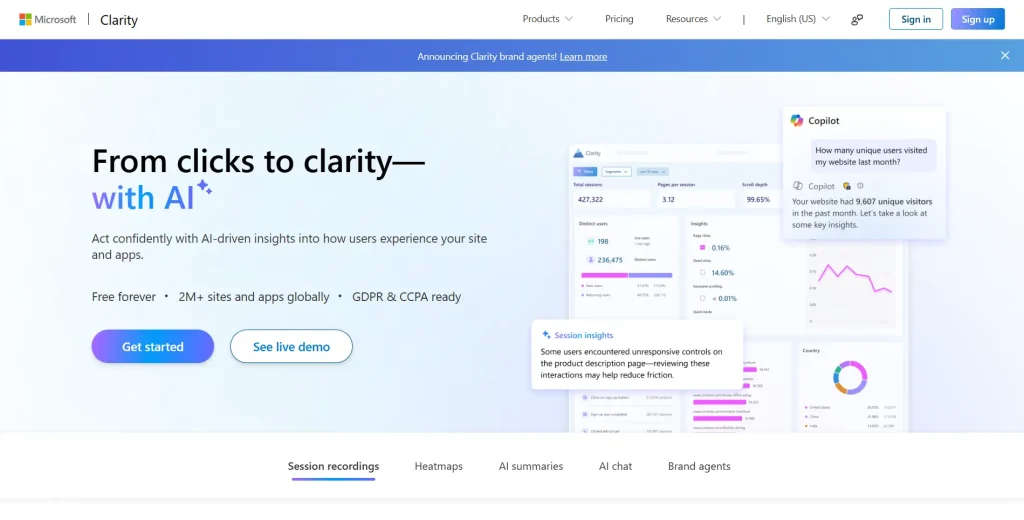
    Microsoft Clarity is completely free. There are no paid tiers or feature unlocks. The tradeoff is that Microsoft can use the anonymized data collected from your site to improve advertising systems and machine learning models.

    For content sites or small blogs, this may be acceptable. For privacy conscious SaaS companies and regulated industries such as healthcare or fintech, this can be a serious concern.

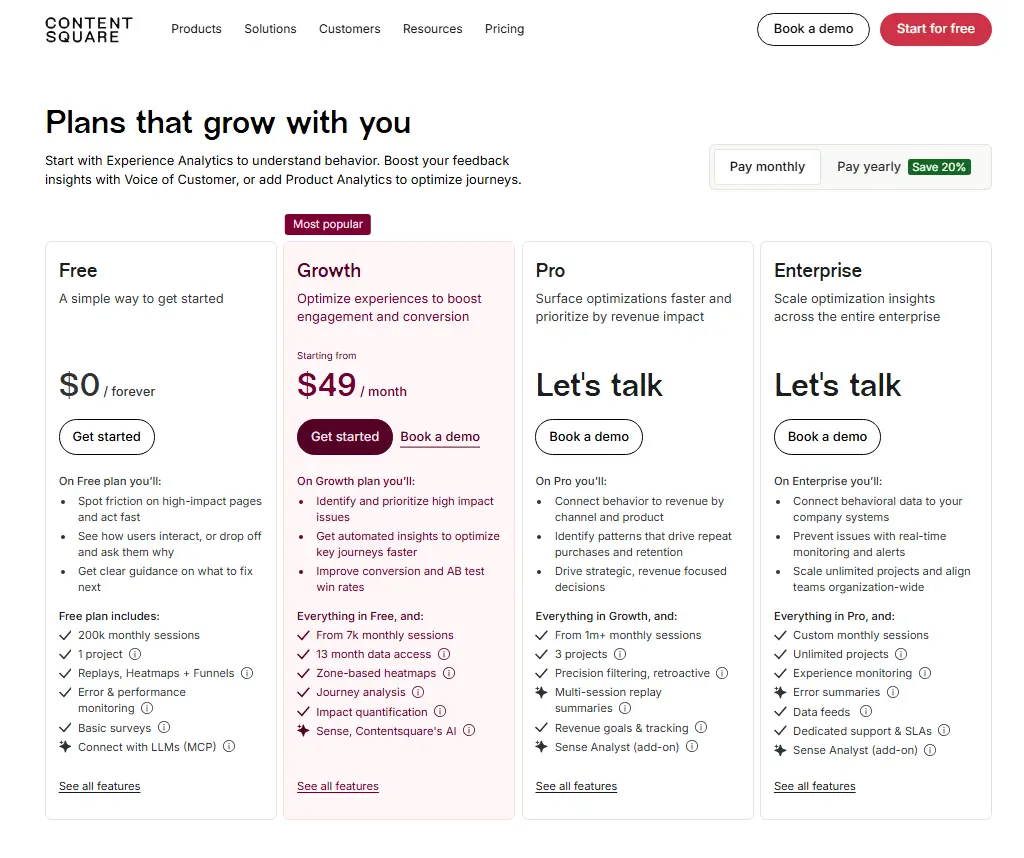
    Hotjar uses a classic SaaS pricing model. You pay for features, data limits and privacy controls. As traffic grows, pricing scales up quickly, especially if you want more recordings, more sites or more team seats.

    Data Sampling vs. 100 Percent Capture

    Sampling is one of the most important technical differences.

    • Hotjar often records only a subset of visitors. For example, out of 10,000 visits, you may only see 2,000 recordings. This means the exact session where a VIP customer reports a bug may never be captured.
    • Microsoft Clarity usually captures all traffic, but lacks advanced segmentation and filtering that make deep analysis easier.
    • FullSession focuses on 100 percent unsampled data capture. You keep full visibility into every session so you can debug issues with confidence.

    Fig. 2: A visual funnel where Hotjar records only a small fraction of sessions while FullSession records all of them, avoiding missing critical bug reports.

    Feature by Feature Showdown

    Hotjar and Microsoft Clarity overlap on core features such as heatmaps and session recordings, but they were built for different primary use cases.

    Heatmaps (Static vs Dynamic)

    Microsoft Clarity offers standard click and scroll maps. They work well on simple marketing pages, but can struggle with single page applications where content updates without reloading.

    Hotjar provides click, scroll and move maps with a polished interface. However, many setups require manual snapshot refreshing to keep reports aligned with current designs.

    FullSession goes a step further with interactive heatmaps that track dynamic elements such as dropdown menus, popups and components on React or Vue based apps.

    Session Recording (Debugging Capability)

    Microsoft Clarity includes robust replay for a free tool and basic filters for signals such as rage clicks and dead clicks. It is useful for high level pattern spotting and light debugging.

    Hotjar offers smooth playback and an intuitive player. The downside is limited data retention on lower plans. If you do not investigate a bug quickly, the relevant recording may expire.

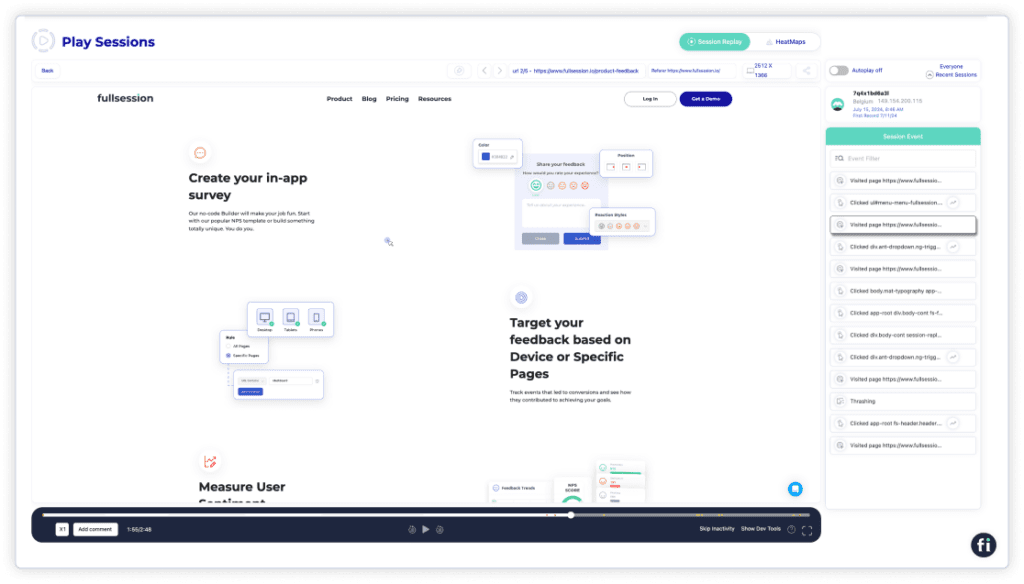
    FullSession focuses on debugging. You can filter sessions by error events, funnels or user attributes to jump directly to the most impactful recordings.

    Feedback and Surveys (The Missing Link)

    Microsoft Clarity does not include native feedback or survey tools. You can see what users did, but you cannot ask them why directly inside the product.

    Hotjar built its name on incoming feedback widgets, surveys and on page polls. For many marketers, this direct feedback is the main reason they adopt Hotjar.

    FullSession combines behavioral data with lightweight feedback options so you can attach voice of customer insights to specific sessions and journeys.

    Fig. 1: A split view dashboard with Microsoft Clarity on the left showing basic traffic metrics and FullSession on the right highlighting rage clicks, error rates and funnel drop off charts.

    The Third Option: Why FullSession Wins on Value

    If you feel caught between a free but data hungry tool and a popular but sampling heavy tool, FullSession acts as the middle path for serious SaaS and product teams.

    Unsampled Insights

    FullSession records every interaction without aggressive sampling. When a high value customer reports a checkout error, your team can:

    • Search that specific user by email or IP, depending on your setup
    • Open the exact session recording from the time of the complaint
    • See the sequence of clicks, errors and UI states that led to the problem

    This reduces guesswork and support back and forth, especially for complex flows such as multi step forms, onboarding or subscription upgrades.

    Advanced Funnel Analysis

    Neither Hotjar nor Microsoft Clarity offers deep funnel analysis out of the box. FullSession lets you define multi step funnels such as:

    • Visit pricing page → Start trial → Complete onboarding
    • Add to cart → Shipping → Payment → Thank you page

    You can then watch only the recordings of users who dropped off at a specific step. This connects the what (drop off rate) with the why (video evidence of the friction).

    See How FullSession Compares – Book a Demo

    Comparison Matrix: Hotjar vs Clarity vs FullSession

    The table below summarizes the main differences between Microsoft Clarity, Hotjar and FullSession for teams evaluating their analytics and UX stack.

    Feature Microsoft Clarity Hotjar FullSession Best Value
    Cost Free forever Paid plans that scale with traffic (can be expensive at high volume) Transparent pricing with plans designed for growth teams, product management and engineering. There is also a free forever plan.
    Data Privacy Uses anonymized data to improve Microsoft Ads and products GDPR compliant when configured correctly Fully GDPR, CCPA and PCI compliant with PII masking by default
    Data Sampling No sampling, but limited advanced filtering High sampling on many plans which can miss critical sessions Zero sampling with full visibility into every session
    Feedback Forms No native feedback or survey tools Rich surveys, NPS and incoming feedback widgets Integrated feedback tied to specific sessions and journeys
    Heatmaps Basic click and scroll maps, limited SPA support Click, scroll and move maps for static pages Interactive heatmaps that work on dynamic content and modern web apps
    Funnel Analysis Very basic path and filter options Limited funnel views, not the primary focus Advanced, configurable funnels connected directly to session replays
    Error Tracking Basic JavaScript error detection Lightweight issue reporting Advanced console logs and error analysis linked to individual sessions

    Conclusion: Which Tool Fits Your Stack?

    There is no universal winner. The best choice depends on your goals, budget and risk tolerance.

    • Use Microsoft Clarity if you are a blogger or small business with zero budget and low privacy sensitivity.
    • Use Hotjar if you are a marketer who cares most about surveys, polls and quick user feedback on landing pages.
    • Use FullSession if you are a Product Manager or SaaS founder who needs to debug errors, optimize funnels and trust 100 percent of your behavioral data.

    Instead of guessing why users drop off, watch what actually happens and fix it with confidence.

    Frequently Asked Questions

    Is Microsoft Clarity really free?

    Yes. Microsoft Clarity is free from a pricing perspective. The tradeoff is that Microsoft can use the anonymized data collected from your site to improve its advertising and product ecosystems.

    Does Hotjar slow down my website?

    Hotjar can impact performance metrics such as Time to Interactive because it loads scripts for heatmaps, recordings and feedback widgets. Tools that use lighter, asynchronous scripts like FullSession are designed to minimize this impact on Core Web Vitals.

    Why is data sampling bad for SaaS?

    In SaaS, you often need to debug specific issues reported by high value accounts. If your analytics tool samples traffic and does not record every session, the exact session you need to investigate may never be available, which makes it harder to reproduce and fix critical bugs.

    Can I migrate from Hotjar to FullSession?

    Yes. You can install the FullSession script alongside Hotjar and run both in parallel during a transition period. This lets you compare data quality and confidence before fully switching over.

    Is FullSession GDPR compliant?

    FullSession is fully GDPR, CCPA and PCI compliant. The platform offers automatic masking of personally identifiable information in input fields and tools to honor regional privacy regulations.

  • We Tried Hotjar vs Microsoft Clarity: Here’s Our Feedback

    We Tried Hotjar vs Microsoft Clarity: Here’s Our Feedback

    Customer experience analysis is complex. Despite your best efforts, you might misinterpret user data or miss crucial website usability issues.

    User behavior tools can simplify this process, offering accurate and relevant insights into website performance and user experience.

    Hotjar and Microsoft Clarity are popular user behavior analytics software that provide insights into how users interact with your website or web apps. However, each has limitations—Hotjar may slow down your site during UX analysis, while Microsoft Clarity lacks advanced behavior analytics tools and features.

    These drawbacks often push users to seek alternatives.

    In this comparison article, we’ll explore the main differences between these two tools to help you decide which is best for your team.

    We’ll also introduce FullSession, which combines the key features of Hotjar and Microsoft Clarity and goes a step further by offering advanced dynamic element analysis and comprehensive user engagement tracking—features these tools lack.

    Start a free trial or book a demo to learn more.

    Key Takeaways

    1. Hotjar and Microsoft Clarity are user behavior analytics tools that help businesses understand how visitors interact with their websites.
    2. FullSession is the best alternative, combining the strengths of both solutions while introducing unique features. It excels in real-time analysis of user interactions with dynamic content without compromising website performance. Book a demo today to see FullSession in action.
    3. FullSession captures all user interactions in real-time, provides visual reports, and allows you to analyze key user behavior metrics in one place to boost your website optimization. It also helps identify frustration signals that lead to funnel drop-offs and decreased conversion rates. 
    4. While Hotjar offers a comprehensive suite of user behavior tools, Microsoft Clarity primarily focuses on heatmaps and session recordings and lacks customer feedback tools, funnel and conversion tracking. FullSession, however, includes the same features as Hotjar and adds advanced customer feedback forms, analysis, and reports. It connects each feedback to a session recording, providing deeper insights into user sentiments and frustrations.
    5. Hotjar handles user data responsibly, whereas Clarity grants Microsoft rights to use the data collected, raising privacy concerns. FullSession, on the other hand, is GDPR, CCPA, and PCI compliant, ensuring robust data security and user privacy.
    6. Microsoft Clarity is entirely free but comes with a limited feature set. Both Hotjar and FullSession start at $23 per month. However, FullSession grants access to all key features and allows tracking of up to 5,000 monthly sessions, compared to Hotjar’s limit of 100 daily sessions. FullSession also offers a 20% discount on the annual plan, providing more value for businesses with higher traffic. Visit the Pricing page for more details.

    While Hotjar and Microsoft Clarity each offer valuable features, FullSession stands out as the best option due to its comprehensive feature set, superior tracking capabilities for dynamic elements, strong data privacy compliance, and competitive pricing.

    Its ability to provide real-time insights and connect the user feedback data directly to session recordings makes it invaluable for businesses looking to improve user experience and optimize their websites.

    What is FullSession?

    FullSession is a web analytics software that helps e-commerce businesses, product teams, and digital marketing teams track and analyze user engagement data to understand better how web visitors engage with various site features.

    With FullSession, you can identify funnel drop-offs and areas where users experience setbacks when navigating your site so you can fix website issues and boost conversions.

    Start a free trial or book a demo today.

    What is Hotjar?

    Hotjar is a user behavior analytics software that helps businesses understand how website visitors interact with various website pages via session recordings, heatmaps, surveys, and website feedback widgets.

    With Hotjar, you can see how users navigate specific web pages and answer questions like; 

    • Do users scroll excessively? 
    • What buttons do they give the most attention to? 
    • Which page elements are blocking conversions?

    Hotjar doesn’t just let you visualize user activities; it also enables you to uncover the reasons behind their actions to learn what works or not to improve user experience.

    If you want to learn about other analytics tools and how they compare to Hotjar, you can read the following comparison articles: 

    1. Hotjar vs Mixpanel
    2. Hotjar vs MouseFlow 
    3. Smartlook vs Hotjar
    4. Decibel Insight vs Hotjar
    5. Lucky Orange vs Hotjar
    6. Hotjar vs Inspectlet

    What is Microsoft Clarity?

    Microsoft Clarity is a Microsoft product that visually represents user behavior across individual website pages.

    This web behavior analytics tool creates detailed heatmaps determining which parts of the website drive maximum user engagement and provides information about rage clicks, dead clicks, excessive scrolling, user inactivity, and JavaScript errors. 

    It also allows you to record individual user behavior sessions, too.

    Hotjar vs Microsoft Clarity: How They Compare and Contrast

    Hotjar and Microsoft Clarity are behavior analytics tools that help you analyze user engagement data. In this section, we’ll evaluate their strengths and weaknesses to help you choose the right tool for your business. 

    Additionally, we’ll highlight the benefits of FullSession and how you can use them to your advantage.

    Hotjar vs Microsoft Clarity: Basic differences

    When comparing Hotjar and Microsoft Clarity, it’s essential to understand their key differences. Here are four fundamental distinctions:

    1. Integrations: Hotjar integrates with numerous third-party tools, such as Slack, Segment, HubSpot, and Google Optimize, and offers over 1,000 integrations via Zapier. In contrast, Microsoft Clarity integrates only with Google Analytics.
    2. Feedback collection: Both tools provide session recordings and heatmaps, but Hotjar also offers surveys and a feedback widget to capture user sentiments. Microsoft Clarity does not support user feedback collection.
    3. Behavioral insights: Microsoft Clarity provides an overview of user behavior and experience on your website. Hotjar, however, does not offer an overview of user behavioral trends.
    4. Target audience: Hotjar includes advanced behavior analytics tools designed for team collaboration, while Microsoft Clarity is more suited for individuals who do not require team-based features.

    Having introduced Hotjar and Microsoft Clarity and highlighted their differences, let’s explore their user ratings, deployment, use cases, pricing, integrations, and features.

    Hotjar vs Microsoft Clarity: User rating

    To understand user feedback on both tools, we checked G2 reviews. Hotjar has been recognized positively by users on platforms like G2.

    It has 4.3 out of 5 stars from 260 reviews, while Microsoft Clarity got 4.4 out of 5 from 15 reviews.

    Hotjar vs Microsoft Clarity: Use cases

    Hotjar suits e-commerce, digital marketing, product development, and research analysis teams.

    Microsoft Clarity is a good option for site owners with differing traffic levels, from bloggers to enterprises. However, it has some drawbacks; due to diverse analytics needs across industries, Microsoft Clarity may not effectively meet all requirements.

    FullSession best suits e-commerce, SaaS/web apps and general websites. It helps individuals and teams in quality assurance, customer support, product development, marketing, sales, UX design and data analytics.

    Hotjar vs Microsoft Clarity: Deployment

    Microsoft Clarity, Hotjar and FullSession allow you to use their web analytics features similarly. To deploy each solution, you must install its code snippet into your site’s source code. 

    The code snippet logs analytics data like mouse trails, button clicks, scroll depth, browser information, and text inputs.

    Hotjar vs Microsoft Clarity: Key features comparison

    In this section, we’ll explore the key features of Microsoft Clarity, Hotjar, and FullSession, and discuss what distinguishes each of these user behavior analytics solutions.

    1. Session recordings

    While both Microsoft Clarity and Hotjar offer session recordings to observe user navigation, Hotjar provides additional collaboration features. 

    It allows you to skip user inactivity in sessions, making it easier to find relevant activities quickly. Hotjar also enables the use of custom tags to mark challenging recording sessions.

    How FullSession session recordings and replays work

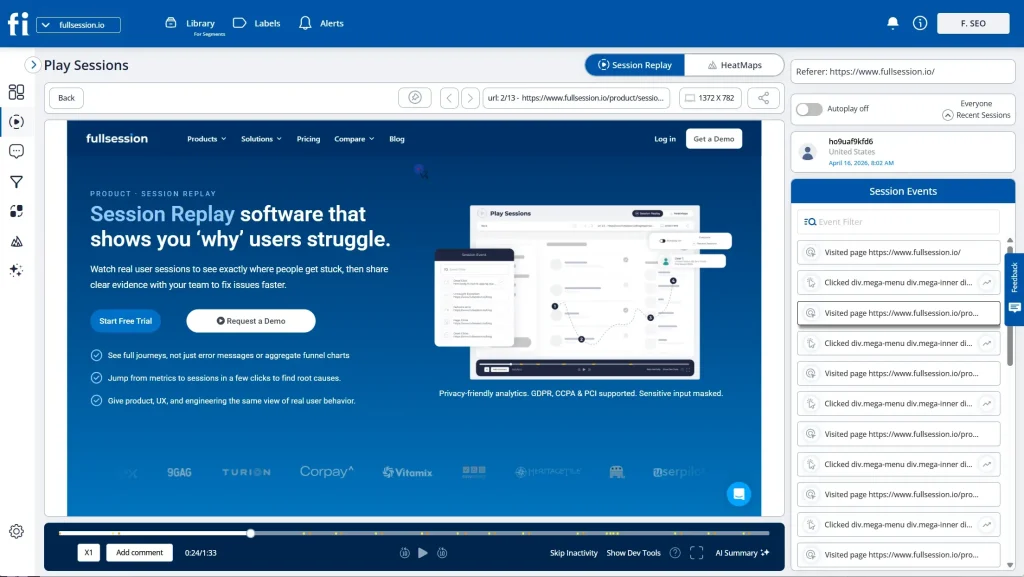
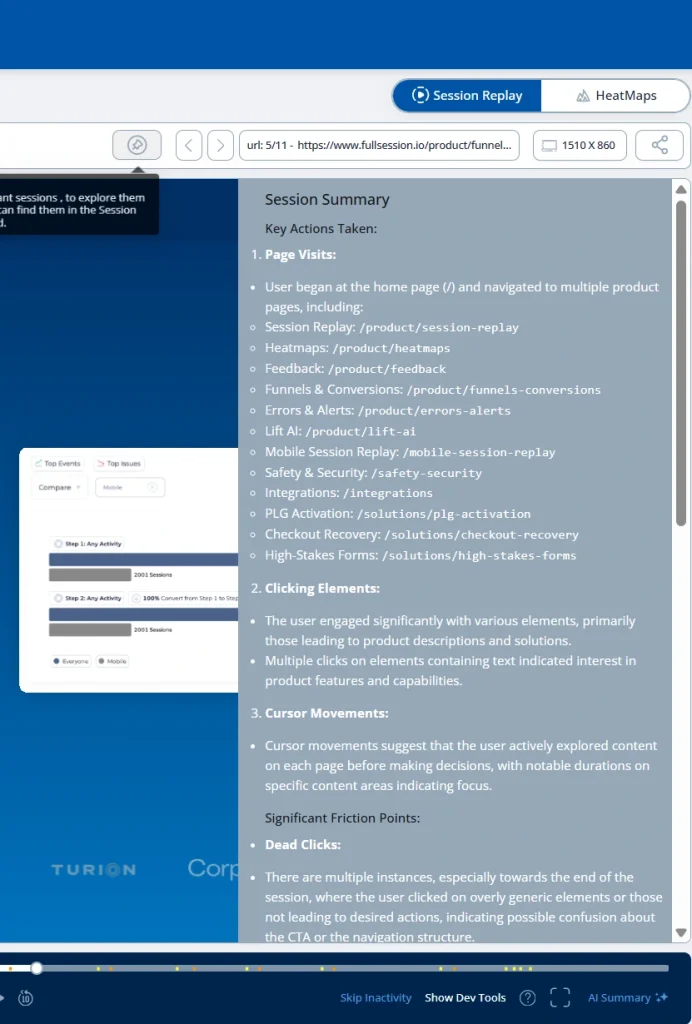
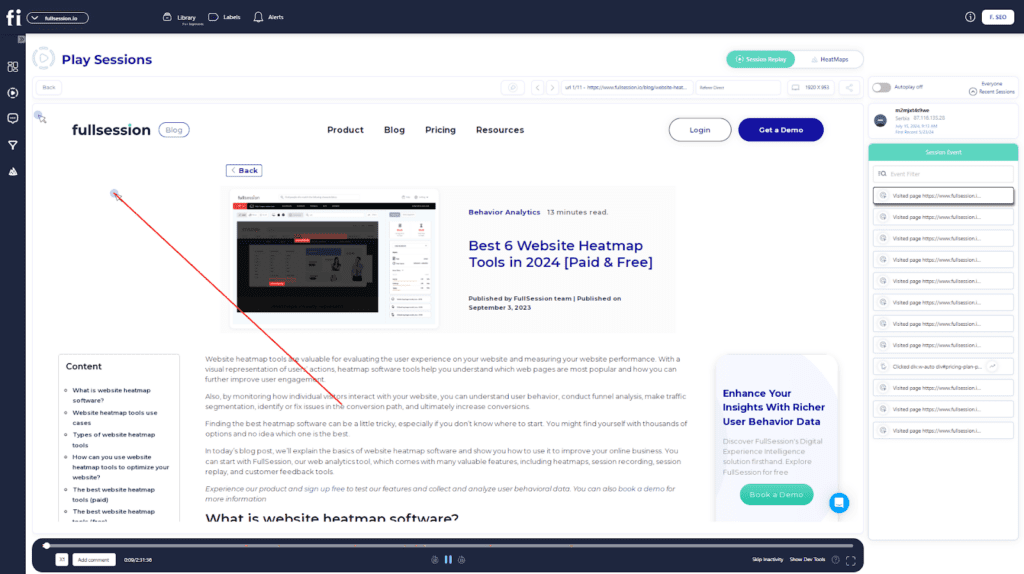
    Our session recordings and replay tool help you see every user activity on your website. 

    With this feature, you can see how users interact with individual web pages, including how they scroll, areas they rage click, and the web content they find most useful. Here is what you can accomplish with our session recordings:

    1. Identify broken links, website bugs, or usability problems 
    2. Track the total time users spend on your web pages
    3. Evaluate overall user trends 
    4. Monitor the total pages that users visit 
    5. Measure the performance of specific marketing campaigns to maximize advertising ROI

    Session recordings and replays are important analytics features that help you skip the guesswork and use real-time user engagement data to understand how people interact with your site.

    Our session recording and replay also allows you to analyze user behavioral data such as

    • User location and IP address 
    • Total time on page
    • Clicked URLs
    • Session events 
    • Session list
    • Visited web pages 
    • Referrals 

    In addition to providing a complete picture of users’ activities, you can apply advanced filters to identify critical events in a user session.

    2. Heatmaps

    Hotjar and Microsoft Clarity provide website heatmap tools, but Hotjar offers unlimited heatmaps and comes with additional functionality. While both provide scroll and click maps, Hotjar also includes move maps that are unavailable in Microsoft Clarity. 

    FullSession provides interactive and data-driven heatmaps

    Our website heatmap tools provide visual reports of web pages with the highest user engagement. This feature allows you to visualize the user journey on your website. 

    For instance, if you own an e-commerce site, you can answer questions like: 

    1. Which product images do users give the most attention to? 
    2. Are users paying any attention to the CTA button or ignoring it? 
    3. Do users have any issues with web forms?

    Even more, we provide three types of heatmaps 

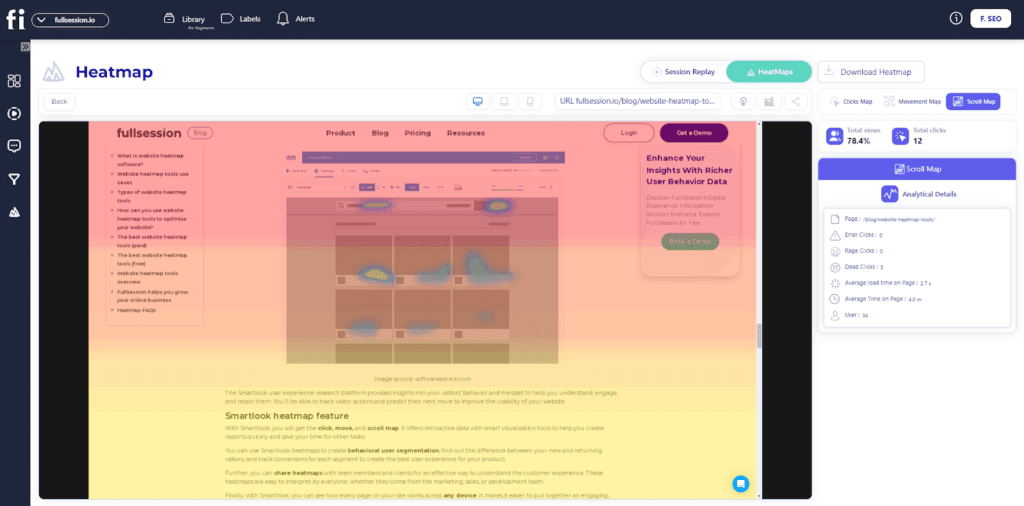
    • Scroll maps to analyze the scroll depth of your site
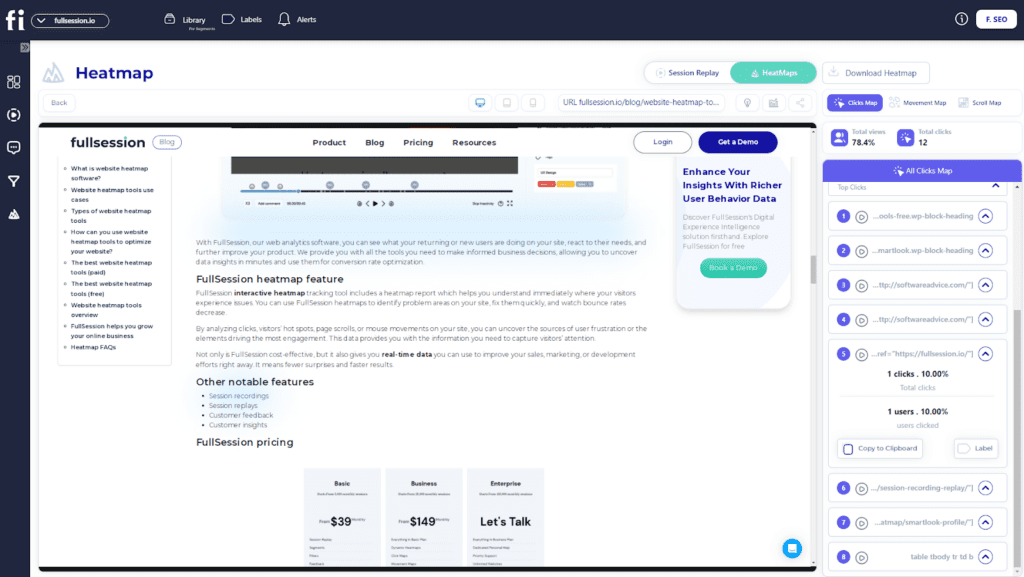
    • Click maps to gather data and identify the areas where users click the most
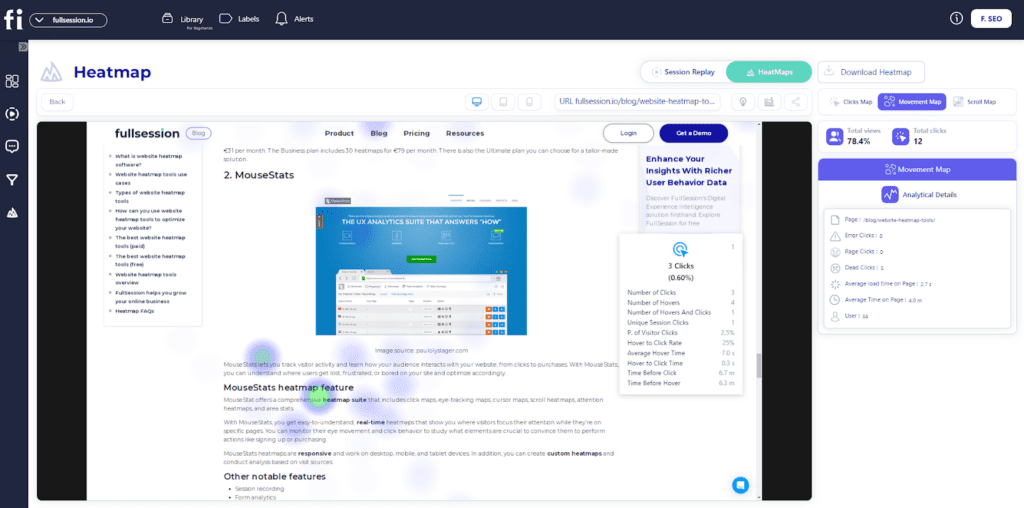
    • Move maps to see how users behave while navigating your site

    These essential features serve as pointers for detecting potential usability issues, low engagement data, or dead links.

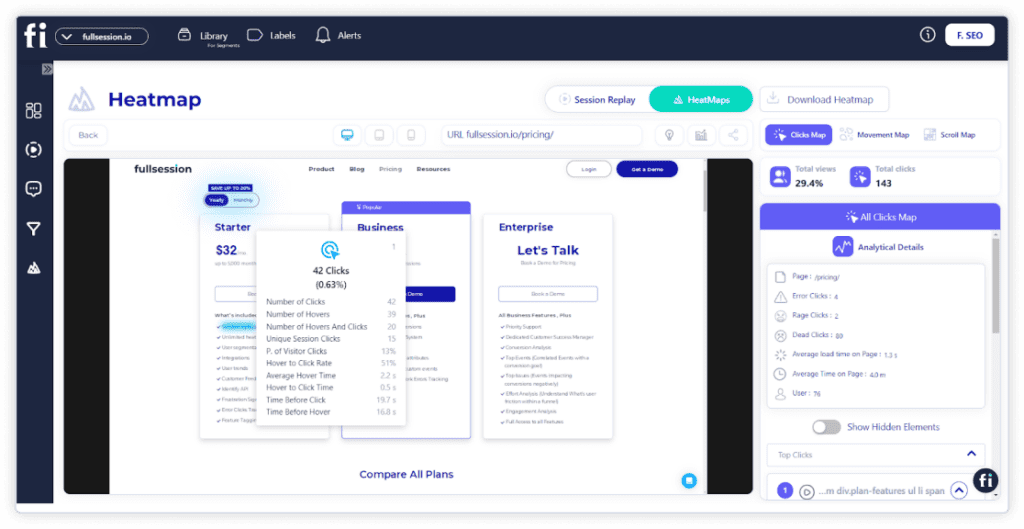
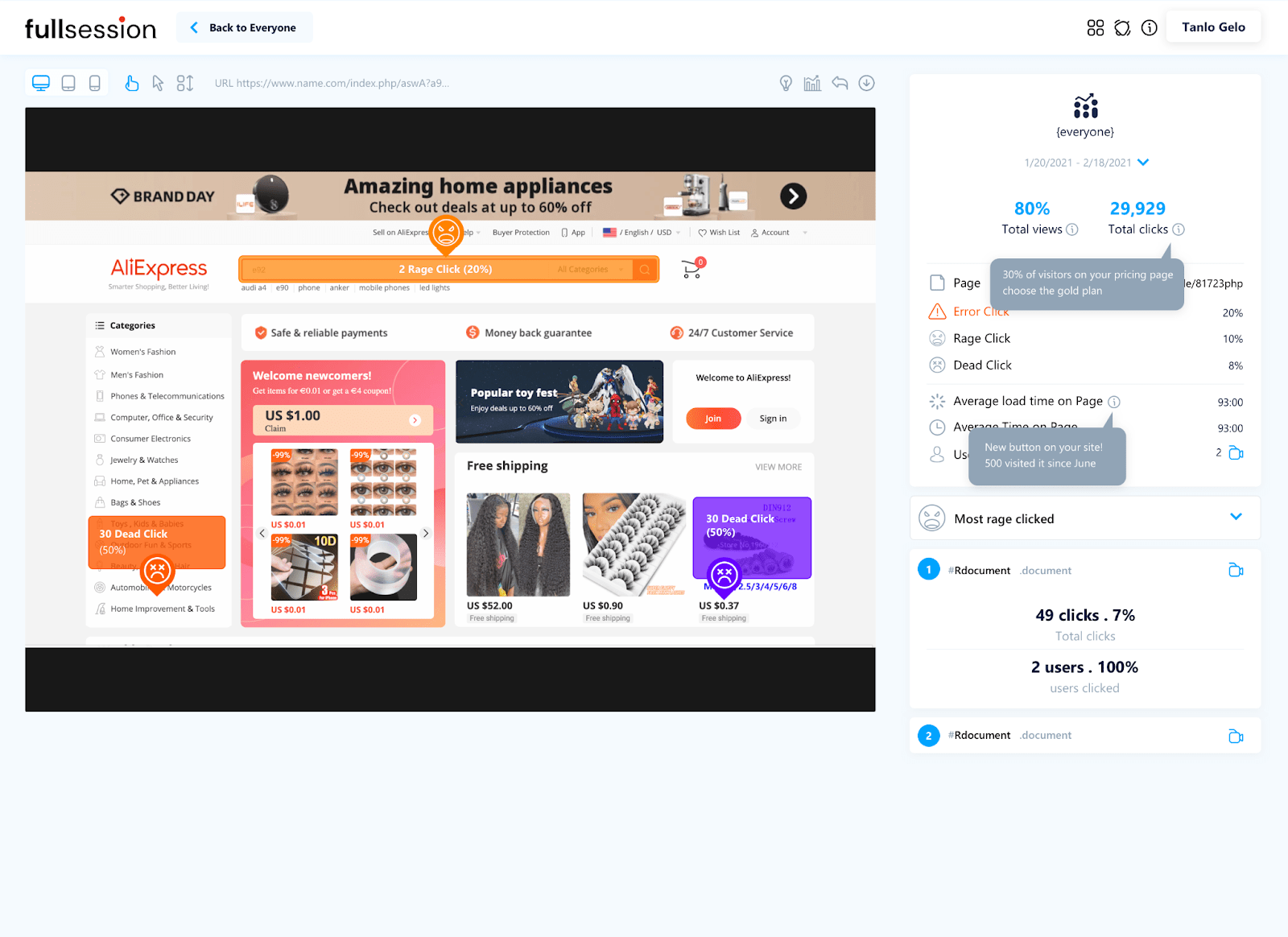
    You can also use the FullSession interactive heatmaps to filter user actions and perform the following activities:

    • Preview the heatmap on different devices
    • See the URL the user visited
    • See the number of total views and total clicks
    • Watch error clicks
    • Track rage clicks
    • Monitor dead clicks
    • See the average load time on page
    • See the average time on page
    • Track the number of users that visited the page

    You can use these analytics data to filter necessary customer actions across multiple pages and optimize your site’s functionality for better performance.

    Click map example

    Scroll map example

     Mouse movement map example

    3. Survey and user feedback tools

    Hotjar enables you to gather feedback from web visitors, helping you understand their thoughts on your website’s functionality and online experience. 

    In contrast, Microsoft Clarity lacks survey and user feedback tools, limiting your ability to collect crucial information about user issues.

    FullSession provides customer feedback widget to collect user feedback

    With our customer feedback widget, you can collect customer feedback in real-time to understand how users feel about your website’s performance.

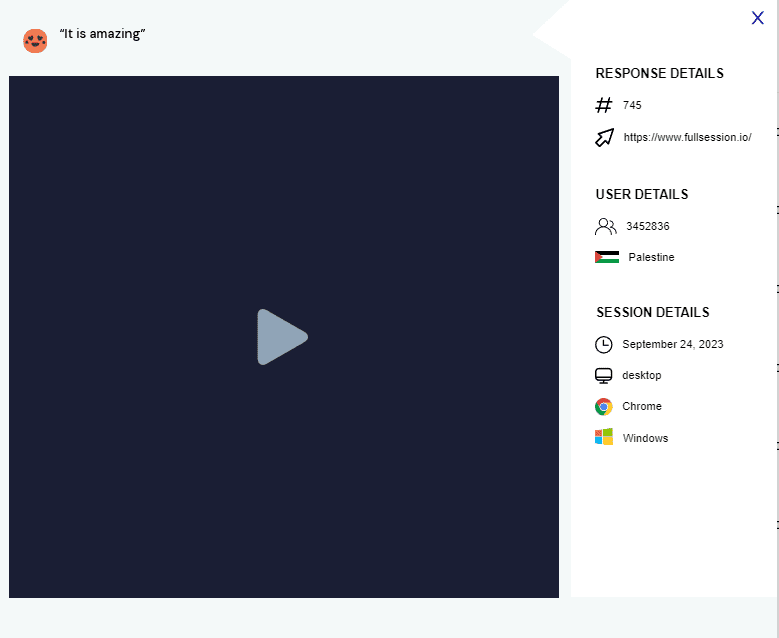
    Using several classifications, you can analyze our customer feedback report to evaluate the feedback you receive from customers. For instance, you can see the user information, such as 

    • Email address
    • Location
    • The feedback customers submitted
    • Device type
    • Date of feedback
    • URL they engaged with

    You can also watch a session recording connected to the feedback to understand better what happened during the session.

    Additional features of FullSession user behavior software

    Now, let’s explain some additional FullSession features that make it a smarter choice than Hotjar and Microsoft Clarity.

    Advanced user analytics to gain actionable insights

    With FullSession advanced analytics, you can capture and collect data on every aspect of your users’ sessions to gain valuable insight into their behavior. Here are some of the metrics you can evaluate in our analytical dashboard:

    • User trends
    • Segment health
    • Feedback trends
    • Device breakdown
    • Browser breakdown
    • User feedback trends
    • Top referrers
    • Screen resolution breakdown
    • Error clicks and rage click

    Advanced user segmentation and filtering options

    With advanced user and event segmentation and filtering options, you can create unique user segments to filter important user events and identify questionable sessions.

    Funnels and conversion tracking

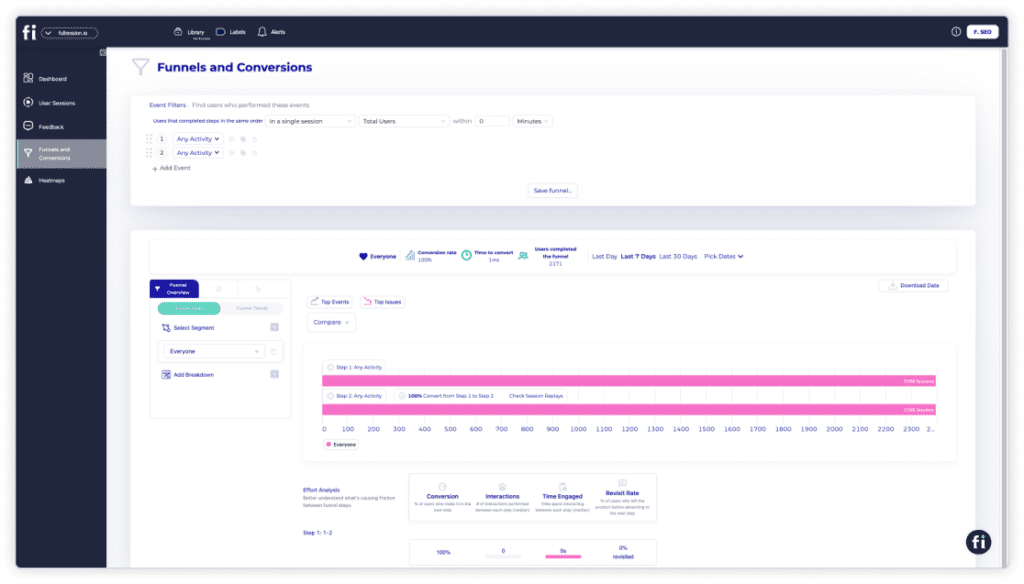
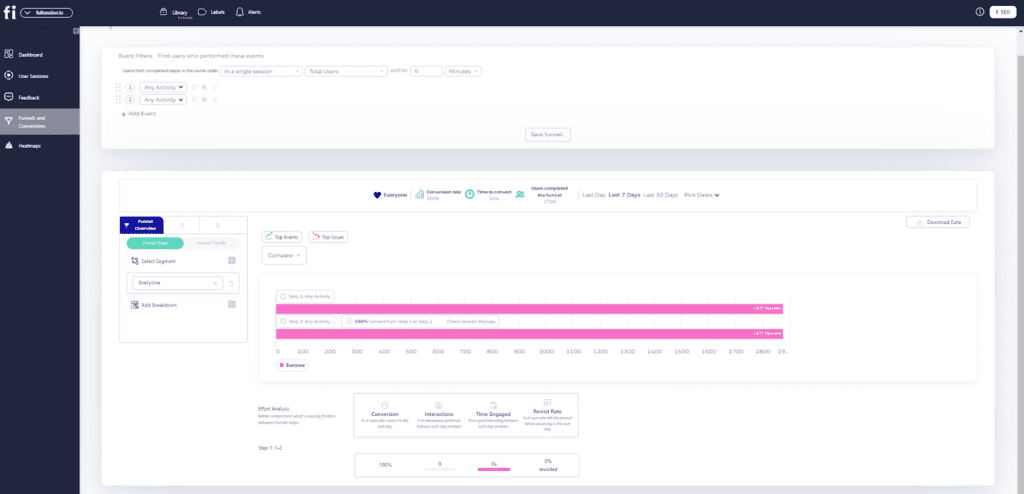
    The FullSession web analytics tool provides conversion and funnel tracking features and offers a detailed analysis of user journeys to help you optimize conversion funnels. It includes:

    • Funnel steps: Visualize user progression, conversion, and drop-off rates.
    • Funnel trends: Monitor changes in user flows and conversion rates over time.
    • Top events: Identify key actions that boost conversions.
    • Top issues: Detect obstacles that reduce conversions and implement fixes.
    • Time engaged: Measure interaction time to identify frustration points.
    • Top engaged: Highlight the most engaging steps or features.
    • Revisit rate: Track exits before advancement to identify issues.
    • Segment analysis: Compare performance across user segments.
    • Time period comparison: Analyze trends over different periods.

    Error analysis

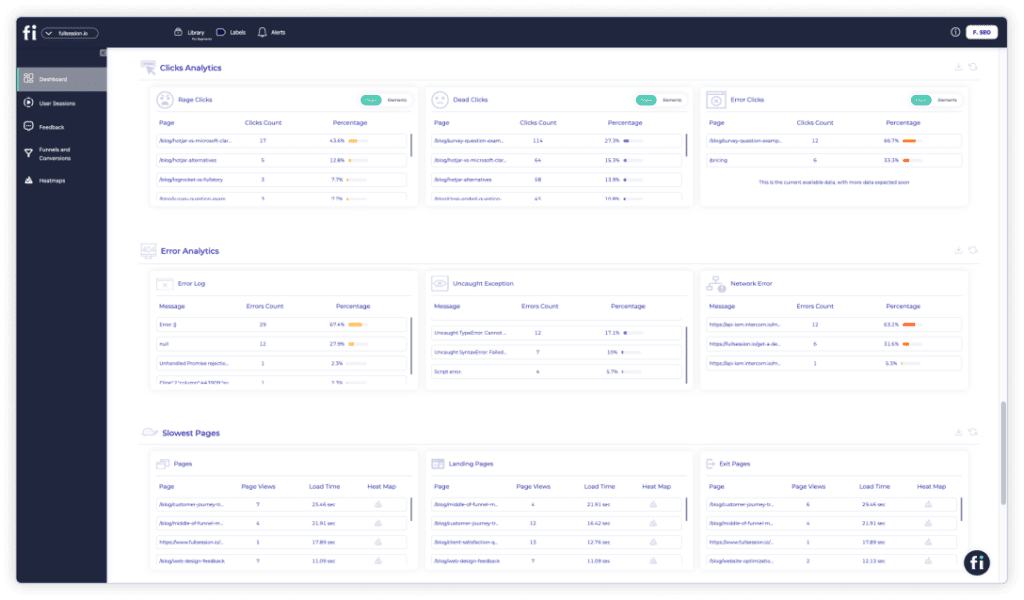
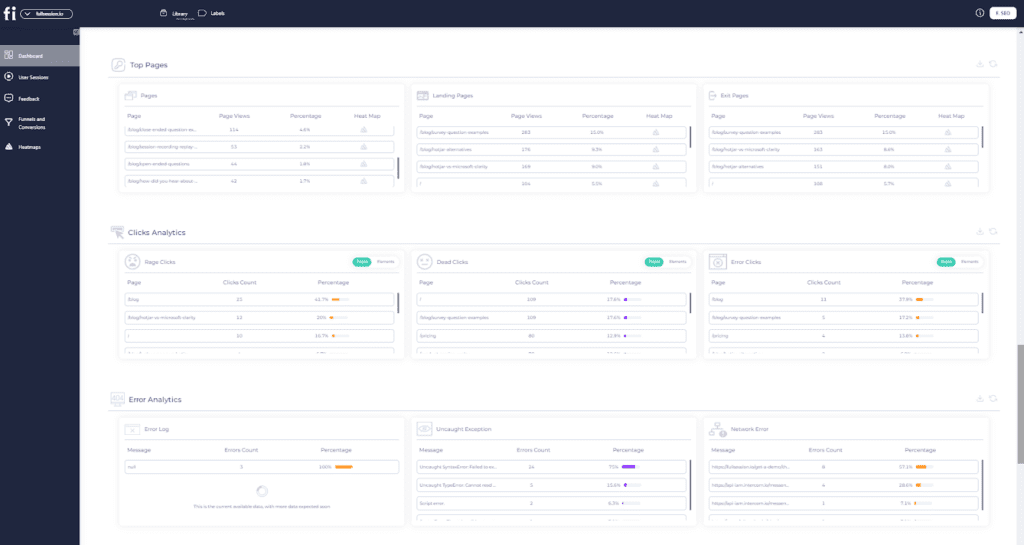
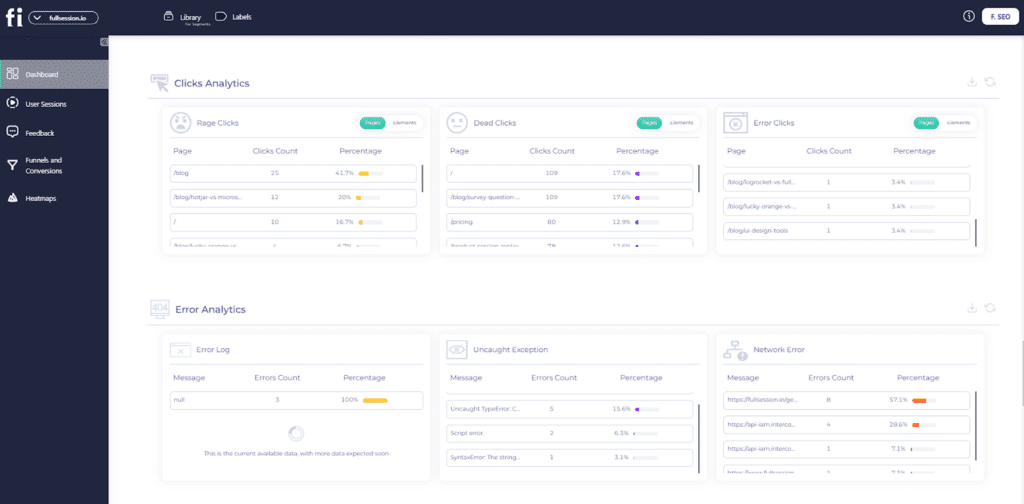
    FullSession error analysis identifies, analyzes, and resolves errors impacting user experience using data on error clicks, network errors, console errors, error logs, JavaScript errors and uncaught exceptions.

    This feature provides actionable insights to enhance reliability and user satisfaction.

    • Error clicks: Detect and fix non-responsive elements with session replays.
    • Network errors: Monitor and analyze server request failures.
    • Console errors: Log and analyze JavaScript errors with session replays.
    • Error logs: Capture detailed error information for debugging.
    • Uncaught exceptions: Monitor and handle critical errors to prevent crashes.
    • Error trends: Segment data and visualize error trends over time.
    • Alerts: Get real-time alerts via Slack and customize notifications.

    Experience the power of advanced dynamic element analysis and comprehensive user engagement tracking to optimize your website’s performance.

    Hotjar vs Microsoft Clarity: Languages

    Microsoft Clarity offers analytical web services in multiple languages, including English, Spanish, French, and German. 

    Hotjar’s primary interface and documentation are in English, but its surveys and feedback tools support other languages. 

    FullSession fully supports English, French, and Arabic.

    Hotjar vs Microsoft Clarity: Integrations

    Regarding integrations, both analytics tools offer different options. 

    Hotjar integrates with many third-party apps, such as Slack, Segment, WordPress, HubSpot, Shopify, and Google Optimize and offers over 1,000 integrations via Zapier. 

    Microsoft Clarity integrates with Google Analytics and various AB testing, CRO, marketing, and e-commerce tools.

    FullSession integrates with Zapier and platforms like Shopify, Wix, BigCommerce, and WordPress.

    Hotjar vs Microsoft Clarity: Support

    Hotjar has a dedicated support team and provides more personalized customer support than Microsoft Clarity.

    It offers diverse support options, responds to email tickets within 48 hours, and has a free learning hub for all users, including product tours and video demos. 

    Microsoft Clarity provides support through FAQs, documentation, and email contact.
     
    FullSession supports users via live chat and a knowledge base.
    Now, let’s move on to the pricing structure for each software.

    Hotjar vs Microsoft Clarity: Pricing

    Both Hotjar and Microsoft Clarity allow unlimited users on their free plans.

    Microsoft Clarity offers free access to all its web analytics features without requiring an upgrade to a premium plan.

    Hotjar has a free forever plan. It comes with limited features, so you need to upgrade for more data. It charges monthly and yearly fees for its modular paid plans—Observe, Ask, and Engage:

    • Observe Plan: Heatmaps and recordings range from $39/month for up to 100 daily sessions to $213/month for tracking 500 to 270k daily sessions.
    • Ask Plan: Surveys and feedback features range from $48/month for 250 monthly responses to $128/month for unlimited responses.
    • Engage Plan: The cost of user interviews ranges from $39/month for three monthly interviews to $440/month for 12 interviews.

    FullSession offers a 14-day free trial and a 20% discount on yearly plans.

    Unlike Hotjar’s modular approach, FullSession combines all necessary features—heatmaps, session recordings, surveys, conversion and funnel tracking, error tracking and user feedback—into one cohesive platform, simplifying user experience and management.

    The Starter Plan, at $32/month, includes all essential features and allows tracking up to 5,000 monthly sessions. The Business Plan consists of all advanced features at $60/month and allows tracking up to 100,000 monthly sessions, providing more value for money.

    We also offer an Enterprise plan we can customize to your needs.

    For more details, visit the Pricing page or book a demo today.

    Hotjar vs Microsoft Clarity vs FullSession: A Summary

    Here is a brief comparison table highlighting the features of Hotjar, Microsoft Clarity, and FullSession.

    Features/similarities and differencesHotjarMicrosoft ClarityFullSession
    Real-time session recording
    Funnel analysis
    Customer segmentation
    Customer journey mapping
    Conversion tracking
    Interactive heatmaps
    Surveys and customer feedback
    Insights
    Free version
    Free trial
    Analysis of dynamic elements
    Customer Support

    What Makes FullSession Stand Out

    When you examine the FullSession platform closely, you’ll notice some similarities to Hotjar and Microsoft Clarity. However, numerous aspects make it unique. 

    Here are the most important ones:

    1. Using FullSession, you can track and analyze how your site users interact with website elements like headers, hamburger menus, product images, and forms. You can use the insights to improve site performance and increase conversions.
    2. FullSession visualizes your best-performing web content and pages with the least engagement.
    3. With FullSession, you can conduct UX analysis without slowing your website performance, unlike Hotjar, which can significantly slow down your site’s loading speed.
    4. FullSession helps you run surveys and collect customer feedback to understand the “why” behind visitor behavior and user actions.
    5. Our insights feature provides an analytical overview of various user events so you can quickly grasp user behavior and website performance.

    Now that we’ve highlighted the traits that make FullSession stand out, let’s explore why FullSession is an excellent tool for monitoring visitor behavior and user actions.

    Five Reasons to Use FullSession

    Here are five reasons why FullSession is ideal for tracking user events and behavior:

    1. FullSession helps you save time and improve web user experience by identifying key events within a session.
    2. Our website optimization software provides a 14-day free trial so that you can test our analytics features.
    3. With FullSession, you can quickly identify your web pages with broken links, low engagement, rage clicks, and areas blocking conversions.
    4. FullSession provides advanced audience segmentation and filtering options. These options allow you to create specific user attributes that can be used to filter critical events in a session.
    5. You can dig deeper into customer insights by collecting feedback through a user and form system.

    Hotjar vs Microsoft Clarity: Final Words

    Hotjar and Microsoft Clarity are analytics-tracking applications that help you identify and fix website bugs to improve your web performance.  

    A significant difference between the two software programs is that Hotjar is designed for cross-functional team collaboration and provides more advanced behavior analytics features than Microsoft Clarity.

    Microsoft Clarity is suitable if you have a site with less traffic and need basic web tracking features.

    Also, if you want to learn more about other analytics tools, you can check out our in-depth review of Hotjar alternatives. You can also read our Hotjar vs Crazy Egg and Hotjar vs FullStory comparison articles.

    FullSession, our user behavior analytics platform, helps you perform accurate UX analysis without affecting your site’s performance. It enables you to understand user behavior and track mouse movements, scroll patterns, and text inputs to improve the user experience.

    FullSession also doesn’t require advanced technical skills. It offers real-time user session recordings, interactive heatmaps, conversion and funnel analysis, error tracking tools and customer feedback to help you make better product development and optimization decisions.

    See your website through your users’ eyes. Discover advanced insights and optimize your user experience!

    Book a demo today

    FAQs About Microsoft Clarity and Hotjar

    Who uses Microsoft Clarity?

    Microsoft Clarity is used by website owners, digital marketers, UX/UI designers, and developers. It’s beneficial for anyone looking to understand user behavior, improve website performance, and enhance user experience through detailed analytics.

    What is the difference between Hotjar and Google Analytics?

    Hotjar focuses on user behavior insights with tools like heatmaps, session recordings, and feedback polls. Google Analytics provides comprehensive website traffic data, including visitor demographics, traffic sources, and conversion tracking.

    While Hotjar offers qualitative data about user interactions, Google Analytics provides quantitative data on overall site performance. To learn more about the difference between Hotjar and Google Analytics, you can check out our Hotjar vs Google Analytics comparison article.

    Is Microsoft Clarity better than Hotjar?

    It depends. Clarity is free and integrates with Microsoft products. Hotjar offers more features like surveys and conversion funnels but requires a subscription for advanced features.

    What are the disadvantages of Hotjar?

    Hotjar’s advanced features are costly, data retention is limited on free plans, scripts can slow down websites, and the free plan has restricted features. Some advanced tools can be complex to set up.

    Is Microsoft Clarity really free?

    Yes, Microsoft Clarity is completely free with no hidden costs or premium plans.

    What is the point of Microsoft Clarity?

    Microsoft Clarity provides insights into user behavior with heatmaps and session recordings, helping improve website performance and user experience, all for free.


  • User Testing vs. Usability Testing: What’s the Difference?

    User Testing vs. Usability Testing: What’s the Difference?

    Have you ever wondered about the difference between user testing and usability testing? Though often used interchangeably, they have different purposes. Both aim to identify functionality issues and UX design flaws impacting the user experience. Due to this overlap, many mix them up. 

    In this blog post, we’ll clarify the user testing vs usability testing differences and explain why both are crucial for understanding user needs.

    We’ll also introduce FullSession, our user behavior analytics software, which helps you gather user feedback and optimize websites, web apps, and landing pages. It efficiently collects quantitative and qualitative data and features session recording and replay, interactive heatmaps, error analysis, funnel and conversion tools, customer feedback widgets, and more.

    So, if you want to learn exactly how customers interact with your website and what sparks their interest, schedule a demo now or read this blog post. 

    Let’s get right into it!

    User Testing vs Usability Testing: The Main Difference 

    User and usability testing are essential to designing websites, web apps, landing pages, and mobile apps, but they are not the same.

    User testing lets you observe how real-life users interact with a product. In contrast, usability testing focuses on identifying and solving specific usability problems and determining whether the product works correctly.

    Generally, user testing should be conducted before launching a product and throughout the development and design process. You can also conduct usability testing after a product is released to get user feedback.

    User Testing vs Usability Testing: The Purpose 

    Understanding the difference between user testing and usability testing is key for anyone involved in designing and developing products, especially in software and web development. 

    User testing shows how real users interact with a product and helps you identify any issues they encounter. This type of testing is holistic, focusing on broader questions about user experience and satisfaction. The main goals are identifying user needs, evaluating user satisfaction, uncovering pain points, and gathering user feedback.

    Common methods include surveys, interviews, and focus groups. User testing is beneficial throughout the product lifecycle, especially early on, to ensure the product meets user needs and expectations.

    On the other hand, usability testing assesses how easily and effectively users can accomplish tasks using the product. This type of testing is more specific and targets the product’s design and functionality. 

    The primary objectives are to measure task success and identify usability issues hindering the user’s ability to use the product efficiently.

    User Testing vs Usability Testing: When to Use Each

    Start with UX testing as soon as possible. Usability testing is critical during development because it helps ensure your product meets users’ needs.

    However, you shouldn’t stop performing usability testing even after the product launch, especially if you plan to introduce new software features. Usability testing determines how easy it is for customers to use your product or website, so it’s essential to approach it thoroughly.

    On the other hand, user testing is vital throughout the entire product lifecycle. User testing methods like surveys and market research are great for gathering ideas before launch. Other techniques, like A/B testing, should be done post-launch to ensure that your product meets the quality levels your customers expect.

    Convenient usability testing tools like FullSession can help you identify potential usability issues and weak spots on the website, web app, or landing page through interactive heatmaps, customer feedback forms, funnel and conversion tracking, error analysis, and session recordings and replays.

    FullSession combines important user and usability testing features to help you analyze user behavior and provides insights on friction points that may lead to website abandonment or affect conversion rates.

    Usability testing tools

    Interactive heatmaps work in real time and show what the user pays attention to. They use visual data to showcase results—users interact with red and warm-colored areas the most, while blues and colder colors represent areas users interact with the least.

    Session recordings help you determine which parts of the website users have issues navigating. The FullSession session recording tool captures each user session and all key interactions. You can replay each recording and see what caused the customer to leave your website.

    FullSession’s funnels and conversions feature provides a comprehensive analysis of user journeys, enabling you to track, understand, and optimize each step of your conversion funnel. 

    You can visualize the progression of users through each step, identify key actions driving conversions, and pinpoint issues causing drop-offs. 

    The error analysis feature assists in detecting, evaluating, and fixing various errors affecting user experience. 

    FullSession uses extensive data on error clicks, network errors, console errors, error logs, and uncaught exceptions to offer valuable insights for improving the reliability of your digital products.

    The customer feedback form lets you collect insights directly from website visitors. FullSession has a convenient editor that enables you to create accessible and attractive website feedback forms in minutes. 

    We’ll discuss creating a user feedback form with FullSession below, so stay tuned.

    User Testing vs Usability Testing: The Testing Process

    Grasping the difference between user testing and usability testing is key for anyone diving into product design and development. 

    Let’s explain what each process entails and why it matters.

    Types of usability tests

    Several usability testing methods help you discover usability issues and improve the final product. There are different types of usability tests, each with a unique purpose depending on your test user and target audience. Let’s talk about each one.

    1. Unmoderated and moderated usability testing

    Unmoderated usability testing involves choosing a group of participants who will test a product or service on their devices at home without researchers monitoring them. It’s excellent for simulating real-world experience.

    Conversely, moderated testing requires researchers to participate and observe users. At the same time, users perform specific activities, such as setting up the application, browsing products, or navigating your website. 

    You can conduct moderated testing in an office setting to ensure all users have the same equipment.

    2. Guerilla testing

    Guerilla testing is a great way to get feedback on your prototype by presenting it publicly. It is more cost-effective because you don’t need to spend funds gathering a dedicated focus group. You only need random people on the street who agree to see or test your product.

    The only downside is that this method doesn’t show how the product would appeal to specific user groups—it focuses on the general public. Because you’re testing random participants, not all will be in your niche interest group. 

    So, if you’re in early-stage development, you might want to use more traditional methods such as surveys and user feedback.

    3. Session recordings

    Session recordings and replays are among the most effective methods to see how users navigate your website.

    Tools like FullSession let you record a user’s every move on your website. So, for example, if the user bails before finalizing a purchase, you will identify the exact point at which the user decides to exit. This helps you diagnose potential issues and modify your pages accordingly.

    Book a demo today.

    How to conduct a usability test?

    The best way to conduct a usability test is to use FullSession to analyze your website and identify specific usability problems.

    You can watch user interaction with your website and analyze user activity through website heatmaps and session recordings. We also provide a customer feedback feature that lets you create customer feedback forms quickly.

    Our funnels and conversions tool helps you track and optimize each step of your conversion funnel. The error analysis feature allows you to detect and resolve various errors, ensuring a smoother user experience.

    Setting up FullSession is easy, and it only requires a couple of steps:

    1. Sign up for a free trial
    2. Confirm your email address and connect your website to FullSession
    3. Get your recording code
    4. Confirm installation 
    5. Access each tool through your dashboard

    Types of user tests

    You can use various user research methods to gather actionable data on what works on your website and what doesn’t. We’ll mention several types of user tests below that are the most common and most effective.

    1. A/B testing

    The most famous user test is an A/B test or a multivariant test. It involves showing users two versions of a product or service and then measuring which one performs better. 

    A/B tests can be conducted online or in person and often test website or app changes.

    2. Focus group

    Another popular type of user research is focus groups. It involves gathering a group of users to discuss their thoughts on a product or service. 

    You can conduct focus groups in-person or online to get feedback on a new product or service before it’s launched.

    3. Surveys and feedback

    Finally, surveys and feedback are user assessment tools that can help you learn more about what goes on inside your customer’s head.

    You can conduct surveys and feedback online or in person and ask users about their thoughts on a variety of topics or specific features on your website.

    How to conduct user testing?

    To conduct user testing, observe users while using your product. You can do this by watching them interact with the product or by asking them to complete specific tasks. You’ll also need to ask users for feedback about their experience using the product.

    FullSession can help you gather customer feedback with ease and in real time.

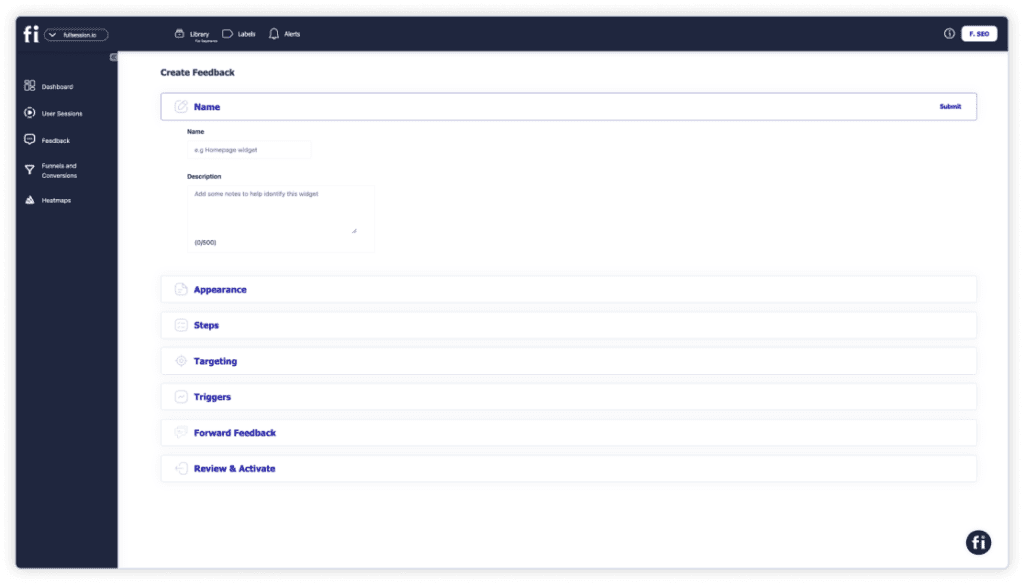
    Here’s how to create your feedback form with FullSession:

    1. Sign up for a free trial
    2. Confirm your email address and connect your website to FullSession

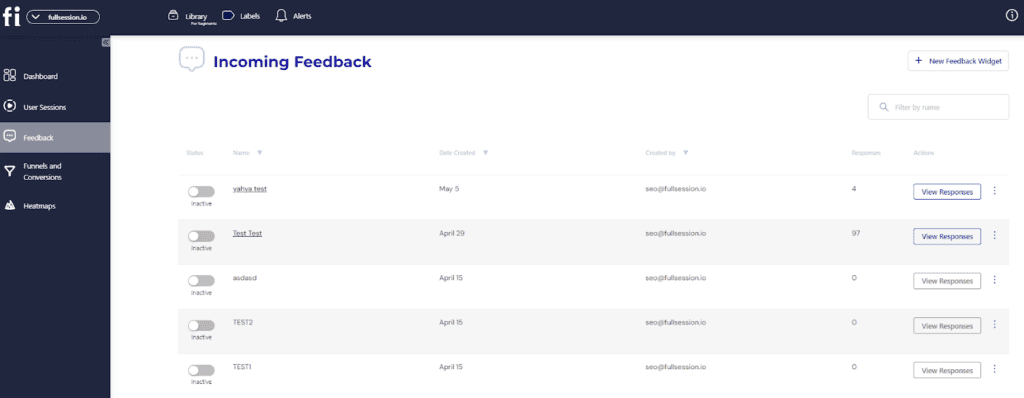
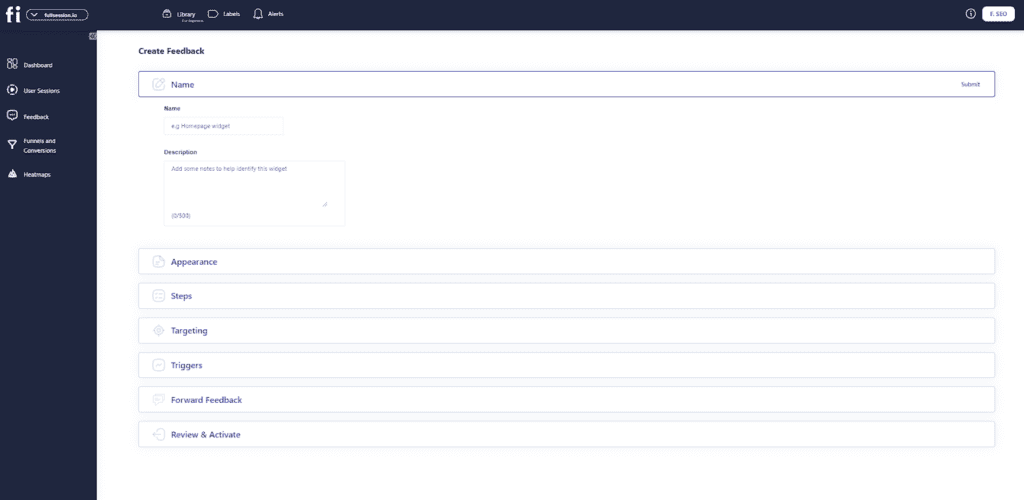
    Open your dashboard and navigate to the Feedback section. 

    Click on the New feedback widget option.

    new feedback widget button

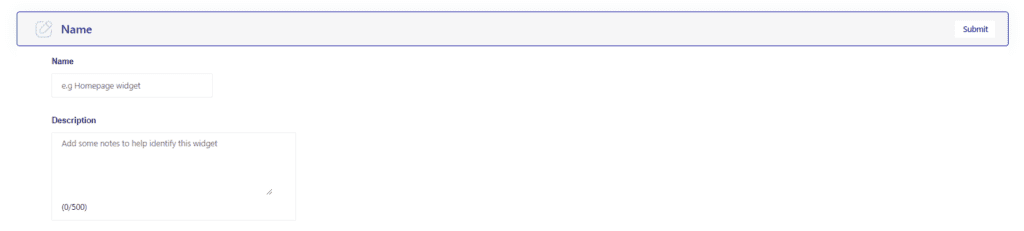
    Name your widget and add a description (for identification purposes).

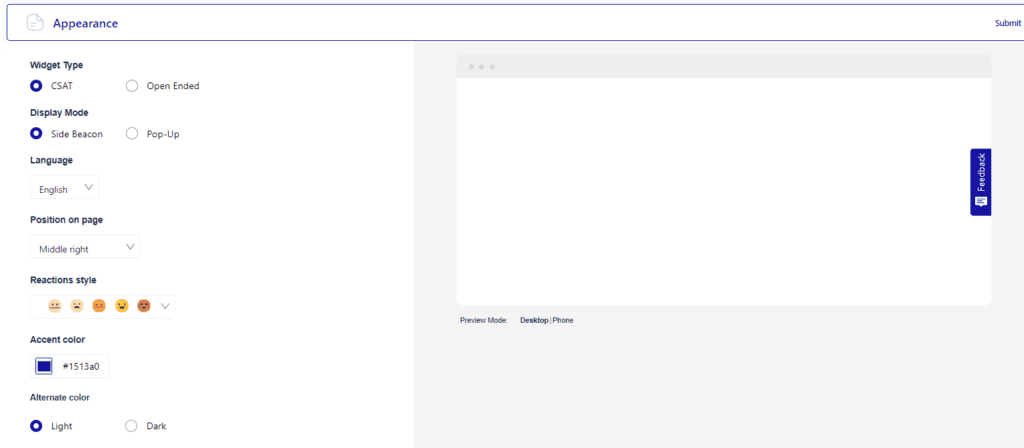
    Select language, position on the page, reaction style, and accent colors.

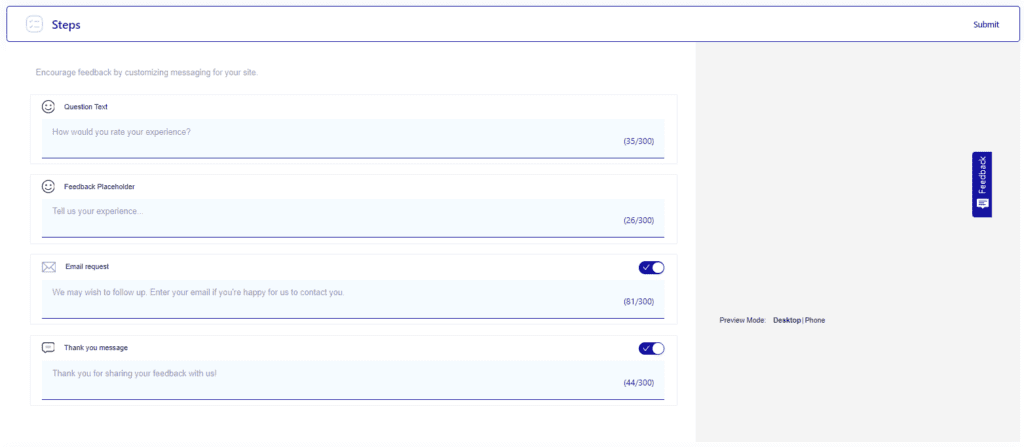
    Customize the messages your customers will see when prompted to leave feedback. Toggle buttons on and off to select different feedback form options.

    Choose the devices you’d like to collect feedback from.

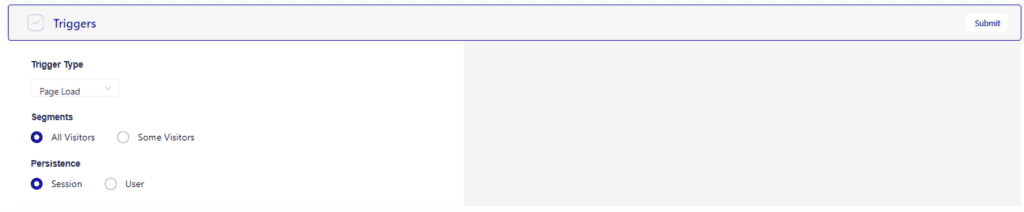
    Select the specific triggers for when you want to deploy the feedback widget.

    Choose whether to receive the data in your personal or team inbox by toggling the button.

    Before you finish, you’ll see a quick checklist that confirms you took all steps correctly before publishing.

    Once the checklist is complete, you can activate the feedback form. Press Start incoming feedback to enable the widget.

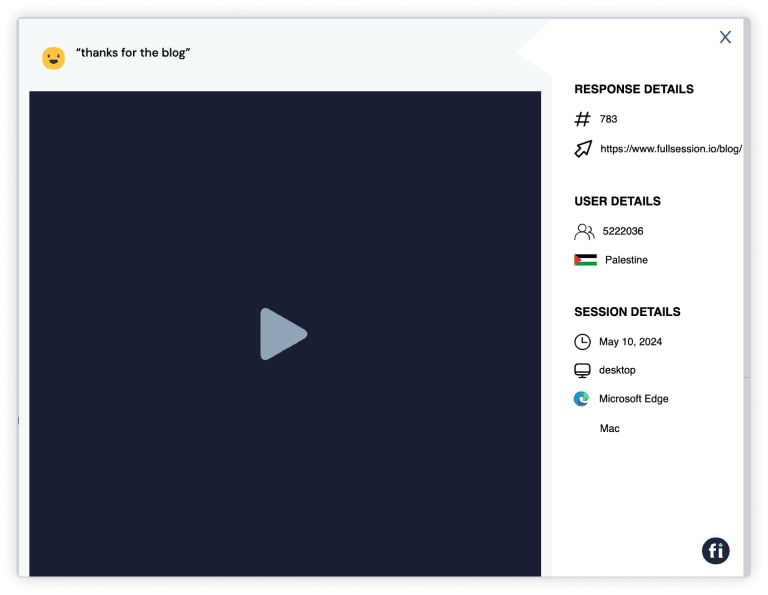
    Each customer feedback is connected to a session recording so you have a detailed overview of the user’s experience during their session. 

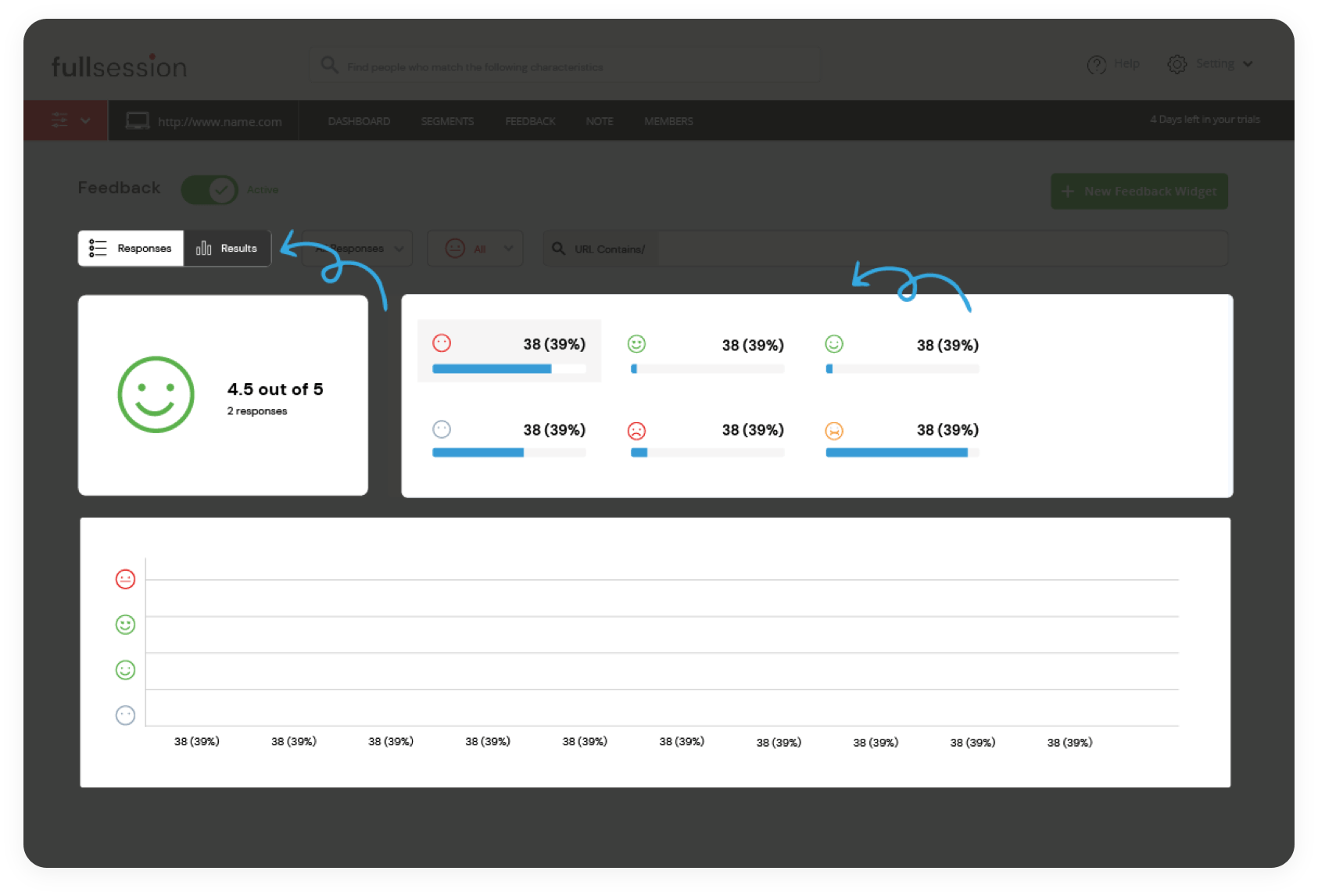
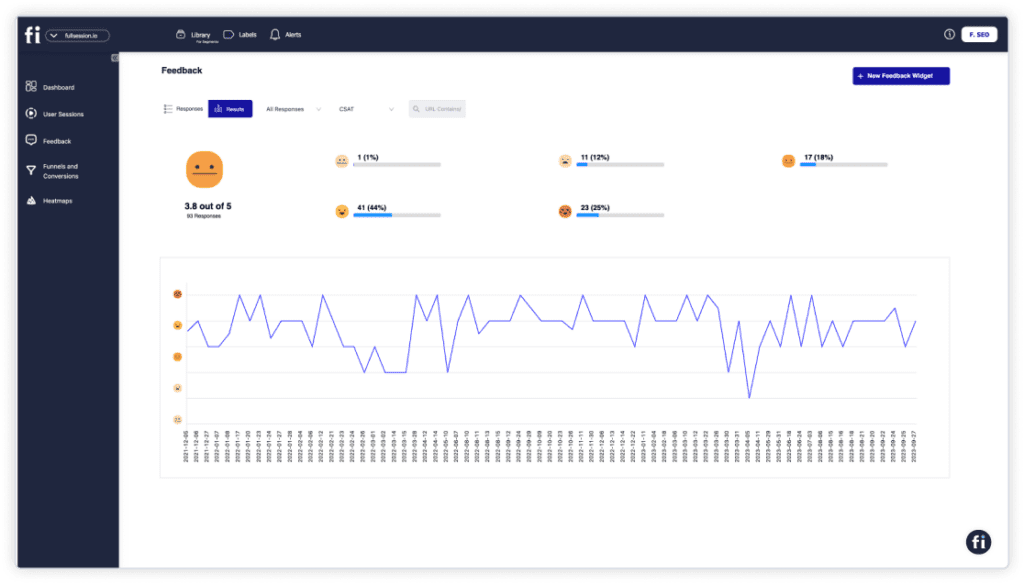
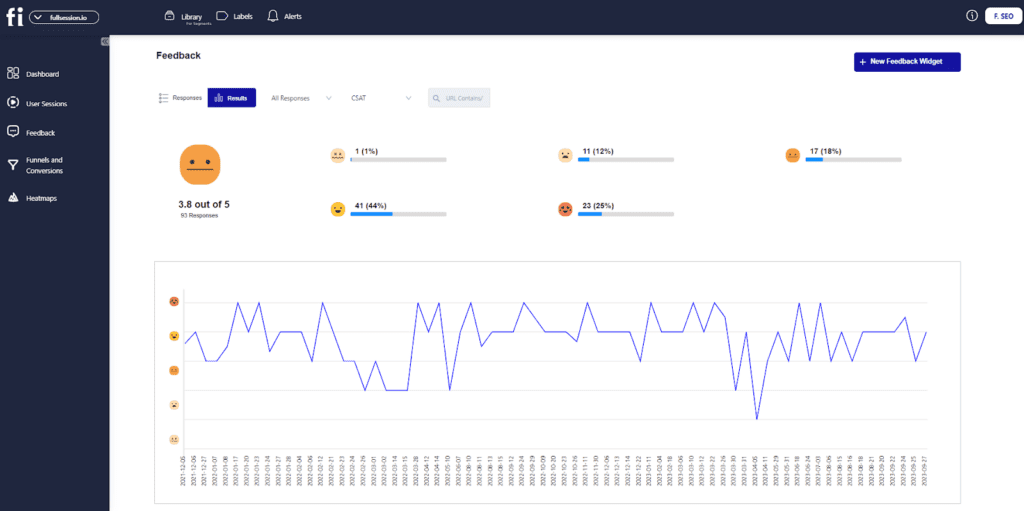
    You can also get an overview of all the users’ feedback and key metrics for each feedback widget. When you click on ‘Results’ in the Feedback tab, you’ll see the overall score of your feedback widget as well as the distribution of each rating.

    That’s it! You’ll receive notifications anytime a user fills out the feedback form. You can access this data by navigating to the Feedback panel and checking the Incoming Feedback section.

    As you can see, creating interactive feedback forms has never been easier with FullSession. 

    Book a demo and see how our user experience analysis tool can help you boost conversions.

    User Testing vs Usability Testing: The Benefits

    User testing and usability testing are two important methods for evaluating a product’s user experience. Both have benefits, so let’s compare them to see which suits your needs best.

    Benefits of website usability testing

    What’s the point of web usability testing methods? Here are several benefits:

    • Improved usability – When you fix usability issues, your website becomes easier to use, and people are more likely to achieve their goals. It can improve customer satisfaction and loyalty and increase conversions and revenue.
    • Increased efficiency – With a more efficient website, people will be able to find what they’re looking for faster and will be less likely to abandon your website feeling frustrated.
    • Improved user satisfaction – A well-designed website that’s easy to use will make your users happy, leading to increased brand loyalty and word-of-mouth marketing.
    • Increased conversions – When a website is easy to use, people are more likely to complete the tasks they set out to do. It can lead to increased sales and conversions.
    • Reduced support costs – Easy-to-use websites typically require less support, leading to reduced expenses.
    • Increased customer retention – Happy customers are more likely to stay with your company, while unhappy customers are more likely to leave.
    • Improved search engine ranking – A well-optimized website that’s easy to use is more likely to rank high in search engine results pages.
    • Increased market share – You can improve your market share and attract new customers.

    Benefits of website user testing

    On the other hand, here are the most important advantages of website user testing:

    • Diagnosing hidden issues User testing can help you find usability issues you may not have been aware of, such as problems with your website layout, design, or content.
    • Understanding users better It lets you see how people use your website, which can be very different from how you think they use it. This feedback can be priceless for understanding what works well on your website and what doesn’t.
    • Improved user experience and user-friendliness User testing can help you make your website more user-friendly by identifying and addressing usability issues. It can also help you understand how users interact with your website, which can help you make your website easier to use.
    • Improved conversions User testing sessions can help you increase conversions on your website by identifying and addressing why customers decide to leave your website.
    • Fewer customer support inquiries It helps you enjoy reduced customer support inquiries by identifying and addressing usability issues. If a website is easy to use, no one will have questions about how it works.

    Improve Website Usability with FullSession

    So, what’s the difference between user testing and usability testing? 

    User testing is the process of observing people as they use your product or website. On the other hand, usability testing is a more formal evaluation that measures how easily users can complete specific tasks on your site.

    We offer powerful tools for capturing and analyzing user behavior, allowing you to identify areas  for improvement and create a fantastic user experience. 

    FullSession helps you learn why customers exit the website, why your cart abandonment rate is high, or why some elements on your website don’t convert as well as others. 

    If you want to conduct usability and user tests with FullSession, schedule a demo today.

    FullSession Pricing Plans

    Fullsession Pricing

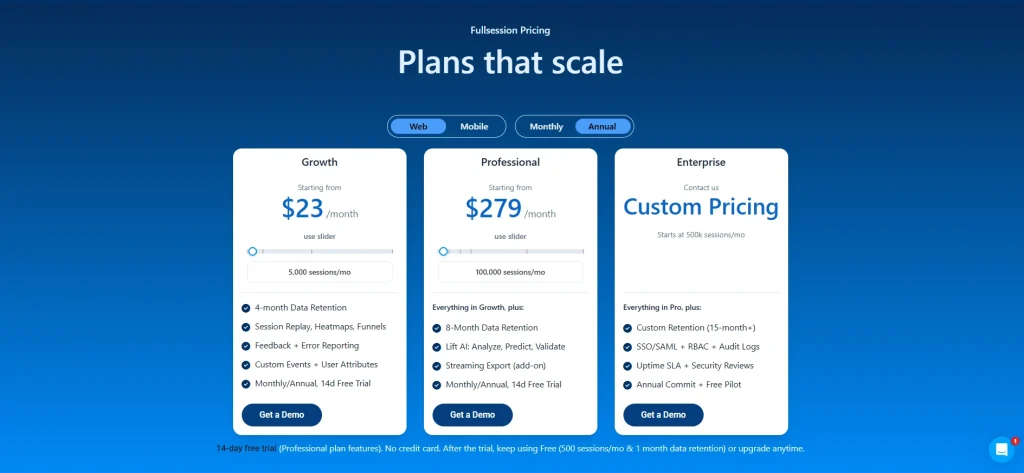
    The FullSession platform offers a 14-day free trial and three paid plans: Starter, Business, and Enterprise. A yearly subscription can save you up to 20%!

    Here are more details on each plan.

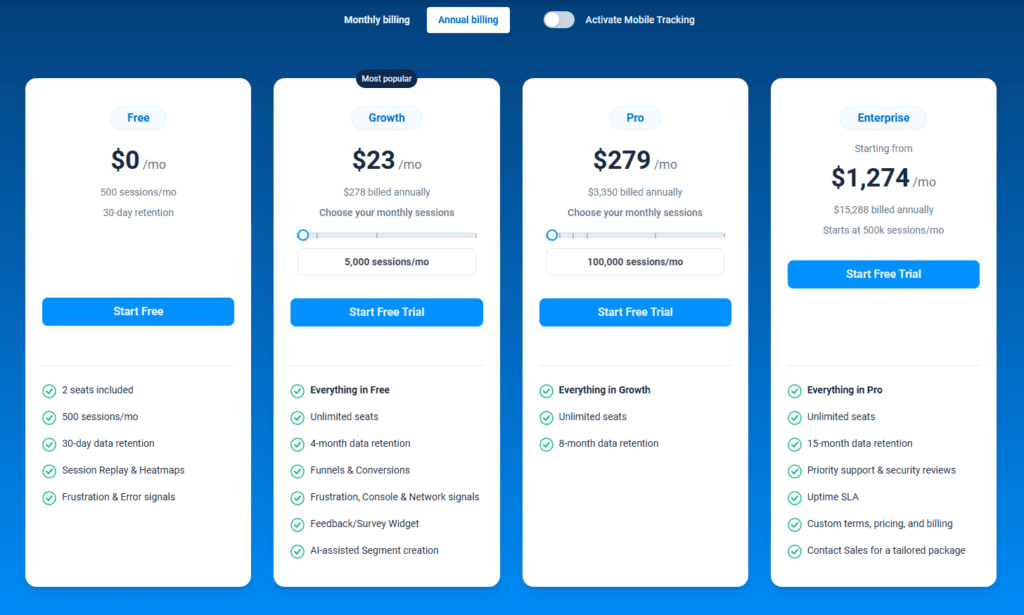
    • The Free plan is available at $0/month and lets you track up to 500 sessions per month with 30 days of data retention, making it ideal for testing core features like session replay, heatmaps, and frustration signals.
    • The Growth Plan starts from $23/month (billed annually, $276/year) for 5,000 sessions/month – with flexible tiers up to 50,000 sessions/month. Includes 4 months of data retention plus advanced features like funnels & conversion analysis, feedback widgets, and AI-assisted segment creation.
    • The Pro Plan starts from $279/month (billed annually, $3,350/year) for 100,000 sessions/month – with flexible tiers up to 750,000 sessions/month. It includes everything in the Growth plan, plus unlimited seats and 8-month data retention for larger teams that need deeper historical insights.
    • The Enterprise plan starts from $1,274/month when billed annually ($15,288/year) and is designed for large-scale needs with 500,000+ sessions per month, 15 months of data retention, priority support, uptime SLA, security reviews, and fully customized pricing and terms.

    Book a demo today.

    Conduct Your First User Testing Today

    Setting up your first user testing tools with FullSession takes less than 5 minutes, and it’s completely free!

    Get a demo now.

    FAQs About User Testing and Usability Testing

    What is the difference between usability and user acceptance testing?

    Usability testing evaluates how easy and user-friendly a product is, aiming to improve user experience. User acceptance testing (UAT) ensures the product meets business requirements and is ready for deployment.

    What are the three types of user testing?

    The three types of user testing are usability testing (to improve user experience), user acceptance testing (UAT) (to validate business requirements), and A/B testing (to compare two versions for performance).

    What are the main differences between user interviews and usability testing?

    User interviews gather qualitative data about user needs and opinions without product interaction. Usability testing observes users interacting with the product to identify usability issues.

    What is the difference between user validation and usability testing?

    User validation confirms the product meets user needs and requirements. Usability testing ensures that the product is effective by assessing how easy and efficient it is for users to accomplish tasks within the product.


  • Customer Journey Tracking: How to Map Your Customer’s Path to Conversion

    Customer Journey Tracking: How to Map Your Customer’s Path to Conversion

    We all know that it’s essential to track website conversion rates, but what about monitoring customer journeys on your website? With a comprehensive customer journey map, you can identify potential obstacles and optimize your website accordingly.

    In this article, we will go in-depth about the different methods you can use to map customer journeys.

    We will also explain how to use FullSession, our user behavior analytics tool, and its features, such as session recordings and replays, interactive heatmaps, and customer feedback, to map customers’ journeys quickly and efficiently.

    Start a Free Trial to Experience FullSession

    Discover how FullSession user behavior analytics help you capture the entire user journey and visualize and improve each step in your sales or marketing funnel.

    What is Customer Journey Tracking?

    Understanding how your customers go from observers to promoters will help you create a more personalized experience, which is why you should start mapping their journeys as soon as possible. Let’s start with the basics.

    Customer journey tracking helps you monitor all digital interactions between customers and your business. That journey starts when customers first interact with your company (visit the website, sign up for newsletters) and ends when they stop all activities.

    It is an excellent way to analyze your customers’ engagement with your company and learn more about retaining them longer and increasing customer lifetime value.

    Why Is Customer Journey Tracking Important?

    Customer journey mapping is essential because it gives you a unique perspective and helps you optimize and maximize your marketing efforts.

    To understand how customers interact with your brand, it is necessary to track their journey from beginning to end. By mapping out the customer’s path to conversion, identifying customer touchpoints and increasing conversions becomes much easier.

    Additionally, customer journey tracking can help you identify areas where the customer may drop off in your marketing funnel, allowing you to make necessary changes to your marketing strategy. To track the customer journey effectively, it is essential to collect data from various sources, such as web analytics, customer surveys, and sales data.

    You can use this data to create a customer journey map that helps you understand the customer’s experience and make improvements.

    Benefits of Customer Journey Tracking

    There are many benefits of customer journey tracking. Businesses can optimize their marketing and sales efforts to meet customer needs better. Companies can build stronger relationships with their customers by learning how they interact with their products and services.

    Here’s a quick list of other customer journey mapping benefits you might not have thought of before:

    • Creating a better experience for your customers
    • Providing more accessible content
    • Personalizing products and services
    • Increasing customer retention
    • Creating a more user-friendly website
    • Making marketing efforts more targeted and effective
    • Receiving accurate retargeting insights
    • Learning more about your customer base
    • Accelerating sales cycle
    • Increasing profits and revenue
    • Identifying problem areas and pain points
    • Increasing customer loyalty

    Why Use Customer Journey Analytics?

    As you know, customer satisfaction is essential to success. Happy customers are more likely to return and recommend your company to others. Therefore, it is necessary to understand the customer journey, from first contact to post-purchase follow-up. That is where customer journey analytics comes in.

    By tracking customer behavior and interactions across touchpoints, you can gain valuable insights into what works and what doesn’t. You can then use this information to improve and personalize the customer experience.

    In today’s competitive marketplace, customer journey analytics is essential for any business that wants to stay one step ahead of the competition.

    How to Map Your Customer’s Path to Conversion

    Mapping your customer’s path to conversion is a great way to optimize your website and improve your marketing strategy. By understanding your customers’ steps to make a purchase, you can make the process as smooth as possible. So, let’s get started!

    1. Establishing business goals

    Establishing business goals gives you and your sales and marketing teams a clear idea of what you want to achieve.

    Without setting business goals, you won’t be able to effectively track the success and effectiveness of your customer journey maps. Undefined business goals cause a lot of confusion and stress for companies. Here’s what you need to focus on:

    • Implement a performance management system
    • Define each goal
    • Define key performance indicators
    • Allocate resources
    • Establish a timeline

    2. Identifying touch points and critical moments

    The first step is to identify the customer’s entry point into the journey. With the first touchpoint, the customer begins engaging with your company through social media, Google searches, referrals, or other sources.

    Once you’ve identified the entry point, you can track the customer’s journey through your sales funnel. It will help you see where customers are dropping off and identify potential roadblocks. 

    When you have a clear understanding of the customer journey, you can start to make improvements that will lead to more conversions.

    3. Tracking and analyzing data

    Tracking and analyzing data is a significant part of customer journey mapping. It allows you to get a precise insight into what your customers are doing and how your optimizations are performing.

    You can track and analyze user behavior with tools like FullSession that monitor all user activity on your website, web app, or landing page and provide you with statistics and visual data that help you understand your customers better.

    FullSession offers session recordings and replays, interactive heatmaps, customer feedback, and analytics, which are extremely important for keeping track of customer journeys. You can try FullSession for free, or stay tuned to learn more about each feature.

    4. Scoring the performance of customer journeys

    Scoring the performance of customer journeys helps you pinpoint which customers require more attention and which conversion efforts aren’t working.

    You can assign each customer a journey performance score to see how profitable their interaction with your business is. You should define the score using different metrics that showcase the experience at various touchpoints and the value you receive from each customer experience.

    For example, one of the metrics can be the Net Promoter Score, which calculates the customer satisfaction level of your business. You get this score by surveying customers about that experience and breaking down the results to see the average impression.

    What Are User Behavior Tools?

    User behavior tools help you understand how visitors interact with your website. By tracking user clicks, scrolling, and other interactions, these tools can provide valuable insight into what users are looking for and where they may be having difficulties.

    You can then use this information to improve the user experience and optimize the customer journey by changing your website’s layout, content, or navigation. Your team can also use user behavior tools to identify potential security risks or detect fraud.

    By understanding how users interact with a site, user behavior tools can help you keep your website safe and user-friendly.

    How to Use FullSession for Customer Journey Tracking

    FullSession is your best friend when it comes to customer journey analytics. We offer a full suite of user behavior tracking tools – session replays and recordings, interactive heatmaps, conversion funnel analysis, error tracking and customer feedback forms.

    Our user behavior tools also include comprehensive analytics that helps you monitor behavior flow and receive actionable insights about how your customers interact with your website. Tools like FullSession are imperative in any customer journey mapping process.

    They give you a clear idea of what needs to be improved and which elements are working or not. FullSession helps you identify challenging areas on your website that impact your customers’ purchasing decisions.

    Visualize, Analyze, and Optimize with FullSession

    See how to transform user data into actionable insights for peak website performance.

    1. Behavior flow

    Here’s how FullSession can help with your customer journey mapping efforts.

    By combining all of FullSession’s features and incorporating them into your customer satisfaction strategy, you will get a unique overview of your customers’ behavior flow. Identifying the behavior flow is crucial because it gives you a visual map of how your customers behave while on your website.

    For example, let’s say that you have a big sale button on your homepage just below the fold. You’ll see how many customers scroll past it, click on it, or ignore it altogether by tracking the behavior flow.

    Or, if you have a new collection, the behavior flow will help you identify whether your customers prioritize it over existing items.

    Keeping track and noting down these bits and pieces of customer behavioral information helps you create a better offer and speeds up the process of turning window shoppers into customers.

    2. Session recordings and replays

    Session recordings are the embodiment of customer journey mapping.

    FullSession session recording and replay feature records every click, move, and action the user takes while on your website. 

    You can install FullSession with a couple of clicks, and our software will automatically record the user activities across the whole website, web app, or landing page.

    Customer behavior is predictable as long as you gather enough information while they browse your website. People shop in patterns. These patterns are important because they allow you to be proactive with your marketing strategy and stay ahead of your customers. 

    Our session recording tool helps you do just that.

    You can replay user sessions as many times as you want. That is particularly useful if you notice a lot of users bouncing off your website. 

    Replaying a couple of user sessions can help you spot the issue causing an increase in the bounce rate, allowing you to fix it and prevent further losses.

    Our team has also added advanced user and event filtering options to complement session recordings and make navigation more accessible and more convenient. You can segment sessions by any activity you’re interested in, such as:

    • Browser type
    • Email address
    • Operating systems
    • IP address
    • Referrer URL
    • Clicked text
    • Dead clicks
    • Thrashed cursor
    • Abandoned forms
    • Page load speed

    3. Interactive heatmaps

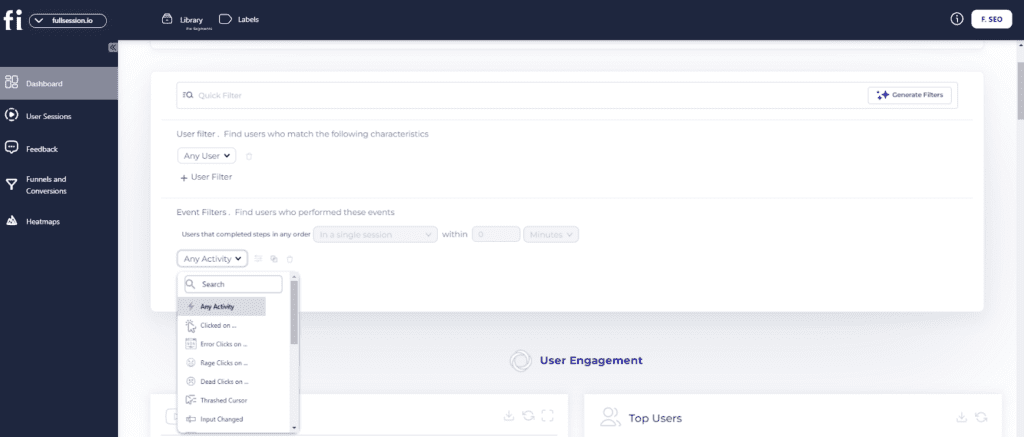
    Heatmaps create a graphic overview of the most and least popular elements and sections of your website, web app, or landing page. With FullSession, you’ll get access to click, mouse movement and scroll heatmaps.

    A heatmap represents this data in a color-coded system where warm colors (orange-yellow-red) represent popular areas users frequently interact with, while cold colors (blue-green) represent areas users often overlook or completely ignore.

    What sets FullSession’s heatmap feature ahead of competitors is that it’s interactive and doesn’t slow down your website, unlike other similar tools likeHotjar.

    Besides static, it also lets you track dynamic elements like pop-ups, drop-down menus, and hidden items. It relays this information in real time, meaning you’ll be able to analyze an interaction as soon as it happens.

    4. Customer feedback

    Feedback forms are a great way to find out what bothers or impresses your customers directly from them. They remove the need for any guesswork because they gather information straight from the source.

    You can use theFullSession customer feedback feature to create pop-up forms and other types of surveys.

    You can also watch a session recording connected to the feedback to understand what happened during the user’s session.

    You can set up different triggers that prompt the survey to appear and enjoy a visual overview of the results. For example, if a customer is about to exit the website, you can set up a trigger and ask them about their experience on your website.

    With the FullSession user behavior suite, the options are endless, and you can create attractive customer feedback surveys in minutes.

    Try FullSession now and see how our tool can help map customer journeys and increase customer satisfaction.

    5. Insights

    Insight is a handy tool for gathering, sorting, and reviewing different analytics that will help you understand your customer’s journey. The results will indicate what you need to work on and what you need to keep up with.

    There are many benefits of using the FullSession insight tool, such as:

    • Increasing time spent on the website
    • Testing features
    • Segmenting and filtering different types of users
    • Monitoring user progress
    • Discovering errors and pain points
    • Improving customer experience

    6. Funnels and conversions

    The FullSession Funnels feature offers an in-depth analysis of user journeys, allowing you to monitor, comprehend, and optimize every stage of your conversion funnel. 

    This tool helps identify crucial actions that drive conversions, detect issues causing drop-offs, and analyze user interactions to improve the overall user experience. Its main features include:

    • Funnel steps: Visualize user progression through each funnel step, showing conversion and drop-off rates. Track user movement percentages and compare metrics across segments and time periods.
    • Funnel trends: Monitor changes in user flows and conversion rates over time. Spot trends and seasonal variations in user behavior to adjust strategies accordingly.
    • Top events: Identify key actions and events boosting conversion rates. Use insights to replicate successful patterns and optimize journeys.
    • Top issues: Detect actions or obstacles reducing conversion rates. Implement fixes to reduce friction and enhance the user experience.
    • Time engaged: Measure user interaction time between funnel steps to understand user effort. Find areas where excessive time indicates frustration or complexity.
    • Top engaged: Analyze the most engaging funnel steps or features, then improve engaging features to improve retention and conversion.
    • Revisit rate: Track users leaving the product before advancing to identify potential issues. Optimize steps to streamline journeys and reduce exits.
    • Segment analysis: Compare funnel performance across user segments, such as device type, location, or referral source. Tailor experiences based on segment-specific interactions.
    • Time period comparison: Analyze performance over different periods to identify trends. Adjust strategies based on temporal insights to maintain or improve performance.

    7. Error analysis

    FullSession error analysis helps identify, analyze, and resolve errors impacting user experience by leveraging data on error clicks, network errors, console errors, error logs, and uncaught exceptions. 

    This feature provides actionable insights to improve the reliability and user satisfaction of digital products.

    • Error clicks: Detects non-responsive elements causing client-side JavaScript errors and uses session replays and error click maps to identify and fix issues.
    • Network errors: Monitors server request failures due to timeouts, DNS errors, or server unavailability and analyzes error impact by URL, status code, and request method to resolve connectivity issues.
    • Console errors: Logs JavaScript error messages and events. It also filters and analyzes errors to identify and fix codebase issues, using session replays for context.
    • Error logs: Captures detailed error information, including messages, stack traces, and timestamps, and facilitates accurate debugging and issue resolution for an optimized application.
    • Uncaught exceptions: Monitors critical unhandled errors to prevent application crashes and ensures proper error handling and resolution to enhance stability.
    • Error trends and segmentation: Segments data by user attributes, session properties, and error types for deeper insights, visualizes error trends and impacts over time to monitor platform health and validate fixes, and integrates session replays to see errors from the user’s perspective.
    • Alerts and notifications: Integrates with Slack for real-time error alerts and customizes notifications for various error types, ensuring quick team responses.

    FullSession Pricing Plans

    Fullsession Pricing

    The FullSession platform offers a 14-day free trial. It provides three paid plans—Starter, Business, and Enterprise. You can save up to 20% with a yearly subscription!

    Here are more details on each plan.

    • The Free plan is available at $0/month and lets you track up to 500 sessions per month with 30 days of data retention, making it ideal for testing core features like session replay, heatmaps, and frustration signals.
    • The Growth Plan starts from $23/month (billed annually, $276/year) for 5,000 sessions/month – with flexible tiers up to 50,000 sessions/month. Includes 4 months of data retention plus advanced features like funnels & conversion analysis, feedback widgets, and AI-assisted segment creation.
    • The Pro Plan starts from $279/month (billed annually, $3,350/year) for 100,000 sessions/month – with flexible tiers up to 750,000 sessions/month. It includes everything in the Growth plan, plus unlimited seats and 8-month data retention for larger teams that need deeper historical insights.
    • The Enterprise plan starts from $1,274/month when billed annually ($15,288/year) and is designed for large-scale needs with 500,000+ sessions per month, 15 months of data retention, priority support, uptime SLA, security reviews, and fully customized pricing and terms.

    Book a demo today.

    Create an Effective Customer Journey Map With FullSession

    Every customer interacts with a business uniquely, and it’s important to understand how they progress during the journey to optimize their experience.

    FullSession is a user behavior analytics platform that assists businesses with mapping customer journeys and identifying opportunities for improvement.

    FullSession provides detailed data and analysis on every customer interaction, helping businesses to see where there are potential issues and make changes accordingly. 

    With FullSession, you can take control of the entire customer journey and improve your overall performance.

    Turn User Behavior into Growth Opportunities

    Learn how to visualize, analyze, and optimize your site with FullSession.

    FAQs About Customer Journey Tracking

    What is customer journey tracking?

    Customer journey tracking is the process of observing and analyzing the steps a customer takes from the first interaction with a brand to the final purchase and beyond. It helps businesses understand customer behavior and optimize their experience.

    What is a customer journey mapping tool?

    Customer journey mapping tools collect and visually present customer journey data for easy access and quality insights. These can be user behavior tools, map and chart designing tools, or customer experience solutions.

    What are the best customer journey mapping tools?

    There are many different customer journey mapping tools on the market that can make your choice very difficult. However, some tools stand out from the rest:

    1. FullSession
    2. UXPressia
    3. Lucidchart
    4. Microsoft Visio
    5. Custellence
    6. Omnigraffle
    7. Smaply
    8. IBM Journey Designer
    9. InMoment
    10. Asana
    11. Hotjar

    What are the 7 steps to map the customer journey?

    1. Set clear objectives: Define what you want to achieve.
    2. Create customer personas: Identify different customer types.
    3. Identify touchpoints: Map out every interaction point.
    4. Map the journey: Visualize the steps customers take.
    5. Identify pain points: Spot areas where customers struggle.
    6. Analyze data: Use metrics to understand behavior.
    7. Optimize and improve: Make changes to enhance the experience.

    Why do companies use customer journey analytics?

    Customer data and journey tracking are vital for understanding how your customers interact with your brand. By mapping out the customer’s path to conversion, you can identify pain points and develop strategies to improve the customer experience.  

    Analytics is a significant component because it quantifies the experience and gives you the statistical information necessary for any growth strategy.

    What are the customer journey stages?

    There are five main stages of every customer journey that all marketers and business owners should know:

    1. Awareness stage
    2. Consideration stage
    3. Decision stage
    4. Retention stage
    5. Advocacy

    How to monitor customer journey?

    Use tools like analytics software, heatmaps, and customer feedback to track interactions and behaviors at each touchpoint. Regularly review data to identify trends and areas for improvement.

    What are the 4 stages of customer journey mapping?

    1. Awareness: Customer becomes aware of your brand.
    2. Consideration: Customer evaluates your product or service.
    3. Purchase: Customer decides to buy.
    4. Retention: Efforts to keep the customer coming back.

    How do you optimize customer journeys?

    You can do that by gathering customer data and analyzing your customer’s experience. For example, let’s say you notice a user frequently visiting your website and looking at products or services but is still not converting.

    You would use FullSession session recording and replay tools to see the point at which they decide to exit. You notice that each time they want to add an item to the cart, the previous cart items reset. You can easily conclude that this error causes frustration and that an easy fix can make them convert in minutes.