Category: Blog

Blog

  • Stop Guessing Why Shoppers Abandon Checkout: Use a Friction Heatmap Workflow That Prioritizes Fixes

    Stop Guessing Why Shoppers Abandon Checkout: Use a Friction Heatmap Workflow That Prioritizes Fixes

    A checkout friction heatmap can point at where customers struggle, but it can also send you on expensive detours. Checkout is dynamic: fields appear and disappear, address suggestions change layouts, wallets hand off to embedded widgets, and mobile taps look like “rage clicks” even when the user is simply trying to zoom or scroll.

    This guide is a practitioner workflow. You will segment first, interpret heatmap patterns with checkout context, corroborate with funnels and replay, then prioritize fixes with an impact × effort × confidence rubric. Finally, you will validate the outcome with step-level measurement and guardrails so you can roll changes out with confidence.

    Define “friction” in checkout using observable signals

    Checkout friction is anything that increases hesitation, errors, or abandonment during checkout. In practice, it shows up as:

    • Behavioral signals: repeated clicks or taps, back-and-forth scrolling, field re-entry, long pauses, abandonment at a step boundary, coupon hunting loops.
    • Technical signals: dead clicks, UI not responding, validation errors, payment failures, slow loads, layout shifts, and embedded widget issues.

    What heatmaps are good for: spotting clusters and patterns that suggest confusion or blocked intent.
    What heatmaps are not: proof of causality. A hotspot can be a symptom, not the cause.

    Step 1: Segment before you interpret any checkout heatmap

    If you look at an aggregate checkout heatmap first, you are likely to average away the real problem. Many checkout issues are segment-skewed: mobile users suffer from small targets, certain traffic sources bring lower intent, and some payment methods fail more often.

    Minimum segmentation set for checkout friction

    Start with these slices:

    1. Device: mobile vs desktop (and consider tablet if meaningful)
    2. New vs returning: returning shoppers often behave differently (saved addresses, familiarity)
    3. Traffic source or campaign: high-intent brand vs low-intent paid social can change behavior
    4. Payment method: card vs wallet vs pay-later can create different failure modes

    If you only do one thing from this guide, do this.

    Step-level vs page-level heatmaps

    Checkout is usually multi-step. A page-level heatmap can hide step-specific friction. Prefer:

    • Step-level heatmaps when each step is meaningfully different (shipping, payment, review).
    • State-based views if your checkout changes within the same URL (collapsible sections, progressive disclosure, dynamic errors).

    Aggregate heatmap traps in stateful checkout UI

    Watch for these misreads:

    • Dynamic components: autocomplete lists, wallet widgets, and modals shift the clickable area.
    • Collapsible sections: clicks cluster on headings because the user is trying to reveal content.
    • Validation states: error messages can change layout, moving targets under the user’s finger.
    • Sticky elements: floating CTAs, chat widgets, and cookie banners create false clusters.

    Step 2: Map heatmap patterns to likely checkout friction types

    Below is a practical pattern library. Use it as a starting hypothesis, then corroborate in the next step.

    Pattern library: what you see → what it often means

    1) Dense clicks on non-interactive text near a form field

    • Likely cause: label ambiguity, unclear requirements, users trying to “activate” the field
    • Fast verification: replay for repeated attempts, look for validation errors
    • Typical fix: clearer microcopy, inline hints, field formatting guidance

    2) Clusters on the coupon field or “Apply” button

    • Likely cause: coupon distraction, users pausing to search for discounts
    • Fast verification: time-to-complete increases when coupon is used, replay shows exit to search
    • Typical fix: de-emphasize coupon entry, show “Have a code?” collapsed, or clarify offer availability

    3) High click density around shipping cost, delivery dates, or totals

    • Likely cause: price surprise or delivery uncertainty
    • Fast verification: funnel drop-off spike at shipping step, replay shows hover or repeated taps on totals
    • Typical fix: earlier shipping estimates, clearer breakdown, reduce surprise fees

    4) Dead clicks on primary CTA (Continue, Pay, Place order)

    • Likely cause: blocked action (disabled state not obvious), validation preventing progress, slow response
    • Fast verification: error logs, replay showing repeated clicks with no state change
    • Typical fix: clearer disabled states, inline error summary, performance improvements, prevent double-submit confusion

    5) Rage clicks near payment method selection or wallet buttons

    • Likely cause: widget not responding, method switching confusion, focus issues on mobile
    • Fast verification: payment failure rate by method, replay showing repeated taps and no progress
    • Typical fix: simplify payment options, improve widget reliability, make selection state obvious

    6) Scroll heatmap shows heavy scroll and re-scroll in a single step

    • Likely cause: users hunting for missing info, unclear next action, long forms
    • Fast verification: replay shows backtracking, time-to-complete inflated, repeated focus changes
    • Typical fix: reduce fields, group logically, progressive disclosure with clear step completion cues

    Checkout-specific friction patterns to watch

    • Trust gaps: heavy interaction around security badges, return policy links, or terms suggests reassurance needs.
    • Form-field friction: repeated interaction on address, phone, and ZIP fields often correlates with validation confusion.
    • Payment failures: spikes in repeated taps on “Pay” can be a symptom of declined payments, 3DS loops, or widget errors.

    False positives: don’t “fix” what isn’t broken

    Use rage clicks as a flag, then verify with replay and error signals.

    Before you ship changes:

    • Rage clicks vs rapid taps on mobile: quick repeated taps can be normal when users try to zoom, scroll, or reposition their thumb. Verify in replay.
    • Dead clicks caused by scroll-jank: if the page is janky, taps during scroll may not register. Corroborate with performance metrics and replay.
    • Mis-taps near small targets: clusters around tiny checkboxes or close icons can be fat-finger errors. Verify with device segmentation and replay.

    Step 3: Corroborate with adjacent signals (fast verification)

    Heatmap patterns become actionable when you pair them with signals that explain what happened next in your cart abandonment analysis.

    Funnel drop-off and step completion

    For each checkout step, review:

    • Step-to-step completion rate
    • Drop-off rate and where it spikes by segment
    • Time spent per step
    • Re-entry rate (users who leave and return)

    Session replay cues

    In session replay, look for:

    • Repeated attempts to continue with no progress
    • Backtracking after errors
    • Coupon hunting loops
    • Switching payment methods repeatedly
    • UI shifts or modals that obscure CTAs

    Error telemetry and form analytics

    If you have them, connect:

    • Validation error counts by field
    • Payment failures by method and device
    • JavaScript errors in checkout
    • Slow interactions on key actions (submit, address lookup, wallet load)

    If you do not have these signals, treat the heatmap as a hypothesis generator, not a roadmap.

    Step 4: Prioritize fixes with Impact × Effort × Confidence

    Most teams stop at ‘we saw a hotspot.’ The win comes from turning observations into a ranked plan, using prioritized CRO tests for ecommerce heatmaps.

    The rubric

    Score each candidate fix 1 to 5 on:

    • Impact: expected lift on checkout completion or RPV if fixed
    • Effort: engineering and design effort, plus risk
    • Confidence: strength of evidence from segmentation + corroboration

    Then rank by (Impact × Confidence) ÷ Effort. This prevents “big feelings” from outranking high-confidence quick wins.

    Copyable triage table template

    Use this table as a working document for checkout triage:

    Heatmap signal (segmented)Likely causeFastest verificationRecommended fixPrimary KPIGuardrails
    Dead clicks on “Continue” (mobile, new users)Validation blocking progress, CTA appears tappableReplay + validation error countsInline error summary + clearer disabled stateStep completionError rate, time-to-complete
    Rage clicks on wallet button (iOS)Wallet widget not respondingPayment failures by method + replayImprove widget load, fallback pathPayment step completionPayment failure rate
    Heavy interaction around totals (paid social)Price surpriseDrop-off by traffic sourceEarlier shipping estimate + fee clarityCheckout completionAOV mix shift, refund rate
    Coupon field dominates clicksCoupon hunting loopReplay shows exit and returnCollapse coupon entry, clarify promoRPVTime-to-complete, abandonment

    Classify the work: quick wins vs structural vs bugs

    • Quick win: copy, layout, affordances, clearer error states
    • Structural fix: form simplification, step restructuring, shipping transparency changes
    • Bug: dead clicks, widget failures, broken validation, performance regressions

    This classification helps you route work correctly and set realistic expectations.

    Step 5: Validate causality and measure success with guardrails

    Even if checkout conversion rises after a change, you still need to confirm it was the fix and not traffic mix, promos, or seasonality.

    What to measure beyond conversion

    Pick a primary KPI and add step-level diagnostics:

    • Primary KPI: checkout completion rate or RPV
    • Step KPIs: step completion rate (shipping, payment, review)
    • Friction guardrails:
      • Validation error rate (overall and by field)
      • Payment failure rate (by method, device)
      • Time-to-complete checkout (median, by segment)
      • Drop-off at targeted step
      • Re-attempt rate on primary CTA

    Avoid “false wins”

    Watch for:

    • AOV shifts that mask a decline in completion
    • Traffic mix changes (campaigns, device distribution)
    • Promo effects that change coupon behavior
    • Operational impacts (refunds, support tickets, chargebacks)

    Rollout plan: test, monitor, widen

    A practical sequence:

    1. Ship behind a test where possible (or phased rollout)
    2. Monitor step-level KPIs and guardrails first
    3. Confirm the targeted friction signal reduces (fewer dead clicks, fewer repeats)
    4. Then widen rollout once stability is proven

    Checklist: the repeatable checkout friction heatmap workflow

    The 15-minute version

    1. Segment (device, new vs returning, traffic source, payment method)
    2. Identify 1 to 3 heatmap hotspots per segment
    3. Verify with replay on the same segment
    4. Cross-check with step drop-off and error signals
    5. Write the smallest fix you can test

    The 60-minute version

    1. Segment and select the highest-drop-off step
    2. Build a pattern-to-cause hypothesis list
    3. Verify causes with replay + errors + payment failures
    4. Score candidates using (Impact × Confidence) ÷ Effort
    5. Define KPI and guardrails, then test and monitor

    FAQ

    What heatmap type is best for checkout friction?

    Click and tap heatmaps are usually the fastest for identifying interaction hotspots. Scroll views help when forms are long or users backtrack. Rage or dead click views can be useful, but only after segmentation and replay verification to reduce false positives.

    How many sessions do I need before trusting a checkout heatmap?

    Enough to see stable patterns within a segment. If a pattern disappears when you slice by device or payment method, it was likely an aggregate illusion. Use heatmaps to generate hypotheses, then rely on step KPIs and replay to confirm.

    How do I interpret rage clicks on mobile checkout?

    Treat them as a flag, not a verdict. Verify whether the user is rapidly tapping because of a blocked action, or because of thumb repositioning, zoom attempts, or scroll-jank. Replay plus error and payment signals usually clarifies which it is.

    Conclusion 

    A checkout friction heatmap can be your fastest path to finding UX blockers, but it works best as part of a broader checkout recovery motion. 

    Use heatmap patterns to identify the biggest checkout blockers, prioritize fixes with an impact × effort × confidence rubric, and validate results with a step-level measurement loop before rolling changes out broadly.

  • Payment and validation failures are your real checkout UX issues: diagnose, recover, and validate

    Payment and validation failures are your real checkout UX issues: diagnose, recover, and validate

    Checkout drop-offs are rarely caused by one “bad UI choice.” They are usually a mix of hesitation (trust, transparency, delivery uncertainty) and failure states (validation loops, slow shipping quotes, 3DS interruptions, declines). This guide gives ecommerce CROs and checkout PMs a repeatable way to find what matters, fix it, and prove impact on RPV, not just clicks.

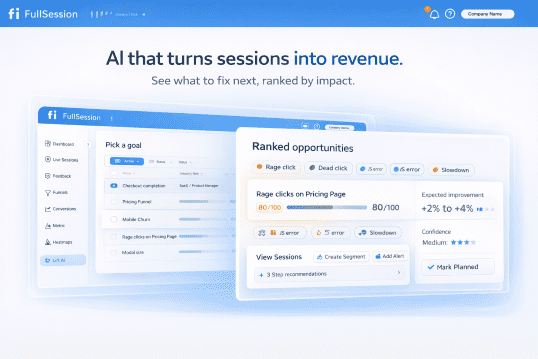
    If you want to operationalize the workflow with a tool, this maps cleanly to Lift AI and the Checkout Recovery solution.

    Quick Takeaway / Answer Summary (verbatim, 40–55 words)
    Checkout UX issues are moments of doubt, confusion, or failure between “Checkout” and “Order confirmed” that cause drop-off. The fastest way to reduce abandonment is to segment where users exit, classify the root cause, prioritize fixes by impact and effort, then validate with funnel, error, and device-level guardrails.

    What are checkout UX issues?

    Definition (What is “checkout UX issues”?)
    Checkout UX issues are design, content, performance, and failure-state problems that increase the effort or uncertainty required to complete a purchase. They show up as drop-offs, repeated attempts, error loops, slow steps, and “I’m not sure what happens next” moments across account, address, shipping, payment, and review.

    Why does this matter for RPV?
    Because “small” checkout friction compounds. A confusing shipping promise, a coupon edge case, or a mobile keyboard mismatch can remove a meaningful share of otherwise qualified buyers from the revenue path.Industry research consistently lists extra costs, trust concerns, forced account creation, and checkout complexity among top abandonment drivers. If you want a tighter breakdown of how to analyze your own drop-offs, start with cart abandonment analysis.

    Where checkout UX issues cluster: the 5 breakpoints

    Most teams argue about “one-page vs multi-step” checkout. In practice, issues cluster around the decisions and failures inside each step.

    1) Account selection (sign-in vs guest)

    Common issues:

    • Guest checkout exists, but is visually buried
    • Password creation happens too early, or has strict rules that trigger retries
    • “Already have an account?” flows that bounce users out of checkout

    Baymard’s research repeatedly shows that guest checkout needs to be prominent to avoid unnecessary abandonment.

    2) Address and contact

    Common issues:

    • Too many fields, poor autofill, and unclear input formats
    • Inline validation that fires too early, or only on submit
    • Phone and postal code rules that do not match the user’s locale

    3) Shipping and delivery choices

    Common issues:

    • Shipping fees, taxes, or delivery times appear late
    • Delivery promise language is vague (“3–7 business days”) with no confidence cues
    • Slow shipping quote APIs that cause spinners and rage clicks

    4) Payment and authentication

    Common issues:

    • Missing preferred payment methods (wallets, BNPL, local methods)
    • Card entry friction on mobile (keyboard type, spacing, focus)
    • 3DS/SCA interruptions with weak recovery messaging
    • Declines that read like user error, with no guidance on what to do next

    5) Review, promo, and confirmation

    Common issues:

    • Promo codes that fail silently or reset totals
    • Inventory or price changes that appear after effort is invested
    • Confirmation page lacks next-step clarity (receipt, tracking, returns)

    Which checkout UX issues should you fix first?

    Question hook: What should I fix first if I have a long checklist of checkout problems?
    Fix the issues that combine high revenue impact with high frequency and clear evidence, while staying realistic about effort. Start by sanity-checking your baseline against checkout conversion benchmarks. A prioritization model keeps you from spending weeks polishing low-yield UI.

    Use ICEE for checkout: Impact × Frequency × Confidence ÷ Effort

    • Impact: If this breaks, how much RPV is at risk? (Payment step failures usually rank high.)
    • Frequency: How often does it happen? (Segment by device, browser, geo, payment method.)
    • Confidence: Do we have proof? (Replays, errors, field-level signals, support tags.)
    • Effort: Engineering and risk cost. (Some fixes are copy or validation rules. Others touch payments.)

    Practical rule: prioritize “high impact + high frequency” failure states before “nice-to-have” UX polish.

    A diagnostic table you can use today

    Symptom you seeLikely root cause categoryProof to collect
    Drop spikes at “Pay now”Declines, 3DS interruptions, payment method mismatchDecline reason buckets, 3DS event outcomes, replay of failed attempts
    High exit on shipping stepFees shown late, slow quote, unclear delivery promiseQuote latency, rage clicks, users changing address repeatedly
    Form completion stallsValidation loops, autofill conflicts, unclear formatsField error logs, replays showing re-typing, mobile keyboard mismatches
    Promo usage correlates with exitsCoupon edge cases, total changes, eligibility confusionPromo error states, cart total deltas, support tickets tagged “promo”

    Mid-workflow tooling note: this is the point where teams often pair funnel segmentation with session evidence. If you want a single place to go from “drop-off spike” to “what users did,” Lift AI and the checkout recovery workflow are designed for that.

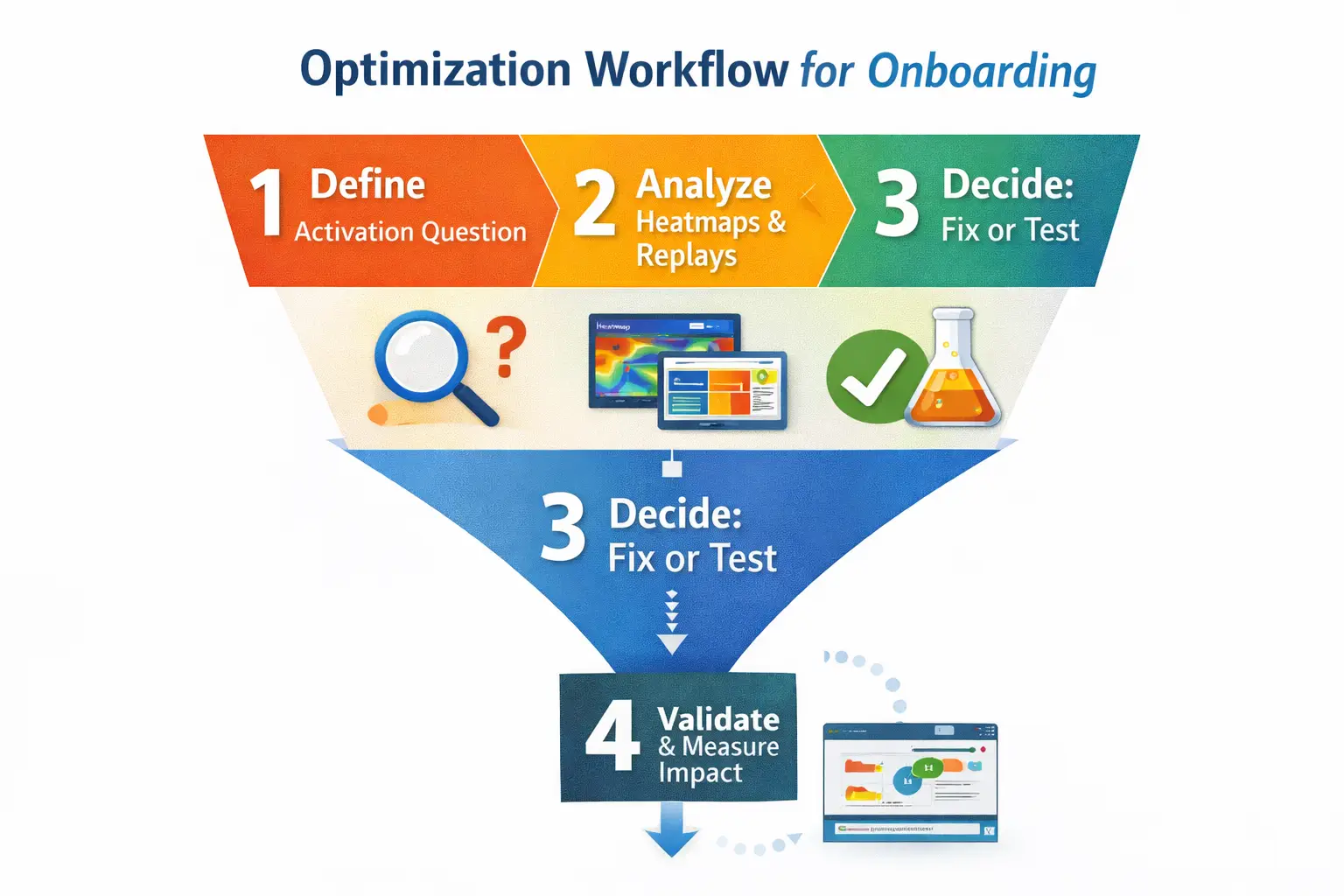
    The practical workflow: diagnose → confirm → fix → validate

    Question hook: How do you diagnose checkout UX issues without guessing?
    Use a repeatable workflow: start with segmented drop-off, classify root cause, confirm with evidence, ship a targeted fix, then validate with guardrails.

    Step 1) Find the drop and segment it (do not average it)

    Start with the simplest question: Where exactly do people exit? Then segment before you brainstorm fixes.

    Segmentation that usually changes the answer:

    • Mobile vs desktop
    • New vs returning
    • Payment method (wallet vs card)
    • Geo and locale
    • Browser and device model
    • Promo users vs no promo

    Deliverable: a shortlist of “top 2–3 drop points” by segment.

    Step 2) Classify the root cause category (so you stop debating opinions)

    Pick one dominant category per drop point:

    • Expectation and transparency: fees, delivery, returns, trust cues
    • Form friction: fields, input rules, validation, autofill
    • Performance: slow shipping quotes, slow payment tokenization, timeouts
    • Payment failure states: declines, 3DS/SCA, retries
    • Content and comprehension: unclear labels, weak microcopy, uncertain next step

    Step 3) Confirm with evidence (proof, not vibes)

    Question hook: What counts as “proof” for a checkout UX problem?
    Proof is a repeatable pattern you can point to: a consistent behavior in replays, a consistent error bucket, or a consistent field-level failure in a segment. If you want a practical way to turn click and scroll behavior into a test backlog, see ecommerce heatmaps and prioritized CRO tests.

    Examples of strong proof: this is where session replay helps because you can see the exact retry loops, hesitation, and dead-ends behind the drop-off, not just the metric.

    • Replays showing users repeatedly toggling shipping methods, then leaving
    • Field-level logs showing postal code validation rejects a specific region format
    • High latency on shipping quote calls correlating with exits
    • 3DS challenge loops causing repeated “Pay” attempts

    Step 4) Fix with recovery-first patterns

    Instead of “make it simpler,” ship fixes that reduce uncertainty and help users recover.

    High-yield fix patterns by breakpoint:

    • Account: make guest checkout obvious; delay account creation until after purchase where possible
    • Forms: add inline validation that is helpful, not punitive; do not wait until submit for everything
    • Shipping: show total cost earlier; make delivery promise concrete and consistent
    • Payment: design for retries; make declines actionable; keep the user oriented during authentication
    • Review: handle promo edge cases with clear microcopy and stable totals

    Step 5) Validate outcomes with guardrails (so you do not “win” the wrong metric)

    Validate on the KPI you actually care about, with checks that prevent accidental damage.

    A simple validation plan:

    • Primary: checkout completion and RPV in the affected segment(s)
    • Guardrails: payment authorization rate, error rate, page performance (especially mobile), refund and support contact rate
    • Time window: compare pre/post with the same traffic mix (campaigns change everything)

    Tooling note: if you are trying to move fast without losing control, you want a workflow that ties funnel movement to what users actually experienced. That is the point of the checkout recovery approach, and it pairs naturally with Lift AI when you need help prioritizing what to test and proving impact.

    Failure-state UX: the part most “best practice” lists skip

    Question hook: Why do “clean” checkouts still have high abandonment?
    Because the checkout UI can be fine, but the failure states are not. Declines, timeouts, and authentication interruptions create confusing loops that users interpret as “this site is broken” or “I’m about to get charged twice.”

    Patterns to implement for payment and auth failures

    • Declines: say what happened in plain language, and offer a next action (try another method, check billing address, contact bank). Avoid blame-heavy copy.
    • Retries: preserve entered data where safe; confirm whether the user was charged; prevent double-submit confusion.
    • 3DS/SCA interruptions: keep a stable frame, show progress, and explain why the step exists. If the challenge fails, explain what to do next.
    • Timeouts: provide a clear “try again” path and record enough detail for debugging.

    This is also one of the most measurable areas: you can bucket declines and auth outcomes and watch whether UX changes reduce repeated attempts and exits.

    Accessibility and localization: small changes that quietly move RPV

    Accessibility is not just compliance. It is checkout completion insurance.

    Minimum accessibility checks for checkout forms:

    • Errors must be identified in text, not only by color or position.
    • Error messages should be associated with the field so assistive tech users can recover.
    • Keyboard navigation and focus states must work across the full checkout, especially modals (address search, payment widgets).

    Localization checks beyond “add multi-currency”:

    • Address formats vary. Avoid forcing “State” or ZIP patterns where they do not apply.
    • Phone validation should accept local formats or clearly explain the required format.
    • Tax and VAT expectations differ by region. Make totals transparent early.

    Scenario A (CRO): Shipping step drop-off after a promo launch 

    A CRO manager sees a sharp drop on the shipping step, mostly on mobile, starting the same day a promotion banner went live. Funnel segmentation shows the drop is concentrated among users who add a promo code, then switch shipping methods. Session evidence shows long loading states after shipping selection and repeated taps on the “Continue” button. The team buckets shipping quote latency and finds a spike tied to the promo flow calling the quote service more often than expected. The fix is not “simplify checkout.” It is to reduce redundant quote calls, display a stable delivery promise while loading, and keep the call-to-action disabled with clear progress feedback. Validation focuses on mobile checkout completion and RPV, with latency and error rate as guardrails.

    Scenario B (Checkout PM): Payment drop-off driven by declines and retries 

    A checkout PM sees drop-off at “Pay now” increase, but only for card payments in one region. Wallet payments look healthy. Decline codes show a rise in “do not honor,” and replays show users attempting the same card multiple times, then abandoning. The UI currently says “Payment failed” with no guidance, and the form clears on retry. The team ships a recovery-first change: preserve safe inputs, add plain-language guidance (“Try another payment method or contact your bank”), and surface wallet options earlier for that region. They also add a “Was I charged?” reassurance message to reduce panic exits. Validation looks at card-to-wallet switching, repeated attempts per session, checkout completion, and RPV in that region, with authorization rate as the key guardrail.

    When to use FullSession for checkout UX issues (RPV-focused)

    If you already know “where” conversion drops but struggle to prove “why,” you need a workflow that connects funnel movement to real user behavior and failure evidence.

    FullSession is a behavior analytics platform that can help when:

    • You need to tie segmented funnel drop-offs to what users actually did in the moments before exiting.
    • You want to prioritize fixes based on observed friction and failure patterns, not stakeholder opinions.
    • You need to validate that changes improved checkout completion and RPV without breaking performance or payment reliability.

    If you want to see where customers struggle in your checkout and validate which fixes reduce drop-off before you roll them out broadly, start with the checkout recovery workflow and use Lift AI to prioritize and prove impact.

    FAQs

    What are the most common checkout UX issues?

    They cluster around hidden costs, trust uncertainty, forced account creation, form friction, and payment failures. The “most common” list matters less than which ones appear in your highest-value segments.

    How do I know if a checkout problem is UX or a technical failure?

    Segment the drop point, then look for evidence. UX friction shows hesitation patterns and repeated attempts. Technical failures show error buckets, timeouts, or sharp drops tied to specific devices, browsers, or payment methods.

    Should I focus on one-page checkout or multi-step checkout?

    Focus on effort and clarity per step, not the number of steps. Many “one-page” checkouts still fail because validation, shipping quotes, or payment widgets create hidden complexity.

    What is the fastest way to reduce checkout abandonment?

    Start with the highest-impact breakpoint (often payment or shipping), segment it, confirm the dominant root cause, then ship a recovery-first fix and validate with RPV and guardrails.

    How should I handle inline validation at checkout?

    Use helpful inline validation that avoids premature errors and makes recovery easy. Validation that only appears on submit, or fires too early, often increases retries and abandonment.

    What should I measure to prove a checkout UX fix worked?

    Measure checkout completion and RPV in the affected segments, plus guardrails like payment authorization rate, error rate, and mobile performance. Track whether the specific failure state you targeted (declines, validation loops, timeouts) decreased.

  • User Behavior Patterns: How to Identify, Prioritize, and Validate What Drives Activation

    User Behavior Patterns: How to Identify, Prioritize, and Validate What Drives Activation

    If you’ve ever stared at a dashboard and thought, “Users keep doing this… but I’m not sure what it means,” you’re already working with user behavior patterns.

    The hard part isn’t finding patterns. It’s deciding:

    • Which patterns matter most for your goal (here: activation),
    • Whether the pattern is a cause or a symptom, and
    • What you should do next without shipping changes that move metrics for the wrong reasons.

    This guide is a practical framework for Product Managers in SaaS: how to identify, prioritize, and validate user behavior patterns that actually drive product outcomes.

    Quick scope (so we don’t miss intent)

    When people search “user behavior patterns,” they often mean one of three things:

    1. Product analytics patterns (what this post is about): repeatable sequences in real product usage (events, flows, friction, adoption).
    2. UX psychology patterns: design principles and behavioral nudges (useful, but they’re hypotheses until validated).
    3. Cybersecurity UBA: anomaly detection and baselining “normal behavior” in security contexts (not covered here).

    1) What is a user behavior pattern (in product analytics)?

    A user behavior pattern is a repeatable, measurable sequence of actions users take in your product often tied to an outcome like “activated,” “stuck,” “converted,” or “churned.”

    Patterns usually show up as:

    • Sequences (A → B → C),
    • Loops (A → B → A),
    • Drop-offs (many users start, few finish),
    • Time signatures (users pause at the same step),
    • Friction signals (retries, errors, rage clicks), or
    • Segment splits (one cohort behaves differently than another).

    Why this matters for activation: Activation is rarely a single event. It’s typically a path to an “aha moment.” Patterns help you see where that path is smooth, where it breaks, and who is falling off.

    2) The loop: Detect → Diagnose → Decide

    Most teams stop at detection (“we saw drop-off”). High-performing teams complete the loop.

    Step 1: Detect

    Spot a repeatable behavior: a drop-off, loop, delay, or friction spike.

    Step 2: Diagnose

    Figure out why it happens and what’s driving it (segment, device, entry point, product state, performance, confusion, missing data, etc.).

    Step 3: Decide

    Translate the insight into a decision:

    • What’s the change?
    • What’s the expected impact?
    • How will we validate causality?
    • What will we monitor for regressions?

    This loop prevents the classic failure mode: “We observed X, therefore we shipped Y” (and later discovered the pattern was a symptom, not the cause).

    3) The Behavior Pattern Triage Matrix (so you don’t chase everything)

    Before you deep-dive, rank patterns using four factors:

    The matrix

    Score each pattern 1–5:

    1. Impact  If fixed, how much would it move activation?
    2. Confidence: How sure are we that it’s real + meaningful (not noise, not instrumentation)?
    3. Effort: How costly is it to address (engineering + design + coordination)?
    4. Prevalence  How many users does it affect (or how valuable are the affected users)?

    Simple scoring approach:
    Priority = (Impact × Confidence × Prevalence) ÷ Effort

    What “good” looks like for activation work

    Start with patterns that are:

    • High prevalence near the start of onboarding,
    • High impact on the “aha path,” and
    • Relatively low effort to address or validate.

    4) 10 SaaS activation patterns (with operational definitions)

    Below are common patterns teams talk about (drop-offs, rage clicks, feature adoption), but defined in a way you can actually measure.

    Tip: Don’t treat these like a checklist. Pick 3–5 aligned to your current activation hypothesis.

    Pattern 1: The “First Session Cliff”

    What it looks like: Users start onboarding, then abandon before completing the minimum setup.

    Operational definition (example):

    • Users who trigger Signup Completed
    • AND do not trigger Key Setup Completed within 30 minutes
    • Exclude: internal/test accounts, bots, invited users (if onboarding differs)

    Decision it unlocks:
    Is your onboarding asking for too much too soon, or is the next step unclear?

    Pattern 2: The “Looping Without Progress”

    What it looks like: Users repeat the same action (or return to the same screen) without advancing.

    Operational definition:

    • Same event Visited Setup Step X occurs ≥ 3 times in a session
    • AND Setup Completed not triggered
    • Cross-check: errors, retries, latency, missing permissions

    Decision it unlocks:
    Is this confusion, a broken step, or a state dependency?

    Pattern 3: The “Hesitation Step” (Time Sink)

    What it looks like: Many users pause at the same step longer than expected.

    Operational definition:

    • Median time between Started Step X and Completed Step X is high
    • AND the tail is heavy (e.g., 75th/90th percentile spikes)
    • Segment by device, country, browser, plan, entry source

    Decision it unlocks:
    Is the content unclear, the form too demanding, or performance degrading?

    Pattern 4: “Feature Glimpse, No Adoption”

    What it looks like: Users discover the core feature but don’t complete the first “value action.”

    Operational definition:

    • Viewed Core Feature occurs
    • BUT Completed Value Action does not occur within 24 hours
    • Compare cohorts by acquisition channel and persona signals

    Decision it unlocks:
    Is the feature’s first-use path too steep, or is value not obvious?

    Pattern 5: “Activation Without Retention” (False Activation)

    What it looks like: Users hit your activation event but don’t come back.

    Operational definition:

    • Users trigger activation event within first week
    • BUT no return session within next 7 days
    • Check: was the activation event too shallow? was it triggered accidentally?

    Decision it unlocks:
    Is your activation definition meaningful or are you counting “activity” as “value”?

    Pattern 6: “Permission/Integration Wall”

    What it looks like: Users drop when asked to connect data, invite teammates, or grant permissions.

    Operational definition:

    • Funnel step: Clicked Connect Integration
    • Drop-off before Integration Connected
    • Segment by company size, role, and technical comfort (if available)

    Decision it unlocks:
    Do you need a “no-integration” sandbox path, better reassurance, or just-in-time prompts?

    Pattern 7: “Rage Clicks / Friction Bursts”

    What it looks like: Repeated clicking, rapid retries, dead-end interactions.

    Operational definition:

    • Multiple clicks in a small region in a short time window (e.g., 3–5 clicks within 2 seconds)
    • OR repeated Submit attempts
    • Correlate with Error Shown, latency, or UI disabled states

    Decision it unlocks:
    Is this UI feedback/performance, unclear affordance, or an actual bug?

    Pattern 8: “Error-Correlated Drop-off”

    What it looks like: A specific error predicts abandonment.

    Operational definition:

    • Users who see Error Type Y during onboarding
    • Have significantly lower activation completion rate than those who don’t
    • Validate: does the error occur before the drop-off step?

    Decision it unlocks:
    Fixing one error might outperform any copy/UX tweak.

    Pattern 9: “Segment-Specific Success Path”

    What it looks like: One cohort activates easily; another fails consistently.

    Operational definition:

    • Activation funnel completion differs materially across segments:
      • role/plan/company size
      • device type
      • acquisition channel
      • first use-case selected
    • Identify the “happy path” segment and compare flows

    Decision it unlocks:
    Do you need different onboarding paths by persona/use case?

    Pattern 10: “Support-Driven Activation”

    What it looks like: Users activate only after contacting support or reading docs.

    Operational definition:

    • Opened Help / Contacted Support / Docs Viewed
    • precedes activation at a high rate
    • Compare with users who activate without help

    Decision it unlocks:
    Where are users getting stuck and can you preempt it in-product?

    5) How to analyze user behavior patterns (methods that don’t drift into tool checklists)

    You don’t need more charts. You need a repeatable analysis method.

    A) Start with a funnel, then branch into segmentation

    For activation, define a simple funnel:

    1. Signup completed
    2. Onboarding started
    3. Key setup completed
    4. First value action completed (aha)
    5. Activated

    Then ask:

    • Where’s the biggest drop?
    • Which segment drops there?
    • What behaviors differ for those who succeed vs fail?

    If you want a structured walkthrough of funnel-based analysis, route readers to: Funnels and conversion

    B) Use cohorts to separate “new users” from “new behavior”

    A pattern that looks “true” in aggregate may disappear (or invert) when you cohort by:

    • signup week (product changes, seasonality)
    • acquisition channel (different intent)
    • plan (different constraints)
    • onboarding variant (if you’ve been experimenting)

    Cohorts are your guardrail against shipping a fix for a temporary spike.

    C) Use session-level evidence to explain why

    Quant data tells you what and where.
    Session-level signals help with why:

    • hesitation (pauses)
    • retries
    • dead clicks
    • error states
    • back-and-forth navigation
    • device-specific usability problems

    The goal isn’t “watch more replays.” It’s: use qualitative evidence to form a testable hypothesis.

    6) Validation playbook: correlation vs causation (without pretending everything needs a perfect experiment)

    A behavior pattern is not automatically a lever.

    Here’s a practical validation ladder go up one rung at a time:

    Rung 1: Instrumentation sanity checks

    Before acting, confirm:

    • The events fire reliably
    • Bots/internal traffic are excluded
    • The same event name isn’t used for multiple contexts
    • Time windows make sense (activation in 5 minutes vs 5 days)

    Rung 2: Triangulation (quant + qual)

    If drop-off happens at Step X, do at least two of:

    • Session evidence from users who drop at X
    • A short intercept (“What stopped you?”)
    • Support tickets tagged to onboarding
    • Error/performance logs

    If quant and qual disagree, pause and re-check assumptions.

    Rung 3: Counterfactual thinking (who would have activated anyway?)

    A common trap: fixing something that correlates with activation, but isn’t causal.

    Ask:

    • Do power users do this behavior because they’re motivated (not because it causes activation)?
    • Is this behavior simply a proxy for time spent?

    Rung 4: Lightweight experiments

    When you can, validate impact with:

    • A/B test (best)
    • holdout (especially for guidance/education changes)
    • phased rollout with clear success metrics and guardrails

    Rung 5: Pre/post with controls (when experiments aren’t feasible)

    Use:

    • comparable cohorts (e.g., by acquisition channel)
    • seasonality controls (week-over-week, not “last month”)
    • concurrent changes checklist (pricing, campaigns, infra incidents)

    Rule of thumb: the lower the rigor, the more cautious you should be about attributing causality.

    7) Edge cases + false positives (how patterns fool you)

    A few common “looks like UX” but is actually something else:

    • Rage clicks caused by slow loads (performance, not copy)
    • Drop-off caused by auth/permissions (IT constraints, not motivation)
    • Hesitation caused by multi-tasking (time window too tight)
    • “Activation” event triggered accidentally (definition too shallow)
    • Segment differences caused by different entry paths (apples-to-oranges)

    If you change the product based on a false positive, you can make onboarding worse for the users who were already succeeding.

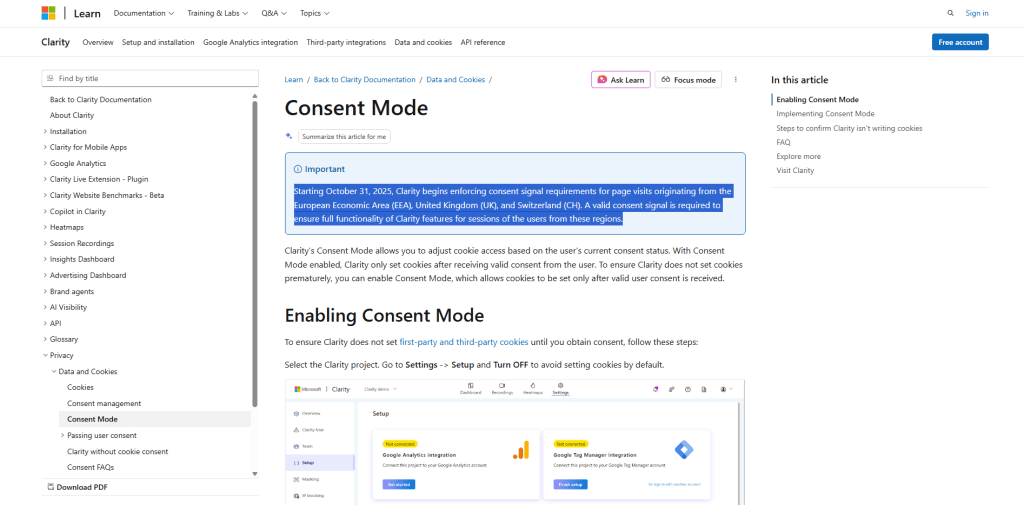
    8) Governance, privacy, and ethics (especially with behavioral data)

    Behavioral analysis can get sensitive fast, particularly when you use session-level signals.

    A few pragmatic practices:

    • Minimize collection to what you need for product decisions
    • Respect consent and regional requirements
    • Avoid capturing sensitive inputs (masking/controls)
    • Limit access internally (need-to-know)
    • Define retention policies
    • Document “why we collect” and “how we use it”

    This protects users and it also protects your team from analysis paralysis caused by data you can’t confidently use.

    9) Start here: 3–5 activation patterns to measure next (PM-friendly)

    If your KPI is Activation, start with the patterns that most often block the “aha path”:

    1. First Session Cliff (are users completing minimum setup?)
    2. Permission/Integration Wall (are you asking for trust too early?)
    3. Hesitation Step (which step is the time sink?)
    4. Error-Correlated Drop-off (is a specific bug killing activation?)
    5. Feature Glimpse, No Adoption (do users see value but fail to realize it?)

    Run them through the triage matrix, define the operational thresholds, then validate with triangulation before changing the experience.

    If you’re looking for onboarding-focused ways to act on these insights, right here: User onboarding 

    FAQ

    What are examples of user behavior patterns in SaaS?

    Common examples include onboarding drop-offs, repeated loops without progress, hesitation at specific steps, feature discovery without first value action, and error-driven abandonment.

    How do I identify user behavior patterns?

    Start with an activation funnel, locate the biggest drop-offs, then segment by meaningful cohorts (channel, device, plan, persona). Use session-level evidence and qualitative signals to diagnose why.

    User behavior patterns vs UX behavior patternsWhat’s the difference?

    Product analytics patterns are measured sequences in actual usage. UX behavior patterns are design principles/hypotheses about how people tend to behave. UX patterns can inspire changes; analytics patterns tell you where to investigate and what to validate.

    How do I validate behavior patterns (causation vs correlation)?

    Use a validation ladder: instrumentation checks → triangulation → counterfactual thinking → experiments/holdouts → controlled pre/post when experimentation isn’t possible.

    CTA

    If you want, use this framework to pick 3–5 high-impact behavior patterns to measure next and define what success looks like before changing the experience.

  • Frontend Error Monitoring: How to Choose Tools and Run an Impact-Based Triage Workflow

    Frontend Error Monitoring: How to Choose Tools and Run an Impact-Based Triage Workflow

    Frontend error monitoring is easy to “install” and surprisingly hard to operate well. Most teams end up with one of two outcomes:

    • an inbox full of noisy JavaScript errors no one trusts, or
    • alerts so quiet you only learn about issues from angry users.

    This guide is for SaaS frontend leads who want a practical way to choose the right tooling and run a workflow that prioritizes what actually hurts users.

    What is frontend error monitoring?

    Frontend error monitoring is the practice of capturing errors that happen in real browsers (exceptions, failed network calls, unhandled promise rejections, resource failures), enriching them with context (route, browser, user actions), and turning them into actionable issues your team can triage and fix.

    It usually sits inside a broader “frontend monitoring” umbrella that can include:

    • Error tracking (issues, grouping, alerts, stack traces)
    • RUM / performance monitoring (page loads, LCP/INP/CLS, route timings)
    • Session replay / UX signals (what happened before the error)
    • Synthetics (scripted checks, uptime and journey tests)

    You don’t need all of these on day one. The trick is choosing the smallest stack that supports your goals.

    1) What are you optimizing for?

    Before you compare vendors, decide what “success” means for your team this quarter. Common goals:

    • Lower MTTR: detect faster, route to an owner faster, fix with confidence
    • Release confidence: catch regressions caused by a deploy before users report them
    • UX stability on critical routes: protect onboarding, billing, upgrade flows, key in-app actions

    Your goal determines the minimum viable stack.

    2) Error tracking vs RUM vs session replay: what you actually need

    Here’s a pragmatic way to choose:

    A) Start with error tracking only when…

    • You primarily need stack traces + grouping + alerts
    • Your biggest pain is “we don’t know what broke until support tells us”
    • You can triage without deep UX context (yet)

    Minimum viable: solid issue grouping, sourcemap support, release tagging, alerting.

    B) Add RUM when…

    • You need to prioritize by impact (affected users/sessions, route, environment)
    • You care about performance + errors together (“the app didn’t crash, but became unusable”)
    • You want to spot “slow + error-prone routes” and fix them systematically

    Minimum viable: route-level metrics + segmentation (browser, device, geography) + correlation to errors.

    C) Add session replay / UX signals when…

    • Your top issues are hard to reproduce
    • You need to see what happened before the error (rage clicks, dead clicks, unexpected navigation)
    • You’re improving user journeys where context matters more than volume

    Minimum viable: privacy-safe replay/UX context for high-impact sessions only (avoid “record everything”).

    If your focus is operational reliability (alerts + workflow), start by tightening your errors + alerts foundation. If you want an operator-grade view of detection and workflow.

    3) Tool evaluation: the operator criteria that matter (not the generic checklist)

    Most comparison posts list the same features. Here are the criteria that actually change outcomes:

    1) Grouping you can trust

    • Does it dedupe meaningfully (same root cause) without hiding distinct regressions?
    • Can you tune grouping rules without losing history?

    2) Release tagging and “regression visibility”

    • Can you tie issues to a deployment or version?
    • Can you answer: “Did this spike start after release X?”

    3) Sourcemap + deploy hygiene

    • Is sourcemap upload straightforward and reliable?
    • Can you prevent mismatches across deploys (the #1 reason debugging becomes guesswork)?

    4) Impact context (not just error volume)

    • Can you see affected users/sessions, route, device/browser, and whether it’s tied to a critical step?

    5) Routing and ownership

    • Can you assign issues to teams/services/components?
    • Can you integrate with your existing workflow (alerts → ticket → owner)?

    6) Privacy and controls

    • Can you limit or redact sensitive data from breadcrumbs/session signals?
    • Can you control sampling so you don’t “fix” an error by accidentally filtering it out?

    4) The impact-based triage workflow (step-by-step)

    This is the missing playbook in most SERP content: not “collect errors,” but operate them.

    Step 1: Normalize incoming signals

    You want a triage view that separates:

    • New issues (especially after a release)
    • Regressions (known issue spiking again)
    • Chronic noise (extensions, bots, flaky third-party scripts)

    Rule of thumb: treat “new after release” as higher priority than “high volume forever.”

    Step 2: Score by impact (simple rubric)

    Use an impact score that combines who it affects and where it happens:

    Impact score = Affected sessions/users × Journey criticality × Regression risk

    • Affected sessions/users: how many real users hit it?
    • Journey criticality: does it occur on signup, checkout/billing, upgrade, key workflow steps?
    • Regression risk: did it appear/spike after a deploy or config change?

    This prevents the classic failure mode: chasing the loudest error instead of the most damaging one.

    Step 3: Classify the issue type (to choose the fastest fix path)

    • Code defect: reproducible, tied to a route/component/release
    • Environment-specific: browser/device-specific, flaky network, low-memory devices
    • Third-party/script: analytics/chat widgets, payment SDKs, tag managers
    • Noise: extensions, bots, pre-render crawlers, devtools artifacts

    Each class should have a default owner and playbook:

    • code defects → feature team
    • third-party → platform + vendor escalation path
    • noise → monitoring owner to tune filters/grouping (without hiding real user pain)

    Step 4: Route to an owner with a definition of “done”

    “Done” is not “merged a fix.” It’s:

    • fix shipped with release tag
    • error rate reduced on impacted route/cohort
    • recurrence monitored for reintroduction

    5) Validation loop: how to prove a fix worked

    Most teams stop at “we deployed a patch.” That’s how regressions sneak back in.

    The three checks to make “fixed” real

    1. Before/after by release
      • Did the issue drop after the release that contained the fix?
    2. Cohort + route confirmation
      • Did it drop specifically for the affected browsers/routes (not just overall)?
    3. Recurrence watch
      • Monitor for reintroductions over the next N deploys (especially if the root cause is easy to re-trigger).

    Guardrail: don’t let sampling or filtering fake success

    Errors “disappearing” can be a sign of:

    • increased sampling
    • new filters
    • broken sourcemaps/release mapping
    • ingestion failures

    Build a habit: if the chart suddenly goes to zero, confirm your pipeline—not just your code.

    6) The pitfalls: sourcemaps, noise, privacy (and how teams handle them)

    Sourcemaps across deploys (the silent workflow killer)

    Common failure patterns:

    • sourcemaps uploaded late (after the error spike)
    • wrong version mapping (release tags missing or inconsistent)
    • hashed asset mismatch (CDN caching edge cases)

    Fix with discipline:

    • automate sourcemap upload in CI/CD
    • enforce release tagging conventions
    • validate a canary error event per release (so you know mappings work)

    Noise: extensions, bots, and “unknown unknowns”

    Treat noise like a production hygiene problem:

    • tag known noisy sources (extensions, headless browsers)
    • group and suppress only after confirming no user-impact signal is being lost
    • keep a small “noise budget” and revisit monthly (noise evolves)

    Privacy constraints for breadcrumbs/session data

    You can get context without collecting sensitive content:

    • redact inputs by default
    • whitelist safe metadata (route, component, event types)
    • only retain deeper context for high-impact issues

    7) The impact-based checklist (use this today)

    Use this checklist to find the first 2–3 workflow upgrades that will reduce time-to-detect and time-to-fix:

    Tooling foundation

    • Errors are grouped into issues you trust (dedupe without losing regressions)
    • Sourcemaps are reliably mapped for every deploy
    • Releases/versions are consistently tagged

    Impact prioritization

    • You can see affected users/sessions per issue
    • You can break down impact by route/journey step
    • You have a simple impact score (users × criticality × regression risk)

    Operational workflow

    • New issues after release are reviewed within a defined window
    • Each issue type has a default owner (code vs 3p vs noise)
    • Alerts are tuned to catch regressions without paging on chronic noise

    Validation loop

    • Fixes are verified with before/after by release
    • The affected cohort/route is explicitly checked
    • Recurrence is monitored for reintroductions

    CTA

    Each issue type should have a default owner and playbook especially when Engineering and QA share triage responsibilities 

    FAQ

    What’s the difference between frontend error monitoring and RUM?

    Error monitoring focuses on capturing and grouping errors into actionable issues. RUM adds performance and experience context (route timings, UX stability, segmentation) so you can prioritize by impact and identify problematic journeys.

    Do I need session replay for frontend error monitoring?

    Not always. Teams typically add replay when issues are hard to reproduce or when context (what the user did before the error) materially speeds up debugging—especially for high-impact journeys.

    How do I prioritize frontend errors beyond “highest volume”?

    Use an impact rubric: affected users/sessions × journey criticality × regression risk. This prevents chronic low-impact noise from outranking a new regression on a critical flow.

    Why do sourcemaps matter so much?

    Without reliable sourcemaps and release tagging, stack traces are harder to interpret, regressions are harder to attribute to deploys, and MTTR increases because engineers spend more time reconstructing what happened.

  • How to compare session replay solutions for UX optimization (not just a feature checklist)

    How to compare session replay solutions for UX optimization (not just a feature checklist)

    If you’ve looked at “best session replay tools” articles, you’ve seen the pattern: a long vendor list, a familiar checklist, and a conclusion that sounds like “it depends.”

    That’s not wrong but it’s not enough.

    Because the hard part isn’t learning what session replay is. The hard part is choosing a solution that helps your team improve UX in a measurable way, without turning replay into either:

    • a library of “interesting videos,” or
    • a developer-only debugging tool, or
    • a compliance headache that slows everyone down.

    This guide gives you a practical evaluation methods weighting framework + a 7–14 day pilot plan so you can compare 2–3 options against your real goal: better activation (for SaaS UX teams) and faster iteration on the journey.

    What you’re really buying when you buy session replay

    Session replay is often described as “watching user sessions.” But for UX optimization, the product you’re actually buying is:

    1. Evidence you can act on
      Not just “what happened,” but what you can confidently fix.
    2. Scale and representativeness
      Seeing patterns across meaningful segments not only edge cases.
    3. A workflow that closes the loop
      Replay → insight → hypothesis → change → measured outcome.

    If any one of those breaks, replay becomes busywork.

    Quick self-check: If your team can’t answer “What changed in activation after we fixed X?” then replay hasn’t become an optimization system yet.

    (If you want a baseline on what modern replay capabilities typically include, start here: Session Reply and Analytics)

    Step 1  Choose your evaluation lens (so your checklist has priorities)

    Most teams compare tools as if every feature matters equally. In reality, priorities change depending on whether you’re primarily:

    • optimizing UX and conversion,
    • debugging complex UI behavior, or
    • operating in a compliance-first environment.

    A simple weighting matrix (SaaS activation defaults)

    Use this as a starting point for a SaaS UX Lead focused on Activation:

    High weight (core to the decision)

    • Segmentation that supports hypotheses (activation cohorting, filters you’ll actually use)
    • Speed to insight at scale (finding patterns without manually watching everything)
    • Collaboration + handoffs (notes, sharing, assigning follow-ups)
    • Privacy + access controls (so the team can use replay without risk or bottlenecks)

    Medium weight (important, but not the first lever)

    • Integrations with analytics and error tracking (context, not complexity)
    • Implementation fit for your stack (SPA behavior, performance constraints, environments)

    Lower weight (nice-to-have unless it’s your main use case)

    • Extra visualizations that don’t change decisions
    • Overly broad “all-in-one” claims that your team won’t operationalize

    Decision tip: Pick one primary outcome (activation) and one primary workflow (UX optimization). That prevents you from over-buying for edge cases.

    Step 2  Score vendors on: “Can we answer our activation questions?”

    Instead of scoring tools on generic features, score them on whether they help you answer questions like:

    • Where do new users stall in the activation journey?
    • Which behaviors predict activation (and which friction points block it)?
    • What’s the fastest path from “we saw it” to “we fixed it”?

    Segmentation that supports hypotheses (not just filters)

    A replay tool can have dozens of filters and still be weak for UX optimization if it can’t support repeatable investigations like:

    • New vs returning users
    • Activation cohorts (activated vs not activated)
    • Key entry points (first session vs second session; onboarding path A vs B)
    • Device/platform differences that change usability

    What you’re looking for is not “can we filter,” but can we define a segment once and reuse it as you test improvements.

    Finding friction at scale

    If your team must watch dozens of sessions to find one relevant issue, you’ll slow down.

    In your pilot, test whether you can:

    • quickly locate sessions that match a specific activation failure (e.g., “got to step 3, then dropped”),
    • identify recurring friction patterns, and
    • group evidence into themes you can ship against.

    Collaboration + handoffs that close the loop

    Replay only drives UX improvements if your process turns findings into shipped changes.

    During evaluation, look for workflow support like:

    • leaving notes on moments that matter,
    • sharing evidence with product/engineering,
    • assigning follow-ups (even if your “system of record” is Jira/Linear),
    • maintaining a consistent tagging taxonomy (more on that in the pilot plan).

    Step 3  Validate privacy and operational controls (beyond “masking exists”)

    Most comparison pages stop at “supports masking.” For real teams, the question is:

    Can we use replay broadly, safely, and consistently without turning access into a bottleneck?

    In your vendor evaluation, validate:

    • Consent patterns: How do you handle consent/opt-out across regions and product areas?
    • Role-based access: Who can view sessions? Who can export/share?
    • Retention controls: Can you match retention to policy and risk profile?
    • Redaction and controls: Can sensitive inputs be reliably protected?
    • Auditability: Can you review access and configuration changes?

    Even if legal/compliance isn’t leading the evaluation, these controls determine whether replay becomes a trusted system or a restricted tool used by a few people.

    Step 4  Run a 7–14 day pilot that proves impact (not just usability)

    A good pilot doesn’t try to “test everything.” It tries to answer:

    1. Will this tool fit our workflow?
    2. Can it produce a defensible activation improvement?

    Week 1 (Days 1–7): Instrument, tag, and build a triage habit

    Pilot setup checklist

    • Choose one activation slice (e.g., onboarding completion, first key action, form completion).
    • Define 2–3 investigation questions (e.g., “Where do users hesitate?” “Which step causes drop-off?”).
    • Create a lightweight tagging taxonomy:
      • activation-dropoff-stepX
      • confusion-copy
      • ui-bug
      • performance-lag
      • missing-feedback
    • Establish a ritual:
      • 15–20 minutes/day of triage
      • a shared doc or board of “top friction themes”
      • one owner for keeping tags consistent

    What “good” looks like by Day 7

    • Your team can consistently find relevant sessions for the activation segment.
    • You have 3–5 friction themes backed by evidence.
    • You can share clips/notes with product/engineering without friction.

    Week 2 (Days 8–14): Ship 1–2 changes and measure activation movement

    Pick one or two improvements that are:

    • small enough to ship fast,
    • specific to your activation segment, and
    • measurable.

    Then define:

    • baseline activation rate for the segment,
    • expected directional impact,
    • measurement window and how you’ll attribute changes (e.g., pre/post with guardrails, or an experiment if you have it).

    The pilot passes if:

    • the tool consistently produces actionable insights, and
    • you can link at least one shipped improvement to a measurable activation shift (even if it’s early and directional).

    How many sessions is “enough”? (and how to avoid sampling bias)

    Instead of aiming for an arbitrary number like “watch 100 sessions,” aim for coverage across meaningful segments.

    Practical guardrails:

    • Review sessions across multiple traffic sources, not just one.
    • Include both “failed to activate” and “successfully activated” cohorts.
    • Use consistent criteria for which sessions enter the review queue.
    • Track which issues record one-off weirdness shouldn’t steer the roadmap.

    Your goal is representativeness: evidence you can trust when you prioritize changes.

    Step 5  Make the call with a pilot scorecard (template)

    Use a simple scorecard so the decision isn’t just vibes.

    Scorecard categories (example)

    A) Activation investigation fit (weight high)

    • Can we define/retain segments tied to activation?
    • Can we consistently find sessions for our key questions?
    • Can we group patterns into actionable themes?

    B) Workflow reality (weight high)

    • Notes/sharing/handoffs feel frictionless
    • Tagging stays consistent across reviewers
    • Engineering can validate issues quickly when needed

    C) Privacy + controls (weight high)

    • Access and retention are configurable
    • Sensitive data controls meet internal expectations
    • Operational oversight is clear (who can do what)

    D) Implementation + performance (weight medium)

    • Works reliably in our app patterns (SPA flows, complex components)
    • Doesn’t create unacceptable page impact (validate in pilot)
    • Supports environments you need (staging/prod workflows, etc.)

    E) Integrations context (weight medium)

    • Connects to your analytics/error tooling enough to reduce context switching

    Decision rules

    • Deal-breakers: anything that blocks broad use (privacy controls), prevents hypothesis-based segmentation, or breaks key flows.
    • Tiebreakers: workflow speed (time to insight), collaboration friction, and how quickly teams can ship fixes.

    Where FullSession fits for SaaS activation

    If your goal is improving activation, you typically need two things at once:

    1. high-signal replay that helps you identify friction patterns, and
    2. a workflow your team can sustain without creating compliance bottlenecks.

    And see activation-focused workflows here: PLG activation

    CTA

    Use a pilot scorecard (weighting + test plan) to evaluate 2–3 session replay tools against your UX goals and constraints.
    If you run the pilot for 7–14 days and ship at least one measurable activation improvement, you’ll have the confidence to choose without relying on generic feature checklists.

    FAQ’s

    1) What’s the fastest way to compare session replay tools for UX optimization?
    Use a weighted scorecard tied to your primary UX outcome (like activation), then run a 7–14 day pilot with 2–3 vendors. Score each tool on segmentation for hypothesis testing, time-to-insight, collaboration workflow, and privacy controls—not just features.

    2) Which criteria matter most for SaaS activation optimization?
    Prioritize: (1) segmentation/cohorting aligned to activation, (2) scalable ways to find friction patterns (not only manual watching), (3) collaboration and handoffs to product/engineering, and (4) privacy, access, and retention controls that allow broad team usage.

    3) How long should a session replay pilot be?
    7–14 days is usually enough to validate workflow fit and produce at least one shippable insight. Week 1 is for setup + tagging + triage habits; Week 2 is for shipping 1–2 changes and measuring activation movement.

    4) How many sessions should we review during evaluation?
    Don’t chase a single number. Aim for coverage across meaningful segments: activated vs not activated, key traffic sources, and devices/platforms. The goal is representativeness so you don’t optimize for outliers.

    5) How do we avoid sampling bias when using session replay?
    Define consistent rules for what sessions enter review (specific cohorts, drop-off points, or behaviors). Include “successful” sessions for contrast, and rotate sources/segments so you don’t only watch the loudest failures.

    6) What privacy questions should we ask beyond “does it mask data”?
    Ask about consent options, role-based access, retention settings, redaction controls, and auditability (who changed settings, who accessed what). These determine whether replay becomes a trusted shared tool or a restricted silo.

    7) What should “success” look like after a pilot?
    At minimum: (1) your team can reliably answer 2–3 activation questions using the tool, (2) you ship at least one UX change informed by replay evidence, and (3) you can measure a directional activation improvement in the target segment.

  • Ecommerce Heatmaps: How to Interpret Them and Turn Insights Into Prioritized CRO Tests

    Ecommerce Heatmaps: How to Interpret Them and Turn Insights Into Prioritized CRO Tests

    Heatmaps are one of the fastest ways to see how shoppers actually interact with your store. But most ecommerce teams hit the same wall: the heatmap looks interesting…and then what?

    This guide is the missing step between “cool visualization” and “repeatable conversion wins.” You’ll learn how to interpret ecommerce heatmaps without common traps, segment them so they become actionable, and convert patterns into a prioritized CRO test plan—especially for the pages that matter most: category/collection, PDP, cart, and checkout.

    What is an ecommerce heatmap (and what it’s actually telling you)?

    An ecommerce heatmap is a visualization that aggregates user behavior on a page or flow. Instead of looking at rows of events, you get a “hot vs cold” overlay showing where interactions cluster.

    Heatmaps can help you quickly spot:

    • Where shoppers click/tap (and where they try to click but can’t)
    • How far they scroll
    • Where “attention-like” behavior may cluster (with move/hover maps—more on the caveats)

    The key mindset: Heatmaps show where behavior concentrates, not why use that insight to improve user onboarding flows too.

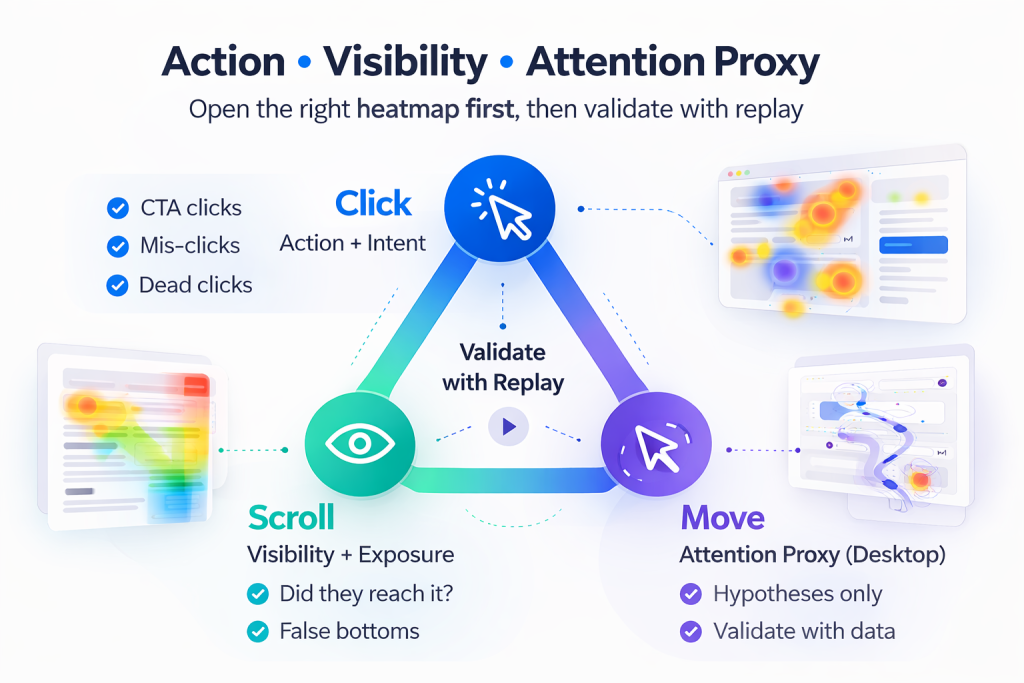
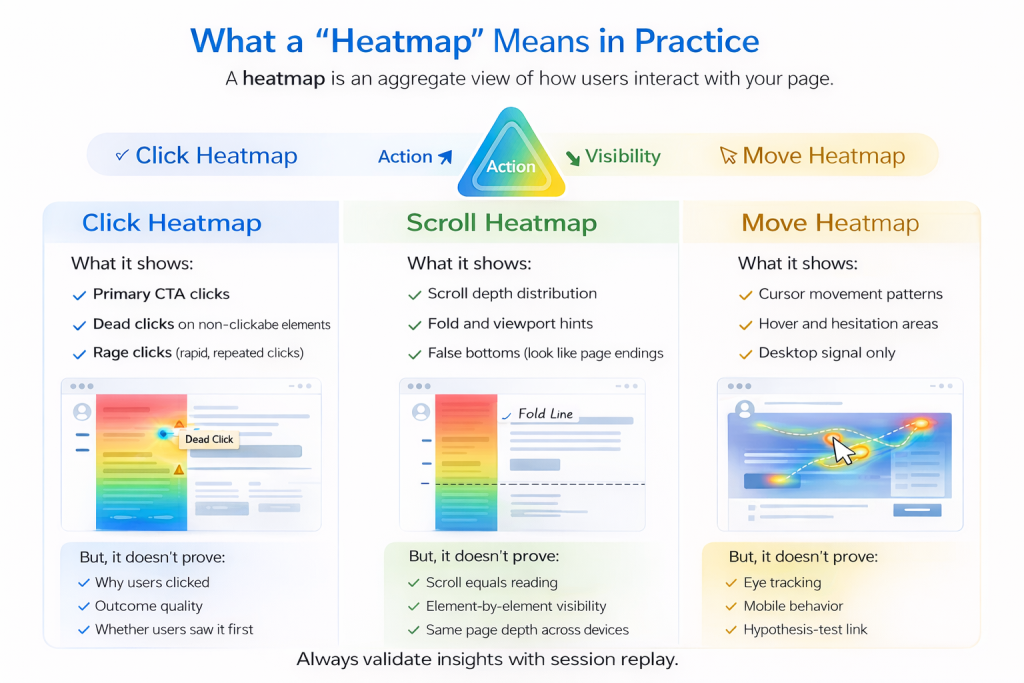
    Types of ecommerce heatmaps (and when to use each)

    Click (tap) heatmaps

    Click/tap maps answer: What do people try to interact with?
    They’re ideal for diagnosing:

    • CTA placement and hierarchy (“Add to cart,” “Checkout,” “Apply coupon”)
    • Misleading UI affordances (elements that look clickable but aren’t)
    • Navigation clarity (filters, sorting, breadcrumbs)
    • Unexpected clicks (e.g., shoppers clicking product images expecting zoom)

    Ecommerce-specific tip: Always review click maps by device. A “dead zone” on desktop might be a hot zone on mobile (or vice versa).

    Scroll depth heatmaps

    Scroll maps answer: How far do shoppers get before they drop off?
    They help you understand:

    • Whether critical content is being seen (shipping/returns, sizing, price, trust signals)
    • If the page is too long for intent (high bounce + shallow scroll)
    • Where users slow down (an indirect hint of confusion or interest)

    Watch out: “Above the fold” is not a fixed line in ecommerce—different devices, browser UI, and sticky elements change what’s visible.

    Move/hover heatmaps (use carefully)

    Move maps can be helpful for exploratory pages (like long-form landing pages), but they’re often overinterpreted.

    Rule of thumb: hover ≠ attention. Use move/hover as a clue, then confirm with:

    • scroll behavior
    • click behavior
    • session replay
    • funnel analytics

    “Dynamic” heatmaps for carts/checkout and dynamic URLs

    Many ecommerce pages are dynamic: cart states change, checkout steps vary, query parameters appear, and authenticated pages behave differently. If your heatmap tool supports dynamic URLs or templated grouping, use it—otherwise you may end up with fragmented, misleading data.

    The segmentation-first rule (the difference between “interesting” and “actionable”)

    Most heatmap mistakes come from looking at an aggregate view and acting too quickly.

    Before you decide anything, segment at least these three ways:

    1. Device: desktop vs mobile (tablet if material)
    2. Traffic source: paid vs organic vs email vs social vs affiliates
    3. New vs returning: familiarity changes behavior dramatically

    Then, add ecommerce-specific segments when you have enough volume:

    • High intent vs low intent (e.g., branded search vs broad paid social)
    • Cart value bands (low vs high cart value often behave differently)
    • Product category (apparel ≠ electronics ≠ consumables)
    • Geo (shipping expectations and payment methods can change flows)

    Segmentation is how you find the real story: the pattern that’s invisible in the average.

    How to interpret ecommerce heatmaps without fooling yourself

    1) Dead clicks aren’t always “bugs”

    A dead click (clicks on something that doesn’t respond) can mean:

    • the element looks interactive but isn’t
    • the page is slow and users click repeatedly
    • the tap target is too small on mobile
    • users expect a different behavior (e.g., click to expand, zoom, or view details)

    Treat dead clicks as a diagnosis prompt:

    • What did the shopper think would happen?
    • Is the UI hinting at the wrong action?
    • Is performance/latency causing repeated input?

    2) High-traffic bias hides high-value minority behavior

    Heatmaps naturally overweight the largest segments. That means:

    • a small group of high-value shoppers can get washed out
    • a problematic behavior in a specific channel can look “fine” overall

    If you run promos, email pushes, or paid campaigns, segment by those sources before declaring the UX “healthy.”

    3) Time windows matter (a lot)

    Heatmaps can change when:

    • you launch a sale
    • you update layout
    • you change shipping thresholds
    • you adjust product mix

    Use consistent windows and refresh heatmaps after meaningful releases.

    Page-type playbook: what to look for (PDP, category, cart, checkout)

    Category/collection pages

    Goal: help shoppers find and commit to a product quickly.

    Look for:

    • Filter and sort engagement: Are they used? Are “no results” states common?
    • Mis-clicks: People clicking non-interactive labels, swatches, or product card areas
    • Scroll behavior: Are shoppers scrolling deep because discovery is working—or because they can’t narrow down?
    • Clicks on “quick add” vs PDP entry: This affects how much detail they need before committing

    Common test ideas:

    • Rework filter UX (labels, order, sticky behavior on mobile)
    • Improve product card clarity (price, delivery, ratings, variants)
    • Make sorting more meaningful (best-selling, fastest shipping, highest rated)

    Product detail pages (PDP)

    Goal: answer “Is this right for me?” and remove purchase anxiety.

    Look for:

    • Where taps cluster near variants: size/color selection issues often show up as repeated taps or dead clicks
    • Trust signal visibility: shipping/returns, delivery estimates, reviews, guarantees
    • Image interaction: zoom, gallery usage, and whether people click images expecting more detail
    • Scroll map: Do shoppers reach key sections (reviews, specs, sizing)?

    Common test ideas:

    • Move essential reassurance closer to the buy decision (near price/CTA)
    • Improve variant selection clarity (defaults, error states, availability)
    • Reduce “choice friction” (size guides, fit info, comparison)

    Cart

    Goal: turn intent into checkout progression.

    Look for:

    • “Proceed to checkout” visibility and repeated interactions
    • Coupon behavior: are shoppers hunting for promo fields and stalling?
    • Quantity changes and remove actions: signals of price shock or mismatch
    • Shipping estimate interactions: uncertainty can cause drop-offs

    Common test ideas:

    • Clarify shipping costs/thresholds earlier
    • De-emphasize coupon field (or gate it behind a link) if it causes distraction
    • Add reassurance near checkout button (secure payment, delivery window)

    Checkout

    Goal: complete payment with minimal friction.

    Look for:

    • Rage clicks / repeated taps on step navigation, payment methods, address fields
    • Checkout drop-off points (scroll depth + step-level funnel analytics)
    • Form friction hotspots (field-level issues, validation confusion, mobile tap targets)

    Common test ideas:

    • Reduce field count and ambiguity
    • Improve inline validation and error messaging
    • Optimize mobile spacing and tap targets
    • Make payment options clearer and faster to select

    Privacy note: Checkout/account pages often contain sensitive information. Ensure proper masking and consent practices before analyzing.

    From heatmap insight → prioritized CRO test plan

    Here’s the workflow most teams are missing.

    Step 1 — Write the observation (not the conclusion)

    Bad: “The CTA is in the wrong place.”
    Good: “On mobile PDPs, 38% of taps cluster on the product image area near the CTA; ‘Add to cart’ receives fewer taps than expected for this traffic segment.”

    Keep it descriptive. Conclusions come later.

    Step 2 — Pair heatmaps with session replay + analytics

    Heatmaps tell you where. Session replay and analytics help tell you why.

    • Use replay to confirm whether clicks are mis-taps, performance issues, or confusion
    • Use analytics to see if the behavior correlates with drop-off, low add-to-cart, or checkout abandonment

    Step 3 — Create hypotheses using a simple template

    Use this structure:

    • Because (insight + segment): “Because mobile shoppers from paid social frequently tap the image area near the CTA…”
    • We believe (mechanism): “…they’re trying to view details/zoom before committing…”
    • If we (change): “…add an explicit ‘Tap to zoom’ affordance and move key reassurance next to the CTA…”
    • Then (expected result): “…more shoppers will proceed to add-to-cart, increasing conversion rate.”

    Step 4 — Score opportunities so you test the right things first

    Use a lightweight scoring model to avoid “heatmap whack-a-mole.”

    Opportunity score (example):

    • Impact (1–5): revenue/conversion upside if fixed
    • Confidence (1–5): strength of evidence across heatmap + replay + analytics
    • Effort (1–5): design/dev/QA complexity (lower is better)
    • Optional: Funnel weight: checkout/cart > PDP > category if KPI is conversion rate

    A simple formula:

    • (Impact × Confidence) ÷ Effort, then apply funnel weight if useful.

    This creates a ranked backlog you can defend—and repeat every month.

    Step 5 — Define validation: A/B vs pre/post + guardrails

    Before shipping:

    • Choose your primary metric (here: conversion rate)
    • Pick guardrails that could be harmed by the change (e.g., AOV, refund rate, error rate, page performance)

    Then decide method:

    • A/B test when you can isolate impact and have stable traffic
    • Disciplined pre/post when A/B isn’t feasible (but control for promos/seasonality and use guardrails)

    Measurement and validation (so you can prove it worked)

    Heatmap-led changes fail politically when teams can’t prove outcomes.

    A practical validation checklist:

    • Define who you’re measuring (segment matches the insight)
    • Define when (avoid sale launches and major merch changes)
    • Track conversion rate plus relevant guardrails:
      • add-to-cart rate (for PDP changes)
      • cart-to-checkout progression (for cart changes)
      • checkout completion rate + error rate (for checkout changes)
      • page performance metrics if you touched media or scripts

    If your store runs frequent promos, document the exact dates and compare like-for-like windows.

    Privacy + data governance on checkout/account pages

    Heatmaps can accidentally expose sensitive interactions if you’re not careful.

    Operational rules:

    • Confirm consent requirements and configurations
    • Ensure masking for any sensitive fields and personal data
    • Treat checkout/account flows as high-risk pages—analyze behavior patterns without capturing sensitive inputs

    FAQs

    Does Shopify have heatmaps?

    Shopify doesn’t ship a universal heatmap feature for every store by default. Many teams use third-party tools or analytics add-ons to generate heatmaps and pair them with session replay.

    Heatmap vs session replay: which should I use?

    Use both when possible:

    • Heatmaps help you spot patterns fast
    • Session replay helps you understand the behavior behind the pattern
      If you can only pick one for early diagnosis, replay often provides faster “why,” while heatmaps make prioritization easier once you have volume.

    How long should I run heatmaps before acting?

    Run long enough to capture a representative sample for the segment you care about (device/source/new vs returning). If you’re in a promo-heavy business, ensure the window reflects “normal” behavior or segment your promo traffic separately.

    Closing CTA

    If you’re evaluating heatmaps for ecommerce optimization, map your top revenue pages, segment by device and traffic source, and validate changes with a clear measurement plan.

  • Form abandonment: how to measure it, diagnose root causes, and prioritize fixes (not just a checklist)

    Form abandonment: how to measure it, diagnose root causes, and prioritize fixes (not just a checklist)

    If you’re a CRO manager at a PLG SaaS, you’ve probably seen this pattern: signups hold steady, but activation flattens. The onboarding form looks “fine.” Funnel charts show where people disappear then everyone argues about why. That’s form abandonment in practice, and it’s fixable when you treat it like a diagnostic problem, not a list of UX tips.

    Early in the workflow, it helps to ground your measurement in funnels and conversion paths (not just overall conversion rate). Start by mapping your onboarding journey in a tool or view like funnels and conversions, and keep the activation outcome tied to your PLG motion.

    Quick Takeaway / Answer Summary (40–55 words)
    Form abandonment is when a user starts a form but leaves before a successful submit. To reduce it, measure drop-offs at the step and field level, diagnose whether the blocker is intent, trust, ability, usability, or technical failure, then prioritize fixes by drop-off × business value × effort, with guardrails for lead quality.

    What is form abandonment?

    Form abandonment happens when a user begins a form (they see it and start interacting) but does not complete a successful submission.

    Form abandonment rate is the share of users who start the form but don’t finish successfully.

    Definition box: the simplest way to calculate it

    • Form starts: sessions/users that interact with the form (e.g., focus a field, type, or progress to step 2)
    • Successful submits: sessions/users that reach “success” (confirmation screen, successful API response, or “account created” event)

    Form abandonment rate = (Form starts − Successful submits) ÷ Form starts

    Two practical notes:

    1. In multi-step flows, calculate both overall abandonment and step-level abandonment (Step 1 → Step 2, Step 2 → Step 3, etc.).
    2. Track “submit attempts” separately from “successful submits”—a lot of “abandonment” is actually submit failure.

    Why does form abandonment matter for SaaS activation?

    Why should you care about form abandonment if the KPI is activation, not just signup?
    Because forms often sit on the critical path to the first value moment: onboarding, workspace creation, inviting teammates, connecting data sources, selecting a template, or choosing a plan key steps that directly impact
    PLG activation.

    If the form blocks progress, you get:

    • Lower activation because users never reach the “aha” action
    • More support load (“I tried to sign up but…”)
    • Misleading experiments (you test copy while a validation loop is the real culprit)

    But here’s the nuance most posts miss

    Not every abandonment is bad. Some abandoners are:

    • Low-intent visitors who were never going to activate
    • Users who lack required information (ability), not motivation
    • People who hit a trust threshold you may need in regulated contexts

    Your goal isn’t “maximize completions at all costs.” It’s: reduce preventable abandonment without degrading lead quality, increasing fraud, or weakening trust.

    How do you measure form abandonment without fooling yourself?

    What should you track to measure form abandonment accurately?
    Track it as a funnel with explicit states (start → progress → submit attempt → success/fail), then add field-level signals to explain the drop-offs.

    Start with a form funnel (macro)

    At minimum:

    1. Viewed form
    2. Started form
    3. Reached submit
    4. Submit attempted
    5. Submit success (and Submit fail)

    If you already have a baseline funnel view (or you build one in funnels and conversions), you’ll quickly see if the big cliff is:

    • Early (start rate is low → intent mismatch or trust)
    • Mid-form (field friction / unclear requirements)
    • Late (submit failure, technical errors, hidden constraints)

    Add field-level diagnostics (micro)

    Track:

    • Field drop-off: which field is the last interaction before exit
    • Time-in-field: long dwell time can mean confusion or lookup effort
    • Validation errors: client-side and server-side; count + field association
    • Return rate: users who leave and come back later (and whether they succeed)

    Don’t ignore “failure mode” abandonment

    A huge share of abandonments are not “user changed mind.” They’re:

    • Submit button does nothing
    • API error or timeout
    • Validation loop (“fix this” but no clear instruction)
    • Form resets after an error
    • Mobile keyboard covers the CTA or error message

    If you only measure “start vs completion,” these get mislabeled as intent problems, and you’ll ship the wrong fixes.

    What causes form abandonment? Use the 5-bucket diagnostic taxonomy

    What’s the fastest way to diagnose why people abandon a form?
    Classify the drop-off into one of five buckets—intent, trust, ability, usability, technical failure—then apply the minimum viable fix for that bucket before you redesign the whole thing.

    1) Intent mismatch

    Signals

    • High form views, low starts
    • Drop-off before the first “commitment” field
    • Disproportionately high abandonment from certain traffic sources

    Likely root cause

    • The user expected something else (pricing, demo, content)
    • The form appears too early in the journey
    • The value exchange isn’t clear

    Minimum viable fix

    • Clarify value and “what happens next”
    • Align the CTA that leads into the form
    • Gate less (or move form later) if activation requires early momentum

    2) Trust / privacy concern

    Signals

    • Drop-off spikes at sensitive fields (phone, company size, billing, “work email”)
    • Rage-clicking around privacy text or tooltips
    • Higher abandonment on mobile (less screen space for reassurance)

    Likely root cause

    • “Why do you need this?” is unanswered
    • Fear of spam / sales pressure
    • Unclear data handling

    Minimum viable fix

    • Add microcopy: why the field is needed, and how it’s used
    • Use progressive disclosure for sensitive asks
    • Set expectations: “No spam,” “You can edit later,” “We’ll only use this for X”

    3) Ability (they can’t provide the info)

    Signals

    • Long time-in-field on “domain,” “billing address,” “team size,” “tax ID”
    • Users pause, switch apps, or abandon at lookup-heavy fields
    • Higher return rate (they come back later with info)

    Likely root cause

    • You’re asking for info users don’t have yet
    • The form assumes a context (e.g., admin) the user isn’t in

    Minimum viable fix

    • Make fields optional where possible
    • Allow “I don’t know” or “skip for now”
    • Collect later (after activation) when the user has more context

    4) Usability / cognitive load

    Signals

    • Mid-form cliff across many sources/devices
    • Errors repeat; users bounce between fields
    • Mobile drop-off is materially worse than desktop

    Likely root cause

    • Too many fields, unclear labels, poor grouping
    • Confusing validation rules or error placement
    • Accessibility issues (focus states, contrast, screen reader labels)

    Minimum viable fix

    • Reduce required fields; group logically
    • Inline validation with clear, specific messages
    • Mobile-first layout, correct input types, keyboard-friendly controls

    5) Technical failure

    Signals

    • Submit attempts without success
    • Abandonment correlates with slow performance, browser versions, or releases
    • Users retry, refresh, or get stuck in a loop

    Likely root cause

    • Network/API errors, timeouts
    • Client-side bugs, state resets
    • Third-party script conflicts

    Minimum viable fix

    • Improve error handling + retry; preserve user input on failure
    • Make failure states visible and actionable
    • Pair engineering triage with real sessions (not just logs)

    A simple prioritization model: what to fix first

    How do you prioritize form fixes without guessing?
    Score candidates using Drop-off × Business value × Effort, then add guardrails so you don’t “win” a conversion metric while harming activation quality.

    Step 1: Build a shortlist from evidence

    From your funnel + field data, list the top issues:

    • Top abandonment step(s)
    • Top abandoning fields
    • Top error messages / submit failure reasons
    • Top segments (mobile, new users, certain sources)

    Step 2: Score each candidate

    Use a lightweight rubric:

    Candidate issueDrop-off severityActivation impactEffort / risk
    Sensitive field causing exitsHighMedium–HighLow–Medium
    Validation loop on phone fieldMediumMediumLow
    Submit timeout on step 3Medium–HighHighMedium–High
    Optional field causing confusionMediumLow–MediumLow

    Keep the table simple and mobile-friendly. Your goal is not precision—it’s a shared decision model.

    Step 3: Add guardrails (the part most teams skip)

    Define “success” beyond completion:

    • Primary: form completion (or step completion)
    • Secondary: time-to-complete, validation error rate, submit failure rate
    • Downstream: activation rate, quality signals (e.g., domain verified, team invite, first project created)

    This prevents the classic trap: you reduce friction, completions rise, but activation gets worse because you let low-intent or low-quality entries flood the funnel.

    The diagnostic workflow (numbered steps)

    What’s the most reliable workflow to reduce form abandonment?
    Run a tight loop: quantify the drop, diagnose the bucket, apply the smallest fix, then validate with guardrails.

    1. Measure the funnel state-by-state
      Identify whether the cliff is start rate, mid-form progression, submit attempts, or submit success.
    2. Drill into the top abandoning step/field
      Look for long time-in-field, repeated errors, resets, and device differences.
    3. Classify the root cause (intent / trust / ability / usability / technical)
      Don’t brainstorm solutions until you can name the bucket.
    4. Pick the minimum viable fix for that bucket
      Avoid redesigning the whole form when microcopy or validation behavior is the real issue.
    5. Validate with guardrails, not just “conversion”
      Confirm completion improves and activation-quality signals don’t degrade.
    6. Document the pattern and templatize it
      The goal is not one fix—it’s a repeatable playbook for every form in your product.

    Fixes by root-cause bucket (minimum viable first)

    Intent: make the value exchange explicit

    • Tighten the CTA and surrounding copy so the form matches the promise
    • Add “what happens next” in one sentence
    • Move non-essential fields to later steps after the user has momentum

    Trust: explain why you’re asking (copy patterns that work)

    Instead of “Phone number (required),” try:

    • “Phone number (only used for account recovery and security alerts)”
    • “Work email (so your team can join the right workspace)”
    • “Company size (helps us recommend the right onboarding path)”

    The goal is reassurance without a wall of policy text.

    Ability: reduce lookup burden

    • Provide “skip for now”
    • Make uncertain fields optional
    • Add helper UI: autocomplete, sensible defaults, “I’m not sure” paths

    Usability: reduce cognitive load and validation pain

    • Reduce required fields to what’s needed for the next activation step
    • Use progressive disclosure and conditional logic
    • Make validation messages specific and placed where the user is looking

    Technical failure: preserve progress and make failure recoverable

    • Preserve user input on any error
    • Provide retry and clear error states (not silent failures)
    • Track and prioritize by user impact, not just error volume

    Scenario A (SaaS activation)

    A CRO manager notices activation is down, but signups are flat. The onboarding form isn’t long—so the team assumes it’s a motivation issue. Funnel measurement shows the cliff happens after users click “Create workspace,” not at the start. Field-level data points to repeated validation errors on a “workspace URL” field. Session evidence shows a common loop: users enter a name that’s “invalid,” but the error message doesn’t explain the naming rule, and the form clears the input on refresh. The fix isn’t a redesign: tighten validation rules, make the error message explicit, preserve input, and suggest available alternatives. Completion improves, and—more importantly—more users reach the first meaningful in-product action.

    Scenario B (different failure mode)

    In a different SaaS flow, a “Request access” form sits in front of a core feature. Abandonment spikes at two fields: phone number and “annual budget.” The team considers removing both, but the downstream quality signal is important for sales-assisted activation. Field timing shows users hesitate for a long time, then exit—especially on mobile. The root cause isn’t pure intent; it’s trust + ability. Users don’t know why those fields are needed and often don’t have a budget number handy. The minimum viable fix is progressive disclosure: explain how the data is used, make budget a range with “not sure,” and allow phone to be optional with a clear security/support rationale. Completions rise without turning the flow into a low-quality free-for-all.

    When to use FullSession (mapped to Activation)

    If you’re responsible for activation, form abandonment is rarely “a UX problem” in isolation—it’s a measurement + diagnosis + prioritization problem. FullSession fits when you need to connect where users drop to why it happens and what to fix first, using a workflow that keeps experiments honest.

    • Start with funnels and conversions to find the steepest drop-off step and segment it (mobile vs desktop, new vs returning, source).
    • Tie the remediation work to the activation journey in /solutions/plg-activation so fixes map to the outcome, not vanity completions.
    • Then validate fixes with real-user evidence (sessions, error states, and form behavior) before you scale changes across onboarding.

    If you want to see how this workflow looks on your own onboarding journey, you can get a FullSession demo and focus on one critical activation form first.

    FAQs

    What’s the difference between form abandonment and low conversion rate?

    Low conversion rate is the outcome; form abandonment is a specific behavioral failure inside the journey—users start but don’t finish successfully. A page can convert poorly even if abandonment is low (e.g., low starts due to low intent).

    What’s a “good” form abandonment rate?

    There isn’t a universal benchmark that transfers cleanly across form types and traffic quality. Instead, compare by segment (device/source/new vs returning) and by step/field to find your biggest cliffs and easiest wins.

    Should you always reduce required fields?

    Not always. Removing fields can raise completion while lowering lead quality or weakening security signals. Prefer “minimum viable” reductions: keep what’s needed for the next activation moment, and defer the rest.

    How do I know if abandonment is caused by technical failures?

    Look for a gap between submit attempts and submit success, spikes after releases, browser/device clustering, timeouts, and repeated retries. Treat “silent submit failure” as a top priority because it’s pure waste.

    What’s the fastest fix that usually works?

    For many SaaS onboarding forms: clearer validation messaging + preserving input on error + optional/progressive disclosure for sensitive fields. These are high-leverage because they reduce frustration without changing your funnel strategy.

    How do I avoid false wins in A/B tests for forms?

    Define guardrails up front: completion plus time-to-complete, error rate, and at least one downstream activation/quality signal. If completion rises but downstream quality drops, it’s not a win.

  • Conversion funnel analysis workflow: diagnose drop-offs, validate causes, and prioritize fixes

    Conversion funnel analysis workflow: diagnose drop-offs, validate causes, and prioritize fixes

    You ship a new onboarding flow. Signups look fine. But activation stalls again. Your funnel report tells you where people disappear, but not whether the leak is real, whether it affects the right users, or what fix is worth shipping first.

    Quick Takeaway (40–55 words)
    Conversion funnel analysis is most useful when you treat it like a diagnostic workflow: validate tracking and step definitions first, segment to find where the drop-off concentrates, form competing hypotheses, confirm the “why” with qualitative evidence, then prioritize fixes by impact/confidence/effort and validate outcomes with guardrails. Use tools like FullSession Lift AI to move faster from “where” to “what to do next.”

    What is conversion funnel analysis?

    Conversion funnel analysis is the process of measuring how users move through a defined sequence of steps (events or screens) toward a goal then using step-by-step conversion and drop-off patterns to identify friction, mismatched expectations, or technical issues that block outcomes like Activation.

    A funnel is only as useful as its definitions: what counts as a “step,” how you identify users across sessions/devices, and whether you’re analyzing the right audience for the goal.

    Is this drop-off real or a tracking artifact?

    Before you optimize anything, you need to answer one question: are you seeing user behavior, or measurement noise? If you skip this, teams “fix” steps that were never broken then wonder why activation doesn’t budge.

    Common funnel validity checks (activation-friendly):

    • Step definition sanity: Are steps mutually exclusive and in the right order? Did you accidentally include optional screens as required steps?
    • Event duplication: Are events firing twice (double pageview, double “completed” events)?
    • Identity stitching: Are you splitting one person into two users when they move from anonymous → logged-in?
    • Time windows: Are you using a window so short that legitimate activation journeys look like drop-offs?
    • Versioning: Did the event name or properties change after a release, creating a fake “cliff” in the funnel?

    If you’re using a workflow that blends funnel signals with behavioral evidence (replays, errors, performance), you’ll usually get to the truth faster than staring at charts alone. That’s the idea behind pairing funnels with tools like PLG activation workflows and FullSession Lift AI: less guessing, more proof.

    What should you analyze first: the biggest drop-off or the biggest opportunity?

    Answer: neither start with the most decisionable drop-off: big enough to matter, stable enough to trust, and close enough to the KPI that moving it is likely to move activation.

    Practical rule of thumb:

    • If a drop-off is huge but sample size is tiny or instrumentation is shaky → validate first
    • If a drop-off is moderate but affects your highest-intent users or core segment → prioritize sooner
    • If a drop-off is early but far from activation → you’ll need stronger evidence that improving it changes downstream outcomes

    The conversion funnel analysis workflow (SaaS PM version)

    1) Define the outcome and the audience (before steps)

    Write this in one sentence:

    “Activation means X, for Y users, within Z time.”

    Examples:

    • “Activation = user completes ‘first successful run’ within 7 days for new self-serve signups.”
    • “Activation = team connects a data source and invites at least one teammate within 14 days.”

    Also define who you’re analyzing:

    • All signups? Or only qualified signups (right plan, right channel, right persona)?
    • New users only? Or returning/inviting users too?

    2) Validate instrumentation and step definitions

    Question hook: If we rebuilt this funnel from raw events, would we get the same story?
    Answer: if you can’t confidently say yes, you’re not ready to optimize.

    Checklist:

    • Each step has one clear event (or page/screen) definition
    • Events are deduped and fire once per real user action
    • You can follow a single user end-to-end without identity breaks
    • You can explain what “time to convert” means for this funnel (and whether long journeys are expected)

    3) Measure baseline and locate the leak

    Compute for each step:

    • Step conversion rate (step-to-step)
    • Drop-off rate
    • Time-to-next-step distribution (median + long tail)

    Don’t stop at “Step 3 is bad.” Write the behavioral claim you’re making:

    “Users who reach Step 3 often intend to continue but are blocked.”

    That claim might be wrong and you’ll test it next.

    4) Segment to find concentration (where is it especially bad?)

    Question hook: Who is dropping off and what do they have in common?
    Answer: segmentation turns a generic drop-off into a specific diagnosis target.

    High-signal activation segments:

    • Acquisition channel: paid search vs content vs direct vs partner
    • Persona proxy: role/title (if known), company size, team vs solo accounts
    • Lifecycle: brand new vs returning; invited vs self-serve
    • Device + environment: mobile vs desktop; browser; OS
    • Cohort vintage: this week’s signup cohort vs last month (release effects)
    • Performance / reliability: slow sessions vs fast; error-seen vs no-error (often overlooked)

    5) Build competing hypotheses (don’t lock onto the first story)

    Create 3–4 hypotheses from different buckets:

    • Tracking issue: step looks broken due to instrumentation or identity
    • UX friction: confusing UI, unclear field requirements, bad defaults
    • Performance / technical: latency, errors, timeouts, loading loops
    • Audience/value mismatch: wrong users entering funnel; unclear value prop; wrong expectations

    6) Confirm “why” with qualitative proof

    Question hook: What would you need to see to believe this hypothesis is true?
    Answer: define your proof standard before you watch replays or run interviews.

    Examples of proof:

    • Replays show repeated attempts, back-and-forth navigation, rage clicks, or “dead” UI
    • Errors correlate with the drop-off step (same endpoint, same UI state)
    • Users abandon after pricing/plan gating appears (mismatch)
    • Survey/interview reveals expectation mismatch (“I thought it did X”)

    This is where a combined workflow helps: use funnel segments to find the right sessions, then use behavior evidence to confirm the cause. If you want a structured way to do that inside one workflow, start with FullSession Lift AI and align it to your activation journey via PLG activation workflows.

    7) Prioritize fixes (Impact × Confidence × Effort) + cost of delay

    For each candidate fix, score:

    • Impact: if this works, how likely is activation to move meaningfully?
    • Confidence: do we have strong causal evidence or only correlation?
    • Effort: eng/design/QA cost + risk + time

    Add one more dimension PMs often forget:

    • Cost of delay: are we bleeding high-intent users right now (e.g., new pricing launch), or is this a slow burn?

    8) Ship safely: guardrails + rollback criteria

    Don’t declare victory by improving one step.
    Define:

    • Primary success metric (activation)
    • Step metric(s) you expect to move
    • Guardrails: error rate, latency, support tickets, retention proxy
    • Rollback criteria: “If guardrail X degrades beyond Y for Z days, revert.”

    9) Validate outcome (and check for downstream shifts)

    After rollout:

    • Did activation improve for the target segment?
    • Did the fix shift drop-off later (not actually reduce it)?
    • Did time-to-activate improve, not just step completion?
    • Did downstream engagement/retention signals stay healthy?

    Diagnostic decision table: drop-off signals → likely causes → how to confirm → next action

    What you see in the funnelLikely cause bucketHow to confirm fastWhat to do next
    Sudden “cliff” after a release dateTracking/versioning or UI regressionCompare cohorts before/after release; inspect event definitionsFix instrumentation or rollback/regress the UI change
    Drop-off concentrated on one browser/deviceEnvironment-specific UX or technical bugSegment by device/browser; look for errors/latencyRepro + patch; add QA coverage for that env
    High time-to-next-step long tailConfusion, gating, or slow loadWatch sessions in long-tail; check performanceSimplify UI + speed up + clarify next action
    Drop-off only for a channel cohortAudience mismatch or expectation mismatchSegment by channel; review landing promise vs in-app realityAdjust acquisition targeting or onboarding messaging
    Drop-off correlates with errorsReliability/technicalSegment “error-seen”; review error clustersFix top errors first; add alerting/regression tests

    Segmentation playbooks for activation funnels (practical cuts)

    If you only have time for a few cuts, do these in order:

    1. New vs returning
      Activation funnels often behave differently for invited users vs self-serve signups. Don’t mix them.
    2. Channel → persona proxy
      Paid cohorts frequently include more “tourists.” If a drop-off is only “bad” for low-intent cohorts, you might not want to optimize the product step you might want to tighten acquisition.
    3. Cohort vintage (release impact)
      Compare “this week’s signups” to “last month’s signups.” If the leak appears only after a change, you’ve narrowed the search dramatically.
    4. Performance and error exposure
      This is the fastest way to separate “UX problem” from “the app failed.” If slow/error sessions are the ones leaking, fix reliability before polishing UX copy.

    Quant → qualitative workflow: how to prove the cause

    1. Pick the drop-off step and the segment where it’s worst
    2. Write 3 competing hypotheses (UX vs technical vs mismatch)
    3. For each hypothesis, define what you’d need to observe to believe it
    4. Pull sessions from the drop-off segment and look for repeated patterns
    5. If patterns are unclear, add a lightweight intercept survey or interview prompt
    6. Turn the strongest hypothesis into a fix + measurement plan (activation + guardrails)

    When not to optimize a funnel step

    You can save weeks by recognizing “false opportunities”:

    • The step is optional in real journeys. Making it “convert” better doesn’t help activation.
    • The drop-off is mostly unqualified users. Fixing the product flow won’t fix acquisition mismatch.
    • The data is unstable. Small sample sizes or seasonality can make you chase noise.
    • The fix creates downstream harm. Removing a gating step might increase “activation” while decreasing retention or increasing support load.

    Scenario A (SaaS PM): Activation drop-off caused by hidden complexity

    Your activation funnel shows a sharp drop at “Connect data source.” The team assumes the integration UI is confusing and starts redesigning screens. Before doing that, you segment by company size and see the drop-off is heavily concentrated in smaller accounts. You watch sessions and notice a recurring pattern: users arrive expecting a “quick start,” but the integration requires admin permissions they don’t have. They loop between the integration screen and settings, then abandon. The “problem” isn’t button placement it’s that activation requires a decision and a dependency. The fix becomes: detect non-admin users, offer a “send request to admin” path, and provide a lightweight sandbox dataset so users can reach value before the full integration. You validate with guardrails: support tickets, time-to-activate, and retention proxy because making activation easier shouldn’t create low-quality activated users.

    Scenario B (Growth Marketer + PM): Drop-off is a reliability issue disguised as “friction”

    The funnel shows drop-off at “Create first project.” It’s worse on mobile and spikes in certain geographies. The team debates copy changes and onboarding tooltips. Instead, you segment by device and then by sessions that encountered an error. The drop-off correlates strongly with error exposure. Watching sessions shows users hitting “Create,” getting a spinner, tapping again, then seeing an error toast that disappears too quickly. Some users retry until they give up; others refresh and lose their progress. The right first fix isn’t messaging it’s reliability: stabilize the create endpoint, make the loading state deterministic, and preserve state on refresh. Only after the errors are addressed do you revisit UX clarity. Your validation plan checks activation, error rate, latency, and whether the drop-off simply moved to the next step.

    When to use FullSession (for Activation-focused funnel work)

    If your job is to move activation and you’re tired of debating guesses, FullSession fits best when you need to:

    • Confirm whether a drop-off is real (instrumentation sanity + step definition discipline)
    • Pinpoint where leaks concentrate with high-signal segment cuts
    • Connect funnel signals to qualitative proof (what users actually experienced)
    • Prioritize fixes with confidence, then validate outcomes with guardrails

    If you want to apply this workflow on one critical activation journey, start with FullSession Lift AI and align it to your onboarding KPI via PLG activation workflows.

    FAQs

    1) What’s the difference between funnel analysis and journey analysis?

    Funnels measure conversion through a defined sequence of steps. Journey analysis is broader: it captures multi-path behavior and optional loops. Use funnels to find “where,” then journey views to understand alternative routes and detours.

    2) How many steps should an activation funnel have?

    Enough to isolate meaningful decisions often 4–8 steps. Too few and you can’t diagnose. Too many and you create noise, especially if steps are optional.

    3) How do I avoid false positives when comparing segments?

    Make sure each segment has enough volume to be stable, compare consistent time windows, and verify instrumentation didn’t change between cohorts. If results swing wildly week to week, treat insights as hypotheses, not conclusions.

    4) What’s the fastest way to tell “UX friction” from “technical failure”?

    Segment by error exposure and performance (slow vs fast sessions). If the leak is concentrated in error/slow sessions, fix reliability before redesigning UX.

    5) How do I prioritize funnel fixes without over-optimizing local steps?

    Use impact × confidence × effort, then add downstream validation: activation (primary), plus guardrails like error rate, support load, and a retention proxy.

    6) How do I validate that a funnel improvement really improved activation?

    Track activation as the primary outcome, run a controlled experiment when possible, and monitor guardrails. If only one step improves but activation doesn’t, you likely fixed a symptom or shifted the drop-off.

  • UX analytics: From metrics to meaningful product decisions

    UX analytics: From metrics to meaningful product decisions

    Most activation work fails for a simple reason: teams can see what happened, but not why it happened.
    UX analytics is the bridge between your numbers and the experience that created them.

    Definition box: What is UX analytics?

    UX analytics is the practice of using behavioral signals (what people do and struggle with) to explain user outcomes and guide product decisions.
    Unlike basic reporting, UX analytics ties experience evidence to a specific product question, then checks whether a change actually improved the outcome.

    UX analytics is not “more metrics”

    If you treat UX analytics as another dashboard, you will get more charts and the same debates.

    Product analytics answers questions like “How many users completed onboarding?”
    UX analytics helps you answer “Where did they get stuck, what did they try next, and what confusion did we introduce?”

    A typical failure mode is when activation drops, and the team argues about copy, pricing, or user quality because nobody has shared evidence of what users actually experienced.
    UX analytics reduces that ambiguity by adding behavioral context to your activation funnel.

    If you cannot describe the friction in plain language, you are not ready to design the fix.

    The UX analytics decision loop that prevents random acts of shipping

    A tight loop keeps you honest. It also keeps scope under control.

    Here is a workflow PMs can use for activation problems:

    1. Write the decision you need to make. Example: “Should we simplify step 2 or add guidance?”
    2. Define the activation moment. Example: “User successfully connects a data source and sees first value.”
    3. Map the path and the drop-off. Use a funnel view to locate where activation fails.
    4. Pull experience evidence for that step. Session replays, heatmaps, and error signals show what the user tried and what blocked them.
    5. Generate 2 to 3 plausible causes. Keep them concrete: unclear affordance, hidden requirement, unexpected validation rule.
    6. Pick the smallest change that tests the cause. Avoid redesigning the entire onboarding unless the evidence demands it.
    7. Validate with the right measure. Do not only watch activation rate. Watch leading indicators tied to the change.
    8. Decide, document, and move on. Ship, revert, or iterate, but do not leave outcomes ambiguous.

    One constraint to accept early: you will never have perfect certainty.
    Your goal is to reduce the risk of shipping the wrong fix, not to prove a single “root cause” forever.

    The UX signals that explain activation problems

    Activation friction is usually local. One step, one screen, one interaction pattern.

    UX analytics is strongest when it surfaces signals like these:

    • Rage clicks and repeated attempts: users are trying to make something work, and failing.
    • Backtracking and loop behavior: users bounce between two steps because the system did not clarify what to do next.
    • Form abandonment and validation errors: users hit requirements late and give up.
    • Dead clicks and mis-taps: users click elements that look interactive but are not.
    • Latency and UI stalls: users wait, assume it failed, and retry or leave.

    This is where “behavioral context over raw metrics” matters. A 12% drop in activation is not actionable by itself.
    A pattern like “40% of users fail on step 2 after triggering a hidden error state” is actionable.

    A prioritization framework PMs can use without getting stuck in debate

    Teams often struggle because everything looks important. UX analytics helps you rank work by decision value.

    Use this simple scoring approach for activation issues:

    • Impact: how close is this step to the activation moment, and how many users hit it?
    • Confidence: do you have consistent behavioral evidence, or just a hunch?
    • Effort: can you test a narrow change in days, not weeks?
    • Risk: will a change break expectations for existing users or partners?

    Then pick the top one that is high-impact and testable.A realistic trade-off: the highest impact issue may not be the easiest fix, and the easiest fix may not matter.
    If you cannot test the high-impact issue quickly, run a smaller test that improves clarity and reduces obvious failure behavior while you plan the larger change.

    How to validate outcomes without fooling yourself

    The SERP content often says “track before and after,” but that is not enough.

    Here are validation patterns that hold up in real product teams:

    Use leading indicators that match the friction you removed. If you changed copy on a permission step, track:

    • Time to complete that step
    • Error rate or retry rate on that step
    • Completion rate of the next step (to catch downstream confusion)

    Run a holdout or staged rollout when possible. If you cannot, at least compare cohorts with similar acquisition sources and intent.
    Also watch for “false wins,” like increased step completion but higher support contacts or worse quality signals later.

    A typical failure mode is measuring success only at the top KPI (activation) while the change simply shifts users to a different kind of failure.
    Validation should prove that users experienced less friction, not just that the funnel number moved.

    How UX insights get used across a SaaS org

    UX analytics becomes more valuable when multiple teams can act on the same evidence.

    PMs use it to decide what to fix first and how narrow a test should be.
    Designers use it to see whether the interface communicates the intended action without extra explanation.
    Growth teams use it to align onboarding messages with what users actually do in-product.
    Support teams use it to identify recurring confusion patterns and close the loop back to the product.

    Cross-functional alignment is not about inviting everyone to the dashboard.
    It is about sharing the same few clips, step-level evidence, and a crisp statement of what you believe is happening.

    When to use FullSession for activation work

    Activation improvements need context, not just counts.

    Use FullSession when you are trying to:

    • Identify the exact step where activation breaks and what users do instead
    • Connect funnel drop-off to real interaction evidence, like clicks, errors, and retries
    • Validate whether an experience change reduced friction in the intended moment
    • Give product, design, growth, and support a shared view of user struggle

    If your immediate goal is PLG activation, start by exploring the PLG activation workflow and real-world examples to understand how users reach their first value moment.
    When you’re ready to map the user journey and quantify drop-offs, move to the funnels and conversions hub to analyze behavior and optimize conversions.

    Explore UX analytics as a decision tool, not a reporting task. If you want to see how teams apply this to onboarding, request a demo or start a trial based on your workflow.


    FAQs

    What is the difference between UX analytics and product analytics?

    Product analytics focuses on events and outcomes. UX analytics adds experience evidence that explains those outcomes, especially friction and confusion patterns.

    Do I need session replay for UX analytics?

    Not always, but you do need some behavioral context. Replays, heatmaps, and error signals are common ways teams get that context when activation issues are hard to diagnose.If you can only pick one, RPV is often the better north star because it captures both conversion and order value. Still track CVR and AOV to understand what is driving changes in RPV.

    What should I track for activation beyond a single activation rate?

    Track step-level completion, time-to-first-value, retry rates, validation errors, and leading indicators tied to the change you shipped.

    How do I avoid analysis paralysis with UX analytics?

    Start with one product question, one funnel step, and one hypothesis you can test. Avoid turning the work into a “collect everything” exercise.

    How many sessions do I need before trusting what I see?

    There is no universal number. Look for repeated patterns across different users and sources, then validate with step-level metrics and a controlled rollout if possible.

    Can UX analytics replace user research?

    No. UX analytics shows what happened and where users struggled. Research explains motivations, expectations, and language. The strongest teams use both.

  • Ecommerce Conversion Optimization: A Practical CRO System for Prioritizing, Testing, and Proving Lift

    Ecommerce Conversion Optimization: A Practical CRO System for Prioritizing, Testing, and Proving Lift

    Most ecommerce teams do not have a “tactic problem.” They have a decision problem.

    You can find endless lists telling you to add reviews, tweak your checkout, or speed up pages. The harder part is knowing what to do first, how to prove it worked, and what to do when the data is noisy or the test shows no lift.

    This guide gives you a practical CRO system: how to choose the right KPI, diagnose where the money is leaking, prioritize what to fix, and validate results without fooling yourself.

    What is ecommerce conversion optimization?

    Ecommerce conversion optimization (often called ecommerce CRO) is the practice of increasing revenue from the traffic you already have by reducing friction and improving decision clarity across the shopping journey.

    It includes UX changes (navigation, product pages, checkout), offer and trust changes (shipping clarity, returns, guarantees), and measurement changes (choosing the right KPI, instrumenting the funnel correctly).

    Definition box: ecommerce conversion rate formula

    Ecommerce conversion rate (CVR) is typically calculated as:

    CVR = Transactions / Sessions (or Visitors)

    That formula is useful, but it can also mislead you. If a change increases average order value (AOV) but slightly reduces CVR, you could still make more money. That is why many teams run CRO against a revenue metric, not just a confirmation-page metric.

    Choose the right primary KPI (why RPV often beats CVR)

    If you only optimize for CVR, you can accidentally push the business into bad trade-offs: more low-intent orders, worse margins, higher cancellations, or more support load.

    A practical default for ecommerce CRO is Revenue per Visitor (RPV) because it bakes in both conversion and basket value.

    RPV also forces better questions:

    • Are we converting the right traffic, or just more traffic?
    • Are we improving checkout completion, or lowering order value to do it?
    • Are we shifting revenue between segments (mobile vs desktop) instead of growing it?

    Here’s a simple metric selection table you can use when aligning stakeholders.

    MetricBest used whenCommon risk if you over-focus
    RPVYou want a single north star that reflects revenue impactCan hide margin, refunds, or cancellations if you do not track counter-metrics
    CVRYou have stable AOV and want to reduce friction fastCan reward “cheap wins” that lower order value or quality
    AOVYou are improving bundles, thresholds, and merchandisingCan decrease CVR if you push too hard or add choice overload
    Cart abandonment rateYou have strong add-to-cart but weak checkout completionCan improve while revenue stays flat if traffic quality shifts

    Counter-metrics to keep you honest: refunds, cancellations, payment failures, support tickets, and delivery exceptions. If your checkout change increases RPV but also increases cancellations, that is not a win. It is a delayed loss.

    The practical CRO loop (from signal to shipped change)

    A CRO program works when it produces decisions, not decks. You need a repeatable loop that connects funnel data to user-level evidence and then to a test plan.

    Here is a workflow that holds up in the real world, including traffic constraints and competing priorities.

    1. Define the conversion event and the funnel path
      Start with what you actually care about: purchase revenue, subscription start, lead with deposit, or whatever “value” means for your store. Then map the steps that create it (product view → add to cart → checkout start → payment success).
    2. Find the highest-value drop-off
      Look for steps where a meaningful share of users fall out and where the business impact is obvious. “Checkout start to purchase” is often the highest-value zone, but not always.
    3. Segment before you brainstorm
      Do not mix all users together. At minimum, split by device, new vs returning, and primary acquisition channels. Many “sitewide” CRO ideas are actually one-segment ideas in disguise.
    4. Collect session-level evidence
      Funnel analytics tells you where. It rarely tells you why. Pair the drop-off with session replay, rage clicks, dead clicks, error states, and form hesitation patterns. The goal is not storytelling. It is evidence you can turn into a specific hypothesis.
    5. Write a falsifiable hypothesis
      “Improve trust” is not a hypothesis.
      “If we show delivery date and total cost earlier in checkout, mobile users will complete payment more often because uncertainty drops” is testable.
    6. Choose the smallest test that can prove or disprove it
      You are not trying to rebuild the storefront. You are trying to reduce uncertainty. Start with the smallest change that meaningfully targets the friction source.
    7. Validate with guardrails, then ship or iterate
      Decide up front what “good evidence” looks like, what segments you will read, and which counter-metrics must not regress. Then ship the winner, document the result, and feed the learnings back into prioritization.

    If you want to operationalize steps 1 to 3 with less guesswork, start from your funnel drop-offs and step-to-step completion inside.

    Prioritization that survives real constraints

    Every ecommerce team has more ideas than capacity. Your system should prevent two failure modes:

    • Tactic sprawl: 25 “good ideas” and no focus.
    • Local optimization: improving a micro-step that does not move revenue.

    A simple prioritization approach that works well in practice is Impact × Confidence ÷ Effort, scored per funnel zone and per key segment.

    Impact: If this works, how much revenue could it move?
    Confidence: How strong is the evidence (not opinions)?
    Effort: How long to build, QA, and measure correctly?

    A typical failure mode is treating “confidence” as gut feel. Instead, tie confidence to what you can actually point to:

    • A consistent replay pattern (users stuck on the same field).
    • A measurable error spike (payment failures, address validation loops).
    • A segment-specific drop-off (mobile only, paid social only).

    Practical decision rule:
    If you cannot describe the friction in one sentence and show at least one supporting artifact (funnel step drop-off, replay pattern, or user feedback), your confidence score should be low. That idea goes to the backlog, not the next sprint.

    Diagnose by funnel zone (what to fix first, and why)

    Different funnel zones have different “jobs.” If you apply generic tips everywhere, you waste time.

    Product page (job: decision clarity)

    On product pages, the highest-impact improvements usually reduce uncertainty:

    • Can I trust this product?
    • Will it fit my use case?
    • What will it cost me all-in?

    A common failure mode is optimizing for aesthetic polish while the real blocker is missing information. If you see users bouncing between images, shipping info, and returns, that is not “engagement.” It is uncertainty.

    What to do first: pick one high-traffic product template and fix clarity issues that affect many SKUs (delivery estimates, return policy visibility, size guidance, variant selection usability).

    Cart (job: commitment)

    Cart is where doubt spikes. Users are deciding if the order is worth it once fees and shipping become real.

    What to do first: reduce surprises. If the total cost changes late, you will see it as sudden exits and back-and-forth navigation.

    Checkout (job: completion under constraint)

    Checkout is not where you “sell.” It is where you remove reasons to quit.

    Checkout improvements tend to win when they address:

    • Form friction (address fields, validation loops, mobile keyboard issues)
    • Payment failure and error handling
    • Trust signals at the moment of risk (returns, security reassurance, delivery guarantees)

    Post-purchase (job: reduce regret and support)

    Post-purchase UX affects refunds, cancellations, and repeat purchases. If you only measure confirmation-page conversion, you can miss the damage.

    What to do first: track cancellations and refund reasons as part of your CRO feedback loop. If “did not realize shipping cost” shows up after purchase, that is a checkout transparency problem, not a support problem.

    Validation guardrails (so you do not “prove” the wrong thing)

    Most ecommerce CRO programs fail quietly in measurement. Not because teams do not test, but because they test in ways that overstate confidence.

    Here are practical guardrails that keep teams from shipping false wins:

    • Decide the primary KPI and counter-metrics before you look at results. If you pick the KPI after the test, you are optimizing for a story.
    • Do not peek early and declare victory. Early swings often regress.
    • Avoid running overlapping tests on the same funnel step. You will not know what caused the change.
    • Treat “no lift” as information, not failure. It often means your hypothesis was wrong or your change was too small, not that CRO is broken.
    • Sanity-check tracking before you test. If your checkout events are inconsistent by browser or device, you will chase ghosts.

    Show practical judgment here: if your store does not have enough traffic to run clean A/B tests quickly, you can still do CRO. You just need to rely more on stronger qualitative evidence, larger changes, and longer measurement windows. The trade-off is slower certainty, not zero progress.

    When to use FullSession for ecommerce CRO

    Use FullSession when your KPI is tied to revenue outcomes and you need to connect funnel drop-offs to the real user behaviors causing them.

    FullSession is a privacy-first behavior analytics platform that helps you:

    • See where users drop in the purchase funnel and which steps are leaking value via – Funnels and Conversion
    • Diagnose checkout friction patterns that drive abandonment and payment failure, then route remediation around.
    • Turn “we think” into “we saw,” so your confidence score is earned, not guessed.

    If you want a starting point that is hard to argue with internally, map your funnel drop-offs first, then pick three high-impact tests you can validate with clean measurement.


    FAQs

    What is a good ecommerce conversion rate?

    A “good” conversion rate depends on your category, traffic quality, device mix, and price points. Use your own historical baseline and segment splits (mobile vs desktop, new vs returning) before you chase external benchmarks.

    Should I optimize for conversion rate or revenue per visitor?

    If you can only pick one, RPV is often the better north star because it captures both conversion and order value. Still track CVR and AOV to understand what is driving changes in RPV.

    What usually causes cart abandonment?

    Common causes include surprise costs, forced account creation, slow or confusing checkout on mobile, and payment failures. The fastest path to clarity is pairing funnel drop-off with session-level evidence.

    Do I need A/B testing to do ecommerce CRO?

    A/B testing is useful, but it is not the only path. If traffic is limited, focus on stronger qualitative evidence, bigger changes, and careful counter-metric tracking. The goal is decision quality, not perfect experimental purity.

    What are the first CRO tests most ecommerce teams should run?

    Start where revenue leaks are largest and evidence is strongest. For many stores that means checkout transparency, mobile form friction, and payment error handling before you touch cosmetic product page tweaks.

    How do I prioritize CRO ideas across devices and channels?

    Prioritize per segment. A change that helps desktop organic users can hurt mobile paid traffic. Segment first, then score impact and confidence within that segment so you do not average away the truth.

    What should I track besides conversion rate?

    At minimum: RPV, AOV, checkout start rate, payment success, refunds, cancellations, and support contacts related to ordering. These prevent “wins” that create downstream problems.