The best click tracking software records every tap and interaction on your site and turns that raw data into visual maps you can act on right away.
Want to spot broken elements, fix low-converting pages, or watch exactly how visitors move through a checkout flow or high-priority conversion page? These platforms give you the evidence to stop guessing.
This guide covers five tools: FullSession, Google Analytics, Hotjar, Mouseflow, and Crazy Egg. For each one, you’ll find a breakdown of what it does, who it’s best for, which features matter most, and its cost.
We will also explain why FullSession is the right pick for most CRO and UX teams.
Book a demo to see how FullSession captures every click, rage click, and dead click on your site.
Key Takeaways
Choosing the right click tracking software comes down to how much behavioral context your team actually needs. Here is a quick summary of every tool covered in this guide:
- FullSession is the most complete behavioral analytics platform for CRO and UX teams, combining heatmaps, session replays, error detection, Lift AI, and funnel analysis in one affordable solution.
- Google Analytics is the go-to for traffic attribution and conversion reporting, though it requires additional setup to capture on-page click behavior.
- Hotjar is a strong fit for UX researchers who want to pair visual behavioral data with on-site surveys and user interviews.
- Mouseflow is good at form analytics and friction scoring, making it a solid choice for e-commerce teams focused on reducing checkout abandonment.
- Crazy Egg suits small teams that want basic heatmaps and built-in A/B testing without managing a separate experimentation tool.
FullSession stands out because it records every session without sampling, links errors directly to replays, and delivers all core behavioral analytics features starting at just $23 per month (billed annually), making it the highest-value option for teams serious about conversion optimization.
Ready to see it in action?
Book a demo with FullSession and watch how your visitors actually behave on your site.
What Is Click Tracking?
Click tracking is the practice of recording where visitors click on a webpage, which elements they interact with, and which ones they skip. Good click tracking software goes beyond raw numbers. It gives you click maps, frustration signals, and full session context so you understand not just what happened but why.
The data a quality click tracker collects includes:
- Click location
- Click frequency
- Rage clicks
- Dead clicks
- Error clicks
- Scroll depth
- Click-through rates across page elements
These signals reveal where your site creates friction and where it earns trust. Each signal answers a different question.
Rage clicks tell you visitors are frustrated with an element that isn’t responding. Dead clicks tell you visitors are clicking something they expect to be clickable, but isn’t, like an image or a headline that looks like a button.
Error clicks connect a visitor’s action to a JavaScript failure behind the scenes. Scroll depth tells you whether visitors actually see your key message.
Link tracking vs click tracking software
Here’s a useful distinction. Behavioral tools like FullSession and Hotjar record on-page visitor behavior and present it visually. Link tracking software uses UTM parameters and redirect-based methods to measure URL performance across marketing campaigns.
Both categories have value. Teams serious about marketing strategies often use both.
For a full explanation, including the full range of tracking capabilities modern platforms offer, read our guide on how click tracking works before you decide.
What to Look for in Click Tracking Software
Not all tools capture the same data or present it the same way. Five criteria matter most when you’re evaluating your options.
Real-time tracking capability
Some platforms delay behavioral data by hours. If you’re mid-campaign and need to react quickly, real-time analytics isn’t a nice-to-have. Look for tools that update data as sessions happen, so your team can act on what’s happening now, not yesterday.
This matters most during paid pushes. A broken CTA on a landing page during a $5,000 ad burst costs you hundreds of wasted clicks if you spot it the next morning instead of within the hour.
Ask any vendor how long it takes between a visitor’s click and that click showing up on your heatmap. The honest answers range from seconds to a full day.
That gap decides whether you fix a broken element in time to save the campaign.
Heatmaps and visual click maps
The best tools combine three heatmap styles: click, scroll, and movement. Each answers a different question.
Click maps add a visual layer on top of raw numbers. You can see which elements attract attention, where visitors stop scrolling, and which calls to action get ignored.
Mouse movement overlays add another layer by showing where people hover before they click or leave. That hesitation signal often tells you more than the click itself.
A visitor who hovers over your pricing for six seconds before bouncing isn’t confused about the product. They’re confused about the price.
Scroll maps show attention span by tracking how far users move down a page, revealing where they stay engaged and where they lose interest or drop off.
Read our guide on click vs scroll vs move heatmaps to learn more about these advanced features.
Session replays for full context
Data tells you what visitors clicked. Watching a session recording replay shows you the full picture of how users interact with your site.
A recording of a user repeatedly clicking a broken element tells you something no summary report can. For UX work and usability issues, session-level review is essential.
Focus on tools that let you filter replays by frustration signals, not chronologically. Watching every session is impossible at scale. Watching 15 session recordings where visitors showed rage clicks or error clicks tells you exactly what needs fixing this week.
Privacy and compliance
Teams serving European customers or operating under California’s privacy laws need analytics tools that mask sensitive inputs, anonymize personal data, and store it compliantly.
Verify that any platform you consider is GDPR, CCPA, and PCI compliant before using it on a site that handles personal information.
Skip this check, and you risk fines. GDPR penalties can reach 4% of annual global revenue.
Look for automatic masking of password fields, credit card inputs, and any form marked as sensitive. Ask whether data is stored in your region or shipped overseas.
Confirm that the vendor signs a data processing agreement without charging extra for it. These questions take 10 minutes during a sales call and save you from a six-figure fine later.
Easy setup for non-technical teams
If deploying your tracking setup requires a developer ticket and two weeks, you lose momentum before collecting a single data point. You can add the best tools with one code snippet.
Non-technical teams should configure heatmaps and view session replays without writing any code.
This matters especially when you need customer journey data fast. Marketers, designers, and product managers shouldn’t have to queue behind sprint tickets to answer questions about their own pages.
Start a free trial with FullSession and have your first heatmap running in under five minutes. No credit card required.
Best Click Tracking Software: Quick Comparison
Here’s a snapshot of all five tools side by side before the full breakdown.
| Tool | G2 Rating | Best For | Top Feature | Starting Price |
| FullSession | 5.0/5 | Behavioral click analysis for CRO teams | Heatmaps + session replays + error reporting + Lift AI | Free plan, starts at $23/month (billed annually) |
| Google Analytics | 4.5/5 | Traffic attribution and conversions | GA4 event tracking with GTM integration | Free, GA360 starts around $50,000 per year |
| Hotjar | 4.3/5 | UX research and qualitative feedback | Heatmaps, replays, funnels, surveys, and feedback | Free plan, paid plans start at $49/month |
| Mouseflow | 4.6/5 | E-commerce and form optimization | Heatmaps + friction insights + form analytics | Free plan, paid plans start at $39/month |
| Crazy Egg | 4.2/5 | Visual data with built-in A/B testing | Heatmaps + recordings + A/B testing | Free trial, paid plans start at $29/month |
The 5 Best Click Tracking Software Tools
Once you know what makes a click tracking platform useful, the next step is choosing the right tool for your team.
Some platforms give you full behavioral context with heatmaps and session replays. Others focus more on traffic attribution, UX feedback, form analytics, or page-level testing.
Here is the full breakdown of each option.
1. FullSession
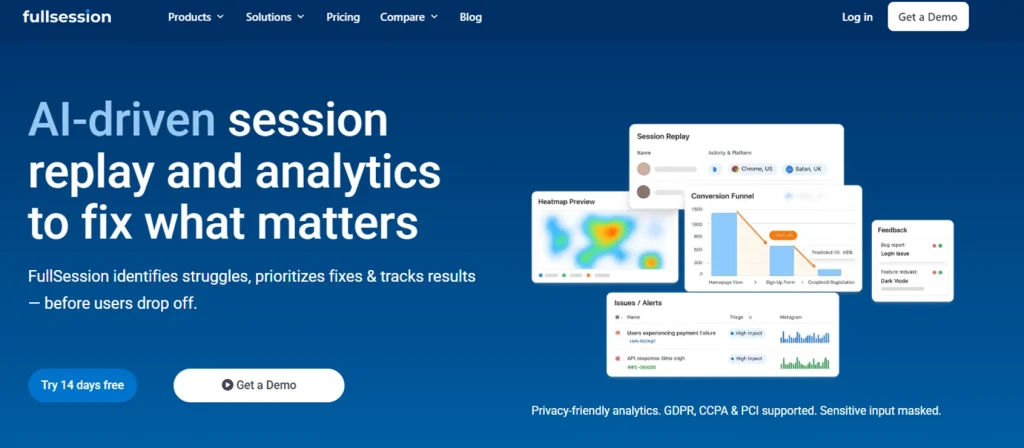
FullSession is a user behavior analytics platform built for teams that need more than website traffic data. Install one code snippet, and it starts working in under 10 minutes.
From there, heatmaps populate as sessions come in, and the dashboard organizes replays by page, device, and frustration score, so you can start with data analysis the same day.
The platform captures every click, scroll, mouse movement, and form interaction, then replays them as visual reports you can share with your team to gain insights into how users interact with your site.
Real time data flows directly into your heatmaps and session replays, so you are always working with current behavior rather than yesterday’s numbers.
Where most tools stop at aggregate heatmap data, FullSession ties individual replays to click maps, frustration signals, and error detection, giving your team the behavioral context needed to make data-driven decisions with confidence.
You can filter sessions by rage click activity, link error clicks to the JavaScript issues that triggered them, and watch exactly what a specific visitor experienced when something went wrong.
Each session includes customer profiles showing device, location, and referral source, including visits from email campaigns, so you can see how different audiences behave across the same pages.
That difference matters. Aggregate numbers tell you 14% of visitors drop at step three. FullSession tells you why.
FullSession works across websites, web apps, and landing pages, and integrates with Shopify, WordPress, Wix, and BigCommerce.
You can connect it with your existing tech stack via APIs, webhooks, and Zapier. It also complies with GDPR, CCPA, and PCI, with sensitive input masking to protect user data.
Sign up today for our generous free plan and test all Professional features.
Best for
CRO, eCommerce, product, UX, and marketing teams who want to understand user experiences without depending on developer support to maintain the setup.
Key features
- Session replays: Watch every visitor session from start to finish, with inactivity skipped so you get straight to the moments that matter. Filter by rage clicks, error clicks, or exit intent to surface the sessions worth reviewing first, then share any recording with your team via a direct link. Sensitive inputs are masked automatically to keep user data protected.
- Interactive heatmaps: See exactly where visitors click, how far they scroll, and where their mouse travels before they act or leave. Visual reports update with real time data so you can filter any view by device, URL, or segment and gain insights into behavioral patterns without digging through raw exports.
- Error detection: Catch non-responsive elements, failed network requests, and console errors before they cost you conversions. Every error links directly to the session where it occurred, including customer profiles with device, location, and referral source, so your team can reproduce the issue and fix it without guesswork.
- Conversion funnel analysis: Build funnels across any combination of pages, track conversions at every step, and pinpoint exactly where visitors drop off. Jump straight into the session replays behind each exit to make targeted fixes based on real user experiences rather than assumptions.
- Customer feedback forms: Trigger on-site feedback widgets at the right moment, when a visitor rage clicks, shows exit intent, or completes a key action. Every response links back to the session it came from, so you can see what the visitor experienced right before they gave their feedback.
- Lift AI: Let FullSession’s AI tell you what to fix next and why. It analyzes sessions, funnels, and behavior signals, then ranks opportunities by expected impact and revenue, with direct links to the affected pages, funnel steps, and supporting recordings so your team can act immediately.
Pricing
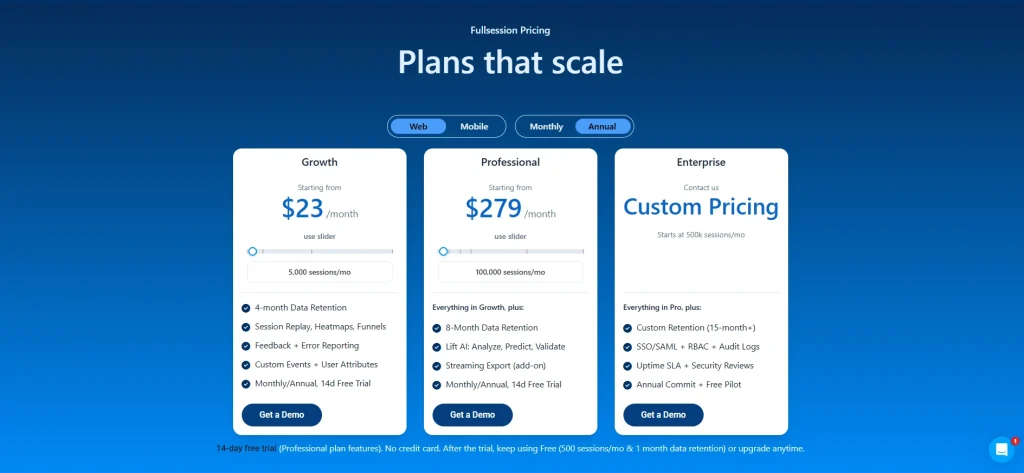
FullSession offers a free plan with 500 sessions per month and 30 days of data retention.
The Growth plan starts at $23/month (billed annually) and includes 5,000 sessions per month, 4-month data retention, session replay, heatmaps, funnels, feedback, and error reporting.
If you choose annual billing, you can save 20% on all plans.
Visit the pricing page to learn more.
Book a demo to get a personalized walkthrough of FullSession’s full analytics suite.
2. Google Analytics
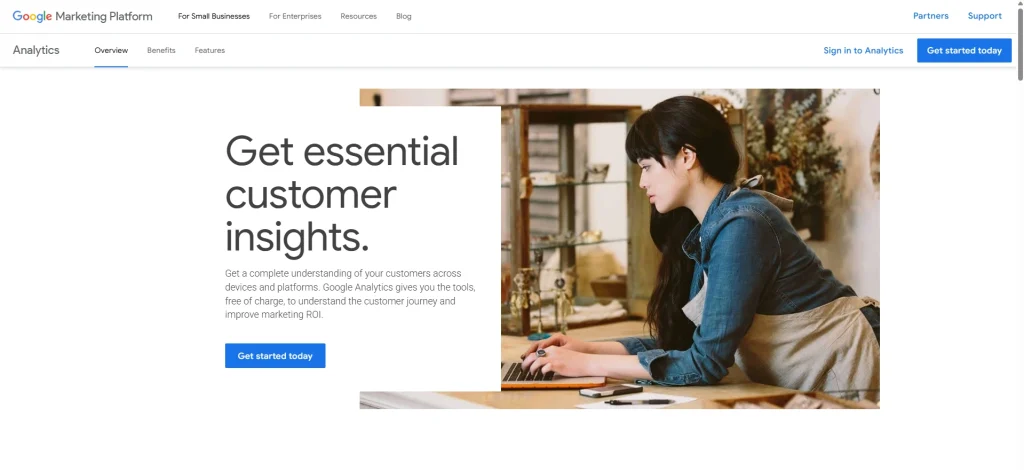
Google Analytics is a marketing analytics platform you can use to understand user behavior.
You can see where visitors come from, how they move through a site, and whether they complete your conversion goals. GA4, the current version, uses event-based tracking software to monitor specific user interactions like button clicks, form submissions, and file downloads.
It doesn’t provide visual click maps or session-level replays natively. Detailed click behavior analysis in GA4 requires Google Tag Manager alongside it, which adds technical setup.
That makes it more suited to teams with developer support than to those who want to start tracking behavioral data independently.
GA4 is strongest at answering source-and-volume questions:
- Where did traffic come from?
- Which campaign drove the most conversions?
- How much did each acquisition cost?
It’s weaker at answering experience questions.
- Why did visitors leave?
- What confused them on the pricing page?
For those answers, pair GA4 with a behavioral tool like FullSession.
- Learn more about Google Analytics vs Amplitude.
- Read more about Hotjar vs Google Analytics.
Best for
Teams already working inside the Google stack. They need traffic sources attribution, conversion goal reporting, and integration with Google Ads to see what happens to ad spend after a visitor clicks through.
Key features
- GA4 event tracking: Create custom tags in Google Tag Manager to monitor specific elements and fire events on defined actions. Track button clicks, outbound links, video plays, and form completions.
- Conversion tracking: Define which events count as goal completions, then measure them against visitor sources, campaigns, and audience segments. Useful for evaluating marketing efforts and campaign performance across your site.
- Path exploration reports: Visualize how visitors move from page to page. Gives a broad view of user engagement flow without the session-level detail that behavioral tools provide.
- Google Ads integration: Connect GA4 to your campaigns and see which clicks lead to conversions. Track how ad network placements perform after the initial click to understand the full cost-per-acquisition picture.
Pricing
GA4 is free for all Google users and covers most standard analytics needs. The enterprise version starts at $50,000 per year and adds higher data thresholds, SLA guarantees, and dedicated support for large enterprise organizations.
3. Hotjar
Hotjar is a UX research tool and feedback platform that combines heatmaps, recorded sessions, and survey tools in one lightweight interface. Now part of Contentsquare, it’s one of the most widely adopted tools in this space, with fast setup and a large community of users and learning resources.
Most behavioral platforms don’t include built-in interview or feedback features, which makes Hotjar a strong option for teams with a UX research focus.
Hotjar uses continuous heatmap capture. Once the code is live, data accumulates automatically across pages without per-page setup. For session replay, Hotjar spreads capture across the month instead of recording every session until the limit is reached.
For small sites, that sampling approach can work well. For larger sites that want complete data on every visitor, a tool that records every session until the plan limit may be a closer fit.
- Read our Hotjar review for more details.
- Learn if Hotjar slows down your site.
- See the best Hotjar alternatives.
- Learn how FullSession compares with Hotjar.
Best for
UX designers and product teams that want to combine behavioral click and scroll data with on-site surveys and user interviews, without switching between multiple channels of research tools.
Key features
- Continuous heatmaps: See click, scroll, and mouse movement maps for every page. No per-page setup required. Unlimited heatmaps on paid plans is a strong advantage over tools that cap heatmap counts.
- Session replays with frustration detection: Watch individual sessions and filter by rage clicks, exit intent, and U-turns. The filtering interface is straightforward and easy for non-developer team members to use.
- On-site surveys and feedback widgets: Deploy targeted surveys triggered by specific visitor actions. Get direct feedback from your actual customer base rather than relying only on observed behavioral data.
- Funnel visualization: See drop-off points across multi-step flows. Link funnel exits directly to replays to see the behavior behind the numbers and diagnose friction at each step.
Pricing
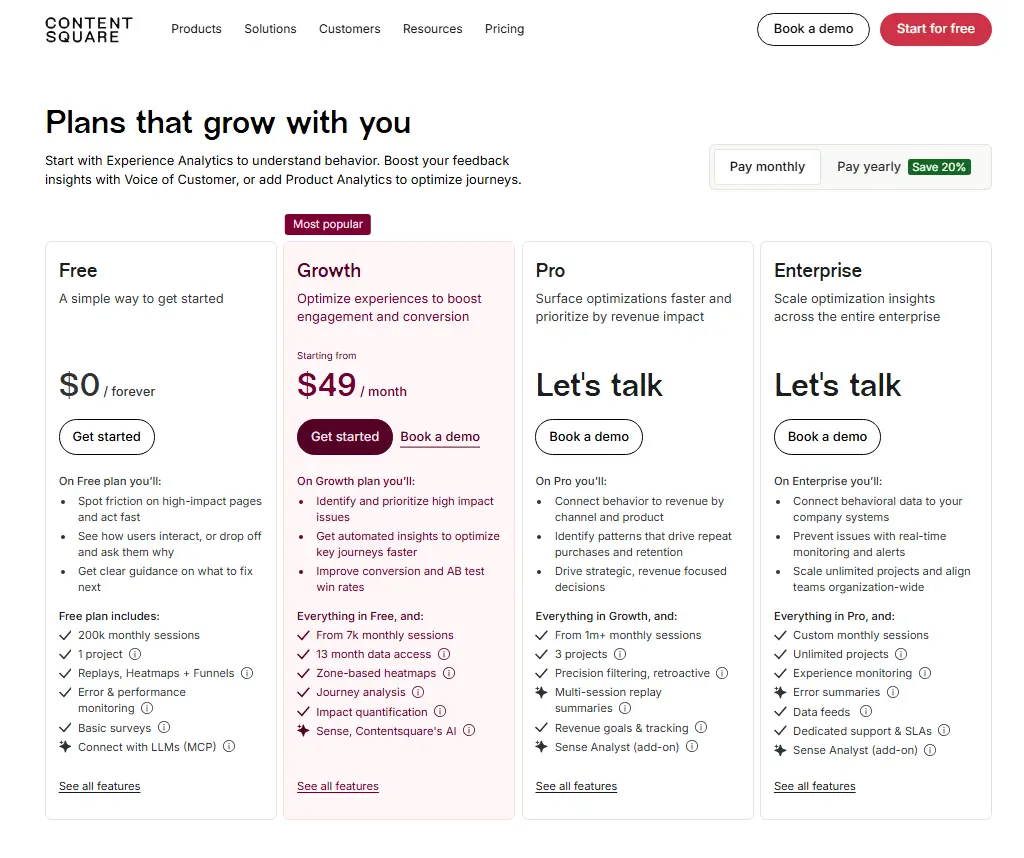
Hotjar offers a free plan that includes 200k monthly sessions, 1 project, replays, heatmaps, funnels, error and performance monitoring, and basic surveys.
The Growth plan starts at $49/month and includes everything in Free, plus 7k monthly sessions, 13 months of data access, zone-based heatmaps, journey analysis, and impact quantification.
Enterprise plans use custom pricing for teams that need higher session volumes, more projects, advanced monitoring, or dedicated support.
4. Mouseflow
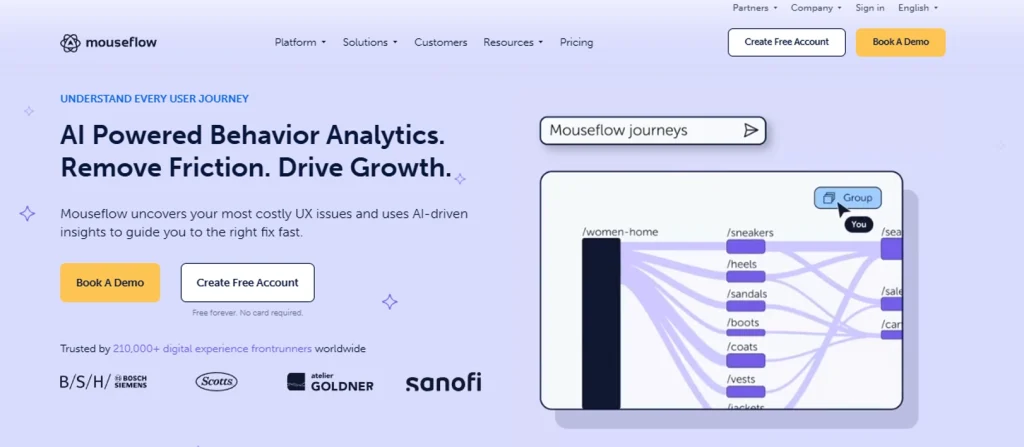
Mouseflow is a behavioral tracking solution that includes session replays, six heatmap types, form analytics, and an automated friction scoring system that shows the most problematic sessions without requiring manual review of every recording.
Where Hotjar samples sessions, Mouseflow records all sessions until your monthly limit. That gives you complete data fidelity without gaps.
Its form analytics tool tracks individual field-level behavior, which is key for teams working to reduce checkout abandonment or improve sign-up rates across affiliate software integrations and third-party lead forms.
Mouseflow’s friction score also shortens review time. Rather than scanning dozens of replays to find the ones that matter, you open the highest-scoring sessions first. A session with a friction score of 80 almost certainly contains a rage click, an error click, or a U-turn worth watching.
- See how Mouseflow compares to FullSession.
- Learn more about Mouseflow vs VWO.
- See the best Mouseflow alternatives.
Best for
E-commerce teams, conversion rate specialists, and marketing analytics professionals who need detailed behavioral segmentation with a particular focus on form performance and checkout optimization.
Key features
- Six heatmap types: Click, move, scroll, attention, geo, and live. The geo heatmap shows how mobile users and visitors from different regions interact with pages, which helps teams running location-targeted campaigns. It also gives affiliate marketer teams visibility into which geographic segments convert best.
- Friction score: Mouseflow automatically scores each session based on frustration signals, including rage clicks, error clicks, and U-turns. Review the highest-scoring recordings first rather than watching everything at random.
- Form analytics: Track clicks on individual fields, see where visitors hesitate, and identify which fields trigger abandonment. Useful for identifying IP addresses or location fields that cause friction for international customers.
- Advanced filtering and segmentation: Filter sessions by device, referral source, location, or custom attributes. Affiliate managers will find the traffic source segmentation particularly useful for evaluating referral quality.
Pricing
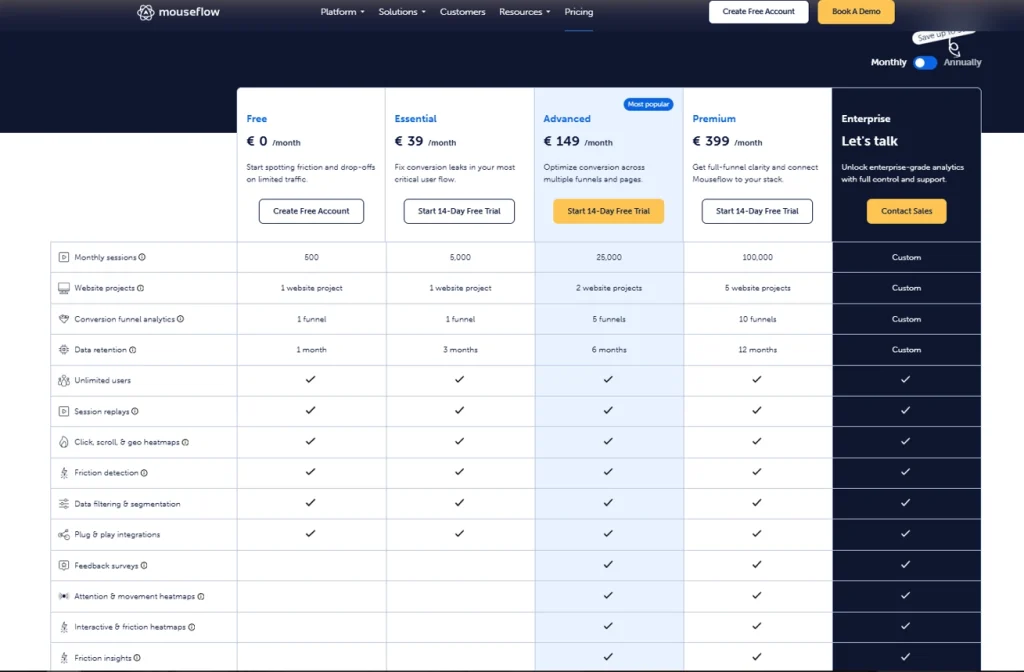
Mouseflow offers a free plan with 500 tracked sessions per month. Paid plans start at $39 per month, with the Essential plan including 5,000 monthly sessions.
Enterprise includes custom pricing.
All listed plans include unlimited users. They also include session replays, clicks, scrolls, and geo heatmaps.
You’ll also get friction detection, data filtering, segmentation, and plug-and-play integrations.
5. Crazy Egg
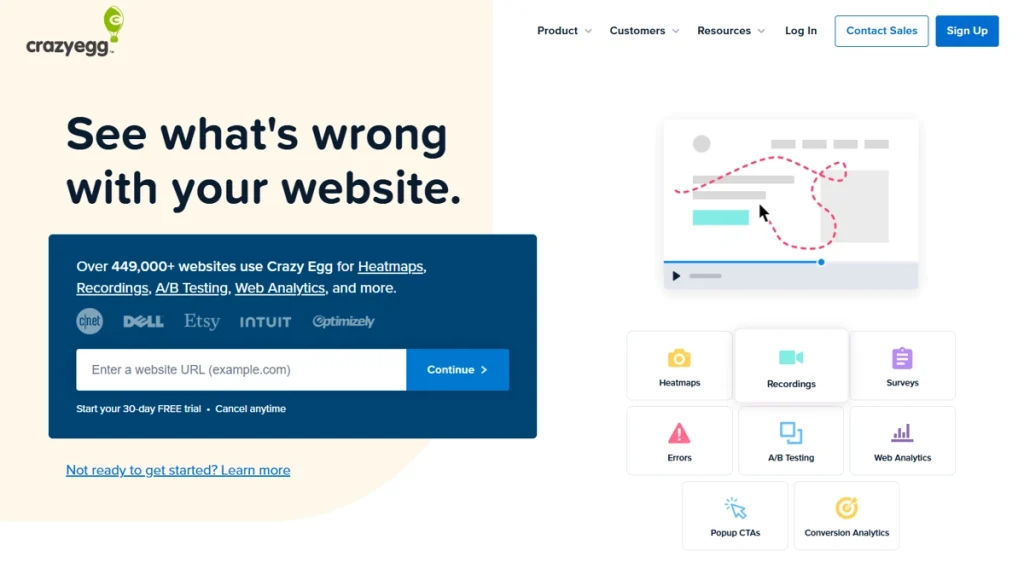
Crazy Egg focuses on page-level visual analytics and website experimentation. It gives you heatmaps, scroll maps, session replays, and a built-in A/B testing tool. That last feature sets it apart from most behavioral platforms, which treat testing as a completely separate product category.
Setup is different here from tools like FullSession and Hotjar.
Crazy Egg requires per-page heatmap configuration, which means you only collect data for specific pages you’ve explicitly configured. If a page you didn’t configure receives a traffic spike, you won’t have historical click behavior data for it.
Crazy Egg doesn’t suit teams that need site-wide behavioral data or deep funnel analysis that spans the entire product experience. But for teams running targeted tests on a handful of high-priority pages, it’s a practical choice.
The native A/B testing is the real draw. Most behavioral tools force you to pair the analytics side with a separate experimentation platform like VWO or Optimizely.
Crazy Egg lets you build variants, run the test, and see the results next to the heatmap data in one dashboard. That removes a whole tool from the stack for teams doing page-level optimization on a handful of high-traffic pages.
- Learn more about Crazy Egg competitors.
- Read how Crazy Egg compares to Hotjar, Mouseflow, and FullStory.
Best for
Small business owners and marketers who want to test page elements alongside visual behavioral data. They can do this without maintaining a separate subscription for optimization tools or A/B testing platform.
Key features
- Confetti click report: Shows individual click dots color-coded by link tracking tools source, device, or segment. You can see whether paid and organic visitors click the same elements, which helps diagnose campaign performance differences between channels.
- A/B testing: Build and run page experiments directly inside Crazy Egg without a third-party tool. One of the few platforms in this category with native experimentation. Useful for teams focused on optimizing campaigns at the page level.
- Scroll maps and heatmaps: Standard click and scroll visualization. Per-page setup is a limitation for large sites but works well for teams focused on a defined set of high-traffic pages.
- Session replays: Watch individual sessions with click and scroll activity. Includes customization options for filtering by device, referral source, or behavior. Tracking links from email or social campaigns can be evaluated through the traffic source filtering within recordings.
- Traffic analysis: Review top visitor sources and compare how different audience segments interact with the same pages. Teams in affiliate marketing will find this useful since each referral source acts like a standalone link tracker, showing entry point and downstream behavior. Many tools in this category give deeper source analytics behind premium plans.
Pricing
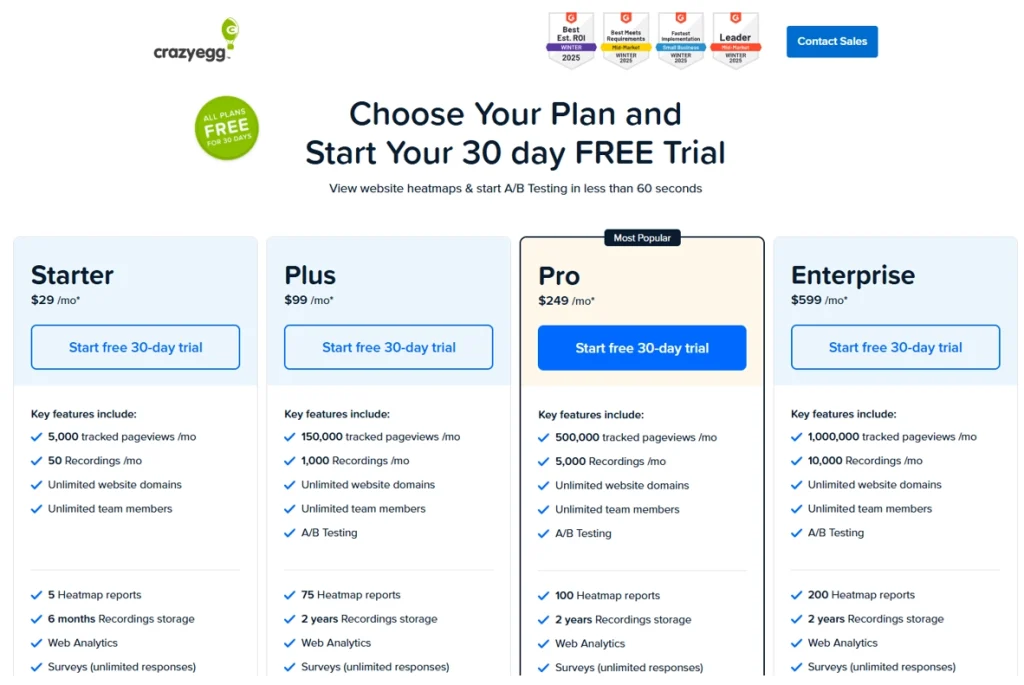
Crazy Egg offers a free 30-day trial. Its paid plans start at $29/month.
The Starter plan includes 5,000 tracked pageviews per month, 50 recordings per month, 5 heatmap reports, and 6 months of recordings storage.
All plans are billed annually.
Is FullSession the Best Click Tracking Software?
For most teams doing serious behavioral work, yes. Here’s the case.
Most teams end up paying for three or four separate tools to cover what FullSession handles in one subscription. Everything connects on the same dashboard from day one, with no stitching tools or paywalled features you didn’t expect.
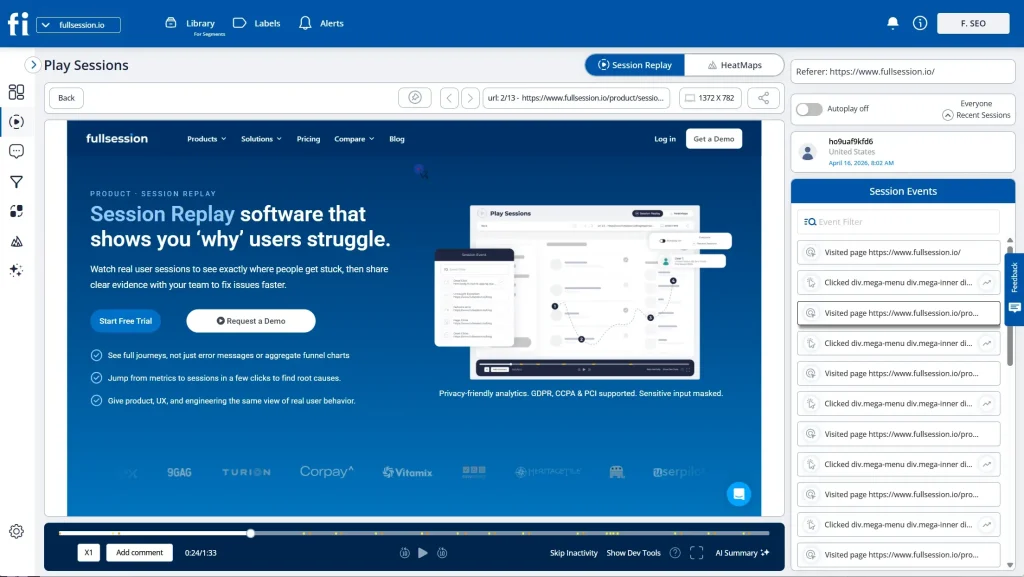
The Play Sessions interface shows each interaction in sequence, the HeatMaps tab is one click away from any session, and the Errors and Alerts dashboard shows broken user flows before they reach a support ticket.
Lift AI takes that data and tells you what to fix first. It scans behavioral signals, ranks friction points by expected revenue impact, links each priority to the relevant session replays, and then validates whether a fix actually moved the needle after it ships
The interface is built for entire teams, not just analysts. Product managers, marketers, and customer success teams can filter sessions, review heatmaps, and act on behavioral data without pulling in engineering.
The SDK runs asynchronously on a separate thread, so you get full behavioral coverage across web and mobile without touching your Core Web Vitals.
Pricing starts at $23/month, billed annually and covers sessions, heatmaps, funnels, feedback, error reporting, and Lift AI in one plan. Every tier is listed publicly.
Sensitive inputs are masked by default, and GDPR, CCPA, and PCI DSS compliance come built in with no extra configuration.
When something isn’t working, FullSession’s outstanding support team responds fast and personally, treating every issue as a priority rather than a queue number.
FullSession currently has fewer native third-party integrations than some of the larger competitors.
However, we welcome integration requests as part of any enterprise engagement. If it’s a blocker to adoption, we build it. Responsiveness is something we can still offer that the larger players can’t.
Quick head-to-head comparison
- FullSession vs. Google Analytics: GA tells you where your traffic comes from and whether a conversion goal was met. It doesn’t show you what happened in between. FullSession picks up where GA stops, capturing every click, scroll, and frustration signal so you can see why visitors convert or leave. Use both together to connect source data with on-page behavior across the full funnel.
- FullSession vs. Hotjar: Hotjar samples sessions rather than recording every one, which means gaps in your data at higher traffic volumes. FullSession records every session until your plan limit, links errors directly to the recordings where they occurred, and updates heatmaps in real time. Hotjar wins if qualitative surveys and user interviews are your priority. FullSession wins if complete session data and error-level behavioral context matter more.
- FullSession vs. Mouseflow: Mouseflow is strong on form analytics and friction scoring, which makes it a solid fit for e-commerce checkout optimization. FullSession covers that ground and adds native error tracking, integrated feedback forms, Lift AI prioritization, and cleaner multi-touch attribution across sessions and funnel steps that Mouseflow doesn’t include natively. For teams that need behavioral data, error context, and optimization guidance in one place, FullSession is the more complete package.
- FullSession vs. Crazy Egg: Crazy Egg requires per-page heatmap configuration, so any page you haven’t manually set up collects no data. FullSession captures behavior site-wide from the moment the snippet is installed. Crazy Egg’s built-in A/B testing is a genuine advantage for teams running page-level experiments, but its limited coverage and annual-only billing make it harder to justify against FullSession’s broader feature set at a lower starting price.
FullSession is the rare analytics tool that works for everyone on the team.
Most users, from marketers and analysts to product managers, can run it independently without developer support. Product and UX teams get the session-level precision and error context they need to make confident decisions.
And at $23/month to start, it doesn’t require a budget approval process to get your whole team access.
Most behavioral analytics tools make you choose between depth and usability. FullSession doesn’t. You get complete session data, real-time heatmaps, AI-driven prioritization, and built-in compliance in one platform, so your team can maximize ROI from your analytics setup without managing multiple subscriptions.
Book a demo to see FullSession’s full analytics suite in action.
Final Words About the Best Click Tracking Software
Traffic reports show you how many people arrived. Click data shows you what they did after that.
FullSession is a powerful tool that gives you the full picture. Heatmaps, session replays, error detection, funnel analysis, and customer feedback sit in one platform, starting at $23/month (billed annually).
The free account gets you going with no credit card required.
Book a demo and see FullSession in action, or start a free trial and have your first heatmap live within minutes.
FAQs About the Best Click Tracking Software
What is click tracking software?
This type of behavioral tool records where visitors click on a website, including button interactions, rage clicks, and dead clicks. It turns that behavioral data into click maps, session replays, and detailed reports showing how visitors engage with each page.
How does click tracking work on a website?
You install a JavaScript snippet on your site. The snippet logs every click event, including the element, its position, and the timestamp.
That data flows to a dashboard where it populates heatmaps, replays, and click reports. Most platforms also provide deeper insights from individual session data alongside aggregate views.
What is the best free click tracking software?
FullSession’s free plan includes 500 sessions per month with heatmaps and frustration signals included. Hotjar also has a no-cost tier covering up to 200,000 sessions per month. Both let you explore the platform before committing to a paid tier.
What is the difference between click tracking and link tracking tools?
An on-page behavioral tracking tool records how visitors interact with elements on a page. That covers which buttons, images, and links they click and how they move around.
UTM parameters, redirect methods, and simple URL shortening services attribute traffic back to a source. Both approaches answer different questions.
How do I choose the best click tracker for my business?
Check five things:
- Does the tool provide real-time tracking?
- Which heatmap types does it support?
- How do session replays work?
- Is it privacy compliant?
- What is the per-session cost at your traffic volume?
For teams focused on behavioral data and optimization tools rather than pure link attribution, start with FullSession’s free account.
Can click tracking software improve conversion rates?
Yes. Teams use click data to identify broken elements, dead zones, and ignored calls to action to make changes based on evidence.
Fixing a non-responsive button or repositioning a CTA based on actual click behavior produces faster and more reliable conversion improvements. These invaluable insights from session-level data let you focus on fixes that directly affect revenue.

Roman Mohren is CEO of FullSession, a privacy-first UX analytics platform offering session replay, interactive heatmaps, conversion funnels, error insights, and in-app feedback. He directly leads Product, Sales, and Customer Success, owning the full customer journey from first touch to long-term outcomes. With 25+ years in B2B SaaS, spanning venture- and PE-backed startups, public software companies, and his own ventures, Roman has built and scaled revenue teams, designed go-to-market systems, and led organizations through every growth stage from first dollar to eight-figure ARR. He writes from hands-on operator experience about UX diagnosis, conversion optimization, user onboarding, and turning behavioral data into measurable business impact.