A large share of shoppers who add items to their cart never complete their purchase. Your analytics platform can show you that it happened, but understanding why is often much harder. That gap is where the best tools for web session replay in ecommerce earn their place.
Session replay records and replays user sessions, capturing clicks, scrolls, mouse movements, and navigation patterns, so your team can watch real user behavior instead of guessing from aggregate numbers.
Where your analytics dashboard shows a drop-off, session replay shows the hesitation, the broken field, or the confusing layout that caused it.
Understanding why session replay tools matter is step one. Choosing the right one for your ecommerce stack is step two. This guide covers both. You’ll find reviews of seven platforms, a comparison table, a team-matching matrix, and a direct answer on which tool works best for ecommerce.
Key Takeaways
- FullSession is the strongest pick for ecommerce CRO teams, combining ecommerce-native integrations, Lift AI, funnel tracking, heatmaps, and feedback in one platform built for conversion optimization.
- FullStory suits enterprise retail teams with dedicated analytics functions, though the complexity and cost put it out of reach for most mid-market operations.
- LogRocket is the go-to for engineering and QA teams who need session recordings enriched with console logs, network requests, and JavaScript errors for faster bug reproduction.
- Microsoft Clarity is the free option, offering unlimited recordings and heatmaps with no session cap, but no funnel tracking or ecommerce platform integrations.
- Hotjar works best for UX and research teams that want behavioral and attitudinal data together through session replay, heatmaps, and on-site surveys in one place.
- UXCam is the only purpose-built option for native mobile ecommerce apps, capturing touch gestures, crash sessions, and mobile funnels in a way no web-first tool can replicate.
- Quantum Metric ties session data directly to revenue impact through Felix AI, but an average annual cost of a three-month implementation makes it enterprise-only in every sense.
For ecommerce teams focused on conversion and checkout recovery, FullSession is the only platform where session replay, Lift AI, funnels, heatmaps, and feedback work together without a complex setup or developer dependency.
Start a free trial to see why shoppers drop off and start fixing it fast.
Key Features to Evaluate in Ecommerce Session Replay Tools
Not every session replay tool is built for ecommerce. Some are developer-focused tools built for debugging. Others target enterprise analytics pipelines. Before you compare session replay software tools, know which capabilities actually move the needle for checkout recovery and conversion optimization.
Ecommerce-native integrations
Look for native connectors to Shopify, BigCommerce, WooCommerce, and Wix. Confirm that checkout events and cart interactions are captured with full commerce context, not just as generic page views. A tool that doesn’t understand your platform won’t surface the right data.
Replay fidelity
Pixel-perfect DOM reconstruction is the difference between a session that shows exactly what went wrong and one that drops elements or skips frames. For ecommerce, where checkout flows involve multi-step forms and real-time validation, fidelity gaps mean missed diagnoses.
Frustration signal detection
Rage clicks, dead clicks, excessive scrolling, and hesitation patterns separate a frustrated shopper from a converting one. Tools that detect these frustration signals automatically save hours of manual review.
Session filtering and segmentation
Recording every session is easy. Finding the right one is hard. Effective filtering narrows results by cart value, checkout step, device type, or custom events so your team spends time on sessions that reveal something actionable, not scrolling through noise.
Privacy and data masking
Session recording tools capture sensitive data by default: form inputs, addresses and payment fields. Any tool you deploy needs automatic PII masking, configurable exclusion rules, and documented GDPR and CCPA compliance before it touches a live checkout. This isn’t optional.
AI-powered analysis
Modern tools use AI-powered analysis to prioritize sessions automatically, surfacing recordings with the highest conversion impact and flagging anomalies before they affect revenue. For teams that can’t manually watch recordings, this has moved from nice-to-have to essential.
How We Chose the Best Session Replay Software for Ecommerce
Every tool on this list was evaluated against six criteria from the perspective of a US ecommerce team:
- Ecommerce integration depth: native connectivity to Shopify, BigCommerce, WooCommerce, and major ecommerce platforms, with checkout event tracking.
- Replay fidelity: pixel-perfect DOM reconstruction with no dropped interactions on dynamic pages or multi-step checkout flows.
- Filtering and segmentation: the ability to isolate sessions by cart value, funnel step, device, and custom behavioral events.
- Pricing transparency: clarity on what you pay at different traffic volumes, with no hidden session caps.
- Frustration signal detection: automatic identification of rage clicks, dead clicks, and form hesitation.
- G2 user ratings: verified reviews from practitioners, prioritizing ecommerce and digital marketing teams.
Best Tools for Web Session Replay in Ecommerce at a Glance
| Tool | G2 Rating | Best For | Top Feature | Starting Price |
| FullSession | 5.0 | Ecommerce CRO teams | Ecommerce-native replay + Lift AI | From $23/month (billed annually) |
| FullStory | 4.5 | Enterprise UX teams | Behavioral analytics + AI anomaly detection | Custom |
| LogRocket | 4.6 | Engineering/QA teams | Console logs + network requests | From $99/month |
| Microsoft Clarity | 4.5 | Budget-conscious stores | Unlimited recordings, free forever | Free |
| Hotjar | 4.3 | UX research + feedback | Session replay + heatmaps + surveys | From $49/month |
| UXCam | 4.6 | Mobile-first ecommerce apps | Mobile gesture + funnel analytics | Custom |
| Quantum Metric | 4.6 | Enterprise ecommerce | Felix AI + revenue-tied behavioral data | Custom |
Top 7 Best Session Replay Tools for Ecommerce
Below are seven of the best session replay software tools for identifying friction, improving conversions, and uncovering issues traditional analytics often miss on web and mobile.
1. FullSession: ecommerce conversion analytics built around session replay
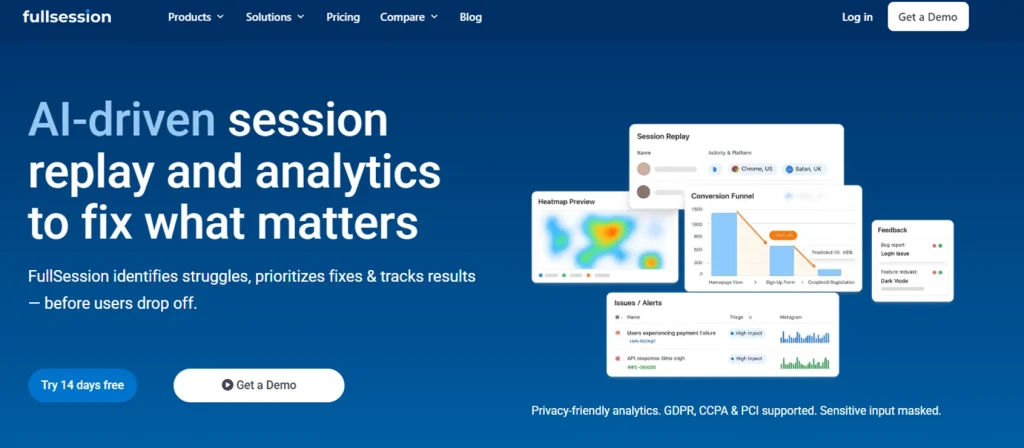
FullSession is a web behavior analytics platform combining session replay, heatmaps, funnel tracking, in-page feedback, and error analysis in a single interface.
It’s built for teams who need to connect qualitative replay data directly to conversion outcomes, not just observe behavior.
What sets it apart is Lift AI, which scans user behavior across sessions to predict which issues carry the highest conversion impact, so your team knows what to fix without manually reviewing hundreds of recorded sessions.
It supports native integrations with Shopify, BigCommerce, Wix, and WordPress, and connects directly to the checkout recovery workflow.
Best for
Ecommerce product teams, CRO managers, and marketing leads at direct-to-consumer brands who want to reduce checkout friction and connect replay data to funnel analysis without needing a dedicated developer.
Key features
- Pixel-perfect session replay: reconstructs each session with a time-stamped event timeline covering clicks, scrolls, rage clicks, and navigation paths, with no dropped interactions on dynamic checkout pages.
- Lift AI: automatically surfaces sessions and behavioral patterns with the highest predicted conversion impact so product teams can prioritize fixes by business value, not manual intuition.
- Ecommerce-native integrations: native connectors for Shopify, BigCommerce, Wix, and WordPress capture cart, checkout, and product page sessions with full commerce context.
- Funnel and conversion tracking: a built-in funnel builder maps drop-off at every checkout step and links directly to replays from that stage, so you can watch exactly what happened before the abandonment.
- Error and rage click alerts: proactive detection of JavaScript errors, rage clicks, and broken flows with smart alerts that surface issues before they damage conversion at scale.
- Interactive heatmaps: click, scroll, and cursor-tracking maps with real-time processing and no impact on site speed.
Pricing
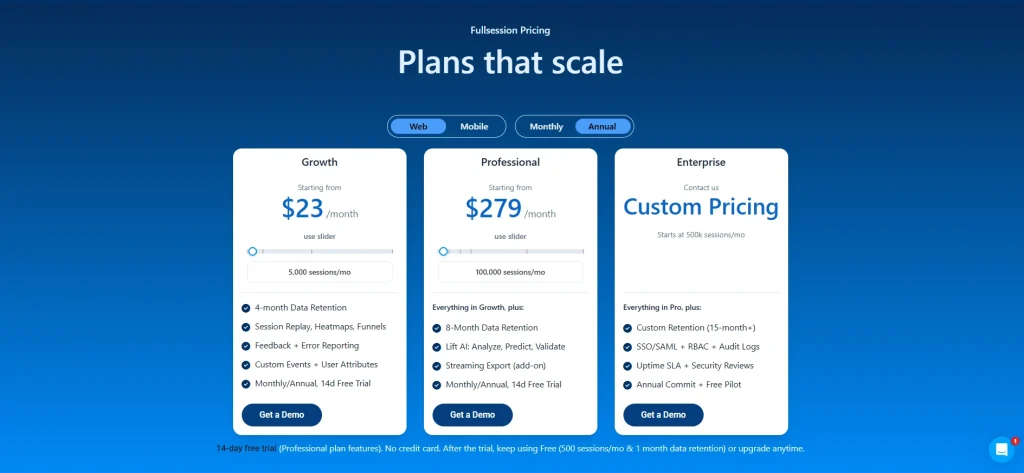
A 14-day free trial is available. Paid plans start from $23/month billed annually, or $29/month month-to-month. Custom enterprise pricing is available on request.
Book a demo to see FullSession’s ecommerce session replay in action.
2. FullStory: enterprise behavioral analytics with deep session replay search
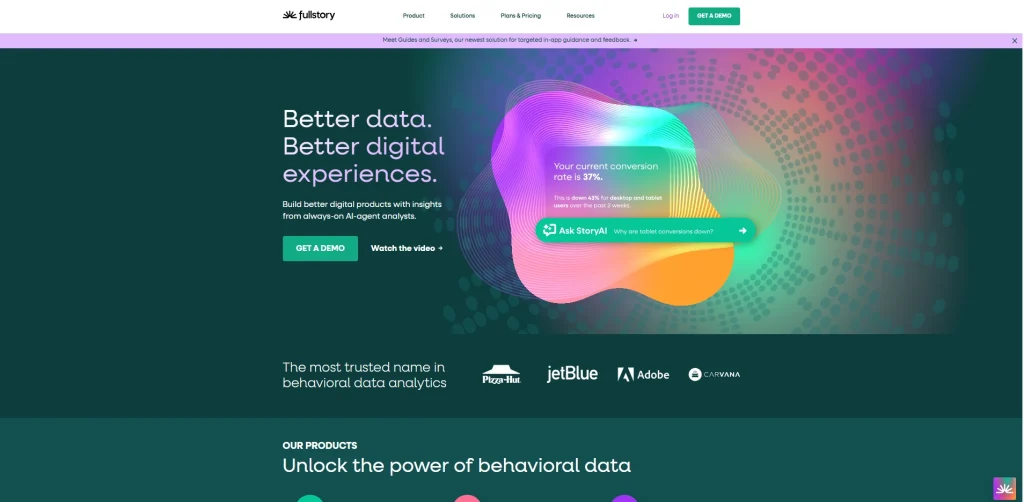
FullStory auto-captures every user interaction without requiring manual event tagging, so your team can run retroactive analysis on behaviors you didn’t think to instrument at setup.
It’s built for organizations that need to search across behavioral data at scale, filtering by specific interactions, form field states, or device conditions, then jump directly to the relevant replay.
Its strength is data breadth and searchability. Ease of onboarding and ecommerce specificity are secondary priorities.
- Learn more about FullStory competitors.
- See FullSession vs FullStory comparison.
Best for
Enterprise ecommerce and retail teams with dedicated analytics or UX functions who need deep behavioral search, cross-journey insight, AI-assisted anomaly detection, and shared replay workflows across product, design, and customer success departments.
Key features
- Pixel-perfect session replay: high-fidelity session reconstruction with retroactive data access; sessions are searchable even for events not tagged at setup.
- AI insights and anomaly detection: DX Data scoring surfaces friction moments and quantifies their impact across large user populations without manual configuration.
- Journey mapping: visualizes the full path a user takes across multiple sessions, revealing patterns that individual replays can’t show.
- Funnel and conversion tracking: conversion funnels with drop-off visualization link directly to session replays so analysts can move from metric to behavior in one click.
- Frustration signal detection: rage clicks and error clicks are auto-captured and searchable across the entire session library.
- Heatmaps: click, scroll, and move heatmaps included within the platform.
Pricing
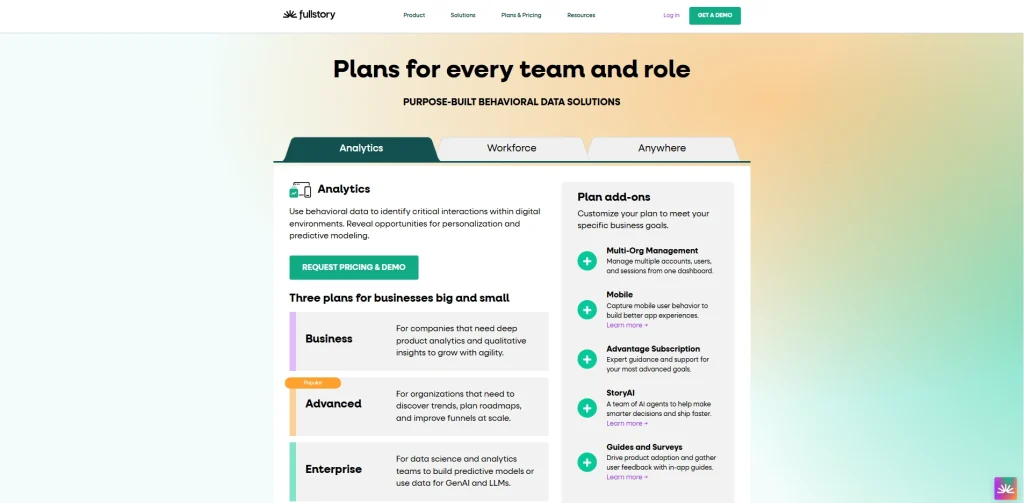
Custom pricing. A demo is required before pricing is disclosed.
3. LogRocket: developer-first session replay with full technical context
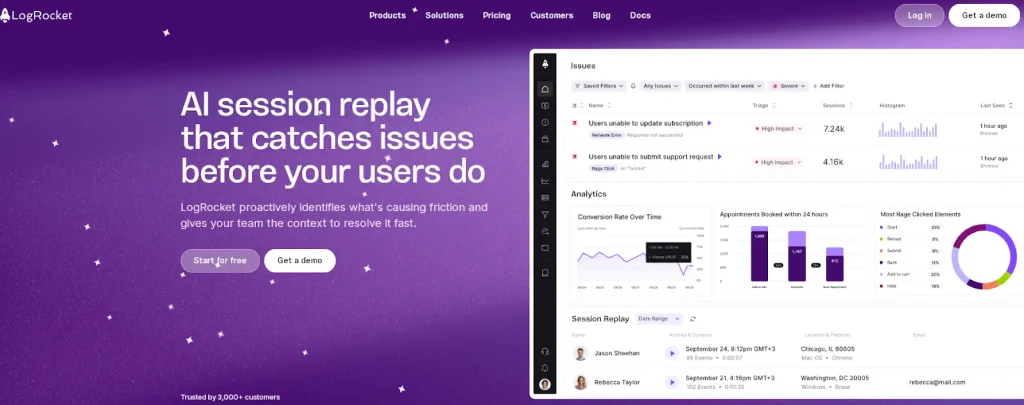
LogRocket is built for engineering teams that need more than behavioral data. Each recording comes enriched with console logs, network requests, JavaScript errors, Redux state mutations, and frontend performance metrics in a synchronized timeline.
Unlike traditional replay tools which show you what the user did, LogRocket shows you what the system was doing at the same time, making it the natural choice for teams whose primary goal is reproducing bugs and cutting time from incident to resolution.
It’s less suited to ecommerce marketing and CRO teams who need conversion-focused insight.
- Learn more about LogRocket competitors.
- Read our FullSession vs LogRocket comparison.
Best for
Engineering teams, QA specialists, and developer-forward product teams at ecommerce companies who need to reproduce frontend errors, diagnose checkout breakage, and connect session replays to their error tracking or observability stack.
Key features
- Pixel-perfect session replay: recordings synchronized with console logs, network requests, JS errors, and Redux state so developers can watch user behavior alongside system behavior simultaneously.
- Error tracking: solid frontend error tracking with direct session replay correlation links every JavaScript error to the exact user interaction that preceded it.
- Galileo AI: scans sessions to surface and prioritize issues automatically, reducing the manual triage burden for technical teams.
- Network monitoring: captures all network calls during a session, including request timing, response codes, and payload data, critical for diagnosing silent API failures at checkout.
- Performance metrics: CPU usage, memory consumption, and page load data are captured per session, making it possible to identify performance regressions tied to specific user journeys.
- Developer integrations: native connectors to Sentry, Jira, Datadog, and Segment bring session context directly into existing engineering workflows.
Pricing
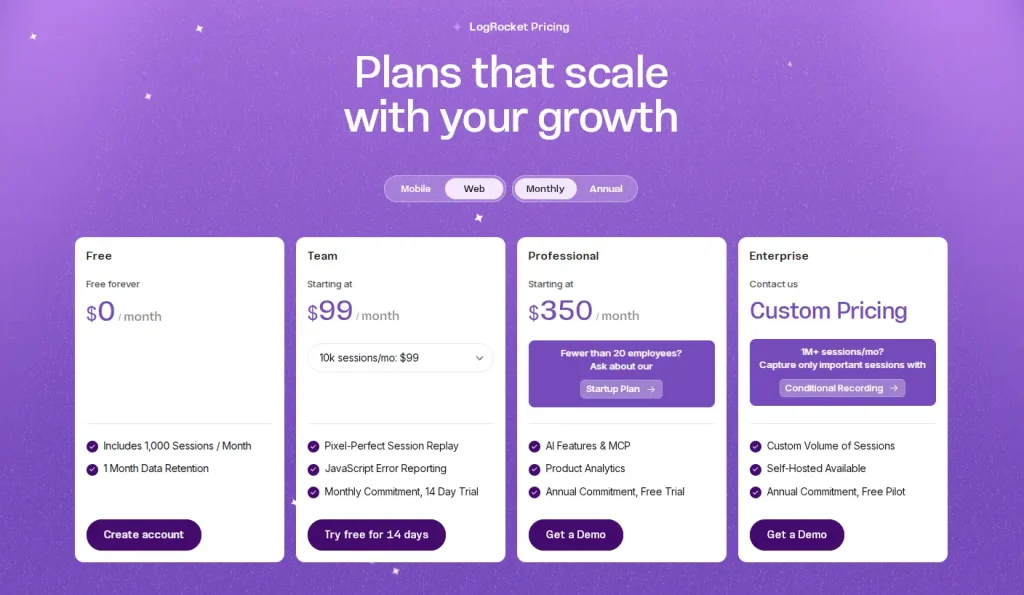
A free plan is available for limited session volumes. Team plan from $99/month. Professional plan from $350/month. Enterprise pricing is custom.
Learn more about LogRocket pricing.
4. Microsoft Clarity: free session replay with no traffic cap
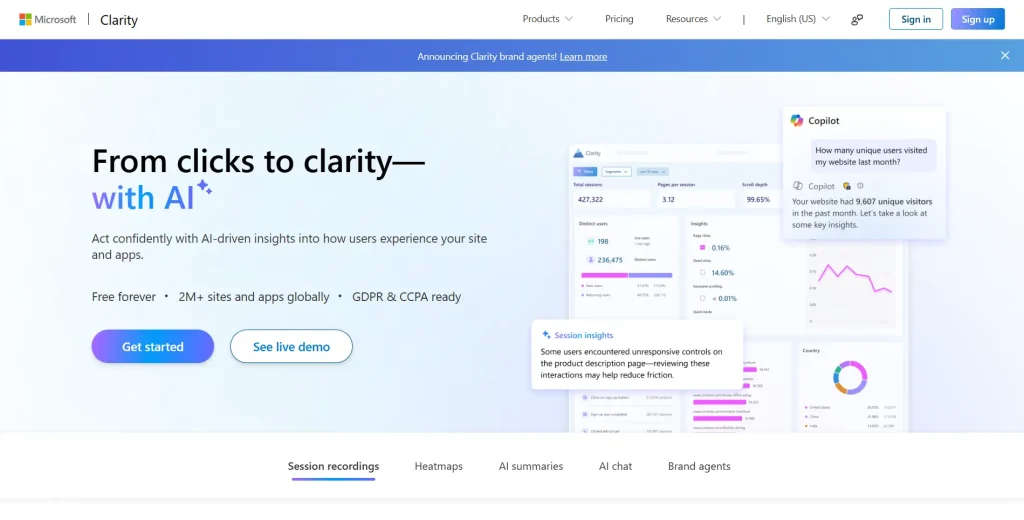
Microsoft Clarity provides unlimited session recordings, heatmaps, and basic frustration signal detection with no session cap and no paid tier. It installs via a lightweight script or Google Tag Manager and integrates directly with Google Analytics.
It’s the only tool on this list that costs nothing regardless of traffic volume, which makes it widely adopted, though it limits the depth of insight you can extract compared to paid alternatives.
There’s no native ecommerce platform integration, no funnel builder, and no checkout-specific event tracking.
- Learn more about Hotjar vs Microsoft Clarity.
- See how FullSession compares with Microsoft Clarity.
Best for
Small ecommerce teams, solo store owners, and budget-constrained marketers who need a zero-cost starting point to understand basic shopper behavior before investing in a more capable platform.
Key features
- Unlimited recordings: no session cap, no traffic threshold, and no paid upgrade required to access historical data.
- Heatmaps: click, scroll, and area heatmaps are included at no cost, covering both desktop and mobile sessions.
- AI insights: basic AI-powered session summaries and Microsoft Copilot integration for natural language querying of session data.
- Google Analytics integration: native GA4 integration lets teams jump from aggregate analytics data to specific session replays without leaving their existing analytics tools.
- Rage-click and dead-click detection: automatic identification included; no JavaScript error tracking or console logs; network capture is available.
- Google Tag Manager support: deployable without a developer through Google Tag Manager, making it accessible for non-technical users with no coding resources.
Pricing
Completely free. No paid tier and no session limit. This is the only tool on this list with an unlimited free plan.
5. Hotjar: UX research, qualitative feedback, and session replay in one platform
Hotjar combines session replay with heatmaps, on-site feedback widgets, and user surveys. Teams can start collecting replay data and qualitative feedback without involving a developer.
Unlike LogRocket or FullStory, Hotjar is built for non-technical practitioners who want to understand shopper behavior quickly and gather user sentiment alongside behavioral evidence.
It doesn’t capture console logs, network requests, or JavaScript errors, and its ecommerce platform integration is limited to Shopify and Tag Manager. It’s a common entry point for smaller teams evaluating multiple tools before committing to a paid platform.
- Learn more about Hotjar alternatives.
- Read our FullSession vs Hotjar comparison.
- See if Hotjar slows down your site.
Best for
UX teams, CRO specialists, and marketing managers at ecommerce brands who want to combine session replay with on-site surveys and feedback tools to get both behavioral and attitudinal data from shoppers.
Key features
- Session replay: clean, easy-to-use session recording with rage click detection, dead click flagging, and scroll depth tracking, straightforward for non-technical users.
- Heatmaps: click, scroll, and move heatmaps presented alongside session replays on a shared analytics dashboard.
- Feedback tools: on-site feedback widgets, NPS surveys, and interview recruitment tools collect qualitative input directly from the shoppers whose sessions you’re watching.
- Session segmentation: pre-built engagement and frustration segments let teams quickly isolate high-intent sessions or sessions with detected frustration signals.
- AI summaries: AI-generated session summaries available in higher-tier plans reduce time spent watching full recordings for teams analyzing large session volumes.
- Shopify integration: native Shopify integration and Google Tag Manager support cover most ecommerce deployment scenarios without custom development.
Pricing
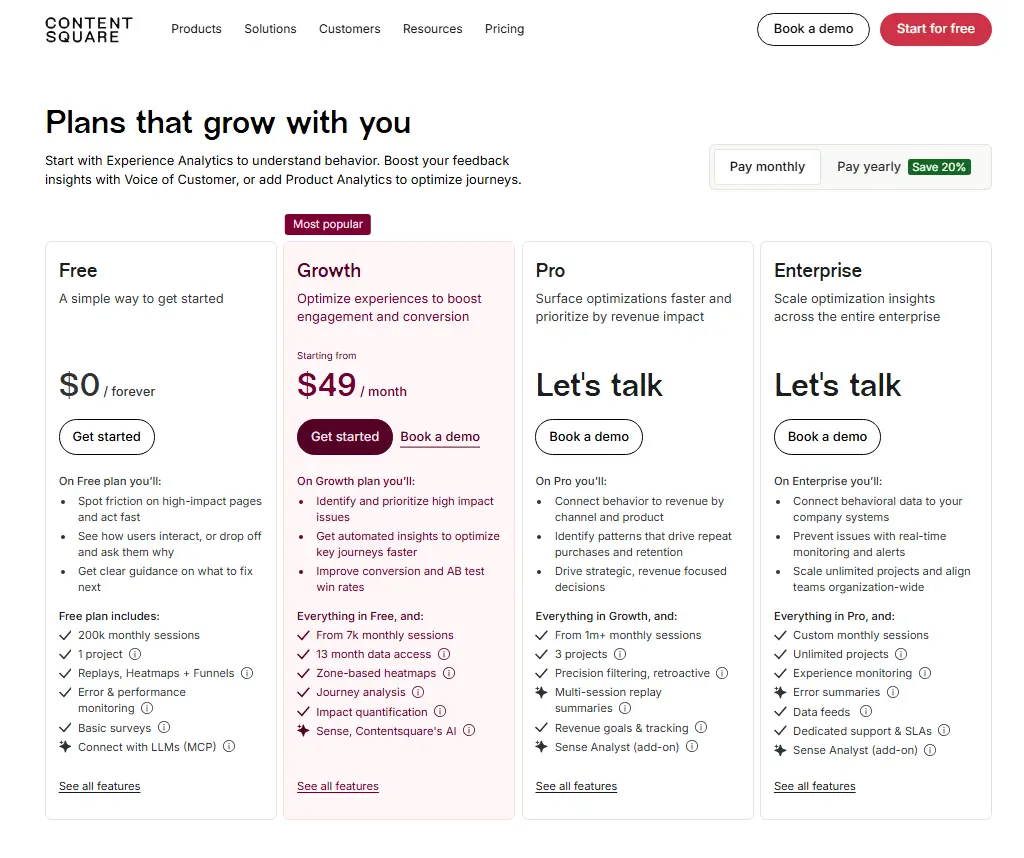
Hotjar offers a free plan. Paid plans available at multiple tiers via Contentsquare, starting at $49 per month. Pricing for higher-tier plans is not public.
6. UXCam: native mobile session replay for ecommerce apps
UXCam is built from the ground up for mobile applications, with web replay capabilities added more recently. It specializes in capturing touch gestures, taps, swipes, and mobile-specific interactions that web-first replay tools either miss or render poorly.
Beyond replay, UXCam provides funnel analytics, retention analysis, and feature adoption tracking, positioning it as a broader mobile product analytics platform.
Best for
Ecommerce brands with a significant iOS or Android mobile app presence that need to understand in-app shopper behavior, diagnose mobile checkout breakdowns, and optimize native app experiences.
Key features
- Mobile session replay: native mobile session recording captures touch gestures, swipes, taps, and screen transitions in iOS and Android apps with frame-accurate playback.
- Mobile funnel analytics: maps user drop-off across app screens and checkout steps in native mobile environments where web analytics tools have no visibility.
- Crash session capture: automatically records the session that preceded an app crash, giving engineering teams the behavioral context needed to reproduce and resolve the issue.
- Gesture heatmaps: touch heatmaps and gesture maps show where users tap, how they scroll, and which elements receive the most engagement on mobile screens.
- Retention analytics: tracks retention patterns and feature adoption across mobile sessions, helping product teams identify where users disengage after updates.
- AI session tagging: automatically tags sessions by detected behavior patterns, reducing the time needed to find recordings relevant to a specific investigation.
Pricing
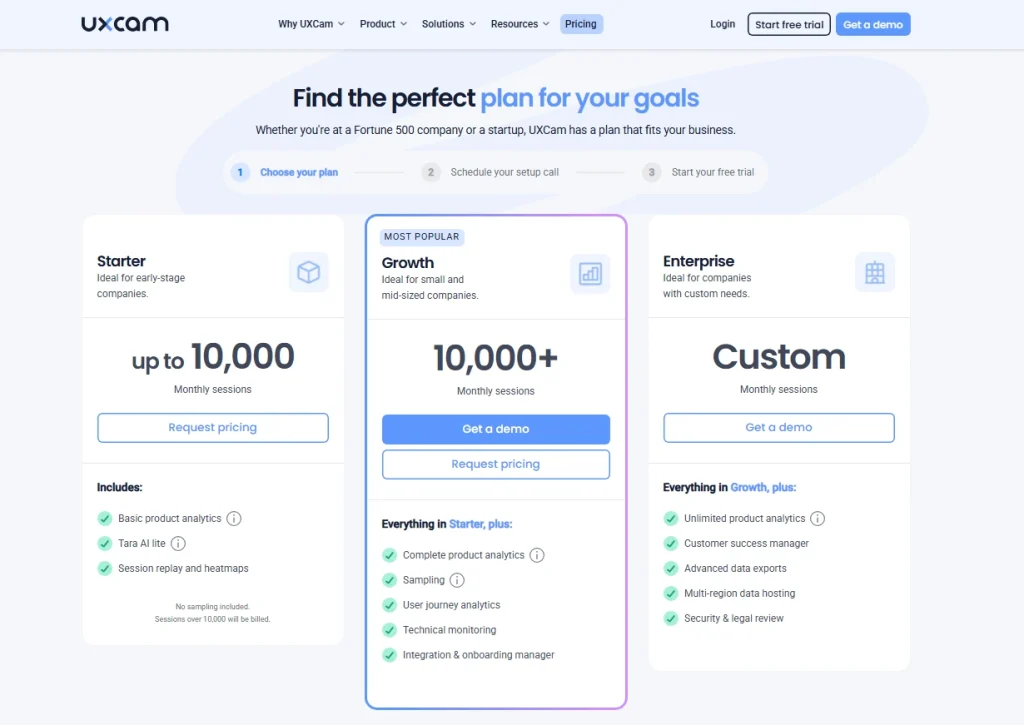
Paid plans start at 10,000 monthly sessions and use custom pricing. You’ll need to book a demo to get a quote.
7. Quantum Metric: enterprise session replay tied directly to revenue outcomes
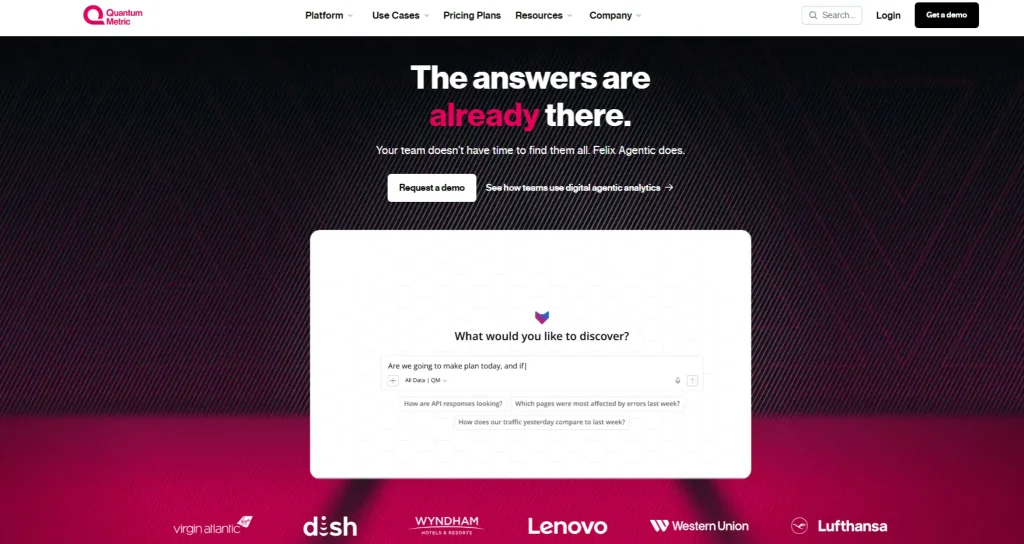
Quantum Metric connects session replay to real-time behavioral data and revenue impact modeling through Felix AI, its built-in AI companion that interprets session data in response to natural language queries.
Its advanced features suit large ecommerce organizations that need to attach a dollar value to every friction signal, not just a UX observation. Teams can ask Felix questions like “How many users struggled at checkout this week?” and receive instant summaries with quantified business outcomes.
Best for
Enterprise ecommerce and digital retail organizations with dedicated analytics functions that need to quantify the revenue cost of friction, automate behavioral analysis across millions of sessions, and align product, engineering, and business teams around shared behavioral data.
Key features
- High-fidelity session replay: session recordings linked directly to transaction data, business metrics, and behavioral signals in a unified timeline.
- Felix AI: natural language querying of behavioral data delivers instant summaries and impact quantification without requiring an analyst to manually segment and review recordings.
- Revenue-tied funnel analytics: funnel drop-off at every stage is quantified in revenue terms, not just session counts, so prioritization decisions reflect actual business outcomes.
- Enterprise integrations: connects to Optimizely, Split, Salesforce, ServiceNow, Looker, and Tealium, covering experimentation, CX, and data platform workflows.
- Frustration signal detection with revenue thresholds: alerts trigger when frustration signals exceed a revenue impact threshold, not just a frequency count.
- Zone-based heatmaps: zone and scroll heatmaps are available alongside session replay within the platform.
Pricing
Custom pricing. A demo is required before pricing is provided.
How to Choose the Right Ecommerce Session Replay Tool
Four questions will help you narrow the field before you evaluate any platform.
- Web or mobile app? Web-first teams are well served by FullSession, FullStory, Hotjar, or Microsoft Clarity. If your store runs through a native iOS or Android app, FullSession and UXCam are the options purpose-built for that environment.
- Conversion optimization or debugging? Teams focused on reducing checkout abandonment should evaluate FullSession or FullStory. Teams whose primary goal is reproducing frontend errors should look at LogRocket.
- What’s your team’s technical depth? Non-technical users will find Hotjar and Microsoft Clarity approachable from day one. LogRocket and Quantum Metric have a more complex setup and require more technical resources to configure. FullSession sits in the middle: powerful yet requires no developer involvement for daily use.
- What’s your budget? Microsoft Clarity is the only completely free option with no session limit. FullSession and Hotjar cover the mid-market. FullStory and Quantum Metric carry enterprise-grade price tags.
Before you commit, confirm the tool handles your traffic volume without session sampling and includes data masking that meets your compliance requirements.
Which Option Is Best for Different Ecommerce Teams?
Different teams need different things from a replay platform. The table below maps common team types to the tool that serves them best, including customer-facing teams who use session context to diagnose reported issues faster.
| Team Type | Best Tool | Why |
| CRO and marketing teams | FullSession | Ecommerce-native replay + heatmaps + Lift AI, no developer required |
| Engineering and QA teams | LogRocket | Console logs, network requests, and JS error tracking in a synchronized timeline |
| UX research teams | Hotjar | Session replay combined with surveys and feedback tools |
| Support teams | FullSession or FullStory | Session context tied to tickets eliminates back-and-forth with customers |
| Budget-constrained stores | Microsoft Clarity | Unlimited free recordings with heatmaps and rage click detection |
| Mobile-first ecommerce teams | UXCam | Native mobile session replay, gesture heatmaps, and crash session capture |
| Enterprise ecommerce | Quantum Metric or FullStory | Revenue-tied analytics and AI-powered behavioral analysis at scale |
Is FullSession the Best Session Replay Tool for Ecommerce?
For ecommerce teams whose primary goal is conversion optimization and checkout recovery, FullSession is the strongest option on this list.
It’s the only platform here that combines ecommerce-native integrations, AI-powered session prioritization through Lift AI, funnel tracking, heatmaps, feedback collection, and error detection in a single product built specifically for web ecommerce workflows.
For the CRO manager, marketing lead, or product owner who wants to watch real sessions, understand why shoppers drop off, and refine user flows without building a complex analytics setup, FullSession is where to start.
Book a demo to see the ecommerce session replay workflow in action.
Common Pain Points and Solutions
Session replay tools solve real problems. They also come with operational frustrations. Here are the four most common issues and how to handle them.
1. Session sampling cuts off the sessions you actually need
Many platforms on usage-based pricing only record a portion of your traffic. The session with the checkout bug is just as likely to be in the unrecorded half. Choose a tool that records all sessions, or configure sampling to prioritize high-intent events like checkout initiation and cart additions.
2. Mobile gaps make mobile shoppers invisible
Other session replay tools built for desktop web produce degraded or incomplete recordings for mobile sessions, skipping touch events or missing interactions on native app screens. If mobile commerce is a meaningful share of your revenue, verify mobile replay quality before committing.
3. Privacy configuration creates compliance delays
Manually configuring masking rules for every sensitive field across a checkout flow is time-consuming and error-prone. Tools like FullSession, FullStory, and Microsoft Clarity offer automatic masking of sensitive user data fields by default. Establish your data retention policies before deployment, not after the first compliance question arrives.
4. Pricing cliffs at scale create budget pressure
Session-based pricing can look manageable at low traffic and become expensive fast as your store grows. Pairing session replay with A/B testing and experimentation tools as part of a broader optimization stack also amplifies the return per dollar spent.
Before signing an annual contract, model the cost at 2x and 5x your current session volume. Flat-rate models give more predictable costs at scale than pure usage-based pricing.
Conclusion About Best Tools for Web Session Replay in Ecommerce
The right session replay tool depends on your primary use case, technical depth, and budget.
- For debugging-heavy engineering teams: LogRocket.
- For mobile-first operations: UXCam.
- For teams starting with zero budget: Microsoft Clarity.
For ecommerce teams focused on conversion optimization and checkout recovery, FullSession delivers the most complete set of capabilities in a single platform built for that workflow.
The value of session replay compounds over time. The more sessions your team reviews, the sharper your intuition becomes for where friction lives in your checkout flow, and the faster you can eliminate it.
When you use session replay data alongside your broader analytics stack to understand user behavior, it becomes one of the highest-leverage tools in your optimization workflow.
Book a demo for a guided walkthrough, or start a free trial to explore the product at your own pace.
Frequently Asked Questions
What is the best free session replay tool for ecommerce?
Microsoft Clarity is the best completely free option. It offers unlimited recordings, heatmaps, and rage click detection with no session cap and no paid tier. For teams that need ecommerce-specific features like checkout funnel tracking and AI-powered session prioritization, FullSession’s free plan provides a more capable starting point before committing to a paid plan.
How does session replay help reduce cart abandonment?
Session replay shows you exactly what happens during sessions that end in cart abandonment: the field that triggered a validation error, the shipping cost that caused a U-turn, the button that didn’t respond on mobile. Replay makes those moments visible and reproducible, so your team can fix them systematically.
Can session replay tools slow down my ecommerce site?
A well-implemented session replay tool adds minimal overhead to page load time. Tools like FullSession run asynchronously without blocking page rendering. Test your Core Web Vitals before and after installation using Google PageSpeed Insights, and prioritize tools that load asynchronously and use lightweight SDKs. Microsoft Clarity is widely cited for its low performance footprint.
What is the difference between session replay and screen recording?
Session replay reconstructs user sessions from captured DOM events: clicks, scrolls, user actions, and navigation changes, then replays them as a video-like playback. It’s not recording actual video footage of a user’s screen. This produces smaller file sizes, enables event-level filtering across millions of sessions, and allows automatic masking of sensitive fields before data leaves the browser. Traditional screen recording tools capture raw video and offer none of these capabilities.
Is session replay data GDPR compliant?
Session replay data can be collected in a GDPR-compliant way, but compliance depends on your implementation. Every tool on this list includes automatic masking for sensitive input fields. You must also inform users through your privacy policy, obtain appropriate consent, configure data retention limits, and restrict access to recorded sessions within your organization. FullSession, FullStory, and Microsoft Clarity all include built-in compliance features, but correct configuration is your team’s responsibility.

Roman Mohren is CEO of FullSession, a privacy-first UX analytics platform offering session replay, interactive heatmaps, conversion funnels, error insights, and in-app feedback. He directly leads Product, Sales, and Customer Success, owning the full customer journey from first touch to long-term outcomes. With 25+ years in B2B SaaS, spanning venture- and PE-backed startups, public software companies, and his own ventures, Roman has built and scaled revenue teams, designed go-to-market systems, and led organizations through every growth stage from first dollar to eight-figure ARR. He writes from hands-on operator experience about UX diagnosis, conversion optimization, user onboarding, and turning behavioral data into measurable business impact.