.svg)
.svg)

9 Best Customer Feedback Collection Tools for 2026


Customer feedback collection tools help you truly understand customers and improve their experience with your product or service. You can capture real-time insights and make smart decisions about product roadmaps, feature prioritization, and overall business strategy.
One example is FullSession, a user behavior analytics software that goes beyond raw numbers. It helps you capture and visualize all customer interactions, analyze trends and patterns and optimize your website performance.
FullSession also provides customer feedback tools with connected session recordings. It allows you to gather feedback at critical points in the user journey, watch session replays to evaluate customer behavior on your site and better understand the context behind their comments.
Want to see how it works? Book a demo now.
The key benefits of these customer survey tools include actionable insights that help improve satisfaction, reduce churn, and boost customer loyalty.
However, finding the right tool can be tricky, as each offers unique features, pricing, and integration options.
In this article, we’ll explore the top customer feedback tools and highlight their key features and drawbacks so you can confidently choose the best one for your business.
Key Takeaways
- FullSession is a user behavior analytics software with accurate, real-time insights into user behavior that helps you optimize digital experiences. It offers session recordings, interactive heatmaps, customer feedback tools, error analysis, and funnel and conversion tracking. FullSession integrates with APIs, native platforms, modern webhooks, and Zapier while complying with GDPR, CCPA, and PCI standards. Pricing starts at $39 per month with a 20% discount for annual plans. Book a demo now.
- SurveyMonkey is a survey and feedback management tool built for gathering customer feedback, conducting market research, and analyzing customer feedback. Its key features include pre-built templates, customizable surveys, A/B testing, and multi-channel distribution. SurveyMonkey is easy to use but has a learning curve for users new to survey tools. While the free plan is limited, paid plans start at $99 per month, with advanced features such as survey logic available only in higher tiers.
- Qualtrics CoreXM is a market research software suitable for large enterprises and research teams. It offers analytics, AI-driven insights, and customizable surveys across multiple channels. Despite its features, Qualtrics CoreXM’s pricing is not transparent and may be expensive for smaller businesses. Custom pricing is available upon request.
- SurveySparrow is an online survey software that focuses on creating engaging, conversational surveys that boost response rates. Its key features include NPS surveys, multi-channel distribution, and real-time analytics. Pricing starts at $39 per month, but advanced features like recurring surveys are available only on higher-tier plans.
- Zonka Feedback is an AI-driven customer experience and feedback platform offering multi-channel feedback collection and real-time alerts. Its key features include NPS, CSAT, and CES surveys, customizable forms, and offline survey capabilities. Because its pricing starts at $79 per month, it may be on the higher side for smaller businesses.
- Google Forms is an online form creator tool suitable for individuals and small businesses. Its key features include customizable forms, real-time collaboration, and automatic data collection. While it integrates well with Google apps, it lacks advanced analytics and customization options compared to paid survey tools. Google Forms is free to use, but more features are available in Google Workspace, which starts at $6 per month.
- Typeform is an online form builder tool known for its sleek, conversational style that engages respondents. Its features include customizable forms, logic jumps, and real-time analytics. It integrates well with popular tools and offers a free plan, but it’s limited to only ten responses per month. Pricing starts at $29 per month for more features.
- QuestionPro is an online survey software offering advanced features like survey logic, real-time analytics, and a global panel of respondents. It integrates with various business tools and is suited for market researchers and HR teams. Pricing starts at $99 per month, but it may be too complex for beginners.
- Survicate is a customer feedback and survey tool designed to collect insights through website widgets, email surveys, and NPS surveys. It integrates with popular business tools and provides real-time analytics. The free plan is limited, and paid plans start at $99 per month.
Boost Customer Satisfaction and Experience
Learn how our customer feedback tools help you identify recurring issues and user needs.
Best 9 Customer Feedback Collection Tools Right Now
Here’s a quick overview of the top website feedback tools available today, each offering unique features to help you capture customer feedback and gather actionable insights:
- FullSession (Get a demo)
- SurveyMonkey
- Qualtrics CoreXM
- SurveySparrow
- Zonka Feedback
- Google Forms
- Typeform
- QuestionPro
- Survicate
Let’s begin with our analysis of these best customer feedback tools.
1. FullSession
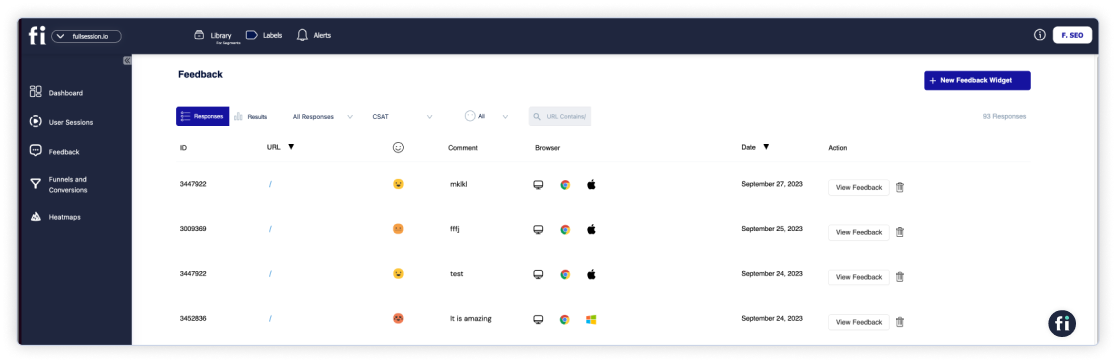
FullSession is an all-in-one user behavior analytics software that helps you effectively collect and store customer feedback via website feedback forms. FullSession allows you to customize thefeedback widgets:
- Customize the form appearance: Choose the display mode, language, page position, reaction style, and accent or alternate colors.
- Set up the steps: Input your questions, feedback placeholder, email request, and thank you message.
- Target specific users: Select users on desktops, tablets, or phones.
- Choose a trigger type: Activate the survey on page load, after a rage click, or when the user scrolls to a certain point.
- Forward feedback: Opt to have responses sent to your email.
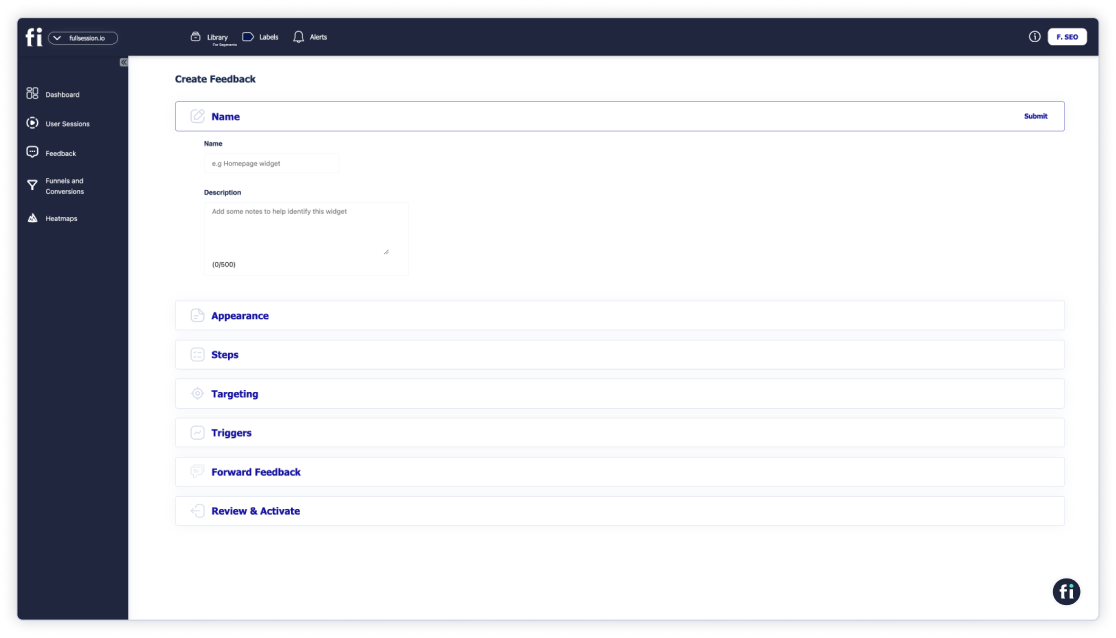
Each feedback has a connected session recording, allowing you to observe what happened during the user’s website visit so you can better understand the context behind their comments.
In cases of negative feedback, these recordings can help quickly identify and resolve the problem, leading to a better customer experience.
By visualizing user engagement and gathering detailed feedback, FullSession allows you to make data-driven decisions to improve your website, increase conversions, and boost customer satisfaction.
With additional features such as interactive heatmaps, conversion funnel analysis, and error tracking, FullSession offers a comprehensive solution for understanding your users’ needs and pain points and optimizing your website for peak performance.
It is also fully compliant with GDPR, CCPA, and PCI standards.
If you’re looking to optimize user experiences while ensuring privacy and compliance, FullSession is the best choice.
Visualize, Analyze, and Optimize with FullSession
See how to transform user data into actionable insights for peak website performance.
Best for
FullSession is perfect for:
- E-commerce businesses
- SaaS companies
- Digital marketers
- UX designers
- Data analysts
- Product development teams
- Quality assurance teams
- Customer support teams
- Customer experience professionals
Key features
- Advanced user and event segmentation: Sort and categorize website visitors based on their behaviors, trends, patterns and preferences and analyze data to optimize user journeys, and improve engagement and conversion rates.
- Session recordings and replays: Capture every interaction on your website in real-time. Replay sessions, observe customer behavior and spot UX, UI, or website performance issues. Keep user privacy by excluding sensitive customer data from recordings.
- Interactive heatmaps: Track mouse movements, clicks, and scrolls with immediate heatmap data processing. Test different page elements to see which ones you need to improve without slowing down your website.
- Website feedback forms and reports: Gather user feedback directly from your site using branded forms. Link this feedback tosession recordings to better understand the context.
- Conversion and funnel optimization tools: Identify where users drop off during critical points in their journey and test new designs or content to improve conversions.
- Error analysis: Automatically detect and fix issues like JavaScript errors, network problems, and failed API calls to improve site functionality and user experience.
Get a demo today to explore how these features can improve your business.
Supported platforms
FullSession tracks user behavior on web platforms and can also show mobile user recordings, but it does not currently support user behavior tracking on mobile apps.
Integrations
FullSession integrates with open APIs, modern webhooks, and Zapier. It connects with popular platforms such as Shopify, WordPress, Wix, and BigCommerce and provides native integrations. It works with your entire tech stack.
Customer support
FullSession offers excellent customer support via live chat and email. Additionally, users can access a comprehensive help center for self-service resources.
Pricing
FullSession has three pricing plans to suit businesses of all sizes. The Starter Plan costs $39 per month and includes unlimited heatmaps and up to 5,000 session recordings each month, making it a budget-friendly option for smaller businesses.

If you choose an annual subscription, you can save 20% and get the Starter plan at only $32/month. To learn more, check out our pricing page.
Pros
- Easy to customize website feedback widgets
- Real-time tracking of dynamic elements for precise insights
- Fast heatmap processing with no impact on website speed
- Privacy-focused, with no sensitive data recording
- Easy data management with quick access to key insights
- Integrates well with popular platforms like Shopify and WordPress
- Supports team collaboration
Cons
- Doesn’t support user behavior tracking for mobile apps
2. SurveyMonkey

Image source: G2
SurveyMonkey is an online survey tool known for its user-friendly interface and versatility.
It helps businesses gather customer feedback, conduct market research, and analyze results, making it a good option for teams of all sizes.
User rating
SurveyMonkey has an average user rating of 4.4 out of 5 based on 22,855 reviews on G2.
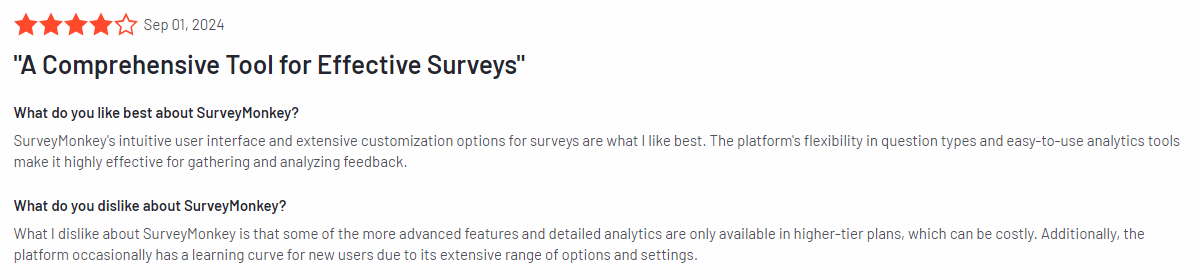
Image source: G2
Best for
SurveyMonkey is suitable for many users, including small to large businesses, market researchers, customer experience teams, educational institutions, and nonprofit organizations.
Key features
- Pre-built survey templates: Access a library of customizable survey templates for different industries and purposes.
- Customizable customer feedback surveys: Adjust survey design with branding, logos, and various question types.
- Analytics and reporting: Analyze responses with visual reports and export customer feedback data for further analysis.
- A/B testing: Compare different survey versions to see which performs better.
- Multi-channel distribution: Share surveys via email, social media, or embed them on your website.
- Survey logic: Apply skip logic and branching to create more personalized surveys based on user responses.
Supported platforms
SurveyMonkey is available on web-based platforms and iOS and Android mobile apps.
Integrations
SurveyMonkey integrates with tools such as Salesforce, HubSpot, Microsoft Teams, Google Drive, and Slack. You can streamline workflows, automate data transfer, and improve collaboration across different platforms.
Customer support
SurveyMonkey provides multiple customer support options, including email and a detailed help center for self-service. However, to access phone support, you need to subscribe to higher plans.
Pricing
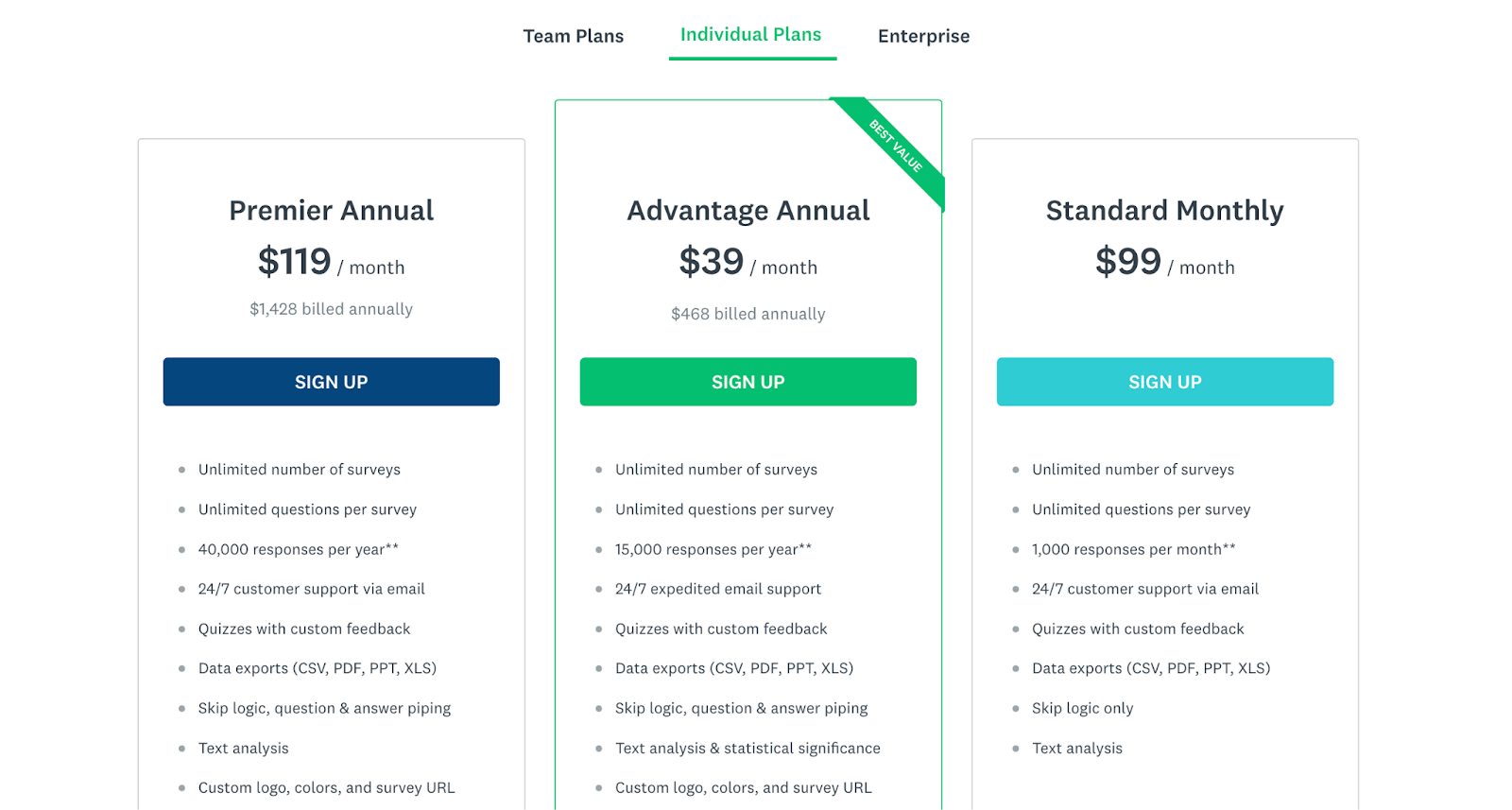
SurveyMonkey offers a free plan with limited features and several paid options starting at $99 per month for the Standard Monthly plan for one user. Custom pricing is available for enterprise solutions.
Pros
- Easy-to-use interface
- Wide range of customizable survey options
- Good analytics and reporting features
- Available free plan for basic use
Cons
- Limited features in the free plan
- Advanced features like survey logic only available in paid plans
- Learning curve for less experienced users
3. Qualtrics CoreXM
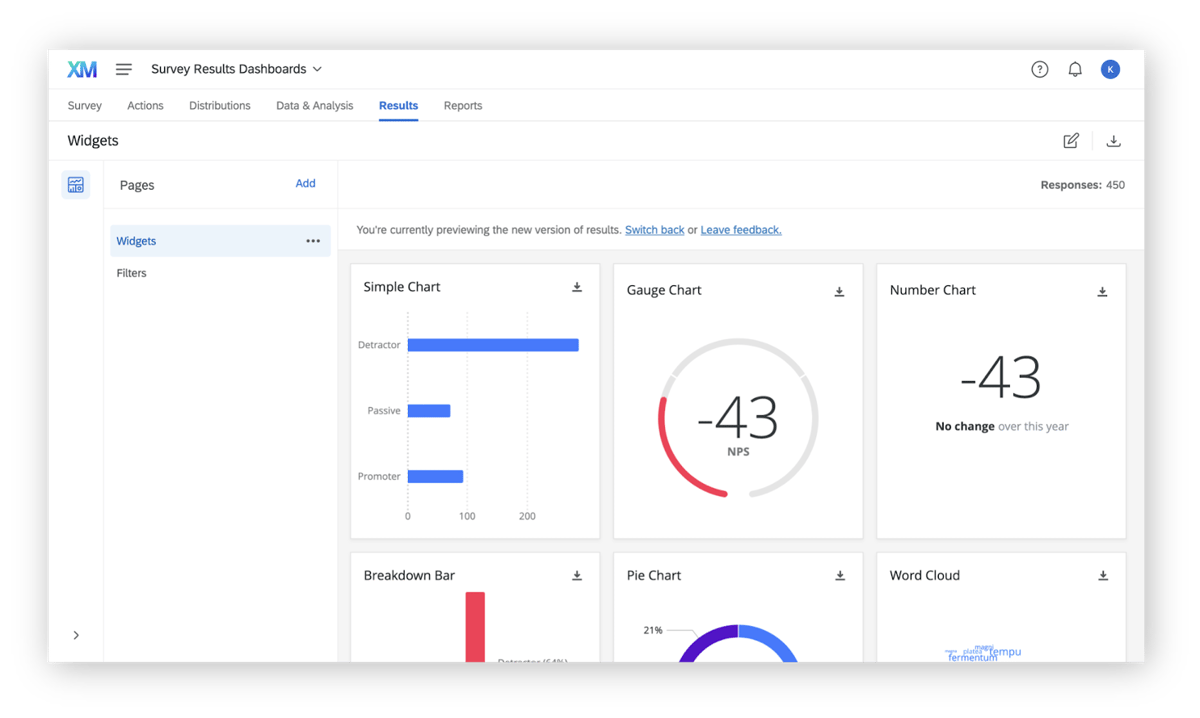
Image source: G2
Qualtrics CoreXM is a market research software for businesses looking to collect and act on customer feedback.
Its features, including AI-driven analytics and customizable survey tools, make it suitable for organizations that want to make data-driven decisions to enhance customer experience and improve operations across multiple touchpoints.
User rating
Qualtrics CoreXM holds an average rating of 4.4 out of 5 based on 2,919 reviews on G2.
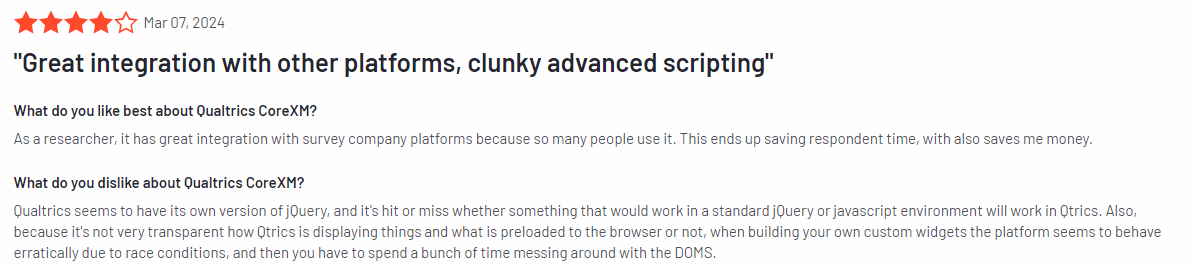
Image source: G2
Best for
Qualtrics CoreXM is for large enterprises, research teams, customer experience professionals, human resource departments, educational institutions, and government organizations.
Key features
- Advanced analytics: Leverage AI-driven insights and in-depth customer feedback analysis with tools like text analysis and statistical modeling.
- Customizable surveys: Tailor surveys to specific needs with a variety of question types, branding options, and complex logic.
- Cross-channel feedback collection: Collect feedback from multiple channels including web, mobile, email, and social media.
- Pre-built templates: Access industry-specific templates for easy survey creation.
- Real-time reporting: Generate real-time reports with visual data to track trends and patterns.
- Action planning: Turn insights into actionable steps with workflow automation and real-time alerts.
Supported platforms
Qualtrics CoreXM is available on both web-based platforms and mobile apps for iOS and Android.
Integrations
Qualtrics CoreXM integrates with Salesforce, Adobe Analytics, Microsoft Teams, Google Analytics, HubSpot, and Tableau.
Customer support
Qualtrics CoreXM offers many support options, including live chat, email, and phone support for paid users. Additionally, there is a comprehensive knowledge base with tutorials, guides, and FAQs, helping users troubleshoot issues and get the most out of the platform’s features.
Pricing
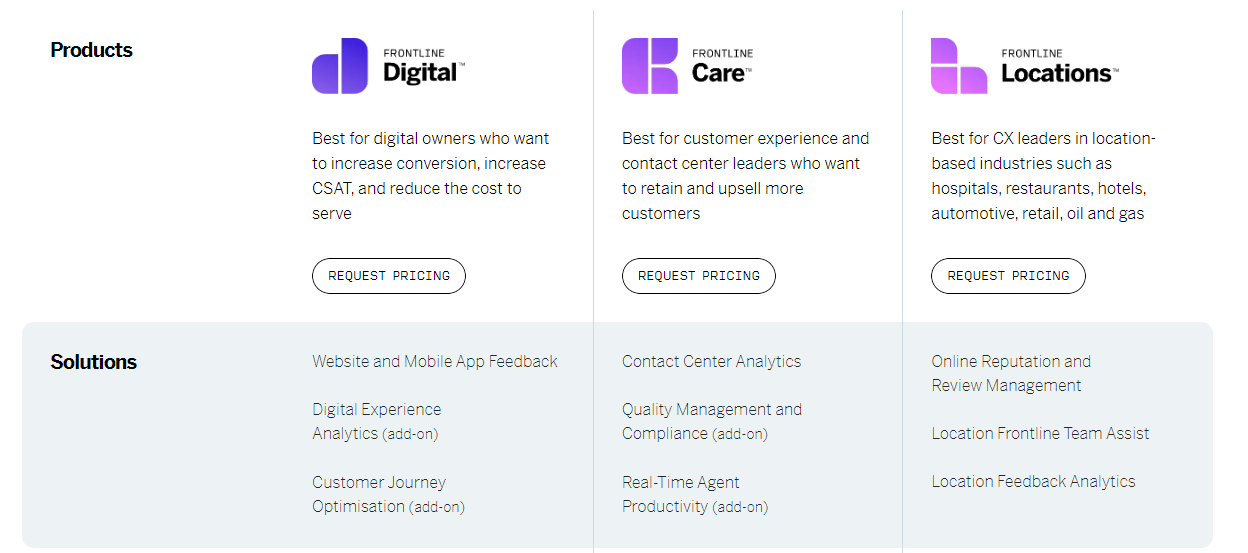
Qualtrics CoreXM provides custom pricing solutions. You need to contact them directly for more information.
Pros
- AI-driven insights and advanced analytics
- Extensive survey customization options
- Cross-channel feedback collection
Cons
- Pricing may be high for smaller businesses
- The interface can be challenging for first-time users or those unfamiliar with advanced survey tools
4. SurveySparrow

Image source: G2
SurveySparrow is an end-to-end omnichannel experience management platform that helps you create engaging, conversational surveys. It makes it easier to collect feedback and improve response rates.
With a user-friendly design focus, SurveySparrow offers various survey options, including recurring surveys and Net Promoter Score (NPS) surveys, to help you analyze customer feedback and enhance their overall experience.
User rating
SurveySparrow has an average user rating of 4.4 out of 5 based on 2,008 reviews on G2.
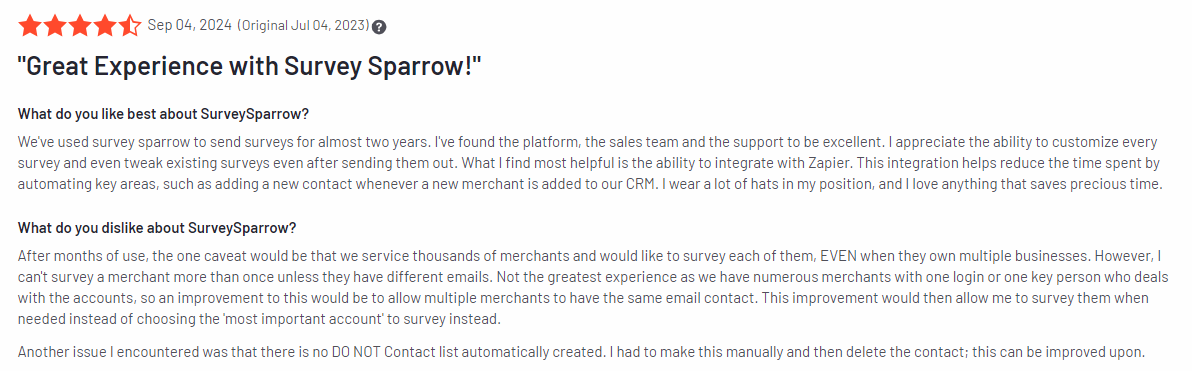
Image source: G2
Best for
SurveySparrow is suited for small to mid-sized businesses, customer experience teams, marketers, and HR departments.
It’s a tool for companies looking to gather feedback through engaging, mobile-friendly surveys that are easy to set up and customize.
Key features
- Conversational surveys: Create surveys that feel more like conversations to boost engagement and response rates.
- NPS surveys: Measure customer loyalty with built-in NPS survey functionality.
- Recurring surveys: Set up automated recurring surveys to continuously gather feedback over time.
- Multi-channel distribution: Distribute surveys via email, SMS, social media, or embed them on your website.
- Customizable design: Personalize survey themes with logos, colors, and fonts to match your branding.
- Detailed reporting and analytics: Analyze survey results with real-time dashboards and export data for deeper customer insights.
Supported platforms
SurveySparrow is available on both web platforms and mobile devices through iOS and Android apps.
Integrations
SurveySparrow integrates tools like Slack, Google Sheets, HubSpot, Salesforce, and Mailchimp.
Customer support
SurveySparrow offers customer support via email, live chat, and a comprehensive help center with tutorials and guides. Paid plans also include dedicated account managers for personalized support.
Pricing
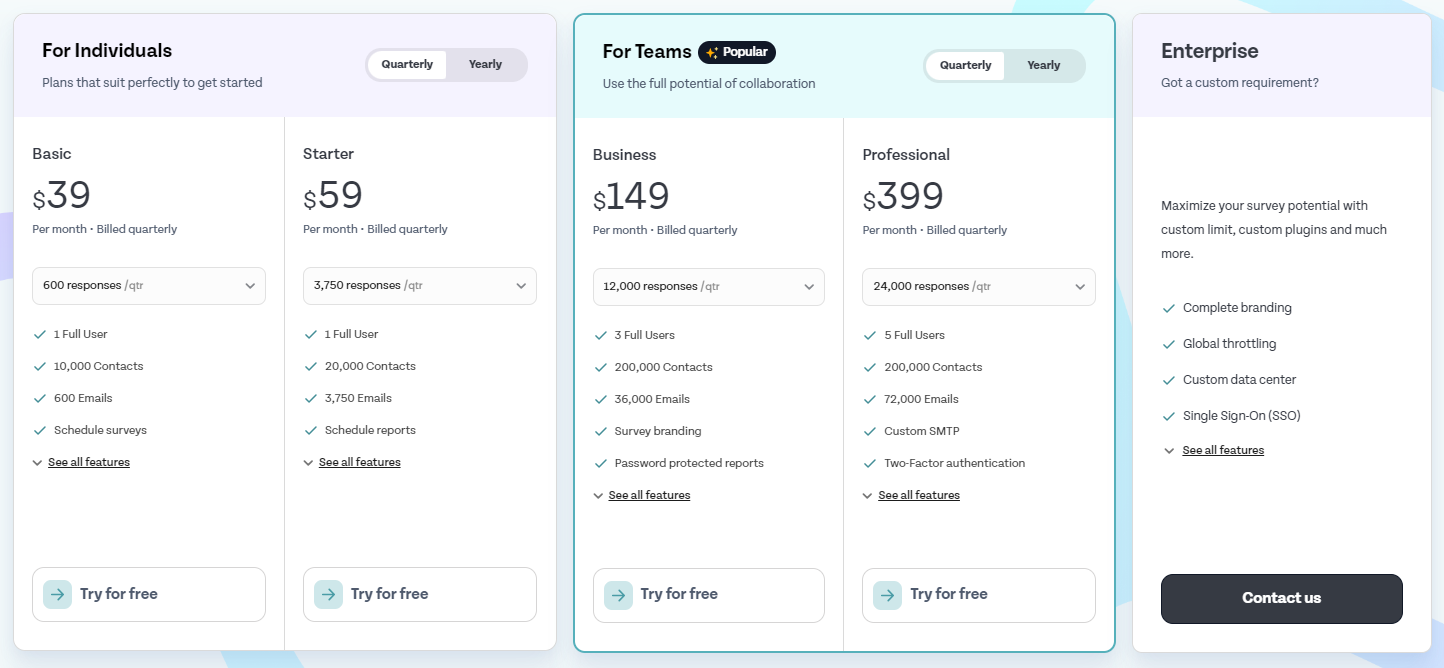
Paid plans start at $39 per month for the Basic Plan, which allows up to 600 responses per quarter, 600 emails, and survey scheduling. Custom pricing is available for enterprises requiring advanced features and larger usage limits.
Pros
- Engaging, conversational survey design
- Easy to set up and distribute across multiple channels
- Real-time analytics with customizable reporting
- Affordable pricing options for small businesses
Cons
- No option to get scoring from individual answers
- Some advanced features, like recurring surveys, are only available in higher-tier plans
- Some users may encounter potential bugs
5. Zonka Feedback

Image source: G2
Zonka Feedback is a customer experience and feedback platform that helps businesses measure customer satisfaction and improve their overall experience.
It offers tools for conducting surveys, tracking customer satisfaction, and gathering real-time insights.
With features like customizable surveys and multi-channel feedback collection, Zonka Feedback allows businesses to understand better and respond to customer needs.
User rating
Zonka Feedback has an average user rating of 4.7 out of 5 based on 71 reviews on G2.

Image source: G2
Best for
Zonka Feedback is suitable for small to large businesses, customer experience teams, hospitality industries, healthcare providers, and retail businesses.
Key features
- Multi-channel feedback collection: Collect customer feedback via email, SMS, online surveys, kiosk surveys, and mobile apps.
- Customizable surveys: Personalize surveys with your brand’s colors, logos, and custom question types.
- NPS, CSAT, and CES surveys: Measure customer loyalty and satisfaction through Net Promoter Score, Customer Satisfaction (CSAT), and Customer Effort Score (CES) surveys.
- Real-time feedback and alerts: Get instant feedback from customers and receive real-time alerts when negative feedback is submitted.
- Advanced reporting and analytics: Analyze feedback data and generate detailed reports.
- Offline surveys: Gather feedback in offline modes, which is good for locations with unreliable internet access.
Supported platforms
Zonka Feedback supports web-based platforms and is available on iOS and Android devices.
Integrations
Zonka Feedback integrates tools such as Slack, HubSpot, Salesforce, Google Sheets, Zapier, and Intercom.
Customer support
Zonka Feedback provides support through live chat, email, and phone. The platform also offers an extensive knowledge base with tutorials, guides, and FAQs to help users make the most of its features. Paid users have access to premium support, including dedicated account management.
Pricing
Zonka Feedback offers a free trial and multiple pricing tiers. The Starter Plan begins at $79 per month, which includes basic features and up to 250 monthly responses.
Higher-tier plans with more advanced features, larger response limits, and custom reporting are available for larger businesses, with custom pricing for enterprise-level solutions.

Pros
- Collect feedback across multiple channels, including offline modes
- Offers NPS, CSAT, and CES surveys for a comprehensive view of customer satisfaction
- Real-time alerts for quick responses to negative feedback
- Customizable survey options to match your brand
Cons
- Pricing may be on the higher side for small businesses
- Some advanced features, like offline surveys, are only available in higher-tier plans
- Limited device log-ins unless you delete them
6. Google Forms

Image source: Capterra
Google Forms is a free online form creator for creating surveys, quizzes, and forms. It’s widely used for collecting customer feedback, conducting polls, and managing simple data collection tasks.
User rating
Google Forms has an average user rating of 4.7 out of 5 based on 10,818 reviews on Capterra.

Image source: Capterra
Best for
Google Forms is suitable for individuals, small businesses, educational institutions, and teams looking for a free and easy-to-use tool to collect responses and manage basic surveys.
Key features
- Customizable forms: Create forms with a variety of question types, including multiple choice, text, and dropdowns.
- Real-time collaboration: Share forms with team members for collaborative editing and viewing of responses.
- Automatic data collection: Responses are automatically stored in Google Sheets for easy analysis.
- Unlimited responses: Collect as many responses as you need without any limits.
- Templates: Access pre-designed templates for various use cases like feedback forms, RSVPs, and quizzes.
- Integration with Google apps: Seamless connection with Google Drive, Sheets, and other Google tools.
Supported platforms
Google Forms is available on web platforms and is accessible through any browser. You can also use it on mobile devices through the Google Drive app on iOS and Android.
Integrations
Google Forms integrates easily with other Google services like Google Sheets, Google Drive, and Gmail. It also connects to third-party apps through tools like Zapier for additional automation options.
Customer support
It offers limited customer support, mainly through the Google Workspace Help Center, forums, and FAQs. Dedicated support is available to Google Workspace users.
Pricing
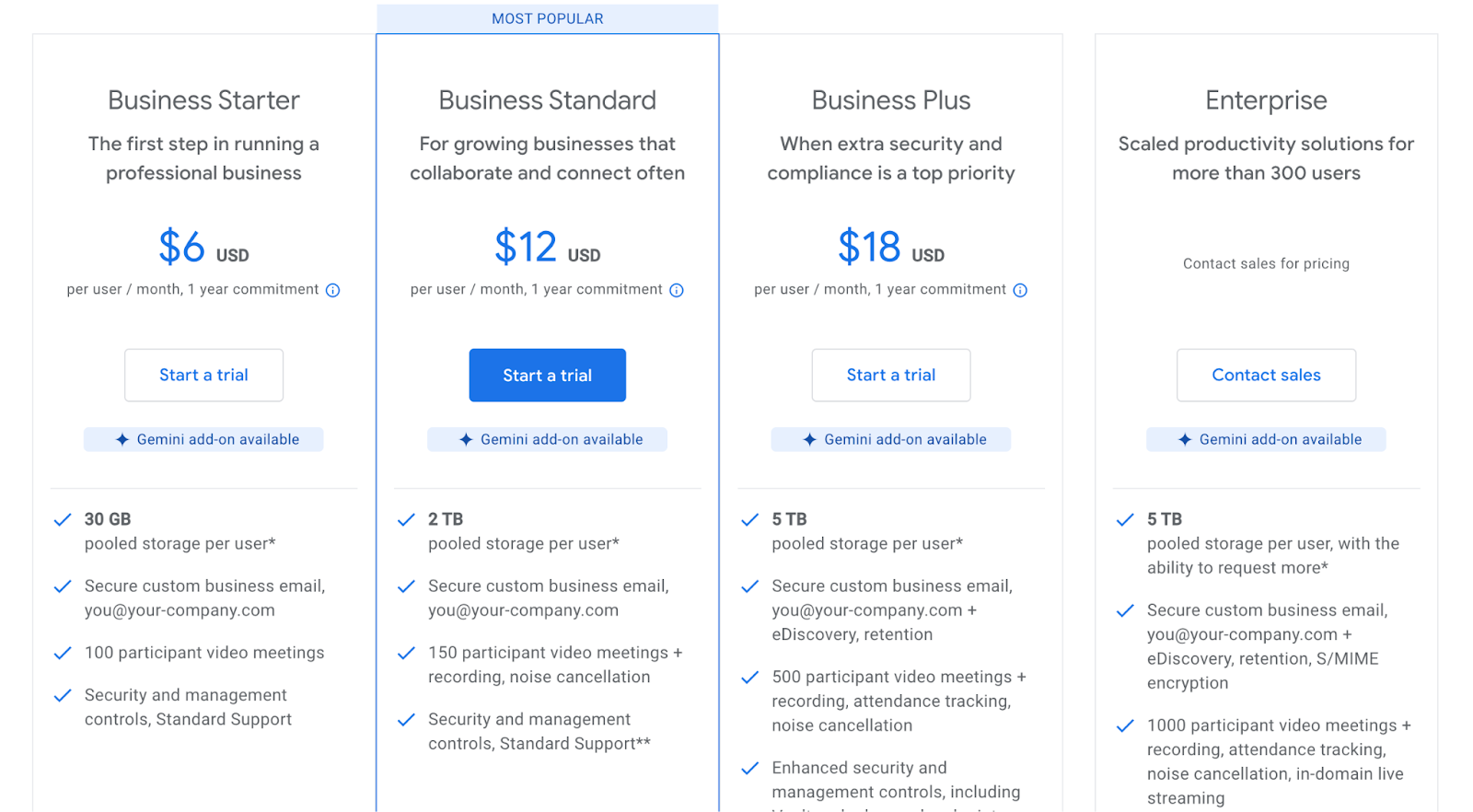
The tool is free to use for all users with a Google account. It’s part of Google’s free suite of tools, with additional features available to Google Workspace users through paid plans starting at $6 per user per month.
Pros
- Free and easy to use
- Integration with Google tools
- Unlimited responses and data collection
- Real-time collaboration for shared editing
- Drag-and-drop interface
Cons
- Limited customization options compared to paid survey tools
- Basic analytics and reporting features
- Minimal support for advanced survey logic
7. Typeform
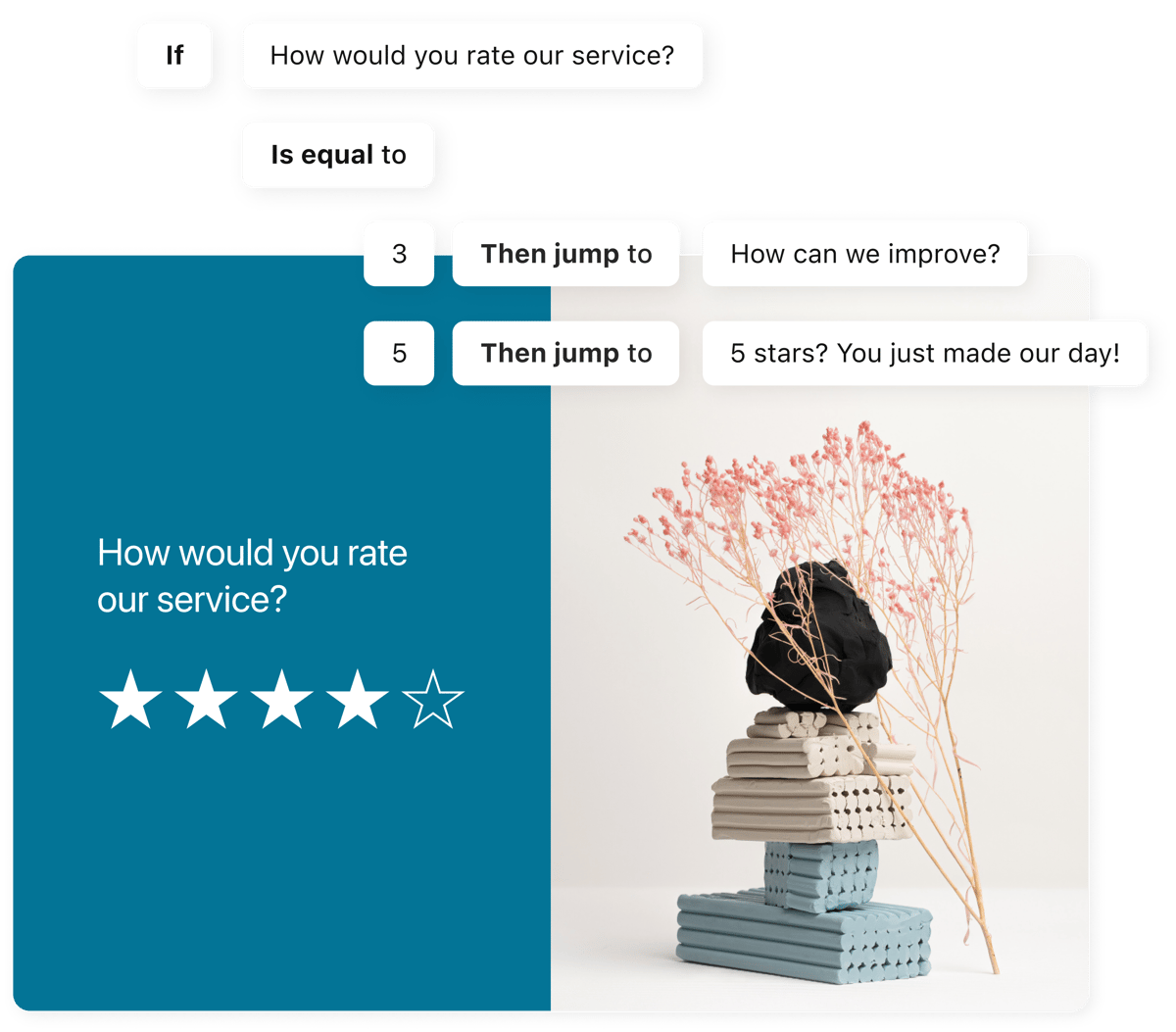
Image source: G2
Typeform is an online survey tool known for its sleek design and conversational style of collecting responses.
It allows businesses to create interactive forms, surveys, and quizzes that feel more engaging for users.
User rating
Typeform has an average user rating of 4.5 out of 5 based on 756 reviews on G2.

Image source: G2
Best for
Typeform is for businesses, marketers, customer experience teams, and freelancers who want to create highly engaging surveys or quizzes that feel more interactive than traditional forms.
Key features
- Conversational forms: Surveys that guide respondents one question at a time, creating a more engaging experience.
- Customizable design: Choose from a selection of themes, fonts, and layouts to match your brand’s style.
- Logic jumps: Add logic rules to create personalized paths for respondents based on their answers.
- Multi-channel distribution: Share forms via email, social media, or embed them on your website.
- Real-time analytics: View and analyze responses in real-time with easy-to-understand reporting tools.
- Templates: Access pre-built templates for various use cases like feedback, lead generation, and market research.
Supported platforms
Typeform is web-based and accessible through any browser. It’s also mobile-responsive, making surveys look and work well on smartphones and tablets, including iOS and Android.
Integrations
Typeform integrates with Zapier, Google Sheets, HubSpot, Slack, Mailchimp, and Salesforce, allowing you to automate workflows and sync all your survey data across platforms.
Customer support
Typeform offers customer support through email and a comprehensive help center with tutorials and FAQs. Paid users on higher-tier plans also have access to priority support.
Pricing
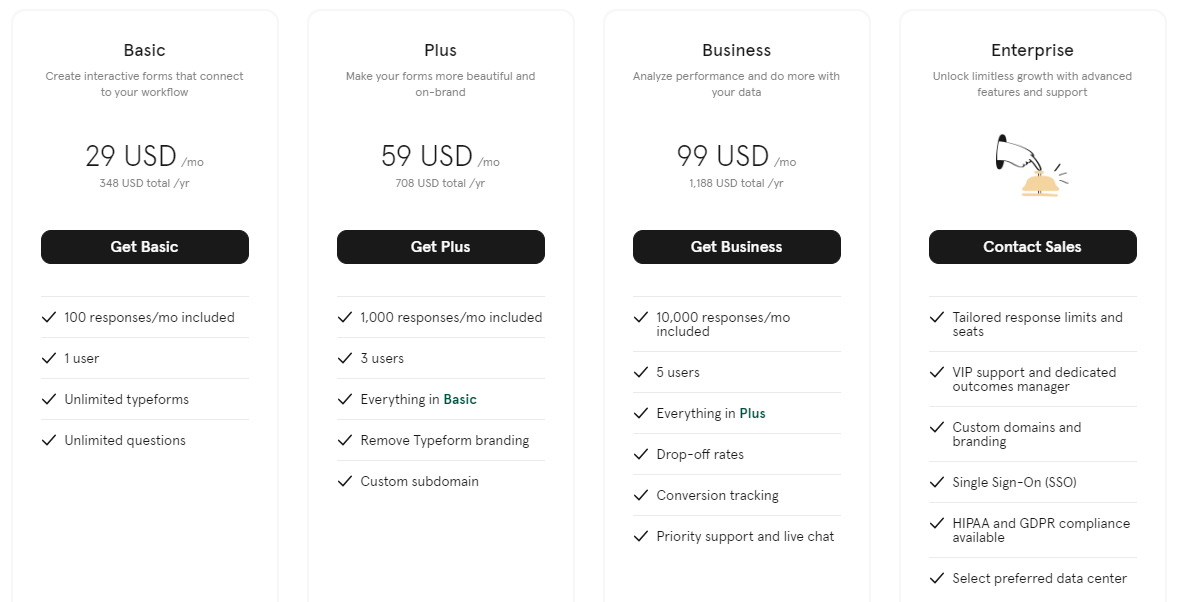
Paid plans start at $29 per month for the Basic Plan, which includes advanced customization, logic jumps, and up to 100 responses per month for one user. Higher-tier plans are available for businesses needing more features and response limits.
Pros
- Engaging, interactive forms
- Customization options for branding
- Logic jumps for personalized surveys
- Integrates with popular business tools
Cons
- Free plan has limited features and response limits
- Customer support might be slow
- Learning curve for advanced features like logic jumps
8. QuestionPro

Image source: G2
QuestionPro is an online survey software helping businesses and researchers create, distribute, and analyze surveys across various channels. It offers advanced survey features, including analytics, real-time reporting, and customizable templates.
User rating
QuestionPro has an average user rating of 4.5 out of 5 based on 934 reviews on G2.
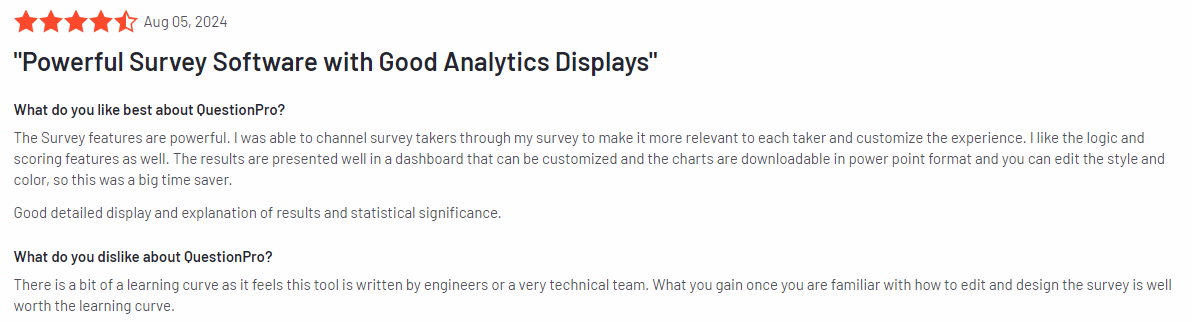
Image source: G2
Best for
QuestionPro is suitable for businesses, market researchers, educational institutions, HR teams, and nonprofits. It’s particularly beneficial for organizations that require detailed feedback collection and in-depth data analysis.
Key features
- Customizable surveys: Build surveys with multiple question types, branding, and advanced logic to fit specific needs.
- Advanced reporting and analytics: Access detailed reports with real-time data analysis and export options.
- Survey logic: Use skip logic, branching, and piping to create dynamic, personalized surveys.
- Multi-channel distribution: Send surveys via email, mobile, social media, and website embeds.
- Pre-built templates: Choose from a library of templates for market research, customer feedback, and employee surveys.
- 24/7 global panel: Access millions of survey respondents through a global audience panel.
Supported platforms
QuestionPro is available on web platforms and has dedicated mobile apps for iOS and Android.
Integrations
QuestionPro integrates with Salesforce, Zapier, Google Analytics, HubSpot, and Google Analytics.
Customer support
QuestionPro provides customer support via live chat, email, and phone. It also offers a detailed knowledge base with guides, tutorials, and FAQs to help users get the most out of the platform.
Pricing
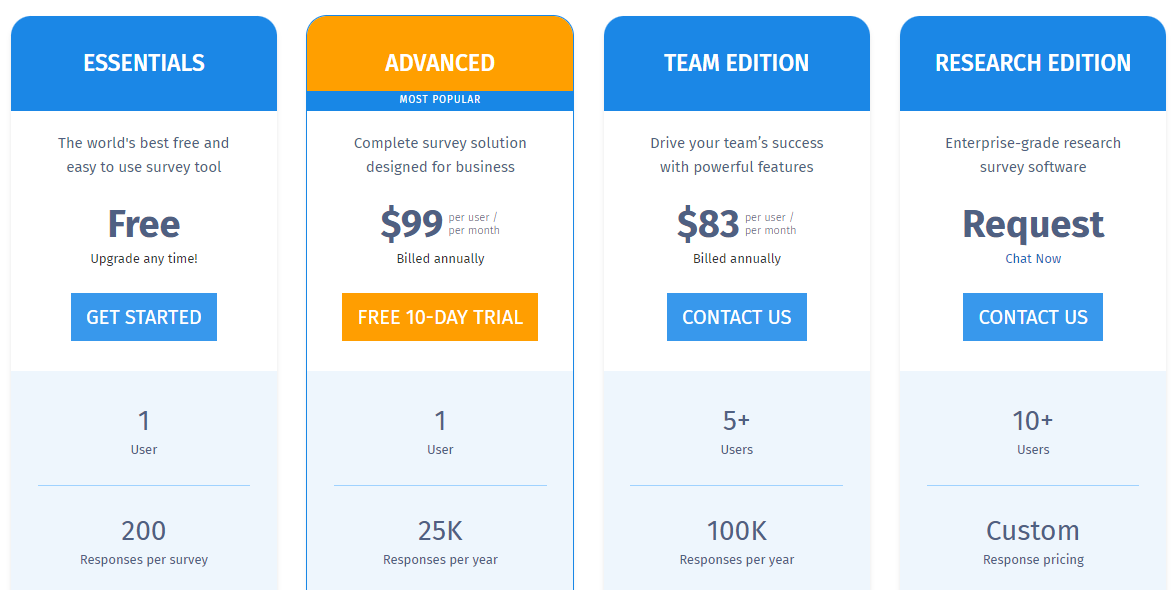
QuestionPro offers a free plan with basic features, and its paid plans start at $99 per user per month for the Advanced package, which includes more survey options, advanced logic, and in-depth analytics.
Enterprise-level plans with unlimited surveys are available with custom pricing for larger organizations.
Pros
- Survey customization and logic features
- Good reporting and analytics tools
- Multi-channel distribution and global audience panel access
Cons
- Higher pricing compared to basic survey tools
- Can be overwhelming for less experienced users
- Questionnaires with images can slow down the web operations
9. Survicate

Image source: G2
Survicate is a survey software that allows businesses to gather insights through surveys, polls, and feedback widgets.
Known for its simplicity and integration capabilities, Survicate helps organizations capture real-time feedback from customers across various touchpoints, such as websites, emails, and mobile apps.
User rating
Survicate has an average user rating of 4.6 out of 5 based on 174 reviews on G2.

Image source: G2
Best for
Survicate is suited for small to mid-sized businesses, customer experience teams, digital marketers, and product teams.
Key features
- Website feedback widgets: Collect in-the-moment feedback from visitors directly on your website with customizable widgets.
- Email and link surveys: Send surveys via email or share direct survey links to reach customers in various channels.
- NPS, CSAT, and CES surveys: Measure customer loyalty and satisfaction with built-in templates for Net Promoter Score, Customer Satisfaction, and Customer Effort Score surveys.
- Real-time analytics: View and analyze feedback results instantly with easy-to-read dashboards.
- Survey targeting: Make targeted surveys based on user behavior, location, or activity to get relevant feedback.
- Pre-built templates: Choose from a variety of templates to quickly create surveys for different use cases.
Supported platforms
Survicate is web-based and supports integration on websites and mobile devices, including iOS and Android.
Integrations
Survicate integrates with popular business tools like HubSpot, Intercom, Salesforce, Slack, and Zapier, to streamline workflows and automatically sync feedback with other platforms for further analysis.
Customer support
Survicate provides customer support via live chat, email, and an extensive help center that includes tutorials, guides, and FAQs. Paid plans come with premium support.
Pricing
Paid plans start at $99 per month for the Good Plan, which includes up to 500 responses per month, AI research assistant, and more integrations. Custom pricing is available for larger businesses with enterprise needs.

Pros
- Easy-to-use feedback collection with customizable widgets
- Wide range of integrations with popular business tools
- Real-time analytics for quick insights
- Pre-built templates for common feedback scenarios
Cons
- Free plan has limited responses
- HubSpot integration can be complex
- Navigating the help center might be difficult
Best 9 Customer Feedback Collection Tools Comparison Table
This comparison table highlights the key features, pricing, and potential drawbacks of the best customer feedback collection tools. Use it to quickly find the right customer feedback tool for you.
FullSession |
SurveyMonkey |
Qualtrics CoreXM |
SurveySparrow |
Zonka Feedback |
Google Forms |
Typeform |
|
|---|---|---|---|---|---|---|---|
Session recordings |
|||||||
Heatmaps |
|||||||
Customer feedback tools |
|||||||
Conversion funnel analysis |
|||||||
Error tracking |
|||||||
Real-time analytics |
|||||||
Survey logic/branching |
|||||||
Monthly pricing |
$39 |
$99 |
n/a |
$39 |
$79 |
Free |
$29 |
Best 9 Customer Feedback Collection Tools: Our Verdict

When choosing the best customer feedback tool, FullSession is a top choice. It provides robust feedback collection and offers comprehensive user behavior analytics, making it a complete customer feedback tool for businesses looking to optimize their customer experiences.
Here are the key benefits of FullSession:
- Customizable surveys: Tailor each feedback widget depending on your survey goals.
- Session recordings to pair with customer feedback: View session replays for more context behind specific feedback.
- Real-time tracking: Monitor dynamic elements in real time to gain precise insights into how users interact with your site.
- Fast heatmap processing: Interactive heatmaps load quickly without affecting site performance, making it easy to visualize user behavior.
- Privacy-focused: Safeguard user privacy by excluding sensitive data from recordings, ensuring compliance with GDPR, CCPA, and PCI standards.
- Data management: Efficiently handle large data sets and quickly extract key user insights to support data-driven decisions.
- Targeted tracking: Focus behavior tracking solely on your site, preventing misuse while still capturing essential feedback.
- Team collaboration: Streamline cross-team collaboration by centralizing efforts on one platform for improved communication and strategy execution.
Collecting feedback and measuring customer satisfaction has never been easier.
FullSession offers a comprehensive suite of features designed to improve user experience and optimize your feedback collection processes, including your customer feedback loop.
Book a demo now to experience the FullSession difference.
Conclusion About Best 9 Customer Feedback Collection Tools
Customer feedback collection tools are essential for any online business that wants to understand its customers, determine customer satisfaction, and improve their experience.
These tools help you gather valuable insights, identify pain points, and make data-driven decisions that can boost customer satisfaction and retention.
FullSession is the best option for businesses looking to combine feedback collection with powerful user behavior analytics. Its ability to track real-time interactions, process heatmaps quickly, and protect user privacy makes it a top choice for optimizing customer experiences.
Ready to see how FullSession can transform your business?
Book a demo now to get started.
FAQs About Best 9 Customer Feedback Collection Tools
FullSession, SurveyMonkey, Qualtrics, and Google Forms are the best customer feedback platforms. Each customer feedback platform offers features like surveys, feedback forms, and real-time insights to help businesses gather and analyze customer feedback.
You can collect customer feedback through multiple channels, including online surveys, email surveys, website feedback forms, social media polls, and in-app feedback widgets. Businesses can use customer feedback software like FullSession to gather feedback from various touch points to understand customer needs better.
You can gather feedback through several methods such as Net Promoter Score surveys, Customer Satisfaction surveys, open-ended feedback surveys, one-on-one interviews, focus groups, social media listening, and feedback forms embedded on websites.
You can track customer feedback using user behavior analytics platforms like FullSession that collect feedback and track user behavior and interaction with your site. Real-time dashboards and reports allow businesses to monitor feedback trends and take actionable steps based on collected data.
Google Forms is a free form builder you can use to create surveys, but it has limited features and analytics. If you want a customer feedback survey tool to provide deep insights into the customer journey, go for FullSession.
See what’s costing you, and prove whats fixing it is worth
Watch the real journey, rank every issue by revenue impact, and validate the result against baseline.






.svg)



All systems operational.