Most checkout errors go unreported. A customer hits a broken payment field, a JavaScript error fires on the cart page, and a network request fails at the worst possible moment. They leave. No support ticket. No complaints. Just a lost sale your team never knew about.
According to Baymard Institute, the global average cart abandonment rate sits at 70.19%, tracked across 49 studies over 14 years. Baymard also estimates that better checkout design alone could recover up to $260 billion in lost orders annually. Error tracking is where that recovery starts.
The best tools for tracking ecommerce errors give your team visibility into failures the moment they happen, with enough context to reproduce and fix them fast.
This article covers seven of those tools, how we evaluated them, and how to choose the right one. You can also browse ecommerce analytics tools for a broader analytics comparison.
Key Takeaway
- FullSession combines session replay, AI-powered error prioritization, and native ecommerce integrations in one platform, so your team sees exactly what went wrong and why without switching tools.
- Noibu is built specifically for ecommerce revenue protection, making it the strongest option for teams that need every error scored by its direct revenue impact.
- Sentry is a developer-first platform with deep stack trace diagnostics and broad language coverage, best for engineering teams who need code-level visibility across a full stack.
- LogRocket pairs session replay with frontend error detection and performance monitoring, giving product and engineering teams the session context they need alongside the error data.
- Raygun is a flexible crash reporting and real user monitoring tool with usage-based pricing, suited to developer teams who want granular error data without a fixed seat-count cost.
- Bugsnag automates error prioritization and grouping across web, mobile, and server layers, reducing the manual triage work that slows engineering teams down.
- Adobe Analytics is an enterprise behavioral analytics platform best suited to large teams already in the Adobe ecosystem who need cross-channel intelligence at scale rather than dedicated error tracking.
Of the seven, FullSession is the most complete option for ecommerce teams who need more than a code-level alert.
It connects every flagged error to the session replay, console log, and network request that preceded it, and Lift AI surfaces which errors are costing the most conversions so your team knows what to fix first.
Native integrations with Shopify, BigCommerce, Wix, and WordPress mean setup takes minutes, and everything from session replay to funnel analysis lives in one dashboard.
Book a demo today.
Why Ecommerce Error Tracking Matters
Ecommerce errors are silent by default. When a JavaScript error fires during checkout, most customers don’t open a support ticket. They close the tab.
You can’t fix what you can’t see. Most ecommerce analytics software and error monitoring tools were built for software engineering teams, not merchants focused on tracking ecommerce KPIs and ecommerce metrics like conversion rate, average order value, and customer retention.
A generic monitoring tool tells you that an error occurred. It won’t tell you that the error happened on step 3 of a 4-step checkout flow, right after a customer entered their payment details.
That’s where combining error tracking with session replay changes things.
When a failure is flagged in your session replay timeline, your team sees what the user was doing before the error, what the console logged, and whether the customer abandoned it as a result.
That context separates a 10-minute fix from a 3-day investigation.
Our guide to ecommerce session recording strategies covers how session replay and error resolution work together in practice.
You can also explore session replay tools compared for ecommerce to understand how session context fits into a broader observability stack.
How We Selected the Best Tools for Tracking Ecommerce Errors
Not every error monitoring tool is built for ecommerce. A platform that works well for a mobile app development team may give you raw stack traces with no connection to your checkout funnel, no Shopify integration, and no way to see which errors are costing you revenue. Tools like Google Analytics can tell you traffic dropped on your checkout page; they won’t tell you why.
We evaluated each tool on five criteria:
- E-commerce-specific error detection. Does the tool show errors that directly affect checkout flows, cart pages, and product pages, or does it treat every JavaScript error equally, regardless of where in the customer journey it occurs?
- Session context and replay capabilities. Can your team watch a recording of the session in which an error occurred, or does the tool deliver only code-level diagnostics without behavioral context?
- Real-time alerts and error grouping. Does the tool send alerts when errors spike, and does it group related errors intelligently so your team isn’t triaging the same issue 50 times?
- Ecommerce platform integrations. Does the tool offer native support for Shopify, BigCommerce, Wix, or WordPress, or does setup require custom SDK work that slows implementation?
- Pricing model and scalability. Is the pricing model transparent and predictable as your ecommerce store grows? Flexible usage-based pricing works for some teams; flat subscription pricing works better for others.
Every tool on this list covers at least three of these criteria well.
Quick Comparison: 7 Best Tools for Tracking Ecommerce Errors
| Tool | Error Detection Type | Session Replay | Shopify/BigCommerce Native | AI Prioritization | Pricing Starts At |
| FullSession | JS errors, rage clicks, broken flows | Yes | Yes | Yes (Lift AI) | $23/month(billed annually) |
| Noibu | Ecommerce-specific error monitoring | Partial | Yes (Shopify Plus) | Yes | Custom |
| Sentry | Full-stack error monitoring | No | Via integration | Limited | $29/month |
| LogRocket | Frontend + session replay | Yes | Via integration | Yes | $99/month |
| Raygun | Crash reporting + RUM | No | Via SDK | Limited | $60/month |
| Bugsnag | Full-stack automated detection | No | Via SDK | Limited | $23/month |
| Adobe Analytics | Enterprise behavioral analytics | No | Yes | Yes | Custom enterprise |
Pricing verified from official pages at time of writing. Confirm before purchasing.
7 Best Tools for Tracking Ecommerce Errors in 2026
Each tool below covers a different approach to error tracking. Use the breakdown to find the one that fits your team and stack.
1. FullSession
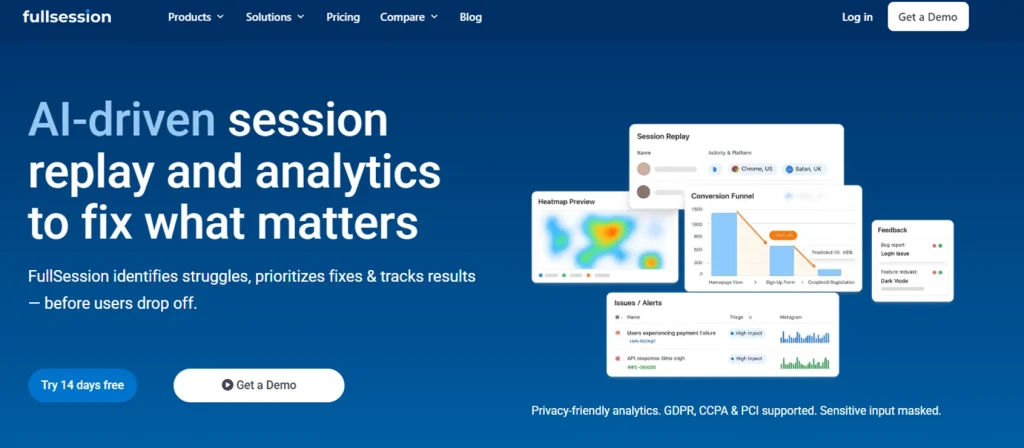
FullSession is a behavioral analytics platform that combines session replay, heatmaps, funnel analysis, in-page feedback, and error tracking in a single interface. It connects qualitative session data directly to conversion outcomes, without stitching together five separate tools.
Learn more about errors and alerts.
Best for
Ecommerce and SaaS product teams that need to link error data to behavioral context without managing multiple disconnected tools. See how FullSession compares across the session recording and replay software market.
Key features
- JavaScript error and rage click detection: FullSession flags JS errors, rage clicks, and broken interaction patterns automatically, showing them in your dashboard without manual configuration.
- Errors flagged in the session replay timeline: When an error is caught, it appears as a marker in the session recording. Your team clicks it and watches exactly what the user was doing, what the console logged, and which network request failed, all in one view.
- Lift AI prioritization: Lift AI, FullSession’s AI layer, scans user behavior data across sessions to predict which errors carry the highest conversion impact. Your team knows what to fix next without reviewing hundreds of recordings manually.
- Real-time alerts: Smart alerts notify your team when error rates spike, so issues on checkout pages don’t sit undetected overnight.
- Native ecommerce platform integrations: FullSession connects natively with Shopify, BigCommerce, Wix, and WordPress. No custom SDK work required.
- GDPR, CCPA, and PCI compliance with mobile session replay: Sensitive fields are masked at capture, so payment data never reaches the recording server. Mobile web and app sessions are recorded in the same dashboard, so mobile checkout errors don’t need a separate tool.
Pricing
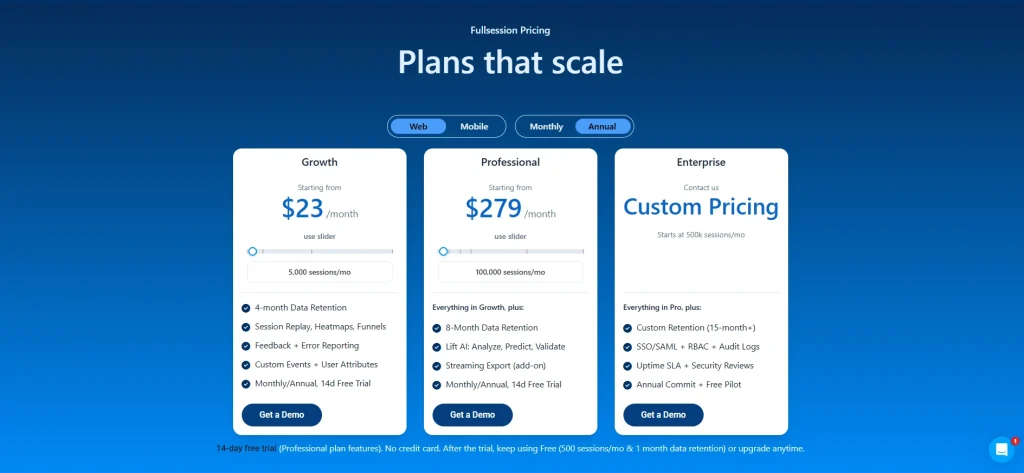
Plans start at $23/month (billed annually), with a 20% discount for annual billing on all plans. Visit the FullSession pricing page to explore options.
Set up FullSession in minutes and start catching errors in your checkout flow today.
2. Noibu
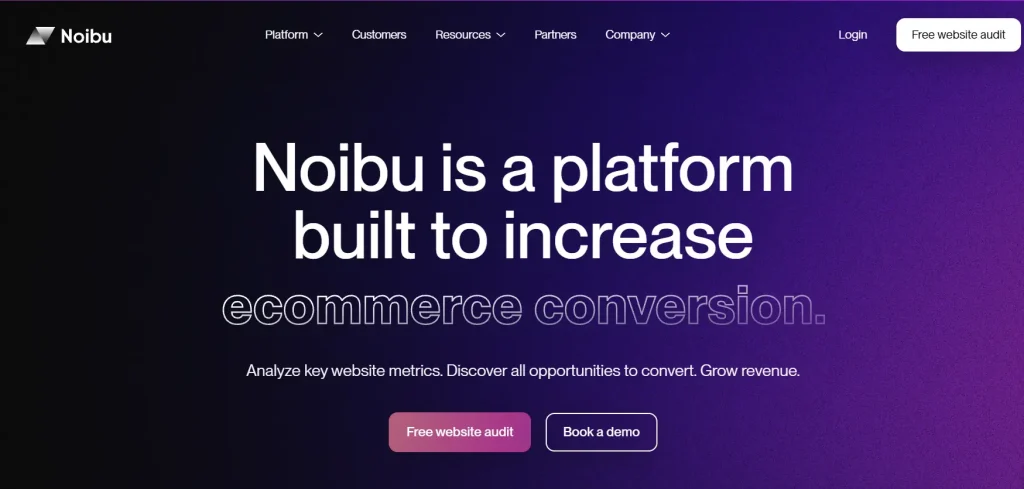
Noibu is an ecommerce analytics and monitoring platform built to help online retailers protect and grow revenue. Every detected issue gets tied directly to a revenue impact estimate, so your team prioritizes based on what’s costing money rather than what’s firing most often. Tracking customer engagement and key metrics across the checkout funnel is central to how Noibu surfaces which errors matter.
Best for
Mid-market to enterprise direct-to-consumer brands on Shopify Plus or custom stacks that need ecommerce-focused error monitoring with quantified revenue impact per issue.
Key features
- Issues and alerts with revenue impact scoring: Every detected error includes an estimate of how much revenue it’s putting at risk, based on how many users hit it and where in the checkout funnel it appears.
- Full session capture: Noibu records complete user journeys so your team sees the path that led to an error, not just the error event in isolation.
- Performance monitoring: Beyond JavaScript errors, Noibu tracks site speed and slowdowns that create friction before an error is thrown, giving an earlier warning on performance issues.
- Release monitoring: Noibu flags changes in error rates after every release, so your team knows immediately if a deployment introduced new problems.
- Page analysis: Visualize how users interact with individual pages, including where they struggle or fail to complete expected actions.
Pricing
Noibu uses custom pricing. You need to contact the team or request a demo.
3. Sentry
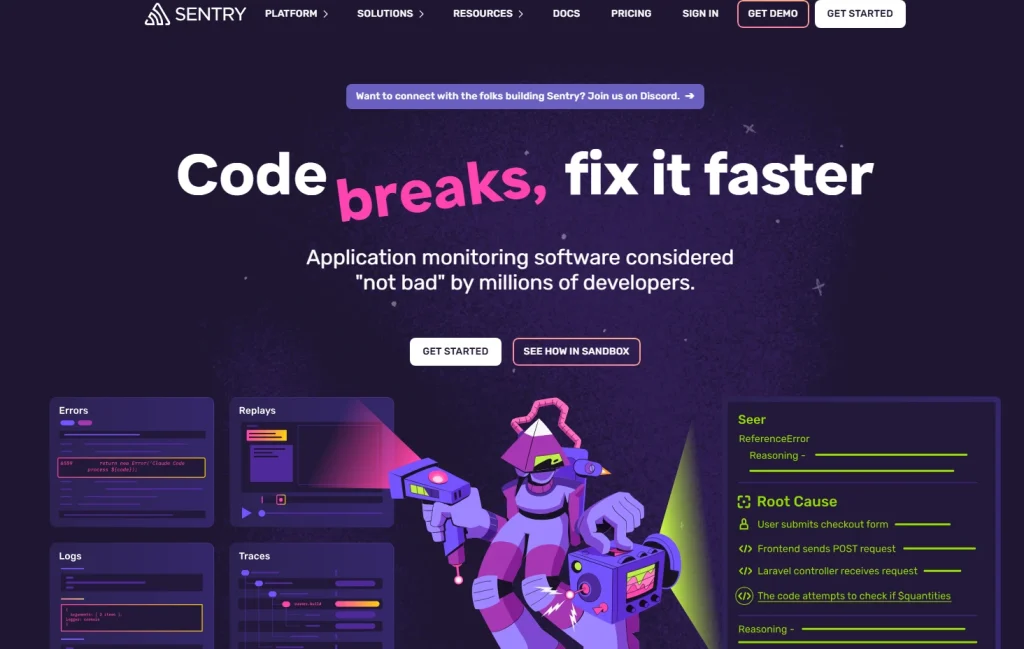
Sentry is an error monitoring platform built for software engineering teams, covering frontend, backend, and mobile applications across more than 30 languages and frameworks. As a popular ecommerce analytics tool in the monitoring category, it has broad developer adoption and a strong track record in production environments.
Best for
Engineering teams that need deep code-level diagnostics and detailed stack traces across a full stack. Less suited to non-technical ecommerce teams who need out-of-the-box behavioral context.
Key features
- Detailed stack traces: Every error caught by Sentry includes a full stack trace showing exactly which line of code triggered the failure and the surrounding call chain.
- Breadcrumbs: Sentry captures the sequence of user actions, network requests, and console events that preceded each error, giving developers a structured timeline to work from.
- Release tracking and issue ownership: Tag errors to specific releases to pinpoint when a spike started, and route issues to the right developer automatically based on code ownership rules.
Pricing
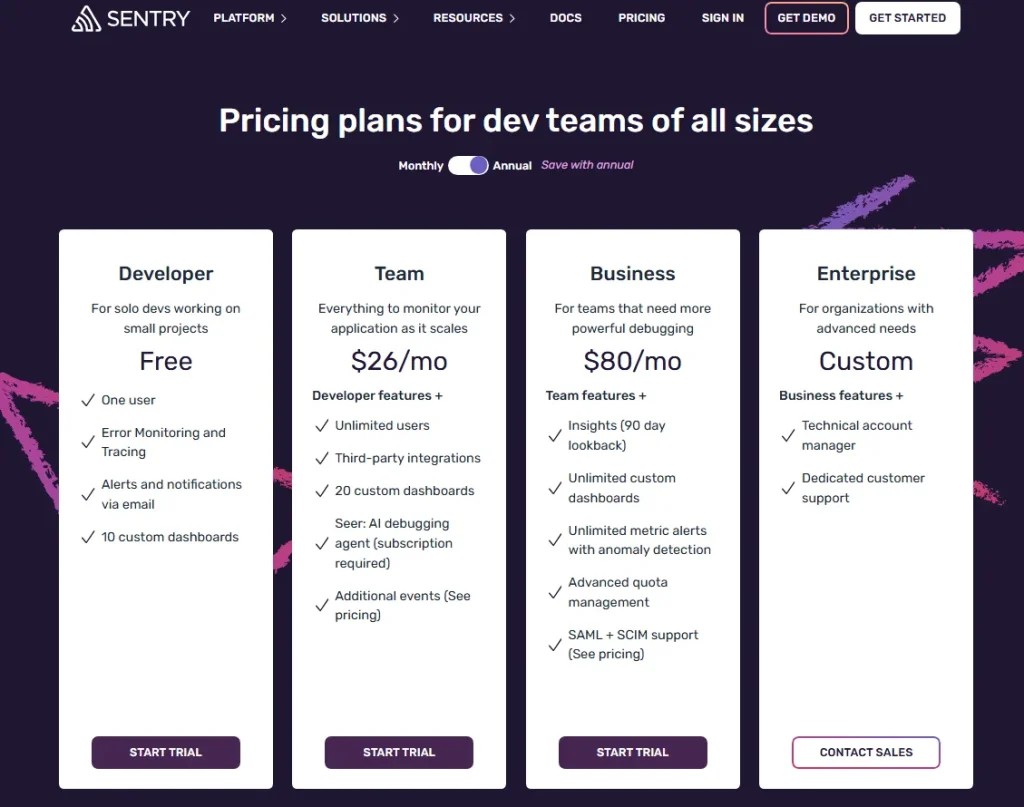
Sentry offers a free developer tier. The Team plan starts at $29/month, and the Business plan starts at $89/month, with pricing scaling by event volume and team size.
4. LogRocket
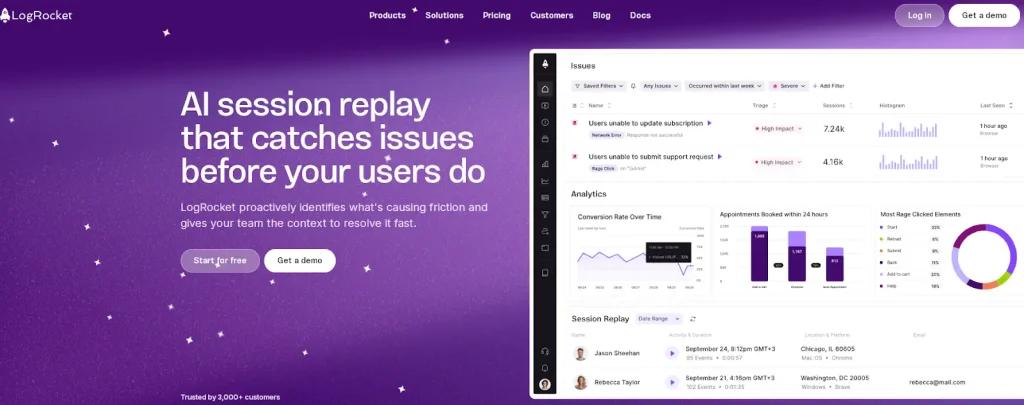
LogRocket is a frontend monitoring platform that combines session replay with performance monitoring and advanced product analytics. Understanding how customers interact with each step of your checkout flow becomes clearer when the error and the session sit in the same view.
- Learn more about LogRocket competitors.
- See how FullSession compares with LogRocket.
- Learn how LogRocket compares with FullStory.
Best for
Engineering and product teams at SaaS and ecommerce companies that need session replay tightly integrated with error identification and front-end performance monitoring.
Key features
- Session replay with console and network context: Every session replay in LogRocket includes the full console log, network request timeline, and Redux state (for React apps), so developers see the complete technical picture alongside what the user experienced.
- Error identification by affected user count: LogRocket shows errors ranked by how many users they affect, with AI-assisted insights that suggest likely root causes based on patterns across sessions.
- Frontend performance monitoring: Track page load times, long tasks, and web vitals alongside error data to connect performance issues to user experience outcomes.
- Heatmaps and funnel analysis: LogRocket includes heatmap and funnel analysis features that let product teams analyze ecommerce data across the customer journey, not just at the error level.
Pricing
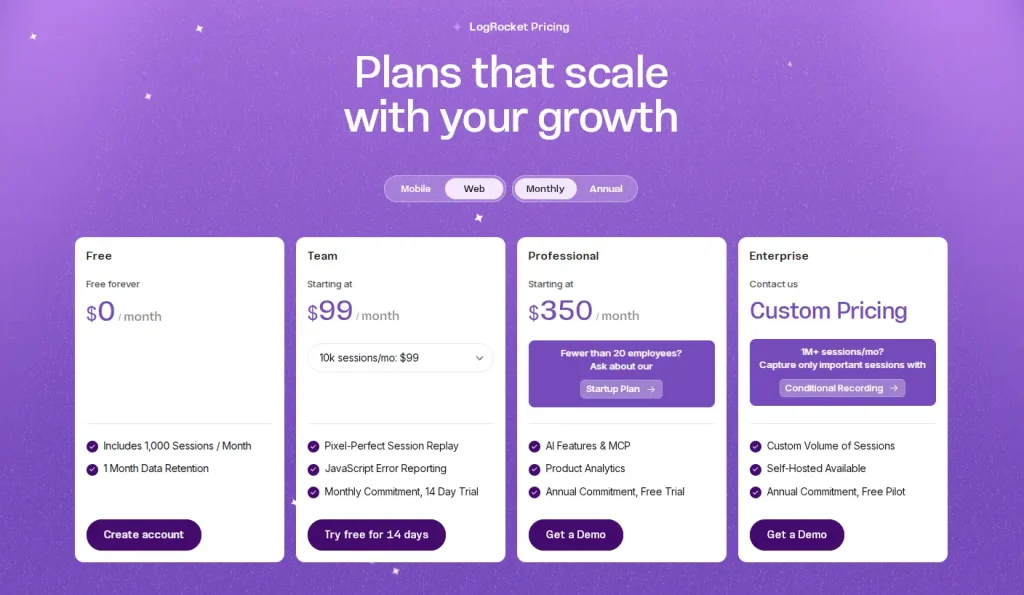
LogRocket starts at $99/month. Enterprise pricing is available on request.
Learn more about LogRocket pricing.
5. Raygun
Raygun is a crash reporting and real user monitoring platform for software teams, covering error detection across web and mobile applications. Its on-demand pricing model suits teams who want costs tied to actual usage rather than seat count.
Best for
Developer-first teams who want strong language and framework coverage, 180-day data retention, and on-demand pricing that doesn’t penalize rapid growth.
Key features
- Crash reporting with full stack trace: Raygun captures complete stack trace data for every error caught, with enough context for root cause analysis without manual reproduction.
- Error grouping by affected users: Raygun groups related errors and shows them ranked by the number of users affected, reducing noise and helping teams focus on what matters.
- Deployment tracking: Raygun monitors error rates against deployment events, so your team can identify whether a spike is tied to a specific release.
- Real user monitoring and 180-day data retention: Raygun’s RUM layer tracks frontend performance across real user sessions, showing page load issues and interaction delays before they trigger an error. Longer retention lets teams identify trends over time, not just react to immediate spikes.
Pricing
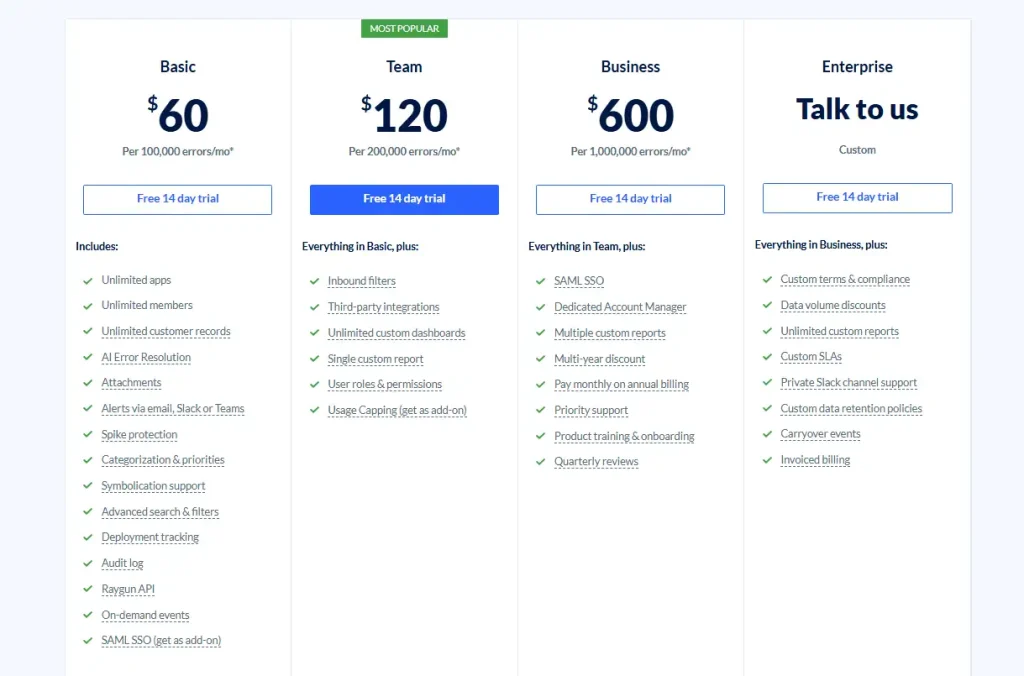
Raygun uses on-demand pricing. Pricing plans start at $60 per 100,000 events per month and go up to $600 per 1,000,000 events per month.
6. Bugsnag
Bugsnag is an automated crash detection and alerting platform for full-stack applications, covering web, mobile, desktop, and server environments. Error prioritization is automatic here, so engineering teams spend time fixing issues rather than triaging them.
Best for
Engineering teams across mobile and web who need automated error prioritization, symbolicated stack traces, and strong integrations with issue trackers like Jira and GitHub.
Key features
- Full-stack error monitoring: Bugsnag detects unhandled and handled errors automatically across web, mobile, desktop, and server layers. Supporting customers experiencing crashes anywhere in your stack is covered from one dashboard.
- Automatic error grouping: Bugsnag groups related errors intelligently, preventing alert fatigue by showing distinct issues rather than hundreds of individual notifications.
- Symbolicated stack traces: Bugsnag transforms minified production code into readable stack traces, so engineers can act on error data without manually decoding output.
- Feature flag monitoring and error burst protection: Bugsnag tracks errors by feature flag state so teams can isolate experiment-related bugs. When error volume spikes suddenly, it throttles notifications to prevent inbox flooding while preserving full error data.
Pricing
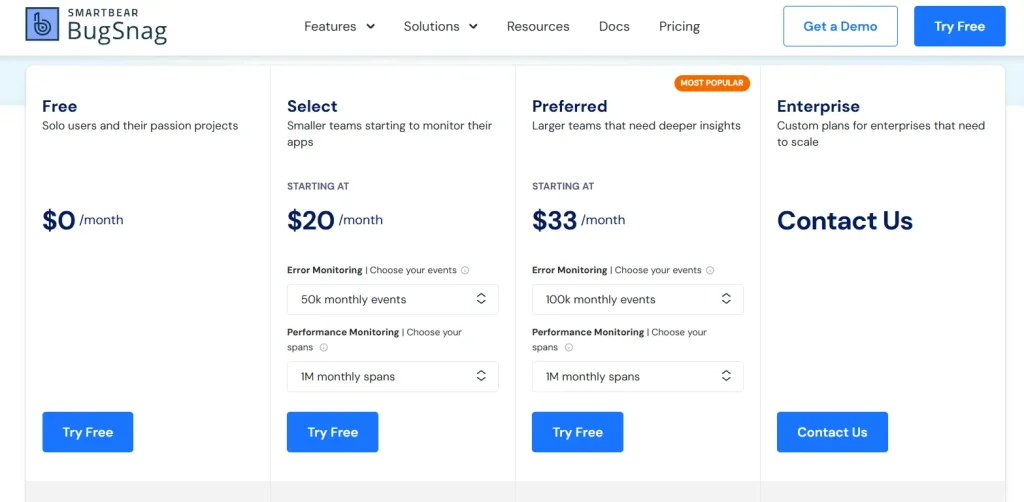
Bugsnag pricing plans start at $23/month for 50k monthly events and 1M monthly spans.
7. Adobe Analytics
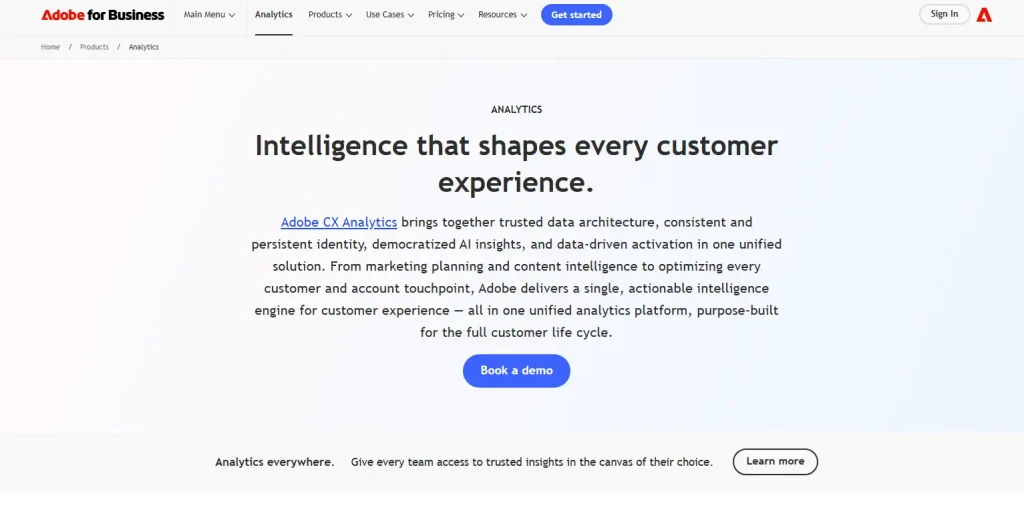
Adobe Analytics is an enterprise-grade data analytics platform for large-scale ecommerce operations, part of the Adobe Experience Cloud.
It’s not a dedicated error monitoring tool, and it sits in a different category from the other six options on this list. For enterprise teams in the Adobe ecosystem, it delivers depth across sales data, customer behavior, and marketing strategies that go well beyond standard ecommerce reporting.
If you’re evaluating Adobe Analytics purely for error tracking, it’s not the right ecommerce analytics tool for that job. Its value is in cross-channel intelligence at scale.
Best for
Large enterprise ecommerce teams already in Adobe Experience Cloud who need advanced analytics, predictive analytics, and cross-channel customer data at scale.
Key features
- Predictive analytics powered by Adobe Sensei AI: Adobe Analytics uses machine learning to find anomalies, forecast performance, and generate customer insights automatically across large data sets.
- Advanced segmentation: Build granular audience segments from any combination of behavioral, transactional, and demographic attributes, then analyze ecommerce data across those segments in real time.
- Cross-channel customer journey tracking: Map the complete customer journey across web, mobile, in-store, and advertising channels, connecting on-site behavior and marketing campaigns to revenue outcomes.
- Ecommerce KPIs and advanced reporting: Track key performance indicators, including average order value, customer lifetime value, and customer lifetime metrics across custom report suites with flexible attribution models. Adobe Analytics connects natively to Adobe Target for personalization tools and Adobe Campaign for marketing tools, keeping customer data unified across the full stack.
Pricing
Adobe Analytics is enterprise-only with custom pricing. Contact Adobe directly for a quote.
How to Choose the Right Ecommerce Error Tracking Tool

Image source: Unsplash
The right analytics tools for your ecommerce business depend on what your team is actually trying to solve.
If your priority is checkout recovery and behavioral context
Use FullSession or LogRocket. Both connect session replay to error detection, so your team sees what users were doing when an error occurred. That visibility is key for reproducing checkout failures without hours of developer investigation.
FullSession adds Lift AI to checkout recovery to show which errors matter most for user engagement and conversion; LogRocket adds deeper technical logs for JavaScript-heavy frontends.
For teams on Shopify, our overview of Shopify analytics tools shows where Shopify analytics data ends and dedicated error tracking begins.
If your priority is ecommerce-specific revenue impact quantification
Use Noibu. Its core differentiator is revenue impact scoring per detected error, letting your product and engineering teams prioritize by business impact rather than error frequency.
This shows actionable insights on which failures to fix first, which matters most for enterprise DTC brands where multiple issues exist simultaneously.
If your priority is deep code-level debugging across a full stack
Use Sentry or Bugsnag. Both deliver detailed stack traces, breadcrumb timelines, and multi-environment coverage. Sentry is more configurable and developer-centric; Bugsnag automates more of the triage workflow.
Either works well for engineering teams who need comprehensive tracking across frontend, backend, and mobile in a single error reporting tool.
For teams evaluating multiple options side by side, a broader analytics software built for ecommerce comparison may help frame the decision alongside your error tracking needs.
If your priority is enterprise behavioral analytics at scale
Use Adobe Analytics. It won’t show individual JavaScript errors the way the other tools on this list do.
For enterprise teams already in the Adobe ecosystem, it delivers deep insights and supports data-driven decisions across the full customer journey, connecting online businesses’ marketing campaigns, sales data, and on-site behavior at a scale that justifies its place in a large stack. A web analytics tools comparison can help clarify where Adobe fits relative to more focused monitoring options.
Why Choose FullSession for Ecommerce Error Tracking
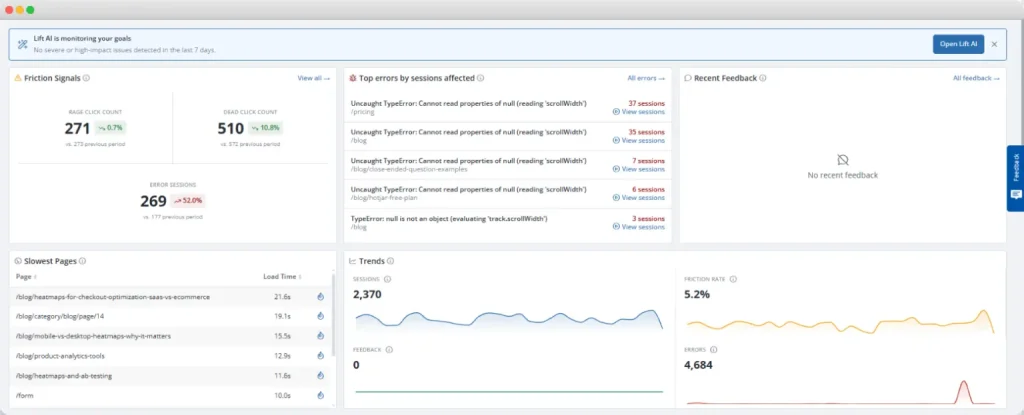
FullSession, a behavioral analytics and error tracking platform for ecommerce and SaaS teams, connects two things most tools keep separate: the error event and the session in which it happened.
When a JS error is flagged, your team doesn’t get just a code-level alert. They get the session replay, the console log, the network request that failed, and Lift AI’s assessment of how much conversion impact the error is carrying.
No manual review of hundreds of sessions to decide what to fix first.
Native integrations with Shopify, BigCommerce, Wix, and WordPress mean setup takes minutes, not days. GDPR, CCPA, and PCI compliance is built in, so sensitive checkout data stays protected at capture.
Running separate tools for error monitoring, session replay, and funnel analysis increases operational costs and creates gaps between teams.
FullSession puts all of it in one place, giving ecommerce and product teams shared, actionable insights on what’s actually happening across the customer journey.
See how FullSession works across your specific stack
Implementation Checklist for Tracking Ecommerce Errors
Choosing a tool is only half the work. Here’s how to get your setup running from day one.
- Install the tracking script on every relevant page. Cover product pages, cart, all checkout steps, and the order confirmation page. Errors anywhere in that flow affect conversion.
- Configure real-time alerts for threshold spikes. Set an alert to fire when a specific error type exceeds a defined rate, such as more than five occurrences in ten minutes.
- Set up funnel tracking alongside error detection. Connect your funnel analysis from the product page to checkout confirmation so your team sees drop-off and error events in the same view.
- Link session replay to error events. Every time an error is caught, it should be watchable in session replay. Stack traces alone don’t give you enough to fix issues at the source.
- Tag errors by revenue impact. Checkout-stage errors take priority over errors on informational pages. Configure your error grouping to reflect where in the customer journey each error occurs.
- Assign error ownership in your issue tracker. Use Jira, Linear, or your preferred tool to route errors to the right engineer. For teams focused on how to recover abandoned checkouts, routing checkout errors quickly is the most direct lever available.
- Run a baseline audit in week one. Identify your top five recurring error types by frequency. These are your immediate priorities.
- Schedule a weekly error review. New errors introduced since the last release get a dedicated slot. Engineering and QA teams reproducing bugs faster is the clearest sign your setup is working.
Conclusion on the Best Tools for Tracking Ecommerce Errors
The right error tracking tool depends on what your team needs from error data. If you need code-level stack trace depth, Sentry or Bugsnag get the job done.
If you need revenue-impact scoring per detected error, Noibu is built for that. If you need behavioral session context linked to every flagged failure so you can reproduce and fix checkout bugs without guesswork, FullSession is where to start.
Most ecommerce teams find that error data alone isn’t enough. Seeing the session behind the error is what turns a vague alert into a fixable problem.
Start catching errors in the context of real user sessions.
FAQs on the Best Tools for Tracking Ecommerce Errors
What is the best tool for tracking ecommerce errors?
The right tool depends on your team’s priority. If you need session context alongside error data, a platform combining session replay and error tracking is worth prioritizing.
If your team needs detailed stack traces and full-stack diagnostics, a dedicated error monitoring tool like Sentry or Bugsnag fits better.
How do I find errors on my ecommerce site?
Install an error monitoring or behavioral analytics tool that captures JavaScript errors, failed network requests, and broken UI interactions automatically. Configure real-time alerts for threshold spikes and link error events to session replays.
Your team can then find and fix errors without relying on customer reports, which typically show only a fraction of what actually occurred.
What is error monitoring in ecommerce?
Error monitoring in ecommerce is the automated detection and tracking of technical failures, including JavaScript errors, failed API calls, and broken checkout flows, that prevent customers from completing purchases.
How does session replay help with ecommerce error tracking?
Session replay records the complete sequence of customer interactions before and after an error occurs. Your developers and product managers watch what the customer experienced rather than working from an abstract error report. This eliminates most of the manual reproduction work and cuts the time between error detection and fix significantly.
What types of errors hurt ecommerce conversion rates the most?
Checkout-stage JavaScript errors, failed payment API calls, broken form validation, and slow page load times on product and cart pages cause the greatest conversion impact. These errors occur at the moment a customer has decided to buy. Fixing them is where error monitoring produces the most direct return.

Roman Mohren is CEO of FullSession, a privacy-first UX analytics platform offering session replay, interactive heatmaps, conversion funnels, error insights, and in-app feedback. He directly leads Product, Sales, and Customer Success, owning the full customer journey from first touch to long-term outcomes. With 25+ years in B2B SaaS, spanning venture- and PE-backed startups, public software companies, and his own ventures, Roman has built and scaled revenue teams, designed go-to-market systems, and led organizations through every growth stage from first dollar to eight-figure ARR. He writes from hands-on operator experience about UX diagnosis, conversion optimization, user onboarding, and turning behavioral data into measurable business impact.