Most SaaS signups never stick. New users sign up, poke around for a few minutes, and disappear before experiencing any real value. For product teams, that gap between signup and value is the most expensive problem in the business.
SaaS user onboarding is the process that guides new users from their first login to a meaningful outcome: the moment a product finally clicks, known as the aha moment. Everything between signup and that moment is onboarding.
This guide covers how to design onboarding for different SaaS models, how behavioral analytics reveals what your metrics can’t, and a 20-point SaaS onboarding checklist you can apply today.
Key Takeaway
- Activation beats completion. A user who finishes every onboarding step without reaching a real value moment can still churn. Define one observable activation event before you design anything else, and measure success against that, not checklist completion.
- PLG and enterprise onboarding are different products. Self-serve users need instant access and a single guided win within hours. Enterprise users need coordinated, CSM-led rollouts across multiple stakeholders. One flow designed for both will underserve both.
- Your metrics tell you where. Your replays tell you why. Funnel drop-off rates show that a problem exists. Session replays show what the user actually experienced at that step. You need both to fix issues with confidence.
- Friction kills onboarding before it starts. Every unnecessary form field, password setup, and permission screen between signup and the first user action creates churn risk. The fastest path to the aha moment wins.
- Onboarding is never finished. Teams that outperform their competitors treat onboarding as an ongoing process. They run a 90-day improvement cycle: measure drop-off, form a hypothesis, test one variable, and validate the results with behavioral data. One focused improvement per cycle compounds over time.
FullSession gives SaaS product teams the one thing standard analytics cannot: visual evidence behind every drop-off. When a user abandons your onboarding funnel, FullSession lets you jump directly into their session replay to see what they saw, where they hesitated, and what went wrong.
Pair that with heatmaps that show layout issues on empty-state screens, rage click detection that shows broken UI before it hurts day-one retention, and in-app feedback linked directly to session recordings, and you have a complete diagnostic toolkit built for continuous onboarding optimization.
Why SaaS User Onboarding Matters
User onboarding is the most important stage in the entire SaaS user lifecycle. It determines whether a new user becomes an active, paying customer or a churn statistic. Every dollar spent on acquisition is wasted if the user onboarding experience fails to deliver value before the user loses interest.
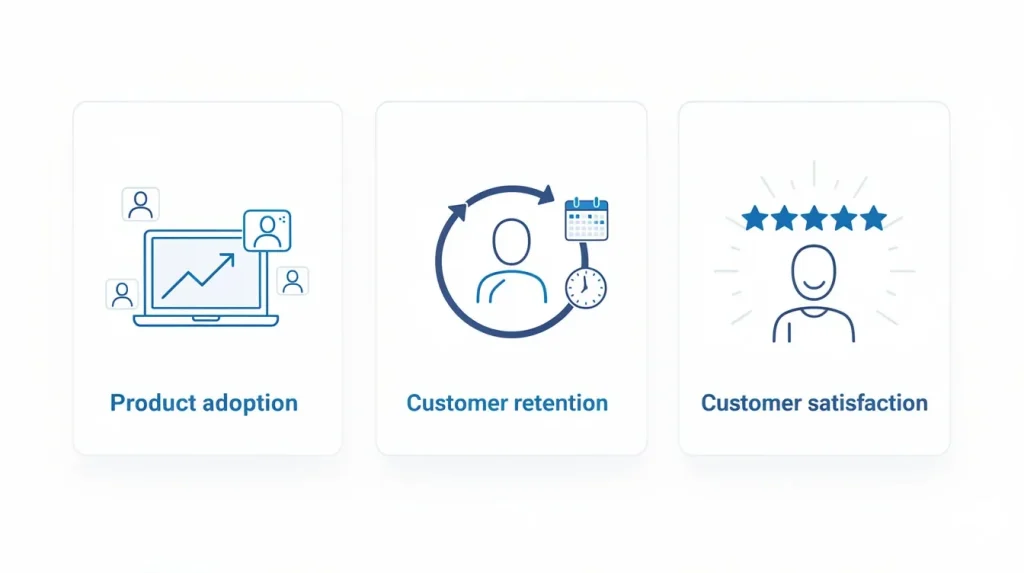
Strong onboarding drives three outcomes that product managers and customer success teams care about most:
- Product adoption. Users who experience a product’s key features in their first session are far more likely to become loyal customers who stick. Onboarding is the bridge between signup and sustained feature adoption.
- Customer retention. The aha moment, the specific action that makes the product’s value obvious, must happen early. Users who miss it in the first few days rarely return.
- Customer satisfaction. A smooth onboarding journey builds confidence. A confusing one builds resentment. First impressions in SaaS are durable.
The initial onboarding process sets the baseline for customer engagement throughout the entire relationship. Users who complete a well-designed onboarding program are more likely to explore advanced workflows, invite teammates, and generate expansion revenue.
Read our guide for a full breakdown of how to measure and shorten your time-to-value in a SaaS context.
Aligning Onboarding with SaaS Business Goals
Onboarding completion and activation are not the same thing. A SaaS user can complete every step in your onboarding checklist and still churn without ever receiving real value. That gap makes completion rate a misleading primary metric for any SaaS business.
To build a customer onboarding process that actually drives business outcomes, answer three questions before designing any flow:
- What is the activation event? Define one observable action that predicts long-term retention for your product. This decision shapes every onboarding choice that follows.
- What is your time-to-value target? For self-serve SaaS models, users should reach the activation event within 24 hours of first login. Every step that delays that moment increases churn risk.
- Which business metric does onboarding move? Tie every onboarding decision to activation rate, Day 7 retention, or trial-to-paid conversion. If a step does not move one of these, it does not belong in the initial onboarding process.
Build your SaaS customer onboarding process around these answers, and onboarding becomes a growth driver. Without this alignment, the customer onboarding journey turns into a series of disconnected steps instead of a clear path to the aha moment.
See Which Steps in Your Onboarding Flow Are Actually Moving Activation
Find out exactly where users stall before reaching their first value moment and see how FullSession helps you fix it.
How Onboarding Differs for Enterprise vs PLG Models
Not all SaaS companies onboard users the same way. The model you operate, whether product-led growth (PLG) or enterprise sales, fundamentally shapes the speed, support structure, and success metrics of the onboarding journey. One flow does not serve both.
PLG onboarding: speed and self-serve
Product-led growth onboarding is fully self-serve. New users complete account setup without human involvement, guided by in-app messaging, interactive walkthroughs, and onboarding checklists. The goal is instant access to the aha moment before users lose patience or open a competitor tab.
SaaS onboarding examples from PLG-native SaaS companies like Notion, the collaborative workspace tool, show what speed-first onboarding looks like: minimal signup fields, immediate product access, and a single guided task that delivers the first win within minutes.
Enterprise onboarding: depth and coordination
Enterprise onboarding is high-touch and human-led. A customer success team manages the process across not just individual users but multiple stakeholders, including procurement, IT, department leads, and end users.
It is not just individuals getting access, it is an organization adopting a platform.
Complex workflows, technical setup requirements, permissions, and integrations mean the onboarding program often spans days or weeks. The success metric shifts from hours to value to full account adoption within a defined window.
| PLG Onboarding | Enterprise Onboarding | |
| Speed | Hours to first value | Days to weeks |
| Support model | Self-serve, in-app | CSM-led, high-touch |
| Primary channel | In-app messaging, tooltips | Calls, email, live training |
| Success metric | Activation rate, time-to-value | Account adoption, NPS |
| Key risk | User drops before aha moment | Slow ramp erodes ROI before renewal |
Most FullSession customers operate in a PLG or hybrid model. The behavioral analytics layer described in this guide applies to both. The onboarding journey looks different, but using real user behavior to find and fix friction works the same way.
What Makes an Effective SaaS Onboarding Process
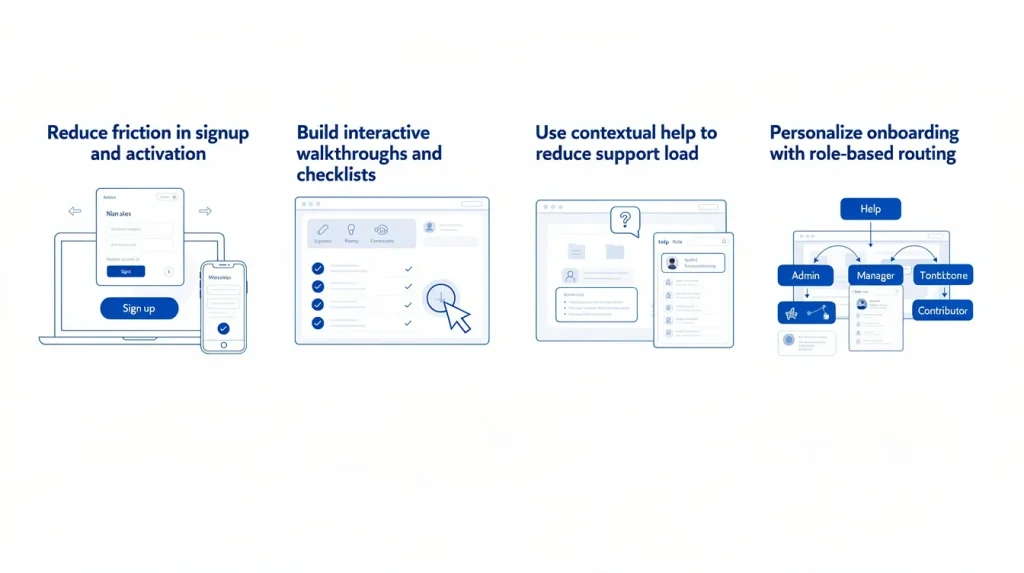
An effective SaaS customer onboarding relies on four pillars: friction reduction, guided activation, contextual help, and personalization. Addressing only one or two produces a customer experience that works for some users and quietly loses the rest.
These are not sequential phases. They run in parallel throughout the customer onboarding experience.
Reducing friction in signup and activation
Friction is the enemy of the signup process. Every extra form field, required technical setup step, and permission screen that appears before a user has seen any value increases the probability they abandon account setup.
The core rule: collect only what is necessary for the user to complete their first task. Collect everything else progressively as they engage.
Proven friction-reduction tactics:
- Use SSO or OAuth so the user signs in without creating a new password. Instant access beats a registration wall every time.
- Ask only one qualifying question at signup to route users into the correct flow without delaying the moment a user signs into the product
- Show a visible progress indicator so users know they’re close to completing setup and are motivated to complete tasks
- Make all non-essential steps optional with a clear skip path, so a user who skips a step now can complete it later
- Remove any step that doesn’t directly contribute to the activation event
Take Slack, the team communication software, as an example. It uses email-code verification with no password setup. That single decision creates a faster, lower-friction path from signup to the first user action. Best practices like this are easy to replicate.
Building interactive walkthroughs and checklists
An interactive walkthrough is not a product tour. A product tour shows users what exists. A walkthrough guides them through doing something, specifically the task sequence that leads to the aha moment.
Each walkthrough step should end with a completed user action. If the activation event is “create first project,” the walkthrough must lead directly to that outcome. Showing a finished project is not onboarding.
Onboarding checklists give users a persistent view of progress. Keep the checklist on the main dashboard and link directly to the next incomplete step.
What to include in your onboarding checklist:
- Each item maps to one specific action, not a general concept.
- Order items from easiest to hardest to build momentum as users progress.
- Core features appear first. Save complex workflows for after the initial value is delivered.
- The final item is the activation event itself.
Watch session replays of users who abandon your walkthrough mid-flow to see exactly which step caused hesitation. No completion metric tells you what a replay does.
Using contextual help to reduce support load
Contextual help is assistance delivered at the exact moment and place a user needs it. It replaces the need for users to search documentation with guidance embedded directly in the interface.
Common formats and when to use them:
- Tooltips: field-level explanations triggered by hover or pause, ideal for complex form inputs.
- Hotspots: visual markers that draw attention to key features users might miss.
- Video tutorials: short walkthroughs of complex workflows, ideally under 90 seconds.
- Knowledge base links: contextual links that open relevant documentation without breaking flow.
- In-app messaging: behavior-triggered messages based on user actions, not timers.
A strong self-serve support layer reduces support tickets and shortens time to value without increasing headcount.
Turn User Confusion Into a Fix in One Click
With FullSession, every piece of in-app feedback links automatically to the session recording so your team sees exactly what went wrong, without asking the user to explain it.
Personalizing onboarding with role-based routing
One onboarding flow does not fit all user personas. A product manager evaluating a SaaS analytics tool needs a different experience than a software engineer setting up the same tool for their development team.
Generic onboarding penalizes both.
Role-based routing is the practical starting point for user segmentation. Ask one qualifying question at signup, such as “What best describes your role?” Use the answer to segment users into different onboarding flows. This single step consistently improves activation rates across audiences.
How to design different onboarding flows by segment:
- Identify the two or three most distinct user personas in your current active users base
- Define a separate activation event and aha moment for each segment
- Build separate onboarding flows with different walkthrough content and onboarding checklist items per persona
- Use customer data from early sessions to refine each flow over time
AI-driven personalization goes further. Behavioral signals from early sessions can adapt in-app messaging dynamically, sending push notifications or targeted emails to inactive users who drop off before reaching the activation event.
Use survey data from these sessions to understand which step causes disengagement.
How FullSession Helps Improve SaaS Product Adoption
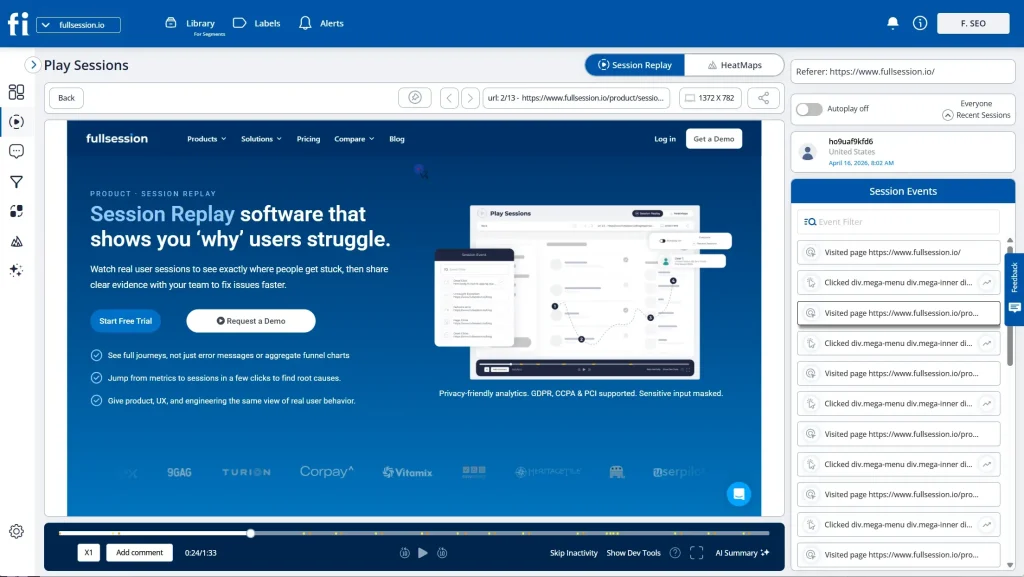
FullSession, a behavioral analytics platform for SaaS product teams, closes the gap between quantitative drop-off data and the qualitative evidence needed to act on it. Standard analytics tools show you where user drops happen. FullSession shows your onboarding team what that drop looked like from the user’s perspective.
That’s the foundation of the Behavior-First Onboarding Audit: a four-step diagnostic workflow built around FullSession’s toolset.
Use FullSession’s funnel analysis to measure drop-off, its session replays to watch exactly what users experienced at the exit point, its rage click and error tracking to identify the root cause, then fix and retest with the next cohort.
The sections below walk through each layer.
Spot friction with session replays
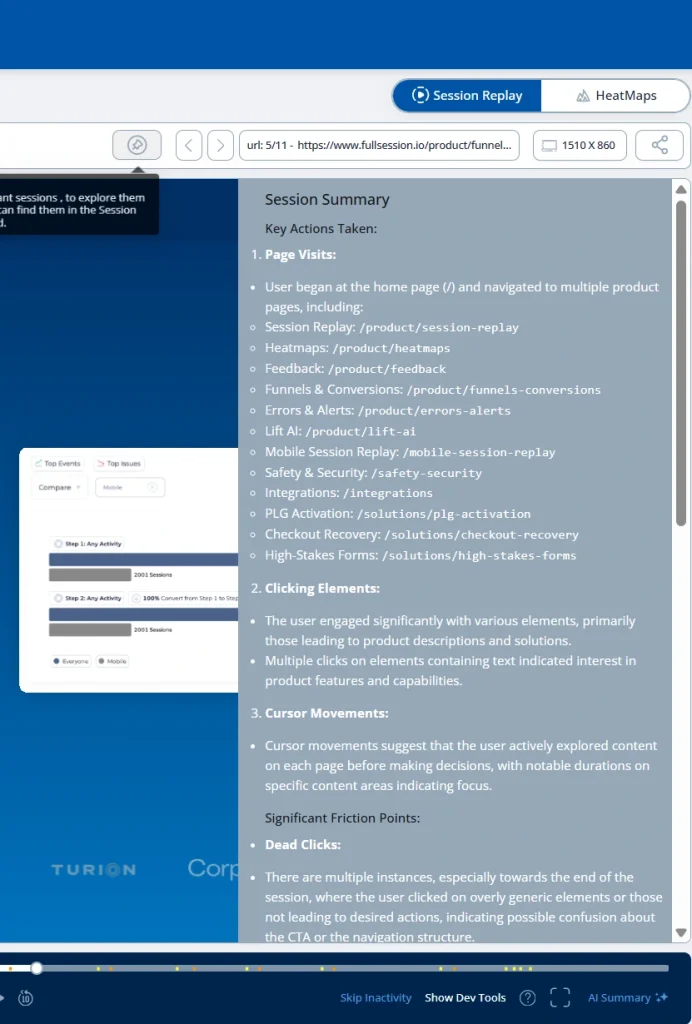
Session replays are recordings of individual user sessions, reconstructed as visual playback of exactly what a user saw and did on screen. Product teams can watch new users navigate the signup process, click through interactive walkthroughs, or attempt dashboard setup, all filtered by behavioral signals. See how session replays work in FullSession.
What session replays expose that no metric can:
- A user clicking a tooltip that doesn’t open
- Users navigating through three menus trying to find a required setup field
- A user re-reading a setup instruction four times before abandoning the flow
- A user who completes all visible steps but misses the activation event because the final step isn’t clearly signposted
Watch at least 10 replays of users who dropped off at each funnel step before forming any hypothesis about root cause.
Analyze funnel drop-offs and milestones
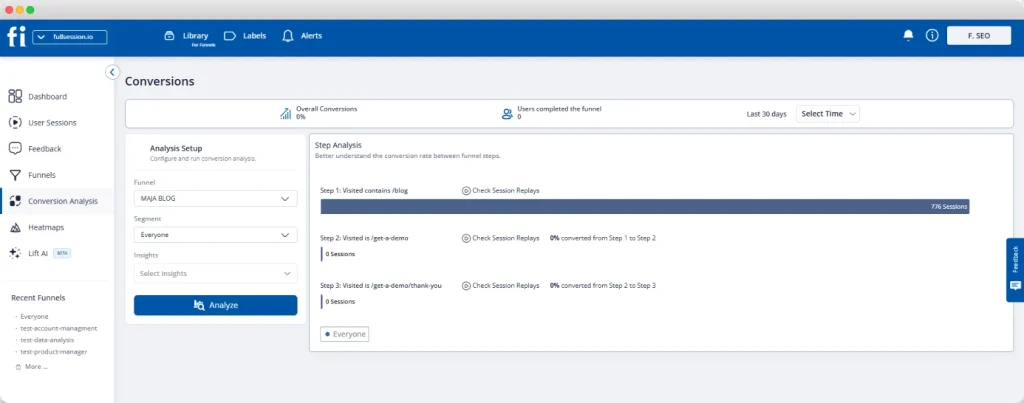
An onboarding funnel maps each step of the customer onboarding journey as a measurable stage. A standard SaaS funnel covers email verification, profile setup, first key action, invite teammates, and create first project.
Each transition produces a conversion rate and a drop-off rate.
FullSession’s funnel analysis tool lets product teams click directly from any drop-off point into the session replays of the specific users who exited there. That diagnostic link is what makes funnel drop-offs actionable rather than just visible.
The funnel gives you the where. The replay gives you the why.
Tracking rage clicks and UX errors

Rage clicks and dead clicks are user behavior signals that FullSession automatically flags. A rage click happens when a user clicks the same element repeatedly: they expected a response and the product didn’t deliver one. A dead click happens when a user clicks a non-interactive element, signaling layout confusion.
Both are especially damaging during onboarding.
A new user who hits a broken button on day one has no goodwill buffer. They leave. FullSession’s errors and alerts module maps JavaScript errors and broken flows directly to the session, so a software engineer can reproduce and resolve the bug in context.
The rage clicks guide covers the full detection-through-resolution workflow for these frustration signals.
Visualizing engagement with heatmaps
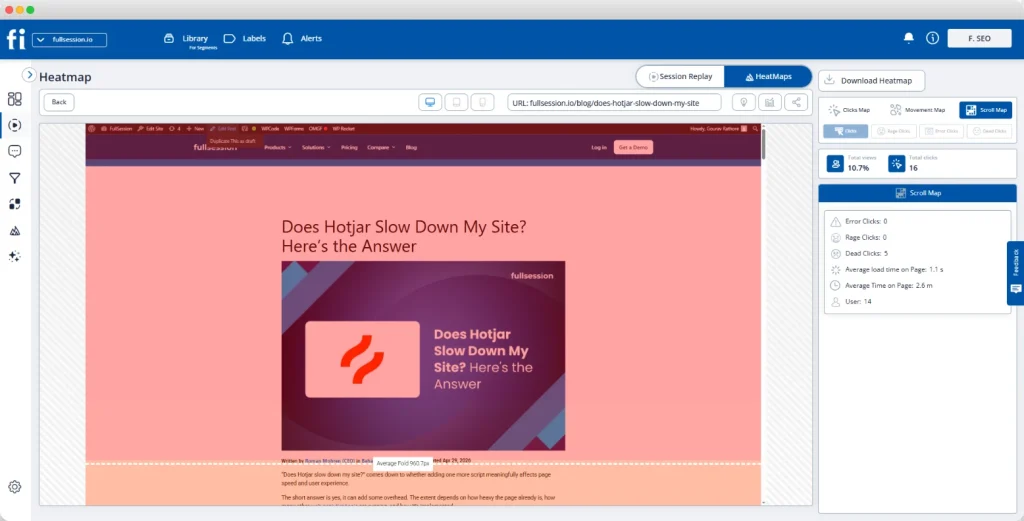
Heatmaps aggregate user behavior across thousands of sessions into a single visual layer. Click maps show where users tap, scroll maps show how far they read, and movement maps trace attention patterns across onboarding screens.
See how FullSession heatmaps work in practice.
For onboarding teams, the highest-value application is empty-state dashboard pages, the screens new users see before they have created any data.
Common heatmap findings on first-login screens:
- The onboarding checklist sits below the fold, so most new users never see it.
- Users engage heavily with secondary navigation instead of the primary call to action.
- Key features receive almost no click attention because they are visually buried.
These patterns can look like disinterest. In reality, they are layout problems, and event-tracking tools will not show them.
Gathering contextual in-app feedback
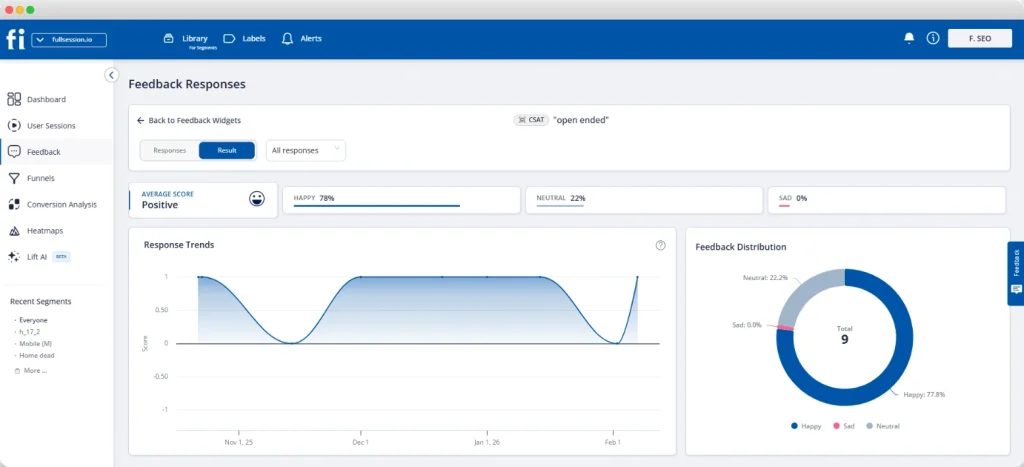
In-app feedback tools let users report confusion or errors directly from the screen where the problem occurs. No support ticket, no survey, and no context lost in translation. FullSession links every feedback submission automatically to the user’s session recording.
That’s what makes in-app feedback more useful than any post-session customer feedback method.
When in-app feedback volume spikes at a particular step, that signal correlates directly with the drop-off data visible in the funnel. Behavioral data and qualitative user feedback together give your onboarding team the evidence needed to prioritize fixes with confidence.
Prioritizing fixes with Lift AI
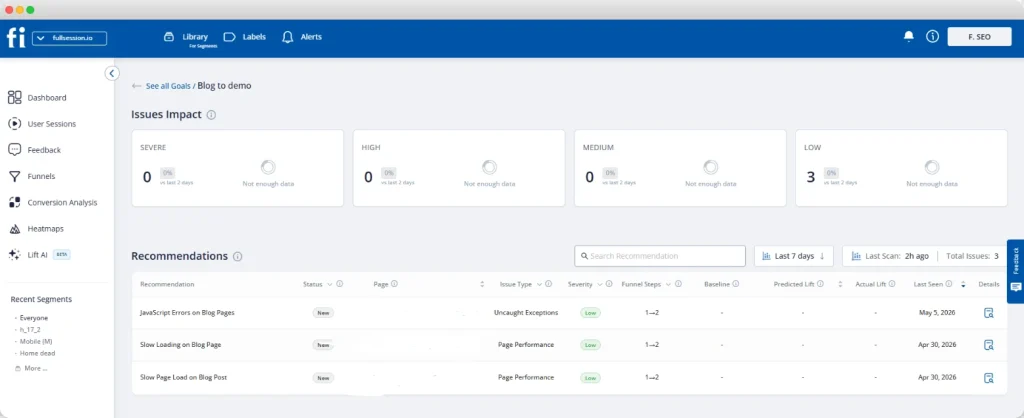
Lift AI scans your session data and ranks every onboarding friction point by its revenue impact. Instead of manually working through replays, funnel data, and feedback submissions to decide what to fix next, your team gets a prioritized list of issues with behavioral evidence already attached.
For onboarding, this matters because product teams almost always have more friction signals than capacity to address them. Lift AI reduces that backlog.
It shows the specific onboarding steps where fixing the issue would have the biggest effect on activation and trial-to-paid conversion, so your team works on what actually changes outcomes rather than what is easiest to spot.
It also validates whether those fixes actually worked. After changes go live, Lift AI tracks the same behavioral signals to measure impact on activation, drop-off, and conversion, so teams can confirm if a fix improved outcomes or had no meaningful effect.
Run the Behavior-First Onboarding Audit on Your Own Product
Connect your onboarding funnel, session replays, and error tracking in one place and see exactly where new users get stuck and why.
Customer Onboarding Metrics to Track
The right customer onboarding metrics tell you whether users are reaching value, not just clicking through steps. Use quantitative metrics to identify where problems exist, and session replays to understand why.
Track these alongside your broader onboarding funnel drop-off analysis and your wider SaaS conversion funnel performance.
| Metric | What It Measures | What to Watch For |
| Activation Rate | % of signups who complete the defined activation event | Low rate = users not reaching the aha moment; watch session replays of non-activated users |
| Time to Value (TTV) | Hours from first login to first value milestone | Long TTV = too many steps before activation; audit the onboarding process for friction |
| Onboarding Completion Rate | % of users who finish all onboarding steps | High completion + low retention = steps complete but no real value reached |
| Day 7 Retention | % of users still active 7 days after signup | Low Day 7 = onboarding didn’t create a habit; check for missing re-engagement triggers |
| Rage Click Rate | % of sessions with rage click events | Rate above 5% on onboarding screens = broken UI element; investigate with session replay |
| Customer Support Tickets | Tickets opened per 100 new users in first 30 days | Rising ticket rate = onboarding contextual help is insufficient; add tooltips or video tutorials |
| Feature Adoption Rate | % of users who use a key feature within 7 days | Low adoption = key features aren’t visible or reachable during the onboarding journey |
Watch the combination most closely: high completion rate alongside low Day 7 retention. It means your onboarding program is finishing users. It’s just not activating them.
Not ready for a full demo? Start a free trial with FullSession and set up session replay and funnel tracking on your onboarding flow in under 15 minutes, no engineering required.
How to Experiment and Improve SaaS Onboarding Continuously
Onboarding isn’t a project with a launch date and a done state. SaaS companies with the strongest user engagement rates treat it as a product with its own plan and active improvement cycle.
The four-step improvement loop
- Measure. Review funnel data, rage click trends, and in-app feedback from the current flow to identify the highest-impact drop-off point. Focus on volume, not instinct.
- Hypothesize. Form one specific hypothesis: “Users are abandoning at the invite step because the value of inviting a teammate isn’t visible before they reach that screen.”
- Change. Test one variable at a time: copy, step order, CTA placement, or field count. Testing multiple variables at once makes root cause identification impossible.
- Validate. Measure activation rate and onboarding completion after a sufficient sample. Use session replays to confirm the behavioral change, not just the metric movement.
What to review each cycle
Run this loop on a 90-day cadence at minimum. Each review should cover:
- Funnel conversion rates at every onboarding step to catch new drop-off patterns
- Rage click rates on key onboarding screens and customer feedback volume by step
- Activation rates by user segment to identify which user personas are underperforming
- Survey data from existing users who completed onboarding 30-plus days ago, to identify which key features drove long-term retention
User segmentation is the most powerful lever in this cycle. Identify which segment has the lowest retention: onboarding users who churned as inactive users before activation, or existing users who stopped using basic features.
Fix that group’s flow before improving for the broader user base.
The 20-Point SaaS User Onboarding Checklist
Use this SaaS user onboarding checklist to audit your current flow or build a new one from scratch.
Group 1: Strategy and goals
- Define your activation event as one observable action that predicts long-term customer retention
- Map your onboarding program to a specific business goal: activation rate, time-to-value, or trial-to-paid conversion
- Document the aha moment separately for each of your primary user personas
- Set a time-to-value target. For self-serve SaaS, users should reach activation within 24 hours of first login.
- Confirm that the customer success team and product manager agree on the activation event before building any flow
Group 2: Signup and first login
- Reduce the signup form to three fields or fewer and collect additional customer data progressively
- Implement SSO or OAuth to remove password creation from the signup process entirely
- Add a role-based routing question at signup to guide users into the correct onboarding flows for their persona
- Write a welcome email that restates the value proposition and links to the specific first action
- Design a first-login screen with one clear next step, not a full product overview or feature tour
Group 3: In-app guidance
- Build an interactive walkthrough where every step ends with the user completing a task, culminating in the activation event
- Create a persistent onboarding checklist on the main dashboard with real-time progress and links to the next incomplete step
- Add contextual tooltips at the two to three steps where session replays show the most confusion and user hesitation
- Build a knowledge base covering the top five questions new users ask customer support in their first 30 days
- Add in-app feedback widgets on the highest drop-off steps so you gather user feedback from the exact screen where confusion occurs
Group 4: Analytics and improvement
- Build an onboarding funnel with at least four steps from signup to the activation event and monitor conversion rates weekly
- Enable rage click and error tracking to automatically catch broken UI elements and JavaScript errors in the onboarding flow
- Watch at least 10 session replays of users who dropped off at each funnel step before drawing any conclusion about root cause
- Set a 90-day improvement cycle: review customer onboarding metrics and ship one focused change each quarter
- Compare session replays of activated users against those of inactive users who churned before activation. That behavioral gap is your next improvement priority.
If you want to run through this checklist with real behavioral data from your product, book a demo with FullSession and see where your users are actually getting stuck.
Conclusion About SaaS User Onboarding
SaaS user onboarding is the most important stage in the user lifecycle. Every decision between signup and the aha moment either builds customer loyalty or erodes it. The product teams that treat onboarding as a discipline, with their own metrics, improvement cycles, and evidence from real user behavior, consistently out-retain those who treat it as a one-time setup task.
Strategy without behavioral data produces guesswork. Behavioral data without strategy produces noise. Together they form the foundation of a good onboarding process that gets stronger with every improvement cycle.
Building a better customer onboarding experience isn’t about adding more steps, more tooltips, or more in-app messages. It’s about understanding what your users actually do, finding where the customer onboarding journey breaks down, and fixing those breaks with evidence.
Set Up Session Replay and Funnel Tracking in Under 5 Minutes
With FullSession, every piece of in-app feedback links automatically to the session recording so your team sees exactly what went wrong, without asking the user to explain it.
FAQs About SaaS User Onboarding
What are the 5 C’s of onboarding?
The 5 C’s of onboarding are Clarity, Confidence, Connection, Capability, and Commitment. Clarity means users immediately understand the product’s value. Confidence grows when they complete early wins. Connection links the product to their specific goal. Capability is built through walkthroughs and contextual help. Commitment comes when users reach a repeatable value moment and choose to stay.
What are the 4 phases of onboarding?
The 4 phases of SaaS customer onboarding are Signup and Account Setup, Activation, Habit Formation, and Expansion. In the Signup phase, users create their account. Activation is when they complete the core action that signals real engagement. Habit Formation is where regular use develops, and Expansion is where users adopt advanced features or invite teammates.
What are the 5 stages of the onboarding process?
The 5 stages of the SaaS onboarding process are Welcome, Setup, Education, Activation, and Retention. Welcome covers first login and orientation. Setup handles account configuration. Education delivers walkthroughs, tooltips, and contextual help. Activation is the defined first-value action. Retention is when the user returns and expands usage. Each stage should be a discrete funnel step with its own completion rate.
Is SaaS onboarding safe?
Yes. Reputable SaaS platforms protect user data during onboarding through encryption, SOC 2 compliance, and role-based access controls. Behavioral analytics onboarding tools used to monitor user flows, including session replay and heatmaps, mask sensitive fields automatically. FullSession applies privacy-first data collection by default, excluding passwords and personal data from all session recordings.
What metrics matter most for SaaS user onboarding?
The four most important SaaS onboarding metrics are Activation Rate, Time to Value, Onboarding Completion Rate, and Day 7 Retention. Track them together: a high completion rate alongside low Day 7 retention means users are finishing guided steps without reaching real, repeatable value. Customer support ticket volume in the first 30 days is an important secondary signal.

Roman Mohren is CEO of FullSession, a privacy-first UX analytics platform offering session replay, interactive heatmaps, conversion funnels, error insights, and in-app feedback. He directly leads Product, Sales, and Customer Success, owning the full customer journey from first touch to long-term outcomes. With 25+ years in B2B SaaS, spanning venture- and PE-backed startups, public software companies, and his own ventures, Roman has built and scaled revenue teams, designed go-to-market systems, and led organizations through every growth stage from first dollar to eight-figure ARR. He writes from hands-on operator experience about UX diagnosis, conversion optimization, user onboarding, and turning behavioral data into measurable business impact.