Customer insight software helps businesses understand how customers behave, what they need, and where they experience friction across the journey. The best tools combine analytics, feedback, segmentation, and reporting so teams can improve customer experience, conversion, and retention.
In this guide, we compare the best customer insight software for 2026, including customer insights platforms for behavior analytics, surveys, feedback collection, and product usage analysis. We’ll also explain how to choose the right customer insight tool based on your business goals, team, and data needs.
If you’re comparing customer insight tools, customer insights software, or even consumer insights software, this breakdown will help you shortlist the right option faster.
What Is Customer Insight Software?
Customer insight software is a category of tools that helps businesses collect and analyze customer data, including behavior, feedback, preferences, and trends. A customer insights platform can help teams understand why customers convert, churn, hesitate, or disengage, then turn those insights into better product, marketing, and customer experience decisions.
Why this should be added
- strong featured snippet candidate
- strong AI citation block
- improves zero-click visibility while also positioning the page as authoritative
| Tool | Best For | Type of Insight | Ideal For |
|---|---|---|---|
| FullSession | Website behavior analytics | Session replay, heatmaps, funnels, feedback | Ecommerce, SaaS, CRO teams |
| SurveyMonkey | Direct feedback collection | Surveys, questionnaires, sentiment | CX and research teams |
| Google Analytics | Website and traffic analytics | Traffic, channels, conversions | Small to midsize businesses |
| Userpilot | Product usage insights | In-app behavior, onboarding, segmentation | SaaS and product-led teams |
| Typeform | Conversational feedback | Surveys and forms | Marketing and customer research |
| Exploding Topics | Trend discovery | Emerging consumer and market trends | Strategy and market research |
| Mixpanel | Event-based product analytics | Funnels, retention, cohorts | Product and growth teams |
What Are Customer Insight Tools?
Customer insight software helps businesses collect, organize, and interpret customer data so they can better understand behavior, preferences, pain points, and intent. These tools pull insight from sources such as website interactions, surveys, support conversations, product usage, and market signals.
In practice, customer insights software helps answer questions like:
- Where are customers dropping off?
- What do customers want or expect?
- Which segments behave differently?
- What experience issues are hurting conversion or retention?
A customer insights platform usually goes a step further by combining multiple sources of customer data into one system for analysis and decision-making.

Main Types of Customer Insight Tools
“Customer insights software” isn’t just one tool; it’s more of an umbrella term for tools designed to collect customer data with the goal of improving the overall customer experience.
These tools come in various forms with each designed to capture different types of data and provide unique insights. Here’s a breakdown of the primary types you might consider for your business:
Analytics Tools
Analytics tools are your go-to for keeping an eye on everything that happens on your website or app. They track where your traffic is coming from, how users are interacting with your content, and where you might be losing their interest. For teams that need deeper visibility into clicks, scrolls, hesitation, and drop-off points, user behavior tools can help turn those interactions into clearer optimization opportunities.
This in-depth insight helps you optimize your site to keep users engaged longer and convert more visits into actions.
Survey Tools
Want to know what your customers think? Survey tools let you ask them directly.
Set up a survey to gather feedback on everything from product satisfaction to service experiences. It’s a straightforward way to tap into your customers’ thoughts and use those consumer insights to make smarter business moves.
Feedback Management Tools
You can keep all your customer feedback in one place with feedback management tools. Whether it’s praise, complaints, or just casual comments, these tools help you track and analyze what your customers are saying across emails, social media, and support tickets.
These tools can guide your next big decision and help you focus on what truly matters to your customers.
Predictive Analytics Tools
As the name suggests, predictive analytics tools take your existing data and turn it into future predictions. They help you foresee customer behaviors and identify trends so you can adjust your strategies in advance.
Whether it’s ramping up for a big sale or tweaking your product lineup, these tools keep you one step ahead.
Customer Segmentation Tools
Split your audience into more manageable groups based on their preferences, behaviors, or demographics using customer segmentation tools.
This allows you to craft marketing messages that resonate more personally with each segment, which helps improve the effectiveness of your campaigns and improve customer engagement.
Social Media Monitoring Tools
What are people saying about your brand online? Social media monitoring tools help you track all the mentions and discussions related to your brand across the social web.
Needless to say, such feedback is invaluable for responding quickly to customer concerns and for harnessing positive sentiment to amplify your brand’s presence.
Customer Insights Software vs Consumer Insights Software
Customer insights software usually focuses on your existing users or customers, including their behavior, needs, journey friction, and feedback. Consumer insights software usually focuses more broadly on market behavior, trends, audience preferences, and category demand.
If your goal is improving conversion, UX, retention, or product experience, customer insights software is usually the better fit. If your goal is market research or trend discovery, consumer insights tools may be more useful.

How to Choose the Right Customer Insights Platform
The best customer insights platform is not the one with the most features. It is the one that helps your team answer the right customer questions and act on them quickly.
1. Start with the insight you need
Decide whether you need behavioral analytics, direct feedback, segmentation, product usage data, or broader consumer trend research.
2. Check your data sources
A strong customer insights platform should integrate with the systems you already rely on, such as analytics tools, CRM platforms, support channels, product data, and survey tools.
3. Evaluate time to value
Choose a platform your team can realistically adopt, use regularly, and turn into action without heavy reporting friction.
4. Look for flexible reporting and segmentation
The best customer insight technology helps you filter data by audience, journey stage, behavior, and business goal.
5. Review privacy and security controls
Because customer insight software often handles sensitive behavior and feedback data, access controls, retention settings, and security standards matter.
6. Compare cost against practical use
Do not pay for enterprise complexity if your team only needs a few core capabilities. Choose based on fit, not feature volume.
Best Customer Insight Software for 2026
To help you choose the right platform, we’ve compared the best customer insight software for 2026. Each tool below stands out for a different use case, from website behavior analytics and surveys to product analytics and consumer trend research.
1. FullSession: Best for Overall Analytics
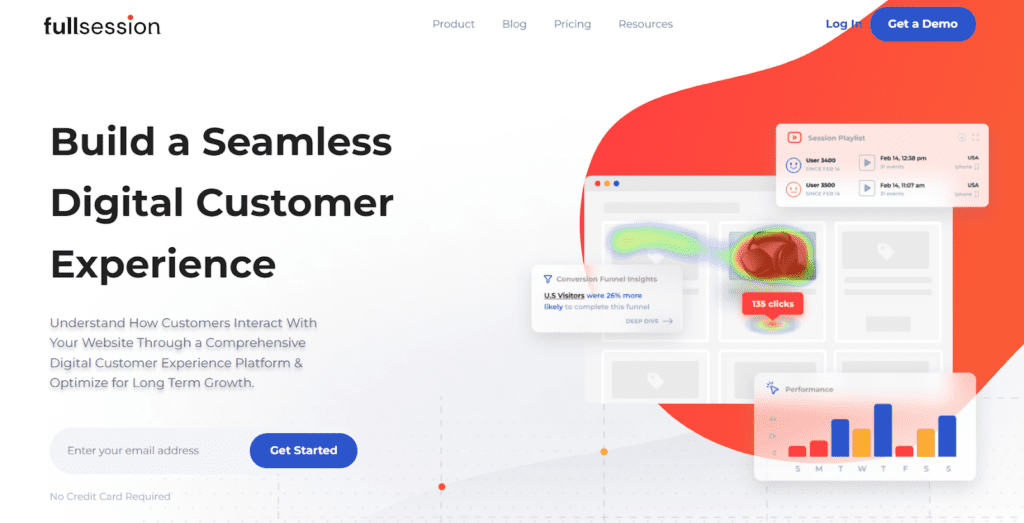
FullSession is a customer insights platform built for teams that need to understand how visitors actually experience their website. It combines session replay, heatmaps, funnel analysis, form analytics, and feedback tools to help teams identify friction, improve UX, and increase conversions.
It is especially useful for ecommerce, SaaS, and lead-generation teams that want to see where users hesitate, abandon, or struggle during high-value journeys.
Key Features:
- Session replay: Watch real user journeys to identify friction, confusion, and abandonment points.
- Heatmaps: Visualize clicks, scroll behavior, and engagement hotspots.
- Form analytics: Find where users hesitate or drop off in forms.
- Feedback tools: Collect customer feedback in context.
- Custom dashboards: Monitor metrics tied to conversion and experience improvement.
Best for:
Teams that want behavioral customer insights from website visitors and need to improve conversion, UX, or funnel performance.
Limitations:
Best for digital journey analysis rather than broad market research or enterprise-scale consumer panel research.
2. SurveyMonkey: Best for Surveys
SurveyMonkey is best for collecting structured customer feedback at scale. It helps teams run surveys, gather responses across multiple channels, and analyze sentiment or recurring patterns in customer input.
Whether you’re a small business or a big company, SurveyMonkey lets you modify every question to get the exact insights you need.
Key features:
- Customizable templates: Pick from loads of ready-to-go templates that you can customize to make your own.
- Advanced analytics: Get the lowdown on your survey results with tools that help you spot trends and understand the big picture.
- Multi-channel distribution: Send your surveys out into the world via email, web, social media platforms, or mobile to catch your audience wherever they hang out.
- Real-time results: Watch the responses roll in as they happen, so you can quickly make sense of what your audience is telling you.
Best for:
CX teams, research teams, and businesses that rely on direct customer feedback.
Limitations:
- Behavioral context is limited compared with analytics tools.
- Advanced use cases may require higher-tier plans.
3. Google Analytics: Best Free Foundation for Customer Insights
Google Analytics is best for teams that need a free starting point for traffic, conversion, and website behavior analysis. It gives businesses a baseline view of how users arrive, what they do, and which channels or pages contribute to results.
Regardless of the size of your site or audience, Google Analytics helps you understand where your visitors are coming from, what they’re doing on your site, and how you can improve their experience to increase engagement and conversions.
Key Features:
- Traffic analysis: Track where your visitors are coming from, whether it’s search engines, social media, or direct visits.
- Behavioral insights: See what pages your users visit, how long they stay, and what actions they take while they’re browsing.
- Conversion tracking: Set up goals to monitor how well your site fulfills your target interactions, like signing up for a newsletter or making a purchase.
- Audience demographics: Get a breakdown of your audience’s age, gender, interests, and more to tailor your content and marketing strategies.
Limitations:
- Complexity for beginners: While it’s incredibly powerful, the sheer amount of data available can be overwhelming for newcomers.
- Dependence on proper setup: To get the most out of Google Analytics, it needs to be set up correctly, which can require a bit of technical know-how or external help.
- Privacy concerns: With increasing scrutiny over data privacy, some users might be cautious about the extent of data tracking involved.
4. Userpilot: Best for Customer Behavior Analytics
Userpilot takes the guesswork out of understanding user behavior by offering crystal-clear insights into every click and interaction within your product.
Ideal for SaaS companies and any digital business aiming to boost product engagement, Userpilot acts like your own in-product tour guide, which reveals not just what users do, but sheds light on why they do it.
Key Features:
- Behavioral triggers: Spot specific actions your users take and use this intel to make their experience smoother and more engaging.
- In-app guidance: Roll out handy walkthroughs, tooltips, and pop-ups that help users get the most out of your product without scratching their heads.
- Segmentation capabilities: Group users based on their actions and preferences, and tailor the app’s experience to meet their specific needs.
- A/B testing: Put different features or user paths to the test to find out what clicks best with your audience and fine-tune your interface based on real data.
Limitations:
- Learning curve: Getting a handle on all the bells and whistles can take a bit, so be prepared to climb a bit of a learning curve.
- Integration requirements: To truly benefit from Userpilot, it needs to mesh seamlessly with your product, which might need some technical tweaking.
- Pricing: While it offers a lot of bang for your buck, keep an eye on costs as they can accumulate, particularly for startups or smaller companies on a tight budget.
5. Typeform: Best for Engaging Customer Feedback Tools
Typeform turns the chore of filling out forms into a delightful experience. It’s designed to engage users with its sleek, conversational interface that feels more like a chat than a traditional survey.
This platform is a favorite among businesses that prioritize user experience and seek to capture deeper, more meaningful insights from their audience.
Key Features:
- Conversational UI: Typeform’s user interface is clean and engaging, making it feel like you’re having a conversation rather than filling out a form.
- Highly customizable: Adjust every aspect of your forms, from the layout and design to the types of questions and how they’re presented.
- Logic jumps: Create dynamic forms that adapt based on how users answer previous questions to keep the customer experience relevant and simple.
- Integration capabilities: Easily integrates with other tools such as Google Sheets, Mailchimp, and Slack to automate workflows and streamline data collection.
Limitations:
- Pricing can be steep: While Typeform offers a free version, the more powerful features are locked behind higher-priced tiers, which might be a stretch for smaller budgets.
- Limited to forms and surveys: Primarily focused on forms and surveys, it may not be enough for more complex data collection needs or analytical tasks.
- Dependent on Internet connectivity: Being a web-based platform, its performance is heavily reliant on Internet speed, which can affect the user experience in areas with poor connectivity.
6. Exploding Topics: Best for Predictive Analytics
Exploding Topics can help you stay ahead of the curve by identifying trends before they hit mainstream awareness. This consumer insights software scours the internet to detect emerging topics and technologies, which gives businesses a critical head start on adapting to new market shifts.
It’s especially valuable for marketers, product developers, and strategists who aim to keep their offerings fresh and aligned with the next big thing.
Key Features:
- Trend detection: Exploding Topics uses advanced algorithms to analyze data from across the web, identifying up-and-coming trends in real-time.
- Insight reports: Receive detailed reports on new trends, complete with growth metrics and predictive insights to help you understand their potential impact.
- Custom alerts: Set up alerts to be notified when new trends start gaining traction, ensuring you never miss an opportunity to innovate or adapt.
- Wide coverage: Tracks a broad spectrum of industries and topics, offering valuable insights regardless of your market niche.
Limitations:
- Overwhelming data: The volume of data and trends can be overwhelming, making it challenging to distinguish between fleeting fads and genuinely impactful trends.
- Requires strategic interpretation: While it identifies trends, the real challenge is interpreting these insights strategically to benefit your business.
- Subscription cost: Access to the most robust features and in-depth trend information comes at a premium, which may be cost-prohibitive for smaller businesses or individual entrepreneurs.
7. Mixpanel: Best for Real-Time Analytics
Real-time analytics let you track and understand user actions instantly, and Mixpanel excels at this.
This tool is a game-changer for businesses that need to keep their finger on the pulse of user activity, perfect for optimizing marketing tactics on the go, refining app features in a snap, or elevating the customer experience at lightning speed.
Key features:
- Event tracking: Dive deep into the details with Mixpanel’s ability to monitor specific actions your users take, from a simple scroll to a complete purchase.
- Real-time data updates: Watch your data refresh moment by moment. This up-to-the-minute insight lets you adapt quickly to what your users want and need.
- User journey analysis: Map out the routes your users travel on your site or app so you can pinpoint what draws them in and what might be turning them away.
- Advanced segmentation: Break down your data by age, gender, activity—you name it. This lets you tailor your strategies to hit the right notes with various user groups.
Limitations:
- Learning curve: There’s a bit to learn before you can fully harness the power of Mixpanel. New users might find the array of options and depth of data a bit overwhelming at first.
- Integration complexity: To get the most from Mixpanel, it needs to mesh well with your other systems. This can sometimes require some tech gymnastics.
- Pricing model: Mixpanel’s pricing can climb as your data needs grow, so keep an eye on your usage to manage costs effectively.
Which Customer Insights Platform Is Right for Your Business?
Best for ecommerce
If you need to understand product-page behavior, checkout friction, and conversion drop-off, choose a behavioral customer insights platform with replay, heatmaps, and funnel visibility.
Best for SaaS
If you need onboarding, activation, feature adoption, and retention insights, choose product analytics or in-app behavior tools.
Best for customer feedback programs
If your workflow depends on surveys, questionnaires, or structured responses, choose tools built for direct feedback collection.
Best for market and trend research
If your goal is to understand demand shifts, audience interests, or category growth, use consumer insights tools focused on market signals and trend detection.

Get a Deeper Understanding of What Your Customers Think
Behavioral data shows what customers actually do, not just what they say. When you can watch journeys, analyze drop-off points, review friction patterns, and compare segments, it becomes much easier to prioritize changes that improve conversion and customer experience.
With FullSession, you gain access to tools that will help you gather customer insights without much effort:
- Session recordings and replay: Catch live footage of how visitors explore your website. Use the replay option to review user sessions anytime to get a clear view of customer experiences and areas that might need a fix or two.
- Interactive heatmaps: Dive into FullSession’s heatmaps for a colorful display of where users click, scroll, and pause. It’s an easy way to see what grabs attention and what gets ignored, helping you make smarter design choices.
- Market segmentation: Slice and dice your audience with FullSession’s robust segmentation tools. See how different customer groups interact with your content to uncover tailored insights that can drive your strategy forward.
- Customer feedback integration: Collect customer feedback from users right on your site. FullSession’s customer feedback forms let you hear straight from the horse’s mouth whether you’re nailing customer satisfaction or if there’s room for improvement.
FullSession Pricing
For the latest pricing, plan limits, and feature details, visit the FullSession pricing page.
Final Thoughts
The best customer insight software depends on what you need to learn. Some teams need behavior analytics, others need direct feedback, and others need product or market insight. The right platform is the one that helps your team turn customer data into decisions quickly and consistently.
If your priority is understanding website behavior, friction, and conversion barriers, a behavior-focused customer insights platform such as FullSession may be the strongest fit.
FAQs About Customer Insight Platforms
What is the difference between a customer insights platform and customer insights software?
Customer insights software may refer to a specific tool for analytics, surveys, or segmentation. A customer insights platform usually refers to a broader system that combines multiple data sources and insight workflows in one place.
What is the difference between customer insights software and consumer insights software?
Customer insights software focuses on your existing customers and their journeys. Consumer insights software focuses more broadly on markets, audiences, and category-level behavior.
What are customer insight tools used for?
Customer insight tools are used to analyze customer behavior, collect feedback, identify pain points, segment audiences, and improve business decisions across marketing, product, and customer experience.
What should I look for in customer insight technology?
Look for relevant integrations, clear reporting, segmentation, security controls, usability, and a strong match between the tool’s capabilities and your team’s goals.

Mohamed oversees operations and finance at FullSession and has contributed to the company’s UX analytics knowledge base.