UserZoom and UserTesting are two popular UX research tools that help you run usability tests, conduct user interviews, and collect feedback to understand why your users struggle and what you need to change.
They provide different research methodologies.
UserZoom gathers real-time user feedback through surveys, usability testing, user interviews, and secure prototype testing. However, setting it up and the learning curve for getting started can take some time.
UserTesting focuses on qualitative data through video recordings, letting researchers observe how actual users react to a product in real time, making it especially valuable for teams using qualitative research methods.
In this article, we’ll explore UserZoom vs UserTesting: the key features, strengths, and limitations of these two tools to help you understand which one might best fit your needs.
We will also present an all-in-one alternative, FullSession. It offers session recordings and replays, interactive heatmaps, customer feedback forms, funnels and conversions, error analysis, and and mobile testing capabilities through session replay for iOS and Android.
Its built-in Lift AI engine helps you pinpoint customer issues, prioritize fixes by revenue impact, and create a product that delivers an exceptional user experience.
To see how it works, book a demo today.
Key Takeaways
- UserZoom is suitable for comprehensive quantitative testing. Its features, such as live interviews, usability testing, and surveys, make it ideal for product design and development.
- UserTesting focuses on qualitative data with video recordings and real-time user insights. It’s beneficial for identifying usability problems and understanding user perceptions.
- FullSession offers session replay, heatmaps, mobile replay, error tracking, and Lift AI in one platform, with a Free plan available for teams starting with 1,000 sessions/month.
FullSession gives you a single platform for both qualitative and quantitative research, without paying for multiple tools or waiting for a sales quote to understand future pricing.
Book a demo to see it firsthand.
Before we compare UserZoom and UserTesting, let’s discuss FullSession and how it can help you optimize your website performance.
What Is UserZoom?
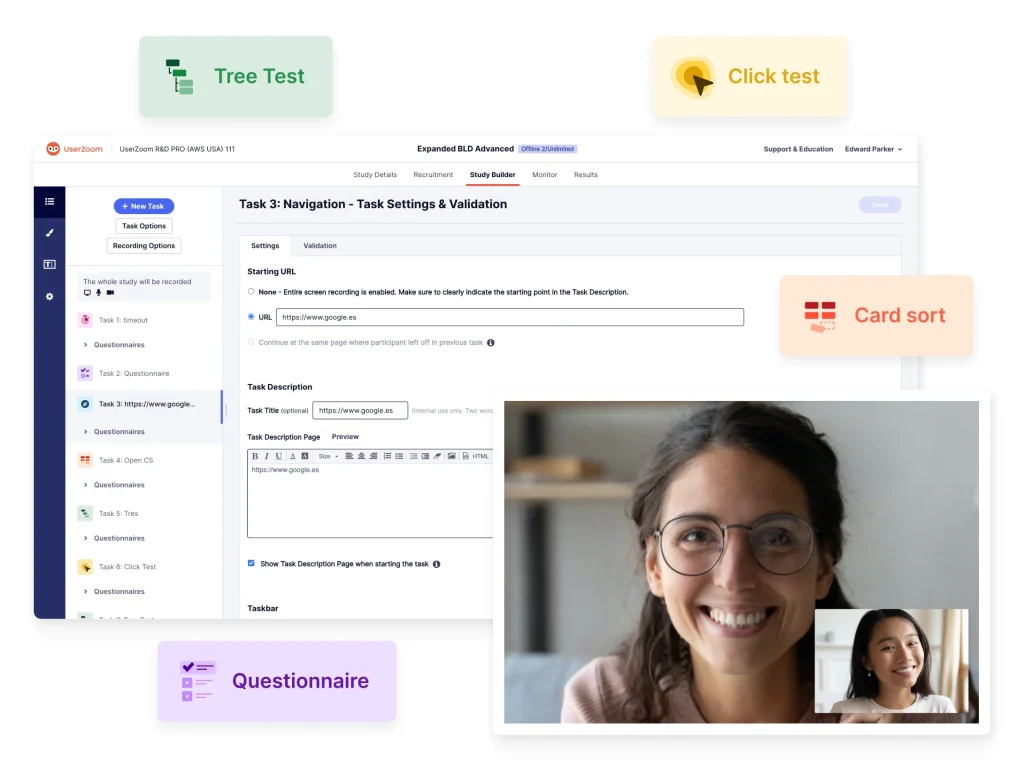
UserZoom is a well-known brand in the user testing market.
You can use this solution to test applications, websites, prototypes, and wireframes. You can carry out interviews, conduct surveys, and usability tests. You can also do card sorting, tree testing, and click testing.
UserZoom also supports advanced workflows like participant recruitment and offers advanced demographic targeting to ensure high-quality research samples.
What Is UserTesting?
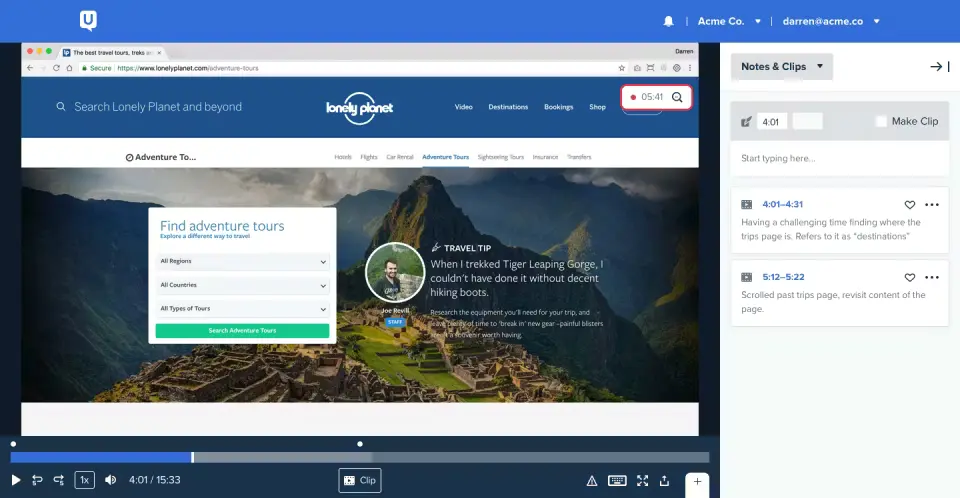
UserTesting is a platform for testing website or app functionality. It focuses on video recordings and human insights to help you understand users’ authentic experiences when interacting with your product.
The researchers can observe user reactions to a website or an app in real time. They can study facial expressions, emotions, body language, and tone of voice.
UserTesting allows a good deal of customization. You can create specific questions and tasks and define test groups. You can carry out the tests with members of the UserTesting Contributor Network or invite your own participants.
With UserTesting, you can gather, analyze, and draw conclusions from data. It provides transcripts, metrics, and visualizations.
UserTesting allows a good deal of customization and includes continuous improvements and new features that enhance testing flexibility and reporting.
What Is FullSession?
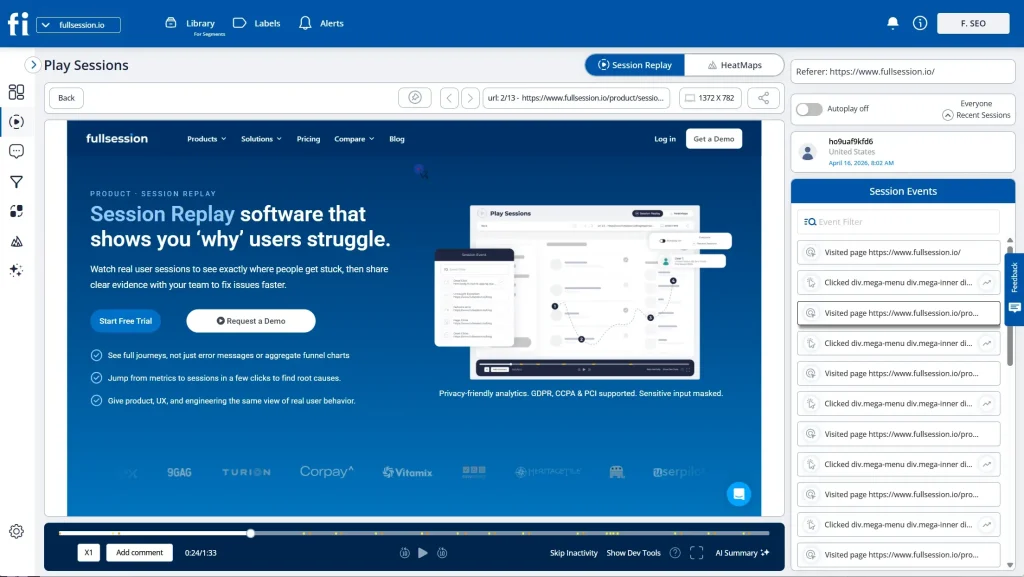
FullSession is a user behavior analytics platform that shows you exactly how actual users interact with your website, web app, or landing page, and tells you what to fix first by revenue impact.
Most teams end up paying for three or four separate tools to cover what FullSession handles in a single subscription from day one.
It’s designed for cross-collaborative teams, enabling product, marketing, UX, and support to align on shared insights.
Here’s a closer look:
- Real-time session recording: See how actual users interact with your site as it happens, and get immediate insight into how they engage with each page.
- Heatmap analysis: Track clicks, mouse movements, and scrolls to see where users are most active, all without slowing down your site.
- In-app feedback tools: Collect direct insights from your audience right on your site.
- Funnels and conversions: Dive into your conversion funnel to see what’s driving success and where you can improve the user journey.
- Error analysis: Spot and fix issues that impact user experience, from error clicks to network problems, to keep your site running smoothly.
- Mobile session replay: Replay user sessions on iOS and Android mobile apps with the same level of detail you get on web, covering gestures, taps, and navigation paths.
- Lift AI: Scan behavioral data, rank friction points by expected revenue impact, and link each priority directly to the session replays where the issue occurs. When a fix ships, validate whether it moved the needle.
- Data privacy compliance: Keep user data secure and meet GDPR, CCPA, and PCI standards while automatically excluding sensitive information from recordings.
Want to see it in action?
Book a demo today and discover how FullSession can improve your website’s performance
UserZoom vs UserTesting: How They Compare
We’ve introduced you to the tools outlined in this article. Now, let’s see how they compare. We’ll cover basic differences and key features.
We’ll also highlight how FullSession compares to these solutions.
User ratings
UserZoom has a 4.5 score on Gartner based on 17 reviews. UserTesting has a 4.4 rating on G2 based on 788 reviews.
Basic differences
The main difference between these tools is that they serve different purposes or, at the very least, have different focus.
UserZoom helps you conduct full-scale user research and detect issues with the user experience. UserTesting, on the other hand, concentrates on website functionality.
UserZoom focuses on quantitative research, which evaluates website usability and customer experience through comprehensive testing capabilities. It supports a wide range of research objectives, including user interviews, moderated interviews, and secure prototype testing. It’s a complex platform, and the learning curve for getting started can take some time.
UserTesting is a good option for product teams that need qualitative data. You can collect video-based human insight, use its test builder to assign specific tasks, generate task reports, and watch how actual users complete them. This helps you evaluate how users perceive your product.
If you’re looking for a balanced solution that combines ease of use with powerful insights, FullSession could be the perfect fit.
It covers both qualitative and quantitative research on a single platform, with a user-friendly interface thatQA,product managers, marketers, and customer success teams can navigate without a training session.
Filters, session search, and heatmap views are designed to show actionable insights in clicks, so teams can move faster and make decisions with confidence.
Key features at a glance
What makes these UX research tools tick? Let’s take a look at the key features of each user testing tool.
| Feature | FullSession | UserZoom | UserTesting |
| Session recordings | Yes | Yes | Yes |
| Surveys | Yes | Yes | Yes |
| Heatmaps | Full (click, scroll, mouse movement) | Click maps & path flows only | Click maps & path flows only |
| Funnel analysis | Yes | Not listed | Not listed |
| Error analysis | Yes | Not listed | Not listed |
| Mobile session replay | Yes | Yes | Yes |
| AI prioritization | Yes (Lift AI) | AI summaries (all plans) | AI-powered Insight Discovery (Ultimate+ only) |
| Rage click detection | Yes | Not listed | Not listed |
| Real-time alerts | Yes | Not listed | Not listed |
| Transparent pricing | Free plan available; Professional from $279/month | Quote-based | Quote-based |
| Free trial | 14-day free trial | Demo only | One free test; trial by request |
| Languages | English, Arabic, French | 30+ (English, German, Spanish +) | 100+ via network |
As you can see, UserZoom and UserTesting are more focused on gathering detailed insights through testing. FullSession gives you all the tools you need to understand user behavior from a more holistic perspective.
Start a free trial to see how it works.
UserZoom vs UserTesting: Use Cases, Setup, and Support
Now let’s take a closer look at what each tool actually offers. The comparison table gives you the high-level picture, but the features below are where the real differences show up.
Use cases
Both UserZoom and UserTesting are used by UX researchers, UX designers, marketers, and product managers for UX testing. UserTesting also lists executives and product teams.
UserZoom is used in technology, finances, retail, travel, healthcare, gaming, and gambling. Some government entities also employ it. It’s particularly strong for enterprise level research where teams need structured research objectives, secure prototype testing, and moderated interviews at scale.
UserTesting is also popular in many industries mentioned above but adds others to the list, such as communications, non-profit, media and entertainment, automotive, manufacturing, and education. Its test builder and task reports make it a solid fit for teams running frequent user interviews without a complex setup.
FullSession is the best option for eCommerce, product, marketing, QA and customer success teams. It helps you optimize your website with deep insights into user behavior through session recordings, heatmaps, conversion funnel analysis, error tracking, and integrated customer feedback. FullSession helps you optimize the shopping experience, boost conversions, and ensure your site meets customer expectations.
Deployment
Both UserZoom and UserTesting are web applications. To track user interactions, they need more configuration for complex research studies.
FullSession is also a web application with easy deployment. After you sign up for a free trial, you will be redirected to a new page where you need to follow four simple steps to add FullSession to your website.
Read our guide on how to use FullSession.
For privacy, you can exclude sensitive data. Sensitive form inputs are masked by default, and GDPR, CCPA, and PCI DSS compliance come built in, with no additional privacy modules or custom configuration required.
Once set up, sessions appear in your dashboard and are ready for analysis.
Integrations
You can integrate UserZoom and UserTesting with Slack, Jira, Trello, and more. Recent integrations also include Microsoft Entra for SSO (Single Sign-On), which facilitates secure and seamless user access.
UserTesting additionally offers integrations with Adobe XD, Google Calendar, Outlook Calendar, Qualtrics, and more.
Thanks to open APIs and modern webhooks, FullSession integrates with major third-party tools, including Wix, WordPress, BigCommerce, and Shopify. It currently has fewer native third-party integrations than some of the larger competitors.
However, we welcome integration requests as part of any enterprise engagement. If it’s a blocker to adoption, we build it. Responsiveness is something we can still offer that the larger players can’t.
Support
The UserZoom website has a help center. The company also offers a UserZoom Academy, a collection of helpful articles about UX testing. You can contact UserZoom via phone or email.
UserTesting offers a customer help section. You can contact the company via phone, email, Twitter, Facebook, LinkedIn, and Instagram. They also provide extensive support resources, including a knowledge base, community forums, and UserTesting University for training and development.
FullSession’s Customer Success team is known for fast, personalized responses rather than queue-based auto-replies. Whether you’re just getting started or need help with advanced features, you can reach out via live chat, email, and a detailed knowledge base.
When something isn’t working, you reach a person who knows the product and prioritizes your outcome.
UserZoom vs UserTesting: Pricing
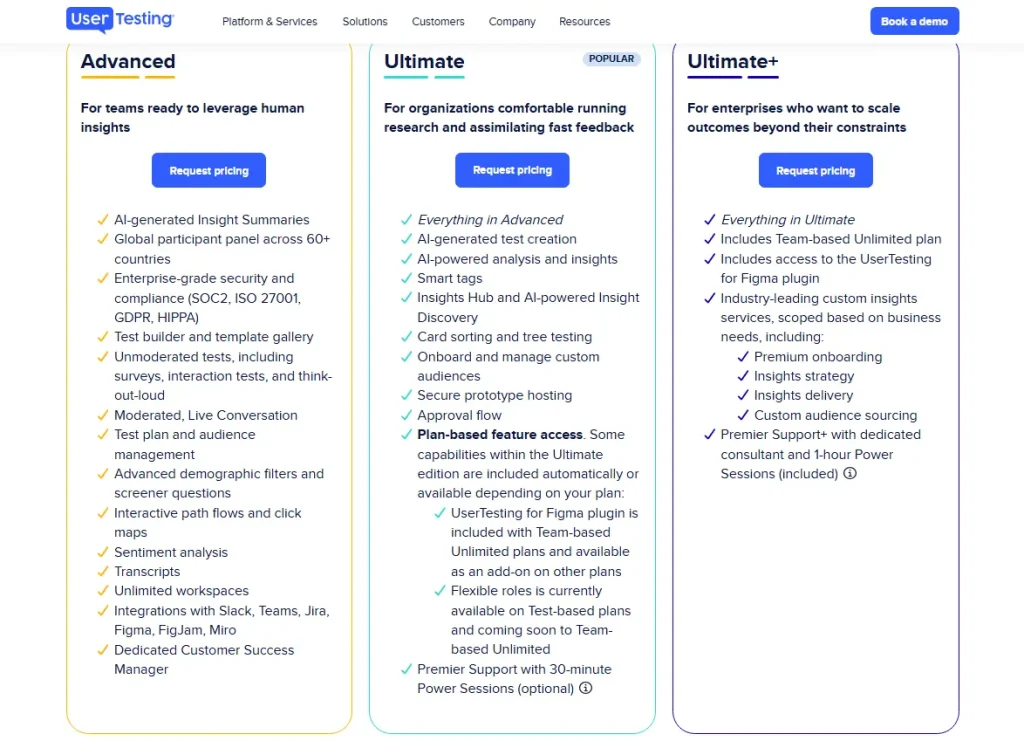
Following the merger of UserZoom and UserTesting, the two platforms have been consolidated into a single, unified product suite under these three streamlined plans to provide a consistent research experience.
| Plan | Who it’s actually for | Key differentiators |
| Advanced | Teams ready to leverage human insights | Core testing suite (unmoderated, moderated, surveys, think-out-loud), AI insight summaries, click maps, 60+ country panel, Slack/Jira/Figma integrations. No card sorting, no Insights Hub, no AI test creation. |
| Ultimate | Organizations comfortable running research and assimilating fast feedback | Everything in Advanced + AI test creation, AI-powered analysis, Insights Hub, card sorting & tree testing, secure prototype hosting, custom audience management, smart tags. |
| Ultimate+ | Enterprises who want to scale outcomes beyond their constraints | Everything in Ultimate + Team-based Unlimited plan, managed services (strategy, delivery, custom recruiting), dedicated consultant, Premier Support+. |
UserTesting does not have a fixed price list because they use two different “currencies”:
- Test-based Consumption: pay based on test usage across your team, with flexible scaling and unlimited users (no per-seat charges). Best for teams getting started or with variable research needs.
- Team-based Unlimited: unlimited tests within a defined enterprise scope, with predictable pricing for scaling across teams. Best for organizations scaling insights across multiple teams.
All pricing is quote-based; no public prices are listed.
How FullSession compares
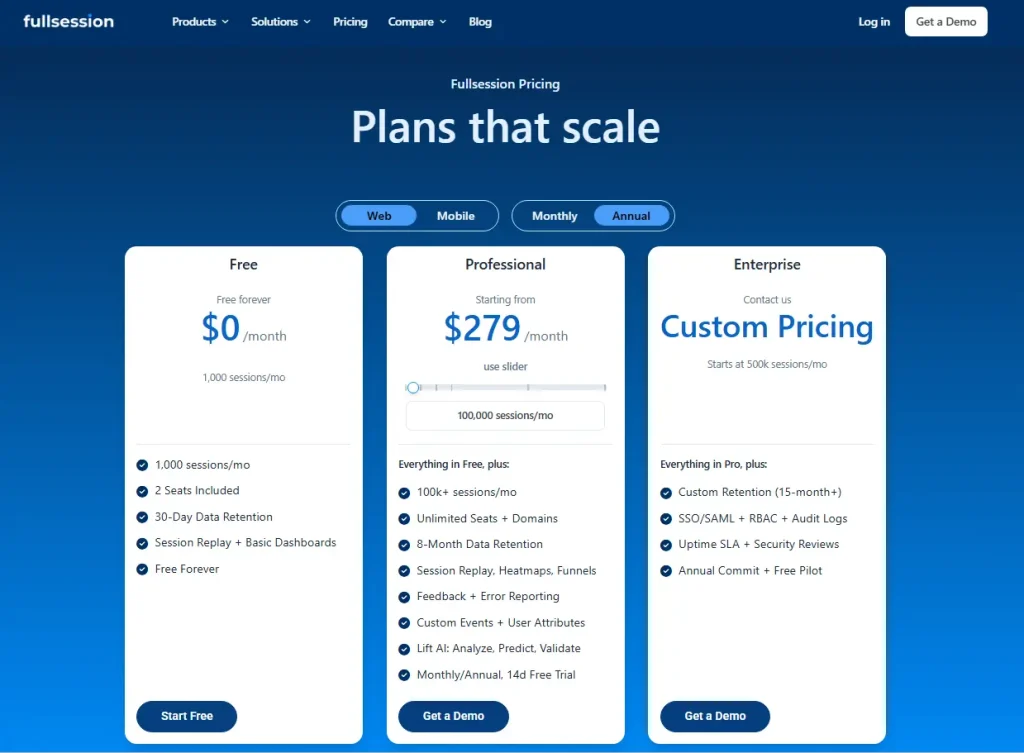
FullSession offers a Free plan at $0/month with 1,000 sessions/month, 2 seats, 30-day data retention, session replay, and basic dashboards.
Professional starts at $279/month for 100,000 sessions/month, while Enterprise uses custom pricing for teams starting at 500k sessions/month with 15+ month retention.
Most platforms charge separately for session replay, heatmaps, funnels, and error tracking. FullSession bundles all of those at a single transparent price, with no hidden tiers.
Visit the pricing page to learn more.
Why Choose FullSession Over UserZoom and UserTesting?
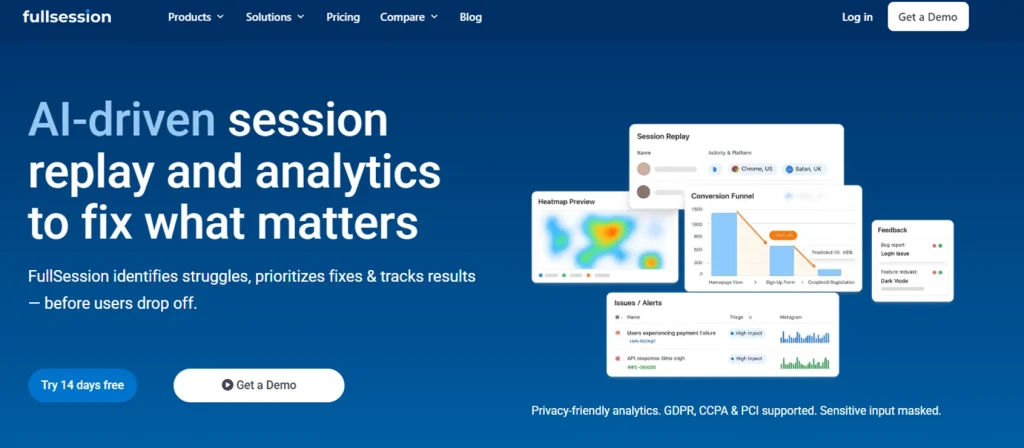
While UserZoom and UserTesting offer deep qualitative feedback, FullSession provides a more agile, data-driven alternative by combining real-time behavioral analytics, like session replays and heatmaps, with transparent, startup-friendly pricing that eliminates the need for expensive enterprise contracts.
Here’s what you get.
Session recordings
FullSession allows you to watch recordings of how actual users interact with your product, not just test participants who resemble your target audience.
The Play Sessions interface gives your team immediate access to every session, with an events panel that shows each interaction in sequence: pages visited, elements clicked, the interactive path through your site, and a timestamp for every action. The HeatMaps tab is one click away from any session.
FullSession helps you spot usability issues on your website quickly. If users have a negative experience with your product, they can leave feedback, and you can watch session recordings to identify user frustrations and fix them.
Instead of identifying general issues in session recordings, you can use FullSession’s advanced filtering feature to segment them and identify usability issues affecting specific user groups.
The recordings show how actual users navigate the website and track where they click. You can also check how much time they spend on the website overall and compare it to the average time.
FullSession offers the option to speed up recordings and skip periods of inactivity.
Heatmaps
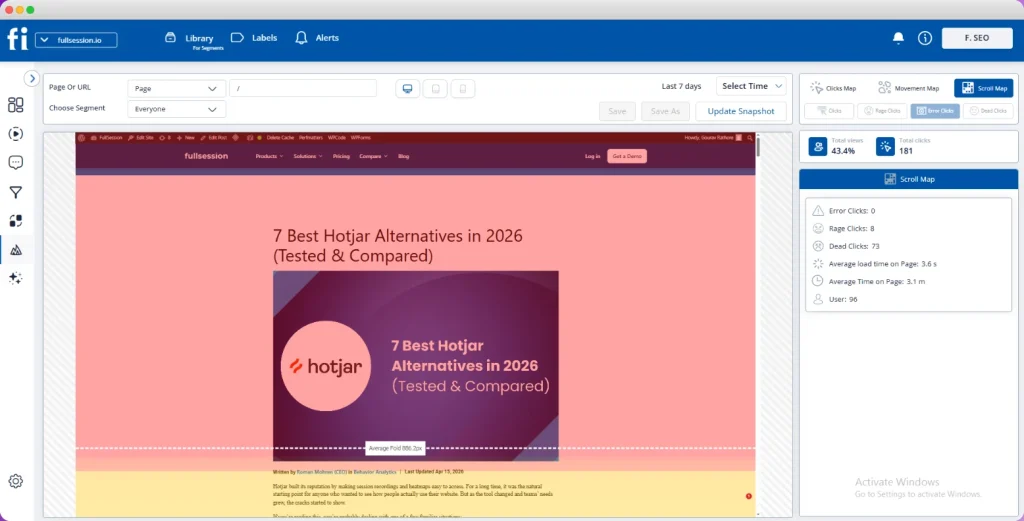
Heatmaps allow you to see which website elements get the most attention and which don’t. With FullSession, you can do all that in real time. You don’t need to wait for the data to be processed.
FullSession gives you three different maps:
- Click map: Visualizes where users click on your website, highlighting popular and underused areas.
- Mouse movement map: Tracks mouse movements to show how users navigate and interact with different elements.
- Scroll map: Displays how far users scroll down a page, helping identify if critical content is being seen or ignored.
In-app feedback
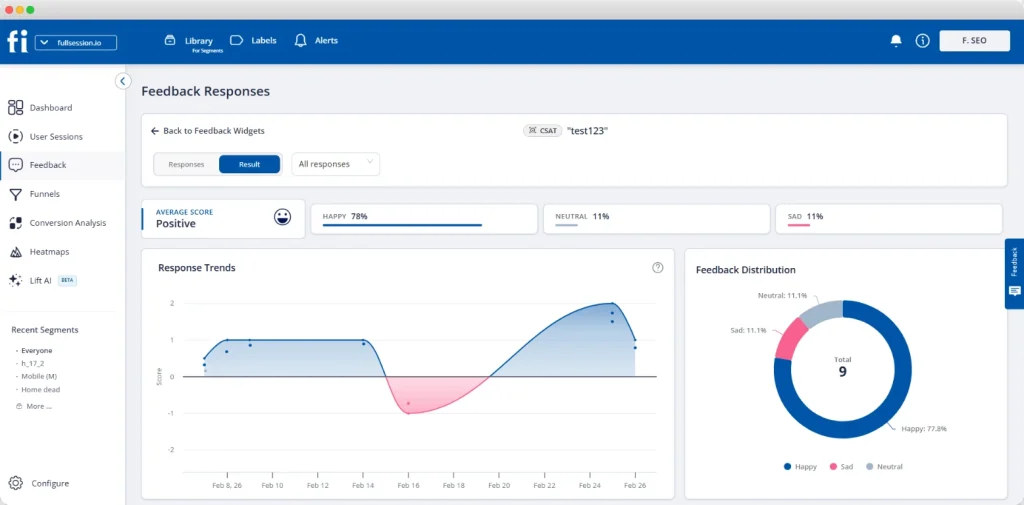
You can use FullSession to ask your users what problems they have and what frustrates them, without recruiting participants or running a separate test plan.
FullSession offers on-page surveys. You can customize branding elements and add questions such as open-ended, multiple-choice questions, and more. The interactive feedback widget also includes a scoring scale.
The customer feedback widget allows you to gather quantitative data and analyze individual feedback by replaying user sessions to see how users’ words relate to their actions. Thanks to the search options, you can always jump to a specific session recording to get more details.
Insights
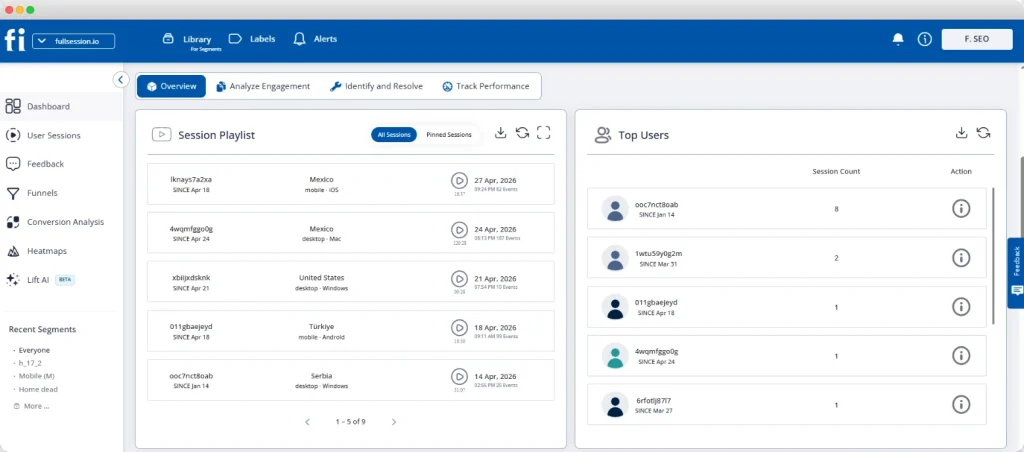
FullSession gives you insights that provide a comprehensive analysis of visitor behavior on your website. This feature detects friction points that may cause problems, so you can reduce unnecessary funnel dropouts and improve conversion rates.
You can access key data directly from the dashboard. Customer insights are divided into three categories:
User engagement
- Median scroll depth by device
- Page load speed by browser
- Session playlist
- Top users
- User trends
- Breakdowns (based on device, browser, and screen)
User experience
- Events per session
- Session length
- Active time
- Feedback data
- Top pages
- Clicks analytics
- Error analytics
- Slowest pages (pages, landing pages, and exit pages)
Marketing channels
- UTM analytics
- Top referrers
Lift AI: From observation to actionable insights
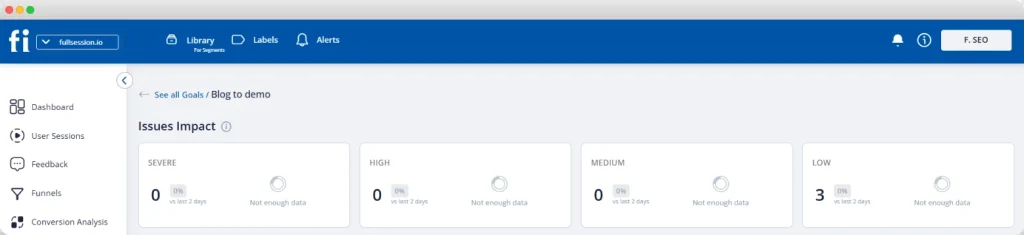
The most expensive problem in analytics isn’t missing data. It’s the gap between seeing a problem and knowing what to fix first. Lift AI, FullSession’s AI prioritization engine, goes further than a summary feature.
It scans behavioral data, ranks friction points by expected revenue impact, and links each priority directly to the relevant session replays. When a fix ships, Lift AI validates whether it actually moved the needle.
You don’t just learn what to fix. You confirm it worked.
This is what separates FullSession from traditional UX research tools that stop at observation. Lift AI turns targeted insights into actions your team can prioritize with confidence.
Conversion funnel analysis
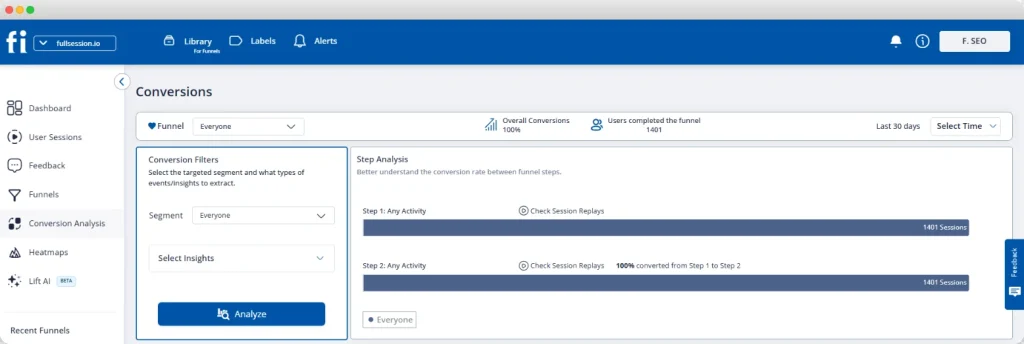
The FullSession funnels and conversions feature is like having a magnifying glass on your user journey. It helps you see how users move through your funnel, where they’re dropping off, and which steps drive conversions.
You can dive into trends over time, spot what’s working, and fix what’s not. It also breaks down performance by user segments so you can tailor your strategies.
For example, say you’re analyzing your purchase process. You set up the funnel to track key steps: Product View, Add to Cart, Checkout, and Purchase Confirmation.
If many users drop off at the Checkout step, you can use session replays and error analysis to see what’s going wrong, maybe a complicated form or a payment issue. Identifying and fixing these problems reduces drop-offs and increases conversions in one pass.
Mobile session replay
FullSession’s mobile session replay extends the same level of behavioral visibility to iOS and Android apps. You can replay how actual users navigate your mobile product, including gestures, taps, and the interactive path through each screen.
This is especially useful for teams with both web and mobile products who need a single platform for live website testing and app analysis.
The SDK runs asynchronously, so your app’s performance stays unaffected.
Error tracking and analysis
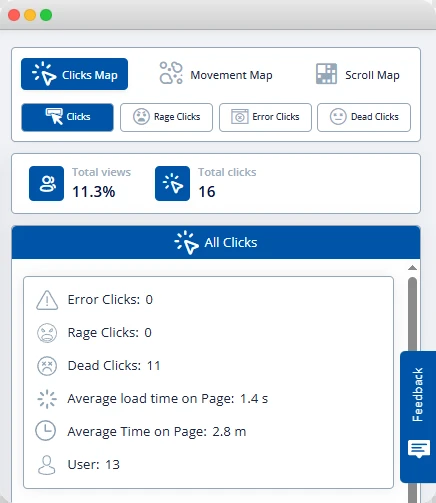
The Errors and Alerts dashboard shows broken user flows before they reach a support ticket. It tracks everything from rage clicks and network hiccups to console errors, uncaught exceptions, and error logs.
With tools like session replays and error click maps, you can see exactly what went wrong and where. You can monitor trends over time, segment errors by user group, and get real-time alerts via Slack, keeping your app reliable and your users happy.
Ready to see how FullSession can improve user satisfaction on your website?
UserZoom vs UserTesting: Final Words
No matter how innovative a product is, adoption depends on how easy it feels to use. If people encounter friction or confusion, they tend to drop off. That’s why UX testing is a core part of building something that genuinely works for your audience.
Both UserZoom and UserTesting offer structured ways to gather user feedback, each with its own strengths. UserZoom leans toward in-depth research and enterprise-level insights, while UserTesting focuses on fast, accessible feedback from real users.
The right choice depends on your team’s priorities, whether that’s depth, speed, or scale.
At the same time, tools like FullSession take a different approach by focusing on behavioral data. With features like session recordings, analytics, real-time heatmaps, mobile replay, and AI-driven prioritization, it helps teams understand not just what users say, but what they actually do.
If you’re looking to complement traditional user testing with deeper behavioral insights, it’s worth exploring how FullSession fits into your workflow.
Book a demo to see firsthand how it helps identify issues and improve the user experience.
FAQs About UserTesting vs UserZoom
What is user testing?
User testing helps businesses understand how real users interact with their digital products, such as websites and apps. It involves observing your own users as they complete tasks, gathering feedback, and identifying pain points to improve usability and overall user experience.
Is UserZoom the same as UserTesting?
UserZoom and UserTesting have merged under the UserTesting brand to offer comprehensive UX research and usability testing tools.
Is UserZoom a good tool?
Yes, UserZoom is highly regarded for its robust UX research capabilities, offering both qualitative and quantitative testing methods.
Did UserTesting buy UserZoom?
Yes, UserTesting acquired UserZoom, and they now operate as a combined entity under the UserTesting brand.
What’s better than UserTesting and UserZoom?
UserTesting helps market research teams make data-driven decisions to improve the customer experience, but it’s not perfect for everyone. Alternatives or complementary apps to UserTesting include platforms like FullSession, Optimal Workshop, and Lookback. You can find more alternatives in our comparisons ofMouseflow vs VWO,Hotjar vs FullStory,Lucky Orange vs Hotjar, or our roundup ofHotjar alternatives.
Who should use FullSession?
FullSession offers an intuitive platform for project management teams, product managers, prototype testing teams, customer service teams, marketing professionals, and more.

Roman Mohren is CEO of FullSession, a privacy-first UX analytics platform offering session replay, interactive heatmaps, conversion funnels, error insights, and in-app feedback. He directly leads Product, Sales, and Customer Success, owning the full customer journey from first touch to long-term outcomes. With 25+ years in B2B SaaS, spanning venture- and PE-backed startups, public software companies, and his own ventures, Roman has built and scaled revenue teams, designed go-to-market systems, and led organizations through every growth stage from first dollar to eight-figure ARR. He writes from hands-on operator experience about UX diagnosis, conversion optimization, user onboarding, and turning behavioral data into measurable business impact.