You open Google Analytics and stare at a 62% bounce rate. Traffic is up, ad spend is up, and yet most visitors leave without clicking a single thing. That’s money walking out the door before it gets near the checkout.
Ecommerce bounce rate is the percentage of visitors who land on your store, view only one page, and leave without taking any action.
Most guides on how to reduce bounce rate ecommerce teams deal with skip straight to tactics. This one starts with the first step that actually matters: knowing what’s driving people away. You’ll get a repeatable framework to detect the problem, diagnose the cause, and fix it with data.
Key Takeaways
- Benchmark before you fix: a good ecommerce bounce rate has a specific range, but what matters is comparing your individual page types against their own benchmarks, not a single site-wide number.
- Speed is the fastest win: even a small page load delay significantly raises bounce probability, and image compression alone can close most of that gap.
- Analytics tells you what, not why: GA4 shows you which pages have a high bounce rate, but session recordings and heatmaps show you the exact moment visitors give up and why.
- Intent mismatch is invisible in most dashboards: if your paid traffic lands on the wrong page, it will always bounce, and no amount of UX tweaking will fix an audience alignment problem.
- Prioritize by impact, not by ease: guest checkout, trust signals, and mobile tap targets move the needle faster than redesigns; fix those first before touching anything cosmetic.
FullSession gives you session replay, heatmaps, funnel analysis, rage-click detection, and error alerts in one place, so you can see exactly what’s driving bounces on each page instead of guessing from aggregate numbers.
With Lift AI, it connects the behavior behind your bounce rate to the solution, cutting the time between spotting a problem, solving it and validating the fix.
Book a demo to see it in action.
What Is Ecommerce Bounce Rate and What Counts as Normal
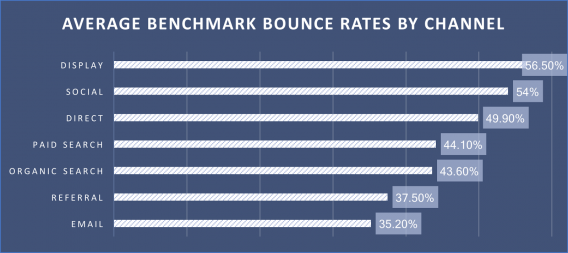
Image source: CXL
Bounce rate measures the share of single-page sessions out of all sessions on your site. Divide your bounced sessions by the total number of sessions and multiply by 100. Tracking your website’s bounce rate by page type, traffic source, and device tells you far more than a single site-wide number ever can.
Google Analytics 4 changed the definition. In GA4, bounce rate counts sessions where users weren’t engaged: spent less than 10 seconds on a page, didn’t convert, or didn’t have a second pageview. GA4 also reports an engagement rate, the inverse of bounce rate. Both are worth tracking.
The bounce rate for ecommerce differs from other industries because your visitors came with purchase intent. A visitor who bounces from a news article may have gotten their answer. A visitor who bounces from a product page left money on the table.
What the benchmarks actually say
According to SaleHoo’s 2026 ecommerce data, the average ecommerce bounce rate sits at 47%, consistent across device types and industries.
According to IRP Commerce’s ecommerce market data, the average bounce rate across the ecommerce market reached 48.27% in March 2026, a 25.58% year-over-year increase, partly attributed to Google’s updated GA4 definition.
Your goal isn’t to match the average. It’s to beat it on the pages that drive revenue.
Why Bounce Rate Matters for Your Ecommerce Business
A high bounce rate costs you in three concrete ways.
- Revenue: Every bounce is a visitor who didn’t make a purchase. If your store gets 50,000 monthly sessions and the bounce rate drops from 60% to 45%, that’s 7,500 more sessions where someone actually explores your products.
- Ad spend: Paid traffic that bounces immediately is wasted budget. At $2 per click with a 55% bounce rate, you’re paying for attention you aren’t keeping.
- Search rankings: Google uses engagement signals to evaluate page quality. High bounce rates on key landing pages can suppress your position in search engines, reducing organic website traffic. For any online business that depends on organic discovery, fewer rankings mean fewer visitors and fewer chances to show visitors relevant content that earns their trust.
These three effects compound. Losing traffic because of weak rankings means fewer visitors, fewer conversions, and slower growth. Fixing bounce rate isn’t just a UX task. It’s a revenue priority.
Key Reasons Visitors Bounce from Your Ecommerce Site
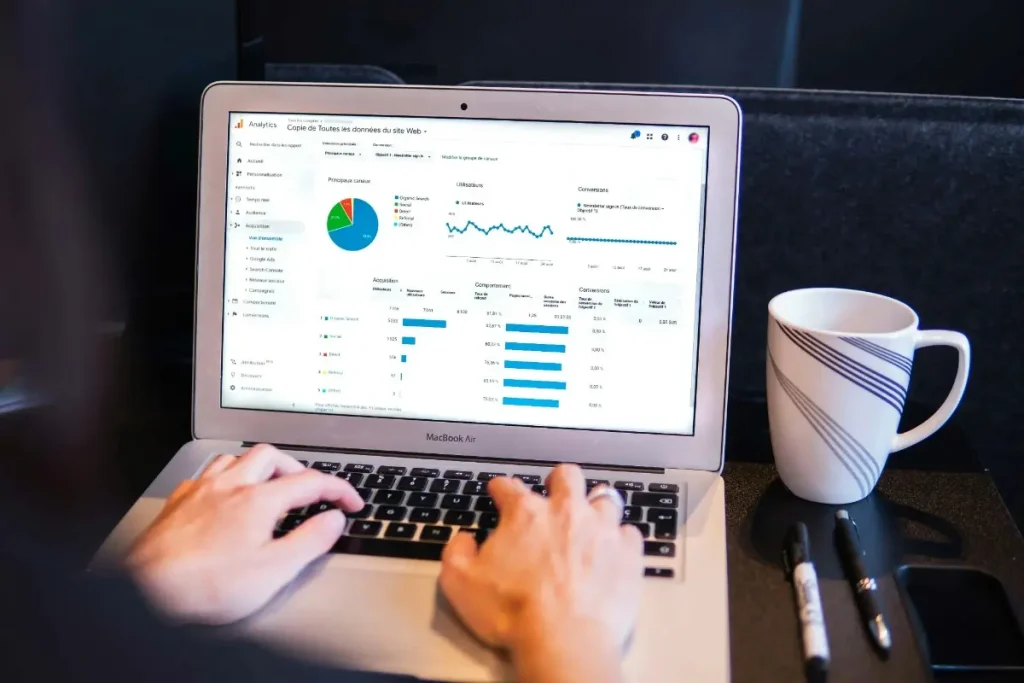
Image source: Unsplash
Before you start optimizing, you need to know which problem you’re actually solving. Here are the six most common causes of a very high bounce rate in ecommerce.
- Slow loading speed: According to Digital Applied’s 2026 bounce rate benchmark analysis, pages loading past three seconds inflate bounce rates by 38% compared to pages loading under one second. Loading speed is the fastest way to lose a visitor who was ready to buy.
- Mismatched intent: Your ad or search listing promises one thing, but the particular page visitors land on delivers something different. This is especially common with broad-match PPC campaigns routing users to a generic homepage instead of a specific product.
- Poor mobile experience: According to Firework’s 2026 mobile commerce data, 78% of all global ecommerce traffic now comes from mobile devices. A layout that isn’t built for smaller screens sends visitors straight to the back button.
- Weak or missing trust signals: No reviews, no security badges, no visible return policy. On an unfamiliar ecommerce brand, these gaps translate directly into bounces, especially on product pages.
- Technical issues: Broken links, 404 errors, JavaScript errors, and product images that fail to render. Your visitors don’t troubleshoot. They leave.
- Bad traffic: If your ads or SEO pull in audiences who were never going to buy, your bounce rate reflects an audience problem, not a page problem. Bad traffic inflates your numbers without surfacing anything fixable.
Audit Framework: Detect, Diagnose, Fix
Reducing bounce rate starts with knowing which pages have the problem and why. This three-step framework gives you a repeatable process.
Step 1: Detect: find your worst-performing pages
Open Google Analytics and go to the landing page report. Sort by bounce rate, or by lowest engagement rate in GA4. Filter for pages with at least 200 sessions per month so you’re working with statistically reliable data.
Segment the results by:
- Device type (mobile vs. desktop bounce rates often differ by 15-20 percentage points)
- Traffic source (paid search, organic, social, email)
- Page type (homepage, collection, product detail, checkout)
Build a shortlist of the pages where the bounce rate significantly exceeds the benchmark for that page type.
Step 2: Diagnose: understand why visitors leave
Standard analytics tells you what happened. It doesn’t tell you why. This is where session recordings become essential.
Watch recordings of real sessions on your highest-bounce pages. Look for:
- Rage clicks: rapid, repeated taps on non-interactive elements, signaling that visitors expect something to work, and it doesn’t
- Scroll depth: whether visitors scroll far enough to see your CTA or key product information
- Dead zones: sections visitors consistently scroll past without any interaction
Tracking page views per session alongside time spent on page helps you determine whether visitors are genuinely engaging or stalling before they leave.
A user-friendly page keeps visitors exploring; a confusing one pushes them out. Understanding the user experience on your highest-bounce pages gives you the qualitative context that quantitative data alone can’t provide.
Step 3: Fix: apply targeted changes
Once you know which pages underperform and why, apply the right fix. The next section covers the six most impactful ones.
Book a demo to see how FullSession finds bounce causes in your store.
Strategies to Reduce Bounce Rate for Your Ecommerce Store
Six fixes cover the majority of bounce rate problems in ecommerce, from the technical issues that push visitors away before the page even loads, to the trust and navigation gaps that lose them once they arrive.
1. Fix page load speed on product pages
What it is: Page speed optimization cuts the time between a visitor clicking your link and your page becoming usable.
Why it drives bounces: A visitor who waits more than three seconds on a mobile device will leave before the page finishes loading. According to Think With Google, a delay from one second to three seconds raises the bounce probability by 32%.
How to fix it:
- Convert product and banner images to WebP format and compress them without visible quality loss
- Enable lazy loading so images below the fold load only as the visitor scrolls
- Run your key landing pages through Google PageSpeed Insights and address issues flagged under Core Web Vitals
2. Align landing pages with ad and search intent
What it is: Intent alignment means the page a visitor lands on matches exactly what they expected based on the ad, search result, or link they clicked.
Why it drives bounces: A visitor who clicked “women’s running shoes” and landed on your general footwear collection didn’t find what they came for. They bounce within a few seconds, and you’ve paid for the click.
How to fix it:
- Audit your top 10 paid landing pages and check whether the headline and product selection match the ad creative
- Create dedicated landing pages for your top ad groups instead of routing all traffic to category pages
- For organic traffic, verify that your page title and meta description match the actual page content
3. Optimize mobile UX for ecommerce shoppers
What it is: Mobile UX optimization makes your store work as well on a 375px smartphone screen as it does on a desktop.
Why it drives bounces: A non-responsive layout, buttons too small to tap, or horizontal scrolling sends mobile users straight to a competitor’s online store. This is one of the fastest-growing sources of bounces in modern ecommerce.
How to fix it:
- Run mobile-specific heatmaps to see where mobile visitors tap and where they stop scrolling
- Check that your primary CTA is reachable with a thumb without zooming
- Test your checkout flow on at least three different mobile screen sizes before publishing changes
Learn more about CRO for mobile.
4. Add trust signals to high-bounce product pages
What it is: Trust signals reduce purchase hesitation: reviews, star ratings, security badges, return policy visibility, and social proof.
Why it drives bounces: On an unfamiliar ecommerce site, visitors are making a risk calculation. Missing trust signals tip that calculation toward leaving rather than buying. Even a beauty brand with strong products loses potential customers if visitors can’t quickly find evidence that others have bought and been satisfied.
How to fix it:
- Place star ratings and review counts directly below the product title, not buried below the fold
- Add a plain-language return policy statement within the add-to-cart section
- Display security badges at checkout entry points
5. Improve internal navigation and product discovery
What it is: Internal navigation covers your menu structure, search functionality, related product recommendations, and internal links between pages.
Why it drives bounces: A visitor who doesn’t find exactly what they searched for will leave if your store gives them no clear path to something related. Keeping ecommerce customers engaged means helping them find other pages worth exploring.
How to fix it:
- Add related product blocks to every product detail page, especially for items frequently browsed together
- Improve your site search so it returns results for common misspellings and synonyms
- Use your ecommerce heatmap data to see which navigation elements visitors actually use
6. Reduce checkout friction that causes early exit
What it is: Checkout friction is anything that slows, confuses, or frustrates a visitor who intended to make a purchase.
Why it drives bounces: Checkout bounces are the most expensive kind. These visitors had enough intent to reach the checkout and then hit a wall. Common culprits include mandatory account creation, unexpected shipping costs, and confusing multi-step forms.
How to fix it:
- Enable guest checkout. Removing mandatory account creation reduces bounce rates significantly for new customers
- Surface shipping costs on product pages, not only at checkout
- Reduce form fields to the minimum required for order completion
Measurement, KPIs, and Monitoring
Fixing bounce rate is a continuous process. Set specific targets before you start so you know what success looks like. Here is an example:
| Page type | Target bounce rate | Monitoring frequency |
| Homepage | Below 50% | Weekly |
| Product detail page | Below 45% | Weekly |
| Paid landing page | Below 35% | Weekly |
| Checkout | Below 25% | Daily |
| Collection / category page | Below 40% | Bi-weekly |
In GA4, track engagement rate alongside bounce rate. Set an alert for any page that exceeds its target by 10 percentage points. That threshold triggers an investigation: pull session recordings and check for new technical issues, content changes, or a traffic source shift.
The exit rate measures exits from a specific page regardless of session length. High exit rate on a page with normal bounce rate often signals a navigation dead end. Use both metrics together when you improve bounce rate. They tell different parts of the same story.
Visitors shouldn’t need to go elsewhere to find all the information they need to make a decision. For a deeper look at how these two metrics differ, read the exit rate vs. bounce rate breakdown.
Experimentation and Prioritization
Image source: Unsplash
Not every fix delivers equal return. Use an ICE framework (Impact, Confidence, Ease) to decide where to start.
Run first (high impact, high ease):
- Image compression and WebP conversion
- Mobile tap target sizing
- Trust signal placement on product pages
- Guest checkout enablement
Plan for next sprint (high impact, lower ease):
- Dedicated landing pages for top ad groups
- Site search improvements
- Personalized related product recommendations
Deprioritize (low impact):
- Cosmetic color and font changes
- Navigation label renaming without structural change
Always A/B test after implementing a fix. Run each variant for at least two weeks before declaring a winner. Data from a controlled test beats intuition every time.
How FullSession Helps You Reduce Bounce Rate for Ecommerce
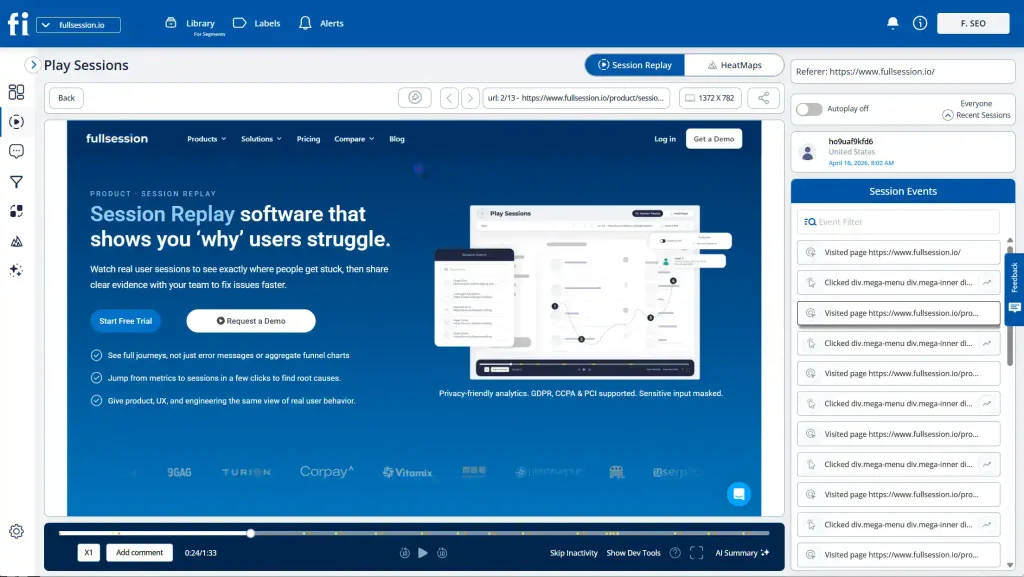
Google Analytics tells you a page has a 58% bounce rate. FullSession, a behavior analytics platform for ecommerce teams, shows you what those visitors actually did in the seconds before they left.
- Session replay records pixel-perfect replays of real user sessions. You can watch exactly how visitors move, click, and scroll on your highest-bounce pages. Rage clicks, hesitation patterns, and the moment someone gives up are all visible without any guessing.
- Heatmaps aggregate click, scroll, and attention data across all sessions on a given page. You see which sections visitors engage with and which they skip entirely. On a product detail page, a scroll heatmap quickly shows whether visitors ever reach your add-to-cart button or your trust signals.
- Funnels and conversions maps drop off at every step of your sales funnel. You can see the exact step where users exit and connect that number directly to session recordings from those sessions. That connection turns a drop-off rate into a fixable problem.
- Errors and alerts catch JavaScript errors, rage clicks, and broken flows in real time. If technical issues are silently driving bounces, a broken form field, a failed image load or a JavaScript error, you get an alert before it compounds into a significant revenue problem.
- Feedback lets you collect in-page responses from visitors and links each one to the session recording behind it. When a visitor reports confusion or frustration, you can watch exactly what they experienced rather than interpret their words in isolation.
- Lift AI scans user behavior across your store and predicts which issues have the highest revenue impact. Instead of deciding where to investigate next based on gut feel, you get a prioritized list of what to fix first.
- Mobile session replay extends the same pixel-perfect replay capability to mobile sessions. Since more than half of ecommerce traffic comes from smartphones, seeing exactly how mobile visitors interact with your pages and where they drop off is a separate diagnostic layer.
Your marketing efforts shift from assumption-driven to evidence-driven. You fix the right pages, in the right order, with a measurable impact on conversion rate and user satisfaction.
Book a demo to see how FullSession works on an ecommerce store.
Conclusion on How to Reduce Bounce Rate in Ecommerce Website
A high bounce rate isn’t a single problem with a single fix. It’s a signal that something between your traffic, your pages, and your visitor expectations isn’t aligned.
Work through the Detect, Diagnose, Fix framework, start with the highest-impact changes, and measure every iteration against a clear target for each page type.
The stores that consistently reduce bounce rate aren’t running more experiments than everyone else; they’re running better-informed ones, because they can see exactly what their visitors are doing.
FullSession gives you the session replay, heatmaps, funnel analysis, and error tracking to make every experiment count, so you stop guessing and start fixing the right things.
Start a free trial and watch your first session recordings today.
FAQs About Ecommerce Website Bounce Rate
What is a good bounce rate for an ecommerce website?
A good bounce rate for an ecommerce website is generally below 40%. High-performing stores reach 20-30% on key pages like product detail pages and paid landing pages. According to Digital Web Solutions, most e-commerce sites have a bounce rate between 37% to 47%
How do I reduce my ecommerce bounce rate?
Start by identifying your top-bouncing pages in Google Analytics 4. Then use session recordings and heatmaps to understand why visitors are leaving. Apply targeted fixes based on what you find: faster page load times, better intent alignment between ads and landing pages, improved mobile UX, and stronger trust signals on product pages.
Does bounce rate affect Google rankings?
Google uses engagement signals as quality indicators for search rankings. A high bounce rate doesn’t directly penalize a page, but consistently low engagement signals poor user behavior and weak page performance. Over time, this can suppress your search rankings and reduce organic traffic.
What causes a high bounce rate on product pages?
The most common causes are slow page load times, missing or hard-to-find trust signals like reviews and return policies, product images that don’t render, unclear add-to-cart CTAs, and bad traffic that wasn’t looking for that specific product. Session recordings typically reveal which of these applies to your specific pages.
How is bounce rate measured in Google Analytics 4?
In Google Analytics 4, bounce rate is the percentage of sessions where users weren’t engaged: sessions lasting under 10 seconds with no conversion event and no second pageview. GA4 also reports engagement rate as the inverse metric. Track both together for a complete picture of page performance.

Roman Mohren is CEO of FullSession, a privacy-first UX analytics platform offering session replay, interactive heatmaps, conversion funnels, error insights, and in-app feedback. He directly leads Product, Sales, and Customer Success, owning the full customer journey from first touch to long-term outcomes. With 25+ years in B2B SaaS, spanning venture- and PE-backed startups, public software companies, and his own ventures, Roman has built and scaled revenue teams, designed go-to-market systems, and led organizations through every growth stage from first dollar to eight-figure ARR. He writes from hands-on operator experience about UX diagnosis, conversion optimization, user onboarding, and turning behavioral data into measurable business impact.