Your analytics dashboard shows 67% of users abandoning checkout at step three. What it can’t tell you is why. Was it a confusing form field, a broken button, or a layout that collapsed on mobile? Without seeing what happened, you’re guessing, and guessing is expensive.
Session recording and session replay fix that. Instead of inferring problems from quantitative data alone, you watch real users move through your website, click, scroll, hesitate, and leave. The qualitative insights you get from a replay are what no dashboard can produce.
This guide breaks down how session recording actually works, what to look for when analyzing replays, and how to turn raw user behavior into clear, actionable improvements.
It also shows how FullSession simplifies this entire process. Instead of digging through scattered data, FullSession brings recordings, insights, and patterns into one place, making it easier to connect the dots and act fast.
Key Takeaways
- Session recording captures user interactions; session replay is the playback. Together, they explain what dashboards can’t.
- Session replay works through DOM event logging: no video file, no privacy risk when configured correctly.
- The highest-value use cases span bug fixing, support resolution, conversion work, UX research, feature validation, and mobile optimization.
- GDPR and CCPA compliance requires consent, masking, and access controls, all of which are available in FullSession by default.
- Analyze recordings with a defined question, behavior-signal filters, and heatmap and funnel cross-references.
- Advanced tools combine AI prioritization, integrated analytics, and mobile support in one connected platform.
FullSession gives you all of this in a single platform, from pixel-perfect session replay and rage click alerts to funnel analysis and Lift AI.
If you’re ready to stop guessing and start watching, book a demo and see exactly where your users get stuck.
What Are Session Recordings and Replays?
Session recording refers to capturing everything a user does during a visit to your website or app. Session replay is the playback of captured data: visual playbacks your team can review anytime.
The terms are used interchangeably across the industry, but technically, they describe two stages of the same process. Recording is capture; replay is playback. Together, they give you a deeper understanding of user behavior than any dashboard can match.
Session replay isn’t a literal video of your users. It reconstructs user sessions from logged DOM events, making it lightweight, privacy-safe by design, and accurate across dynamic single-page applications. It’s a core layer of any behavior analytics platform that turns raw interaction data into something you can see and act on.
What session replay captures
- Mouse movements and cursor path, including hesitation before clicks
- Clicks, double-clicks, and tap events across the page
- Scroll depth and direction
- Form field interactions, with sensitive fields masked before capture
- Rage clicks as repeated frustrated taps on an unresponsive element
- Dead clicks on non-interactive design elements
- Error clicks that trigger JavaScript exceptions
- Page navigation and exit events
Advanced solutions like FullSession take session replay beyond passive observation.
Instead of forcing you to sift through hours of recordings, it automatically surfaces the moments that matter like friction points, broken interactions, and patterns behind funnel drop-offs.
By connecting individual sessions with aggregated insights, FullSession helps you move from “something’s wrong” to knowing exactly what to fix and why.
How FullSession Session Replay Works
Session replay works by recording changes to the Document Object Model (the live structure of your web page as it renders in a browser) rather than capturing video frames. No camera, no screenshots. The reconstruction happens from structured event logs, which is what makes it both privacy-safe and technically accurate.
Here’s the process, step by step:
- A user visits a page. The FullSession SDK loads with a single line of code.
- The SDK captures DOM mutations and user events: every structural change, click, scroll, and input.
- Events are stored server-side, with sensitive data masked before it leaves the browser.
- The replay tool reconstructs the session into a pixel-perfect visual playback.
- Your team reviews the replay, with the ability to skip forward through inactive periods and filter by event type.
That event-log approach is exactly why session replay stays compliant with GDPR, CCPA, and PCI DSS when configured correctly. For a technical definition of the DOM, see UCF Web Courses’ DOM reference.
What Session Replay Reveals
Session replay lets you observe the full range of user actions in any visit. You see mouse movements, clicks, scroll depth, rage clicks on broken elements, dead clicks on unresponsive design elements, errors, form abandonment, and full navigation paths across the session.
FullSession surfaces rage clicks and errors automatically with real-time alerts. Filter sessions by these signals and go from hundreds of recordings to the ten worth watching in minutes.
You don’t need to watch every recording manually to find what matters.
6 Ways Teams Use Session Recording and Session Replay
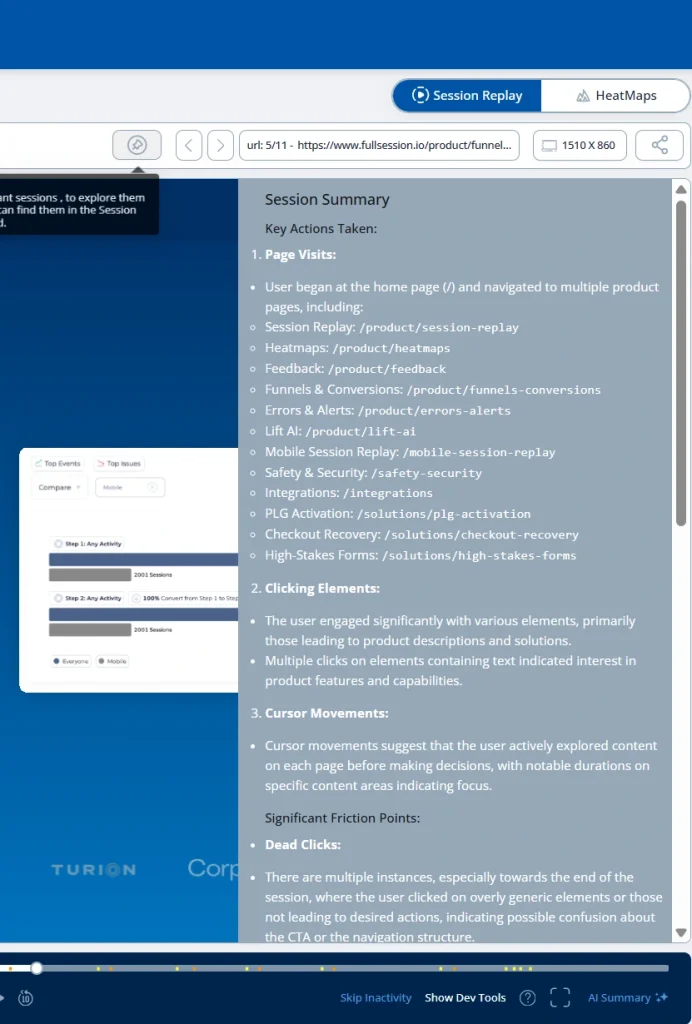
Instead of relying on assumptions or incomplete reports, teams can see real user behavior, validate hypotheses, and act with confidence.
Bug reproduction and debugging
Developers waste hours asking users to describe what happened before an error appeared. Written tickets rarely contain enough context, and reproducing the exact user events that triggered a bug can take longer than fixing it.
With session replay, developers watch a pixel-perfect reconstruction of every step before the failure: the exact page state, the exact sequence, the exact browser conditions. No guessing.
FullSession’s errors and alerts feature links every JavaScript error directly to the session that triggered it. When an error fires, your team gets an alert with a direct link to the replay, no extra effort required.
It leads to faster resolution and engineers spending time fixing bugs rather than chasing them.
Customer support resolution
Customer support teams spend significant time trying to understand what a user actually experienced. Users describe problems vaguely; agents try to reproduce them without context.
Session replay shows exactly what the user did before filing a ticket: their clicks, the page they were on, and the errors they hit. You get the full customer journey without asking the user to describe anything or retrieving information through back-and-forth.
FullSession lets customer support teams search sessions by user ID or email and pull up any user’s session instantly, meaning shorter resolution times and higher customer satisfaction scores.
Conversion rate optimization
You can see where users drop off on landing pages and checkout flows in your analytics. You can’t see why. Bounce rates rise, conversion rates fall, and the cause stays hidden.
Watching session replays of users who didn’t convert reveals the specific pain points dashboards hide: the CTA that looks unclickable, the form field that trips everyone up, the mobile layout that breaks at the wrong point.
That behavioral evidence is what lets you optimize conversion rates with precision rather than assumptions.
FullSession’s funnel analysis and session replay are fully integrated. Click any drop-off step, and FullSession surfaces the sessions of users who exited there. You go from seeing where people left to watching why.
You can fix specific CRO blockers and improve conversion rates on high-value flows.
UX research and usability testing
Traditional usability testing requires recruiting participants who know they’re being watched, which changes how they behave. It’s slow, expensive, and hard to scale.
Session recording gives you real users in their own environments, behaving naturally. It’s usability testing that runs every day on your actual customers, with no recruiting overhead.
For example, you can segment replays to study first-time visitors on mobile without scheduling a single session.
FullSession’s advanced filtering lets UX teams identify areas of interest by device type, browser, location, traffic source, and behavior signal.
It’s faster research based on how users interact in their actual environment.
Product development and feature validation
After shipping new features, product managers often don’t know whether users are finding them or using them correctly. Standard product analytics show activation metrics but not the behavioral story behind the numbers.
Session recording shows exactly how users encounter new features: where they find them, what confuses them, and where they leave without engaging. It’s the context that turns usage data into a real decision.
FullSession’s Lift AI scans behavior patterns continuously and flags the sessions most worth watching, ranked by predicted business impact. Product managers spend less time searching and more time acting.
It leads to faster iteration cycles and evidence-based roadmap decisions.
Mobile app experience optimization
Mobile users experience your product differently from desktop users. Tap targets, scroll behavior, and form completion patterns all differ across devices. Standard analytics tools rarely surface these differences in actionable detail.
Watching mobile sessions separately from desktop lets you identify places where mobile users encounter friction that desktop users never hit. That specificity is what makes mobile fixes actually land.
FullSession supports mobile session replay for iOS and Android, capturing tap events, scroll depth, and keyboard interactions across full mobile user journeys with the same fidelity as desktop sessions.
It leads to reduced mobile bounce rates and improved conversion on mobile flows. Book a demo to see all of these in action across a single platform.
Session Replay and User Privacy
Session replay is legal and compliant with GDPR and CCPA when set up correctly. It doesn’t record video footage. Sessions are reconstructed from event logs, which means sensitive information never enters the recording at all.
User privacy and behavioral insight aren’t in conflict. They’re a configuration choice.
FullSession’s privacy defaults:
- Passwords and authentication fields are masked before capture
- Payment fields are excluded from all recordings
- PII input fields are configurable for masking
- All data is stored in compliance with GDPR, CCPA, and PCI DSS
- Role-based access controls determine who can view replays
Your GDPR compliance checklist for session replay:
- Disclose recording activity in your privacy policy
- Get user consent where required
- Configure masking rules for all sensitive data fields
- Set data retention periods aligned with your policy
- Restrict replay access to named roles only
For full requirements, see the official GDPR guidelines.
How to Analyze Session Recordings Effectively
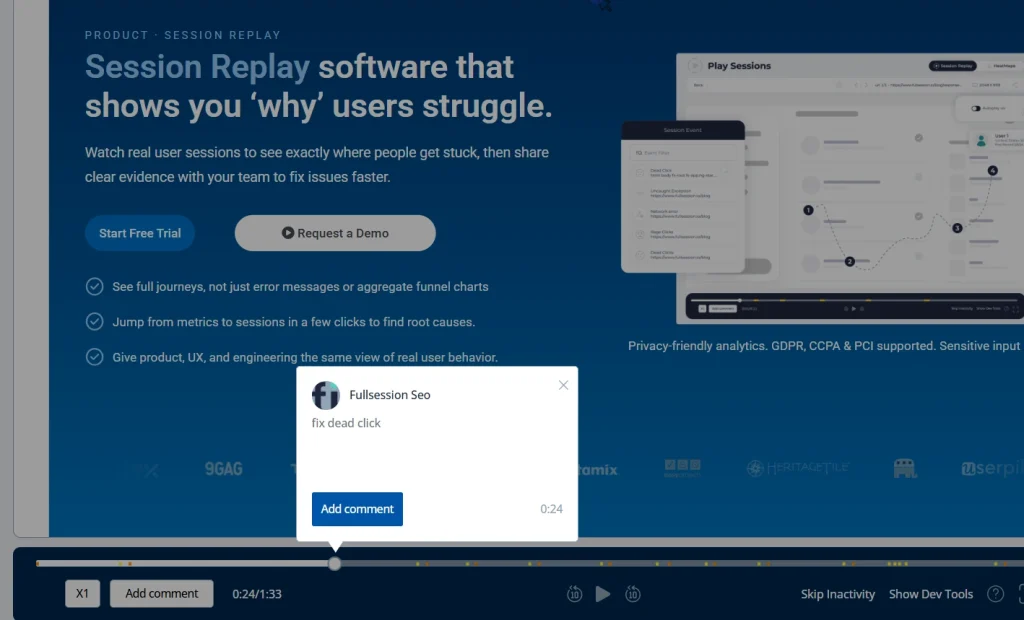
Don’t watch sessions at random. The teams that get the most from session recording treat each analysis as a structured activity with a defined question and a specific cohort to review.
Five-step analysis framework:
- Define your research question. “Why are users dropping off at step two of checkout?” is a research question. “Let’s see what users are doing” isn’t.
- Filter sessions by behavior signal: rage clicks, error events, and exit page filters isolate the sessions most relevant to your question. FullSession flags these automatically.
- Watch 10 to 20 sessions per segment before drawing conclusions. One unusual session is an outlier. A pattern across 15 is a finding.
- Tag and categorize patterns as you go. FullSession’s session tagging lets you label replays in real time, so findings are organized before the analysis ends.
- Cross-reference with heatmap analysis and funnel analysis for full context. Replays show what one user did; heatmaps show what thousands did in aggregate.
For connecting individual session observations to broader conversion trends, see the customer journey analytics guide.
Structured session replay analysis is one of the most direct ways to see where your efforts are actually paying off.
Start a free trial and begin recording sessions in minutes, no credit card required.
How Other FullSession Features Work with Session Replay
Session replay shows individual behavior, but on its own, it doesn’t tell you how widespread a pattern is. Combined with other features, it helps you connect single-user actions with broader trends, so you can see both the detail and the bigger picture.
Interactive heatmaps
Interactive heatmaps aggregate click distribution, scroll depth, and attention patterns across all your visitors. Where a session replay shows what one user did, a heatmap shows what the majority does.
Use them to identify areas where most visitors stop scrolling, which important elements get ignored, and where attention concentrates on the page.
When a heatmap shows an unexpected pattern, drill into the individual sessions that created it to get the context only a replay can provide.
In-session user feedback
FullSession’s website feedback tool collects in-page responses from users at the exact moment they hit a problem. Every submission links directly to the session recording it came from.
That connection means your team doesn’t just know something went wrong. They can watch it happen, with full context attached.
Funnel and error tracking
The funnels and conversions feature maps your most important flows step by step, with every drop-off point linking directly to the sessions of users who left there.
FullSession’s errors and alerts system monitors your website for JavaScript errors, rage clicks, and broken flows in real time. Each event links automatically to its replay, so your team sees both the problem and the behavior that caused it.
Lift AI
Lift AI scans behavioral data continuously and surfaces sessions with the highest predicted impact on retention and conversions. It gives product managers and growth teams on-demand resources for prioritization without needing a data science background.
Start a free trial to test these features.
What to Look for in a Session Replay Tool
Not all session replay tools are built for every team. These six criteria matter regardless of which platform you’re evaluating.
| Criterion | Why It Matters | FullSession |
| Pixel-perfect replay quality | Low-fidelity replays miss detail in complex interfaces | ✅ |
| Mobile device support | Mobile traffic is a majority share for most products | ✅ |
| Privacy and data masking | GDPR and CCPA compliance requires masking before capture | ✅ |
| Analytics integration (funnels, heatmaps) | Replay without context produces observations, not decisions | ✅ |
| AI-powered session prioritization | Teams can’t manually review hundreds of sessions per day | ✅ |
| Easy setup without developer overhead | Slow implementation delays time-to-value | ✅ |
Many session replay tools cover the first two. Advanced session replay tools like FullSession cover all six and connect them into a single workflow, so you never switch platforms to get from a metric to an explanation.
If you’re comparing options, this guide to Session Recording Replay Tools can help you evaluate which platforms offer the right mix of replay quality, privacy controls, analytics integrations, and prioritization features.
Is FullSession Among the Best Session Replay Tools?
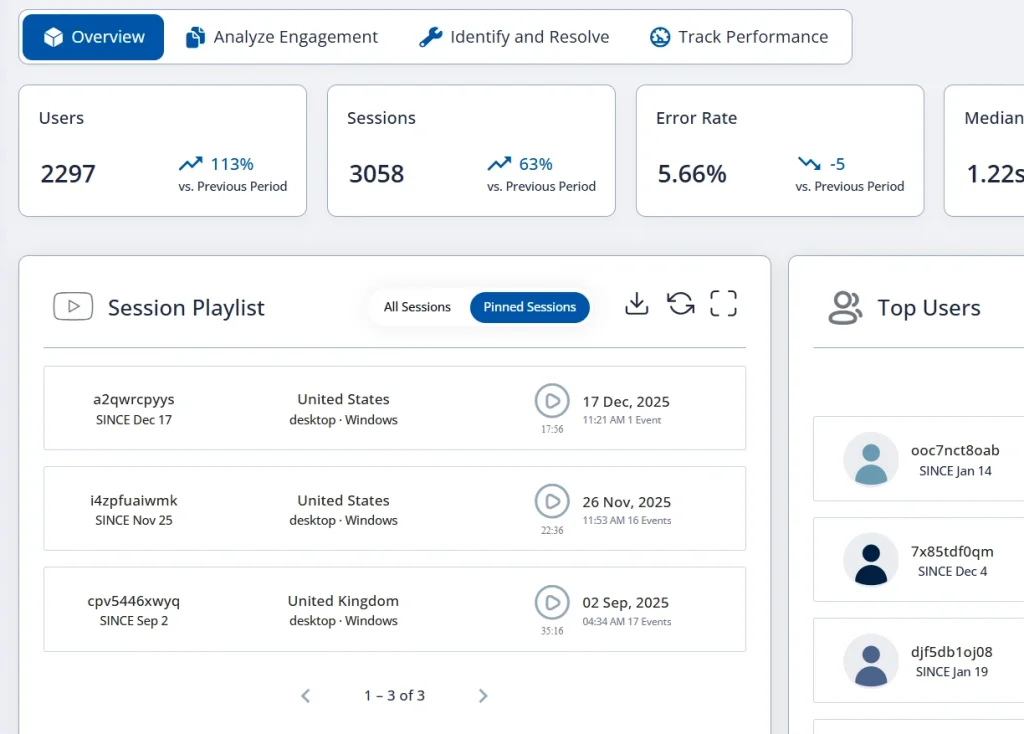
We’ll let others debate the absolute ranking. There are well-established tools in this space, and any honest comparison has to acknowledge that. But if you’re evaluating your options, FullSession consistently earns a place at the top of the list.
Here’s why product, UX and ecommerce teams choose it.
Everything in one place. Session replay, heatmaps, funnels, errors and alerts, feedback, and mobile session replay for iOS and Android, all fully integrated by design, not stitched together.
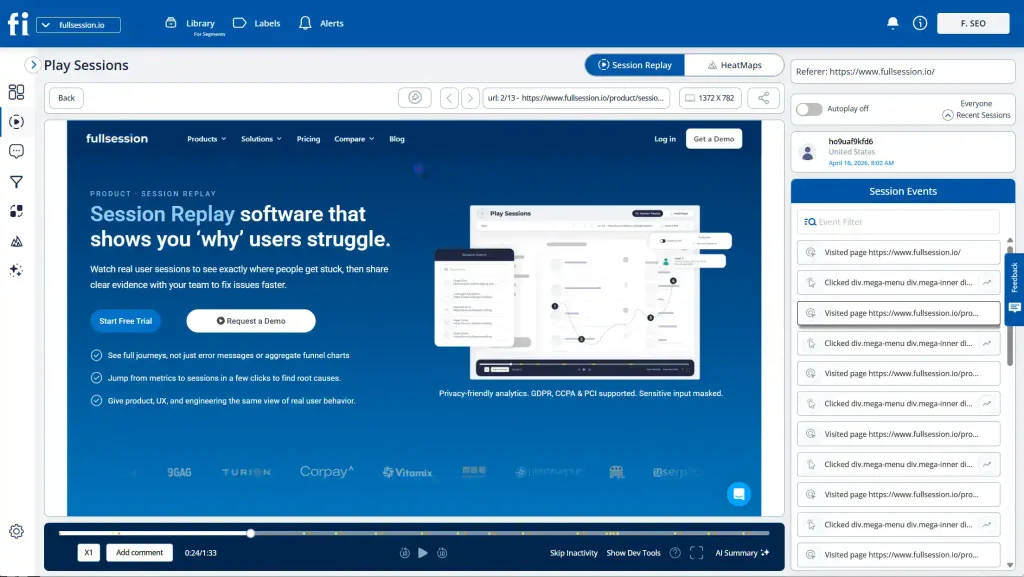
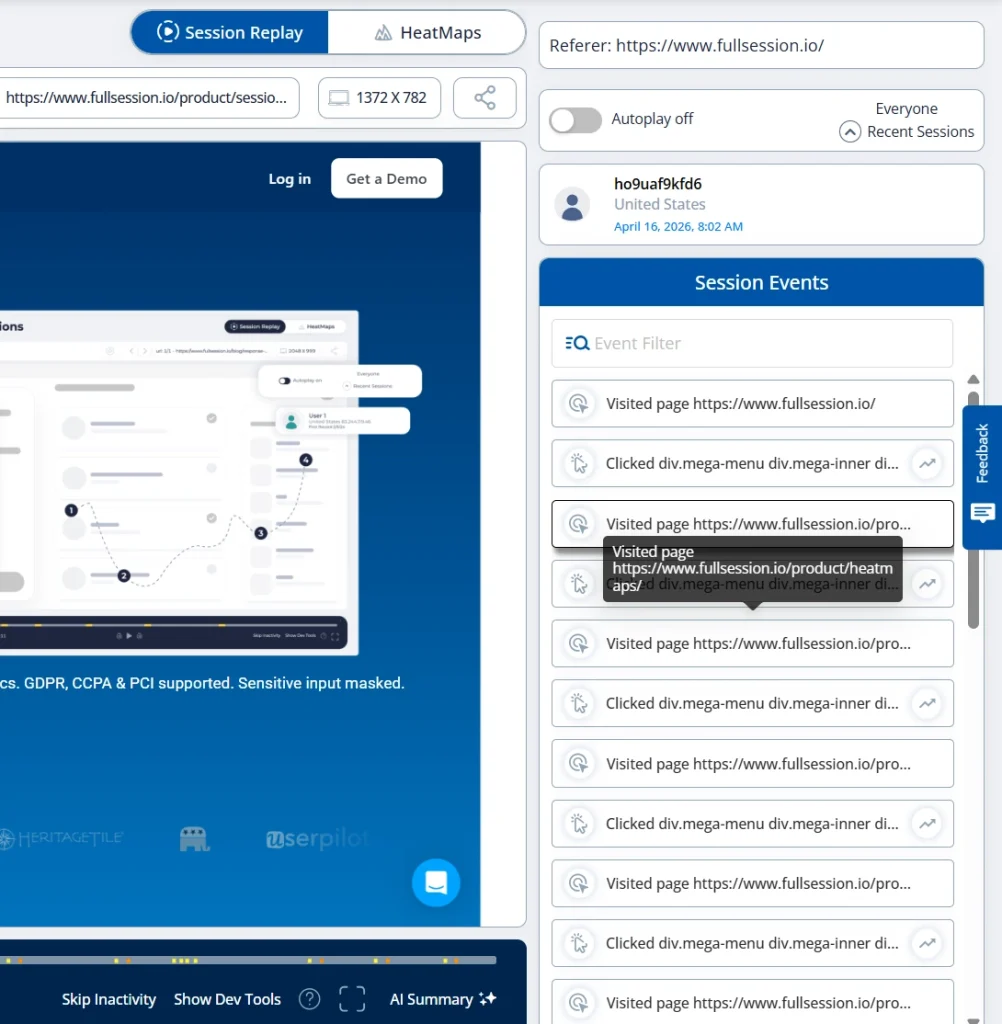
The Play Sessions interface gives your team immediate access to every session. The session events panel displays each interaction in sequence: pages visited, elements clicked, navigation path, and timestamp.
The HeatMaps tab is one click away from any session, and the Errors and Alerts dashboard surfaces broken flows without waiting for a support ticket.
Beyond the intuitive interface, a few things consistently come up from users who’ve made the switch:
- AI that goes beyond summaries: Lift AI automatically shows high-impact sessions, so your team focuses on what matters, predicts improvement potential before you ship a fix, and then validates the lift after.
- Proactive detection, not reactive firefighting: Rage clicks, and error detection alert your team the moment users encounter problems, so you can see these issues before they reach a support ticket.
- Compliance without configuration: GDPR, CCPA, and PCI DSS compliance come built in, so you don’t need custom configuration. Sensitive inputs are masked by default.
- Support and a product that listens: FullSession’s Customer Success team is known for fast, personalized responses. Our team actively tracks feature requests, including third-party integrations, and ships them regularly.
- More features, lower cost: Most platforms charge separately for session replay, heatmaps, funnels, and error tracking. FullSession bundles it all and even offers advanced AI at an affordable price.
Use session replay to discover issues early and act on them before they affect your metrics.
Ready to see it in action?
Book a demo and see this in real time.
Conclusion About Session Recording and Replay
Session replay is the layer between your metrics and your understanding of them. Your analytics tell you where the problems are. Session replay shows you why they exist, and that’s what your team can act on.
Teams that use session replay most effectively reduce friction across their products by treating it as the connective tissue between their analytics data, their support workflows, and their product decisions.
They watch recordings with a specific question, filter by the user actions that matter, and use behavioral evidence to improve the overall customer experience in ways that show up directly in their metrics.
FullSession is built to be that connective tissue. Ready to see your users in action?
Book a FullSession demo and discover issues your analytics dashboard will never show you.
Prefer to explore on your own? Start your free trial, no credit card required.
FAQs About Session Recording and Replay
What is session recording?
Session recording is the process of capturing everything a user does during a visit to your website or app. It logs clicks, scrolls, mouse movements, form interactions, and page navigation in real time, so your team can play it back later as a visual reconstruction of exactly what happened.
What does “recording session” mean?
A recording session refers to a single captured user visit, from the moment someone lands on a page to the moment they leave. Each recording session contains the full sequence of interactions that took place, giving your team a complete picture of how that user experienced your product.
What is session replay, and how does it work?
Session replay recreates user sessions from logged DOM events, not literal video recordings. It captures clicks, scrolls, mouse movements, form interactions, and rage clicks, then stitches them into a visual playback. A lightweight SDK records the events server-side; the replay tool reconstructs them on demand.
Is session replay legal?
Yes. Session replay is legal when implemented with proper consent, sensitive data masking, and compliance with GDPR and CCPA. FullSession masks passwords and payment fields by default and provides role-based access controls. Disclose recording activity in your privacy policy and obtain consent where your jurisdiction requires it.
What’s the difference between session recording and session replay?
Session recording is the data capture process: the SDK logs DOM mutations and user events during a visit. Session replay is the playback of that captured data as a visual reconstruction. The two terms are used interchangeably across the industry, but they describe different stages of the same workflow.

Roman Mohren is CEO of FullSession, a privacy-first UX analytics platform offering session replay, interactive heatmaps, conversion funnels, error insights, and in-app feedback. He directly leads Product, Sales, and Customer Success, owning the full customer journey from first touch to long-term outcomes. With 25+ years in B2B SaaS, spanning venture- and PE-backed startups, public software companies, and his own ventures, Roman has built and scaled revenue teams, designed go-to-market systems, and led organizations through every growth stage from first dollar to eight-figure ARR. He writes from hands-on operator experience about UX diagnosis, conversion optimization, user onboarding, and turning behavioral data into measurable business impact.