Your analytics show 5,000 shoppers hit your product page yesterday. Four thousand left without buying. Google Analytics tells you they left. It can’t tell you why.
E-commerce session recording captures every interaction a visitor has on your store: clicks, scrolls, taps, form inputs, and page transitions. Session replay reconstructs that visit as a precise, event-by-event playback from logged DOM data, not video. The result is a lightweight, searchable, privacy-safe record of exactly what each shopper saw and did.
This guide covers how e-commerce session recording and replay work, what to look for in a session replay tool, and how FullSession connects replay with heatmaps, conversion funnels, error tracking, customer feedback, and Lift AI to give your team a complete picture of your store’s performance.
Key Takeaways
- Session replay reconstructs real visitor interactions (clicks, scrolls, taps, form inputs) as event-by-event playback, not video, making it lightweight, searchable, and privacy-safe by default.
- Traditional analytics tools like Google Analytics tell you where shoppers drop off. Session replay shows you why, whether it’s a rage-clicked button buried under a cookie banner or a mobile keyboard covering the checkout field.
- The most valuable sessions to watch aren’t random ones. Filter for rage clicks, cart abandoners who never hit confirmation, sessions with JavaScript errors, or visits over four minutes on a page designed to take 30 seconds.
- Mobile users hit completely different friction points than desktop users. Filter and analyze them separately, because the fixes rarely overlap.
- Session replay works best when paired with quantitative data. Use analytics to find the problem page, then use replay to understand exactly what went wrong there.
- Checkout is your highest-revenue page and usually your most friction-filled. Session replay commonly uncovers hidden cost reveals, broken form validation, and UI elements blocking the payment button on mobile.
- Privacy compliance isn’t optional. Sensitive fields like passwords and payment details should be masked at the point of capture, before data ever reaches the recording server.
FullSession goes further than standard replay tools by connecting session recordings to heatmaps, conversion funnels, error tracking, and customer feedback in a single platform.
Its Lift AI feature automatically highlights the issues most likely to affect your revenue, so your team spends time on what matters rather than manually sorting through thousands of sessions.
For e-commerce teams serious about conversion rate optimization, it’s the difference between watching behavior and actually understanding it.
Book a FullSession demo and see your store through your customers’ eyes.
What is E-commerce Session Recording and Replay?
The two terms describe the same technology. What matters is what the tool captures and what you can do with that data.
The tool captures the Document Object Model, the underlying structure of your web page, along with every change to that structure and all user events triggered during the visit.
When you hit play, it rebuilds the page from those logged events in sequence. It looks like a video, but it’s a precise reconstruction, not a screen recording.
Three practical benefits follow from this.
Files are lightweight, with no bulky video storage. You can search and filter recordings by behavior, errors, or segments. And sensitive data like passwords and payment details gets masked at capture, so it never enters the recording at all.
Compare Screen Recording, Session Replay, and Traditional Analytics
Here’s how session replay stacks up against the alternatives.
| Method | How it works | Privacy risk | Filterable by behavior | Best for |
| Screen recording | Records full-screen video of a user’s device | High | No | Moderated usability testing |
| Session replay | Reconstructs visits from logged DOM events | Low | Yes | Ongoing behavioral analysis at scale |
| Web analytics (GA4) | Aggregates event data into metrics and reports | Very low | Metrics only | Measuring volume and trends |
Why traditional web analytics tools fall short for e-commerce
Traditional web analytics tools like Google Analytics show bounce rates, exit rates, and funnel drop-off percentages. They can’t show you why those numbers are what they are.
A checkout page with, say, a 68% drop-off rate is measurable in GA4. When you watch session replays on that page, you might find that mobile users on iOS are rage-clicking a “Place Order” button blocked by a floating cookie banner. That’s the insight that drives the actual fix.
Qualitative and quantitative data need each other. Quantitative data tells you the scale. Qualitative data shows you the cause.
How session replay differs from screen recording
A screen recording captures a full video of a user’s screen: heavy, hard to search, and a privacy liability at scale.
Session replay reconstructs visits from structured event data. That makes it searchable, filterable, and privacy-safe.
You can skip inactive periods, jump to rage-click moments, and attach session data to error events or funnel steps. None of that is possible with a video file.
Key Features of E-commerce Session Replay Tools
There are many session replay tools on the market. For e-commerce teams, the right platform shows you not just what happened, but gives you the tools to act on it.
FullSession is a user behavior analytics platform built for teams who need session replay connected to heatmaps, conversion funnels, error tracking, feedback, and AI-powered prioritization.
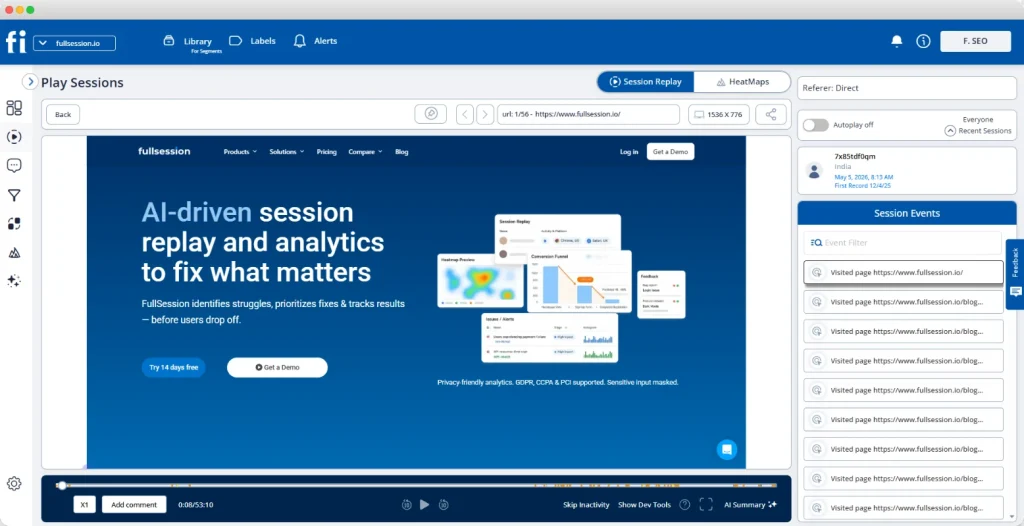
The session replay player shows a live timeline of user events on the right, while the left panel plays back exactly what the visitor saw, with tabs to switch instantly between replay and HeatMaps on the same session.
Start a free trial to see how it works.
Here are the key features to look for in any e-commerce session replay platform, and how FullSession delivers each one.
Behavioral tracking and user event capture
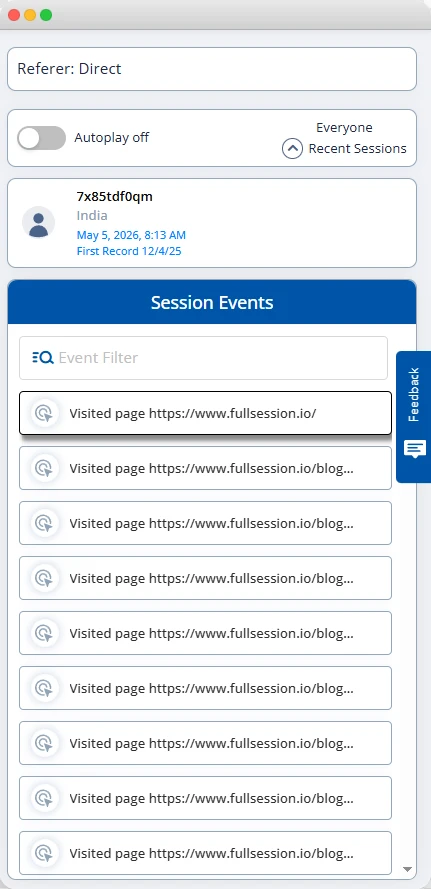
A strong session replay tool captures the full range of user interactions: clicks, taps, scrolls, mouse movements, form inputs, and navigation between pages. It should also flag frustration signals automatically: rage clicks, dead clicks, and long pauses before abandonment.
On an online store, these signals are direct revenue indicators.
A rage-click cluster on your “Add to Cart” button means something is broken. A dead click on your product image means shoppers expect a zoom you haven’t built.
FullSession captures all of these and shows them in the event timeline alongside the replay.
Session filtering and segmentation
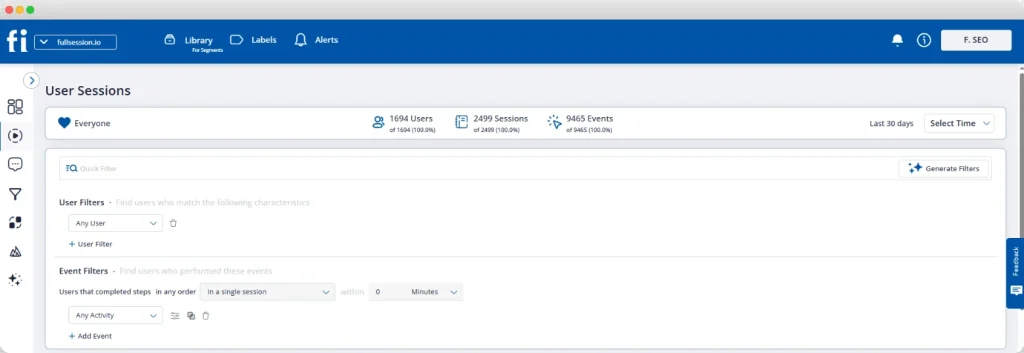
Session filtering
With FullSession, you can filter session replays by:
- Device type
- Browser
- Geographic region
- Landing page
- Visited URL
- User behavior
- Error type
- User ID
Filter recordings according to your needs to stop watching random sessions. FullSession helps you watch only the relevant sessions that tell you something useful.
Session filtering to mobile users who dropped off at the payment step on a Tuesday might reveal a payment gateway error that only surfaces on certain devices.
The filtering panel sits directly in the session list, not buried in settings.
Mobile session replays
Mobile session replays show problems that the analysis on desktop devices misses: thumb-zone issues, form fields too small to tap, payment widgets failing on specific browsers, and mobile keyboards covering the submit button.
FullSession records both mobile web and mobile app sessions in the same dashboard, so you never have to switch tools or reconcile separate data sources.
Error tracking and JavaScript errors
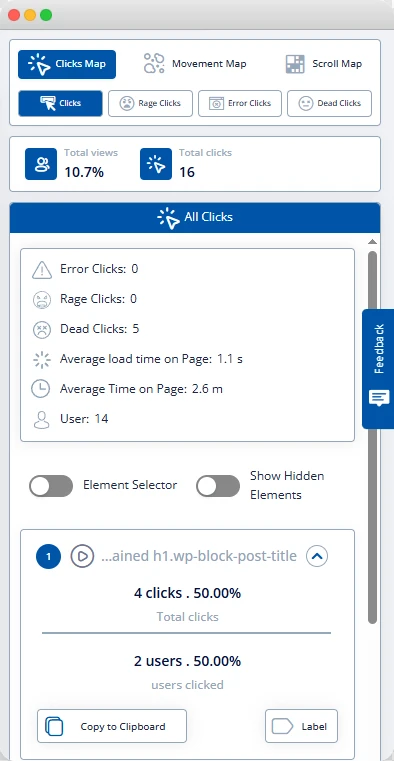
When a checkout page breaks, most customers don’t report it. They leave.
Error tracking connected to your session replay platform shows the problem in real time, linked to the sessions where it occurred.
JavaScript errors, failed API calls, and broken form validation all leave behavioral traces, and with FullSession, your engineering team watches what the user experienced and reads the attached console logs without a support ticket to reproduce the bug. See how session replay and JavaScript error tracking work together.
Privacy controls and sensitive data protection
A credible session recording software masks sensitive information at capture: passwords, payment card numbers, billing addresses, and any field you designate as private.
That data never reaches the recording server.
For US ecommerce teams with California customers or EU traffic, GDPR, CCPA, and PCI DSS compliance aren’t optional. FullSession applies masking at capture by default and meets all three standards.
Book a demo to learn more.
Choose the Right Session Replay Tool for Your E-commerce Store
Picking the right e-commerce session replay tool comes down to three questions.
Does it integrate with your e-commerce platform?
The right session replay connects to your existing stack without an engineering project. Native integrations with Shopify, BigCommerce, WooCommerce, and Magento matter.
So does Google Tag Manager support, which lets you deploy the recording script without touching your codebase.
FullSession integrates directly with Shopify, BigCommerce, WordPress, and Wix, and supports GTM. Most teams record live sessions the same day they sign up.
Do you need an advanced e-commerce session recording or a basic recorder?
Advanced session replay tools connect session data to conversion funnels, heatmaps, error logs, and in-app feedback forms. That moves you from watching what happened to understanding why and knowing what to fix.
Session recording tools at the basic end record visits and let you play them back. Fine for small stores needing occasional qualitative context.
For any ecommerce team working on conversion rate optimization, you need the connected workflow FullSession provides from day one.
What session volume do you need?
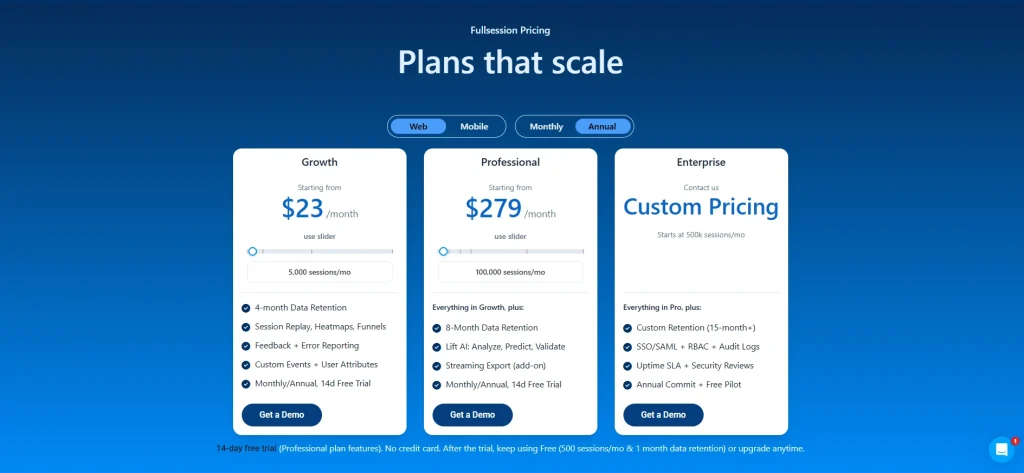
FullSession scales from a free plan through enterprise, with tiers built around your actual session volume. See the current plans and limits on the pricing page.
Capture Real Users and Map the Customer Journey
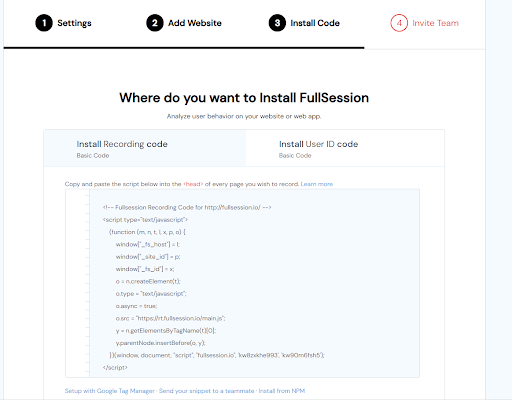
Setting up session recording is easy. Getting value from it takes a systematic approach to which sessions you capture and how you review them.
Getting your first recordings live
Four steps get you running:
- Add the FullSession script to your store via the site header or Google Tag Manager.
- Define which pages to record: at a minimum, product pages, cart, and checkout page.
- Configure masking rules to exclude fields containing sensitive information before going live.
- Go live. Within minutes, real users start appearing in your dashboard.
Mapping the user journey across multiple pages
A single ecommerce session typically spans multiple pages: a landing page, a collection page, a product detail page, the cart, and checkout.
FullSession’s session replay lets you follow that entire path in one continuous playback.
The point of abandonment is rarely where the problem started. A shopper who drops off at payment may have hit friction on your product page first: a confusing size guide, a missing trust signal, or a slow image carousel.
The user journey across pages reveals that chain. Watching pages in isolation misses it.
Identifying the sessions worth watching
A high-value session is one where a real user encounters friction, triggers an error, or reaches a key conversion step without completing it. Focus your review time on these:
- Sessions with rage clicks on any element
- Sessions that hit the cart but not the order confirmation page
- Sessions over four minutes on a page designed to take under 30 seconds
- Sessions where error messages appeared in the browser console
FullSession’s Lift AI shows these automatically, ranked by predicted impact, so your team spends time on only the recordings that matter.
Integrate With Analytics Tools and Quantitative Data
E-commerce session replay doesn’t replace your existing analytics tools. It completes them.
Pairing session replay with Google Analytics
Google Analytics pinpoints where problems exist: high-exit pages, drop-off funnel steps, and behavioral differences across traffic sources. E-commerce session replay shows what users experienced at those exact points.
| Step | Tool | What you get |
| 1. Identify the problem page | Google Analytics | High exit rate or drop-off percentage |
| 2. Filter sessions to that page | FullSession | Recordings of users who exited there |
| 3. Watch what users experienced | Session replay | The specific friction causing the exit |
| 4. Act on the insight | Your dev/design team | A targeted fix, not a guess |
That combination of data analytics turns a percentage into a specific change you can ship.
Combining qualitative and quantitative data
Quantitative data (conversion rates, session duration, funnel drop-off percentages) tells you the magnitude of a problem. Qualitative data from session replays shows you the specific cause.
Teams relying only on web analytics build theories and test them through expensive A/B experiments. Teams that use session replays alongside their analytics confirm the issue through replay first, then run a targeted test. That sequence wastes far less budget and engineering time.
The goal is to understand user behavior at the moment it happens, not weeks later when it shows up as a conversion drop in your dashboard.
Analyze Customer Behavior to Improve Conversion Rates

These use cases deliver direct, measurable impact on conversion rates.
Checkout page optimization
Your checkout is the highest-revenue page on your store. Session replay shows the exact moments where shoppers hesitate, abandon form fields, search for a coupon they can’t find, or hit a broken payment step.
Common checkout friction points visible in ecommerce session recording:
- Form validation errors that don’t explain what went wrong
- Shipping cost reveals that trigger immediate exits
- Mobile keyboards covering the “Continue” button
- Coupon fields sending shoppers off-site to hunt for a discount code
Product page friction and user behavior
Users click on product images expecting them to zoom. They scroll for the size guide. They hover over “Add to Cart” without clicking, not because they’re uninterested, but because they haven’t found the information they need to commit.
Ecommerce session replay software makes each pattern visible and maps it to a fix:
- Dead clicks on static images: add zoom functionality
- Repeated scrolling past specs: move sizing info above the fold
- Exits after viewing the shipping policy: improve delivery cost transparency
Understanding cart abandonment through behavioral data
Behavioral data from session replays lets you categorize abandonment rather than just count it. Most ecommerce teams watching a sample of abandoned sessions find the causes cluster into four buckets:
- UX confusion: shoppers can’t find what they’re looking for
- Technical error: something is broken in the checkout flow
- Price friction: an unexpected cost appears late in the process
- Trust deficit: no reviews, unclear return policy, or unfamiliar payment options
Knowing which bucket drives most of your abandonment tells you exactly where to focus. For a deeper breakdown of how to approach this, see our guide to cart abandonment analysis.
Analyzing how mobile users behave differently
Mobile users don’t just behave differently from desktop users. They hit entirely different friction points. A dropdown menu that works in Chrome on desktop can break on mobile Safari. A tap target fine for a mouse cursor is too small for a thumb.
Filter your session replays to mobile-only traffic and review them as a separate analysis pass, not an afterthought to your desktop review. The fixes you find will rarely overlap, and treating them as one combined audience means you’ll consistently under-serve one of them.
| Common ecommerce friction issue | What session replay reveals |
| High checkout page drop-off | Rage-clicks on a payment button blocked by a floating element |
| Low product page add-to-cart rate | Dead clicks on static images; shoppers expecting zoom |
| High exit rate on landing pages | Users scroll past the key CTA without seeing it |
| Mobile conversion gap | Keyboard covers submit button; form fields too small to tap |
| Cart abandonment spike | Shipping cost reveal at the final step triggers immediate exit |
Pairing Replay With Heatmaps, Funnels, and Error Tracking
Session recording software alone shows you what happened. FullSession connects session replay to five additional capabilities that show you why and what to fix.
Heatmaps for ecommerce teams
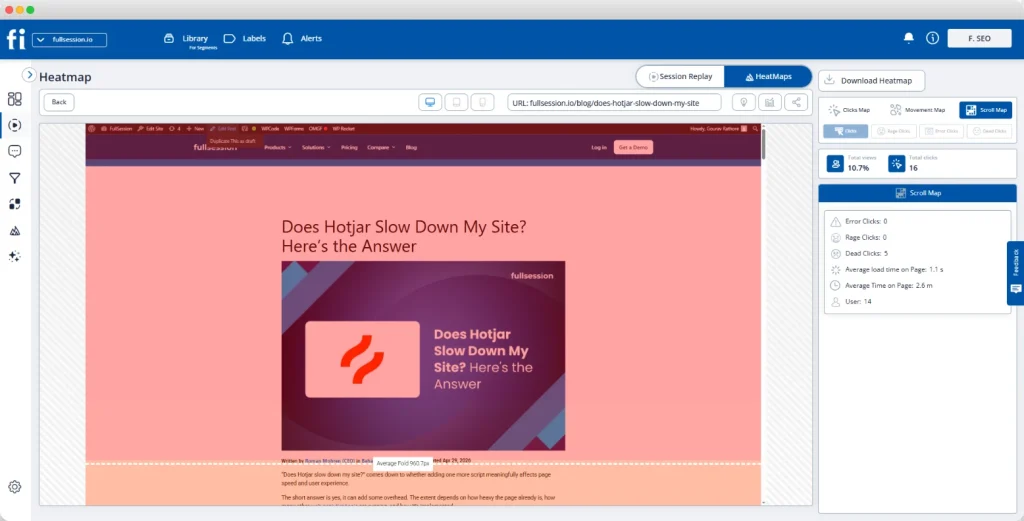
FullSession’s heatmaps aggregate user interactions across all sessions into a visual overlay. Click maps show where users interact most. Scroll maps show how far down users navigate before dropping off. Movement maps track mouse movements across your layout.
On key pages like product detail pages and landing pages, heatmaps reveal attention patterns individual replays can’t surface: the CTA below the scroll threshold for the majority of visitors, the nav element pulling clicks away from your conversion path, the trust badge nobody sees on mobile.
See how heatmap insights drive checkout optimization in practice.
Conversion funnel tracking
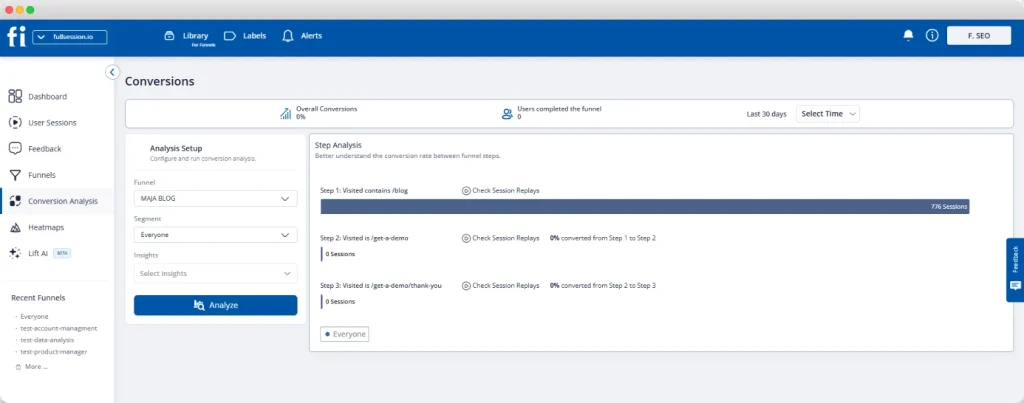
FullSession’s funnel tool maps each step of your ecommerce flow: product view, add to cart, checkout initiation, payment, and confirmation. It shows conversion rates and drop-off percentages at every stage.
Click any funnel step and FullSession surfaces the session replays from users who dropped off there. You go from knowing that roughly half your shoppers abandon between cart and checkout to watching exactly what they experienced at that moment.
See how conversion funnel analysis connects to replay in practice.
Error tracking and alerts

FullSession monitors your store for JavaScript errors, failed API calls, and broken interactions in real time. When an error spike hits your checkout page, you get an alert and a direct link to the session replays where that error appeared.
Your engineering team watches a real user session where the issue occurred, reads the attached console logs, and resolves in hours what used to take days.
Customer feedback integration
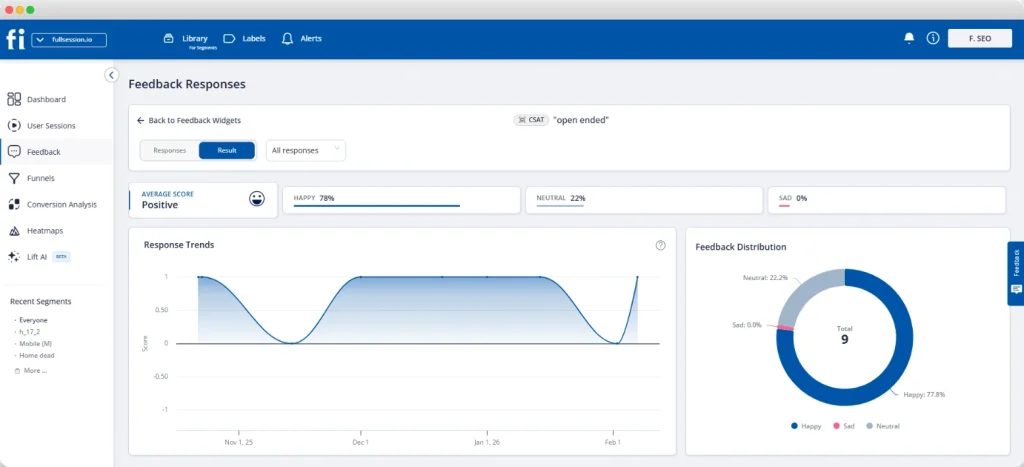
FullSession’s in-page feedback widgets let you ask shoppers a specific question at the moment that matters: on the checkout page, after an error, or when they’re about to leave.
Each response links automatically to the session replay from that visit.
When a shopper says “the checkout is confusing,” you click through to their session and watch exactly what they experienced. Direct feedback combined with user behavior context removes all ambiguity about what to fix.
Lift AI
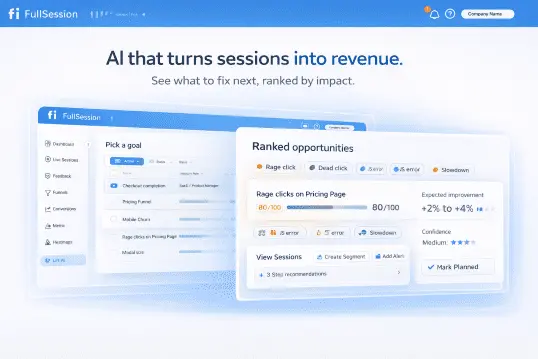
Lift AI reviews your session replay data automatically, identifies friction patterns across large session volumes, and surfaces the issues most likely to affect your conversion rates, ranked by severity and predicted revenue impact.
For ecommerce teams managing thousands of sessions per week, Lift AI answers “what should we watch?” before you open the session player. You start with a prioritized list of the user session replays that matter most, not a queue of recordings to sort through manually.
Start a free trial now.
Empower Customer Support and Product Teams
Session replay isn’t only for conversion optimization. Two more teams get direct value from it.
Using session replays for customer support
When a customer contacts customer support about a problem, the usual process involves back-and-forth questions to reconstruct what happened. Ecommerce session replay cuts that out entirely.
If the customer’s user ID is known, support agents pull the exact session from their visit and understand the issue in under two minutes. No reconstruction, no frustration, no re-explaining. The customer experience improves because resolution happens fast.
Connect session replays to your customer journey tracking workflow to give support and product teams a shared view of what’s actually happening.
Product team use cases for ecommerce
Usability testing traditionally requires scheduling participants, preparing scripts, and running moderated sessions. Session replay gives you a continuous alternative: real, unmoderated sessions from actual customers, captured as they shop.
Product teams use session replays to validate design decisions before shipping to all users and build evidence for roadmap priorities based on observed behavior, not stakeholder opinions.
When users encounter friction on a new feature, session replay surfaces it within hours of launch, not weeks later when it appears in your conversion trends.
Operational and Privacy Best Practices
Getting ecommerce session replay right operationally protects your customers and your team.
Privacy compliance checklist for US ecommerce teams
- Enable automatic masking for all password, payment card, and personally identifiable information fields before recording goes live in production.
- Add a cookie consent mechanism and CCPA opt-out for California users. Confirm your session replay vendor supports consent-based recording.
- Configure recording exclusions for logged-in account pages displaying order history, saved payment methods, or personal profile data.
- Set data retention to match your actual needs. Most ecommerce teams work with 30 to 90 days. Storing longer than necessary creates unnecessary compliance exposure.
- Confirm your vendor supports consent-based recording for GDPR and CCPA, and masks payment card and CVV fields at capture. FullSession does both, supporting PCI DSS scope reduction while keeping sensitive data off the recording server entirely.
Performance and site speed
A session replay script that slows your store costs you more than it saves. FullSession’s recording script runs as a background process and doesn’t block page rendering.
High-traffic teams should configure retention and capture rules based on privacy, performance, and plan limits.
Measure Impact and Track Outcomes
Session replay delivers the most value when it connects to a measurement loop.
Before-and-after conversion rate tracking
Before acting on any session replay insight, baseline your funnel metrics: the conversion rate at each checkout step, cart abandonment rate by device type, and exit rate on key product pages.
After shipping the fix, measure those same metrics against the baseline.
That’s how session replay becomes a revenue tool rather than a research exercise. The ecommerce checkout optimization workflow in FullSession makes this straightforward: set up your funnel before the fix, ship the change, and compare step-level conversion rates.
KPIs to track after session replay optimization
A meaningful KPI for session replay optimization is any metric that changes directly when a friction point is removed. Track these weekly after any change informed by session replay data:
- Checkout completion rate at each funnel step, segmented by device
- Cart abandonment rate on mobile vs. desktop separately
- Session duration on product pages (long sessions often signal confusion, not engagement)
- JavaScript error frequency on checkout and payment pages
- Rage-click rate on your key call-to-action elements
A successful fix shows measurable improvement within one to two weeks on a well-trafficked store.
Conclusion About Ecommerce Session Recording
Ecommerce session recording and replay is the missing layer between your analytics dashboard and the actual experience your customers have on your store. It answers what web analytics can’t: not just where shoppers drop off, but what they were doing and experiencing in the moments before they left.
FullSession connects session replay to heatmaps, conversion funnels, error tracking, customer feedback, and Lift AI. Your team doesn’t just watch what happened. They understand why, and they know what to fix.
Book a FullSession demo and see your store through your customers’ eyes. Or start a free trial and get your first session replays live today.
FAQs About Ecommerce Session Replay
What is the best user session recording software for ecommerce websites?
FullSession is the strongest choice for ecommerce teams that need more than basic playback. It connects session recording to heatmaps, conversion funnels, error tracking, and Lift AI in one platform. The right session recording tools for your store depend on your session volume, ecommerce platform, and whether you need an integrated workflow or a standalone recorder.
What is an ecommerce session recording?
An ecommerce session recording captures every interaction a visitor has on your online store during a single visit: clicks, scrolls, taps, and page transitions. Unlike a screen recording, it logs structured event data from the Document Object Model rather than video, making it lightweight, searchable, and privacy-safe by default.
What are sessions in ecommerce?
A session is a single continuous visit by one of your website visitors, from arrival to exit or 30 minutes of inactivity. Each session includes the pages users navigate, the actions they take, and the device they’re on. Session replay tools reconstruct these visits to give your team valuable insights into individual customer behavior.
What sites use session recording?
Session recording is used by ecommerce stores of all sizes, from Shopify merchants to enterprise retailers, and by SaaS companies, media publishers, and fintech platforms. For ecommerce specifically, it’s most valuable where customer behavior on product pages, carts, and checkout flows has a direct impact on revenue.

Roman Mohren is CEO of FullSession, a privacy-first UX analytics platform offering session replay, interactive heatmaps, conversion funnels, error insights, and in-app feedback. He directly leads Product, Sales, and Customer Success, owning the full customer journey from first touch to long-term outcomes. With 25+ years in B2B SaaS, spanning venture- and PE-backed startups, public software companies, and his own ventures, Roman has built and scaled revenue teams, designed go-to-market systems, and led organizations through every growth stage from first dollar to eight-figure ARR. He writes from hands-on operator experience about UX diagnosis, conversion optimization, user onboarding, and turning behavioral data into measurable business impact.