
“Does Hotjar slow down my site?” comes down to whether adding one more script meaningfully affects page speed and user experience.
The short answer is yes, it can add some overhead. The extent depends on how heavy the page already is, how many other web analytics tools are running, and how it’s implemented.
Hotjar points out that adding any JavaScript can influence site performance to some degree, so no impact-free outcome can be assumed. At the same time, they note that their script is built to keep that effect as small as possible, using async loading, CDN delivery, and browser caching.
In practice, the more useful question is whether the insight it provides is worth the tradeoff on pages where performance matters. This article looks at this issue in a bit more detail and explains what kind of impact you can expect, when it tends to matter, and how to limit it if needed.
How Hotjar’s Tracking Code Works
The Hotjar tracking code is a JavaScript snippet you paste into your site’s HTML once. It has four specific jobs.
- It queues any events that fire before the main Hotjar script has finished loading, so no interactions are lost.
- It uses your Hotjar ID to load the correct site settings and route collected data to your account.
- It stores your snippet version number so Hotjar can identify outdated code and notify you if an update requires replacement.
- It loads the main Hotjar script that activates data collection.
You need to place the tracking code on each page where you want this to work.
What Happens When You Add Hotjar?
Hotjar does not automatically break performance, but it can slow down your site when a page is already crowded with third-party code, media, experiments, or rendering work.
Hotjar’s help documentation explains that its usage tracking for session recordings and heatmaps is built to have minimal impact, partly because the script supports efficient execution in modern browsers and captures interaction data in a lightweight way.
The script samples user behavior continuously during page sessions for recordings and heatmaps. That matters because the browser still has to download the script, parse it, execute it, and keep it running while visitors move through the page.
Asynchronous loading helps, but it does not make the script free of performance cost or resource overhead.
Google’s Web Vitals guidance still expects a good user experience at the 75th percentile, with LCP at 2.5 seconds or less, INP at 200 milliseconds or less, and CLS at 0.1 or less.
Why Hotjar Can Affect Site Speed and Page Performance

When you install Hotjar, the browser must fetch the file, evaluate it, and keep it active as people move, click, and scroll, which adds to the overall page load time on every visit. On a lean site, that extra work may barely affect load speed.
On a heavier site with chat, consent banners, personalization, A/B tests, and other tools, the combined load can become noticeable. Hotjar says the script is designed to run efficiently, but it also says that adding JavaScript can negatively affect performance.
Hotjar’s documentation explains that its tracking for user recordings and heatmaps captures user interactions like clicks, scrolls, and DOM changes passively in the background. This lets features like feedback widgets, heatmap tools, and replays monitor how users interact with your pages without requiring any special user action.
It is also why the page may feel busier under the hood than a page with only a basic analytics tag.
Why overhead feels different from site to site
The same script can feel harmless on one site and expensive on another because each page has its own baseline.
If the page already spends a lot of time loading media, rendering components, and executing JavaScript, one more script can change the website’s performance enough to show up in page speed testing. If the page is already lean, the added cost may be too small to matter in practice.
According to the HTTP Archive Web Almanac, the median home page in 2025 was 2.4 MB on desktop and 2.36 MB on mobile, which shows how little headroom many sites have before another script starts to matter.
That average website size is a useful reminder that every extra request competes for limited browser resources like CPU, memory, and network capacity already stretched by images, fonts, CSS, and other scripts.
When Hotjar Is Most Likely to Hurt Performance
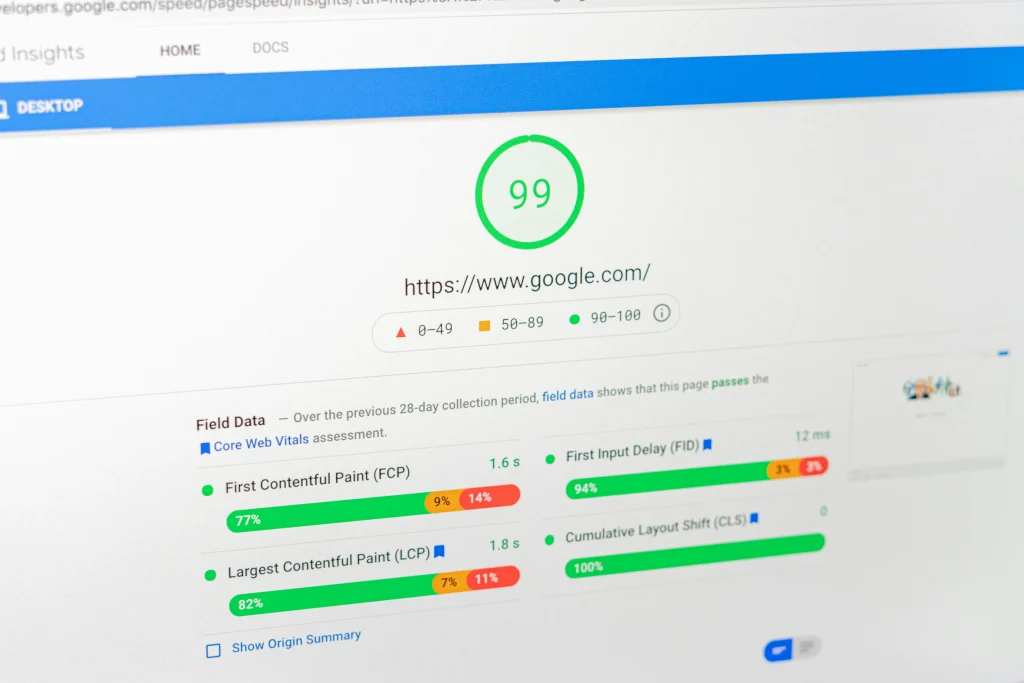
Hotjar is more likely to create measurable drag in these cases:
- Pages with high media weight or heavy component rendering
- Templates carrying many third-party tags from marketing campaigns
- SPAs with frequent DOM changes
- Checkout, signup, or lead-gen pages where milliseconds can change outcomes
- Traffic mixes where weaker mobile devices dominate
Those are the conditions where users drop, where Lighthouse or field data can flag regressions, and where teams start to wonder whether Lighthouse is being overly strict. It usually is not. Lighthouse is simply highlighting the work the browser has to do.
High-risk scenarios at a glance
| Scenario | Why risk rises | Likely result |
| Heavy landing page | Limited room for one more script | Longer paint or interaction delays |
| Tag-heavy stack | Multiple scripts compete for CPU | Slower responsiveness |
| SPA route changes | Frequent updates increase observation work | More scripting time |
| Conversion page | Small delays change intent | Higher abandonment risk |
| Mobile-first audience | Constrained devices feel the overhead first | More visible slowdowns |
This is why teams that load Hotjar across every route without a plan often end up reviewing the decision later. The larger risk is whether added code makes high-intent user sessions less responsive on a site that already carries too much script weight.
Common Implementation Mistakes That Increase the Issue
Many teams create their own trouble by deploying the tool carelessly. These are the most common mistakes:
- Enabling every module on every template, including during website revamps when new templates haven’t been audited for script weight
- Ignoring privacy configuration for sensitive input fields
- Treating one Lighthouse run as final proof
- Letting old tag-manager logic pile up after redesigns
- Failing to review consent and user privacy settings
Those issues matter because the real problem is often not the vendor alone. It is the combination of scripts, experiments, and media all firing at once.
How to Test Whether Hotjar Is the Actual Cause
The best way to test Hotjar is to compare the same page with and without the script under similar conditions. Use one controlled process and keep everything else stable.
- Pick a page that matters.
- Record baseline data with the tool removed.
- Add the script back.
- Repeat tests several times.
- Compare lab and field signals.
- Decide whether to keep, limit, or replace it.
Step 1: Pick the right page
Choose a page where performance matters to revenue or lead quality. Good options are pricing, signup, demo, checkout, or a heavily trafficked product page. Avoid using a low-value blog page unless it reflects your real bottleneck.
Step 2: Measure the baseline
Remove the Hotjar code and run a clean set of tests. Check filmstrips, request waterfalls, CPU activity, and the browser’s main-thread work. You want a before state, not a guess.
Step 3: Reintroduce the script
Add the tracking script back exactly as production would use it. Then rerun the same tests under similar conditions. If the page worsens consistently, the difference is evidence. If the change is small or noisy, look at the full stack before blaming one vendor.
Step 4: Compare business signals too
Don’t stop at synthetic tests. Look at form completion, checkout progression, rage clicks, and whether website visitor analytics show more friction on important journeys. Replay and analytics data matter only if they don’t compromise the path they are meant to improve.
Step 5: Separate “interesting” from “important”
A script can show up in a report without being the reason performance is meaningfully worse. Compare the overhead against outcomes such as conversions, lead quality, and retention, not just raw technical scores.
This process works because it evaluates Hotjar as part of the whole page. Hotjar itself points users toward testing tools such as WebPageTest when they want deeper analysis, and Google’s Web Vitals documentation explains why real-user thresholds matter more than single synthetic runs.
When Google Analytics tells you traffic is healthy but conversions are dropping, Hotjar’s qualitative data is often where you find the explanation.
How to Optimize Hotjar Usage
Start by deciding where replay is truly useful. Some pages justify session recordings, on-site surveys, and deeper observation; others do not. A focused Hotjar installation is usually safer than a blanket deployment across every route.
Then review feature usage. Hotjar offers a range of modules including scroll maps, feedback widgets, and a net promoter score survey tool. If your team mainly needs meaningful insights from a few key pages, you may not need every module or every behavior capture option. Teams often enable advanced features long before they prove they need them.
Next, audit the rest of the stack. Hotjar may not be the only script creating drag. Old chat widgets, pixels, A/B testing frameworks, stale tags, and duplicate trackers all compete for resources. If your page already carries a high page weight, even one extra script can matter more than it would on a leaner template.
According to the HTTP Archive Web Almanac, JavaScript remains one of the major contributors to page weight on modern home pages.
How to Reduce Overhead Without Losing Insight
Use this checklist:
- Restrict Hotjar to revenue-critical or research-critical templates
- Disable modules you don’t actively use
- Review consent logic and privacy masking
- Reduce duplicate measurements from overlapping tools
- Retest after every meaningful change, especially during key periods like product launches or seasonal traffic spikes
That gives you a cleaner answer than removing Hotjar in frustration and then losing the very data that explained why people hesitated, clicked, or abandoned.
For comparison, Google’s open source tool Lighthouse helps identify rendering and script issues, but it doesn’t replace replay-based diagnosis. Lighthouse, CrUX, and Hotjar each answer different questions, so the right decision depends on what your team actually needs.
How to Decide if Hotjar Is Worth Keeping?
Ask three questions before you decide:
- Does Hotjar measurably slow key revenue pages?
- Does it drive frequent, high-value team decisions?
- Can targeted pages or modules deliver actionable insights?
If the answer to the second question is yes, Hotjar may still be worth it. If it’s no, the script is just another moving part on a page already carrying marketing automation, ad pixels, consent logic, and testing tags.
Some teams also find the real issue isn’t session replay alone. It’s the combined weight of heatmaps, feedback widgets, tags, and experiments running together. That’s why simplifying the stack first usually leads to a clearer decision than switching tools straight away.
Consider replacing Hotjar when it creates repeatable regressions on high-value pages, when your team needs deeper journey analysis than it was designed to provide, or when your stack already has too much overlapping measurement.
A switch should be justified by observed performance and workflow fit, not by frustration or by procurement terms such as Hotjar pricing tiers, Hotjar cost comparisons and module limits. If Hotjar adds a small cost and your team uses it well, keeping it may be the smarter call.
Check out Hotjar alternatives to see your options.
Hotjar vs Lighter Alternatives: A Practical Framework
If you need a tool mainly for heatmaps, replay, and feedback, Hotjar may still be a reasonable fit. If you need stronger product analytics, broader funnel tracking, or less overlap with existing measurement, a more advanced solution may serve you better.
Here is a simple decision framework.
| Keep Hotjar | Limit Hotjar | Consider replacing Hotjar |
| Performance impact is small | Impact exists only on some pages | Impact appears on critical journeys |
| Data drives active decisions | Only a few templates need to be replayed | Replay value doesn’t justify overhead |
| Team relies on feedback modules | The scope can be tightened | Another platform covers needs more cleanly |
This is also where Hotjar pricing matters. Buyers often compare the free plan, paid plans, and whether a vendor reserves priority support or custom integrations for higher tiers. Those details matter commercially, but they shouldn’t override the performance question on their own.
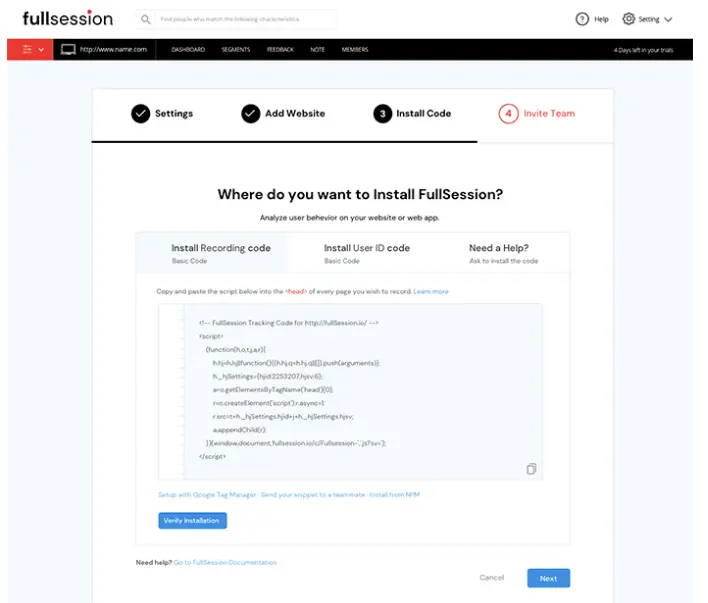
This is also where more advanced tools come into the picture. Platforms like FullSession go beyond heatmaps and basic replays, combining session tracking with deeper product analytics, funnel analysis, and more flexible data control without impacting your website performance.
How Hotjar Compares With FullSession

Hotjar works well for teams getting started with behavioral analytics. It covers session replay, heatmaps, and user feedback in a way that is easy to pick up, and for simpler use cases, that is often enough.
Where it starts to fall short is when teams need to track user interactions across the full product journey, react to issues as they happen, or scale without running into feature or pricing limits.
With FullSession, the main difference is not just having more features, but how everything ties together. Session replays connect directly to heatmaps, funnel drop-offs, error events, and in-app feedback in one place.
Hotjar shows you individual signals in separate views; FullSession lets you follow what actually happened in a single flow.On performance, FullSession’s SDK is designed to be lightweight and asynchronous, running on a separate thread to avoid blocking the main thread, so it doesn’t block the critical rendering path. Configurable sampling, efficient compression, and flexible capture settings keep overhead low on high-traffic or performance-sensitive pages, including mobile applications
A few other areas where FullSession goes further:
- Lift AI scans behavioral patterns continuously and surfaces the sessions most likely to affect conversions, so your team doesn’t have to manually hunt for what matters
- Errors and alerts detect rage clicks and JavaScript errors in real time, with each event linked directly to the session that triggered it
- Mobile session replay for iOS and Android runs on the same platform as desktop, with no separate tool or integration required
- Unlimited seats on all paid plans, so your product, support, and growth teams all have access without bumping up the bill
For more details, check out FullSession vs Hotjar.
Hotjar works well at the entry level. If you’re finding that your team needs more connected data, faster error detection, or a platform that scales without adding scripts or seat costs, FullSession is worth a closer look. Book a demo and see how it compares against your current setup.
Additional Considerations Before You Remove Hotjar
Hotjar can still be useful when you need qualitative data on friction, hesitation, and intent, especially on pages where standard analytics doesn’t explain why users leave before converting.
In these cases, the decision is not just about performance impact, but whether the insight is worth it during launches, seasonal spikes, or post-redesign reviews.
Before removing it, website owners should check how it behaves on your most important pages, especially those already running heavy media, A/B tests, and other third-party scripts.
Performance issues often come from the combined weight of multiple tags competing for browser resources, not a single tool alone. The same setup can behave very differently depending on page complexity and traffic patterns.
Hotjar also adds value through features like:
- Scroll depth tracking and heatmaps
- Surveys and NPS prompts
- Signals that help identify where users lose interest or encounter friction
For some teams, that context is worth the tradeoff. For others, especially those with complex front ends or mobile-heavy traffic, the impact becomes more noticeable on slower devices.
Is Hotjar GDPR compliant?
Hotjar is fully GDPR compliant and provides privacy controls and masking options, but compliance in practice depends on your specific setup, consent logic, and data-handling policies.
Hotjar support documentation covers the configuration steps in detail. Review how masking and sensitive data handling are configured and how data collection aligns with your actual use case.
Finally, feature value matters. Hotjar’s site tools can be useful, but the key question is whether they match your workflow.
Platforms like FullSession may offer deeper replay capabilities, real time analytics, a lighter implementation, or more integrations depending on what your team actually needs.
Conclusion
Hotjar is not inherently a bad tool. The issue is fit. On lightweight pages with high research value and controlled deployment, it can work well.
On already heavy pages, or when multiple scripts compete for resources, or when only part of the tool is actually used, it can start to have a noticeable impact on performance and user experience.
Curious whether FullSession is a better fit than Hotjar? Book a demo and take a closer look.
FAQs
Will Hotjar slow down my site?
Hotjar can slow a page when the script adds enough network, execution, and observation work to a page that is already busy. Hotjar says its script is designed for low overhead, but it does not promise zero impact.
How does Hotjar’s script affect page load?
The script adds download and execution work after the browser requests it. Hotjar says the script loads asynchronously, which helps reduce parser blocking, but the browser still has to do the work.
Could Hotjar affect my site’s performance?
Yes. Google’s Web Vitals guidance measures real-user performance thresholds, and any added JavaScript can push a page closer to those limits if the page is already heavy.
Why does Google PageSpeed say my site is slow with Hotjar?
Google PageSpeed Insights surfaces the work the browser must perform. If Hotjar appears in the report, it means the script contributed some cost, not necessarily that it was the only cause.
Does async loading mean Hotjar cannot hurt Core Web Vitals?
No. A script can use asynchronous loading and still affect LCP or INP if the page is resource-constrained or crowded with third-party work.
Is Hotjar safe for privacy-conscious teams?
Hotjar provides privacy controls and masking options, and teams should configure them carefully before rollout. Privacy readiness depends on your setup, consent logic, data-handling policies, and GDPR compliance.
Can Hotjar hurt Core Web Vitals?
Yes. Hotjar can influence Core Web Vitals because it adds extra script loading, execution, and ongoing tracking work, which can affect loading speed and responsiveness. It’s designed to be lightweight, but it doesn’t eliminate impact entirely. The effect is usually more noticeable on already complex pages like forms, checkout flows, or pages loading critical assets such as large images or web fonts.

Roman Mohren is CEO of FullSession, a privacy-first UX analytics platform offering session replay, interactive heatmaps, conversion funnels, error insights, and in-app feedback. He directly leads Product, Sales, and Customer Success, owning the full customer journey from first touch to long-term outcomes. With 25+ years in B2B SaaS, spanning venture- and PE-backed startups, public software companies, and his own ventures, Roman has built and scaled revenue teams, designed go-to-market systems, and led organizations through every growth stage from first dollar to eight-figure ARR. He writes from hands-on operator experience about UX diagnosis, conversion optimization, user onboarding, and turning behavioral data into measurable business impact.