Author: Mohamed Sehwail

  • What is Behavioral Targeting and How to Do It Successfully?

    What is Behavioral Targeting and How to Do It Successfully?

    Successful businesses should always seek innovative strategies to connect with their target audience effectively. One such approach popular in recent years is behavioral targeting. This method involves the analysis of online user behavior to deliver personalized content and advertisements.

    Your audience clicks, and you learn! Gathering data points like fireflies in a jar, lighting up patterns of your customers’ interests. Tailored messages that speak to them so personally, it feels like you’ve read their diaries… only with permission!

    In this article, we’ll guide you through what is behavioral targeting, why it is so important, and how to do it successfully.

    What is Behavioral Targeting?

    Behavioral targeting is a strategy that includes analysis of users’ online behaviors, enabling you to tailor content and advertisements based on their individual preferences and actions. This approach contrasts with traditional mass marketing, which casts a wide net with generalized messages.

    Instead, behavioral targeting uses the wealth of data generated by users as they navigate websites, click on links, make online purchases, and engage with various online content.

    Why is Behavioral Targeting Important Nowadays?

    You’re probably aware that traditional advertising often misses the mark and behavioral targeting becomes a digital marketing savior. It’s not about guessing what might tickle your customers’ fancy; it’s about knowing what does based on their past clicks and scrolls.

    If you analyze patterns such as purchase histories and web browsing behavior, you can deliver personalized ads that speak to each individual rather than shouting into a void.

    Digital-savvy consumers are no longer impressed by generic pitches. They crave personalized ads that reflect their interests, a kind of digital empathy if you will. And here lies the beauty of behavioral data: it helps craft those relevant ads that lead to improved conversion rates. Let’s face it, we’re more likely to buy something when it feels like it was made just for us.

    Behavioral Targeting vs. Contextual Targeting

    Everyone has probably experienced contextual targeting without even realizing it. Seeing an ad for dog food on a pet care blog seems logical enough but it doesn’t necessarily mean you have a pooch begging for treats back home.

    This is where behavioral stands tall over contextual methods as it goes beyond mere relevance to current content; instead digging deep into users’ online activities over time.

    Personalized ads crafted from rich internet activity insights can boost engagement so much so that six or eight times may be all they need before deciding “Yep, I’m getting this.” Remember The Rule of Seven? Well with targeted approaches honed by behavioral insights, these numbers aren’t just rules, they’re results waiting to happen.

    The Mechanics Behind Successful Behavioral Targeting

    If someone is browsing the web, and ads for that quirky gadget they Googled last week keep popping up. Coincidence? Not at all. That’s behavioral targeting flexing its muscles, turning your target audience’s online behavior into a goldmine when you want to sell your stuff.

    But, how to do it? Let’s see what this process involves.

    Collecting User Data as the First Step

    First off, we need user data, and lots of it, to kickstart our journey into targeted advertising. From every click to time spent on pages, these digital breadcrumbs are scooped up faster than free samples at a bakery.

    It’s like piecing together a jigsaw puzzle of user profiles; only instead of ending with a scenic landscape, you get detailed insights into consumer behaviors.

    This isn’t just any old data collection. It’s about capturing those moments when users show us their true colors through their browsing behavior and purchase histories. If you leverage this treasure trove using sophisticated data management platforms, you can place behavioral targeting ads so relevant they almost read minds.

    Profiling Target Audience Through Their Online Activities

    The era of employing a broad approach to attract a diverse audience is a thing of the past. Today’s strategy revolves around precision, akin to fishing with customized bait. Profiling comes down to dissecting online activities until distinct audience segments emerge from the sea of users’ web browsing patterns.

    We don’t just look at the user’s web browsing, we dig deeper because context matters. What good is an ad for steak knives if someone is researching vegan recipes?

    By sifting through heaps of clicks and scrolls with an eagle eye on contextual clues too, you can deliver messages that resonate more deeply than ever before. Stats show that personalized ads are preferred by 91% of consumers because they make shopping feel less like guesswork and more like destiny unfolding one click at a time.

    image of session recording details

    Advantages of Leveraging Behavioral Data in Advertising

    Tapping into behavioral analytics is like unlocking a treasure chest for advertisers. With it, you can boost user engagement and ramp up conversion rates by tailoring your approach to match consumer behaviors.

    Enhancing Consumer Experience with Personalization

    We’ve all been there. Scrolling through the web when an ad pops up that feels like it was made just for us. That’s no coincidence, it’s successful behavioral targeting at work. By collecting nuggets of user data, from what they click on to how long they linger on a page, you can serve personalized ads that hit the mark way more often than traditional advertising ever could.

    Getting tailored recommendations based on past purchase histories or browsing behavior makes the online customer experience smoother and frankly, less annoying. This kind of relevant ad experience not only keeps consumers happy but also nudges them closer to making a purchase, hence improving conversion rates multifold.

    The beauty here lies in the subtlety. It’s about showing users they’re understood without overstepping privacy lines. Crafting ads based on users’ interests derived from their web browsing activities means you’re providing value while respecting boundaries.

    Crafting User Personas for Precision Marketing

    The days when ‘spray and pray’ tactics worked wonders in marketing campaigns are over. Today, precision is key, and creating detailed user personas helps unlock it. Imagine being able to pinpoint exactly who your ideal customer is using demographic info combined with their digital footprints across various management platforms.

    It’s like having x-ray vision into consumer habits which lets businesses place behavioral targeting companies right where they need them most.

    Digging deep into these insights allows you to create advertising messages that resonate deeply because they’re built around real-life behaviors rather than assumptions. Think of higher click-through rates because every message feels handpicked for each individual recipient. It doesn’t get much better than this.

    How to Create Buyer Personas for Behavioral Marketing

    Imagine being a detective, but instead of solving crimes, you’re decoding the DNA of your ideal customer for your advertising campaign. That’s what crafting buyer personas is all about, piecing together clues from demographic and psychographic data to nail down who really wants what you’re selling.

    Using On-page Surveys to Understand Your Audience

    Ever wish customers would just tell you straight up what they want? Enter on-page surveys. They’re like having a chat with your site visitors without needing to bring them coffee. These interactive quizzes can reveal important information about consumer preferences that are more telling than basic analytics could ever dream of being.

    You’ll learn stuff that goes beyond age or location. You’ll get the scoop on their pain points, desires, and even hobbies. Now, you’ve got yourself one fine-looking persona sketch.

    Conduct Customer Interviews for In-depth Insights

    If on-page surveys are first dates, then customer interviews are those deep conversations at 2 AM that leave an impression long after they’ve ended. By engaging in one-on-one dialogues, we dive deeper into the minds of our consumers.

    We aren’t talking small talk here; these interviews allow us to construct comprehensive profiles packed with insights no algorithm could guess, like why someone prefers eco-friendly products or splurges online post-breakup (it happens).

    Digital marketing can sometimes feel like shouting into the void, but not when armed with killer buyer personas crafted from rich layers of behavioral insights. When done right, ads become less “Hey buy this.” and more “I totally get you.”

    Personalized ads based on actual interests lead users down paths lined with relevant content rather than annoying dead ends filled with irrelevance. That’s successful behavioral targeting doing its magic dance toward improved conversion rates.


    How to Include Best Practices In Your Behavioral Campaigns

    To hit the bullseye with behavioral targeting, it’s not just about knowing your target audience; it’s about becoming a mind reader of sorts. You’ve got to collect relevant data points like you’re crafting tips to implement successful campaigns that make competitors weep.

    First things first: let’s talk user engagement. Behavioral tracking is all about reading digital body language, the clicks, scrolls, and hovers that tell you what users want even when they don’t say it out loud.

    By understanding these silent signals through real-time data analysis, you can tailor your ads so well they feel like personal letters from an old friend rather than generic billboards on the information superhighway.

    Creating Audience Segments That Stick

    Gathering information is crucial in this whole process. When collecting user data, consider it as assembling components for a valuable puzzle. Each piece signifies distinct online behaviors or purchase histories.

    Then, with personalized ads derived from web browsing behavior and additional insights like email campaign performance or past brand interactions across various instances, your approach shifts from aimless attempts to targeted precision.

    The Art Of Personalized Messaging

    Effective messages seem like those carefully wrapped presents under the Christmas tree, capturing attention as they are chosen specifically for your customers. The effectiveness of these messages relies on a deep understanding of consumer behaviors, facilitated by management platforms capable of handling intricate datasets seamlessly.

    Insights derived from significant data reveal the potential for higher click-through rates through the integration of highly personalized content at every stage of user engagement within behavioral strategies.

    The goal here is to make users feel valued and unique. Who doesn’t love feeling special?

    Get FullSession’s Behavioral Analytics Tools For a Successful Campaign

    To make the whole process more effective, FullSession’s robust suite of analytical tools can help with gathering behavioral data. Designed to decode user interactions seamlessly, FullSession provides a comprehensive arsenal to enhance your behavioral targeting strategies:

    • Session recordings: This tool helps you gain valuable insights by replaying user sessions, so you can witness firsthand how visitors navigate your website. Now you will see the pain points, user preferences, and areas of improvement and refine your targeting approach.
    • Interactive heatmaps: Heatmaps let you visualize user engagement patterns. This tool highlights the hotspots and cold zones on your website. Once you know where users concentrate their attention, you can strategically place targeted content for maximum impact.
    • Funnel and conversions: FullSession’s tools also allow you to map out user journeys, from the initial interaction to conversion. Identify drop-off points, optimize conversion paths, and tailor your messaging at each stage to guide users seamlessly through the conversion funnel.


    Start Behavioral Targeting With FullSession

    It takes less than 5 minutes to start your behavioral targeting campaign with FullSession, and it’s completely free!

    FullSession Pricing Plans

    FullSession Pricing

    Here are more details on each plan.

    • The Starter plan costs $39/month or $32/year and allows you to monitor up to 5,000 monthly sessions with up to 6 months of data storage.
    • The Business plan costs $75/month or $60/year and helps you to track and analyze up to 100,000 monthly sessions with up to 12 months of data storage.
    • The Enterprise plan has custom pricing and offers customizable sessions plus full access to all features.

    Book a demo today.

    FAQs in Relation to Behavioral Targeting

    What is an example of behavioral targeting?

    An ad for running shoes pops up because you’ve been looking at fitness articles and race schedules lately.

    What is behavioral advertising?

    Behavioral advertising targets ads based on your browsing history, clicks, and online habits to show relevant offers.

    What is behavioral targeting vs contextual targeting?

    Behavioral hones in on user activity; contextual focuses solely on the content of the page being viewed.

    What is targeting in consumer behavior?

    Aiming marketing efforts at specific groups based on their purchasing actions, preferences, and habits hits the mark every time.


  • Top 9 Website Optimization Strategies: The Complete 2025 Guide

    Top 9 Website Optimization Strategies: The Complete 2025 Guide

    Creating a superb product or service is something we all like, but 89% of consumers will go to your competitor after a poor user experience. And this is where good website optimization strategies come to the scene. They can help you outrank your direct rivals, and grab a bigger market share. Which we all fight for, right?

    In this article, we will show you some of the best strategies and optimization techniques that can help you rank higher in search engines, and more importantly—build a solid website that will be ready to deliver.

    What is Website Optimization?

    Website optimization, or as industry professionals know it, Search Engine Optimization (SEO), is the process of improving a website to increase its visibility when people search for products or services that are related to the business in search engines like Google, Bing, etc.

    If you want to optimize your website, you need to apply multiple techniques, as Google Search Console takes multiple factors into the picture:

    1. Site speed
    2. Website content quality
    3. Mobile compatibility
    4. Website organization, etc.

    The more boxes you tick, the better your user experience will be.

    What Are The Goals of Website Optimization?

    Website optimization, after all, wants to optimize the website resources and achieve the full potential of the product or service. But what are the main targets?

    • Increase the web traffic
    • Improve the user experience
    • Boost the conversion rates
    • Build more brand visibility and awareness
    • Achieve a better ROI (Return-on-Investment).

    9 Best Website Optimization Strategies

    Website Optimization Strategies

    Website optimization strategies are crucial if you want to improve user experience and achieve your business goals. They are the difference between a successful business and a promising one that hasn’t lived up to expectations. Let’s see the 10 crucial website optimization strategies that can make or break your website.


    1. Incorporate Mobile-First Design

    With over half of global web traffic coming from mobile devices, a responsive design isn’t just smart. It’s essential. Such a strategy means designing your site for smaller screens first and then scaling up. The payoff? A much better user experience could help keep those ever-impatient mobile users engaged.

    The key is simplicity and speed. Think big buttons, responsive layouts, minimalistic menus, and lightning-fast load times. Google loves this approach, too, because it aligns with their focus on mobile-first experience—so much so that they’ve made mobile-friendliness a ranking factor. 

    2. Optimize Content to the Best On-Page SEO Practices

    You can have the sleekest website around, but without solid content marketing in place, you might as well be winking in the dark—the right people just won’t find you. Let’s see some of the best SEO practices you may have to apply:

    • Focus on creating high-quality, informative, and engaging content. Your content should provide real value to your audience and answer their questions, needs, and interests. Well-researched, original, and relevant content is more likely to attract more readers.
    • Try to answer search intent. You don’t need SEO tools to see it. Just use Google or a SERP API to get these insights. 
    • Identify and target the right keywords that your audience is searching for. Use these keywords strategically in your content – in titles, headings, the body of the text, and meta descriptions.
    • Organize your content using header tags (H1, H2, H3, etc.). It helps search engines understand the structure and key points of your content.
    • Include relevant images, videos, infographics, and other multimedia elements. These can help explain complex topics, break up text, and engage users. 
    • Regularly update your content to keep it current and relevant. It is especially important for topics that change frequently.

    3. Spend Some Time on Technical SEO

    Technical SEO is the part that is related to how well the site is structured. It is crucial for improving a website’s structure and ensuring it’s easily navigable by both users and search engines. Some of the aspects of the strategy focus on:

    • Improving site structure for better crawlability and indexing by Google.
    • Correct technical errors and broken links.
    • Make sure the robots.txt file is accurately guiding search engine crawlers.
    • Use Google Search Console to monitor site indexing and address any issues.
    • Conduct content audits to find and improve or remove underperforming content.
    • Do not forget about the core web vitals, as they can significantly boost your visibility.

    4. Improve User Experience (UX)

    The user experience analysis is among the most common website optimization strategies. Why? When UX hits sweet spot levels after optimization, you can see bounce rates drop by a lot while time spent on a page goes up significantly.

    Websites optimized for UX don’t just look good—they feel good too. They anticipate user needs before even users do it themselves. And let us tell you, when someone finds using your site easier than snapping their fingers, they’re bound to come back for more.

    5. Improve Page Load Speed

    Website speed is among the ranking factors which often gets underestimated. Site speed can sometimes be a deciding factor for user retention and engagement. A faster loading site improves user experience and is favored in search engine rankings. 

    Some key strategies to improve page load speed include (but are not limited to) optimizing image sizes, leveraging browser caching, minifying CSS, JavaScript, and HTML files, using a content delivery network (CDN), and ensuring efficient server response times. 

    6. Optimize Images and Videos

    A huge part of the optimization process is related to media files, albeit some web admins and SEOs don’t take full advantage of it. You should compress images without compromising quality, and you can easily do so with online tools like TinyPNG or ImageCompressor.  

    Use the appropriate file formats (JPEG, PNG, etc.) and implement lazy loading for images to load only when they come into the user’s viewport.

    7. Analyze Your Performance and Monitor Progress

    Knowing if optimization practices work is, without a doubt, paramount for your website’s success. Analyzing performance and monitoring progress is essential in website optimization, as you can see if there are any website issues.

    You can use tools like Google Analytics and Google Search Console to track website performance with key metrics such as traffic, bounce rate, conversion rate, and page load times.

    8. Include Link Building

    Link building is an effective optimization strategy, as it helps Google understand that you are a trustworthy source. When other credible sources cite or link back to your website, it signals authority and boosts your search rankings.

    Using a link building agency can be beneficial too, to save you time and effort. For example, if you own a SaaS, you can partner with a SaaS link building agency to acquire you backlinks on autopilot.

    It can also elevate your average position in search results, ultimately driving more traffic to your site. Some of the ways you can get more external links is to create content that is helpful for your website visitors and build relationships with other industry members so you get valuable mentions.

    9. Test, Test, Test

    No matter what you do, you can’t really bring more website users, if you don’t know what works, and what doesn’t. A/B and multivariate tests can offer some great benefits that can help you rank higher. 

    Both testing methods can significantly boost site performance. A/B testing is ideal for gaining clear insights into single changes, while multivariate testing is best for optimizing multiple aspects of a page simultaneously. But the latter is a bit more complicated, so have that in mind.

    What Are the Benefits of Optimizing Your Website?

    The benefits of website optimization will impact the functionality of your site and contribute to your brand’s image and online visibility. Here are some of the key benefits you’ll gain:

    • Better user experience: Website optimization strategies lead to better page loading speed and responsiveness. A user-friendly interface encourages visitors to engage for longer and interact with you content more.
    • Improved traffic: Once your website is at the top of search results, it will get increased traffic. The more people visit it and interact with it, the longer it will remain at the top position.
    • Increased conversion rates: A well-optimized website will positively impact conversion rates. This will ensure higher conversion rates, whether it’s sales, sign-ups, or other actions.
    • Positive impact on brand image: A fast, user-friendly, and technically sound website will have a positive impact on your brand image. Visitors usually associate a well-optimized site with professionalism and trustworthiness.
    • Analytics-driven decision-making: Optimization also involves constant monitoring and analysis of website performance metrics. When you use analytics tools, you gain insights into user behavior, preferences, and trends. It also allows you to easily identify areas for future improvements.

    How Can FullSession Help With The Optimization Process?

    interactive heatmaps

    If you want your business to succeed, you need to know your target audience very well. It means being aware of every action they take on your website. Knowing your customers’ behavior will help you understand what they want. Where did they click and why? 

    FullSession offers useful features that can help you track this. Let’s take a look at how they work.

    1. Session Recordings

    The session recording tool allows you to get a detailed overview of your customers’ behavior on your website. It captures the real-time journey of your customers as they navigate through your website by recording mouse movements, clicks, and interactions.

    This tool will help you find pain points and areas of interest. You can also spot and fix any usability issues, technical glitches, or other challenges they may encounter during their visit.

    2. Interactive Heatmaps

    Interactive heatmaps can help you visualize user engagement patterns by highlighting areas of high and low activity on your website. They can be applied to pages and specific elements or forms.

    The main benefit of website heatmap tools is that you can see which sections of your website are receiving the most attention. Use this data to optimize your content, calls-to-action and any visual elements.

    3. Funnel Optimization

    Funnel optimization keeps an eye on how users move through certain paths on your website, like buying something or filling out a form. This tool lets you see where users stop and leave the website. Then you can make those paths better so more people finish what they came to do.

    This way, you can base your website optimization strategies on concrete data rather than assumptions. Once you know which areas to optimize, it will lead to higher conversion rates.

    Optimize Your Website With FullSession

    It takes less than 5 minutes to get your website optimization tools, with FullSession, and it’s completely free!

    FullSession Pricing Plans

    FullSession Pricing

    Here are more details on each plan.

    • The Starter plan costs $39/month or $32/year and allows you to monitor up to 5,000 monthly sessions with up to 6 months of data storage.
    • The Business plan costs $75/month or $60/year and helps you to track and analyze up to 100,000 monthly sessions with up to 12 months of data storage.
    • The Enterprise plan has custom pricing and offers customizable sessions plus full access to all features.

    Book a demo today.

    Conclusion

    Now you’ve got the lowdown on website optimization strategies. You know what they are, why they matter, and how to use them. Remember this: faster load times keep users happy. A sleek design turns heads. Solid SEO gets you found. And analytics? They’re your roadmap to success.

    Tune in to FullSession for even more insight into refining your site’s performance. Make it a magnet for both new visitors and loyal customers alike.

    FAQs in Relation To Website Optimization Strategies

    How do you optimize a website?

    To tune up your site, focus on loading times, mobile-friendliness, SEO practices, quality content, and strong call-to-actions. It’s all about the user journey.

    What are some techniques for improving website performance?

    You can boost your site speed if you compress images, minimize code bloat, and ditch unnecessary plugins.

    What is website performance optimization?

    Website performance optimization is a process that wants to improve the site’s speed, efficiency, and usability to improve user experience, increase engagement, and boost search engine rankings.

    What are website optimization strategies?

    Website optimization strategies are strategies that aim to improve the general website health, rank it higher in search engines (like Google), and bring more traffic.


  • How To Ask Open Ended Questions? (5 Examples)

    How To Ask Open Ended Questions? (5 Examples)

    When you get feedback from customers, the goal is to get real insights, not just yes or no answers. Open ended questions are your ticket there. They’re like keys that unlock what’s really on your customer’s mind, giving you the full picture. Think of them as conversation starters; they invite people to share their thoughts in detail.

    Read on to learn what open-ended questions look like, compare them with close-ended questions, and see some valuable examples which can help collect quality feedback from your customers.

    What Are Open Ended Questions?

    Open-ended questions are questions that allow the reader to answer in any way they like, rather than just a yes or no. They are a useful way for companies to gather detailed feedback from their clients or employees. 

    The format is commonly used in customer feedback surveys, as it provides much deeper insights than the standard Yes-No questions. Open-ended questions often begin with words like “how,” “why,” “what,” or “describe,” so they can invite respondents to explain, elaborate, or explore a topic in detail.

    Differences Between Open-Ended Questions and Closed-Ended Questions

    While closed-ended questions require readers to choose a single-word answer, often ‘yes’, ‘no’, and sometimes – ‘maybe’, open-ended questions allow readers to answer in their own words and share their opinions.

    Here are some examples of open-ended questions:

    • What do you like about our product?
    • How was your onboarding experience?
    • Which are your favorite features from our product and why?

    Let’s see some closed-ended questions, too:

    • Do you like our product?
    • Was your onboarding experience enjoyable?
    • Do you like our dashboard feature?

    When you are gathering product feedback, the main benefit of open-ended questions is letting readers express their experiences however they want it, rather than how you frame the question. 

    How to Write Open-Ended Questions?

    Open-ended questions should start with words that can lead readers into giving detailed answers, instead of short ones. And here, we’re going to show you how to write an open-ended question in a couple simple steps:

    1. Focus on asking questions that start with ‘How,’ ‘Why,’ or ‘What’.
    2. Avoid questions that lead to a particular answer.
    3. Encourage readers to provide a descriptive response rather than a one-word answer.
    4. Ask follow-up questions to allow readers to explain the answer in more detail.

    4 Tips for Effective Open-Ended Questions

    You might be wondering how to compose your survey questions so you get the the best possible answers. And it’s understandable. Let’s see three useful tips that can help you get a detailed response.

    1. Your Question Should Be Easy-To-Answer

    Your questions should always be clear and concise. It should be straightforward enough that respondents don’t feel confused. But make sure it’s also broad enough to allow for a spectrum of responses; you’re looking for context here, not just black-and-white facts.

    2. Don’t Lead the Question

    Avoid leading the reader. Phrasing matters a lot because even the slightest suggestion can steer an answer off course. You need to encourage respondents to express their opinions openly, so you can gather valuable feedback and enhance your product.

    3. Don’t Make Assumptions When You Have Answers

    The best way might be through curiosity without presumption. It’s tempting to assume we know what our customers think but it may not be accurate. Instead ask something genuinely curious about their experience without any hint of assumption baked in.

    4. Encourage Readers to Write Free-Form Answers

    Provide just enough detail to guide readers but leave room for personal interpretation. Instead of asking them if they like the product, you can ask them to describe their own experience. 


    Open-Ended Question Examples

    If you’ve ever been on the receiving end of a “How was your day?” that led to an unexpected heart-to-heart, then you know the power of an open-ended question. In customer feedback and surveys, these types of questions are like gold mines for digging into what your customers truly think and feel about their experience with your product or service.

    Question 1: Can you describe how our product made a difference in your daily routine?

    This question is designed to let customers share their stories. It’s not just asking if they liked the product; it’s probing deeper—how did it integrate into their life? You might find surprising ways people use your products or meaningful impacts that never crossed your radar.

    Question 2: What challenges were you hoping to address by using our service?

    Aiming straight at the ‘why’ behind a purchase can give insights beyond surface-level satisfaction metrics. The query opens up conversations around expectations versus reality, which can be critical when fine-tuning offerings or developing new features.

    Question 3: If you could change one thing about our platform, what would it be and why?

    We’re not fishing for compliments here—we want constructive criticism. Encouraging frankness may seem scary but trust us—it is where growth happens. Users will often provide actionable suggestions that can drive innovation within FullSession’s website and product feedback software.

    Question 4: How do you see yourself continuing to use our app in the future?

    This forward-looking inquiry doesn’t just ask users if they’ll stick around—it gets them envisioning long-term engagement with your brand. Plus, understanding ongoing user needs helps anticipate market trends so we stay ahead rather than play catch-up.

    Question 5: How easy or difficult was it to learn to use our product? Can you elaborate on your learning experience?

    Such a question can be pretty helpful to gather useful insights from your target audience. You need to ask questions which promote critical thinking, so you can get as much information as possible from survey respondents. 

    What Is the Role of Open-Ended Questions in Collecting Customer Feedback?

    Compared to close-ended questions, open-ended questions encourage respondents to elaborate on certain topics which can help you get interesting answers and opinions on your product from a customer’s perspective. 

    Think about it: when you ask someone “How was your day?” you get much more than if you’d asked “Was your day good?” Open-ended questions in surveys work the same way. They give us detail—the ‘whys’ behind the ‘whats.’ 

    How to Gather Rich Feedback Through FullSession?

    To gather rich feedback effectively using FullSession’s website, businesses should create open-ended questions that allow them to gain deeper knowledge of what customers truly think. It can also boost your customer experience analysis by a mile.

    With features designed specifically for capturing comprehensive user sentiment, FullSession provides both flexibility and depth in survey design and lets companies not only hear but understand every chuckle, sigh, rant—or rave. 

    How to Use Open Ended Questions for Feedback?

    Gathering authentic, insightful customer feedback can be as much of an art as it is a science. Open-ended questions are the paintbrush that helps you color outside the lines of yes-or-no data, revealing the nuanced opinions and experiences of your users. With FullSession’s website and product feedback tools, tapping into this wealth of qualitative information becomes simpler.

    1. Set Up Your Feedback Framework

    To start, ensure your survey or feedback form includes sections where customers can express their thoughts freely. 

    Create prompts that feel like a conversation rather than an interrogation. Think: ‘Tell us what you love about our checkout process’ instead of ‘Do you like our checkout process?’. It’s these little tweaks in phrasing with FullSession’s customizable forms that let customers know you’re genuinely interested in their input.

    2. Capture In-Depth Insights

    When using FullSession, capture not only what readers type but also observe how they interact with your site through session recordings before and after providing feedback. These behavioral breadcrumbs lead to richer insights – why did several users mention difficulty finding information even though navigation seems intuitive?

    This dual-lens approach enables deeper understanding by correlating user actions with their articulated concerns or praises, giving context to otherwise isolated comments.

    3. Analyze Responses Effectively

    Once responses flood in through FullSession surveys filled with well-crafted open-ended queries, sorting them might seem daunting—but fear not. Categorize responses based on themes such as usability issues or feature requests which help identify common threads across diverse user inputs.

    Leverage built-in analytics tools to sift through qualitative data efficiently—no manual labor required here—and get ready for some eye-opening patterns that could redefine how you perceive user satisfaction (or lack thereof).

    4. Incorporate Feedback Into Strategy Development

    You’ve got the quantitive data needed for success. Now it’s time to put it to work. Use these insights from open-ended question analysis via FullSession reports to inform business strategies and development priorities directly linked back to real-user needs because nothing beats making decisions based on direct-from-the-source intel.

    Install Your First Website Feedback Form Right Now

    It takes less than 5 minutes to set up your first website or app feedback form, with FullSession, and it’s completely free!

    FullSession Pricing Plans

    Fullsession Pricing

    Here are more details on each plan.

    • The Free plan is available at $0/month and lets you track up to 500 sessions per month with 30 days of data retention, making it ideal for testing core features like session replay, heatmaps, and frustration signals.
    • The Growth Plan starts from $23/month (billed annually, $276/year) for 5,000 sessions/month – with flexible tiers up to 50,000 sessions/month. Includes 4 months of data retention plus advanced features like funnels & conversion analysis, feedback widgets, and AI-assisted segment creation.
    • The Pro Plan starts from $279/month (billed annually, $3,350/year) for 100,000 sessions/month – with flexible tiers up to 750,000 sessions/month. It includes everything in the Growth plan, plus unlimited seats and 8-month data retention for larger teams that need deeper historical insights.
    • The Enterprise plan starts from $1,274/month when billed annually ($15,288/year) and is designed for large-scale needs with 500,000+ sessions per month, 15 months of data retention, priority support, uptime SLA, security reviews, and fully customized pricing and terms.

    Book a demo today.

    Conclusion

    Open-ended questions are a valuable tool for companies to gather detailed feedback from their clients or employees. Unlike yes or no questions, they allow individuals to respond in any way they choose, providing more comprehensive and insightful information.

    You can use these questions to open conversations that reveal valuable feedback which your cannot access if your provide a limited number of answers (which is the territory of closed-ended questions.)

    FullSession’s tools can help collect and analyze customer responses effectively and make sure nothing slips through the cracks.

    FAQs In Relation to Open-Ended Questions

    Are multiple choice questions open-ended questions?

    No, they are not. Multiple-choice questions are leading questions, because they provide pre-generated answers.

    What are two characteristics of open-ended questions?

    Open-ended questions start with ‘how’, ‘what’, and ‘why’. They also allow businesses to build rapport with their consumers, as the latter will feel understood and appreciated.

    Is it good to use open-ended questions?

    Yes, open-ended questions can provide companies with much broader insights from their customers. Many Fortune 500 companies are using them as a way to uncover hidden problems or find areas for improvement.

    What is an example of an open-ended question statement?

    Good open-ended questions examples include questions like, “Describe how you use the app in your daily routine.” and provoke a deeper thought, rather than one-word answers.

  • Best 7 Customer Journey Mapping Tools to Skyrocket Conversions

    Best 7 Customer Journey Mapping Tools to Skyrocket Conversions

    Understanding your customer’s journey is the root of increasing conversions. Customer journey mapping tools give you the ability to visualize their path, pinpointing where users join or drop off.

    In this article, we’ll take a look at the best customer journey mapping tools that help you plan and understand your customer funnel.

    What Are Customer Journey Mapping Tools?

    Customer journey mapping softwares are used to analyze your current customer or user journey on your website or product, and optimize it using that analyzed data. Essentially, these tools give you the ability to run a customer experience analysis.

    These tools capture data at every touchpoint you have along your customer journey, highlighting where customers love your UX or product, or where they get frustrated.

    These analytics and insights into your customer journey help tweak marketing strategies and targeting. You’ll ensure for people land on your site, or go through your product onboarding, their experience is optimized to give them the highest level of satisfaction. The only way of doing this is by understanding each step on their journey, and optimizing them.

    Luckily, there are tools that do this all for you.

    List of the Best Customer Journey Tools In 2024

    1. FullSession

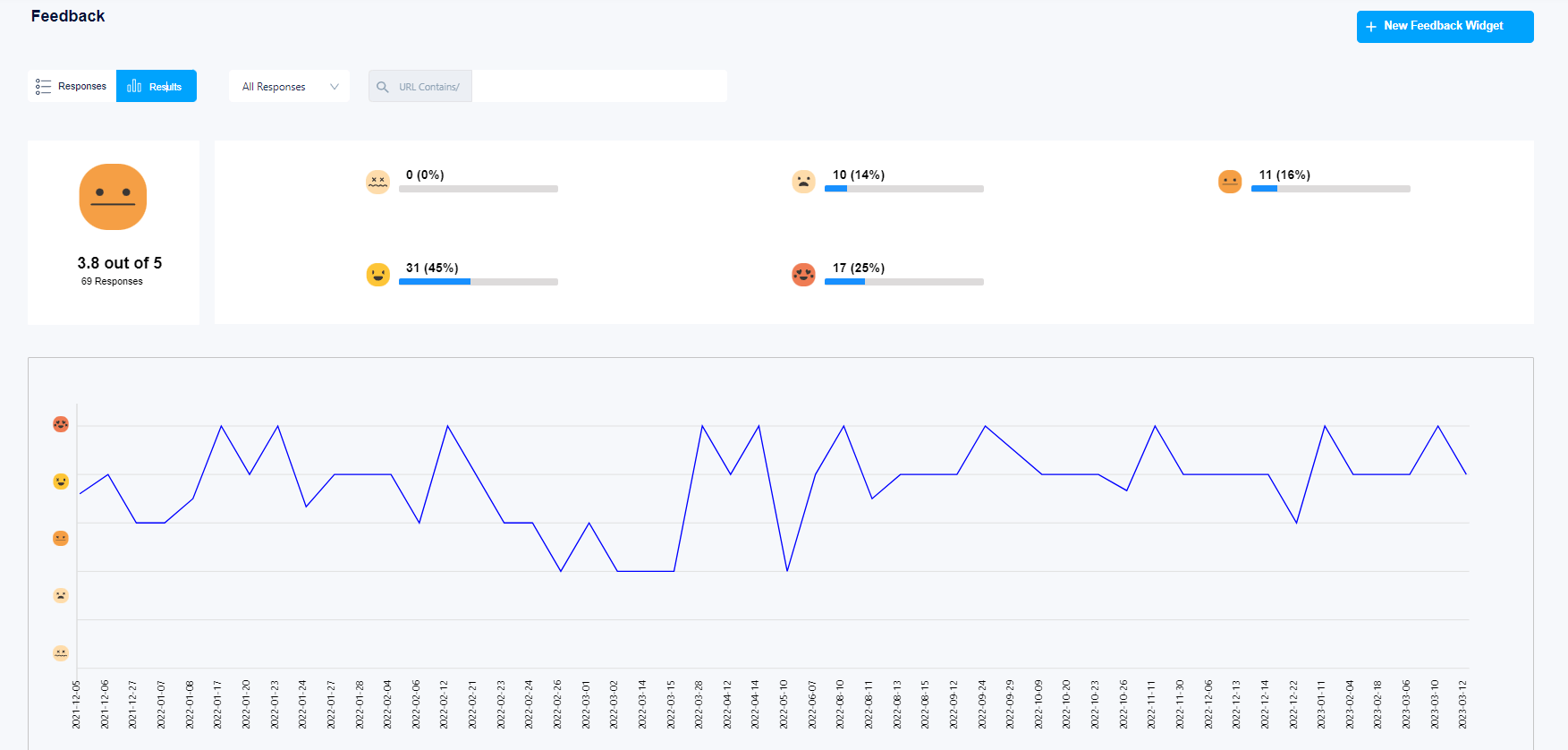
    FullSession feedback analytics

    When it comes to customer journey mapping, FullSession stands out for its ability to breakdown each step of the customer journey, in several ways. You get insight into each step of the customer journey through:

    • Session Recording
    • Heatmaps
    • Feedback and Surveys

    FullSession also has a funnel optimization and analysis tool that brings all data points from those tools, and breaks it down for you.

    Visualize, Analyze, and Optimize with FullSession

    See how to transform user data into actionable insights for peak website performance.

    Session Recording

    Session recording software provided by FullSession allows you to see the recording of every visitor to your site. Alongside the actual recordings, you get data points to analyze with each user.

    Utilizing this tool means you can see the way user’s interact with certain sections of your site, CTA’s, etc. And this is all broken down for you by FullSession’s software using custom analytics like “U-turns” which shows user confusion.

    session recording dashboard by fullsession

    Heatmaps

    Heatmaps provided by FullSession take complex data points and create different thermal visuals. There are various types of heatmaps, and these work alongside session recordings. The various types of heatmaps are:

    • Click Maps
    • Scroll Maps
    • Mouse Movement Maps

    Learn more about what a heatmap is, and how to best use them to increase conversions.

    fullsession heatmap software

    Feedback and Surveys

    Feedback surveys help you understand and map the customer journey on your site by surveying customers at any point in their journey. FullSession gives you the flexibility to choose any point in the customers journey to survey them or collect feedback, and with several different methods of distributing them.

    A disclaimer to this is, you may need a substantial amount of site visitors to collect effective results for optimizing the customer journey. Although, any amount of survey or feedback responses is valuable.

    fullsession feedback widget

    Connect FullSession and Map Your Customer’s Journey Instantly

    It takes less than 5 minutes to set up your first website or app, with FullSession, and it’s completely free!

    FullSession Pricing Plans

    FullSession Pricing

    Here are more details on each plan.

    • The Starter plan costs $39/month or $32/year and allows you to monitor up to 5,000 monthly sessions with up to 6 months of data storage.
    • The Business plan costs $75/month or $60/year and helps you to track and analyze up to 100,000 monthly sessions with up to 12 months of data storage.
    • The Enterprise plan has custom pricing and offers customizable sessions plus full access to all features.

    Book a demo today.

    2. Smaply

    Smaply journey mapping

    Source: Smaply.com

    Smaply is a tool is all about visualizing the journey of your customers and mapping out every single touchpoint. Smaply lets businesses craft detailed maps showcasing not just actions but also emotions and thoughts along the way. You can also integrate direct feedback from customers right into these maps to garner a better understanding.

    Once you gather enough data around each user, and every action they take, you can start to build personas based on different types of actions, thoughts or emotions.

    Smaply Features

    Unlike FullSession, Smaply doesn’t offer any external features alongside customer journey mapping, so you’re missing out on tons of data points. This tool is very centric on specifically the ability to map your customers journey.

    3. Google Analytics

    With Google Analytics, you can track how visitors find and use your website, which is key for mapping out their journey. Analytics breaks down where users came from, and other data points. The benefit of Analytics is it has the most up to date and accurate data regarding all of your site URLs.

    You can set up parameters and conversion tracking which is necessary for customer journey mapping, since conversions are your end goal.

    Here is a full comparison on data points that both Google Analytics and a tool like FullSession provide, but also data points that FullSession provides, and Google Analytics doesn’t.

    4. Click Funnels

    clickfunnels website builder

    Source: Clickfunnels.com

    Click Funnels isn’t tailored towards customer journey analytics, although it does give you great data. The tool is really meant for building a customer journey, with guides, templates and an easy to use software.

    You can build every step of a funnel in a more robust way than any other tool. The best way to use Click Funnels is alongside a tool that will give you the data points and analytics after the funnel is built. A tool like FullSession seamlessly integrates with Click Funnels for example, since you just connect Click Funnels to your domain, FullSession can track your data right on your funnel.

    Once you have this data, Click Funnels is the best tool to act on that data, and optimize your customer journey.

    5. Lucid Chart

    lucidchart mapping software

    Source: Lucidchart.com

    When it comes to customer journey mapping, Lucid Chart stands out for its flexibility and UI. This is strictly a tool designed to map the journey, otherwise known as the flow. Lucid Chart has conducted a way to diagram any type of flow, in a very seamless way, allowing team collaboration and a really good looking UI.

    Drawing the line from point A to B in your customer’s journey should be as easy as clicking an dragging.

    6. Figma

    figma customer journey map

    Source: Figma.com

    Figma gives you the ability to design unlimited layouts and prototypes for your customer journey. It’s a design tool that lets you map out essentially anything you want in any way, shape or form.

    As far as increasing conversions, using Figma alongside an analytics tool that tracks real time customers, you can consistently map out new ideas and strategies, and do it as a team, collaborating on the same design all within Figma.

    In addition to implementing a new Figma design into the user journey, strategizing the mapping and design within Figma itself is also possible to do with a team.

    7. FlowMapp

    FlowMapp is a tool that helps visualize the big picture of your user’s experience in a good looking software. They give you the ability to build a user flow, this allows you to simulate the flow on your site a user might take.

    Once you build out your user flow, you can visualize exactly how you should create your UX based on getting customer satisfaction.

    Using a tool like FlowMapp and FullSession at the same time, gives you a way to analyze how users react to certain UX changes, while also giving you a way to strategize those UX changes.


    The 6 Steps to Customer Journey Mapping

    1. Define user personas

    Before. you can efficiently analyze data, you need to define your user personas. You’ll need to use tools that give you a multitude of data points at different steps in your user’s journey. Two tools that do this effectively are FullSession and Smaply.

    2. Identify touchpoints

    Next, pinpoint every step that customers interact with your brand. Touchpoints are moments that will change outcomes in a customer journey, if changed.

    3. Identify customer goals

    Understanding the goal of a customer can be determined using conversion tracking tools. If you don’t have the right CTA’s in the right places, nobody is going to convert, this is called buying intent. You have to match your customers buying intent.

    4. Evaluate the customer’s experience

    This is where you take the time to understand customer experiences. This process is easily done using Heatmaps, tracking rage clicks, frustration and confusion from the user.

    5. Map out the customer flow

    Once you have all of the data about your funnel or customer journey, this is your time to map it all out. Once you map it out, you now have the ability to work things around and put new versions back to the test.

    6. Test new flows

    Your final step is to put new user flows to the test, based on your new map, and all of the “negative data” you found.


    FAQs in Relation to Customer Journey Mapping Tools

    What is a customer journey map tool?

    A customer journey map tool sketches the route customers take, highlighting interactions and feelings with your brand.

    What is a good customer journey map?

    An effective map nails accuracy in user flows, brims with insights on pain points and peaks at key experiences.

    What are the 6 steps to customer journey mapping?

    1. Define user personas, 2. identify touchpoints, 3. identify customer goals, 4. evaluate the customer’s experience, 5. map out the customer flow, 6. test new flows

  • What Is Heatmap? And How They’re Different In 2025

    What Is Heatmap? And How They’re Different In 2025

    What is a Heatmap?

    Heatmaps are a tool used to take complex data, and give you the ability visualize different ways user engage with your site based on that data. There are different types of website heatmap tools that portray different data points.

    Below, we’ll dive deep into each type of heatmap, what their purpose is and how to use them effectively to increase conversions.

    Types of Heatmaps

    Scroll Maps

    Scroll maps let you visualize your site visitors’ scrolling activity on your site. Using data from a scroll map, you can view how many visitors scroll to each depth of your page.

    This data allows you to understand what section of your page most users drop off, which needs optimization. For example, you may get a report stating that 80% of users drop off at 3/4 page depth. This means that you need to optimize the section of that page, about 3/4 the way down.

    scroll heatmap in action

    Scroll maps are easy to read. The color visualization showcases hotter colors over the section of your page that has retained the most visitors, cooler colors as more visitors drop off.

    Click Maps

    Click maps showcase where your site visitors are clicking the most. These places on your site are portrayed as hot zones.

    This data helps you understand which parts of your site are going unnoticed. For example, a certain CTA button might have a relatively low amount of clicks, which gives you insight into what to optimize.

    clicks hot zone heatmap in action


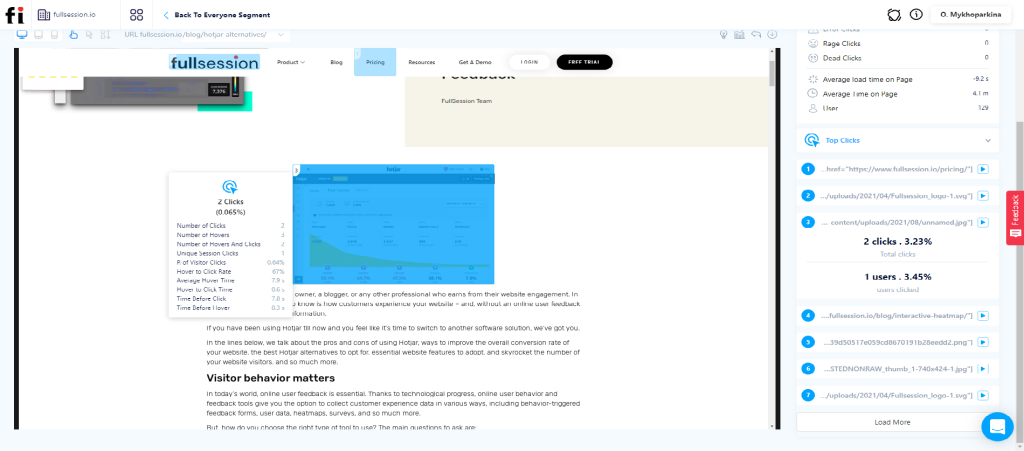
    Alongside conversion rate optimization, click tracking also points out error clicks, dead clicks and rage clicks. These types of clicks work as a notifier of places on your site that need fixing.

    Click maps also provide data and analytics alongside the visual aspect. This allows you to overview the data with the hot zone perspective, but then dive deeper into each section of your page.

    Data points per hot zone provided include:

    • % of visitors clicked
    • Average hover time
    • Hover to click time
    • Time before click
    • Time before hover
    data points that come from a click heatmap

    Here is an in-depth guide on click tracking.

    Mouse Tracking Heatmaps

    Mouse tracking heatmaps, also known as mouse movement heatmaps track mouse movements made by your site visitors. This type of data gives you insight into areas of your site that cause frustration or impatience from the user.

    image of mouse movement heatmap in action

    Utilizing mouse tracking alongside the rest of the click tracking tools really wraps everything together. Visualizing where users click is one thing, but mouse movement visualization tells you how they got from click to click, and if there were any bumps along the way.

    Here is a full breakdown of all of the types of heatmaps you can utilize on your site.

    Benefits of Using Heatmaps

    Optimizing Conversion Rates

    The only way to increase your website conversion rate is through running a UX audit. A proper UX audit gives you real insight into the way users interact with your site, rather than just playing a guessing game.

    Heatmaps are a huge factor in running a UX audit. They take casual data and analytics about your site, and create a visual on it. This benefits you by giving your data a human understanding and a physical element.

    As a bonus, heatmaps also give you insight into usability issues. And as we know, sometimes these usability issues that go unknown, may hurt your conversion rate by 5-10%.

    Analyzing Non-Clickable Elements

    Think about those moments when users hover over something that looks clickable but isn’t, leading to confusion and frustration. Heatmap tools are brilliant at spotting these design flaws.

    For example, you may find that users are clicking furiously on images and areas thinking they were CTAs or navigation buttons. Once you realize this through your heatmap data, you can feed in to the sentiment, and suddenly those dead zones turn into conversion gold mines as clicks translated directly into action.

    Identifying Bounce Rates and Exit Points

    Detective work gets real when studying bounce rates through heat maps display capabilities. By tracking mouse movements and seeing how far down users scroll before dropping, we get insights which help us adjust content placement so everything valuable is seen quicker by more users.

    How to Install a Heatmap Using FullSession

    It takes less than 5 minutes to set up your first heatmap, with FullSession, and it’s completely free!

    FullSession Pricing Plans

    FullSession Pricing

    Here are more details on each plan.

    • The Starter plan costs $39/month or $32/year and allows you to monitor up to 5,000 monthly sessions with up to 6 months of data storage.
    • The Business plan costs $75/month or $60/year and helps you to track and analyze up to 100,000 monthly sessions with up to 12 months of data storage.
    • The Enterprise plan has custom pricing and offers customizable sessions plus full access to all features.

    Book a demo today.

    Why Use FullSession Heatmaps?

    FullSession provides all of the heatmap tools we discussed in this article. Unlike other heatmap softwares, you also unlock a full suite of valuable tools to boost your optimization campaign.

    FullSession also provides:

    Using these tools simultaneously with a heatmap software brings you everything you need to increase your website conversions.

    FAQs in Relation to What is a Heatmap?

    What is a heatmap and why is it used?

    A heatmap tracks where users click, move, or scroll on your site, highlighting hotspots to boost user experience.

    What is an example of a heatmap?

    An e-commerce site’s page showing spots where shoppers mostly click—a clear guide for improving layout design.

    What is a heatmap in website tracking?

    In web tracking, it’s all about spotting user trends and where they linger or bail.

  • Best 9 Website Feedback Tools In 2025 (Comparison Overview)

    Best 9 Website Feedback Tools In 2025 (Comparison Overview)

    Improving user experience through feedback can take your website from good to converting. That’s where website feedback tools come in. They give you the insights needed to boost user experience and keep visitors coming back for more. These tools are crucial because they let you hear directly from users, providing raw data that drives improvement.

    In this article, you should have a better understanding of which website feedback tool is most appropriate for refining your website.

    Overview: Website Feedback Tools

    Website feedback tools allow you to get UX and product functionality feedback anywhere on your site, or in-app. With some tools, this feedback can come in the form of visual feedback, also known as heatmaps.

    Certain feedback widgets give voice to mouse clicks and scrolls, transforming them into actionable insights. Other types of widgets come in the form of customer feedback surveys. These survey tools allow the user to give a wide range of types of feedback, whether it’s in-app feedback, emoji feedback buttons, pop-up surveys, product feature surveys, and more types of feedback widgets.

    Using customer feedback collection tools alongside other software like heatmaps and session recording software allow you to not just send the right types, or most engaging types of pop-up surveys your users, but also know exactly when to trigger the survey or feedback widget on a customer’s journey.

    Types Of Feedback Widgets

    Here is a short list of some of the most important feedback widget types. Here is a deeper dive into types of feedback widgets.

    • Pop-Up Surveys
    • On Page Surveys
    • Website Feedback Widgets
    • Email Surveys
    • Product Reviews

    Why Are Customer Feedback Tools Important

    Collecting feedback is an essential step for website owners to increase customer satisfaction and their UX. Feedback forms are a big step in the process of running a UX audit.

    By implementing customer feedback forms, not only can quantitative data be gathered, but also qualitative information that delves into the factors influencing visitors decision-making processes. 

    This qualitative feedback help identify potential issues, comprehending the reasons behind customer behavior, and determining what motivates them to make purchases or sign up for services.

    Now let’s look into a list of the best of these tools.

    List of the Best 9 Website Feedback Tools in 2024

    1. FullSession

    FullSession offers every tool needed for your website, analyzing every click and scroll to help you understand what works and what doesn’t.

    With FullSession, it’s not about drowning in data; it’s about getting actionable insights that actually make sense. You can watch real-time recordings of user sessions, and see exactly where they get stuck or bail out. 

    FullSession Customer Feedback Tools

    Feedback can be received on any feature your product offers, or the UX of the app or marketing site itself. FullSession has a range of website feedback tools. This includes feedback forms and feedback buttons. Within the FullSession dashboard, you can customize these feedback widgets in any optimal way you want.

    Here are the 7 steps in gathering customer feedback with FullSession.

    image of fullsession feedback creator tool

    This feedback allows you to:

    1.  Understand the intentions behind your users.
    2.  Get direct feedback anywhere on your site or app.
    3.  Understand user sentiment better and implement instantly. 
     
    Net Promoter Score

    Net Promoter Score (NPS) is a straightforward yet powerful customer survey tool used for gauging customer sentiment. It involves asking respondents one question: On a scale of 0 to 10, how likely are you to recommend our company/product/service to someone you know? FullSession allows you to gather this data.

    image of fullsession's NPS feedback score
    Other Features Within the Same Dashboard

    As mentioned before, you can enhance your quantity and quality of feedback responses by simultaneously using tools like heatmaps and session recording.

    FullSession allows you to use all three tools at once:

    1.  Website feedback software.
    2.  Session replay software.
    3.  Website heatmap tools

    Using all three of these softwares on one site or app, makes it so easy to master customer satisfaction. Also, FullSession doesn’t just offer these feedback collection softwares within it’s app, it also provides the following: 

    1. Website analytics.
    2. Customer support functions.
    3. User behavior analysis reports.
    4. Funnel and conversion tracking and AI summaries.
    5. Product and Website Usability Testing.
    image of FullSession's dashboard of funnel analytics optimization

    Install Your First Website Feedback Form Right Now

    It takes less than 5 minutes to set up your first website or app feedback form, with FullSession, and it’s completely free!

    FullSession Pricing Plans

    FullSession Pricing

    Here are more details on each plan.

    • The Starter plan costs $39/month or $32/year and allows you to monitor up to 5,000 monthly sessions with up to 6 months of data storage.
    • The Business plan costs $75/month or $60/year and helps you to track and analyze up to 100,000 monthly sessions with up to 12 months of data storage.
    • The Enterprise plan has custom pricing and offers customizable sessions plus full access to all features.

    Book a demo today.

    2. Feedbackify

    This tool lets users voice their opinions and suggestions without breaking stride in their online journey. Visitors can tell you what rocks and what doesn’t with just a few clicks.

    With Feedbackify, crafting feedback forms is easy. You drag and drop form elements to create custom surveys no coding required.

    Feedbackify features

    Source: Feedbackify

    3. Typeform

    What a typeform feedback survey looks like

    Source: Typeform

    Typeform’s intuitive interface lets you create forms that are not only beautiful but also highly functional. Typeforms can include logic jumps which make them smarter than your average survey. With these smart forms, if a user says they found your checkout process hard, the next question automatically digs deeper into that issue.

    The power of Typeform lies in its ability to blend seamlessly into any brand’s style guide. Typeform is best used as a feedback survey after the user has completed something, such as a purchase. It is not meant for live website visitors or to be embedded on a web app.

    4. Rapidr

    Rapidr feature requests section

    Source: Rapidr

    Rapidr is built for community feedback within an app. This tool doesn’t just collect responses, it’s designed to foster community around your product.

    This includes recieving product suggestions and having a voting system on upcoming features within the community. 

    5. UserEcho

    Userecho community forums section

    Source: UserEcho

    UserEcho is like an online town hall where feedback flows freely and directly influences the roadmap of your site. Similar to Rapidr, it doesn’t just collect comments; it fosters community discussion. Users can cast their ballots for each other’s ideas.

    But don’t let its simplicity fool you, UserEcho adds the element of analytics tools so you can track which issues are gaining traction over time.

    • Voting system lets users prioritize their own pain points.
    • Slick integration means no tech headaches when setting up.
    • Analytics give insight into trends over time—.

    6. Marker.io

    Marker.io is perfect for teams that thrive on visual communication but don’t want their tools scattered. It has the ability to let users report issues right when they spot them, anywhere. 

    They click a button, doodle some feedback onto the screen, and voila. Their input lands exactly where you need it, integrating right into your project management tool.

    7. TrustPilot

    TrustPilot stands out for a reason, what sets it apart is its focus on verified user reviews that help build brand credibility. It’s geared towards service or product feedback rather than functionality or UX.

    This platform isn’t just about collecting feedback, it lets customers champion your business with their testimonials.

    With TrustPilot, gathering insights goes beyond simple star ratings. Detailed analytics give you a peek into customer sentiment trends over time so you can make informed decisions based on what users love or don’t love about your service or product.

    8. SurveyMonkey

    SurveyMonkey offers custom branding and skip logic that makes each question feel like it was custom written. This is similar to TypeForm.

    Although, unique to SurveyMonkey is the types of placements on a site, any the access to a huge library of 300+ survey templates that you can plug-n-play within SurveyMonkey.

    9. CrazyEgg

    CrazyEgg is the closest in getting to the amount of functions that FullSession provides simultaneously. As for feedback collection, It gives surveys and polls an easy home right on your site so that customers can give you feedback.

    Overall, CrazyEgg is one of the top website feedback tools on the market.

    Conclusion

    So, out of the top website feedback tools on the market, which is the best for your business?

    If you’re looking for in-app, community based forums with a voting system and democratized roadmap, Rapidr is your best bet.

    If you’re looking for a customer feedback and survey tool, there are some good options out there. If you’re looking for the product that excels when it comes to customer feedback, but has the most external features that complement feedback, including: 

    1. Session Recording
    2. Heatmaps
    3. Funnel Optimization
    4. Analytics

    In this case, FullSession is your best bet. It takes less than 5 minutes to set up your first website or app feedback form with FullSession, and it’s completely free! Click here to sign up for your 14-day free trial.

    FAQs in Relation to Website Feedback Tool

    What is a website feedback tool?

    A website feedback tool lets users share their thoughts directly on your site, guiding improvements and enhancing user experience.

    How do you collect feedback from a website?

    To gather feedback, embed forms or use tools that prompt visitors to rate features and leave comments as they browse.

    How do I give feedback to my website content?

    Offer clear prompts for users to weigh in on your content’s usefulness and appeal—this can sharpen your material’s edge.

    How can I review my website?

    Analyze visitor data, employ usability tests, or tap into analytics tools for actionable insights into your site’s performance.

  • Best 7 Product Research Tools In 2025 (Paid + Free)

    Best 7 Product Research Tools In 2025 (Paid + Free)

    Product research is the process of pointing your product development in a direction dictated by what the researched user desires in your product.

    In this article, we’ll take a look at the top 7 product research tools to make your research more efficient and accurate. 

    Top 7 Product Research Tools

    Here is a curated list of our top 7 best product research tools.

    1. FullSession – User Behavior, Analytics and Session Replay

    Fullsession lets you watch session recordings of visitors on your site, and gives you a wide range of general and behavioral analytics that are used to optimize your sites user experience.

    • Record all your sessions on the website or landing page
    • Watch recordings of your visitor actions in real-time
    • Watch user flow from the entry page to the exit page

    What Is Session Replay?

    Session recordings track and let you watch everything that a user does on your website. It includes clicks, keystrokes, and scrolls that your user makes.

    image of session recording software in us

    Benefits of Session Replay In Product Research

    Session replay gives you:

    1. In-depth user analytics.

    2. The ability to watch how users interact with your site, this allows you to make your own judgement in product research.

    How do these abilities benefit your product research process?

    • Understand user needs and preferences
    • Improve customer support
    • Improve the user experience
    • Troubleshoot product issues
    • Test new features
    • Improve product design
    • Identify areas for improvement

    Heatmaps

    Fullsession also offers heatmaps that show where users click most. These insights help make sure every part of your site is optmized.

    Image of heatmap software viewing page heatmap

    Different types of heatmaps:

    • Click maps
    • Scroll Maps
    • Mouse Movement Maps

    You can use these heatmaps to enhance your product research, anywhere within your app or marketing site.

    Analytics Provided

    Can analytics that Fullsession offers replace a tool like Google analytics? The answer, yes. Fullsession has all of the tracking features as any other common analytics tool… plus way more. This is exactly what you need in an analytical product research tool.

    Common Analytics Fullsession Tracks:

    • Session Duration
    • Bounce Rate
    • Location
    • Device
    • Visit Source
    • URLs Visited
    • Time Spent On Page
    • Views
    • Conversion Rate

    Unique Analytics Fullsession Tracks:

    • Keystrokes
    • Click Location
    • Scroll Maps
    • Churn
    • Net Promoter Score (NPS)
    • Customer Satisfaction Score
    • Active User Ratio
    • Monthly Recurring Revenue (MRR)
    • Error Data
    • Dead Clicks
    • Rage Clicks
    • Page Load Time
    • Scroll Depth
    • Lead-to-conversion rate
    • Return Rate

    FullSession pricing plans

    FullSession Pricing

    Here are more details on each plan.

    • The Starter plan costs $39/month or $32/year and allows you to monitor up to 5,000 monthly sessions with up to 6 months of data storage.
    • The Business plan costs $75/month or $60/year and helps you to track and analyze up to 100,000 monthly sessions with up to 12 months of data storage.
    • The Enterprise plan has custom pricing and offers customizable sessions plus full access to all features.

    Book a demo today.

    Wistia – Embedded Video Analytics

    Videos are everywhere, but do they work? With Wistia’s analytics, it’s not about guessing anymore. It gives you hard data on who watches what and for how long, for any Wistia hosted video on your site, or in-app. 

    This is great for product research because now you have insights and analytics into the videos you publish on your app.

    Why Use In-App Videos?

    Quick and seamlessly integrated in-app videos are becoming more common with time. Some examples of these videos are:

    • Videos during product onboarding.
    • Videos to explain different areas of your product.
    • Blog topic videos
    • Videos about use cases to help the user use your product more efficiently. 

    Wistia gives the ability to do all of these, but in a seamlessly integrated way, which is necessary. Seeing the analytics and feedback on these types of videos allows you to conduct research on different parts of your product.

    Rapidr – Product Optimization

    Rapidr makes collecting product features feedback a breeze. The software allows you to create customer feedback portals on your own site. Some things customers can do within the portal include: 

    • A portal for generic feedback.
    • Idea suggestion and community idea voting system.
    • Embed the widget to your site.
    • Private comments.
    • Private feedback.
    • Personal support.

    You can also showcase a transparent and up to date product roadmap. Collecting feedback on this couldn’t be more close to developing the perfect product for your customers.

    Actionable Insights Over Fluff Data

    When data meets action—you get results. Dive deep into analytics within Rapidr’s platform and make informed decisions backed by actual user sentiments.

    No more shooting darts in the dark; you can target pain points accurately for an experience that makes users stick around.

    FullSession – User Feedback

    Alongside analytics when it comes to product research, user feedback is important. As we mentioned, Rapidr is useful for product feature feedback, but what about UX and web design feedback?

    Image of the website feedback survey creation process

    Learn how to create a website feedback form for your own site.

    Optimizely – A/B Testing

    With a tool like Optimizely’s A/B testing tool, you can split test any two versions of your marketing site or even your app. When you integrate a tool like this with the other tools we’ve listed in this article, you can take your feedback and product suggestions, and put them to the test simultaneously. 

    No more guesswork. Optimizely doesn’t just have A/B functionality, but their tool also makes it very easy to read and interpret the data. 

    UserPilot – Product Onboarding and Flow

    Imagine giving each user the perfect onboarding and product experience? That’s where UserPilot slides in. It doesn’t just show users the ropes; it turns their customer journey into their own fantasy.

    With UserPilot, personalization is constantly driving engagement. This tool helps tailor the onboarding experience by segmenting users based on behavior or demographics so that they only see content relevant to them.

    UserPilot thrives in its ability to create interactive walkthroughs without needing code—a win for both non-techies and developers who’d rather focus on building features. Plus, with its analytics dashboard, measuring success becomes seamless.

    We’ve now wrapped up product research tools involving in-app optimization and research. But what about external product market research?

    Ahrefs – SEO & Market Analysis

    Ahrefs is the go-to tool that assists you in understanding your place among a great number of search results, as well as giving insight into what rivals are doing to their site and content. This can give you insights into what the market (buying intent) wants from your competitors new features. 

    It offers an extensive keyword explorer, which lets you dive deep into keywords your audience actually searches for. Additionally, with their site audit feature, they’ll help you spot those sneaky technical issues that are holding back your organic rankings, as well as other things like site speed and schema markup.

    How Is Ahrefs Beneficial For Market Research?

    Ahrefs shows you SEO optimization techniques, yes. But this tool also gives you insights into any given market. 

    In this case, a market would be a keyword topic. You can look at competitors strategies, market sentiment (buying intent), new product and feature releases, and run in-depth site audits to learn more about your own site.

    Let’s continue with another external product reserach tool.

    Product Hunt – New Products

    Product Hunt is a tool that can be beneficial for your product research as viewer and a user. Here, fresh apps and web products take center stage each day, with creators getting real-time feedback from an engaged community.

    Putting Your Product On The Platform

    You may not be launching, with Product Hunt you don’t have to. You can put your product on their platform anytime you want, and get direct insights from your potential users.

    It’s also a great way to attract some free customers, if you make it the top of their daily or weekly rankings.

    Becoming A Viewer Of The Platform

    By seeing how folks react to different features or concepts, businesses can iterate quickly without shooting in the dark. It turns first movers into smart movers because being early is good but being right is better.

    Just checking Product Hunt once or twice a day will give you insights into the top products and features being released all the time. The closer these products are to your niche, the more you’ll adapt to getting that right PMF. 

    FAQs in Relation to Product Research Tools

    What is a product research tool?

    A product research tool digs into market trends and customer preferences to help you tailor your products just right.

    What are the types of product research?

    You’ve got user testing, surveys, focus groups – all ways to provide what your customers really want.

    What is the best market research tool?

    The top dog varies by need but tools like FullSession, Rapidr and Wistia give you the most actionable insights. 

  • 5 Steps To Optimize Your Customer Acquisition Funnel

    5 Steps To Optimize Your Customer Acquisition Funnel

    The customer acquisition funnel is the process from a customer landing on your website until the moment they sign up. Analyze each funnel stage to understand why users drop off, or why they finish their way through the funnel. The more catered your funnel is, the more sign ups or calls booked you will drive.

    In this article, we will deep dive into what the customer acquisition funnel is, and how to optimize it.

    1. What is the customer acquisition funnel

    2. The 4 stages of the customer acquisition funnel

    3. How to optimize your customer acquisition funnel

    4. 6 quick tips to optimize your funnel

    What is the customer acquisition funnel?

    The customer acquisition funnel, also known as a conversion or sales funnels, isn’t just some fancy business jargon. It’s the journey any visitor on your site takes from the first moment up until a sign up.

    You might be wondering – why ‘funnel’? As potential leads enter the top of the funnel, only a select few will make it to the bottom and convert into customers. This process mimics an actual physical funnel, hence the name.

    A Deeper Dive Into The Funnel

    Customer acquisition funnels start when someone learns about your brand for the first time – they’ve entered the top of your customer acquisition funnel. At this stage, they’re simply gathering information and exploring what you have to offer without any commitment.

    As these individuals move further down through each layer of your marketing efforts they transition from being casual browsers to interested leads who are considering purchasing from you.

    The 4 Stages of the Customer Acquisition Funnel

    Understanding your customer acquisition funnel is important. It’s made up of four key stages: Awareness, Interest, Decision, and Action.

    Awareness

    This is where potential customers first discover your brand or product, called brand awareness. An effective customer acquisition strategy that appeals to your ideal audience is crucial to the success of your funnel.

    Digital marketing acquisition channels such as SEO optimization, social media advertising, content marketing, and email campaigns can all help raise awareness in an engaging way that piques interest.

    Interest

    At this stage, individuals delve deeper into your offerings after through your website.

    User experience design best practices suggest offering value upfront with free resources or trial offers – something tangible that helps prospects see firsthand how much your solution will help them.

    Decision

    This crucial stage is when prospects weigh their options before deciding whether or not they’ll become customers. The information available should make it easy for them compare features, benefits – basically everything relevant related their decision-making process.

    This is the middle of funnel. The stage where you have peaked interest in your actively buying market, and now is when they want to decide if they choose you or your competitor.

    Action

    The final stage of the funnel represents when a prospect becomes a customer – they’ve taken action. Whether they’ve booked a sales call, signed up for your software, requested a quote, etc.

    This is the stage where you calculate conversion rate. Conversion rate is the percentage of how many qualified potential customers convert and take action. You can tell how many of your potential customers are qualified in the “Decision” stage only.

    This is also where you calculate your customer acquisition costs. Which is the total cost per customer acquisition channel it takes for 1 prospect to become a customer through the entire sales funnel. These two data points, once calculated, allow you to optimize your customer acquisition strategy.

    For example, a potential customer might be interested in the “Interest” stage of the customer journey, but not know that they are not a qualified customer (in your target audience). Conversion rate also helps you shift your customer acquisition strategy, which is ironically all the way in stage one.

    What you can control in optimizing your funnel

    To optimize customer acquisition funnels and lower your customer acquisition costs, you need to actively manage and control the key factors that directly influence the customers experience on the journey.

    Data Analysis

    You can leverage data analysis tools to gain insights into how customers interact with your website or app to achieve your business goals. These observations help make informed decisions for improvements. Here is a curated list of the top website optimization tools that involve data analysis.

    Analyzing metrics such as bounce rates, time spent on each page, and user flow patterns let you understand where potential customers may be dropping off from the acquisition process.

    User Experience (UX)

    The next aspect is enhancing UX design based on collected data. A smooth user experience makes sure visitors don’t leave midway due to frustrations stemming from poor site navigation or unappealing content.

    Running a frequest UX audit is vital. Here is an in-depth guide on how to run a UX audit.

    A/B testing various design elements and tracking visitor interactions using heatmap software will give insights into what works best for engaging visitors effectively throughout their journey within the funnel stages.

    How to Optimize Your Customer Acquisition Funnel

    Running a funnel analysis frequently is important for your business, let’s look at the optimization strategies that can turn prospects into loyal customers.

    The Role of Heatmaps in Funnel Optimization

    Heatmap tools are becoming a necessity nowadays for optimizing your acquisition funnel. They give a visual representation of user activity on your site – where they click or don’t and what parts get more attention.

    This data offers a chance to identify and address obstacles swiftly. It also gives insights into which elements need improvement for better conversion rates.

    Types of heatmaps

    Click Maps


    Mouse Movement Maps


    Scroll Maps

    Data that heatmaps offer

    • Preview the heatmap on different devices
    • See the number of total views and total clicks
    • Track error clicks
    • Track rage clicks
    • Track dead clicks
    • See the average load time on page

    Session Recordings

    Apart from heatmaps, session recording software lets you watch recordings of real users interacting with your website. This is like viewing the journey through their eyes.

    You’ll see firsthand where visitors drop off and why some pages have lower engagement levels than others. With this information, you can make necessary adjustments that keep users moving smoothly down the funnel towards conversion.

    Customer feedback

    Customer feedback directly on your site has become a cheat code that only some businesses are using. If you’ve ever wondered how the big players in your industry are putting out product updates or offers that your customers just love?

    Well they aren’t getting their info from just anywhere, it comes through mass customer feedback.

    Fullsession has made it possible to get mass customer feedback, without spending months, or millions on acquisition. Fullsession has productized the ability. to get valuable customer feedback, and is rolling out features around curated AI integrations about your feedback if you have mass amounts of visitors. Here is a guide into customer feedback.

    FullSession Pricing Plans

    Fullsession offers everything you need to optimize your funnel. UX audits, session recording, heatmaps, customer feedback and funnel tracking and insights.

    FullSession Pricing

    Here are more details on each plan.

    • The Starter plan costs $39/month or $32/year and allows you to monitor up to 5,000 monthly sessions with up to 6 months of data storage.
    • The Business plan costs $75/month or $60/year and helps you to track and analyze up to 100,000 monthly sessions with up to 12 months of data storage.
    • The Enterprise plan has custom pricing and offers customizable sessions plus full access to all features.

    Book a demo today.

    6 Quick Tips on Optimizing a Funnel

    The customer acquisition funnel is like a well-oiled machine. To ensure optimal functioning, regular upkeep of the customer acquisition funnel is essential. Here are 15 tips to keep your funnel running smoothly.

    1. Understand Your Audience

    Run frequent UX audits and feedback campaigns. When. we say frequent, we mean the more you do these, the more customers you get.

    2. Create Engaging Content

    The content on your marketing, service or product pages should answer the questions that potential customers have about your product or service. Make sure it’s informative, engaging, and easy-to-read.

    3. Use Effective Call-To-Actions (CTAs)

    Make your CTA’s direct and concise. Saying “learn more here” is weak. Saying “speak to our team to learn more about our service” will convert much better.

    4. Ensure Mobile Responsiveness

    Guarantee that the whole marketing process functions effortlessly across every device and page size.

    5. Frequent A/B Testing

    This allows you to compare different versions of an element within the sales pipeline so as not to rely solely on assumptions but hard facts.

    6. Offer Live Chat Support

    Having live chat support can significantly improve customer experience, leading to higher conversions and customer retention.

    FAQs in Relation to Customer Acquisition Funnel

    What is the customer acquisition funnel?

    The customer acquisition funnel maps a buyer’s journey from awareness to purchase. It helps businesses understand and optimize this path for higher conversion rates.

    What is a customer purchase funnel?

    A customer purchase funnel, like an acquisition one, traces a consumer’s route from discovering your brand to buying your product. The focus here though is on nudging potential buyers into making that final leap.

    What are the three components of the customer acquisition funnel?

    The core parts of any solid acquisition funnel include: Awareness (grabbing attention), Consideration (engaging interest) and Conversion (turning prospects into paying customers).

    What are the stages of the acquisition funnel?

    The main stages in most funnels cover Awareness, Interest, Decision-making, and Action – often dubbed AIDA for short. Each phase requires different strategies to guide leads further down towards becoming loyal customers.

  • NPS Detractors: Turning Negative Feedback into Positive Outcomes

    NPS Detractors: Turning Negative Feedback into Positive Outcomes

    As a website owner, providing the best possible experience for your customers should be your top priority. It means offering excellent products or services and ensuring your customers’ satisfaction with your business.

    One of the most effective ways to gauge customer satisfaction is via the Net Promoter Score (NPS), a metric used to measure customer loyalty.

    However, not all customers will give you high scores; some may become NPS detractors. Therefore, it’s essential to know how to turn their negative feedback into positive outcomes.

    In this blog post, we’ll discuss who NPS detractors are, why they are essential, and how to address their complaints effectively.

    We will also show you how to use FullSession to get customer feedback using our customer feedback tools and analyze data-rich customer feedback report to increase the number of happy customers.

    You can start a 14-day free trial to assess all features while reading this article. Let’s start with some basic information.

    What is Net Promoter Score?

    NPS scale

    Image source: TeamSupport

    NPS scores help you measure customer loyalty and predict the probability of a customer recommending your business to others.

    Customers can rate their likelihood of recommending your product or service on a scale of 0 to 10. Based on their scores, you can segment users into three groups:

    • Promoters (9-10)
    • Passives (7-8)
    • Detractors (0-6)

    You can calculate the NPS score by deducting the percentage of detractors from the share of promoters.


    Why is NPS important?

    businesses that use NPS survey results

    Image source: SurveyMonkey

    A high NPS score suggests that your customers are satisfied with your products or services, which can translate into increased customer retention, loyalty, and referrals.


    Furthermore, NPS can help you pinpoint improvement areas to meet customer expectations and drive business growth.

    Who are NPS detractors?

    NPS detractors are dissatisfied customers who rate your product or service between 0-6 on the NPS scale.

    They are unlikely to recommend your product or service to others and may provide negative feedback about their customer experience to your existing customers, ruining your reputation.

    Why do users become NPS detractors?

    woman frowning

    Image source: Freepik

    There are many reasons why customers become NPS detractors. Let’s discuss the most critical ones.

    Poor product or service quality

    Customers anticipate high-quality products or services that cater to their requirements. If your product or service fails to fulfill their expectations, they will likely become NPS detractors.

    Broken promises

    When you promise your customers and do not deliver as expected, they will likely be disappointed and become detractors.

    For instance, if you assure them of product delivery within a specific time frame and fail to meet the deadline, customers may lose trust in your brand.

    Unresponsive customer service and unresolved issues

    Customers expect swift and satisfactory resolutions to their issues or complaints from your customer service team.

    Customers may become detractors if your customer service team is unresponsive or unable to resolve problems.

    Difficulties with the website or app navigation

    Unhappy customers encountering website issues may become even more frustrated and assign you a low NPS score.

    It can occur if your website or app is not user-friendly, has confusing navigation, or contains broken links.

    Negative word of mouth or reviews

    Negative word-of-mouth or reviews can significantly impact your NPS score.

    If customers come across negative feedback about your product or service, they may hesitate to recommend it to others.

    Competitive offerings

    When customers find better alternatives, they may switch to a competitor’s product or service, leading to revenue loss for your company.

    It is crucial to continually monitor competitors’ offerings, pricing, and customer feedback.

    Doing so can help you identify gaps in your product or service and improve to prevent customer churn.

    Changes in customer needs or preferences

    Customer needs and preferences are continuously evolving. What was once popular or relevant may not be the case anymore.

    If you fail to adapt to changing customer needs, you risk losing customers to competitors more responsive to their requirements.

    Poor timing or relevance of marketing efforts

    Poorly timed or irrelevant marketing efforts can harm customer satisfaction.

    For instance, customers may feel annoyed or frustrated if they receive a promotional email for a product they have already purchased.

    It can lead to negative feedback and ultimately impact customer loyalty.

    Technical difficulties or glitches

    Technical difficulties or glitches can frustrate customers and quickly turn them into detractors.

    For example, a customer who encounters an error message while trying to purchase on your website may abandon their cart and look for an alternative.

    Pricing and value disparities

    If a customer feels that the value they receive from your product or service does not align with the price they are paying, they may be more likely to leave negative feedback or give a low NPS score.

    Let’s discuss why addressing unhappy customers’ complaints benefits your business.

    What are the benefits of addressing NPS detractors’ feedback

    man submitting a survey on his phone while holding a cup


    Image source: Freepik

    Although it may appear counterintuitive to prioritize negative feedback from NPS surveys, addressing the concerns of disgruntled customers can bring several essential benefits to your business.

    Here are some of the main advantages.

    Increased customer satisfaction

    Addressing the concerns of unsatisfied customers demonstrates your commitment to improving your products and services to meet their demands.

    It can increase customer satisfaction and create a more favorable impression of your brand.

    Improved customer loyalty

    Customers who feel their objections have been attended to and resolved tend to stay loyal to your brand.


    Improving their experience can build stronger customer relationships during the customer journey.

    Higher retention rates

    If customers are content with the quality of your products and services, they are more inclined to continue doing business with you.

    Resolving the issues of NPS detractors can assist in boosting product adoption, lowering churn and enhancing retention rates.

    Increased referrals

    Satisfied customers can recommend your brand to others, and by improving the experience of NPS detractors, you can turn them into brand advocates who will help to promote your products and services through word-of-mouth.

    Improved brand reputation

    You can improve your brand’s reputation by addressing negative feedback constructively and proactively.

    You demonstrate your commitment to providing excellent customer service and improving your products and services, which can build a more positive image in the minds of your customers and the wider public.

    These benefits don’t come without the challenges of Net Promoter Score surveys. Let’s discuss the most common ones.

    What are common challenges with identifying NPS detractors

    worried woman looking at a computer

    Image source: Freepik


    Identifying NPS detractors can be challenging, and several obstacles regarding customer surveys can hinder this process. Let’s explain the most important ones.

    Low response rates

    One of the main challenges with the NPS survey is the low response rate, making it difficult to understand customer sentiment accurately if a significant portion of customers does not respond.

    Limited feedback detail

    Since NPS surveys are typically short, customers can’t provide detailed feedback on what drives their detractor score.

    This lack of specificity can make it challenging to address the root causes of customer dissatisfaction and make meaningful improvements to products and services.

    Customer segmentation challenges

    finger pointing at a smiling emoji


    Image source: Freepik

    Segmenting customers into different groups based on their feedback can be hard if multiple factors drive detractor scores.


    It may require more in-depth customer feedback and data analysis to identify patterns and trends accurately.

    Difficulty measuring customer feedback across multiple channels

    Many companies receive feedback across multiple channels, such as websites, email, phone, social media, and online reviews. It can be hard to get a holistic view of customer sentiment.

    Incomplete or inaccurate data

    If the data is inaccurate or unreliable, it may lead to incorrect assumptions about customer perception, resulting in ineffective solutions or misinformed decisions.

    Inconsistent or inefficient feedback processes

    finger pointing at a check mark


    Image source: Freepik

    If the feedback process is not standardized, it can be challenging to collect, analyze, and act on customer feedback consistently.


    It can result in delays in managing customer concerns, leading to a further decline in customer satisfaction.

    Limited resources or budget

    Implementing effective strategies to address feedback and improve the customer experience can be costly and time-consuming. Companies with limited resources may struggle to allocate sufficient budget or personnel to address these issues effectively.

    How to identify unhappy customers with FullSession

    Fullsession customer feedback tool


    FullSession is the ultimate customer experience platform. Our comprehensive suite of tools offers valuable insights into customer behavior, allowing you to understand their needs, improve their overall experience and turn detractors into promoters.

    We provide you with the following features:

    These are just some of our features. Start your free trial to see FullSession in action.


    fullsession customer feedback form creation


    With FullSession, you can eliminate guesswork and directly gather user feedback using our website feedback form.

    fullsession feedback form software

    Our software collects all user responses in one centralized location, enabling you to quickly identify frustrated customers and the underlying causes of their dissatisfaction.

    Addressing these issues can turn dissatisfied users into loyal customers and improve the overall customer experience.


    fullsession session recording video

    FullSession allows you to evaluate session recordings and replays, analyze user behavior, and explore how customers interact with your site or app.

    Each customer feedback is connected with a specific session replay, providing additional context behind their comments.

    Additionally, you can assess click maps, scroll maps, and mouse maps to gain insights into how users navigate your site or app and explore all issues they might encounter.

    This feature allows you to optimize your product to enhance user satisfaction and drive growth for your business.


    fullsession feedback form data


    Our user feedback categorization system distinguishes between promoters, passives, and detractors, providing actionable insights into what works well and requires improvement and helping you close the customer feedback loop faster.


    fullsession feedback form responses


    With our user sentiment measurement feature, you can clearly understand how your customers feel about your product.

    You can target feedback based on specific pages or devices, track conversion events and evaluate how they contribute to achieving your goals.

    If you want to enhance your customer experience and take your product to the next level, FullSession is the platform you need.

    Sign up today to turn NPS detractors into brand ambassadors.


    What metrics to track to understand customer feedback

    woman looking at charts on a computer and a laptop


    Image source: Freepik


    You can use several metrics for effective feedback analysis, including

    • Net Promoter Score (NPS) for measuring the likelihood of customer recommendations
    • Customer Satisfaction Score (CSAT) for measuring satisfaction
    • Customer Effort Score (CES) for measuring task completion ease
    • Customer Retention Rate (CRR) for measuring customer loyalty
    • Churn Rate for measuring customer dissatisfaction
    • Customer Lifetime Value (CLV) for identifying high-value customers

    Tracking these metrics can help you better understand customer preferences and improve your products and services.


    Best strategies for increasing customer satisfaction

    man presenting three smiley faces and a check mark


    Image source: Freepik


    To increase customer satisfaction, you can implement several strategies, including:


    • Personalizing responses to make customers feel valued and understood
    • Showing empathy towards customers by acknowledging their feelings and concerns
    • Resolving issues promptly and efficiently to prevent customer dissatisfaction
    • Providing customers with clear and actionable steps to solve problems faster
    • Offering compensation or discounts to customers who have experienced issues
    • Addressing website issues such as slow loading times or broken links to improve the customer experience
    • Following up with customers to ensure their issues have been resolved and providing a solution to close the loop.


    Whatever you decide to do, putting customers at the heart of your actions will keep them happy in the long run and reduce the number of NPS detractors.

    NPS detractors: Wrapping up

    Understanding and addressing the concerns of NPS detractors is crucial for any business looking to improve its overall customer satisfaction and loyalty.


    With FullSession, you’ll get access to powerful software that can help identify and address the pain points of detractors, ultimately leading to improved customer retention and increased revenue.


    By leveraging our advanced features, you can gain valuable insights into customer behavior and preferences, allowing you to make data-driven decisions that drive long-term growth and success.


    With FullSession, you can proactively build a loyal customer base and improve your bottom line.


    Start a free trial and unlock all features for two weeks.


  • Product Feedback: Harnessing Customer Insights for Improvement

    Product Feedback: Harnessing Customer Insights for Improvement

    Keeping up with customer demands and expectations is crucial for any company that wants to stay ahead of competitors.

    You can collect product feedback to evaluate your product’s performance and customer satisfaction.

    This customer feedback can come as solicited or unsolicited.

    Solicited feedback refers to feedback that a company requests explicitly from its customers through surveys, focus groups, or website feedback forms.

    On the other hand, you can receive unsolicited product feedback without asking customers, usually through online reviews or social media posts.

    By listening to your customers, you can better understand their needs and wants and optimize your product to boost customer loyalty and drive growth.

    In this article, we’ll take a closer look at the power of user feedback and explore some best practices for gathering and using it to your advantage.

    We will also show you how to use FullSession, our behavior analytics platform, to collect and analyze customer feedback and employ it to drive product improvements.

    You can start a free trial or get a demo.

    What are the benefits of collecting user feedback?

    customer survey pie chart

    Image source: Usersnap

    Here are some crucial advantages of collecting product feedback for optimizing your product roadmap.

    Understanding customers’ demands

    If you collect product feedback, you can better understand what customers want and need from your business. It can help you improve your offerings and make them more suitable for your customers.

    Identifying product deficiencies

    Product feedback can also help you pinpoint problems or shortcomings with your products. It can be precious information you can use to make progress and ensure your products meet the highest quality standards.

    Enhancing customer satisfaction

    Adjustments based on customer feedback can lead to higher customer satisfaction and stronger customer relationships. It can translate to repeat business.

    Increasing product loyalty

    When your customers feel their feedback is being heard and acted upon, they will remain loyal to your brand. It can lead to increased sales and profitability over time.

    Facilitating innovation and growth

    If you collect customer feedback and refine the product, your business can stay ahead of the competition and remain innovative.

    It can lead to new products and services, expanded markets, and increased revenue streams.

    Reducing risk and costs

    By collecting product feedback, you can reduce the risk of product failures and costly recalls by addressing potential issues early on. It can help you save resources in the long run.

    These are just some reasons you shouldn’t hesitate to collect product feedback from your customers and use it to grow your business.

    Common challenges in collecting customer feedback

    two man looking at a laptop

    Image source: Freepik

    Let’s look at some common challenges you might face when collecting product feedback and how to overcome them.

    Low response rates

    When customers don’t provide feedback, making informed decisions about product improvements can be difficult.

    You can offer incentives such as discounts to motivate users and increase response rates.

    You can also improve product feedback surveys by making them shorter, more engaging, and easier to complete to boost customer engagement.

    Biased feedback

    It occurs when customers only provide feedback that aligns with their personal preferences or experiences, leading to inaccurate data and poor decision-making.

    To avoid this, you should use a variety of feedback channels to gather solicited feedback from a diverse range of customers.

    You can also use anonymous product feedback tools to encourage honest feedback and data analysis tools to identify and eliminate nonobjective feedback.

    Inadequate feedback quality

    It happens when customers provide feedback that needs to be more precise or actionable, making it difficult to pinpoint areas for improvement.

    To overcome this, you can provide specific questions and prompts to encourage detailed input and identify patterns in customer responses.

    Lack of actionable insights

    Even with high-quality feedback, you may struggle to take action.

    To overcome this, you can use feedback analysis tools like FullSession to identify customer feedback trends, prioritize responses, and implement changes in your product strategy.

    Limited feedback channels

    If you use only one feedback channel, you may miss out on responses from customers who prefer using other channels for communication with your brand.

    To overcome this, you can collect feedback by email, social media, website forms and in-person interviews and use product feedback tools to identify the most effective channels for customer segments.

    Insufficient resources and expertise

    Collecting feedback takes time and resources, and it can be tricky if you are short on personnel or technology.

    You might overlook important feedback or not address it promptly, leading to customer dissatisfaction.

    Assess your available resources and find ways to optimize them. You might consider investing in product analytics tools or outsourcing workload to third-party providers.

    It helps you ensure that every piece of feedback is given the attention it deserves without overburdening your team.

    Difficulty in managing large volumes of feedback data

    As more and more people start providing feedback, it can become quite challenging to manage data and analyze it correctly.

    It’s easy for important feedback to get lost in the shuffle or go unaddressed if you don’t track everything effectively.

    Advanced customer feedback tools like FullSession can automatically collect, manage and analyze product feedback. We provide detailed visual reports you can evaluate and share with your team members to drive product improvements.

    Start a free trial or get a demo.

    10 types of product feedback you should keep in mind

    woman holding a phone with survey animations and a juice

    Image source: Freepik

    As someone creating a product, you know feedback is essential, but did you know there are different types of feedback you should be looking for?

    Here are ten types of product feedback you should keep in mind.

    • User experience feedback: This feedback focuses on the overall experience of using your product, including ease of use, intuitiveness, and design.
    • Feature requests and suggestions: It gives you insight into what users want to see in your product and what features they feel are missing.
    • Bug reports and technical issues: It is crucial for identifying and fixing technical problems or bugs impacting the user experience.
    • Performance and speed feedback: This feedback relates to the speed and performance of your product, including how quickly it loads and how responsive it is.
    • Pricing and value feedback: You can get insight into whether users feel your product is priced appropriately and whether they believe it provides good value for the money.
    • Competitive analysis feedback: It helps you understand how your product compares to similar products.
    • Customer service feedback: It relates to the quality of customer support and services your team provides.
    • Brand perception and reputation feedback: You can get insight into how users perceive your brand and whether it positively or negatively impacts their decision to use your product.
    • Product strategy and roadmap feedback: This feedback helps you understand how users feel about your product’s current direction and what they want to see in the future.
    • Market trends and demands feedback: It relates to broader market trends and demands, including what users are looking for in a product like yours and what changes may be on the horizon.

    By gathering these ten types of feedback, you can better comprehend your product’s strengths and weaknesses and make the required improvements to ensure your users are happy and satisfied.

    10 ways to collect product feedback

    man completing a survey on his phone

    Image sources: Freepik

    If you’re looking to collect feedback on your product, there are plenty of ways to do so.

    Here are ten options to consider.

    • Customer surveys: You can use survey tools to create and distribute surveys to your customers in a structured and quantitative way.
    • Focus groups: Bringing together customers to discuss their experiences and opinions of your product can provide qualitative feedback.
    • Social media monitoring: You can monitor social media mentions and comments for unsolicited feedback from customers.
    • User testing and analytics: Tools like FullSession can provide valuable data and insights into how users interact with your product.
    • Feedback forms and comment sections: Including feedback forms or comment sections on your website or app allows users to provide feedback directly to you.
    • Online reviews and ratings: Review sites are excellent sources of feedback from customers, and you should implement them in your product feedback strategy.
    • Email and phone support interactions: Customer support interactions can provide valuable feedback on user experience and product features.
    • In-app feedback and prompts: These tools allow users to provide feedback directly within your app, making sharing their opinion more convenient and engaging.
    • Sales and CRM data: Sales and CRM data can provide valuable insights into customer behavior and preferences.
    • Competitive research and benchmarking: Researching your competitors can help you understand what features and experiences users seek and how your product stacks up.

    Using one or a combination of these methods, you can gather valuable feedback and insights to improve your product and better serve your customers.

    How to gather and analyze product feedback with FullSession

    fullsession customer feedback page


    FullSession is our website visitor tracking platform that provides you with user behavior tools such as:

    FullSession simplifies the complex process of gathering product feedback by automatically capturing and storing customers’ responses.


    With FullSession, you can quickly create and customize a website form according to your needs and place it in a visible area of your website to attract users’ attention.

    fullsession create feedback page

    Users can add positive feedback and negative feedback using emojis and leave additional information you can use to address customer challenges.

    fullsession feedback form smiley faces

    Our software then collects all data in one centralized location and allows you to swiftly address negative experiences, ensuring that you can promptly resolve any issues as they arise.

    You can see the feedback ID, visited URL, user’s sentiment, comment, browser and date of the feedback.

    fullsession feedback data page

    With our session recording and replay, you can watch what users did during their session and understand their negative feedback. You can see response, session and user details.

    It helps you pinpoint and fix the issue quickly, improving customer experience.

    fullsession session and response details page

    With FullSession, you can access customer feedback reports. You can see your overall score and customer sentiments and filter all data by the specific page or period you are interested in.


    fullsession customer feedback stats page

    With FullSession, the guesswork is out of the picture. You can finally get customer feedback in minutes and understand what they really think about your product.

    You can create your in-app survey with our no-code builder quickly and efficiently, target your feedback based on devices or specific pages, measure user sentiment and map feedback with session recordings.

    All you need to do is start your free trial.


    Best practices for using customer feedback for product improvement

    person typing on a laptop and survey check marks animated

    Image source: Freepik

    Collecting customer feedback is the beginning of a journey to improve your development. Here are ten best practices to make the most out of your product feedback.

    • Listen and respond promptly to customer feedback
    • Prioritize feedback based on impact and feasibility
    • Involve key stakeholders in the feedback process
    • Use feedback to guide product roadmap and strategy
    • Test and iterate based on feedback until you find the best solution
    • Communicate changes and updates to users through release notes, in-app notifications, and email newsletters
    • Continuously monitor and evaluate feedback programs to ensure they meet your needs and produce valuable insights
    • Use feedback to build stronger relationships with customers
    • Prioritize feedback and make it a crucial part of your product development process
    • Leverage feedback to drive innovation and growth

    By following these best practices, you can maximize customer feedback, deliver a product that meets your users’ needs and expectations and close the product feedback loop.

    Product feedback: Final words

    fullsession homepage

    Collecting and using customer feedback is essential for improving your product and staying competitive in today’s market.

    By listening to your customers and understanding their needs and pain points, you can turn feedback into a strategic advantage for your business.

    With FullSession, you’re not just fixing problems or addressing complaints.

    You also have an opportunity to discover new ideas, improve user experiences, and turn product feedback into a powerful tool for innovation and growth.

    So, why wait?

    Start a free trial or get a demo.