Conversion funnel analysis is the process of measuring how users move through each step of a funnel so you can identify where they drop off, what friction is blocking progress, and which changes are most likely to improve conversions.
Looking for the broader concept first? Read our guide to conversion funnels to understand funnel structure, stages, and strategy. This article focuses specifically on how to analyze funnel performance, diagnose leaks, and prioritize fixes.
Quick Takeaway (40–55 words)
Use conversion funnel analysis to move from “where users drop off” to “why it happens” and “what to fix next.” The most effective workflow is to validate tracking, isolate the drop-off by segment, confirm the cause with behavior evidence, then prioritize fixes based on likely business impact.
What is conversion funnel analysis?
Conversion funnel analysis is the process of tracking how users move from one funnel step to the next, measuring where they drop off, and using those patterns to identify friction, technical failures, or messaging mismatches that reduce conversions.
Unlike a general conversion funnel guide, this process is focused on diagnosis. The goal is not just to map funnel stages, but to understand why users fail to progress and what evidence supports the next optimization decision.
Is this drop-off real or a tracking artifact?
Before you optimize anything, you need to answer one question: are you seeing user behavior, or measurement noise? If you skip this, teams “fix” steps that were never broken then wonder why activation doesn’t budge.
Common funnel validity checks (activation-friendly):
- Step definition sanity: Are steps mutually exclusive and in the right order? Did you accidentally include optional screens as required steps?
- Event duplication: Are events firing twice (double pageview, double “completed” events)?
- Identity stitching: Are you splitting one person into two users when they move from anonymous → logged-in?
- Time windows: Are you using a window so short that legitimate activation journeys look like drop-offs?
- Versioning: Did the event name or properties change after a release, creating a fake “cliff” in the funnel?
If you’re using a workflow that blends funnel signals with behavioral evidence (replays, errors, performance), you’ll usually get to the truth faster than staring at charts alone. That’s the idea behind pairing funnels with tools like PLG activation workflows and FullSession Lift AI: less guessing, more proof.
What should you analyze first: the biggest drop-off or the biggest opportunity?
Answer: neither start with the most decisionable drop-off: big enough to matter, stable enough to trust, and close enough to the KPI that moving it is likely to move activation.
Practical rule of thumb:
- If a drop-off is huge but sample size is tiny or instrumentation is shaky → validate first
- If a drop-off is moderate but affects your highest-intent users or core segment → prioritize sooner
- If a drop-off is early but far from activation → you’ll need stronger evidence that improving it changes downstream outcomes
The conversion funnel analysis workflow (SaaS PM version)
1) Define the outcome and the audience (before steps)
Write this in one sentence:
“Activation means X, for Y users, within Z time.”
Examples:
- “Activation = user completes ‘first successful run’ within 7 days for new self-serve signups.”
- “Activation = team connects a data source and invites at least one teammate within 14 days.”
Also define who you’re analyzing:
- All signups? Or only qualified signups (right plan, right channel, right persona)?
- New users only? Or returning/inviting users too?
2) Validate instrumentation and step definitions
Question hook: If we rebuilt this funnel from raw events, would we get the same story?
Answer: if you can’t confidently say yes, you’re not ready to optimize.
Checklist:
- Each step has one clear event (or page/screen) definition
- Events are deduped and fire once per real user action
- You can follow a single user end-to-end without identity breaks
- You can explain what “time to convert” means for this funnel (and whether long journeys are expected)
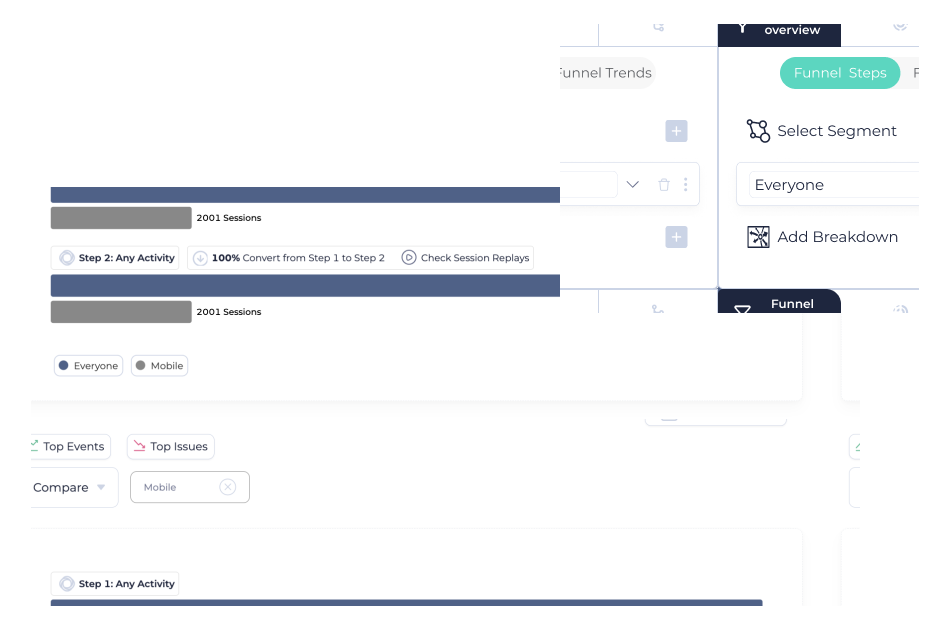
3) Measure baseline and locate the leak
Compute for each step:
- Step conversion rate (step-to-step)
- Drop-off rate
- Time-to-next-step distribution (median + long tail)
Don’t stop at “Step 3 is bad.” Write the behavioral claim you’re making:
“Users who reach Step 3 often intend to continue but are blocked.”
That claim might be wrong and you’ll test it next. For ecommerce teams, this same approach can strengthen an ecommerce CRO audit by connecting funnel leaks to real user behavior instead of relying only on surface-level conversion metrics.
4) Segment to find concentration (where is it especially bad?)
Question hook: Who is dropping off and what do they have in common?
Answer: segmentation turns a generic drop-off into a specific diagnosis target.
High-signal activation segments:
- Acquisition channel: paid search vs content vs direct vs partner
- Persona proxy: role/title (if known), company size, team vs solo accounts
- Lifecycle: brand new vs returning; invited vs self-serve
- Device + environment: mobile vs desktop; browser; OS
- Cohort vintage: this week’s signup cohort vs last month (release effects)
- Performance / reliability: slow sessions vs fast; error-seen vs no-error (often overlooked)
5) Build competing hypotheses (don’t lock onto the first story)
Create 3–4 hypotheses from different buckets:
- Tracking issue: step looks broken due to instrumentation or identity
- UX friction: confusing UI, unclear field requirements, bad defaults
- Performance / technical: latency, errors, timeouts, loading loops
- Audience/value mismatch: wrong users entering funnel; unclear value prop; wrong expectations
6) Confirm “why” with qualitative proof
Question hook: What would you need to see to believe this hypothesis is true?
Answer: define your proof standard before you watch replays or run interviews.
Examples of proof:
- Replays show repeated attempts, back-and-forth navigation, rage clicks, or “dead” UI
- Errors correlate with the drop-off step (same endpoint, same UI state)
- Users abandon after pricing/plan gating appears (mismatch)
- Survey/interview reveals expectation mismatch (“I thought it did X”)
This is where a combined workflow helps: use funnel segments to find the right sessions, then use behavior evidence to confirm the cause. If you want a structured way to do that inside one workflow, start with FullSession Lift AI and align it to your activation journey via PLG activation workflows.
7) Prioritize fixes (Impact × Confidence × Effort) + cost of delay
For each candidate fix, score:
- Impact: if this works, how likely is activation to move meaningfully?
- Confidence: do we have strong causal evidence or only correlation?
- Effort: eng/design/QA cost + risk + time
Add one more dimension PMs often forget:
- Cost of delay: are we bleeding high-intent users right now (e.g., new pricing launch), or is this a slow burn?
8) Ship safely: guardrails + rollback criteria
Don’t declare victory by improving one step.
Define:
- Primary success metric (activation)
- Step metric(s) you expect to move
- Guardrails: error rate, latency, support tickets, retention proxy
- Rollback criteria: “If guardrail X degrades beyond Y for Z days, revert.”
9) Validate outcome (and check for downstream shifts)
After rollout:
- Did activation improve for the target segment?
- Did the fix shift drop-off later (not actually reduce it)?
- Did time-to-activate improve, not just step completion?
- Did downstream engagement/retention signals stay healthy?
Diagnostic decision table: drop-off signals → likely causes → how to confirm → next action
| What you see in the funnel | Likely cause bucket | How to confirm fast | What to do next |
| Sudden “cliff” after a release date | Tracking/versioning or UI regression | Compare cohorts before/after release; inspect event definitions | Fix instrumentation or rollback/regress the UI change |
| Drop-off concentrated on one browser/device | Environment-specific UX or technical bug | Segment by device/browser; look for errors/latency | Repro + patch; add QA coverage for that env |
| High time-to-next-step long tail | Confusion, gating, or slow load | Watch sessions in long-tail; check performance | Simplify UI + speed up + clarify next action |
| Drop-off only for a channel cohort | Audience mismatch or expectation mismatch | Segment by channel; review landing promise vs in-app reality | Adjust acquisition targeting or onboarding messaging |
| Drop-off correlates with errors | Reliability/technical | Segment “error-seen”; review error clusters | Fix top errors first; add alerting/regression tests |
Segmentation playbooks for activation funnels (practical cuts)
If you only have time for a few cuts, do these in order:
- New vs returning
Activation funnels often behave differently for invited users vs self-serve signups. Don’t mix them. - Channel → persona proxy
Paid cohorts frequently include more “tourists.” If a drop-off is only “bad” for low-intent cohorts, you might not want to optimize the product step you might want to tighten acquisition. - Cohort vintage (release impact)
Compare “this week’s signups” to “last month’s signups.” If the leak appears only after a change, you’ve narrowed the search dramatically. - Performance and error exposure
This is the fastest way to separate “UX problem” from “the app failed.” If slow/error sessions are the ones leaking, fix reliability before polishing UX copy.
Quant → qualitative workflow: how to prove the cause
- Pick the drop-off step and the segment where it’s worst
- Write 3 competing hypotheses (UX vs technical vs mismatch)
- For each hypothesis, define what you’d need to observe to believe it
- Pull sessions from the drop-off segment and look for repeated patterns
- If patterns are unclear, add a lightweight intercept survey or interview prompt
- Turn the strongest hypothesis into a fix + measurement plan (activation + guardrails)
When not to optimize a funnel step
You can save weeks by recognizing “false opportunities”:
- The step is optional in real journeys. Making it “convert” better doesn’t help activation.
- The drop-off is mostly unqualified users. Fixing the product flow won’t fix acquisition mismatch.
- The data is unstable. Small sample sizes or seasonality can make you chase noise.
- The fix creates downstream harm. Removing a gating step might increase “activation” while decreasing retention or increasing support load.
Scenario A (SaaS PM): Activation drop-off caused by hidden complexity
Your activation funnel shows a sharp drop at “Connect data source.” The team assumes the integration UI is confusing and starts redesigning screens. Before doing that, you segment by company size and see the drop-off is heavily concentrated in smaller accounts. You watch sessions and notice a recurring pattern: users arrive expecting a “quick start,” but the integration requires admin permissions they don’t have. They loop between the integration screen and settings, then abandon. The “problem” isn’t button placement it’s that activation requires a decision and a dependency. The fix becomes: detect non-admin users, offer a “send request to admin” path, and provide a lightweight sandbox dataset so users can reach value before the full integration. You validate with guardrails: support tickets, time-to-activate, and retention proxy because making activation easier shouldn’t create low-quality activated users.
Scenario B (Growth Marketer + PM): Drop-off is a reliability issue disguised as “friction”
The funnel shows drop-off at “Create first project.” It’s worse on mobile and spikes in certain geographies. The team debates copy changes and onboarding tooltips. Instead, you segment by device and then by sessions that encountered an error. The drop-off correlates strongly with error exposure. Watching sessions shows users hitting “Create,” getting a spinner, tapping again, then seeing an error toast that disappears too quickly. Some users retry until they give up; others refresh and lose their progress. The right first fix isn’t messaging it’s reliability: stabilize the create endpoint, make the loading state deterministic, and preserve state on refresh. Only after the errors are addressed do you revisit UX clarity. Your validation plan checks activation, error rate, latency, and whether the drop-off simply moved to the next step.
When to use FullSession (for Activation-focused funnel work)
If your job is to move activation and you’re tired of debating guesses, FullSession fits best when you need to:
- Confirm whether a drop-off is real (instrumentation sanity + step definition discipline)
- Pinpoint where leaks concentrate with high-signal segment cuts
- Connect funnel signals to qualitative proof (what users actually experienced)
- Prioritize fixes with confidence, then validate outcomes with guardrails
If you want to apply this workflow on one critical activation journey, start with FullSession Lift AI and align it to your onboarding KPI via PLG activation workflows.
FAQs
1) What’s the difference between funnel analysis and journey analysis?
Funnels measure conversion through a defined sequence of steps. Journey analysis is broader: it captures multi-path behavior and optional loops. Use funnels to find “where,” then journey views to understand alternative routes and detours.
2) How many steps should an activation funnel have?
Enough to isolate meaningful decisions often 4–8 steps. Too few and you can’t diagnose. Too many and you create noise, especially if steps are optional.
3) How do I avoid false positives when comparing segments?
Make sure each segment has enough volume to be stable, compare consistent time windows, and verify instrumentation didn’t change between cohorts. If results swing wildly week to week, treat insights as hypotheses, not conclusions.
4) What’s the fastest way to tell “UX friction” from “technical failure”?
Segment by error exposure and performance (slow vs fast sessions). If the leak is concentrated in error/slow sessions, fix reliability before redesigning UX.
5) How do I prioritize funnel fixes without over-optimizing local steps?
Use impact × confidence × effort, then add downstream validation: activation (primary), plus guardrails like error rate, support load, and a retention proxy.
6) How do I validate that a funnel improvement really improved activation?
Track activation as the primary outcome, run a controlled experiment when possible, and monitor guardrails. If only one step improves but activation doesn’t, you likely fixed a symptom or shifted the drop-off.

Roman Mohren is CEO of FullSession, a privacy-first UX analytics platform offering session replay, interactive heatmaps, conversion funnels, error insights, and in-app feedback. He directly leads Product, Sales, and Customer Success, owning the full customer journey from first touch to long-term outcomes. With 25+ years in B2B SaaS, spanning venture- and PE-backed startups, public software companies, and his own ventures, Roman has built and scaled revenue teams, designed go-to-market systems, and led organizations through every growth stage from first dollar to eight-figure ARR. He writes from hands-on operator experience about UX diagnosis, conversion optimization, user onboarding, and turning behavioral data into measurable business impact.