You already know what heatmaps and replays do. The hard part is picking the tool that will actually move Week-1 activation, without creating governance or workflow debt.
Most roundups stop at feature checklists. This guide gives you a practical way to shortlist options, run a two-week pilot, and prove the switch was worth it.
Definition box: What are “Hotjar alternatives”?
Hotjar alternatives are tools that replace or extend Hotjar-style qualitative behavior analytics such as session replay, heatmaps, and on-page feedback. Teams typically switch when they need deeper funnel analysis, better collaboration workflows, stronger privacy controls, or higher replay fidelity.
Why product teams start looking beyond Hotjar
Activation work needs evidence that turns into shipped fixes, not just “interesting sessions”.
If your KPI is Week-1 activation, you are trying to connect a specific behavior to a measurable outcome. The usual triggers for a switch are: you can see drop-off in analytics but cannot see why users stall in the UI, engineering cannot reproduce issues from clips, governance is unclear, or the team is scaling and ad hoc watching does not translate into prioritization.
Hotjar can still be a fit for lightweight qualitative research. The constraint is that activation work is usually cross-functional, so the tool has to support shared evidence and faster decisions.
Common mistake: choosing by “more features” instead of the activation job
Teams often buy the tool with the longest checklist and still do not ship better activation fixes. The failure mode is simple: the tool does not match how your team decides what to fix next. For activation, that decision is usually funnel-first, then replay for the critical steps.
A jobs-to-be-done framework for Hotjar alternatives
Shortlisting is faster when you pick the primary “job” you need the tool to do most weeks.
| Your primary job | What you need from the tool | Watch-outs |
| Explain activation drop-off | Funnels tied to replays, easy segmentation, fast time-to-insight | Replays that are hard to query or share |
| Debug “can’t reproduce” issues | High-fidelity replay, error context, developer-friendly evidence | Heavy SDKs or noisy signals that waste time |
| Run lightweight UX research | Heatmaps, targeted surveys, simple tagging | Research tooling that lacks adoption context |
| Meet strict privacy needs | Masking, selective capture, retention controls | “Compliance” language without operational controls |
This is also where many roundups mix categories. A survey platform can be great, but it will not replace replay. A product analytics suite can show the funnel, but not what the user experienced.
Prioritize what matters first for Week-1 activation
The wrong priority turns replay into entertainment instead of an activation lever.
Start by pressure-testing two things: can you reliably tie replay to a funnel segment (for example, “created a workspace but did not invite a teammate”), and can product and engineering collaborate on the same evidence without manual handoffs. Then validate that privacy controls match your real data risk, because weak governance quietly kills adoption.
A practical two-week pilot plan to evaluate alternatives
A pilot turns tool choice into a measurable decision instead of a loud opinion.
- Define the activation slice. Pick one Week-1 milestone and one segment that is under-performing.
- Baseline the current state. Capture current funnel conversion, top failure states, and time-to-insight for the team.
- Run a parallel capture window. Keep Hotjar running while the candidate tool captures the same pages and flows.
- Score evidence quality. For 10 to 20 sessions in the target segment, evaluate replay fidelity, missing context, and shareability.
- Validate workflow fit. In one working session, can PM, UX, and engineering turn findings into tickets and experiments?
- Decide with a rubric. Choose based on activation impact potential, governance fit, and total adoption cost.
After the pilot, write down what changed. If you cannot explain why the new tool is better for your activation job, you are not ready to switch.
Migration and parallel-run realities most teams underestimate
Most “tool switches” fail on operations, not features.
Expect some re-instrumentation to align page identifiers or events across tools. Plan sampling so parallel runs do not distort what you see. Test performance impact on real traffic, because SDK overhead and capture rules can behave differently at scale. Roll out by scoping to one critical activation flow first, then expanding once governance and workflow are stable.
Quick scenario: the pilot that “won”, then failed in week three
A typical pattern: a product team pilots a replay tool on a single onboarding flow and loves the clarity. Then they expand capture to the whole app, discover that masking rules are incomplete, and lock down access. Adoption drops and the tool becomes a niche debugging aid instead of an activation engine. The fix is not more training. It is tighter governance rules and a narrower capture strategy tied to activation milestones.
Governance and privacy: move past the “GDPR compliant” badge
If you are in PLG SaaS, you still have risk from customer data, admin screens, and user-generated content.
A practical governance checklist to validate during the pilot:
- Can you selectively mask or exclude sensitive inputs and views?
- Can you control who can view replays and exports?
- Can you set retention windows that match your policies?
- Can you document consent handling and changes over time?
Treat governance as a workflow constraint, not a legal footnote. If governance is weak, teams self-censor and the tool does not get used.
A shortlist of Hotjar alternatives that show up for PLG product teams
You do not need 18 options, you need the right category for your activation job.
Category 1: Behavior analytics that pairs replay with funnels
These tools are typically strongest when you need to connect an activation funnel segment to what users experienced. Examples you will often evaluate include FullStory, Contentsquare, Smartlook, and FullSession. The trade-off is depth and governance versus simplicity, so use the pilot rubric to keep the decision grounded.
Category 2: Product analytics-first platforms that add replay
If your team already lives in events and cohorts, these can be a natural extension. Examples include PostHog and Pendo. The common constraint is that replay can be good enough for pattern-finding, but engineering may still need stronger debugging context for “can’t repro” issues.
Category 3: Privacy-first and self-hosted options
If data ownership drives the decision, you will see this category in almost every roundup. Examples include Matomo and Plausible. The trade-off is that replay depth and cross-team workflows can be thinner, so teams often narrow the use case or pair with another tool.
Category 4: Lightweight or entry-level replay
This category dominates “free Hotjar alternatives” queries. Microsoft Clarity is the best-known example. The risk is that “free” can become expensive in time if sampling, governance, or collaboration workflows do not match how your team ships activation improvements.
No category is automatically best. Choose the one that matches your activation job and your operating constraints.
When to use FullSession for Week-1 activation work
FullSession fits when you need to link activation drop-off to behavior and ship prioritized fixes.
FullSession tends to fit Week-1 activation work when your funnel shows where users stall but you need replay evidence to understand why, product and engineering need shared context to move from “we saw it” to “we fixed it”, and you want governance that supports broader adoption instead of a small group of power users.
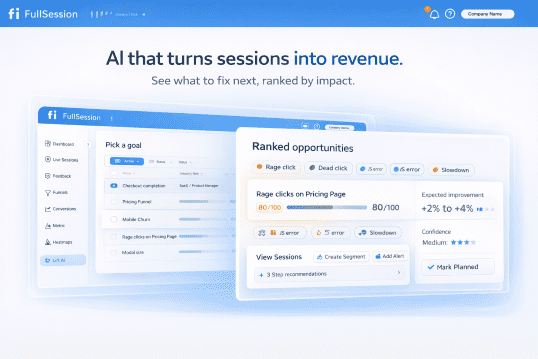
To map findings to activation outcomes, use the PLG activation use case page: PLG activation. To see the product capabilities that support activation diagnosis, start here: Lift AI.
If you are actively comparing tools, FullSession vs Hotjar helps you frame decision criteria before you run your pilot. When you are ready, you can request a demo and use your own onboarding flow as the test case.
FAQs about Hotjar alternatives
These are the questions that come up in real evaluations for PLG product teams.
What is the best Hotjar alternative for SaaS product teams?
It depends on your primary job: activation diagnosis, debugging, research, or privacy ownership. Map your Week-1 milestone to a shortlist, then run a two-week pilot with shared success criteria.
Are there free Hotjar alternatives?
Yes. Some tools offer free tiers or free access, but “free” can still have costs in sampling limits, governance constraints, or time-to-insight. Treat free tools as a pilot input, not the final decision.
Do I need funnels if I already have product analytics?
Often, yes. Product analytics can show where users drop off. Replay and heatmaps can show what happened in the UI. The key is being able to tie the two together for the segments that matter.
How do I prove a switch improved Week-1 activation?
Define baseline and success criteria before you change anything. In the pilot, measure time-to-insight and the quality of evidence that leads to fixes. After rollout, track Week-1 activation for the target segment and validate that shipped changes align with the identified friction.
Can I run Hotjar and an alternative in parallel?
Yes, and you usually should for a short window. Manage sampling, performance budgets, and consent so you are not double-capturing more than needed.
What should I look for in privacy and governance?
Look for operational controls: masking, selective capture, retention settings, and access management. “Compliance” language is not enough if your team cannot confidently use the tool day to day.
Is session replay safe for B2B SaaS?
It can be, if you implement capture rules that exclude sensitive areas, mask user-generated inputs, and control access. Bring privacy and security into the pilot rubric, not in week four.