Every product team has the same dirty secret: they collect more behavioral data than they can act on.
Session replays pile up unwatched. Heatmaps confirm what everyone already suspected. Funnels show where users drop off, but not why, and definitely not what to do about it. The real bottleneck was never data collection. It’s prioritization.
That’s why we built Lift AI.
The prioritization gap in UX analytics
Most analytics tools are excellent at telling you what happened. A smaller number can tell you why. Almost none can tell you what to do next, ranked by business impact, with evidence attached.
This is the gap where teams lose weeks. The PM pulls data one way. The designer interprets it another. Engineering asks for clearer requirements. Growth wants revenue attribution. Alignment meetings multiply. Meanwhile, users keep dropping off at the same checkout step.
We’ve heard this pattern from dozens of teams. It’s not a data problem. It’s a decision problem.
How Lift AI works
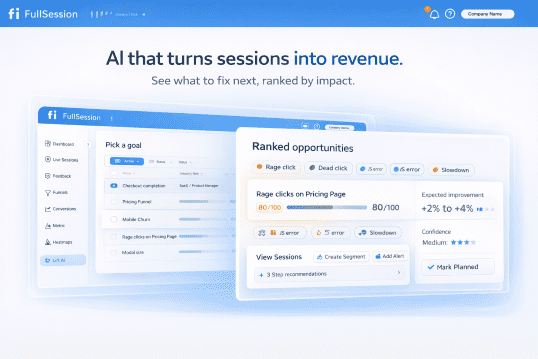
Lift AI sits on top of FullSession’s behavioral data layer (session replays, heatmaps, funnels, error tracking) and transforms raw signals into a prioritized action plan.
Here’s the workflow:
1. Set a goal
Choose the business outcome you’re optimizing for: Checkout completion, Revenue per visitor, Visitor-to-Signup, or any custom funnel goal. This anchors every recommendation to revenue.
2. Lift AI determines the attribution window
The system automatically selects the optimal lookback and forward analysis window based on your funnel metrics. No manual configuration required.
3. Get ranked opportunities
Lift AI analyzes friction, failures, and slowdowns across real sessions. It surfaces a ranked list of opportunities, each with an expected improvement estimate, confidence score, the specific funnel step it impacts, affected pages, and links to example sessions as proof.
That’s it. No dashboards to configure. No segments to build first. No analyst required to interpret the output.
What makes this different from AI summaries
A lot of analytics tools have started bolting on AI features that generate text summaries of your data. These read well but rarely change behavior. They describe what you’re already looking at in slightly different words.
Lift AI is different in three ways:
1. Goal-anchored, not dashboard-anchored
Every recommendation ties back to the specific business outcome you selected. Lift AI doesn’t summarize your heatmap. It tells you which friction point, if resolved, would have the largest estimated effect on your chosen goal.
2. Evidence-backed, not vibes-based
Each opportunity includes the funnel step it affects, the pages involved, and direct links to session replays where the problem manifests. Your team can verify the recommendation before committing engineering time.
3. Confidence-scored, not binary
Not all opportunities are created equal. Lift AI provides a predicated lift impact and when you implemented a recommendation and the post window is complete, it also provides the actual lift. Just be careful not to do lots of changes within the testing timeframe, or the actual lift calculation will be flawed.
Who Lift AI is for
Lift AI is designed for teams responsible for revenue-critical user journeys:
Ecommerce and DTC teams focused on checkout completion and basket value.
PLG SaaS teams optimizing signup-to-paid conversion and onboarding activation.
Growth and Product teams who need a shared, goal-based opportunity list instead of scattered insights across tools.
UX, Engineering, and Analytics teams who want to see exactly where technical and experience issues hurt revenue, with sessions attached.
How to validate a Lift AI recommendation
We’re transparent about what Lift AI is and isn’t. It provides estimates, not guarantees. The recommended workflow is straightforward:
Review the recommendation and its linked evidence (sessions, impacted steps, affected pages).
Ship the fix (UX, copy, flow, or technical) and let Lift AI know you completed the recommended action.
Measure impact using a pre/post comparison.
Your measurement is always the source of truth.
Try Lift AI in beta
Lift AI is available now as a beta feature for all FullSession users. Start a free trial to see it in action, or book a demo if you want a guided walkthrough of how it applies to your specific funnels.
We built this because we believe the next generation of analytics isn’t about more data. It’s about better decisions. Lift AI is our first step toward that.
Roman Mohren is CEO of FullSession, a privacy-first UX analytics platform offering session replay, interactive heatmaps, conversion funnels, error insights, and in-app feedback. He directly leads Product, Sales, and Customer Success, owning the full customer journey from first touch to long-term outcomes. With 25+ years in B2B SaaS, spanning venture- and PE-backed startups, public software companies, and his own ventures, Roman has built and scaled revenue teams, designed go-to-market systems, and led organizations through every growth stage from first dollar to eight-figure ARR. He writes from hands-on operator experience about UX diagnosis, conversion optimization, user onboarding, and turning behavioral data into measurable business impact.
If you want product engagement metrics that actually predict retention, pick a core action, define “active” precisely, then track a small set across frequency, depth, and return behavior. Validate each metric against cohorts and retention outcomes, not vanity DAU.
What are product engagement metrics (and what they are not)
Product engagement metrics measure what users do in the product that indicates progress toward value, habit formation, and future retention. They are not the same as customer engagement metrics like NPS, or traffic metrics like page views. If you cannot tie the metric to a user action and a retention outcome, it is not a product engagement metric.
Start with retention, then pick a “core action”
If retention is the KPI, you need one anchor behavior that represents value in your product. A core action is the smallest repeatable action that reflects real value, not navigation noise. Once you have it, engagement becomes a structured view of frequency, depth, and return behavior. Map that action into a funnel to keep the definition consistent with funnels and conversions.
A decision tree to choose your 3–5 engagement metrics
Most teams do not need 20 KPIs. They need 3–5 metrics that map to a retention story and can be segmented. Use this workflow:
Choose your unit of retention (user, seat, account, workspace).
Pick the lifecycle window (Week 1, Week 4, Month 3).
Pick one metric each for core action rate, time-to-value, return rate, and depth.
Add one guardrail metric (drop-off on the core flow, error rate, or “meaningful session” rate).
Segment before you compare (new vs returning, plan tier, channel, persona).
To operationalize this monthly, attach the decision tree to a single workflow like PLG activation so your definitions, cohorts, and outcomes stay aligned.
The metric definition worksheet (so numbers do not drift)
Engagement programs fail when metric definitions drift. For every metric, document: what counts as active, what counts as engaged, the time window, the unit of analysis, identity rules (anonymous to known, multi-device, seat mapping), edge cases, and an owner for changes. If you are measuring in a funnel, keep “entrants” definitions explicit in funnels and conversions so conversion does not inflate via duplicates.
A practical KPI set for SaaS retention teams
Metric
What it measures
Common pitfall
Core action rate
% active users doing the value action
Core action is too easy, becomes noise
Time-to-value
Time to first core action
Measuring “time in product” instead of value
Return rate
% who return and repeat in-window
No segmentation, averages hide churn
Depth
Core actions per user, or meaningful steps completed
Counting clicks, not progress
Validate engagement metrics against outcomes
A metric is only “good” if it predicts something you care about. Cohort it, check that it separates retained vs churned users, and verify that it moves before retention improves. Watch for false positives like notification-only opens without meaningful progress.
Common measurement pitfalls (and how to prevent them)
Use cohorts to manage seasonality, filter bots and internal traffic, and define “meaningful sessions” to avoid counting empty engagement. Document identity rules so multi-device and seat mapping do not break your denominators.
Common follow-up questions
How many product engagement metrics should we track?
Start with 3–5 that map to frequency, depth, and return behavior. Add one guardrail metric for a critical failure mode so you can diagnose changes quickly.
Is DAU/MAU a good engagement metric?
It is a coarse directional signal. Use it for context, then rely on core action rate and return rate for decisions and experiments.
How do we define an “active user”?
Define active as a set of meaningful events, not a login. Document exclusions and keep the definition stable across releases so the metric stays comparable.
What is the best engagement metric for retention?
Usually core action rate within a lifecycle window plus return rate. The right choice depends on your product’s value action and your retention unit (user vs account).
How do we handle B2B seat mapping?
Pick a unit of analysis, define identity rules, and keep mapping logic centralized so dashboards agree on denominators. Audit changes when roles or seats shift.
Download a metric definition worksheet and cohort template to standardize how your team measures engagement, then operationalize it inside your PLG activation workflow and your funnels and conversions baseline.
Roman Mohren is CEO of FullSession, a privacy-first UX analytics platform offering session replay, interactive heatmaps, conversion funnels, error insights, and in-app feedback. He directly leads Product, Sales, and Customer Success, owning the full customer journey from first touch to long-term outcomes. With 25+ years in B2B SaaS, spanning venture- and PE-backed startups, public software companies, and his own ventures, Roman has built and scaled revenue teams, designed go-to-market systems, and led organizations through every growth stage from first dollar to eight-figure ARR. He writes from hands-on operator experience about UX diagnosis, conversion optimization, user onboarding, and turning behavioral data into measurable business impact.
Quick Takeaway (Answer Summary) User onboarding best practices only work when they’re prioritized and validated in context. Start by identifying your activation moment, find the highest-friction step that blocks it, choose the smallest onboarding change that should reduce that friction, and validate impact with activation quality and time-to-value not just completion rates.
What is user onboarding?
User onboarding is the set of product experiences that help a new user reach their first meaningful outcome, the point where your product’s value becomes obvious enough to keep going.
When people search “user onboarding best practices,” they’re usually asking a more specific question:
“What should we change first to improve activation, and how do we know it worked?”
This post is a practical answer to that question without pretending every “best practice” matters equally for every product.
Onboarding is where your product makes (or breaks) its first value promise.
For SaaS teams, the downstream effects are familiar:
Activation is flat even though signups increase.
Users complete onboarding steps but don’t stick.
Support load spikes with “I’m stuck” tickets that aren’t captured in analytics.
Sales-assisted deals stall because early users can’t reproduce success.
If you can’t connect onboarding to a measurable activation outcome, you end up shipping tours, checklists, and emails that look busy but don’t change behavior.
Why most “best practices” articles feel true and still don’t help
Most lists share three problems:
No prioritization logic A welcome email and role-based routing are not equally important in every product but lists treat them that way.
No sequencing Teams implement everything at once, then can’t attribute impact.
No validation loop “Onboarding completion rate” becomes the proxy for success even when users complete steps and still don’t activate.
So, let’s keep the best-practices format (because it’s useful), but anchor it to decisions: what to do first, why, and how to measure it.
The practical decision framework: Prioritize → Design → Validate
Use this 3-phase loop any time you’re deciding which onboarding best practices to implement.
Step 1: Prioritize the activation constraint
Question:What is the single biggest reason a new user fails to reach activation? You don’t need a perfect model, you need a defensible starting point.
Start with three inputs:
Your activation moment (the first “meaningful outcome”)
Your activation path (the 3–7 actions most users take before activation)
Your highest-friction step (where the most qualified users stall)
Common high-friction patterns:
Users don’t know what to do next (directional ambiguity)
If your best practice doesn’t move these, it may still be “nice UX”but it’s not an activation lever.
User onboarding best practices (sequenced, with when they matter)
Below are the “classic” best practices but framed as decisions.
1) Define activation in one sentence (and align the team)
When it matters most: early-stage products, multi-person teams, or any time you’re debating onboarding changes. What to do: Write a one-sentence definition:
“A user is activated when they ______ within ______.”
Then list the 3–7 actions that typically lead there.
Common failure mode: Teams optimize “setup completion” instead of meaningful outcomes.
2) Reduce setup friction before you add guidance
When it matters most: products with integrations, configuration, or data import. What to do: Remove or defer prerequisites. Provide defaults, templates, or sample data.
Common failure mode: A polished tour that walks users into a hard blocker.
3) Make the next step obvious at every moment
When it matters most: self-serve onboarding and PLG motions. What to do: Use clear calls-to-action, empty states that explain value, and contextual prompts.
Common failure mode: “Explore the dashboard” onboarding that creates decision paralysis.
4) Teach by doing (not by telling)
When it matters most: products with a clear “first win” action (create, invite, publish, launch, analyze). What to do: Convert your onboarding into a guided action path:
Do the action
Show immediate result
Explain what changed (briefly)
Point to the next value step
Common failure mode: Long modal explanations that users skip.
5) Use progressive disclosure for complex products
When it matters most: multi-role, multi-module, or enterprise workflows. What to do: Reveal complexity only when it becomes relevant. Start with one core job-to-be-done.
Common failure mode: Asking users to configure everything upfront “just in case.”
6) Segment onboarding by intent (not by persona slides)
When it matters most: products serving multiple use cases (e.g., reporting vs automation vs collaboration). What to do: Segment by the user’s desired outcome:
“I want to do X”
“I’m evaluating for team use”
“I’m integrating this with Y” Then route users to the shortest path to that outcome.
Common failure mode: Over-personalization that creates branches you can’t maintain.
7) Add trust and confirmation moments (especially around “risky” actions)
When it matters most: financial, data-impacting, irreversible, or “did that work?” actions. What to do: Provide clear success states, previews, and undo paths where possible.
Common failure mode: Users stop because they’re not confident they did it right.
8) Close the loop with a validation cadence
When it matters most: always because onboarding is never “done.” What to do: Run a simple cadence:
Weekly: review drop-offs and top confusion points
Biweekly: ship 1–2 small onboarding improvements
Monthly: cohort review on activation + time-to-value
Common failure mode: Quarterly “big onboarding redesigns” that are hard to attribute.
Prioritization table: map signals → best practice → validation metric
Use this table when you’re resource-constrained and need to pick what matters first.
What you observe (signal)
Likely root cause
Best practice to try first
Validation metric
Users start onboarding but don’t finish setup
Prerequisites too heavy
Reduce setup friction + defaults/templates
Setup completion and activation rate
Users finish onboarding steps but don’t activate
Onboarding not tied to value
Teach-by-doing toward first win
Activation rate + time-to-value
Many users wander (lots of page views, few key actions)
Next step unclear
Make next step obvious (CTAs, empty states)
Drop-off at key step + time-to-value
Users hit support with “I’m stuck”
Hidden blockers or confusing UX
Progressive disclosure + targeted guidance
Fewer “stuck” tickets + activation quality
Scenario 1: Self-serve trial SaaS (speed matters more than completeness)
Context: You run a self-serve trial. Most users will never talk to a human. Your goal is to get qualified users to a first win fast.
What “best practices” usually fail here: Teams add more education (tours, videos, long checklists) when they really need a shorter path to value.
A practical sequence:
Define “activated” as one clear outcome (not “completed onboarding”).
Remove setup steps that aren’t required for the first win.
Guide users through a single “do the thing → see result” flow.
Validate with time-to-value and activation quality (not just completions).
Tradeoff to acknowledge: Reducing friction can increase low-quality activations. That’s why “activation quality” measures whether activated users keep using the product.
Scenario 2: Complex or sales-assisted SaaS (confidence matters more than speed)
Context: Activation depends on configuration, team alignment, permissions, or integration. A fast “first win” may be impossible without setup.
What “best practices” usually miss: This onboarding needs proof and confidence, not just direction.
A practical sequence:
Segment by intent: “quick evaluation” vs “implementation path.”
Provide defaults for evaluation, and a clear checklist for implementation.
Use progressive disclosure: show only what’s necessary for this stage.
Validate with activation rate, time-to-value, and fewer “can’t figure this out” escalations.
Tradeoff to acknowledge: Too much gating can slow evaluation; too little guidance creates misconfiguration and churn later. Your segmentation is how you handle that tradeoff.
What to look for in tooling (if you’re validating onboarding changes)
You can run this framework with basic analytics, but it’s much easier when you can answer two questions quickly:
Where do users drop off on the activation path? (funnels + segmentation)
Why do they drop off? (session replay, interaction patterns, and direct feedback)
A user behavior analytics platform like FullSession can support this loop by combining funnels, session replay, heatmaps, and in-app feedback so you can see both the metric drop and the real user behavior behind it.
FAQs
What are the most important user onboarding best practices?
The most important practices are the ones that remove the biggest constraint on activation for your product right now. Start by defining activation, then identify the highest-friction step on the path to it. Pick the smallest onboarding change that should reduce that friction, and validate with activation rate and time-to-value.
How do you measure onboarding success?
Avoid relying only on onboarding completion. Measure success with activation rate, time-to-value, and activation quality (whether users who “activate” keep using the product). If you have the data, review cohorts to confirm changes improved downstream retention.
What’s the difference between activation and onboarding completion?
Onboarding completion means users finished the steps you designed. Activation means users achieved a meaningful outcome and experienced value. A user can complete onboarding and still not activate if steps aren’t tied to the first win.
How do you prioritize onboarding improvements with limited resources?
Use a constraint-first approach: pick one drop-off point that blocks activation, ship one change aimed at that point, and measure impact. The goal is not to improve everything; it’s to improve the step that’s currently limiting activation.
Should onboarding be personalized for different personas?
Personalization helps when it routes users to different value paths based on intent (what they’re trying to accomplish). It hurts when it creates branching complexity you can’t maintain. Prefer simple intent-based segmentation over heavy persona logic.
What are common onboarding mistakes in SaaS?
Common mistakes include optimizing for completion instead of activation, adding more guidance without removing friction, shipping “explore the dashboard” flows with no next-step clarity, and failing to validate impact with time-to-value and retention.
Next steps
If you want to apply this prioritization-and-validation approach to real onboarding journeys, explore how teams identify and validate onboarding improvements that drive real activation.
Roman Mohren is CEO of FullSession, a privacy-first UX analytics platform offering session replay, interactive heatmaps, conversion funnels, error insights, and in-app feedback. He directly leads Product, Sales, and Customer Success, owning the full customer journey from first touch to long-term outcomes. With 25+ years in B2B SaaS, spanning venture- and PE-backed startups, public software companies, and his own ventures, Roman has built and scaled revenue teams, designed go-to-market systems, and led organizations through every growth stage from first dollar to eight-figure ARR. He writes from hands-on operator experience about UX diagnosis, conversion optimization, user onboarding, and turning behavioral data into measurable business impact.
Most SaaS teams collect plenty of metrics. The harder problem is making sure those metrics actually drive decisions, not debates.
What is product analytics? (Definition) Product analytics is the practice of measuring how people use your product so you can make better product decisions, validate outcomes, and prioritize work.
If your KPI is activation, product analytics should answer one question repeatedly: which behaviors predict a user reaching the first meaningful outcome, and what is blocking that path?
Treat product analytics like a decision-making system, not a reporting layer
A dashboard is output. A decision system is input to your roadmap, onboarding, and experiments.
A typical failure mode is metric theater: teams review numbers weekly, then ship based on gut feel because the data did not map to a choice.
The minimum components of a decision system
You need three things, even before you debate tools.
A small set of decision points (what choices you will use data to make).
A validation loop (how you will confirm the change improved activation).
If you cannot name the decision a chart supports, the chart is overhead.
Start with activation decisions, then work backward to the data you need
For activation work, the most valuable analytics questions are about sequence and friction, not averages.
Below is a practical way to map decision types to the signals you should collect and the output you should produce.
Decision you need to make
Signal to look for
Output you ship
Owner
Which onboarding step to simplify first
Drop-off by step and time-to-first-value
Prioritized onboarding backlog item
PM
Which “aha” action to promote
Behavior paths of activated vs not-yet-activated users
Updated onboarding checklist and prompts
PM + Design
Whether a change helped activation
Cohort comparison with a clear start date
Keep, iterate, or revert decision
PM + Eng
Where qualitative review is required
Rage clicks, dead clicks, repeated errors around key steps
Targeted session review list
PM + Support
What to avoid when activation is the KPI
Teams often over-rotate on broad engagement metrics because they are easy to track. The trade-off is that you lose causal clarity about first value.
Common example: DAU rises after a UI change, but activation does not move because new users still fail in the setup step.
A practical workflow for turning product analytics into decisions
This workflow is designed for a PM running activation work without turning every question into a tracking project.
Write the activation decision you are trying to make. Example: “Should we remove step X from onboarding for Segment A?”
Define the “first value” event and the prerequisite behaviors. Keep it behavioral. Avoid internal milestones like “visited dashboard” unless that is truly valuable.
Instrument only what you need to answer the decision. Start with events for key steps and one identifier that lets you segment (plan, role, integration type).
Diagnose the path, then zoom into friction. Use funnels for sequence, then use session replay or heatmaps when you need to see what users did, not just where they dropped.
Pick the smallest change that can disconfirm your hypothesis. This keeps scope under control and makes outcome validation easier.
Validate, then standardize the learning. Decide what “good” looks like before you ship. After the readout, update the team’s decision rules so you do not re-litigate later.
Outcome validation is where most teams quietly fail
Teams ship onboarding changes, see movement in one metric, and declare success. Then activation drifts back because the change did not generalize.
A safer pattern is to validate in layers:
Primary: activation rate or time-to-first-value for the target segment.
Guardrails: error rate, support contact rate, and downstream retention signals.
If you cannot run a clean experiment, use a clear before/after window and document what else changed that week. It is not perfect, but it is honest.
When FullSession fits an activation-focused product analytics system
If you are trying to improve activation, you usually need both quantitative signals (where users drop) and behavioral context (why they drop).
FullSession is a privacy-first behavior analytics platform that helps teams connect funnels and conversions with session replay, heatmaps, and error signals so product decisions are easier to defend.
If you want to pressure-test your onboarding path and turn drop-off into a concrete backlog, start with Funnels and Conversions. If your activation motion is PLG and onboarding is your bottleneck, review PLG Activation.
FAQs
What is the difference between product analytics and marketing analytics?
Product analytics focuses on in-product behavior and usage outcomes. Marketing analytics focuses on acquisition channels, campaigns, and attribution.
Which product analytics metrics matter most for activation?
Activation rate, time-to-first-value, drop-off by onboarding step, and the conversion rate from setup started to first value achieved.
Do I need a data warehouse to do product analytics well?
Not always. For many activation problems, you can start with focused event tracking plus behavior context, then expand as questions mature.
How do I know if an insight is actionable?
If it suggests a specific change you could ship and a measurement plan to validate the outcome, it is actionable. If it only describes what happened, it is descriptive.
How often should a PM review product analytics?
Weekly for activation work is common, but only if the review ends in a decision. Otherwise reduce cadence and tighten the question.
What are common instrumentation mistakes?
Tracking too many events, inconsistent naming, mixing user and account identifiers, and changing definitions mid-quarter without documenting the impact.
Roman Mohren is CEO of FullSession, a privacy-first UX analytics platform offering session replay, interactive heatmaps, conversion funnels, error insights, and in-app feedback. He directly leads Product, Sales, and Customer Success, owning the full customer journey from first touch to long-term outcomes. With 25+ years in B2B SaaS, spanning venture- and PE-backed startups, public software companies, and his own ventures, Roman has built and scaled revenue teams, designed go-to-market systems, and led organizations through every growth stage from first dollar to eight-figure ARR. He writes from hands-on operator experience about UX diagnosis, conversion optimization, user onboarding, and turning behavioral data into measurable business impact.